cooling TOYOTA VERSO S 2011 User Guide
[x] Cancel search | Manufacturer: TOYOTA, Model Year: 2011, Model line: VERSO S, Model: TOYOTA VERSO S 2011Pages: 664, PDF Size: 160.56 MB
Page 453 of 664
453
6
6-1. Using the air conditioning system and defogger
Interior features
■Adjusting the temperature set-
ting
Turn driver’s side temperature con-
trol dial clockwise to increases the
temperature and turn the dial coun-
terclockwise to decreases the tem-
perature.
The air conditioning system switches
between individual and simultaneous
modes each time the “DUAL” switch is
pressed.
Simultaneous mode (the indicator on
the “DUAL” switch is off):
The driver’s side temperature control
dial can be used to adjust the tempera-
ture for the driver’s and passenger’s
side. At this time, operate the passen-
ger’s side temperature control dial to
enter individual mode.
Individual mode (the indicator on the
“DUAL” switch is on):
The temperature for the driver’s and
passenger’s side can be adjusted sepa-
rately.
■Setting the fan speed
Press the fan speed increase
switch to increase the fan speed
and the fan speed decrease switch
to decrease the fan speed.
Pressing the “OFF” switch to turns off
the fan.
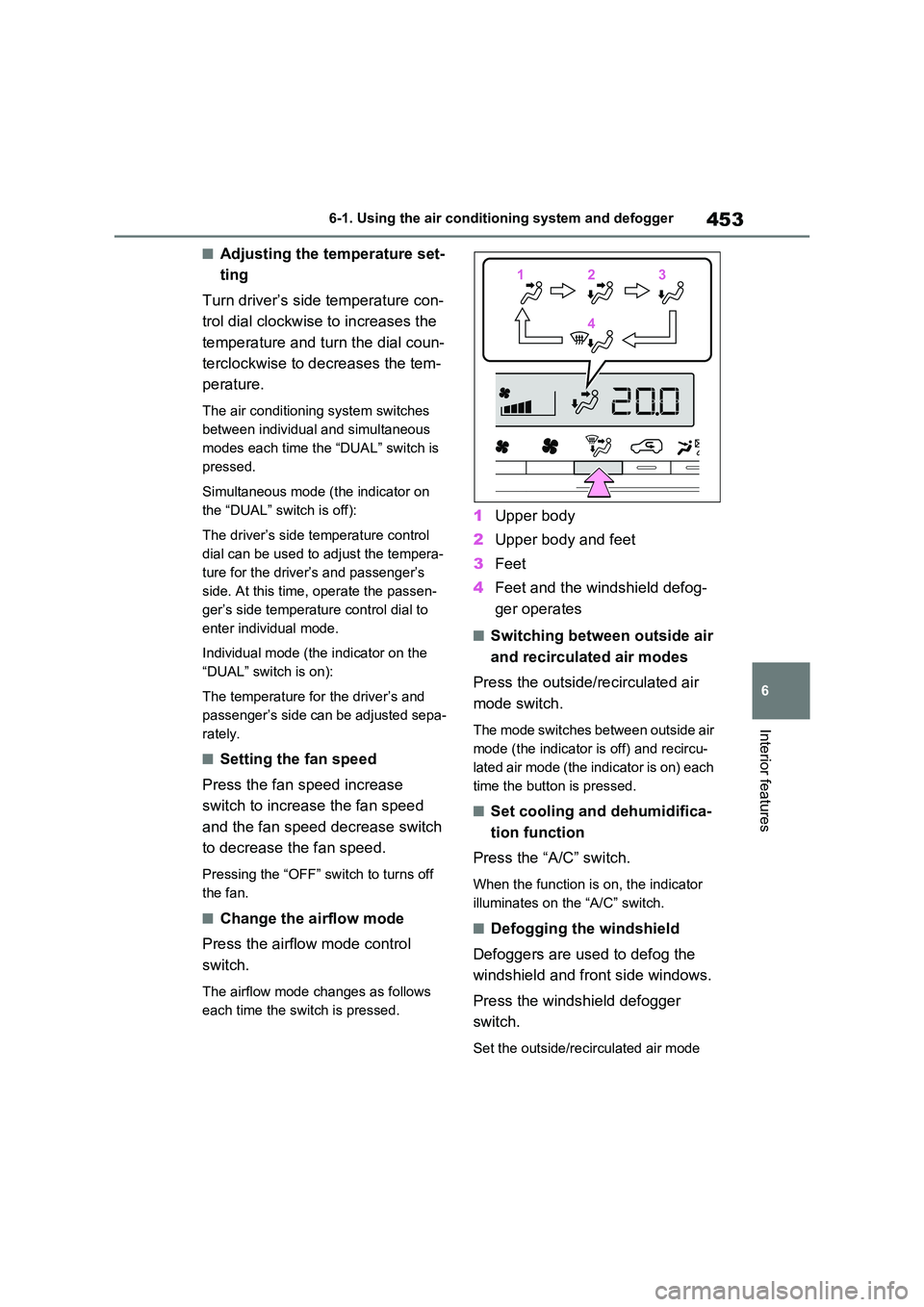
■Change the airflow mode
Press the airflow mode control
switch.
The airflow mode changes as follows
each time the switch is pressed.
1 Upper body
2 Upper body and feet
3 Feet
4 Feet and the windshield defog-
ger operates
■Switching between outside air
and recirculated air modes
Press the outside/recirculated air
mode switch.
The mode switches between outside air
mode (the indicator is off) and recircu-
lated air mode (the indicator is on) each
time the button is pressed.
■Set cooling and dehumidifica-
tion function
Press the “A/C” switch.
When the function is on, the indicator
illuminates on the “A/C” switch.
■Defogging the windshield
Defoggers are used to defog the
windshield and front side windows.
Press the windshield defogger
switch.
Set the outside/recirculated air mode
112233
44
Page 461 of 664
461
6
6-1. Using the air conditioning system and defogger
Interior features
●The outside temperature is extremely
low
●When the hybrid system is cool (for
example, after being left for a long time in low temperatures)
■Windshield defogger
When defogging the windshield using
the Remote Air Conditioning System, defogging may be insufficient due to the power being restricted more than during
normal air conditioning operation. Also, the outside of the windshield may fog up due to the outside temperature, humidity
or air conditioning set temperature.
■Using the heater via the Remote Air Conditioning System
●When the outside temperature is low, heating may feel insufficient due to restricted operation of the air condi-
tioning.
●When the outside heat exchanger
becomes frosted over, heating perfor- mance may decline due to automati-cally switching to the frost removal
operation. ( P.452)
■Security feature
Any unlocked doors will be automatically locked when the system is operating.
The emergency flashers flash to indicate that the doors have been locked or the system has been turned off.
■Conditions affecting operation
P.225
■While the Remote Air Conditioning System is operating
●Depending on the operating condition of the Remote Air Conditioning Sys-tem, the air conditioning compressor
or cooling fan may spin and an operat- ing noise may be heard.However, this does not indicate a mal-
function.
●The air conditioning operation
switches, etc. will not operate while the Remote Air Conditioning System is operating.
■Electronic key battery depletion
P.202
■When the electronic key battery is fully depleted
P.543
■Customization
Setting (e.g. Operation using “A/C” on the wireless remote control) can be changed. (Customizable features:
P.629)
WARNING
■Precautions for the Remote Air Conditioning System
●Do not use the system if people are in the vehicle. Even when the system is in use, the
internal temperature may still reach a high or low level due to features such as the automatic shut-off.
Children and pets left inside the vehicle may suffer heatstroke dehy-dration or hypothermia, or could
result in death or serious injury.
●Depending on the surrounding envi-
ronment, signals from the wireless switch may transmit further than expected. Pay appropriate attention
to the vehicle’s surroundings and use the switch only when neces-sary.
●Do not operate “A/C” on the wire-less remote control if the hood is
open. The air conditioning may operate unintentionally and objects may be drawn into the electrical
cooling fan.
NOTICE
■To prevent the hybrid battery (traction battery) from being dis-charged
Use “A/C” on the wireless remote control only when necessary.
Page 497 of 664
497
7
7-3. Do-it-yourself maintenance
Maintenance and care
WARNING
■When working on the engine compartment
●Make sure that “IGNITION ON” on the multi-information display and the “READY” indicator are both off.
●Keep hands, clothing and tools away from the moving fan.
●Be careful not to touch the engine, power control unit, radiator, exhaust
manifold, etc. right after driving as they may be hot. Oil and other flu-ids may also be hot.
●Do not leave anything that may burn easily, such as paper and
rags, in the engine compartment.
●Do not smoke, cause sparks or
expose an open flame to fuel or the 12-volt battery. Fuel and 12-volt battery fumes are flammable.
●Take care because brake fluid can harm your hands or eyes and dam-
age painted surfaces. If fluid gets on your hands or in your eyes, flush the affected area with clean water
immediately. If you still experience discomfort, consult a doctor.
■When working near the electric cooling fan or radiator grille
Be sure the power switch is off.
With the power switch in ON, the electric cooling fan may automatically start to run if the air conditioning is on
and/or the coolant temperature is high. ( P.504)
■Safety glasses
Wear safety glasses to prevent flying or falling material, fluid spray, etc.,
from getting in your eyes.
NOTICE
■If you remove the air cleaner fil- ter
Driving with the air cleaner filter removed may cause excessive engine wear due to dirt in the air.
■If the fluid level is low or high
It is normal for the brake fluid level to
go down slightly as the brake pads wear or when the fluid level in the accumulator is high.
If the reservoir needs frequent refill- ing, it may indicate a serious problem.
Page 501 of 664
501
7 7-3. Do-it-yourself maintenance
Maintenance and care
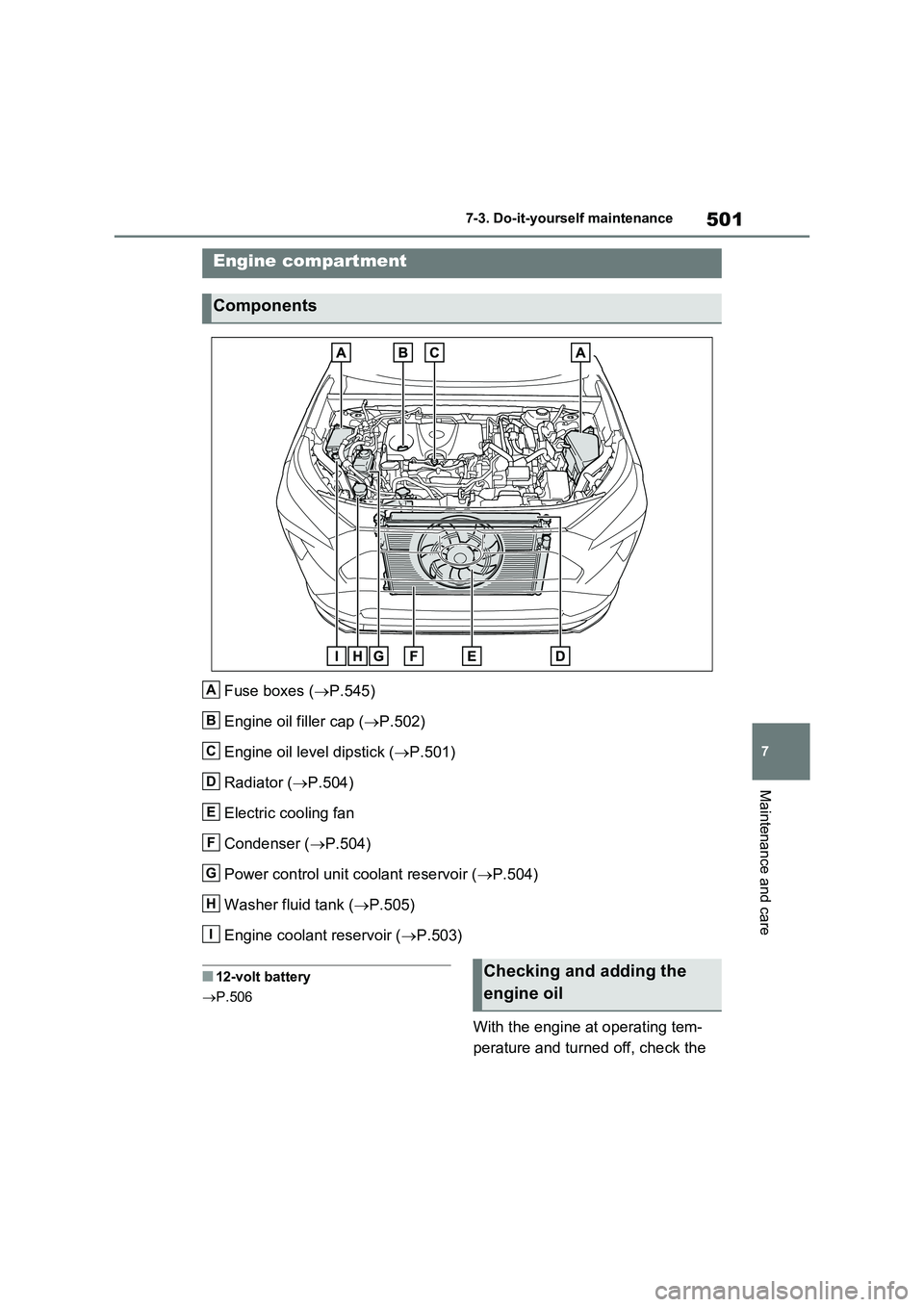
Fuse boxes (P.545)
Engine oil filler cap (P.502)
Engine oil level dipstick (P.501)
Radiator (P.504)
Electric cooling fan
Condenser (P.504)
Power control unit coolant reservoir (P.504)
Washer fluid tank (P.505)
Engine coolant reservoir (P.503)
■12-volt battery
P.506
With the engine at operating tem-
perature and turned off, check the
Engine compartment
Components
A
B
C
D
E
F
G
H
I
Checking and adding the
engine oil
Page 504 of 664
5047-3. Do-it-yourself maintenance
“LOW” line
If the level is on or below the “LOW”
line, add coolant up to the “FULL” line.
( P.611)
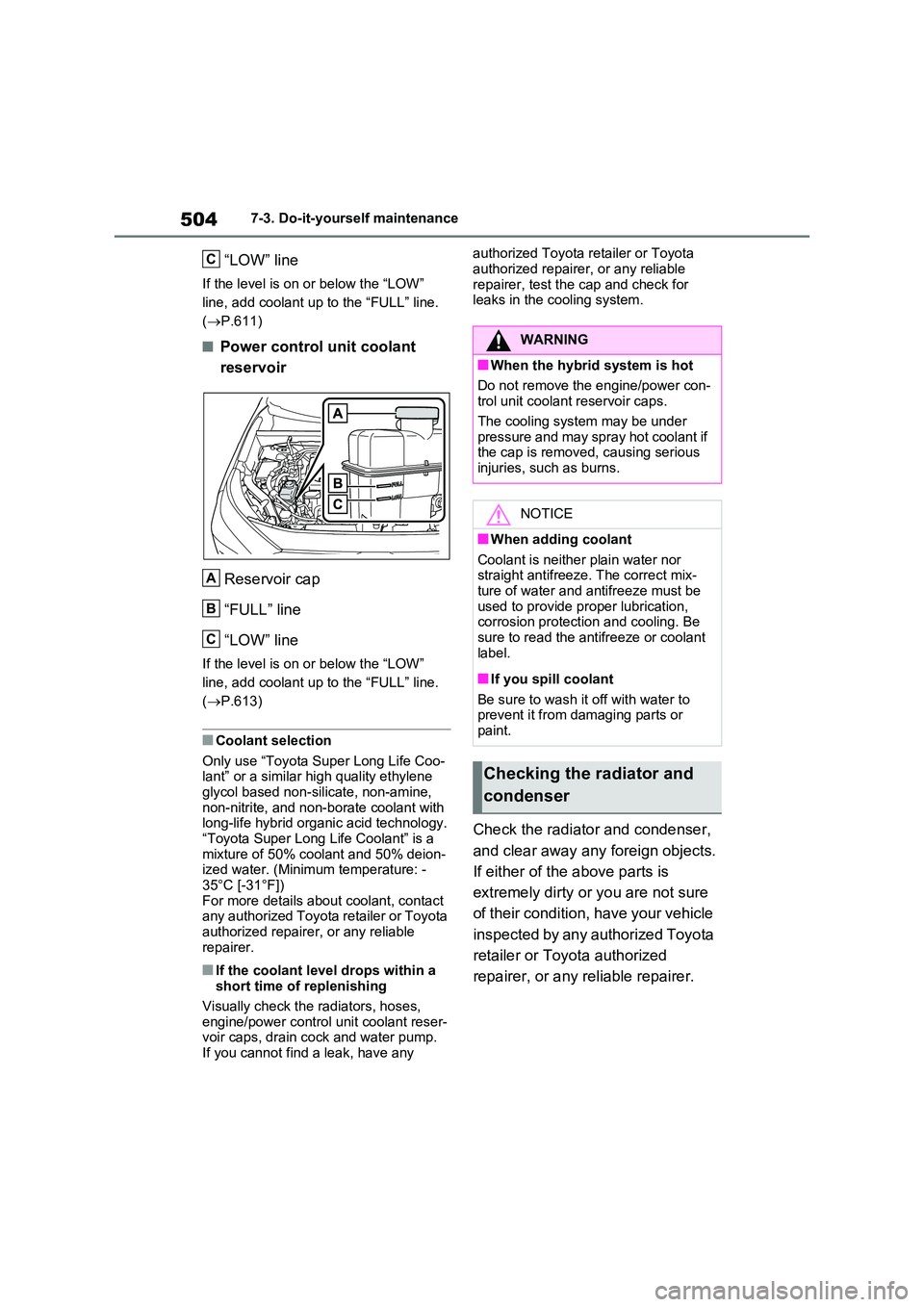
■Power control unit coolant
reservoir
Reservoir cap
“FULL” line
“LOW” line
If the level is on or below the “LOW”
line, add coolant up to the “FULL” line.
( P.613)
■Coolant selection
Only use “Toyota Super Long Life Coo- lant” or a similar high quality ethylene glycol based non-silicate, non-amine,
non-nitrite, and non-borate coolant with long-life hybrid organic acid technology.“Toyota Super Long Life Coolant” is a
mixture of 50% coolant and 50% deion- ized water. (Minimum temperature: -35°C [-31°F])
For more details about coolant, contact any authorized Toyota retailer or Toyota authorized repairer, or any reliable
repairer.
■If the coolant level drops within a short time of replenishing
Visually check the radiators, hoses,
engine/power control unit coolant reser- voir caps, drain cock and water pump.If you cannot find a leak, have any
authorized Toyota retailer or Toyota
authorized repairer, or any reliable repairer, test the cap and check for leaks in the cooling system.
Check the radiator and condenser,
and clear away any foreign objects.
If either of the above parts is
extremely dirty or you are not sure
of their condition, have your vehicle
inspected by any authorized Toyota
retailer or Toyota authorized
repairer, or any reliable repairer.
C
A
B
C
WARNING
■When the hybrid system is hot
Do not remove the engine/power con- trol unit coolant reservoir caps.
The cooling system may be under pressure and may spray hot coolant if the cap is removed, causing serious
injuries, such as burns.
NOTICE
■When adding coolant
Coolant is neither plain water nor straight antifreeze. The correct mix-ture of water and antifreeze must be
used to provide proper lubrication, corrosion protection and cooling. Be sure to read the antifreeze or coolant
label.
■If you spill coolant
Be sure to wash it off with water to prevent it from damaging parts or
paint.
Checking the radiator and
condenser
Page 505 of 664
505
7
7-3. Do-it-yourself maintenance
Maintenance and care
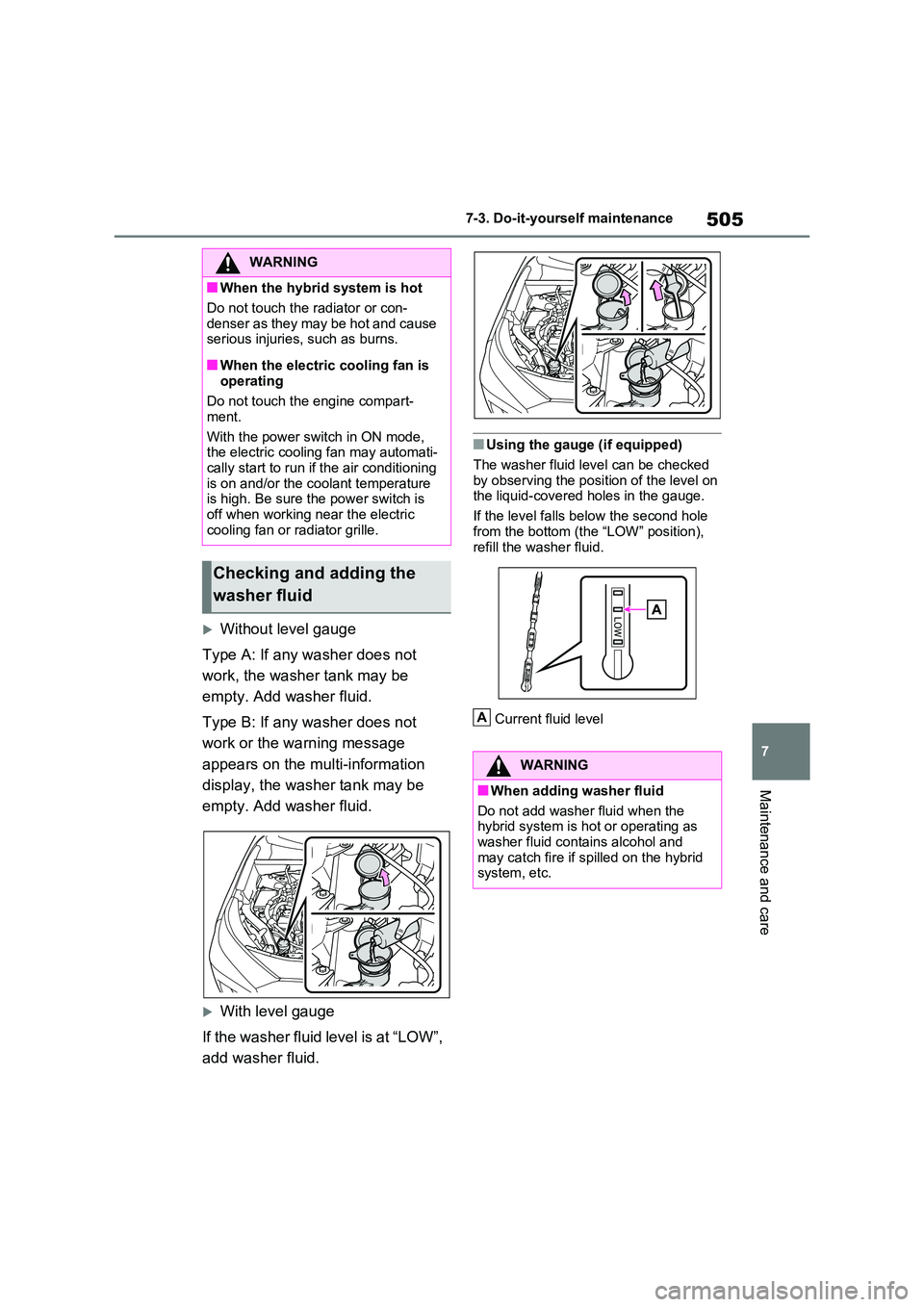
Without level gauge
Type A: If any washer does not
work, the washer tank may be
empty. Add washer fluid.
Type B: If any washer does not
work or the warning message
appears on the multi-information
display, the washer tank may be
empty. Add washer fluid.
With level gauge
If the washer fluid level is at “LOW”,
add washer fluid.
■Using the gauge (if equipped)
The washer fluid level can be checked
by observing the position of the level on the liquid-covered holes in the gauge.
If the level falls below the second hole
from the bottom (the “LOW” position), refill the washer fluid.
Current fluid level
WARNING
■When the hybrid system is hot
Do not touch the radiator or con-
denser as they may be hot and cause serious injuries, such as burns.
■When the electric cooling fan is operating
Do not touch the engine compart-
ment.
With the power switch in ON mode, the electric cooling fan may automati-
cally start to run if the air conditioning is on and/or the coolant temperature is high. Be sure the power switch is
off when working near the electric cooling fan or radiator grille.
Checking and adding the
washer fluid
WARNING
■When adding washer fluid
Do not add washer fluid when the hybrid system is hot or operating as
washer fluid contains alcohol and may catch fire if spilled on the hybrid system, etc.
A
Page 536 of 664
5367-3. Do-it-yourself maintenance
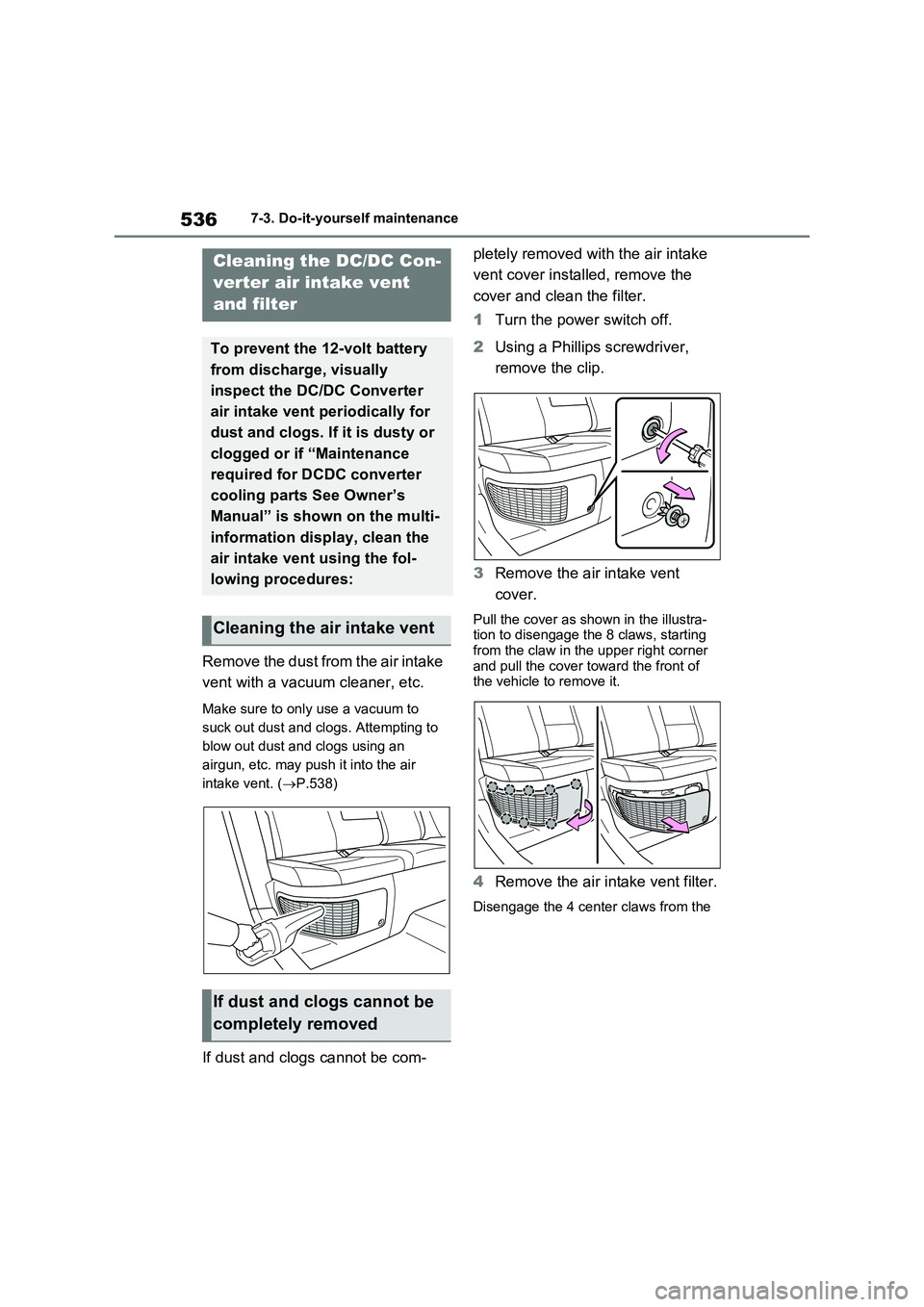
Remove the dust from the air intake
vent with a vacuum cleaner, etc.
Make sure to only use a vacuum to
suck out dust and clogs. Attempting to
blow out dust and clogs using an
airgun, etc. may push it into the air
intake vent. (P.538)
If dust and clogs cannot be com-pletely removed with the air intake
vent cover installed, remove the
cover and clean the filter.
1Turn the power switch off.
2Using a Phillips screwdriver,
remove the clip.
3Remove the air intake vent
cover.
Pull the cover as shown in the illustra-
tion to disengage the 8 claws, starting
from the claw in the upper right corner
and pull the cover toward the front of
the vehicle to remove it.
4Remove the air intake vent filter.
Disengage the 4 center claws from the
Cleaning the DC/DC Con-
verter air intake vent
and filter
To prevent the 12-volt battery
from discharge, visually
inspect the DC/DC Converter
air intake vent periodically for
dust and clogs. If it is dusty or
clogged or if “Maintenance
required for DCDC converter
cooling parts See Owner’s
Manual” is shown on the multi-
information display, clean the
air intake vent using the fol-
lowing procedures:
Cleaning the air intake vent
If dust and clogs cannot be
completely removed
Page 538 of 664
5387-3. Do-it-yourself maintenance
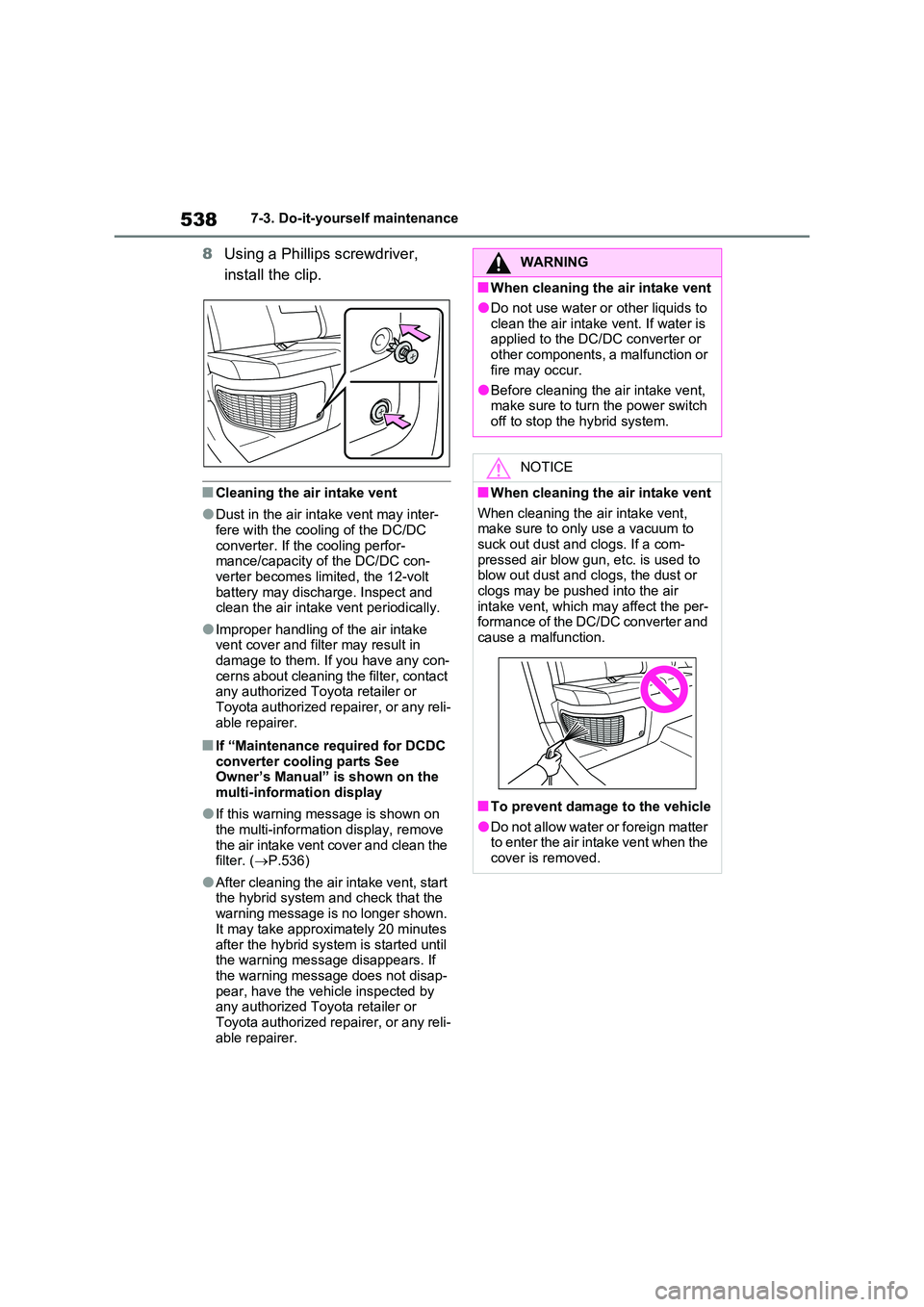
8Using a Phillips screwdriver,
install the clip.
■Cleaning the air intake vent
●Dust in the air intake vent may inter- fere with the cooling of the DC/DC
converter. If the cooling perfor- mance/capacity of the DC/DC con-verter becomes limited, the 12-volt
battery may discharge. Inspect and clean the air intake vent periodically.
●Improper handling of the air intake vent cover and filter may result in damage to them. If you have any con-
cerns about cleaning the filter, contact any authorized Toyota retailer or Toyota authorized repairer, or any reli-
able repairer.
■If “Maintenance required for DCDC converter cooling parts See Owner’s Manual” is shown on the
multi-information display
●If this warning message is shown on
the multi-information display, remove the air intake vent cover and clean the filter. ( P.536)
●After cleaning the air intake vent, start the hybrid system and check that the
warning message is no longer shown. It may take approximately 20 minutes
after the hybrid system is started until the warning message disappears. If the warning message does not disap-
pear, have the vehicle inspected by any authorized Toyota retailer or Toyota authorized repairer, or any reli-
able repairer.
WARNING
■When cleaning the air intake vent
●Do not use water or other liquids to
clean the air intake vent. If water is applied to the DC/DC converter or other components, a malfunction or
fire may occur.
●Before cleaning the air intake vent, make sure to turn the power switch
off to stop the hybrid system.
NOTICE
■When cleaning the air intake vent
When cleaning the air intake vent, make sure to only use a vacuum to suck out dust and clogs. If a com-
pressed air blow gun, etc. is used to blow out dust and clogs, the dust or clogs may be pushed into the air
intake vent, which may affect the per- formance of the DC/DC converter and cause a malfunction.
■To prevent damage to the vehicle
●Do not allow water or foreign matter to enter the air intake vent when the cover is removed.
Page 539 of 664
539
7
7-3. Do-it-yourself maintenance
Maintenance and care
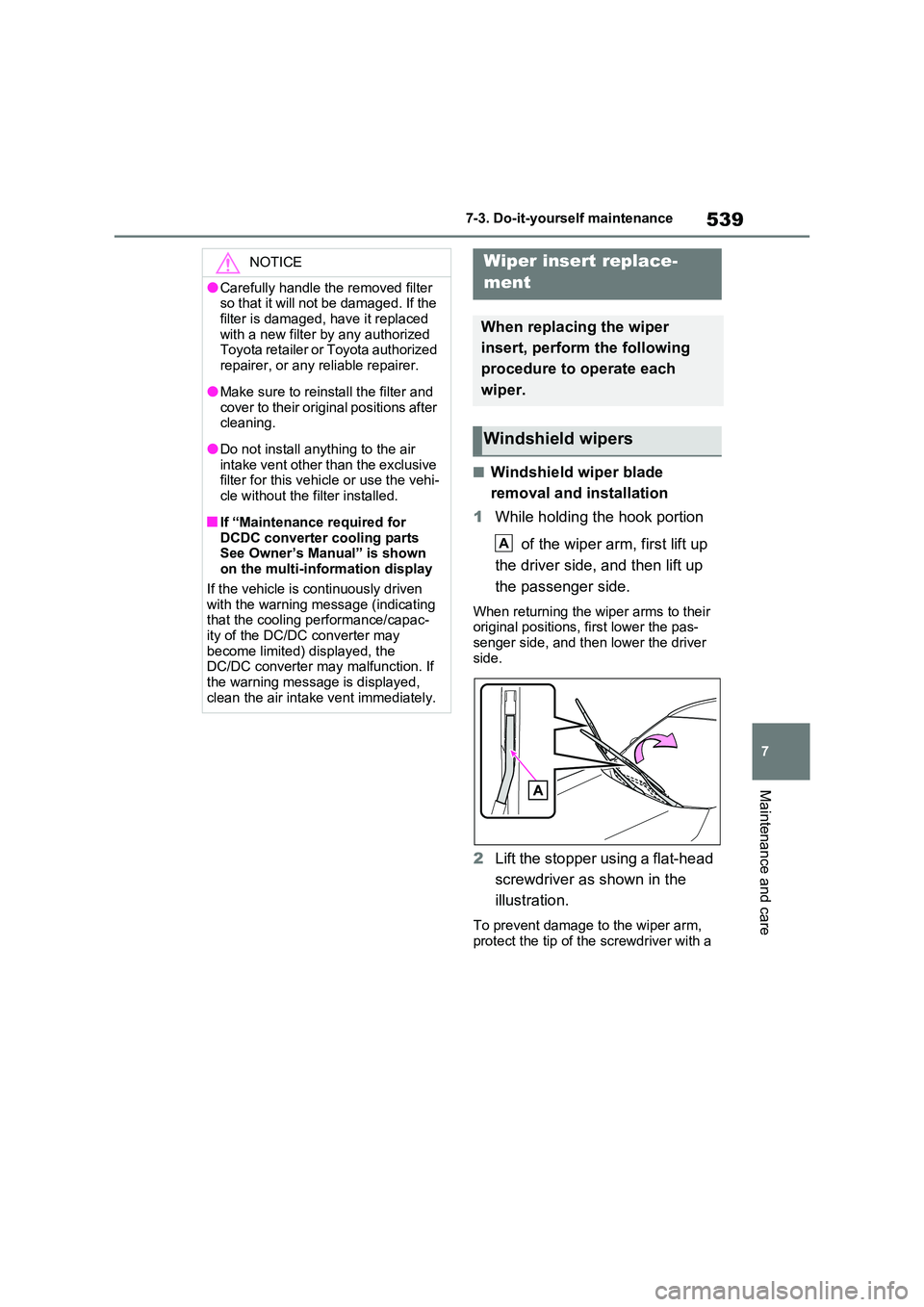
■Windshield wiper blade
removal and installation
1 While holding the hook portion
of the wiper arm, first lift up
the driver side, and then lift up
the passenger side.
When returning the wiper arms to their original positions, first lower the pas-senger side, and then lower the driver
side.
2 Lift the stopper using a flat-head
screwdriver as shown in the
illustration.
To prevent damage to the wiper arm, protect the tip of the screwdriver with a
NOTICE
●Carefully handle the removed filter so that it will not be damaged. If the
filter is damaged, have it replaced with a new filter by any authorized Toyota retailer or Toyota authorized
repairer, or any reliable repairer.
●Make sure to reinstall the filter and
cover to their original positions after cleaning.
●Do not install anything to the air intake vent other than the exclusive filter for this vehicle or use the vehi-
cle without the filter installed.
■If “Maintenance required for
DCDC converter cooling parts See Owner’s Manual” is shown on the multi-information display
If the vehicle is continuously driven with the warning message (indicating that the cooling performance/capac-
ity of the DC/DC converter may become limited) displayed, the DC/DC converter may malfunction. If
the warning message is displayed, clean the air intake vent immediately.
Wiper insert replace-
ment
When replacing the wiper
insert, perform the following
procedure to operate each
wiper.
Windshield wipers
A
Page 580 of 664
5808-2. Steps to take in an emergency
vehicle.
• “Hybrid System Stopped” • “Engine Stopped”
●If “Maintenance required for DCDC converter cooling parts See Owner’s Manual” is shown, the filter may be
clogged, the air intake vent may be blocked, or there may be a gap in the duct. Therefore, perform the following
correction procedure. • If the air intake vent or filter of the DC/DC converter are dirty, perform
the procedures on P.536 to clean them.• If the warning message is shown
when the air intake vent and filter of the DC/DC converter are not dirty, have the vehicle inspected at any
authorized Toyota retailer or Toyota authorized repairer, or any reliable repairer.
●If “12-Volt Battery Charging System Malfunction Stop in a Safe Place See
Owner’s Manual” is shown
Indicates a malfunction in the vehicle’s
charging system. Pull over and stop the
vehicle as soon as it is safe to do so.
While the message is displayed, the
functions of the air conditioning, etc.
may be partially limited in order to
reduce the power consumption of the
12-volt battery.
■If “Hybrid System Overheated Out- put Power Reduced” is shown
The message may be shown when driv-
ing under severe operating conditions. (For example, when driving up a long steep hill or driving up a steep hill in
reverse.)
Coping method: P.611
■If “Traction Battery Needs to be Protected Refrain from the Use of N
Position” is shown
This message may be displayed when the shift lever is in N.
As the hybrid battery (traction battery) cannot be charged when the shift lever
is in N, shift the shift lever to P when the
vehicle is stopped.
■If “Traction Battery Needs to be Protected Shift into P to Restart” is shown
This message is displayed when the hybrid battery (traction battery) charge has become extremely low because the
shift lever has been left in N for a certain amount of time.
When operating the vehicle, shift to P
and restart the hybrid system.
■If “Shift to P when Parked” is shown
Message is displayed when the driver’s
door is opened without turning the power switch to OFF with the shift lever in any position other than P.
Shift the shift lever to P.
■If “Shift is in N Release Accelerator Before Shifting” is shown
Message is displayed when the acceler-
ator pedal has been depressed and the shift lever is in N. Release the accelera-tor pedal and shift the shift lever to D or
R.
■If “Press Brake when Vehicle is Stopped Hybrid System may Over-heat” is shown
Message is displayed when the acceler- ator pedal is depressed to maintain the vehicle position when stopped on a
upward slope, etc.
If this continues, the hybrid system may overheat.
Release the accelerator pedal and depress the brake pedal.
■If “Auto Power OFF to Conserve Battery” is shown
Power was turned off due to the auto- matic power off function.
Next time when starting the hybrid sys-
tem, operate the hybrid system for approximately 5 minutes to recharge the 12-volt battery.