heating TOYOTA VERSO S 2011 User Guide
[x] Cancel search | Manufacturer: TOYOTA, Model Year: 2011, Model line: VERSO S, Model: TOYOTA VERSO S 2011Pages: 664, PDF Size: 160.56 MB
Page 315 of 664
315
5 5-1. Before driving
Driving
■Sudden acceleration/steering
input/cornering
Executing sharp turns when towing
may result in the trailer colliding
with your vehicle. Decelerate well in
advance when approaching turns
and take them slowly and carefully
to avoid sudden braking.
■Important points regarding
turning
The wheels of the trailer will travel
closer to the inside of the curve
than the wheels of the vehicle. To
make allowance for this, take the
turns wider than you would nor-
mally do.
■Important points regarding
stability
Vehicle movement resulting from
uneven road surfaces and strong
crosswinds will affect handling. The
vehicle may also be rocked by
passing buses or large trucks. Fre-
quently check behind when moving
alongside such vehicles. As soon
as such vehicle movement occurs,
immediately start to decelerate
smoothly by slowly applying the
brakes. Always steer the vehicle
straight ahead while braking.
■Passing other vehicles
Consider the total combined length
of your vehicle and trailer and
ensure that the vehicle-to-vehicle
distance is sufficient before execut-
ing lane changes.
■Transmission information
To maintain engine braking effi-
ciency, when using engine braking,
do not use the transmission in D.
(P.321)
■If the hybrid system overheats
Towing a loaded trailer up a long,
steep incline in temperatures
exceeding 30°C (85°F) may result
in the hybrid system overheating. If
the high coolant temperature warn-
ing light indicates that the hybrid
system is overheating, turn the air
conditioning off immediately, leave
the road and stop the vehicle in a
safe place. (P.611)
■When parking the vehicle
Always place wheel chocks under
the wheels of both the vehicle and
trailer. Firmly set the parking brake
and shift the shift lever to P.
■Break-in schedule
Toyota recommends that vehicles fitted
with new power train components
should not be used for towing trailers for
the first 800 km (500 miles).
■Maintenance
●Maintenance must be performed more
frequently when using the vehicle for
towing due to the greater weight bur-
den placed on the vehicle compared
to normal driving.
●Retighten all bolts securing the hitch-
ing ball and bracket after towing for
approximately 1000 km (600 miles).
■If trailer sway occurs
One or more factors (crosswinds, pass-
ing vehicles, rough roads, etc.) can
adversely affect handling of your vehicle
and trailer, causing instability.
Page 318 of 664
3185-2. Driving procedures
■When the ambient temperature is
low, such as during winter driving
conditions
●When starting the hybrid system, the
flashing time of the “READY” indicator
may be long. Leave the vehicle as it is
until the “READY” indicator is steady
on, as steady means the vehicle is
able to move.
●When the hybrid battery (traction bat-
tery) is extremely cold (below approxi-
mately -30°C [-22°F]) under the
influence of the outside temperature, it
may not be possible to start the hybrid
system. In this case, try to start the
hybrid system again after the tem-
perature of the hybrid battery
increases due to the outside tempera-
ture increase etc.
■Sounds and vibrations specific to a
hybrid vehicle
P.91
■If the 12-volt battery is discharged
The hybrid system cannot be started
using the smart entry & start system.
Refer to P.606 to restart the hybrid sys-
tem.
■Electronic key battery depletion
P.202
■Conditions affecting operation
P.225
■Note for the entry function
P.225
■Steering lock function
●After turning the power switch to OFF
and opening and closing the doors,
the steering wheel will be locked due
to the steering lock function. Operat-
ing the power switch again automati-
cally cancels the steering lock.
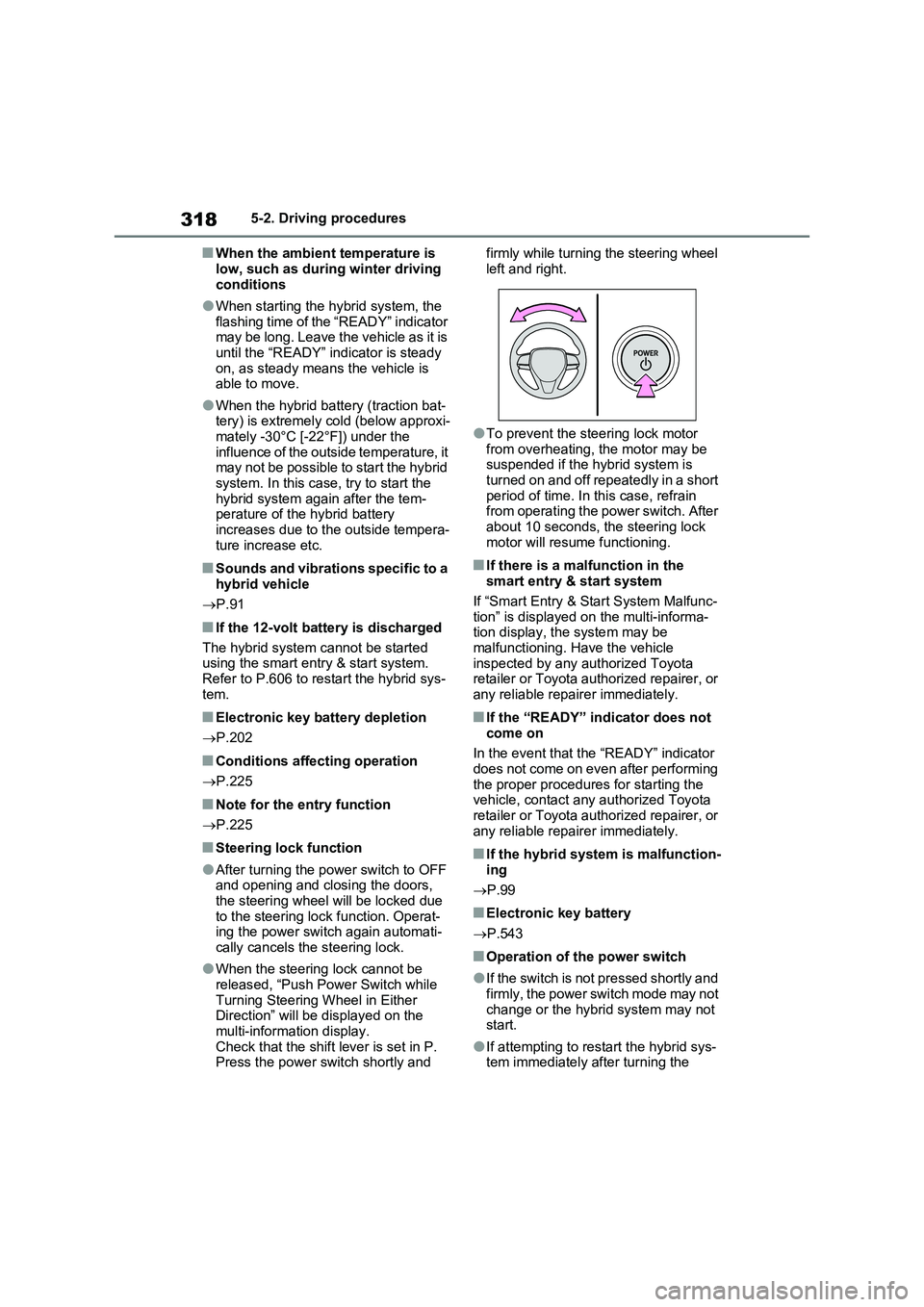
●When the steering lock cannot be
released, “Push Power Switch while
Turning Steering Wheel in Either
Direction” will be displayed on the
multi-information display.
Check that the shift lever is set in P.
Press the power switch shortly and firmly while turning the steering wheel
left and right.
●To prevent the steering lock motor
from overheating, the motor may be
suspended if the hybrid system is
turned on and off repeatedly in a short
period of time. In this case, refrain
from operating the power switch. After
about 10 seconds, the steering lock
motor will resume functioning.
■If there is a malfunction in the
smart entry & start system
If “Smart Entry & Start System Malfunc-
tion” is displayed on the multi-informa-
tion display, the system may be
malfunctioning. Have the vehicle
inspected by any authorized Toyota
retailer or Toyota authorized repairer, or
any reliable repairer immediately.
■If the “READY” indicator does not
come on
In the event that the “READY” indicator
does not come on even after performing
the proper procedures for starting the
vehicle, contact any authorized Toyota
retailer or Toyota authorized repairer, or
any reliable repairer immediately.
■If the hybrid system is malfunction-
ing
P.99
■Electronic key battery
P.543
■Operation of the power switch
●If the switch is not pressed shortly and
firmly, the power switch mode may not
change or the hybrid system may not
start.
●If attempting to restart the hybrid sys-
tem immediately after turning the
Page 328 of 664
3285-2. Driving procedures
●The driver is wearing the seat belt
●The shift lever is in a forward or reverse position.
●The malfunction indicator lamp or brake system warning light is not illu-
minated
If the automatic release function does
not operate, release the parking brake
manually.
■If “Parking Brake Temporarily Unavailable” is displayed on the multi-information display
If the parking brake is operated repeat- edly over a short period of time, the sys-tem may restrict operation to prevent
overheating. If this happens, refrain from operating the parking brake. Normal operation will return after about 1 min-
ute.
■If “Parking Brake Unavailable” is displayed on the multi-information display
Operate the parking brake switch. If the message does not disappear after oper-ating the switch several times, the sys-
tem may be malfunctioning. Have the vehicle inspected by any authorized Toyota retailer or Toyota authorized
repairer, or any reliable repairer.
■Parking brake operation sound
When the parking brake operates, a motor sound (whirring sound) may be
heard. This does not indicate a malfunc- tion.
■Parking brake indicator light
●Depending on the power switch mode, the parking brake indicator light will turn on and stay on as described
below: ON: Comes on until the parking brake is released.
Not in ON: Stays on for approximately 15 seconds.
●When the power switch is turned off with the parking brake set, the parking brake indicator light will stay on for
about 15 seconds. This does not indi-
cate a malfunction.
■When the parking brake switch
malfunctions
Automatic mode (automatic brake set- ting and releasing) will be turned on
automatically.
■Parking the vehicle
P.300
■Parking brake engaged warning buzzer
A buzzer will sound if the vehicle is driven with the parking brake engaged. “Parking Brake ON” is displayed on the
multi-information display (with the vehi- cle reaching a speed of 5 km/h [3 mph]).
■If the brake system warning light comes on
P.568
■Usage in winter time
P.446
WARNING
■When parking the vehicle
Do not leave a child in the vehicle alone. The parking brake may be released unintentionally by a child
and there is the danger of the vehicle moving that may lead to an accident resulting in death or serious injury.
■Parking brake switch
Do not set any objects near the park-
ing brake switch. Objects may inter- fere with the switch and may lead the parking brake to unexpectedly oper-
ate.
NOTICE
■When parking the vehicle
Before you leave the vehicle, shift the shift lever to P, set the parking brake
and make sure that the vehicle does not move.
Page 329 of 664
329
5
5-2. Driving procedures
Driving
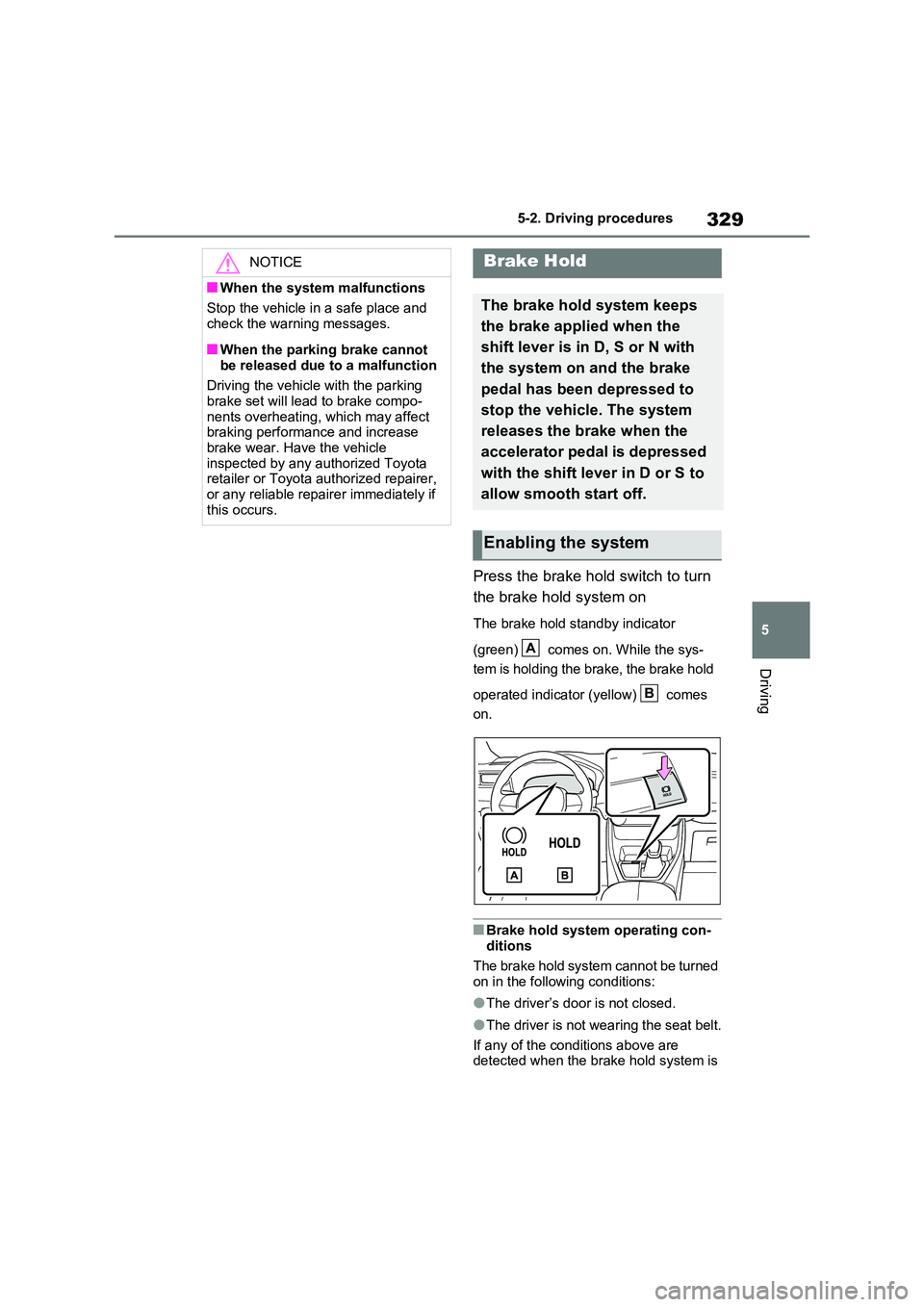
Press the brake hold switch to turn
the brake hold system on
The brake hold standby indicator
(green) comes on. While the sys-
tem is holding the brake, the brake hold
operated indicator (yellow) comes
on.
■Brake hold system operating con-
ditions
The brake hold system cannot be turned on in the following conditions:
●The driver’s door is not closed.
●The driver is not wearing the seat belt.
If any of the conditions above are detected when the brake hold system is
NOTICE
■When the system malfunctions
Stop the vehicle in a safe place and
check the warning messages.
■When the parking brake cannot
be released due to a malfunction
Driving the vehicle with the parking brake set will lead to brake compo-
nents overheating, which may affect braking performance and increase brake wear. Have the vehicle
inspected by any authorized Toyota retailer or Toyota authorized repairer, or any reliable repairer immediately if
this occurs.
Brake Hold
The brake hold system keeps
the brake applied when the
shift lever is in D, S or N with
the system on and the brake
pedal has been depressed to
stop the vehicle. The system
releases the brake when the
accelerator pedal is depressed
with the shift lever in D or S to
allow smooth start off.
Enabling the system
A
B
Page 434 of 664
4345-5. Using the driving support systems
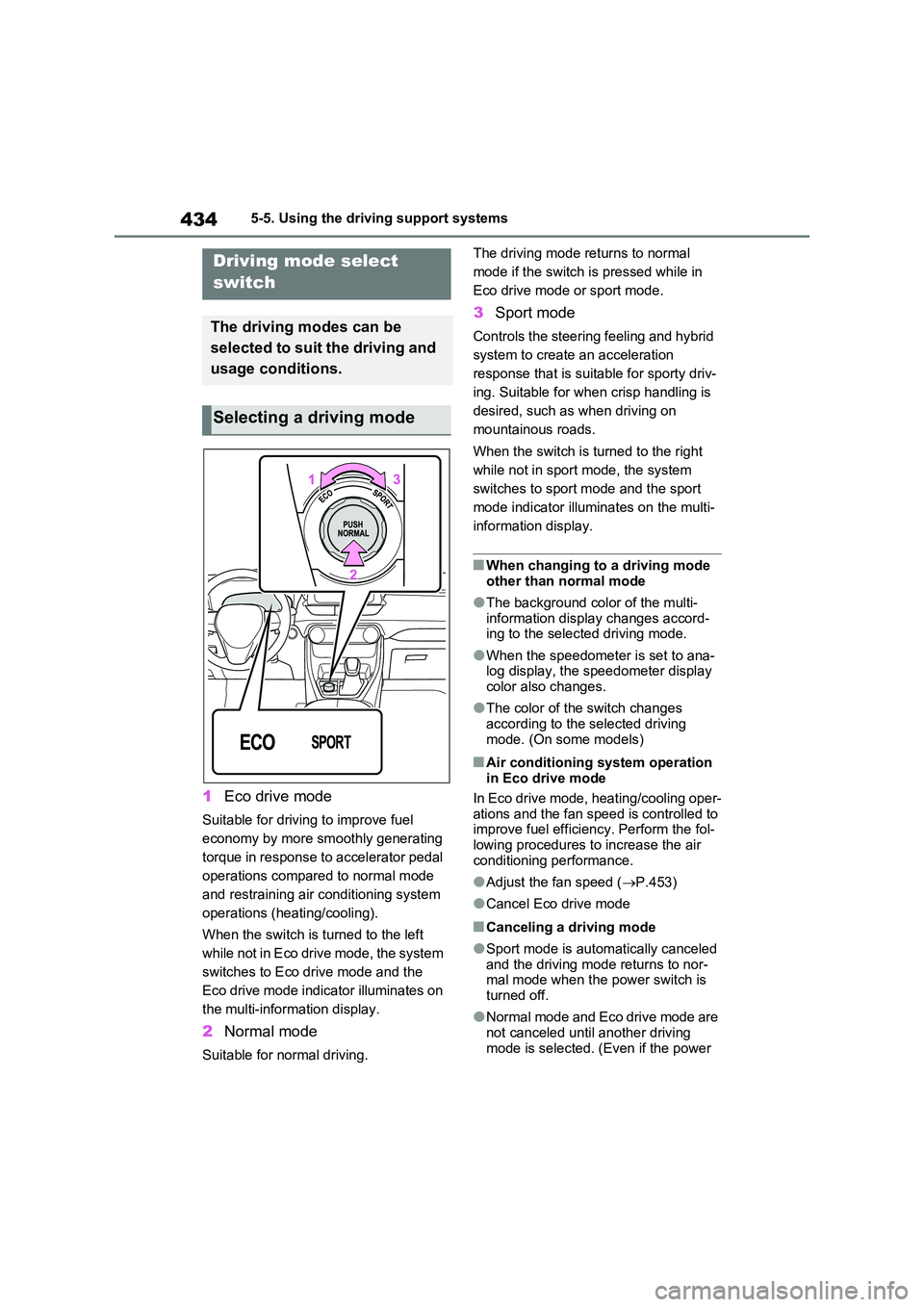
1Eco drive mode
Suitable for driving to improve fuel
economy by more smoothly generating
torque in response to accelerator pedal
operations compared to normal mode
and restraining air conditioning system
operations (heating/cooling).
When the switch is turned to the left
while not in Eco drive mode, the system
switches to Eco drive mode and the
Eco drive mode indicator illuminates on
the multi-information display.
2 Normal mode
Suitable for normal driving.
The driving mode returns to normal
mode if the switch is pressed while in
Eco drive mode or sport mode.
3 Sport mode
Controls the steering feeling and hybrid
system to create an acceleration
response that is suitable for sporty driv-
ing. Suitable for when crisp handling is
desired, such as when driving on
mountainous roads.
When the switch is turned to the right
while not in sport mode, the system
switches to sport mode and the sport
mode indicator illuminates on the multi-
information display.
■When changing to a driving mode
other than normal mode
●The background color of the multi-
information display changes accord- ing to the selected driving mode.
●When the speedometer is set to ana-log display, the speedometer display color also changes.
●The color of the switch changes according to the selected driving
mode. (On some models)
■Air conditioning system operation in Eco drive mode
In Eco drive mode, heating/cooling oper-
ations and the fan speed is controlled to improve fuel efficiency. Perform the fol-lowing procedures to increase the air
conditioning performance.
●Adjust the fan speed ( P.453)
●Cancel Eco drive mode
■Canceling a driving mode
●Sport mode is automatically canceled and the driving mode returns to nor-mal mode when the power switch is
turned off.
●Normal mode and Eco drive mode are
not canceled until another driving mode is selected. (Even if the power
Driving mode select
switch
The driving modes can be
selected to suit the driving and
usage conditions.
Selecting a driving mode
Page 441 of 664
441
5 5-5. Using the driving support systems
Driving
the TRC will turn on when vehicle
speed increases.
If both the TRC and VSC systems are
turned off, automatic re-enabling will
not occur when vehicle speed
increases.
■Operating conditions of Active Cor-
nering Assist
The system operates when the following
occurs.
●TRC/VSC can operate
●The driver is attempting to accelerate
while turning
●The system detects that the vehicle is
drifting to the outer side
●The brake pedal is released
■Reduced effectiveness of the EPS
system
The effectiveness of the EPS system is
reduced to prevent the system from
overheating when there is frequent
steering input over an extended period
of time. The steering wheel may feel
heavy as a result. Should this occur,
refrain from excessive steering input or
stop the vehicle and turn the hybrid sys-
tem off. The EPS system should return
to normal within 10 minutes.
■Operating conditions of emergency
brake signal
When the following conditions are met,
the emergency brake signal will operate:
●The emergency flashers are off.
●Actual vehicle speed is over 55 km/h (35 mph).
●The system judges from the vehicle
deceleration that it is a sudden brak-
ing operation.
■Automatic system cancelation of
emergency brake signal
The emergency brake signal will be can-
celed in any of the following situations:
●The emergency flashers are turned
on.
●The system judges from the vehicle
deceleration that is not a sudden brak-
ing operation.
■Secondary Collision Brake operat-
ing conditions (if equipped)
The system operates when the SRS air-
bag sensor detects a collision while the
vehicle is in motion. However, the sys-
tem does not operate in any of the fol-
lowing situations.
●The vehicle speed is below 10 km/h (6
mph)
●Components are damaged
■Secondary Collision Brake auto-
matic cancellation (if equipped)
The system is automatically canceled in
any of the following situations.
●The vehicle speed drops below
approximately 10 km/h (6 mph)
●A certain amount of time elapses
during operation
●The accelerator pedal is depressed a
large amount
■If a message about AWD is shown on the multi-information display
Perform the following actions.
Page 442 of 664
4425-5. Using the driving support systems
MessageDetails/Actions
“AWD System Over-
heated Switching to 2WD
Mode”
AWD system is overheating.
Drive the vehicle at low speeds and stop the
vehicle in a safe place with the hybrid system
operating until the message is cleared.
Once the display message on the multi-information dis-
play turns off, there is no problem continuing to drive.
If the message does not disappear, have your vehicle
checked by any authorized Toyota retailer or Toyota
authorized repairer, or any reliable repairer immedi-
ately.
“AWD System Over-
heated 2WD Mode
Engaged”
The vehicle switched from all-wheel drive (AWD) to
front wheel drive due to overheating.
Drive the vehicle at low speeds and stop the
vehicle in a safe place with the hybrid system
operating until the message is cleared.
Once the display message on the multi-information dis-
play turns off, the AWD system returns to normal.
If the message does not disappear, have your vehicle
checked by any authorized Toyota retailer or Toyota
authorized repairer, or any reliable repairer immedi-
ately.
“AWD System Malfunc-
tion 2WD Mode Engaged
Visit Your Dealer”
A malfunction occurred in the AWD system.
Have your vehicle checked by any authorized
Toyota retailer or Toyota authorized repairer, or
any reliable repairer immediately.
WARNING
■The ABS does not operate effec- tively when
●The limits of tire gripping perfor-
mance have been exceeded (such as excessively worn tires on a snow covered road).
●The vehicle hydroplanes while driv-ing at high speed on wet or slick
roads.
■Stopping distance when the ABS
is operating may exceed that of normal conditions
The ABS is not designed to shorten
the vehicle’s stopping distance. Always maintain a safe distance from the vehicle in front of you, especially
in the following situations:
●When driving on dirt, gravel or snow-covered roads
●When driving with tire chains
●When driving over bumps in the road
Page 454 of 664
4546-1. Using the air conditioning system and defogger
switch to outside air mode if the recircu-
lated air mode is used. (It may switch
automatically.)
To defog the windshield and the side
windows quickly, turn the air flow and
temperature up.
To return to the previous mode, press
the windshield defogger switch again
when the windshield is defogged.
When the windshield defogger switch is
on, the indicator illuminates on the
windshield defogger switch.
■Defogging the rear window
and outside rear view mirrors
Defoggers are used to defog the
rear window, and to remove rain-
drops, dew and frost from the out-
side rear view mirrors.
Press the rear window defogger
and outside rear view mirror defog-
gers switch.
The defoggers will automatically turn off
after 15 minutes.
When the rear window defogger and
outside rear view mirror defoggers
switch is on, the indicator illuminates on
the rear window defogger and outside
rear view mirror defoggers switch.
■Blower customization
The fan speed can be adjusted
according to your preference.
1Press the automatic mode or
airflow mode control switch.
2Press the blower customization
switch.
3Each time the blower customi-
zation switch is pressed, the fan
speed changes as follows.
Normal “ECO” “FAST”
■Heating
●In HV mode, the gasoline engine may
operate in order to extract heat from
the engine coolant via the heater.
●In EV mode, heating is done by a heat
pump system.
• When the outside temperature is low
or it is snowing, compared to conven-
tional vehicles, heating may be less
effective and warm air may not come
out.
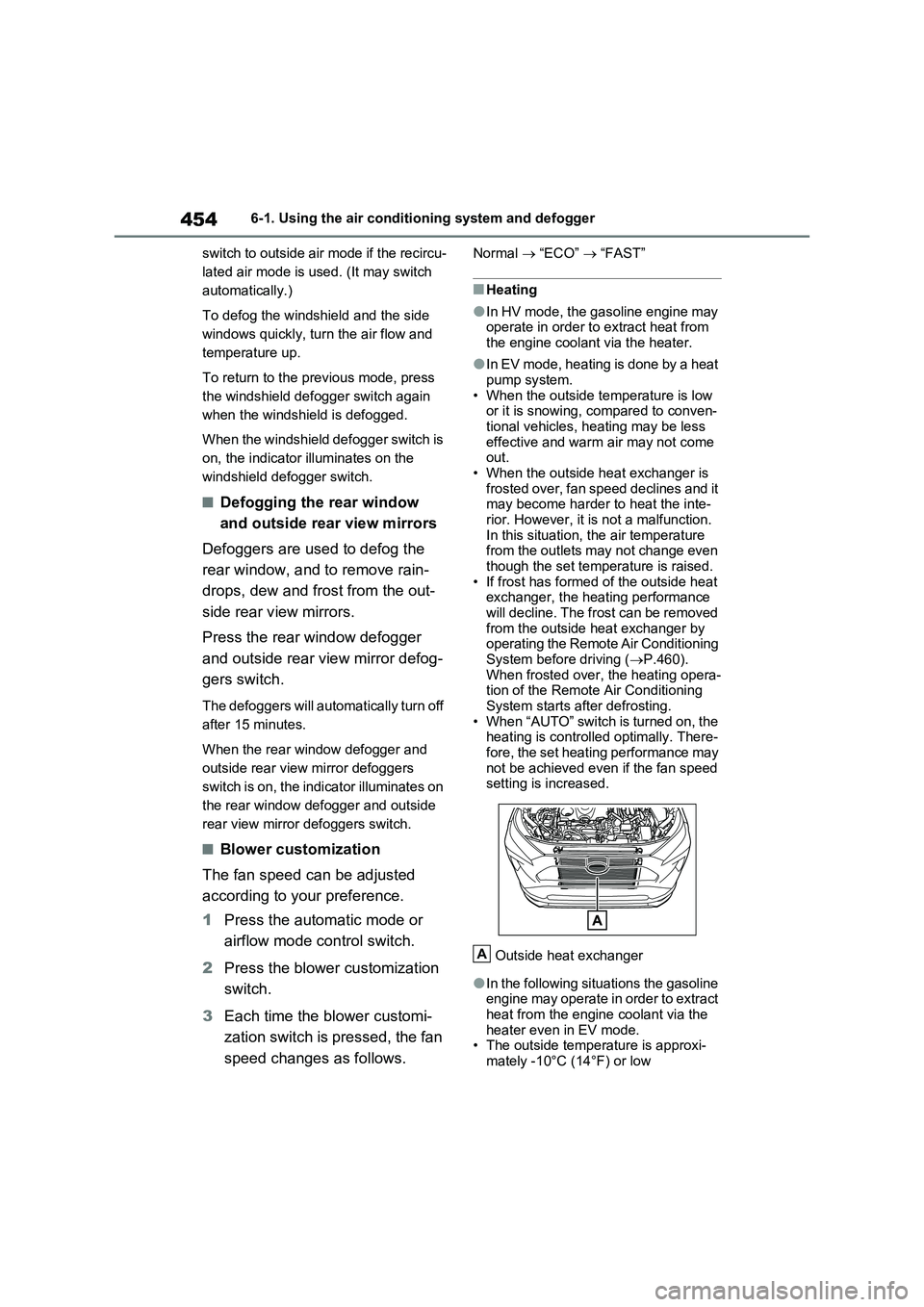
• When the outside heat exchanger is
frosted over, fan speed declines and it
may become harder to heat the inte-
rior. However, it is not a malfunction.
In this situation, the air temperature
from the outlets may not change even
though the set temperature is raised.
• If frost has formed of the outside heat
exchanger, the heating performance
will decline. The frost can be removed
from the outside heat exchanger by
operating the Remote Air Conditioning
System before driving (P.460).
When frosted over, the heating opera-
tion of the Remote Air Conditioning
System starts after defrosting.
• When “AUTO” switch is turned on, the
heating is controlled optimally. There-
fore, the set heating performance may
not be achieved even if the fan speed
setting is increased.
Outside heat exchanger
●In the following situations the gasoline
engine may operate in order to extract
heat from the engine coolant via the
heater even in EV mode.
• The outside temperature is approxi-
mately -10°C (14°F) or low
A
Page 455 of 664
455
6 6-1. Using the air conditioning system and defogger
Interior features
• is operating
■Water droplets during air condi-
tioning operation
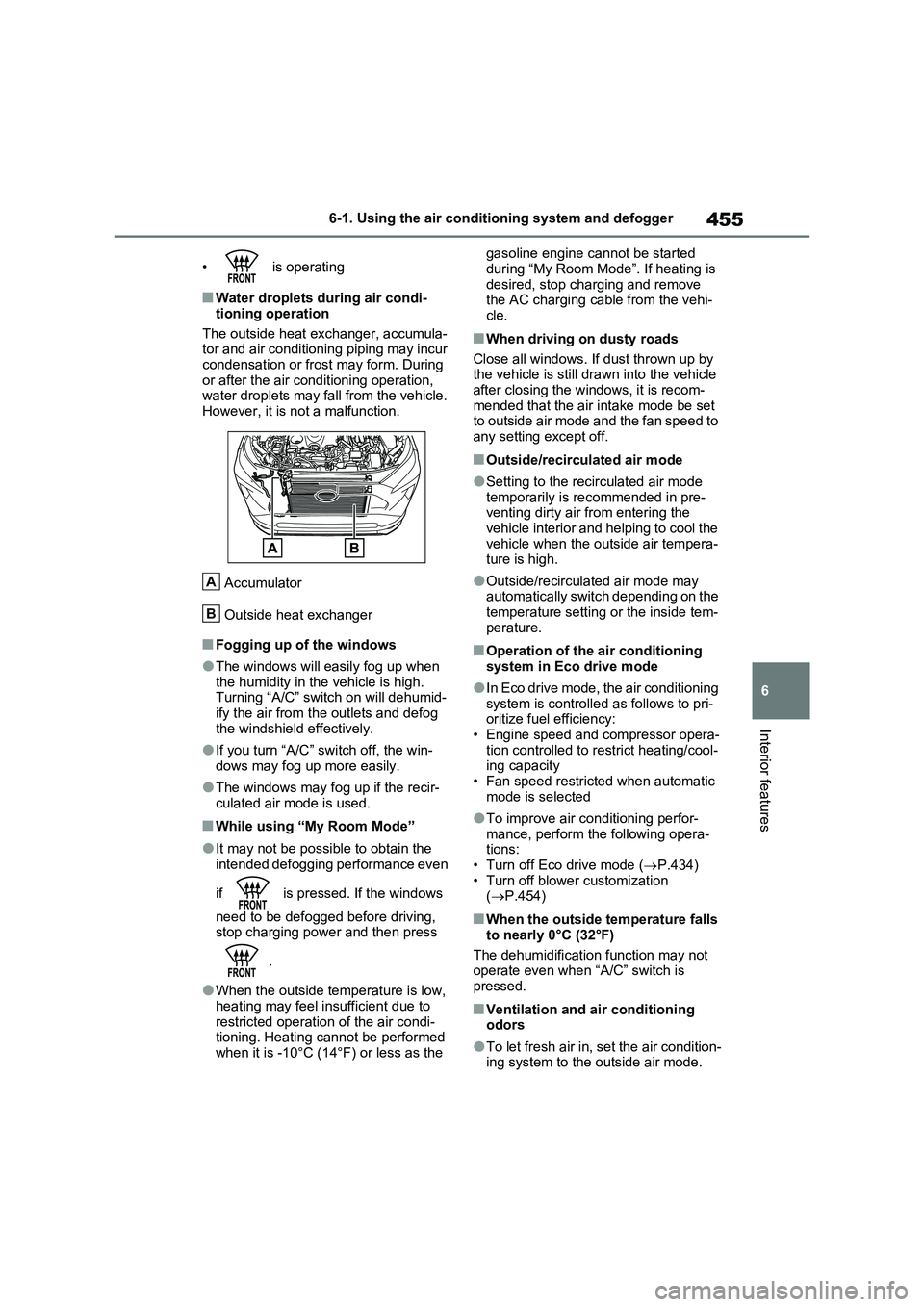
The outside heat exchanger, accumula-
tor and air conditioning piping may incur
condensation or frost may form. During
or after the air conditioning operation,
water droplets may fall from the vehicle.
However, it is not a malfunction.
Accumulator
Outside heat exchanger
■Fogging up of the windows
●The windows will easily fog up when
the humidity in the vehicle is high.
Turning “A/C” switch on will dehumid-
ify the air from the outlets and defog
the windshield effectively.
●If you turn “A/C” switch off, the win-
dows may fog up more easily.
●The windows may fog up if the recir-
culated air mode is used.
■While using “My Room Mode”
●It may not be possible to obtain the
intended defogging performance even
if is pressed. If the windows
need to be defogged before driving,
stop charging power and then press
.
●When the outside temperature is low,
heating may feel insufficient due to
restricted operation of the air condi-
tioning. Heating cannot be performed
when it is -10°C (14°F) or less as the gasoline engine cannot be started
during “My Room Mode”. If heating is
desired, stop charging and remove
the AC charging cable from the vehi-
cle.
■When driving on dusty roads
Close all windows. If dust thrown up by
the vehicle is still drawn into the vehicle
after closing the windows, it is recom-
mended that the air intake mode be set
to outside air mode and the fan speed to
any setting except off.
■Outside/recirculated air mode
●Setting to the recirculated air mode
temporarily is recommended in pre-
venting dirty air from entering the
vehicle interior and helping to cool the
vehicle when the outside air tempera-
ture is high.
●Outside/recirculated air mode may
automatically switch depending on the
temperature setting or the inside tem-
perature.
■Operation of the air conditioning
system in Eco drive mode
●In Eco drive mode, the air conditioning
system is controlled as follows to pri-
oritize fuel efficiency:
• Engine speed and compressor opera-
tion controlled to restrict heating/cool-
ing capacity
• Fan speed restricted when automatic
mode is selected
●To improve air conditioning perfor-
mance, perform the following opera-
tions:
• Turn off Eco drive mode (P.434)
• Turn off blower customization
(P.454)
■When the outside temperature falls
to nearly 0°C (32°F)
The dehumidification function may not
operate even when “A/C” switch is
pressed.
■Ventilation and air conditioning
odors
●To let fresh air in, set the air condition-
ing system to the outside air mode.
A
B
Page 461 of 664
461
6
6-1. Using the air conditioning system and defogger
Interior features
●The outside temperature is extremely
low
●When the hybrid system is cool (for
example, after being left for a long time in low temperatures)
■Windshield defogger
When defogging the windshield using
the Remote Air Conditioning System, defogging may be insufficient due to the power being restricted more than during
normal air conditioning operation. Also, the outside of the windshield may fog up due to the outside temperature, humidity
or air conditioning set temperature.
■Using the heater via the Remote Air Conditioning System
●When the outside temperature is low, heating may feel insufficient due to restricted operation of the air condi-
tioning.
●When the outside heat exchanger
becomes frosted over, heating perfor- mance may decline due to automati-cally switching to the frost removal
operation. ( P.452)
■Security feature
Any unlocked doors will be automatically locked when the system is operating.
The emergency flashers flash to indicate that the doors have been locked or the system has been turned off.
■Conditions affecting operation
P.225
■While the Remote Air Conditioning System is operating
●Depending on the operating condition of the Remote Air Conditioning Sys-tem, the air conditioning compressor
or cooling fan may spin and an operat- ing noise may be heard.However, this does not indicate a mal-
function.
●The air conditioning operation
switches, etc. will not operate while the Remote Air Conditioning System is operating.
■Electronic key battery depletion
P.202
■When the electronic key battery is fully depleted
P.543
■Customization
Setting (e.g. Operation using “A/C” on the wireless remote control) can be changed. (Customizable features:
P.629)
WARNING
■Precautions for the Remote Air Conditioning System
●Do not use the system if people are in the vehicle. Even when the system is in use, the
internal temperature may still reach a high or low level due to features such as the automatic shut-off.
Children and pets left inside the vehicle may suffer heatstroke dehy-dration or hypothermia, or could
result in death or serious injury.
●Depending on the surrounding envi-
ronment, signals from the wireless switch may transmit further than expected. Pay appropriate attention
to the vehicle’s surroundings and use the switch only when neces-sary.
●Do not operate “A/C” on the wire-less remote control if the hood is
open. The air conditioning may operate unintentionally and objects may be drawn into the electrical
cooling fan.
NOTICE
■To prevent the hybrid battery (traction battery) from being dis-charged
Use “A/C” on the wireless remote control only when necessary.