side mirror TOYOTA VERSO S 2011 Owner's Manual
[x] Cancel search | Manufacturer: TOYOTA, Model Year: 2011, Model line: VERSO S, Model: TOYOTA VERSO S 2011Pages: 664, PDF Size: 160.56 MB
Page 393 of 664
393
5
5-5. Using the driving support systems
Driving
*: If equipped
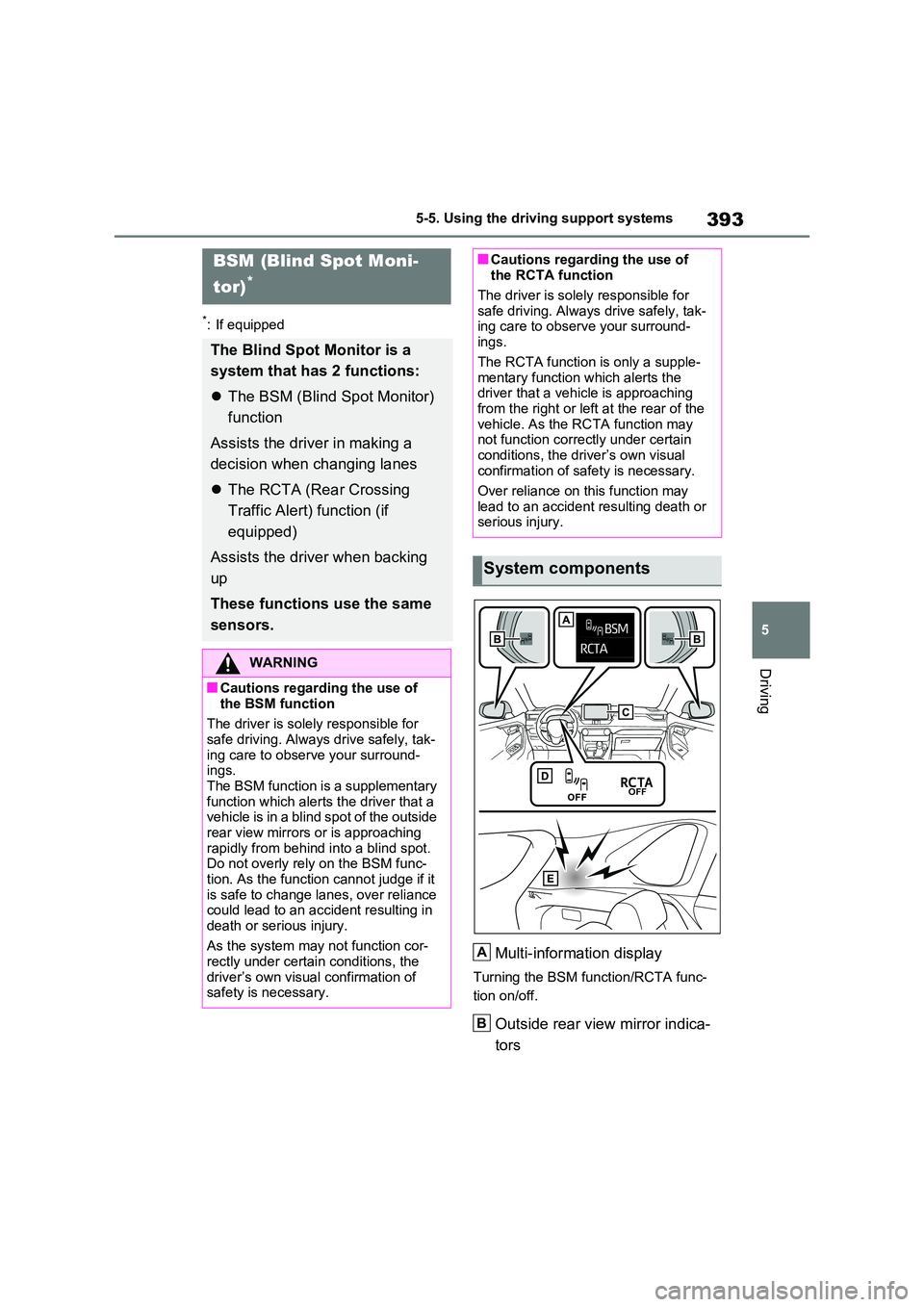
Multi-information display
Turning the BSM function/RCTA func-
tion on/off.
Outside rear view mirror indica-
tors
BSM (Blind Spot Moni-
tor)*
The Blind Spot Monitor is a
system that has 2 functions:
The BSM (Blind Spot Monitor)
function
Assists the driver in making a
decision when changing lanes
The RCTA (Rear Crossing
Traffic Alert) function (if
equipped)
Assists the driver when backing
up
These functions use the same
sensors.
WARNING
■Cautions regarding the use of
the BSM function
The driver is solely responsible for
safe driving. Always drive safely, tak- ing care to observe your surround-ings.
The BSM function is a supplementary function which alerts the driver that a vehicle is in a blind spot of the outside
rear view mirrors or is approaching rapidly from behind into a blind spot. Do not overly rely on the BSM func-
tion. As the function cannot judge if it is safe to change lanes, over reliance could lead to an accident resulting in
death or serious injury.
As the system may not function cor- rectly under certain conditions, the
driver’s own visual confirmation of safety is necessary.
■Cautions regarding the use of the RCTA function
The driver is solely responsible for
safe driving. Always drive safely, tak- ing care to observe your surround-ings.
The RCTA function is only a supple- mentary function which alerts the driver that a vehicle is approaching
from the right or left at the rear of the vehicle. As the RCTA function may not function correctly under certain
conditions, the driver’s own visual confirmation of safety is necessary.
Over reliance on this function may
lead to an accident resulting death or serious injury.
System components
A
B
Page 394 of 664
3945-5. Using the driving support systems
BSM function:
When a vehicle is detected in a blind
spot of the outside rear view mirrors or
approaching rapidly from behind into a
blind spot, the outside rear view mirror
indicator on the detected side will illumi-
nate. If the turn signal lever is operated
toward the detected side, the outside
rear view mirror indicator will flash.
RCTA function:
When a vehicle approaching from the
right or left at the rear of the vehicle is
detected, both outside rear view mirror
indicators will flash.
Monitor screen display (RCTA
function only)
If a vehicle approaching from the right
or left at the rear of the vehicle is
detected, the RCTA icon (P.411) for
the detected side will be displayed.
BSM OFF indicator/RCTA OFF
indicator
When the Blind Spot Monitor is dis-
abled, the BSM OFF indicator illumi-
nates.
When the RCTA function is disabled,
the RCTA OFF indicator illuminates.
RCTA buzzer (RCTA function
only)
If a vehicle approaching from the right
or left at the rear of the vehicle is
detected, a buzzer will sound from
behind the rear seat.
The BSM function and the RCTA
function can be enabled/disabled
on the screen of the multi-infor-mation display. (P.186)
The BSM function/RCTA function will
be enabled each time the power switch
is turned to ON.
■Outside rear view mirror indicators
visibility
In strong sunlight, the outside rear view
mirror indicator may be difficult to see.
■Hearing the RCTA buzzer
The RCTA buzzer may be difficult to
hear over loud noises such as high
audio volume.
■When “Blind Spot Monitor Unavail-
able” or “RCTA Unavailable” is
shown on the multi-information
display
The sensor voltage has become abnor-
mal, or water, snow, mud, etc., may be
built up in the vicinity of the sensor area
of the rear bumper. (P.408)
Removing the water, snow, mud, etc.,
from the vicinity of the sensor area
should return it to normal.
Also, the sensor may not function nor-
mally when used in extremely hot or
cold weather.
■When “Blind Spot Monitor Malfunc-
tion Visit Your Dealer” or “RCTA
Malfunction Visit Your Dealer” is
shown on the multi-information
display
There may be a sensor malfunction or
misaligned. Have the vehicle inspected
at any authorized Toyota retailer or
Toyota authorized repairer, or any reli-
able repairer.
■Customization
Some functions can be customized.
(P.186)
Turning the BSM func-
tion/RCTA function on/off
C
D
E
Page 409 of 664
409
5
5-5. Using the driving support systems
Driving
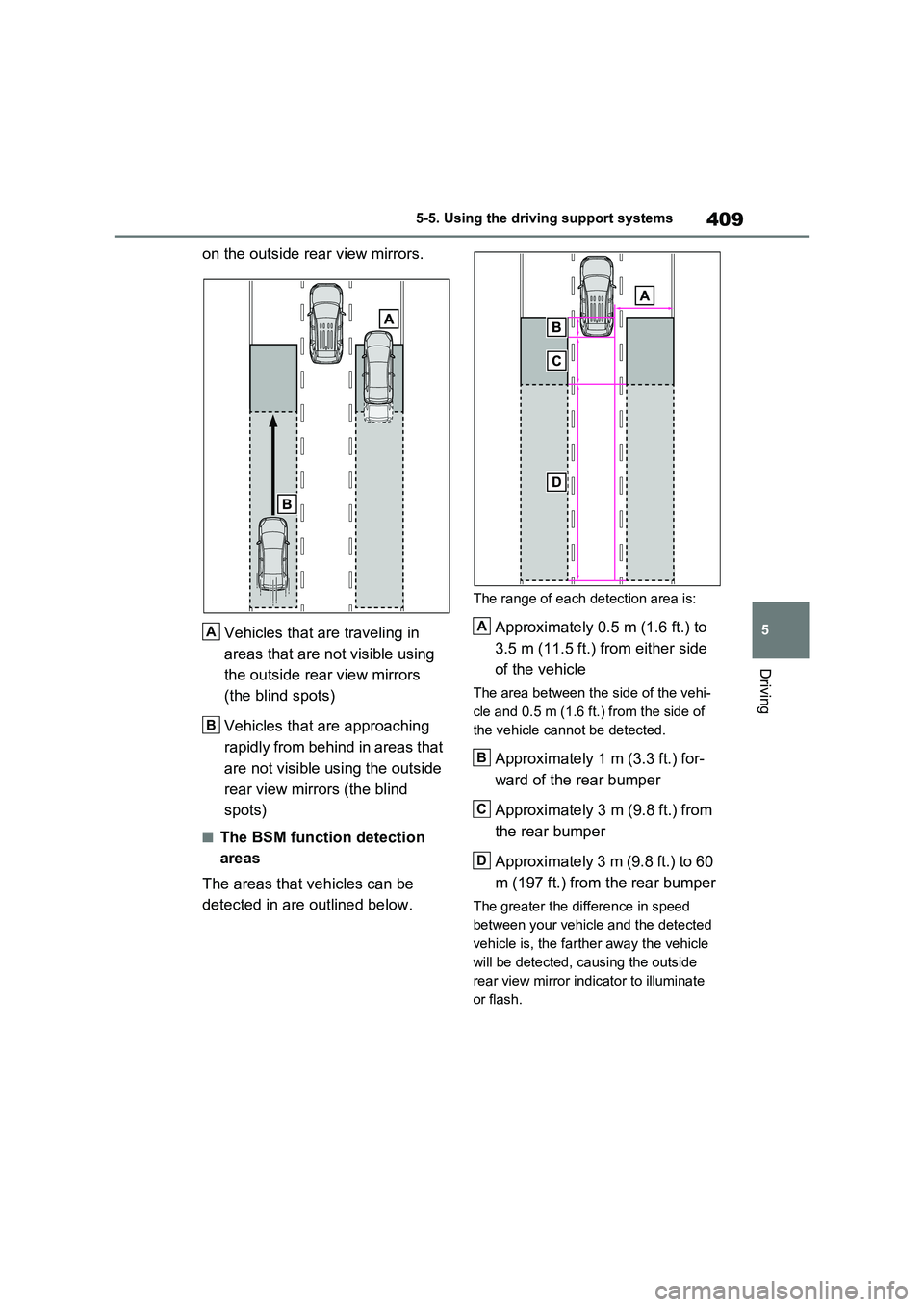
on the outside rear view mirrors.
Vehicles that are traveling in
areas that are not visible using
the outside rear view mirrors
(the blind spots)
Vehicles that are approaching
rapidly from behind in areas that
are not visible using the outside
rear view mirrors (the blind
spots)
■The BSM function detection
areas
The areas that vehicles can be
detected in are outlined below.
The range of each detection area is:
Approximately 0.5 m (1.6 ft.) to
3.5 m (11.5 ft.) from either side
of the vehicle
The area between the side of the vehi-
cle and 0.5 m (1.6 ft.) from the side of
the vehicle cannot be detected.
Approximately 1 m (3.3 ft.) for-
ward of the rear bumper
Approximately 3 m (9.8 ft.) from
the rear bumper
Approximately 3 m (9.8 ft.) to 60
m (197 ft.) from the rear bumper
The greater the difference in speed
between your vehicle and the detected
vehicle is, the farther away the vehicle
will be detected, causing the outside
rear view mirror indicator to illuminate
or flash.
A
B
A
B
C
D
Page 411 of 664
411
5 5-5. Using the driving support systems
Driving
●Instances of the BSM function unnec-
essarily detecting a vehicle and/or
object may increase in the following
situations:
• When the sensor is misaligned due to
a strong impact to the sensor or its
surrounding area
• When the distance between your vehi-
cle and a guardrail, wall, etc. that
enters the detection area is short
• When driving up and down consecu-
tive steep inclines, such as hills, dips
in the road, etc.
• When vehicle lanes are narrow, or
when driving on the edge of a lane,
and a vehicle traveling in a lane other
than the adjacent lanes enters the
detection area
• When driving on roads with sharp
bends, consecutive curves, or uneven
surfaces
• When the tires are slipping or spinning
• When the distance between your vehi-
cle and a following vehicle is short
• When an accessory (such as a bicycle
carrier) is installed to the rear of the
vehicle
• When the vehicle throws up water or
snow behind.
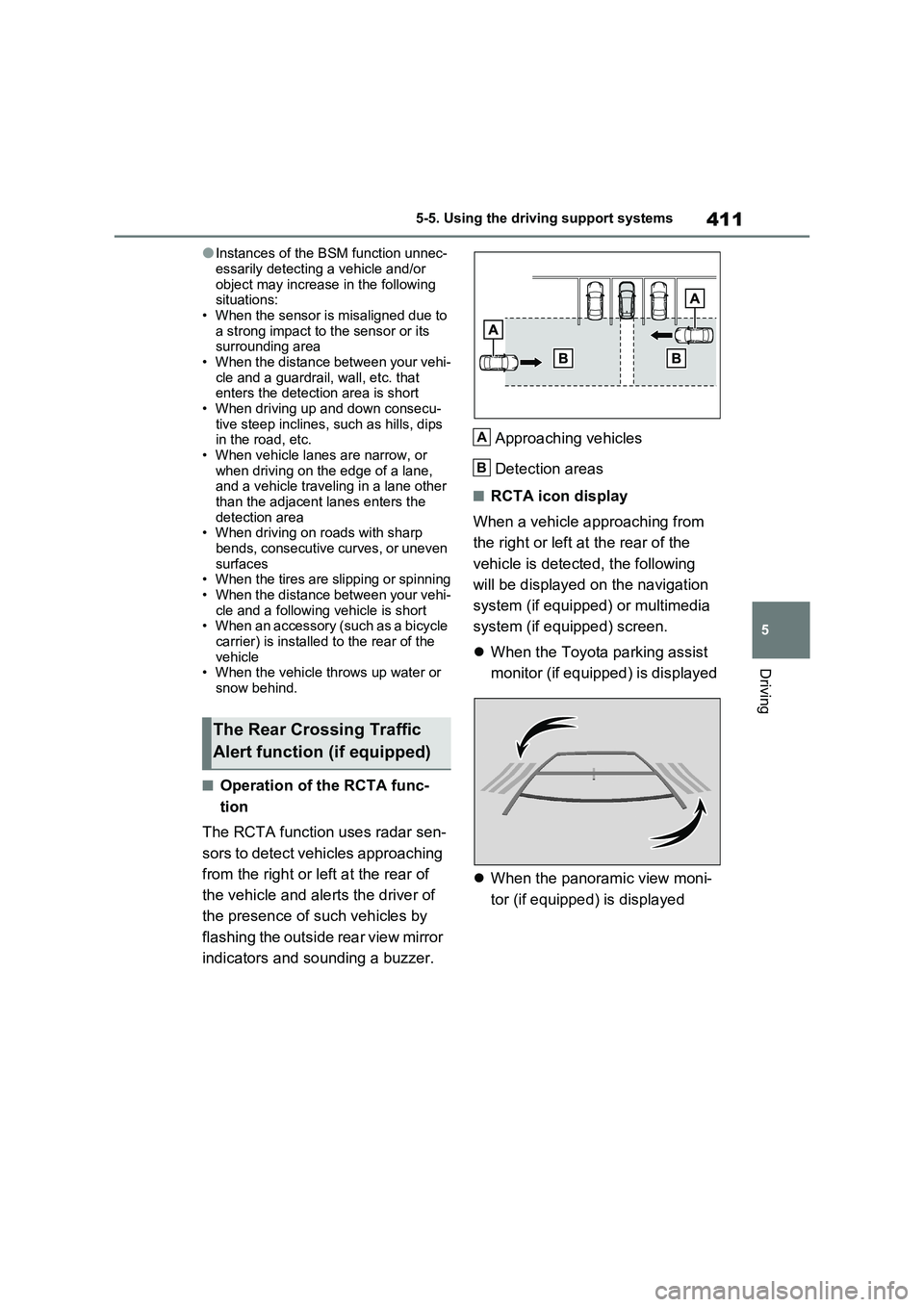
■Operation of the RCTA func-
tion
The RCTA function uses radar sen-
sors to detect vehicles approaching
from the right or left at the rear of
the vehicle and alerts the driver of
the presence of such vehicles by
flashing the outside rear view mirror
indicators and sounding a buzzer.Approaching vehicles
Detection areas
■RCTA icon display
When a vehicle approaching from
the right or left at the rear of the
vehicle is detected, the following
will be displayed on the navigation
system (if equipped) or multimedia
system (if equipped) screen.
When the Toyota parking assist
monitor (if equipped) is displayed
When the panoramic view moni-
tor (if equipped) is displayed
The Rear Crossing Traffic
Alert function (if equipped)
A
B
Page 452 of 664
4526-1. Using the air conditioning system and defogger
6-1.Using the a ir c onditioning sys te m and de fog ger
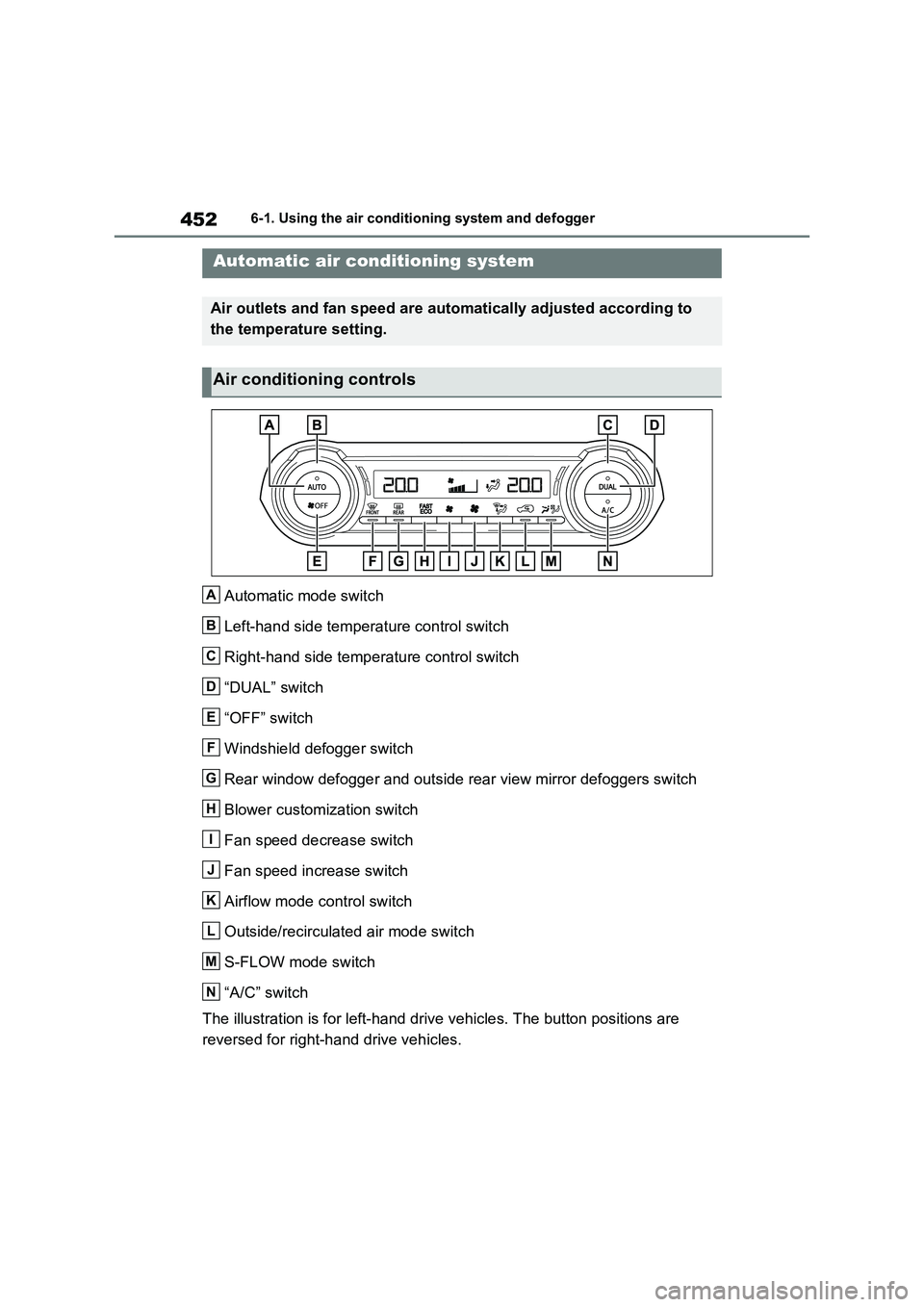
Automatic mode switch
Left-hand side temperature control switch
Right-hand side temperature control switch
“DUAL” switch
“OFF” switch
Windshield defogger switch
Rear window defogger and outside rear view mirror defoggers switch
Blower customization switch
Fan speed decrease switch
Fan speed increase switch
Airflow mode control switch
Outside/recirculated air mode switch
S-FLOW mode switch
“A/C” switch
The illustration is for left-hand drive vehicles. The button positions are
reversed for right-hand drive vehicles.
Automatic air conditioning system
Air outlets and fan speed are automatically adjusted according to
the temperature setting.
Air conditioning controls
A
B
C
D
E
F
G
H
I
J
K
L
M
N
Page 454 of 664
4546-1. Using the air conditioning system and defogger
switch to outside air mode if the recircu-
lated air mode is used. (It may switch
automatically.)
To defog the windshield and the side
windows quickly, turn the air flow and
temperature up.
To return to the previous mode, press
the windshield defogger switch again
when the windshield is defogged.
When the windshield defogger switch is
on, the indicator illuminates on the
windshield defogger switch.
■Defogging the rear window
and outside rear view mirrors
Defoggers are used to defog the
rear window, and to remove rain-
drops, dew and frost from the out-
side rear view mirrors.
Press the rear window defogger
and outside rear view mirror defog-
gers switch.
The defoggers will automatically turn off
after 15 minutes.
When the rear window defogger and
outside rear view mirror defoggers
switch is on, the indicator illuminates on
the rear window defogger and outside
rear view mirror defoggers switch.
■Blower customization
The fan speed can be adjusted
according to your preference.
1Press the automatic mode or
airflow mode control switch.
2Press the blower customization
switch.
3Each time the blower customi-
zation switch is pressed, the fan
speed changes as follows.
Normal “ECO” “FAST”
■Heating
●In HV mode, the gasoline engine may
operate in order to extract heat from
the engine coolant via the heater.
●In EV mode, heating is done by a heat
pump system.
• When the outside temperature is low
or it is snowing, compared to conven-
tional vehicles, heating may be less
effective and warm air may not come
out.
• When the outside heat exchanger is
frosted over, fan speed declines and it
may become harder to heat the inte-
rior. However, it is not a malfunction.
In this situation, the air temperature
from the outlets may not change even
though the set temperature is raised.
• If frost has formed of the outside heat
exchanger, the heating performance
will decline. The frost can be removed
from the outside heat exchanger by
operating the Remote Air Conditioning
System before driving (P.460).
When frosted over, the heating opera-
tion of the Remote Air Conditioning
System starts after defrosting.
• When “AUTO” switch is turned on, the
heating is controlled optimally. There-
fore, the set heating performance may
not be achieved even if the fan speed
setting is increased.
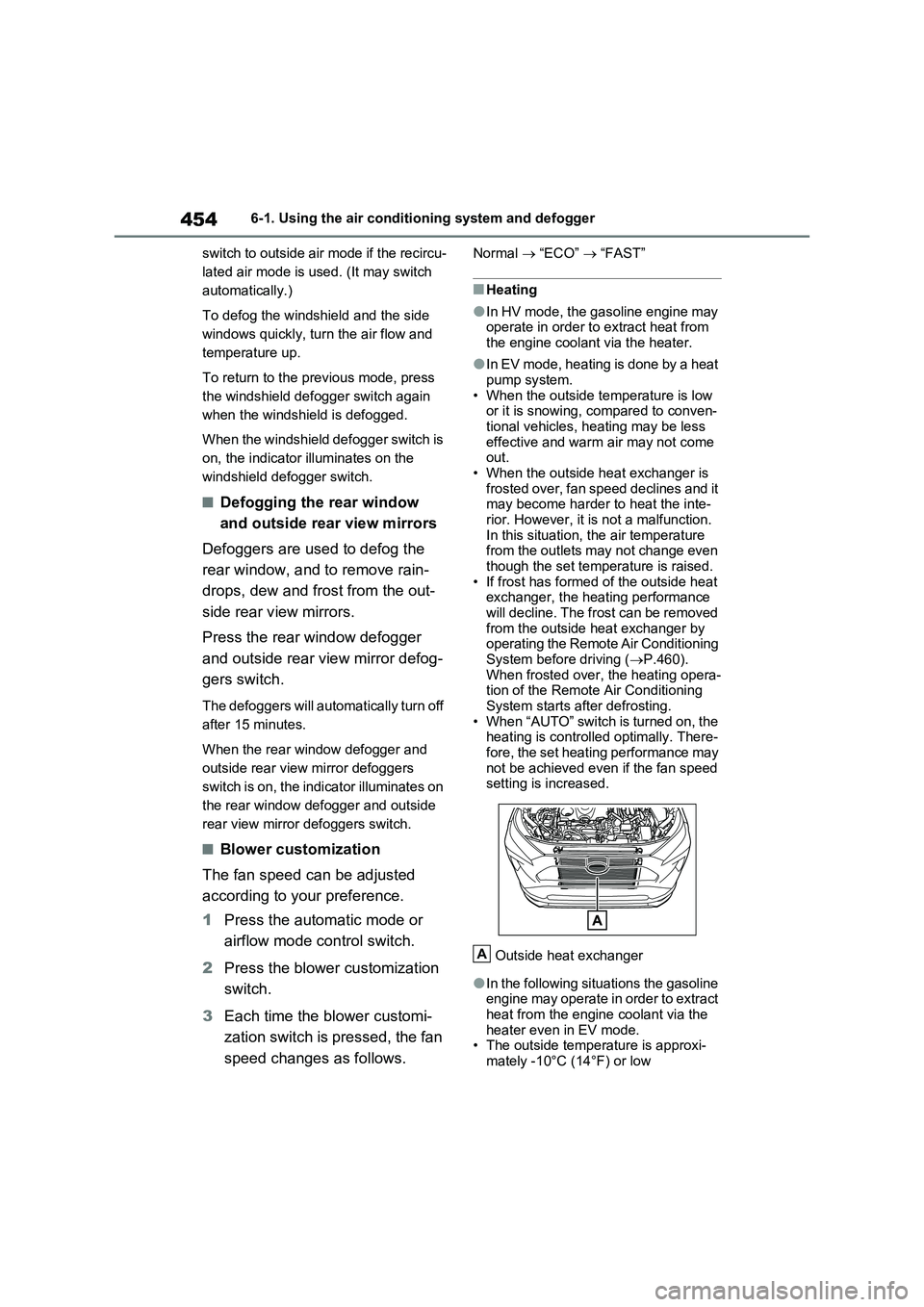
Outside heat exchanger
●In the following situations the gasoline
engine may operate in order to extract
heat from the engine coolant via the
heater even in EV mode.
• The outside temperature is approxi-
mately -10°C (14°F) or low
A
Page 456 of 664
4566-1. Using the air conditioning system and defogger
●During use, various odors from inside
and outside the vehicle may enter into and accumulate in the air conditioning system. This may then cause odor to
be emitted from the vents.
●To reduce potential odors from occur-
ring: • It is recommended that the air condi-tioning system be set to outside air
mode prior to turning the vehicle off. • The start timing of the blower may be delayed for a short period of time
immediately after the air conditioning system is started in automatic mode.
●When parking, the system automati-cally switches to outside air mode to encourage better air circulation
throughout the vehicle, helping to reduce odors that occur when starting the vehicle.
■Air conditioning filter
P.532
■Noise from air conditioning system
Approximately 90 seconds after the power switch turned to OFF, you may
hear sound coming from air conditioning system. This is the sound of a air condi-tioning system initialize and, it does not
indicate a malfunction.
■Customization
Settings (e.g. A/C Auto switch opera- tion) can be changed.
(Customizable features: P.640)
1Press the “AUTO” switch.
The dehumidification function begins to
operate. Air outlets and fan speed are automatically adjusted according to the temperature setting and humidity.
2 Adjust the temperature setting.
3 To stop the operation, press the
“OFF” switch.
If the fan speed setting or air flow
modes are operated, the automatic
mode indicator goes off. However,
automatic mode for functions other
than that operated is maintained.
■Using automatic mode
Fan speed is adjusted automatically
according to the temperature setting and the ambient conditions.
WARNING
■Cautions for using “My Room Mode”
Do not leave children, people who need assistance, or pets inside the vehicle. The system may turn off
automatically and the interior tem- perature may become high or low, resulting in heat stroke, dehydration
or hypothermia. Failure to do so may result in death or serious injury.
■To prevent the windshield from fogging up
Do not use the windshield defogger
switch during cool air operation in extremely humid weather.The difference between the tempera-
ture of the outside air and that of the windshield can cause the outer sur-face of the windshield to fog up,
blocking your vision.
■When the outside rear view mir-
ror defoggers are operating
Do not touch the rear view mirror sur- faces when the outside rear view mir-
ror defoggers are on.
NOTICE
■To prevent 12-volt battery dis- charge
Do not leave the air conditioning sys- tem on longer than necessary when the hybrid system is off.
Using automatic mode
Page 476 of 664
4766-4. Using the other interior features
6-4.Using the o ther interio r fea tures
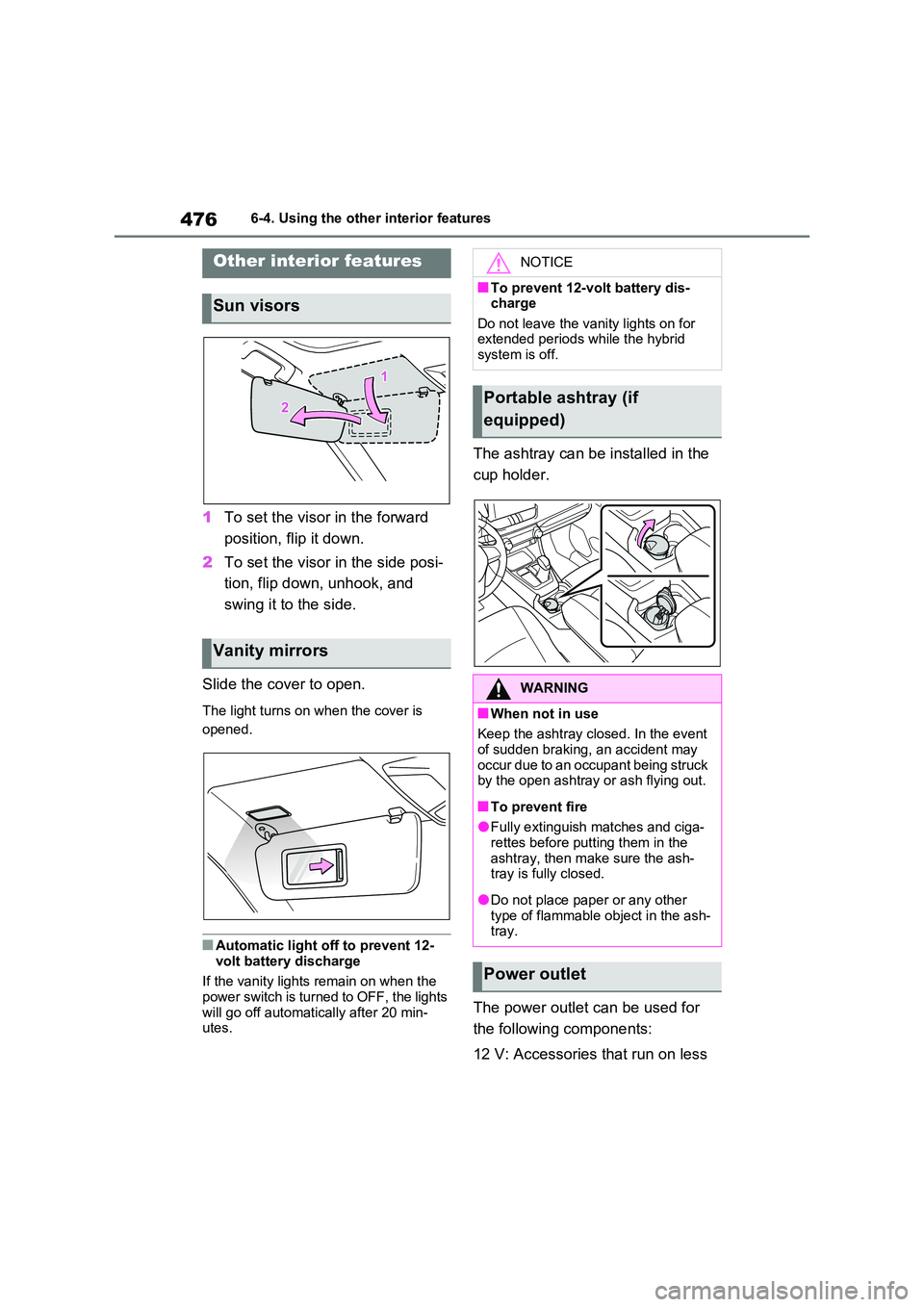
1To set the visor in the forward
position, flip it down.
2 To set the visor in the side posi-
tion, flip down, unhook, and
swing it to the side.
Slide the cover to open.
The light turns on when the cover is
opened.
■Automatic light off to prevent 12-
volt battery discharge
If the vanity lights remain on when the power switch is turned to OFF, the lights
will go off automatically after 20 min- utes.
The ashtray can be installed in the
cup holder.
The power outlet can be used for
the following components:
12 V: Accessories that run on less
Other interior features
Sun visors
Vanity mirrors
NOTICE
■To prevent 12-volt battery dis- charge
Do not leave the vanity lights on for extended periods while the hybrid system is off.
Portable ashtray (if
equipped)
WARNING
■When not in use
Keep the ashtray closed. In the event of sudden braking, an accident may
occur due to an occupant being struck by the open ashtray or ash flying out.
■To prevent fire
●Fully extinguish matches and ciga-rettes before putting them in the
ashtray, then make sure the ash- tray is fully closed.
●Do not place paper or any other type of flammable object in the ash-tray.
Power outlet
Page 488 of 664
4887-1. Maintenance and care
7-1.Mainte nance a nd care
Working from top to bottom, lib-
erally apply water to the vehicle
body, wheel wells and underside
of the vehicle to remove any dirt
and dust.
Wash the vehicle body using a
sponge or soft cloth, such as a
chamois.
For hard-to-remove marks, use
car wash soap and rinse thor-
oughly with water.
Wipe away any water.
Wax the vehicle when the water-
proof coating deteriorates.
If water does not bead on a clean sur-
face, apply wax when the vehicle body
is cool.
■Before car washes
Check that the fuel filler door and
charging port lid on your vehicle are
closed properly.
■Automatic car washes
●Before washing the vehicle:
• Fold the mirrors
• Turn off the power back door (if
equipped)
Start washing from the front of the vehi-
cle. Make sure to extend the mirrors
before driving.
●Brushes used in automatic car
washes may scratch the vehicle sur-
face, parts (wheel, etc.) and harm
your vehicle’s paint.
●Rear spoiler may not be washable in
some automatic car washes. There
may also be an increased risk of dam-
age to vehicle.
■High pressure car washes
As water may enter the cabin, do not
bring the nozzle tip near the gaps
around the doors or perimeter of the
windows, or spray these areas continu-
ously.
■Note for a smart entry & start sys-
tem
If the door handle becomes wet while
the electronic key is within the effective
range, the door may lock and unlock
repeatedly. In that case, follow the fol-
lowing correction procedures to wash
the vehicle:
●Place the key in a position 2 m (6 ft.)
or more separate from the vehicle
while the vehicle is being washed.
(Take care to ensure that the key is
not stolen.)
●Set the electronic key to battery-sav-
ing mode to disable the smart entry &
start system. (P.224)
■Wheels and wheel ornaments
●Remove any dirt immediately by using
a neutral detergent.
●Wash detergent off with water imme-
diately after use.
●To protect the paint from damage,
make sure to observe the following
precautions.
• Do not use acidic, alkaline or abrasive
detergent.
• Do not use hard brushes.
• Do not use detergent on the wheels
when they are hot, such as after driv-
ing or parking in hot weather.
Cleaning and protecting
the vehicle exterior
Perform the following to pro-
tect the vehicle and maintain it
in prime condition:
Cleaning instructions
Page 553 of 664
553
7 7-3. Do-it-yourself maintenance
Maintenance and care
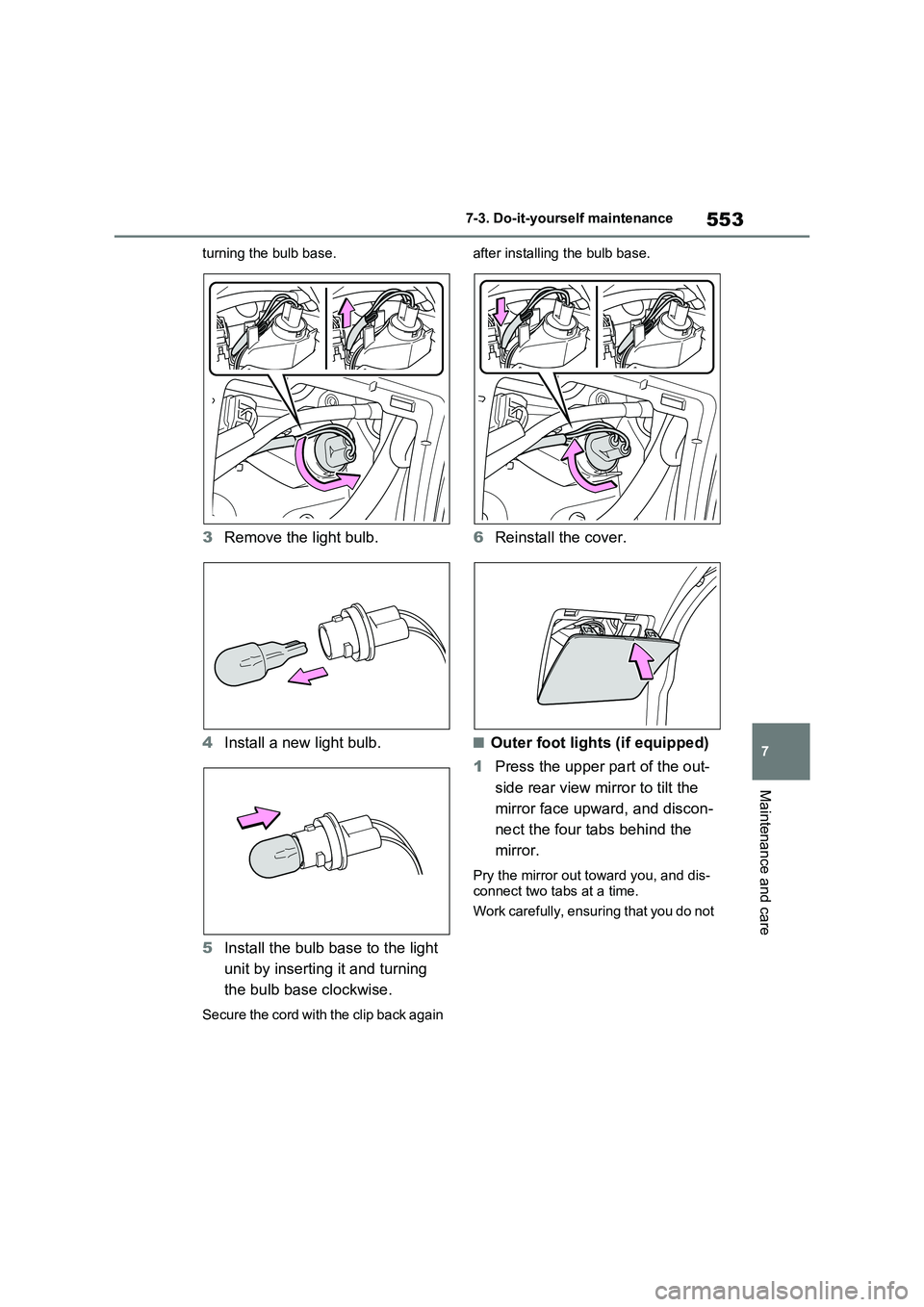
turning the bulb base.
3Remove the light bulb.
4Install a new light bulb.
5Install the bulb base to the light
unit by inserting it and turning
the bulb base clockwise.
Secure the cord with the clip back again after installing the bulb base.
6Reinstall the cover.
■Outer foot lights (if equipped)
1Press the upper part of the out-
side rear view mirror to tilt the
mirror face upward, and discon-
nect the four tabs behind the
mirror.
Pry the mirror out toward you, and dis-
connect two tabs at a time.
Work carefully, ensuring that you do not