tire pressure reset TOYOTA VERSO S 2011 Owners Manual
[x] Cancel search | Manufacturer: TOYOTA, Model Year: 2011, Model line: VERSO S, Model: TOYOTA VERSO S 2011Pages: 664, PDF Size: 160.56 MB
Page 185 of 664
185
3 3-1. Instrument cluster
Vehicle status information and indicators
■Drive information
2 items that are selected using the
“Drive Info Items” setting (average
speed, distance and total time) can
be displayed vertically.
The displayed information changes
according to the “Drive Info Type”
setting (since the system was
started or between resets).
(P.186)
Use the displayed information as a ref-
erence only.
Following items will be displayed.
“Trip”
• “Average Speed”: Displays the aver-
age vehicle speed since hybrid sys-
tem start
*
• “Distance”: Displays the distance
driven since hybrid system start*
• “Total Time”: Displays the elapsed
time since hybrid system start*
*
: These items are reset each time the
hybrid system stops.
“Total”
• “Average Speed”: Displays the aver-
age vehicle speed since the display
was reset
*
• “Distance”: Displays the distance
driven since the display was reset*
• “Total Time”: Displays the elapsed
time since the display was reset*
*
: To reset, display the desired item and
press and hold .
■Energy monitor
P.195
■Tire pressure
P.511
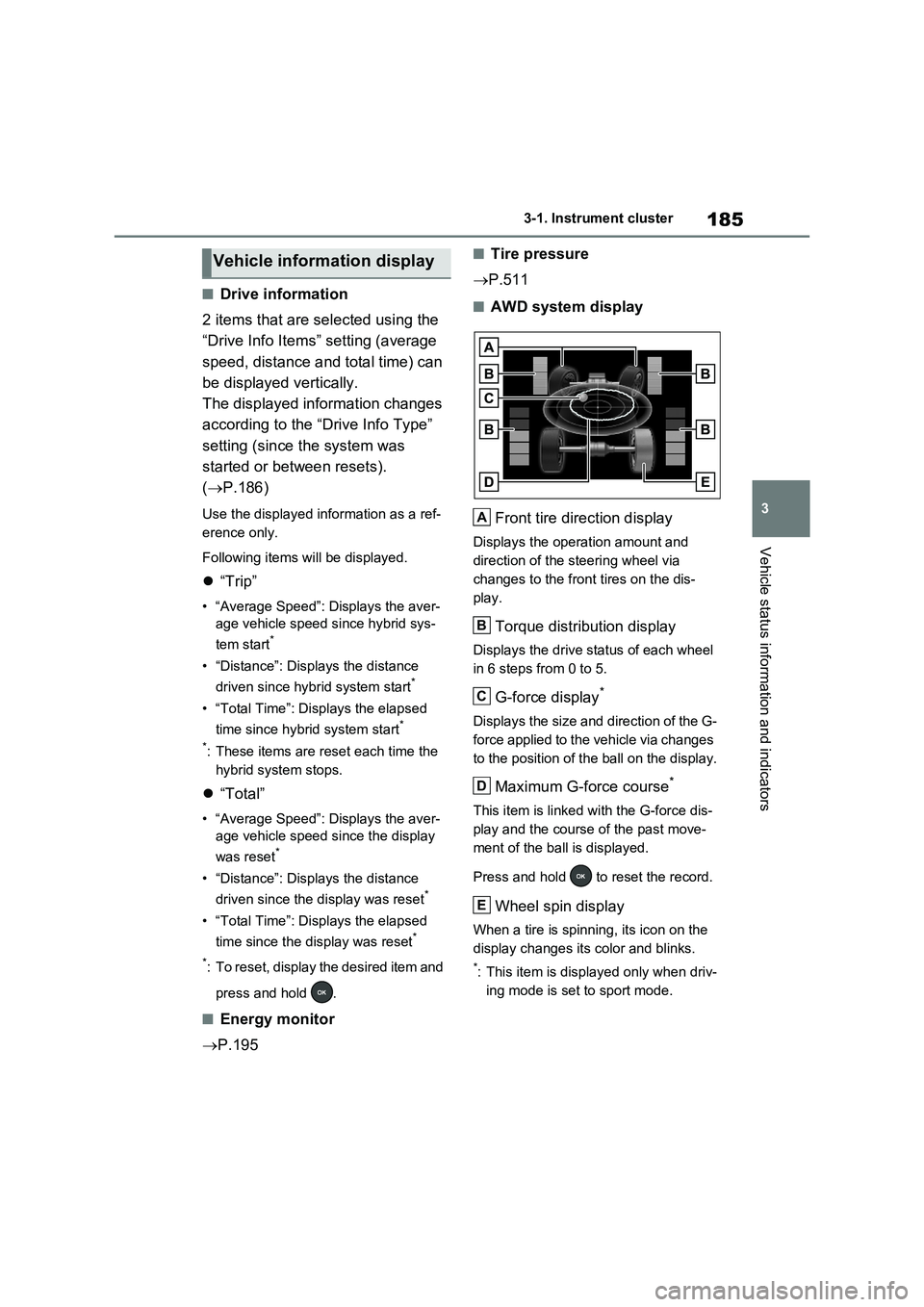
■AWD system display
Front tire direction display
Displays the operation amount and
direction of the steering wheel via
changes to the front tires on the dis-
play.
Torque distribution display
Displays the drive status of each wheel
in 6 steps from 0 to 5.
G-force display*
Displays the size and direction of the G-
force applied to the vehicle via changes
to the position of the ball on the display.
Maximum G-force course*
This item is linked with the G-force dis-
play and the course of the past move-
ment of the ball is displayed.
Press and hold to reset the record.
Wheel spin display
When a tire is spinning, its icon on the
display changes its color and blinks.
*: This item is displayed only when driv-
ing mode is set to sport mode.
Vehicle information display
A
B
C
D
E
Page 525 of 664
525
7
7-3. Do-it-yourself maintenance
Maintenance and care
●If you accidentally perform initializa-
tion when initialization is not neces- sary, adjust the tire inflation pressure to the specified level when the tires
are cold, and conduct initialization again.
●While the position of each tire is being determined and the inflation pres-sures are not being displayed on the
multi-information display, if the infla- tion pressure of a tire drops, the tire pressure warning light will come on.
■If the tire pressure warning system
is not initialized properly
●In the following situations, initialization
may take longer than usual to be com- pleted or may not be possible. Nor-mally, initialization completes within
approximately 30 minutes. • Vehicle is not driven at approximately 40 km/h (25 mph) or more
• Vehicle is driven on unpaved roads • Vehicle is driven near other vehicles and system cannot recognize tire
pressure warning valve and transmit- ters of your vehicle over those of other vehicles.
• If the vehicle is driven in heavy traffic or another situation where other vehi-cles are driven close by, it may take
time for the system to recognize the tire pressure warning valve and trans-mitters of your vehicle over those of
other vehicles.
●If initialization does not complete after
driving for 1 hour or more, park the vehicle in a safe place for approxi-mately 20 minutes and then drive the
vehicle again.
●If the vehicle is reversed during initial-
ization, the data up to that point is reset, so perform the initialization pro-cedure again from the beginning.
●In the following situations, initialization will not be started or was not com-
pleted properly and the system will not operate properly. Perform the initial-ization procedure again.
• If, when attempting to start initializa- tion, the tire pressure warning light
does not blink 3 times.
• If, when the vehicle has been driven for about 20 minutes after performing initialization, the tire pressure warning
light blinks for approximately 1 minute and then illuminates.
If initialization cannot be completed after
performing the above procedure, con-
tact any authorized Toyota retailer or
Toyota authorized repairer, or any reli-
able repairer.
Every tire pressure warning valve
and transmitter has a unique ID
code. When replacing a tire pres-
sure warning valve and transmitter,
it is necessary to register the ID
code.
When registering the ID codes, per-
form the following procedure.
1 Park the vehicle in a safe place,
wait for approximately 20 min-
utes, and then start the hybrid
system.
WARNING
■When initializing the tire pres-
sure warning system
Do not initialize tire inflation pressure without first adjusting the tire inflation
pressure to the specified level. Other- wise, the tire pressure warning light may not come on even if the tire infla-
tion pressure is low, or it may come on when the tire inflation pressure is actually normal.
Registering ID codes
Page 527 of 664
527
7 7-3. Do-it-yourself maintenance
Maintenance and care
●ID codes can be registered by your-
self, but depending on the driving con-
ditions and driving environment,
registration may take some time to
complete.
●As the tires will be warm when regis-
tration is completed, make sure to
allow the tires to cool before perform-
ing initialization.
■Canceling ID code registration
●To cancel ID code registration after it
has been started, select “Identifying
Each Wheel & Position” on the multi-
information display and press and
hold again.
●If ID code registration has been can-
celed, the tire pressure warning light
will blink for approximately 1 minute
when the power switch is turned to
ON and then illuminate. The tire pres-
sure warning system will be opera-
tional when the tire pressure warning
light turns off.
●If the warning light does not turn off
even after several minutes have
elapsed, ID code registration may not
have been canceled correctly. To can-
cel registration, perform the ID code
registration start procedure again and
then turn the power switch off before
driving.
■If ID codes are not registered prop-
erly
●In the following situations, ID code
registration may take longer than
usual to be completed or may not be
possible. Normally, registration com-
pletes within approximately 30 min-
utes.
If ID code registration is not complete
after driving for approximately 30 min-
utes, continue driving for a while.
• Vehicle is not parked for approxi-
mately 20 minutes or more before
driving
• Vehicle is not driven at approximately
40 km/h (25 mph) or more
• Vehicle is driven on unpaved roads
• Vehicle is driven near other vehicles and system cannot recognize tire
pressure warning valve and transmit-
ters of your vehicle over those of other
vehicles
• Wheel with tire pressure warning
valve and transmitter installed is
inside or near the vehicle
If registration does not complete after
driving for 1 hour or more, perform the
ID code registration procedure again
from the beginning.
●If the vehicle is reversed during regis-
tration, the data up to that point is
reset, so perform the registration pro-
cedure again from the beginning.
●In the following situations, ID code
registration will not be started or was
not completed properly and the sys-
tem will not operate properly. Perform
the ID code registration procedure
again.
• If, when attempting to start ID code
registration, the tire pressure warning
light does not blink slowly 3 times.
• If, when the vehicle has been driven
for about 10 minutes after performing
ID code registration, the tire pressure
warning light blinks for approximately
1 minute and then illuminates.
●If ID code registration cannot be com-
pleted after performing the above pro-
cedure, contact any authorized
Toyota retailer or Toyota authorized
repairer, or any reliable repairer.
Your vehicle is equipped with tire
pressure warning system with the
function to have ID codes regis-
tered for a second wheel set, for
example a winter set. You can reg-
ister a second wheel set by your-
self, any authorized Toyota retailer
or Toyota authorized repairer, or
any reliable repairer.
Selecting wheel set