tire size TOYOTA VERSO S 2011 Owners Manual
[x] Cancel search | Manufacturer: TOYOTA, Model Year: 2011, Model line: VERSO S, Model: TOYOTA VERSO S 2011Pages: 664, PDF Size: 160.56 MB
Page 13 of 664
13Pictorial index
Precautions against winter season ................................................. P.445
To prevent freezing (windshield wiper de-icer)
*1............................. P.457
Precautions against car wash ......................................................... P.489
Replacing the wiper insert............................................................... P.539
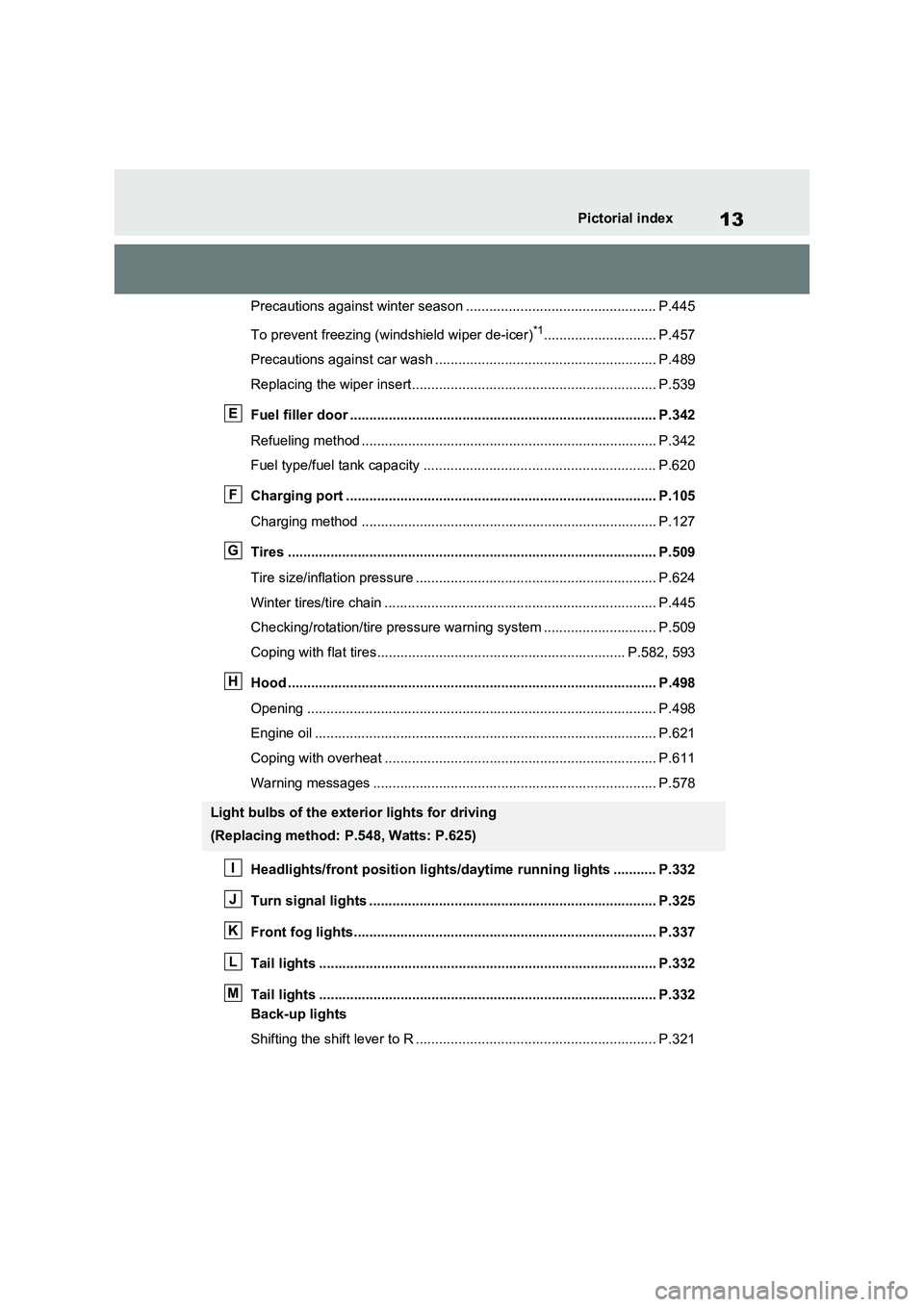
Fuel filler door ............................................................................... P.342
Refueling method ............................................................................ P.342
Fuel type/fuel tank capacity ............................................................ P.620
Charging port ................................................................................ P.105
Charging method ............................................................................ P.127
Tires ............................................................................................... P.509
Tire size/inflation pressure .............................................................. P.624
Winter tires/tire chain ...................................................................... P.445
Checking/rotation/tire pressure warning system ............................. P.509
Coping with flat tires................................................................ P.582, 593
Hood ............................................................................................... P.498
Opening .......................................................................................... P.498
Engine oil ........................................................................................ P.621
Coping with overheat ...................................................................... P.611
Warning messages ......................................................................... P.578
Headlights/front position lights/daytime running lights ........... P.332
Turn signal lights .......................................................................... P.325
Front fog lights.............................................................................. P.337
Tail lights ....................................................................................... P.332
Tail lights ....................................................................................... P.332
Back-up lights
Shifting the shift lever to R .............................................................. P.321
Light bulbs of the exterior lights for driving
(Replacing method: P.548, Watts: P.625)
E
F
G
H
I
J
K
L
M
Page 185 of 664
185
3 3-1. Instrument cluster
Vehicle status information and indicators
■Drive information
2 items that are selected using the
“Drive Info Items” setting (average
speed, distance and total time) can
be displayed vertically.
The displayed information changes
according to the “Drive Info Type”
setting (since the system was
started or between resets).
(P.186)
Use the displayed information as a ref-
erence only.
Following items will be displayed.
“Trip”
• “Average Speed”: Displays the aver-
age vehicle speed since hybrid sys-
tem start
*
• “Distance”: Displays the distance
driven since hybrid system start*
• “Total Time”: Displays the elapsed
time since hybrid system start*
*
: These items are reset each time the
hybrid system stops.
“Total”
• “Average Speed”: Displays the aver-
age vehicle speed since the display
was reset
*
• “Distance”: Displays the distance
driven since the display was reset*
• “Total Time”: Displays the elapsed
time since the display was reset*
*
: To reset, display the desired item and
press and hold .
■Energy monitor
P.195
■Tire pressure
P.511
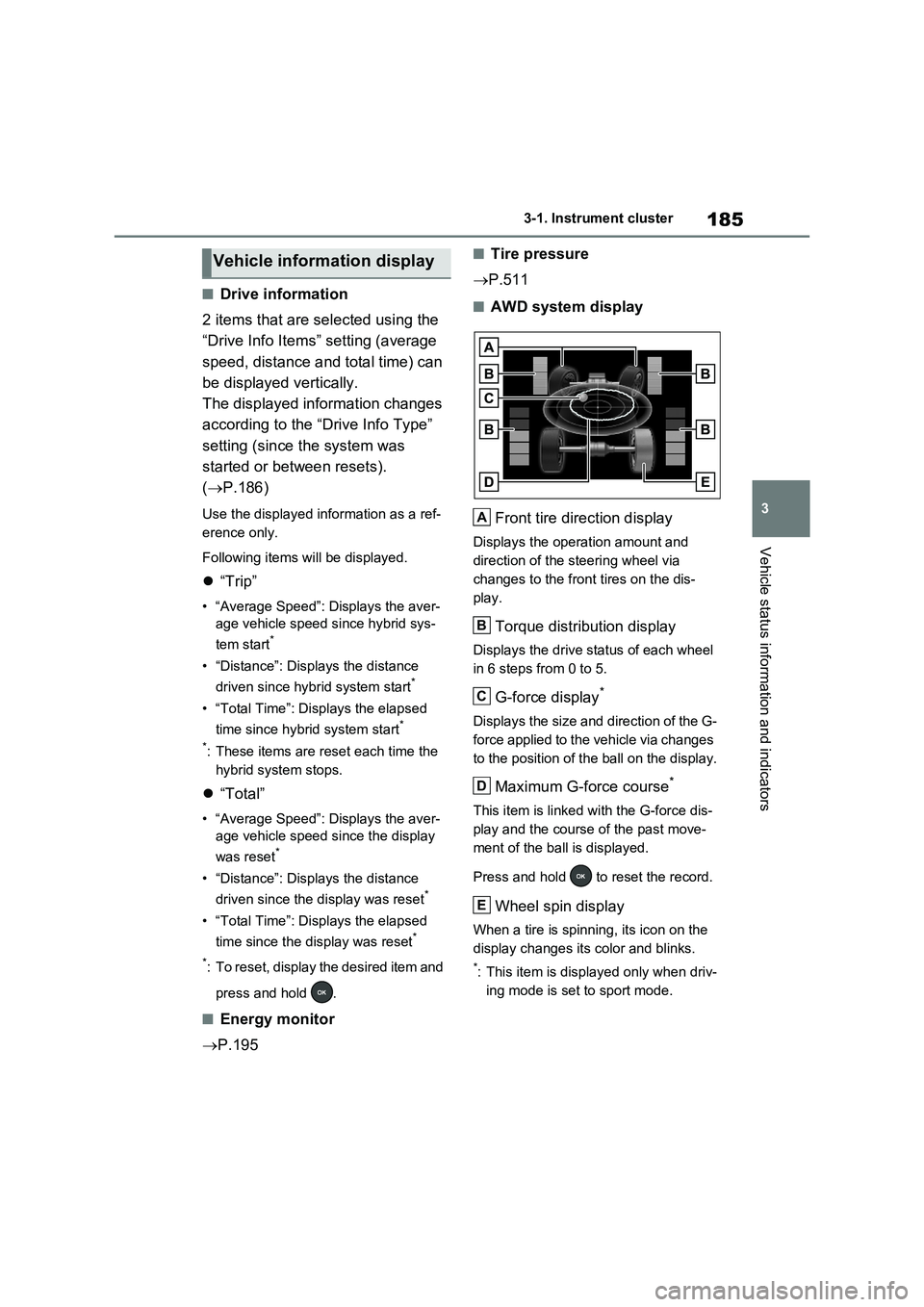
■AWD system display
Front tire direction display
Displays the operation amount and
direction of the steering wheel via
changes to the front tires on the dis-
play.
Torque distribution display
Displays the drive status of each wheel
in 6 steps from 0 to 5.
G-force display*
Displays the size and direction of the G-
force applied to the vehicle via changes
to the position of the ball on the display.
Maximum G-force course*
This item is linked with the G-force dis-
play and the course of the past move-
ment of the ball is displayed.
Press and hold to reset the record.
Wheel spin display
When a tire is spinning, its icon on the
display changes its color and blinks.
*: This item is displayed only when driv-
ing mode is set to sport mode.
Vehicle information display
A
B
C
D
E
Page 283 of 664
283
4
4-4. Adjusting the steering wheel and mirrors
Before driving
ror mode and the optical mirror
mode.
When using the digital mirror
mode
P.282
When using the optical mirror
mode
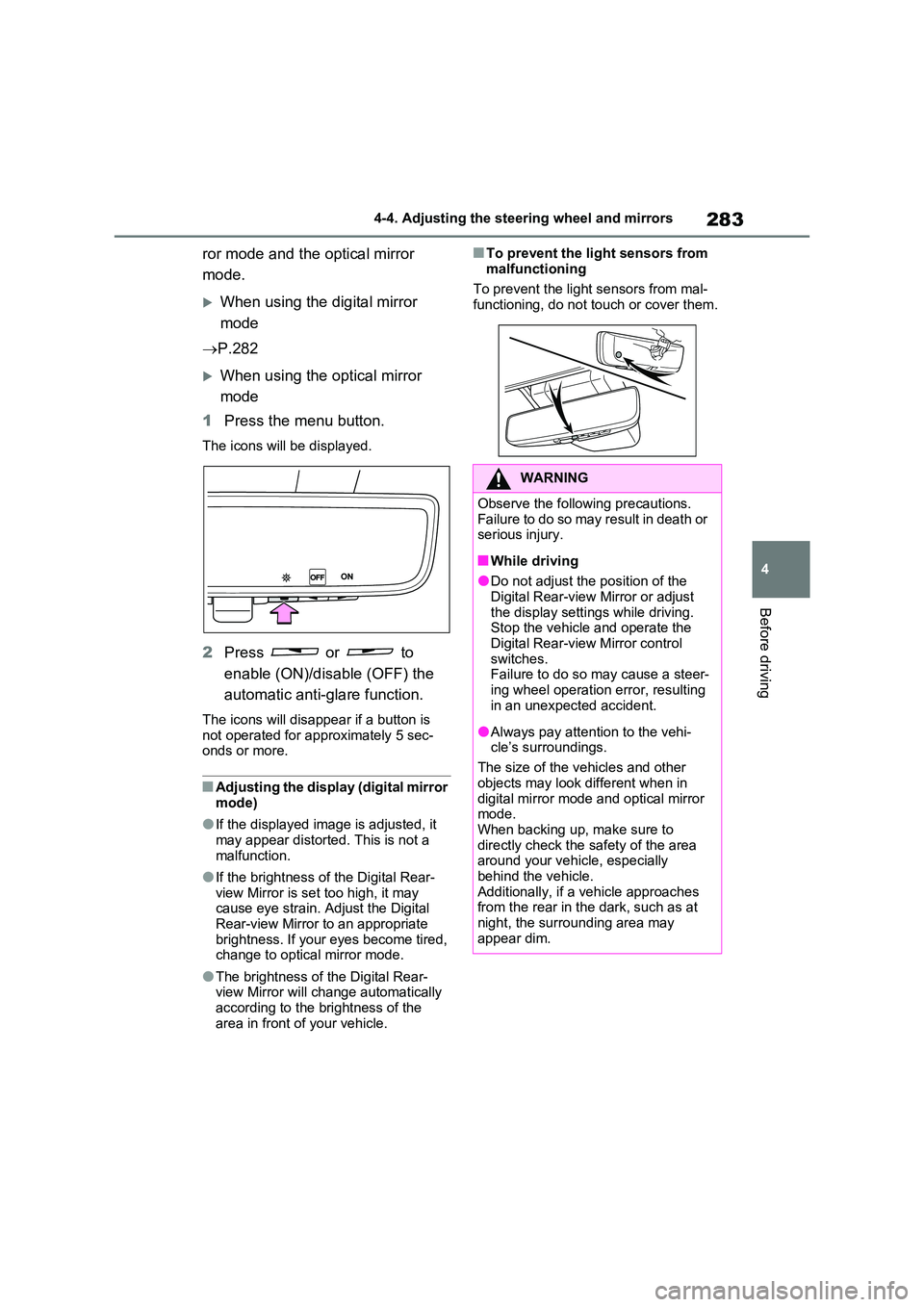
1 Press the menu button.
The icons will be displayed.
2Press or to
enable (ON)/disable (OFF) the
automatic anti-glare function.
The icons will disappear if a button is not operated for approximately 5 sec-onds or more.
■Adjusting the display (digital mirror mode)
●If the displayed image is adjusted, it may appear distorted. This is not a
malfunction.
●If the brightness of the Digital Rear-
view Mirror is set too high, it may cause eye strain. Adjust the Digital Rear-view Mirror to an appropriate
brightness. If your eyes become tired, change to optical mirror mode.
●The brightness of the Digital Rear-view Mirror will change automatically according to the brightness of the
area in front of your vehicle.
■To prevent the light sensors from
malfunctioning
To prevent the light sensors from mal- functioning, do not touch or cover them.
WARNING
Observe the following precautions.Failure to do so may result in death or serious injury.
■While driving
●Do not adjust the position of the
Digital Rear-view Mirror or adjust the display settings while driving.Stop the vehicle and operate the
Digital Rear-view Mirror control switches. Failure to do so may cause a steer-
ing wheel operation error, resulting in an unexpected accident.
●Always pay attention to the vehi-cle’s surroundings.
The size of the vehicles and other
objects may look different when in digital mirror mode and optical mirror mode.
When backing up, make sure to directly check the safety of the area around your vehicle, especially
behind the vehicle. Additionally, if a vehicle approaches from the rear in the dark, such as at
night, the surrounding area may appear dim.
Page 357 of 664
357
5
5-5. Using the driving support systems
Driving
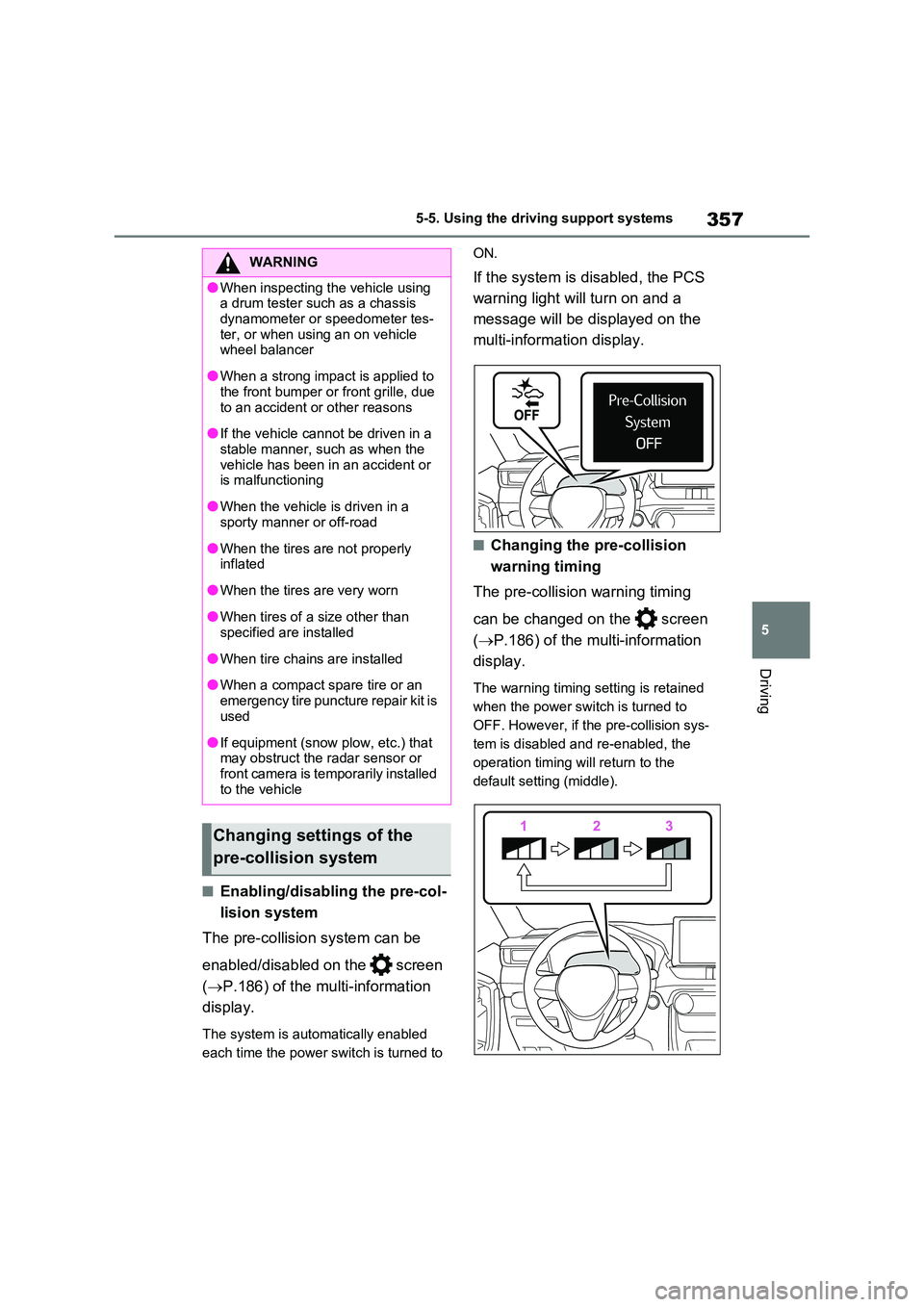
■Enabling/disabling the pre-col-
lision system
The pre-collision system can be
enabled/disabled on the screen
( P.186) of the multi-information
display.
The system is automatically enabled
each time the power switch is turned to
ON.
If the system is disabled, the PCS
warning light will turn on and a
message will be displayed on the
multi-information display.
■Changing the pre-collision
warning timing
The pre-collision warning timing
can be changed on the screen
( P.186) of the multi-information
display.
The warning timing setting is retained
when the power switch is turned to
OFF. However, if the pre-collision sys-
tem is disabled and re-enabled, the
operation timing will return to the
default setting (middle).
WARNING
●When inspecting the vehicle using a drum tester such as a chassis
dynamometer or speedometer tes- ter, or when using an on vehicle wheel balancer
●When a strong impact is applied to the front bumper or front grille, due
to an accident or other reasons
●If the vehicle cannot be driven in a
stable manner, such as when the vehicle has been in an accident or is malfunctioning
●When the vehicle is driven in a sporty manner or off-road
●When the tires are not properly inflated
●When the tires are very worn
●When tires of a size other than specified are installed
●When tire chains are installed
●When a compact spare tire or an
emergency tire puncture repair kit is used
●If equipment (snow plow, etc.) that may obstruct the radar sensor or front camera is temporarily installed
to the vehicle
Changing settings of the
pre-collision system
Page 361 of 664
361
5 5-5. Using the driving support systems
Driving
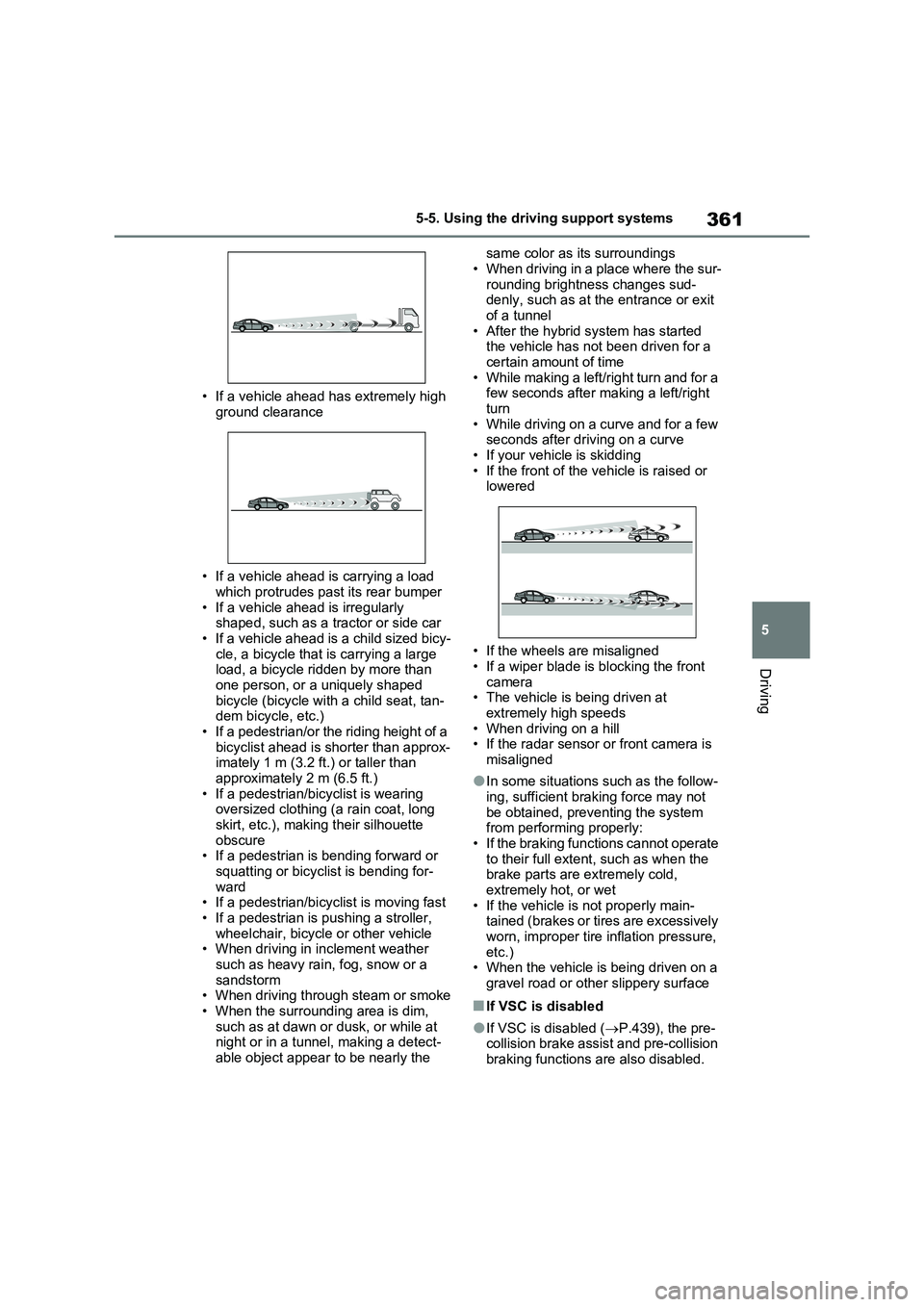
• If a vehicle ahead has extremely high
ground clearance
• If a vehicle ahead is carrying a load
which protrudes past its rear bumper
• If a vehicle ahead is irregularly
shaped, such as a tractor or side car
• If a vehicle ahead is a child sized bicy-
cle, a bicycle that is carrying a large
load, a bicycle ridden by more than
one person, or a uniquely shaped
bicycle (bicycle with a child seat, tan-
dem bicycle, etc.)
• If a pedestrian/or the riding height of a
bicyclist ahead is shorter than approx-
imately 1 m (3.2 ft.) or taller than
approximately 2 m (6.5 ft.)
• If a pedestrian/bicyclist is wearing
oversized clothing (a rain coat, long
skirt, etc.), making their silhouette
obscure
• If a pedestrian is bending forward or
squatting or bicyclist is bending for-
ward
• If a pedestrian/bicyclist is moving fast
• If a pedestrian is pushing a stroller,
wheelchair, bicycle or other vehicle
• When driving in inclement weather
such as heavy rain, fog, snow or a
sandstorm
• When driving through steam or smoke
• When the surrounding area is dim,
such as at dawn or dusk, or while at
night or in a tunnel, making a detect-
able object appear to be nearly the same color as its surroundings
• When driving in a place where the sur-
rounding brightness changes sud-
denly, such as at the entrance or exit
of a tunnel
• After the hybrid system has started
the vehicle has not been driven for a
certain amount of time
• While making a left/right turn and for a
few seconds after making a left/right
turn
• While driving on a curve and for a few
seconds after driving on a curve
• If your vehicle is skidding
• If the front of the vehicle is raised or
lowered
• If the wheels are misaligned
• If a wiper blade is blocking the front
camera
• The vehicle is being driven at
extremely high speeds
• When driving on a hill
• If the radar sensor or front camera is
misaligned
●In some situations such as the follow-
ing, sufficient braking force may not
be obtained, preventing the system
from performing properly:
• If the braking functions cannot operate
to their full extent, such as when the
brake parts are extremely cold,
extremely hot, or wet
• If the vehicle is not properly main-
tained (brakes or tires are excessively
worn, improper tire inflation pressure,
etc.)
• When the vehicle is being driven on a
gravel road or other slippery surface
■If VSC is disabled
●If VSC is disabled (P.439), the pre-
collision brake assist and pre-collision
braking functions are also disabled.
Page 363 of 664
363
5
5-5. Using the driving support systems
Driving
WARNING
■Before using LTA system
●Do not rely solely upon the LTA
system. The LTA system does not automatically drive the vehicle or reduce the amount of attention that
must be paid to the area in front of the vehicle. The driver must always assume full responsibility for driving
safely by paying careful attention to the surrounding conditions and operating the steering wheel to cor-
rect the path of the vehicle. Also, the driver must take adequate breaks when fatigued, such as from
driving for a long period of time.
●Failure to perform appropriate driv-
ing operations and pay careful attention may lead to an accident, resulting in death or serious injury.
●When not using the LTA system, use the LTA switch to turn the sys-
tem off.
■Situations unsuitable for LTA
system
In the following situations, use the LTA switch to turn the system off.
Failure to do so may lead to an acci- dent, resulting in death or serious injury.
●Vehicle is driven on a road surface which is slippery due to rainy
weather, fallen snow, freezing, etc.
●Vehicle is driven on a snow-cov-
ered road.
●White (yellow) lines are difficult to
see due to rain, snow, fog, dust, etc.
●Vehicle is driven in a temporary lane or restricted lane due to con-struction work.
●Vehicle is driven in a construction zone.
●A spare tire, tire chains, etc. are equipped.
●When the tires have been exces-sively worn, or when the tire infla-tion pressure is low.
●When tires of a size other than specified are installed.
●Vehicle is driven in traffic lanes other than that highways and free-
ways.
●When your vehicle is towing a
trailer or during emergency towing
■Preventing LTA system malfunc-
tions and operations performed by mistake
●Do not modify the headlights or
place stickers, etc. on the surface of the lights.
●Do not modify the suspension etc. If the suspension etc. needs to be replaced, contact any authorized
Toyota retailer or Toyota authorized repairer, or any reliable repairer.
●Do not install or place anything on the hood or grille. Also, do not install a grille guard (bull bars, kan-
garoo bar, etc.).
●If your windshield needs repairs,
contact any authorized Toyota retailer or Toyota authorized repairer, or any reliable repairer.
■Conditions in which functions may not operate properly
In the following situations, the func- tions may not operate properly and the vehicle may depart from its lane.
Drive safely by always paying careful attention to your surroundings and operate the steering wheel to correct
the path of the vehicle without relying solely on the functions.
Page 426 of 664
4265-5. Using the driving support systems
■The Parking Support Brake func- tion (static object) will operate
when
The function will operate when the PKSB OFF indicator is not illuminated
( P.170, 171) and all of the following conditions are met:
●Hybrid system output restriction con-trol
• The Parking Support Brake is enabled.• The vehicle speed is approximately 15
km/h (9 mph) or less. • There is a static object in the traveling direction of the vehicle and approxi-
mately 2 to 4 m (6 to 13 ft.) away. • The Parking Support Brake deter-mines that a stronger-than-normal
brake operation is necessary to avoid a collision.
●Brake control• Hybrid system output restriction con-
WARNING
●If the area around a radar sensor is subjected to an impact, the system
may not operate properly due to a sensor malfunction. Have the vehi-cle inspected by any authorized
Toyota retailer or Toyota authorized repairer, or any reliable repairer.
■Handling the suspension
Do not modify the suspension, as changes to the height or inclination of
the vehicle may prevent the sensors from detecting objects correctly or cause the system to not operate or
operate unnecessarily.
■If the Parking Support Brake
function (static objects) operates unnecessarily, such as at a rail-road crossing
In the event that the Parking Support Brake function (static objects) oper-ates unnecessarily, such as at a rail-
road crossing, brake control will be canceled after approximately 2 sec-onds, allowing you to proceed forward
and leave the area, brake control can also be canceled by depressing the brake pedal. Depressing the acceler-
ator pedal after brake control is can- celed will allow you to proceed forward and leave the area.
■Notes when washing the vehicle
Do not apply intensive bursts of water
or steam to the sensor area.
Doing so may result in the sensor malfunctioning.
●When using a high pressure washer to wash the vehicle, do not
spray the sensors directly, as doing so may cause a sensor to malfunc-tion.
●When using steam to clean the vehicle, do not direct steam too
close to the sensors as doing so may cause a sensor to malfunction.
■When to disable the Parking Sup-port Brake
In the following situations, disable the
Parking Support Brake as the system may operate even though there is no possibility of a collision.
●When inspecting the vehicle using a chassis roller, chassis dynamo or
free roller
●When loading the vehicle onto a
boat, truck or other transport vessel
●If the suspension has been modi-
fied or tires of a size other than specified are installed
●If the front of the vehicle is raised or lowered due to the carried load
●When equipment that may obstruct a sensor is installed, such as a tow-ing eyelet, bumper protector (an
additional trim strip, etc.), bicycle carrier, or snow plow
●When using an automatic car wash
Page 429 of 664
429
5 5-5. Using the driving support systems
Driving
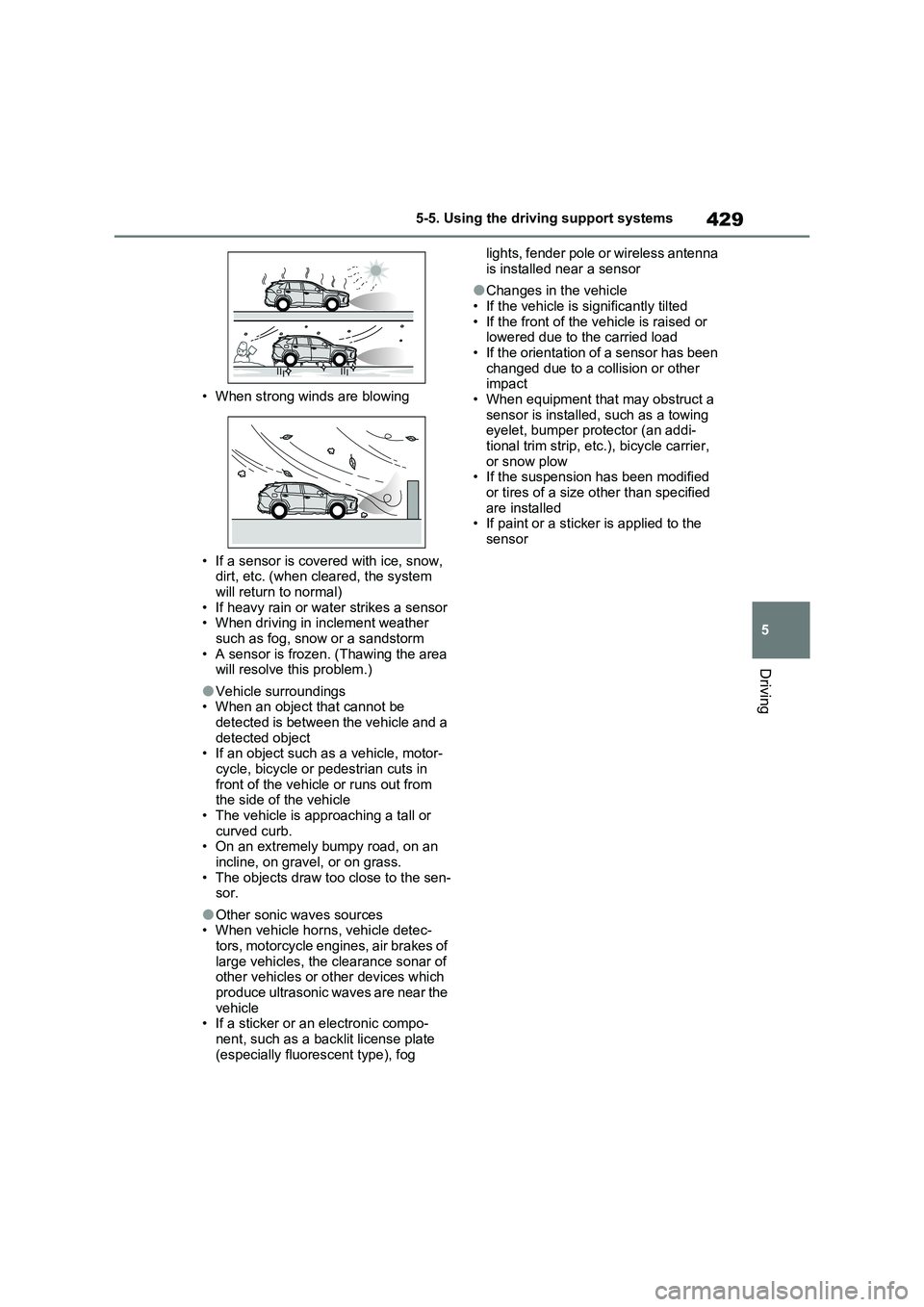
• When strong winds are blowing
• If a sensor is covered with ice, snow,
dirt, etc. (when cleared, the system
will return to normal)
• If heavy rain or water strikes a sensor
• When driving in inclement weather
such as fog, snow or a sandstorm
• A sensor is frozen. (Thawing the area
will resolve this problem.)
●Vehicle surroundings
• When an object that cannot be
detected is between the vehicle and a
detected object
• If an object such as a vehicle, motor-
cycle, bicycle or pedestrian cuts in
front of the vehicle or runs out from
the side of the vehicle
• The vehicle is approaching a tall or
curved curb.
• On an extremely bumpy road, on an
incline, on gravel, or on grass.
• The objects draw too close to the sen-
sor.
●Other sonic waves sources
• When vehicle horns, vehicle detec-
tors, motorcycle engines, air brakes of
large vehicles, the clearance sonar of
other vehicles or other devices which
produce ultrasonic waves are near the
vehicle
• If a sticker or an electronic compo-
nent, such as a backlit license plate
(especially fluorescent type), fog lights, fender pole or wireless antenna
is installed near a sensor
●Changes in the vehicle
• If the vehicle is significantly tilted
• If the front of the vehicle is raised or
lowered due to the carried load
• If the orientation of a sensor has been
changed due to a collision or other
impact
• When equipment that may obstruct a
sensor is installed, such as a towing
eyelet, bumper protector (an addi-
tional trim strip, etc.), bicycle carrier,
or snow plow
• If the suspension has been modified
or tires of a size other than specified
are installed
• If paint or a sticker is applied to the
sensor
Page 432 of 664
4325-5. Using the driving support systems
approximately 24 km/h (15 mph)
*: Depending on the conditions, detec-
tion of a vehicle and/or object may
occur.
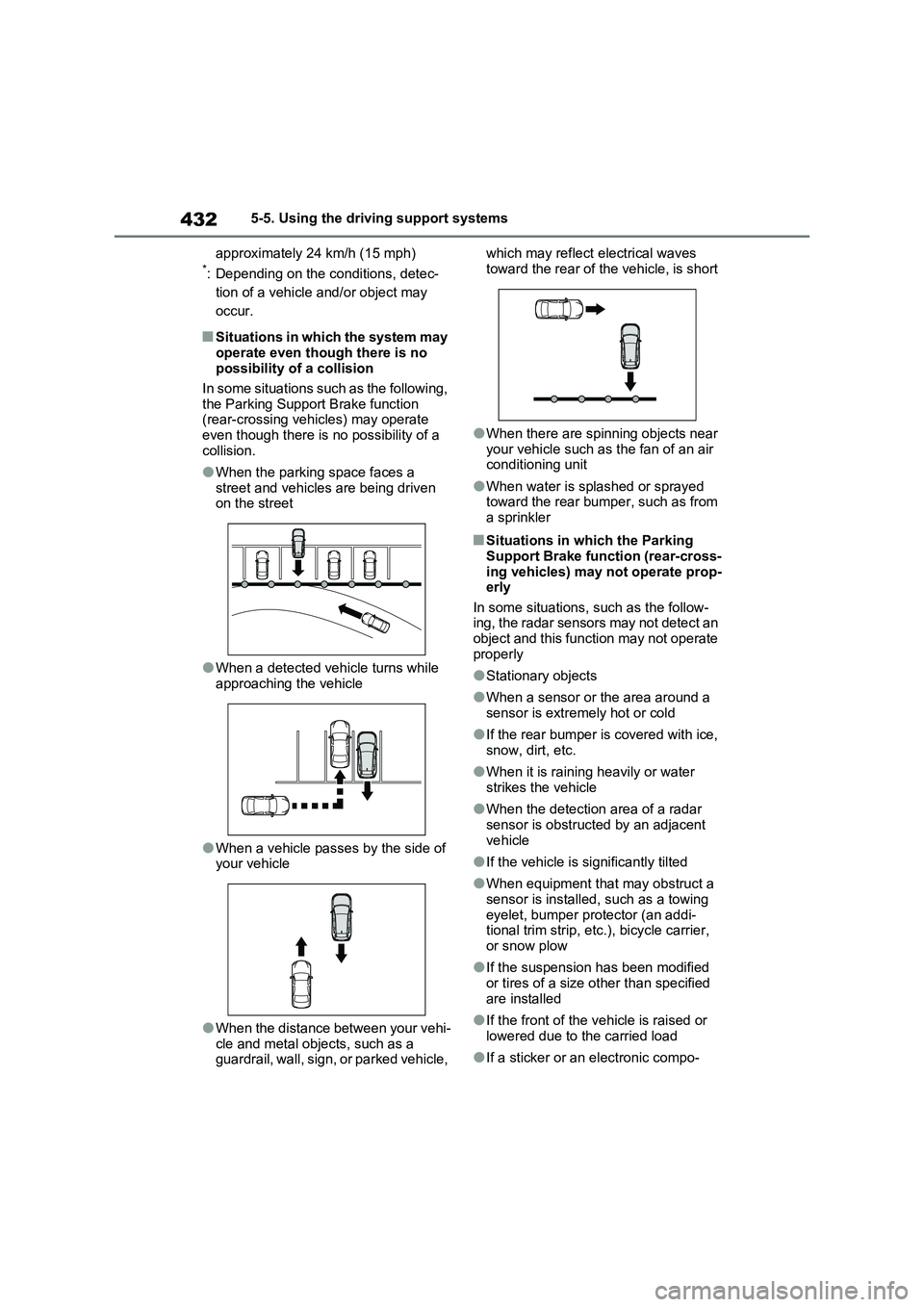
■Situations in which the system may
operate even though there is no
possibility of a collision
In some situations such as the following,
the Parking Support Brake function
(rear-crossing vehicles) may operate
even though there is no possibility of a
collision.
●When the parking space faces a
street and vehicles are being driven
on the street
●When a detected vehicle turns while
approaching the vehicle
●When a vehicle passes by the side of
your vehicle
●When the distance between your vehi-
cle and metal objects, such as a
guardrail, wall, sign, or parked vehicle, which may reflect electrical waves
toward the rear of the vehicle, is short
●When there are spinning objects near
your vehicle such as the fan of an air
conditioning unit
●When water is splashed or sprayed
toward the rear bumper, such as from
a sprinkler
■Situations in which the Parking
Support Brake function (rear-cross-
ing vehicles) may not operate prop-
erly
In some situations, such as the follow-
ing, the radar sensors may not detect an
object and this function may not operate
properly
●Stationary objects
●When a sensor or the area around a
sensor is extremely hot or cold
●If the rear bumper is covered with ice,
snow, dirt, etc.
●When it is raining heavily or water
strikes the vehicle
●When the detection area of a radar
sensor is obstructed by an adjacent
vehicle
●If the vehicle is significantly tilted
●When equipment that may obstruct a
sensor is installed, such as a towing
eyelet, bumper protector (an addi-
tional trim strip, etc.), bicycle carrier,
or snow plow
●If the suspension has been modified
or tires of a size other than specified
are installed
●If the front of the vehicle is raised or
lowered due to the carried load
●If a sticker or an electronic compo-
Page 443 of 664
443
5
5-5. Using the driving support systems
Driving
WARNING
●When driving over roads with pot- holes or uneven surfaces
■TRC/VSC may not operate effec-tively when
Directional control and power may not be achievable while driving on slip-pery road surfaces, even if the
TRC/VSC system is operating. Drive the vehicle carefully in condi-tions where stability and power may
be lost.
■Active Cornering Assist does not
operate effectively when
●Do not overly rely on Active Corner- ing Assist. Active Cornering Assist
may not operate effectively when accelerating down slopes or driving on slippery road surfaces.
●When Active Cornering Assist fre-quently operates, Active Cornering
Assist may temporarily stop operat- ing to ensure proper operation of the brakes, TRC and VSC.
■Hill-start assist control does not operate effectively when
●Do not overly rely on hill-start assist control. Hill-start assist control may not operate effectively on steep
inclines and roads covered with ice.
●Unlike the parking brake, hill-start
assist control is not intended to hold the vehicle stationary for an extended period of time. Do not
attempt to use hill-start assist con- trol to hold the vehicle on an incline, as doing so may lead to an acci-
dent.
■When the TRC/ABS/VSC/Trailer
Sway Control is activated
The slip indicator light flashes. Always drive carefully. Reckless driving may
cause an accident. Exercise particular care when the indicator light flashes.
■When the TRC/VSC/Trailer Sway Control systems are turned off
Be especially careful and drive at a
speed appropriate to the road condi- tions. As these are the systems to help ensure vehicle stability and driv-
ing force, do not turn the TRC/VSC/Trailer Sway Control sys-tems off unless necessary.
Trailer Sway Control is part of the VSC system and will not operate if VSC is turned off or experiences a
malfunction.
■Replacing tires
Make sure that all tires are of the specified size, brand, tread pattern and total load capacity. In addition,
make sure that the tires are inflated to the recommended tire inflation pres-sure level.
The ABS, TRC and VSC/Trailer Sway Control systems will not function cor-rectly if different tires are installed on
the vehicle. Contact any authorized Toyota retailer or Toyota authorized repairer,
or any reliable repairer for further information when replacing tires or wheels.
■Handling of tires and the suspen-sion
Using tires with any kind of problem or modifying the suspension will affect the driving assist systems, and may
cause a system to malfunction.
■Trailer Sway Control precaution
The Trailer Sway Control system is not able to reduce trailer sway in all situations. Depending on many fac-
tors such as the conditions of the vehicle, trailer, road surface and driv-ing environment, the Trailer Sway
Control system may not be effective. Refer to your trailer owner’s manual for information on how to tow your
trailer properly.