USB TOYOTA VERSO S 2012 User Guide
[x] Cancel search | Manufacturer: TOYOTA, Model Year: 2012, Model line: VERSO S, Model: TOYOTA VERSO S 2012Pages: 540, PDF Size: 17.43 MB
Page 313 of 540
313
3-2. Using the audio system
3
Interior features
VERSO-S_EE
Using the steering wheel audio switches
Turning on the power
Press when the audio system is turned off.
Changing the audio source
Press when the audio system is turned on. The audio source
changes as follows each time is pressed.
AMFMCD modeiPod or USB memory mode*
AUX*AM
*: If equipped
: If equipped
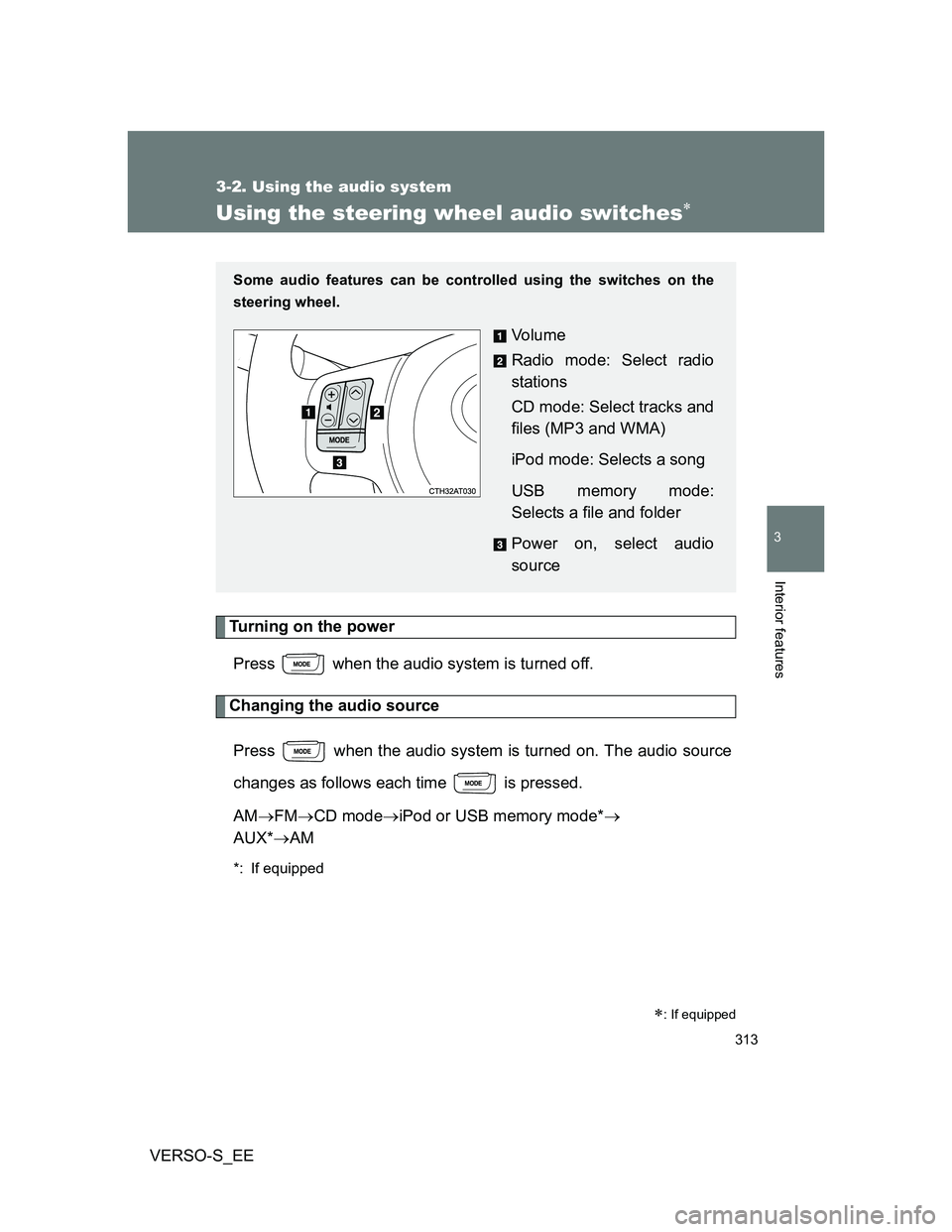
Some audio features can be controlled using the switches on the
steering wheel.
Vo l u m e
Radio mode: Select radio
stations
CD mode: Select tracks and
files (MP3 and WMA)
iPod mode: Selects a song
USB memory mode:
Selects a file and folder
Power on, select audio
source
Page 314 of 540
314 3-2. Using the audio system
VERSO-S_EE
Adjusting the volume
Press “+” on to increase the volume and “-” to decrease the
volume.
Hold down “+” or “-” on to continue increasing or decreasing the
volume.
Silencing a sound
Press and hold .
To cancel, press and hold again.
Selecting a radio station
Press to select the radio mode.
Press “” or “” on to select a preset station.
To scan for receivable stations, press and hold “” or “” on
until you hear a beep.
Selecting a track/file or song
Press to select CD, iPod or USB memory mode.
Press “” or “” on to select the desired track/file or
song.
Selecting a folder (MP3 and WMA or USB memory)
Press to select CD or USB memory mode.
Press and hold “” or “” on until you hear a beep.
STEP1
STEP2
STEP1
STEP2
STEP1
STEP2
Page 525 of 540
525
VERSO-S_EE
Alphabetical index
Alphabetical index
A/C..................................... 258, 264
ABS ........................................... 233
Air conditioning filter .............. 384
Air conditioning system
Air conditioning filter.............. 384
Automatic air conditioning
system ................................ 264
Manual air conditioning
system ................................ 258
Airbags
Airbag manual on-off
system ................................ 123
Airbag operating
conditions ........................... 114
Airbag precautions for
your child ............................ 118
Airbag warning light .............. 432
Curtain shield airbag
operating conditions ........... 114
Curtain shield airbag
precautions ......................... 118
General airbag precautions... 118
Locations of airbags .............. 112
Modification and disposal of
airbags ................................ 122
Proper driving posture... 110, 118
Side airbag operating
conditions ........................... 114
Side airbag precautions ........ 118
SRS airbags .......................... 112Antenna .................................... 349
Anti-lock brake system ........... 233
Armrest ..................................... 333
Audio input............................... 312
Audio system
Antenna ................................ 349
Audio input ............................ 312
AUX port ............................... 312
CD player .............................. 282
iPod....................................... 294
MP3/WMA disc ..................... 287
Optimal use........................... 310
Portable music player ........... 312
Radio .................................... 278
Steering wheel audio
switch ................................. 313
Type ...................................... 274
USB memory ........................ 302
Automatic air conditioning
system .................................... 264
Automatic light control
system .................................... 210
AUX port ................................... 312
Auxiliary box .................... 320, 340A