key battery TOYOTA VERSO S 2012 User Guide
[x] Cancel search | Manufacturer: TOYOTA, Model Year: 2012, Model line: VERSO S, Model: TOYOTA VERSO S 2012Pages: 540, PDF Size: 17.43 MB
Page 109 of 540
109 1-6. Theft deterrent system
1
Before driving
VERSO-S_EE
Alarm-operated door lock
When the alarm is operating, the doors are locked automatically to pre-
vent intruders.
Do not leave the key inside the vehicle when the alarm is operating, and
make sure the key is not inside the vehicle when recharging or replacing
the battery.
Customization that can be configured at any authorized Toyota dealer
or repairer, or another duly qualified and equipped professional
Settings of the alarm using the key can be changed.
(Customizable features: P. 518)
NOTICE
To ensure the system operates correctly
Do not modify or remove the system. If modified or removed, the proper
operation of the system cannot be guaranteed.
Page 172 of 540
172 2-1. Driving procedures
VERSO-S_EE
Operation of the “ENGINE START STOP” switch
When operating the “ENGINE START STOP” switch, one short, firm press is
enough. If the switch is pressed improperly, the engine may not start or the
“ENGINE START STOP” switch mode may not change. It is not necessary to
press and hold the switch.
Electronic key battery depletion
P. 4 4
Conditions affecting operation
P. 4 1
Notes for the entry function
P. 4 2
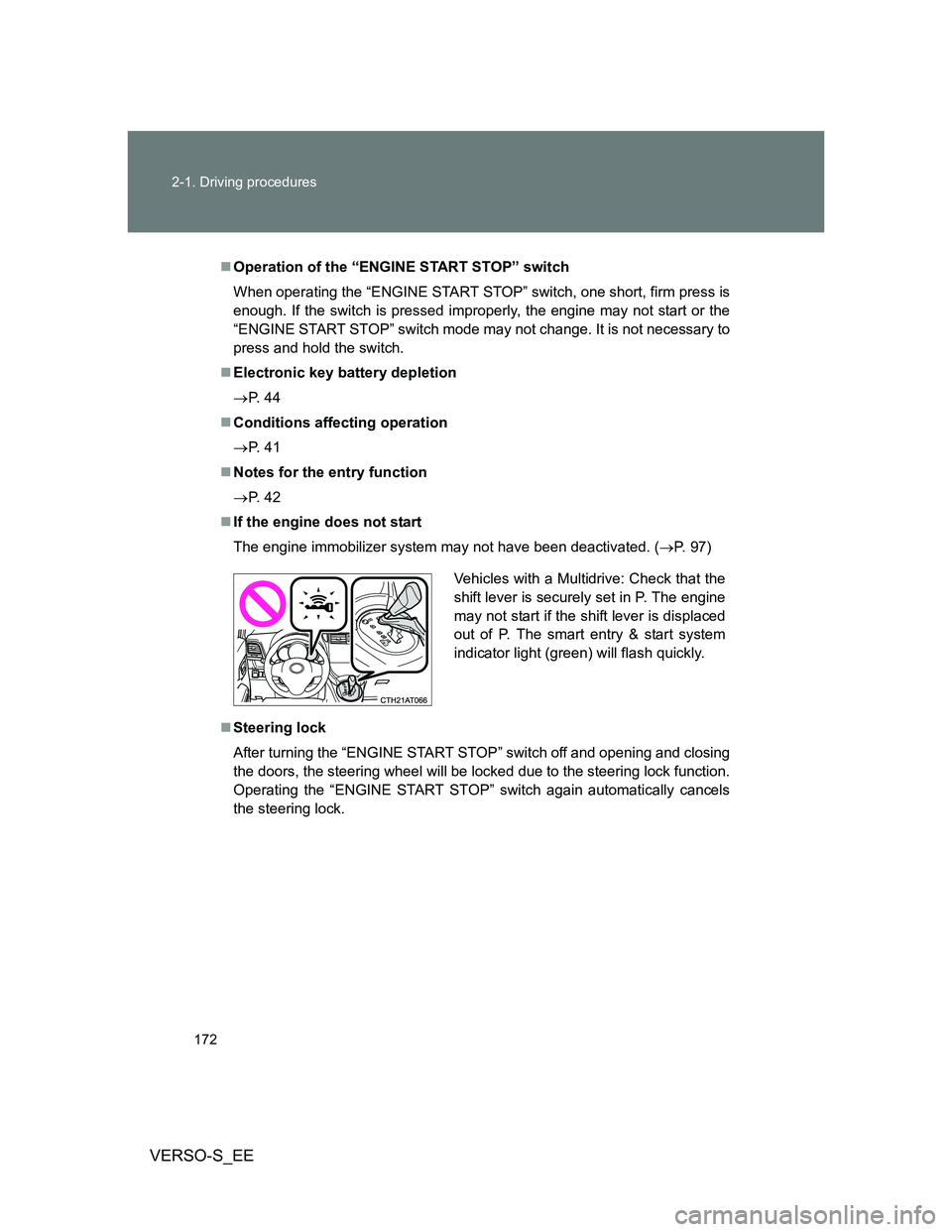
If the engine does not start
The engine immobilizer system may not have been deactivated. (P. 97)
Steering lock
After turning the “ENGINE START STOP” switch off and opening and closing
the doors, the steering wheel will be locked due to the steering lock function.
Operating the “ENGINE START STOP” switch again automatically cancels
the steering lock.
Vehicles with a Multidrive: Check that the
shift lever is securely set in P. The engine
may not start if the shift lever is displaced
out of P. The smart entry & start system
indicator light (green) will flash quickly.
Page 173 of 540
173 2-1. Driving procedures
2
When driving
VERSO-S_EE
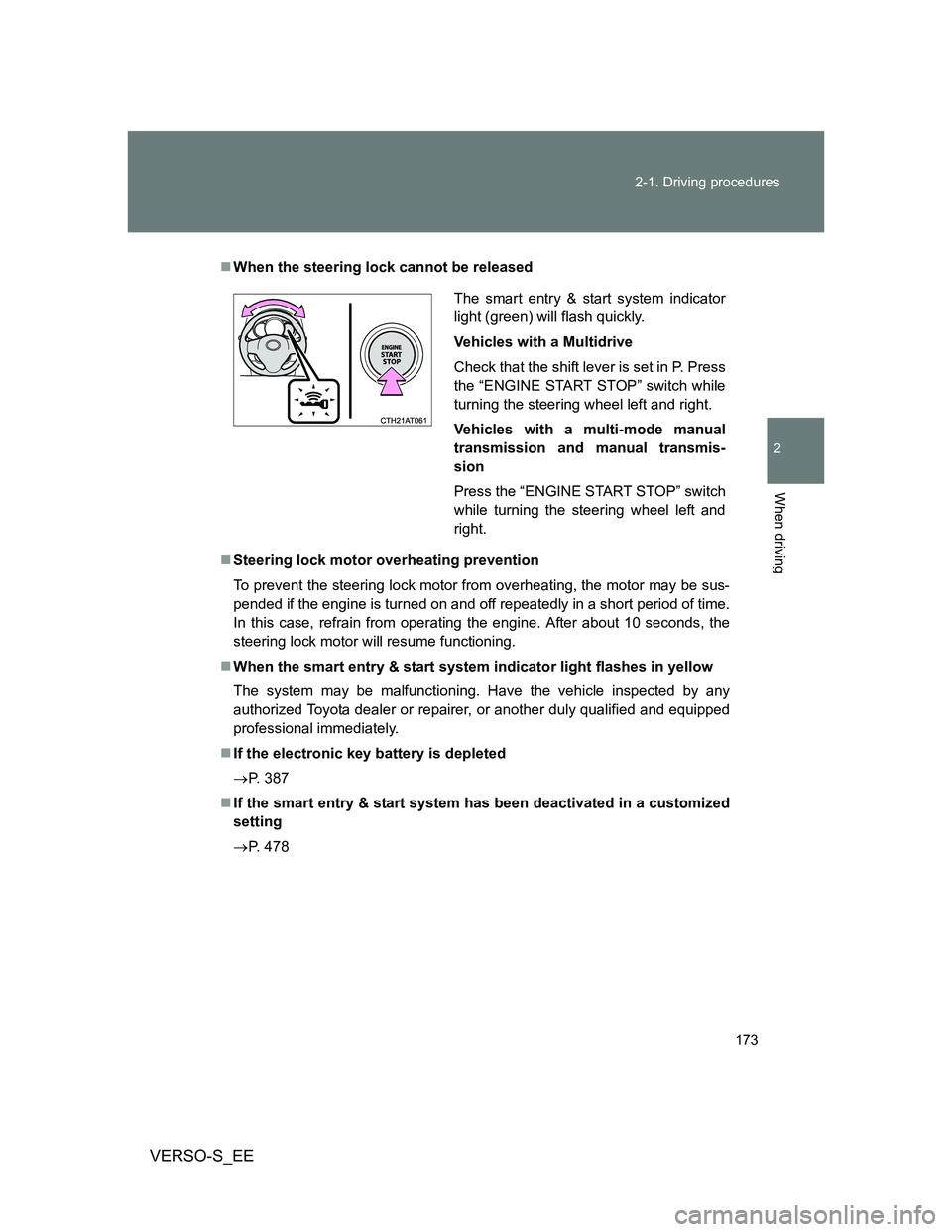
When the steering lock cannot be released
Steering lock motor overheating prevention
To prevent the steering lock motor from overheating, the motor may be sus-
pended if the engine is turned on and off repeatedly in a short period of time.
In this case, refrain from operating the engine. After about 10 seconds, the
steering lock motor will resume functioning.
When the smart entry & start system indicator light flashes in yellow
The system may be malfunctioning. Have the vehicle inspected by any
authorized Toyota dealer or repairer, or another duly qualified and equipped
professional immediately.
If the electronic key battery is depleted
P. 387
If the smart entry & start system has been deactivated in a customized
setting
P. 478
The smart entry & start system indicator
light (green) will flash quickly.
Vehicles with a Multidrive
Check that the shift lever is set in P. Press
the “ENGINE START STOP” switch while
turning the steering wheel left and right.
Vehicles with a multi-mode manual
transmission and manual transmis-
sion
Press the “ENGINE START STOP” switch
while turning the steering wheel left and
right.
Page 318 of 540
318 3-3. Using the interior lights
VERSO-S_EE
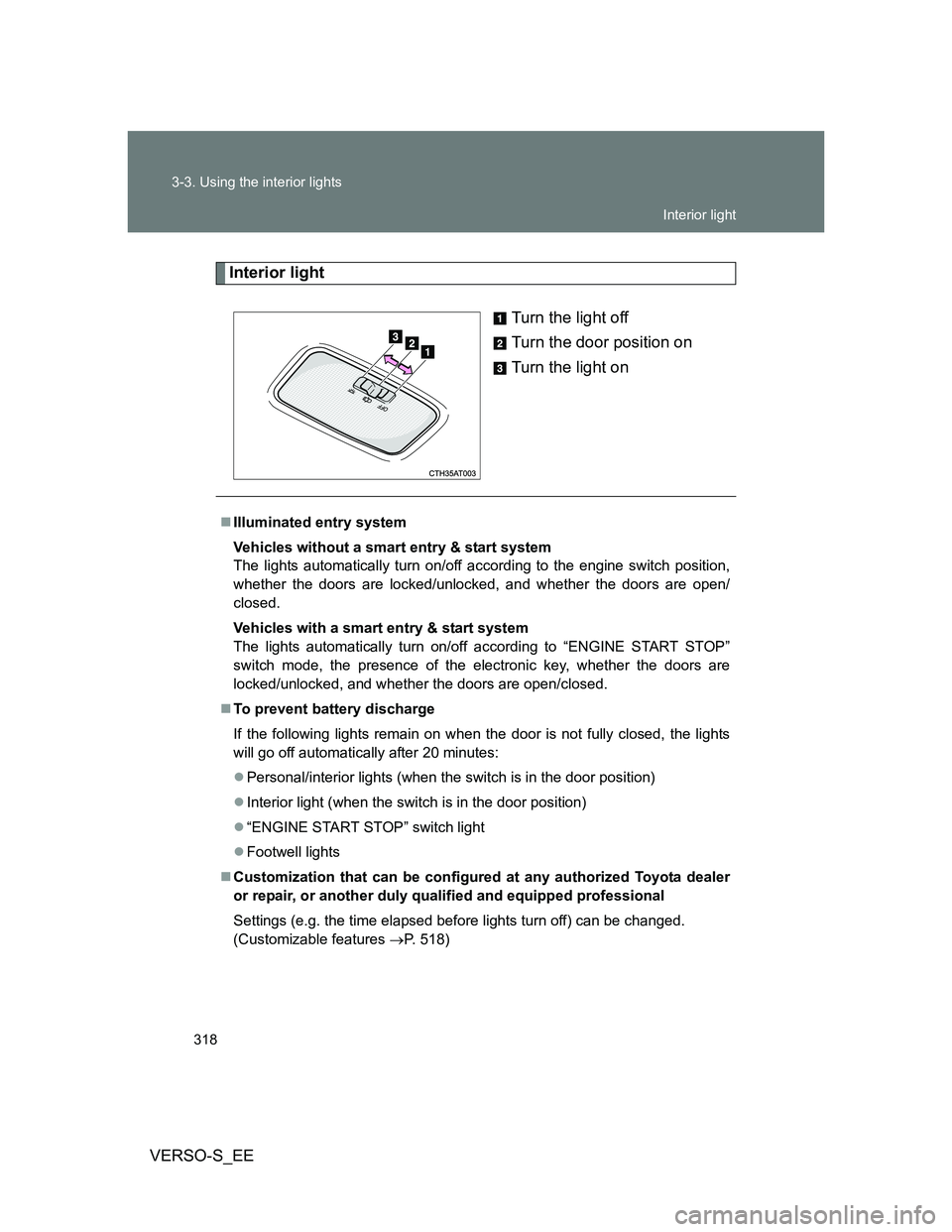
Interior light
Turn the light off
Turn the door position on
Turn the light on
Illuminated entry system
Vehicles without a smart entry & start system
The lights automatically turn on/off according to the engine switch position,
whether the doors are locked/unlocked, and whether the doors are open/
closed.
Vehicles with a smart entry & start system
The lights automatically turn on/off according to “ENGINE START STOP”
switch mode, the presence of the electronic key, whether the doors are
locked/unlocked, and whether the doors are open/closed.
To prevent battery discharge
If the following lights remain on when the door is not fully closed, the lights
will go off automatically after 20 minutes:
Personal/interior lights (when the switch is in the door position)
Interior light (when the switch is in the door position)
“ENGINE START STOP” switch light
Footwell lights
Customization that can be configured at any authorized Toyota dealer
or repair, or another duly qualified and equipped professional
Settings (e.g. the time elapsed before lights turn off) can be changed.
(Customizable features P. 518)
Interior light
Page 345 of 540
4Maintenance and care
345
VERSO-S_EE
4-1. Maintenance and care
Cleaning and protecting
the vehicle exterior ......... 346
Cleaning and protecting
the vehicle interior .......... 350
4-2. Maintenance
Maintenance
requirements................... 353
4-3. Do-it-yourself
maintenance
Do-it-yourself service
precautions ..................... 356
Hood ................................. 359
Positioning a floor jack ...... 360
Engine compartment......... 362
Tires .................................. 377
Tire inflation pressure ....... 380
Wheels .............................. 382
Air conditioning filter ......... 384
Wireless remote control/
electronic key battery...... 387
Checking and replacing
fuses ............................... 391
Light bulbs ........................ 407
Page 373 of 540
373 4-3. Do-it-yourself maintenance
4
Maintenance and care
VERSO-S_EEAdd distilled water.
If the “UPPER LEVEL” line cannot be seen, check the fluid level by
looking directly at the cell.
Put the vent plug back on and close it securely.
Before recharging
When recharging, the battery produces hydrogen gas which is flammable
and explosive. Therefore, observe the following before recharging:
If recharging with the battery installed on the vehicle, be sure to discon-
nect the ground cable.
Make sure the power switch on the charger is off when connecting and
disconnecting the charger cables to the battery.
After recharging/reconnecting the battery (vehicles with a smart entry
& start system)
Unlocking the doors using the smart entry & start system may not be
possible immediately after reconnecting the battery. If this happens, use
the wireless remote control or the mechanical key to lock/unlock the
doors.
Start the engine with the “ENGINE START STOP” switch in ACCES-
SORY mode. The engine may not start with the “ENGINE START STOP”
switch turned OFF. However, the engine will operate normally from the
second attempt.
The “ENGINE START STOP” switch mode is recorded by the vehicle. If
the battery is reconnected, the vehicle will return the “ENGINE START
STOP” switch mode to the status it was in before the battery was discon-
nected. Make sure to turn off the engine before disconnect the battery.
Take extra care when connecting the battery if the “ENGINE START
STOP” switch mode prior to discharge is unknown.
If the engine will not start even after multiple attempts, contact any autho-
rized Toyota dealer or repairer, or another duly qualified and equipped pro-
fessional.
STEP2
STEP3
Page 387 of 540
387
4-3. Do-it-yourself maintenance
4
Maintenance and care
VERSO-S_EE
Wireless remote control/electronic key batter y
Replace the battery with a new one if it is depleted.
You will need the following items:
Flathead screwdriver
Lithium battery CR2016 (vehicles without a smart entry & start
system), or CR1632 (vehicles with a smart entry & start sys-
tem)
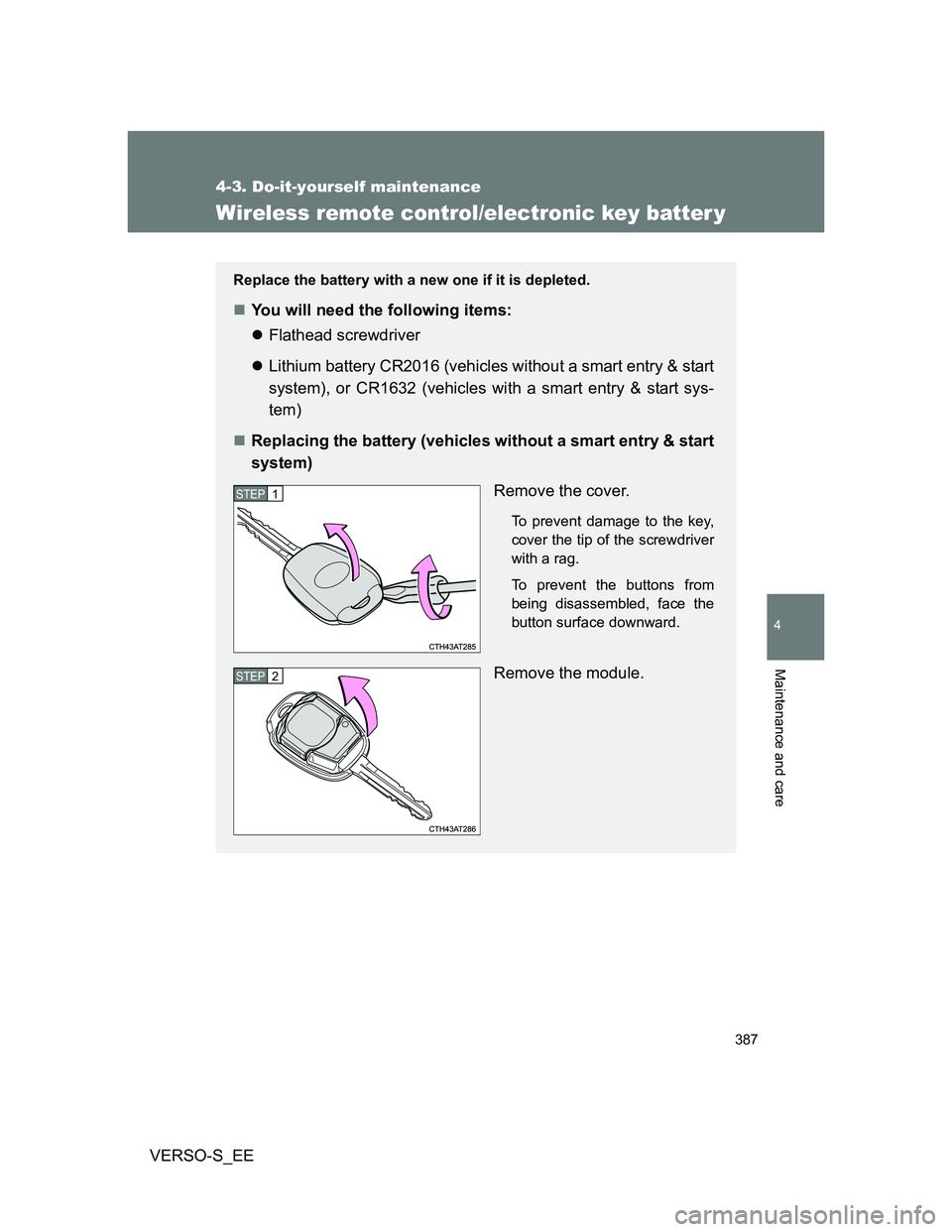
Replacing the battery (vehicles without a smart entry & start
system)
Remove the cover.
To prevent damage to the key,
cover the tip of the screwdriver
with a rag.
To prevent the buttons from
being disassembled, face the
button surface downward.
Remove the module.
STEP1
STEP2
Page 388 of 540
388 4-3. Do-it-yourself maintenance
VERSO-S_EE
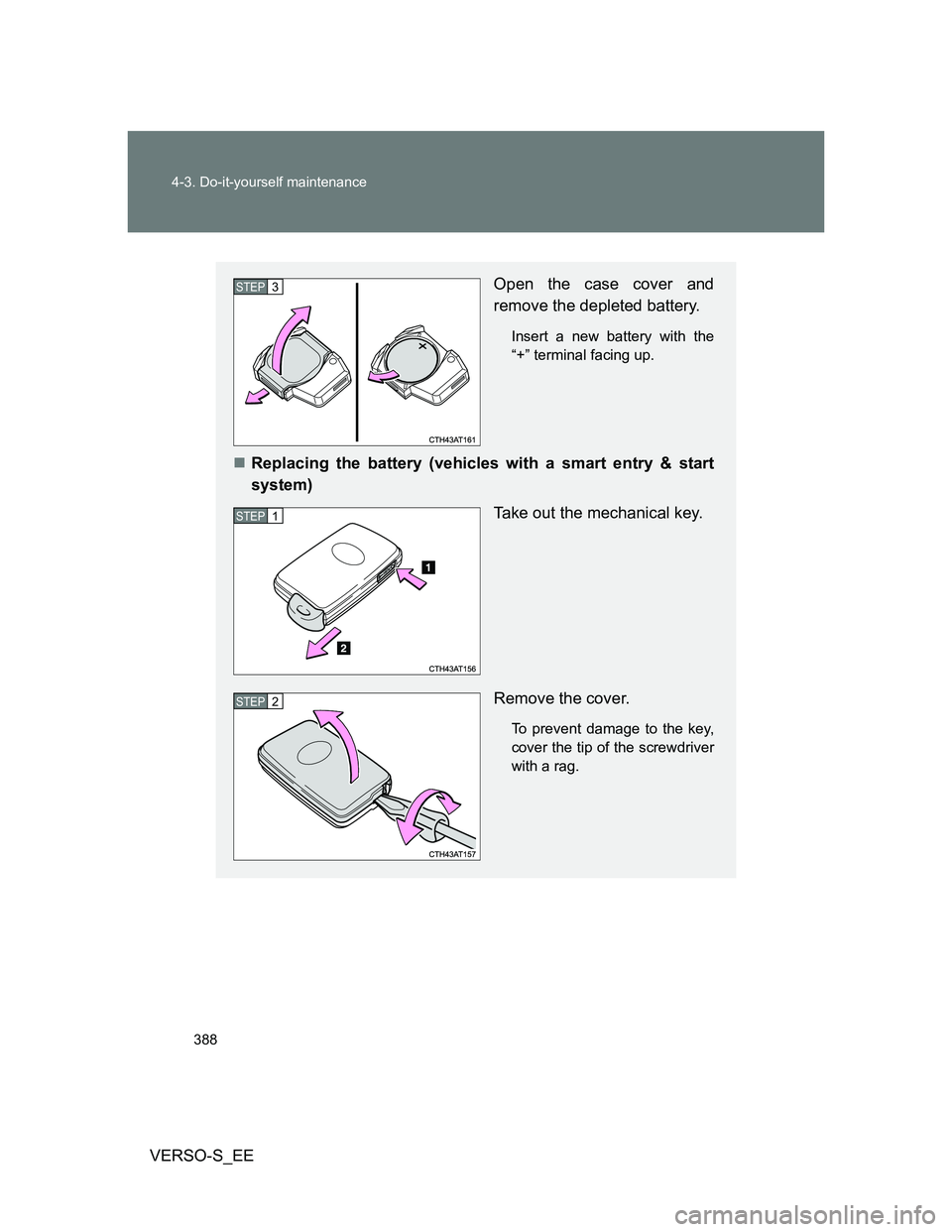
Open the case cover and
remove the depleted battery.
Insert a new battery with the
“+” terminal facing up.
Replacing the battery (vehicles with a smart entry & start
system)
Take out the mechanical key.
Remove the cover.
To prevent damage to the key,
cover the tip of the screwdriver
with a rag.
STEP3
STEP1
STEP2
Page 389 of 540
389 4-3. Do-it-yourself maintenance
4
Maintenance and care
VERSO-S_EE
Use a CR2016 (vehicles without a smart entry & start system) or
CR1632 (vehicles with a smart entry & start system) lithium battery
Batteries can be purchased at any authorized Toyota dealer or repairer,
or another duly qualified and equipped professional, local electrical appli-
ance shops or camera stores.
Replace only with the same or equivalent type recommended by the
manufacturer.
Dispose of used batteries according to local laws.
If the key battery is depleted
The following symptoms may occur:
The smart entry & start system (if equipped) and wireless remote control
will not function properly.
The operational range will be reduced.
When replacing the module (vehicles without a smart entry and start
system)
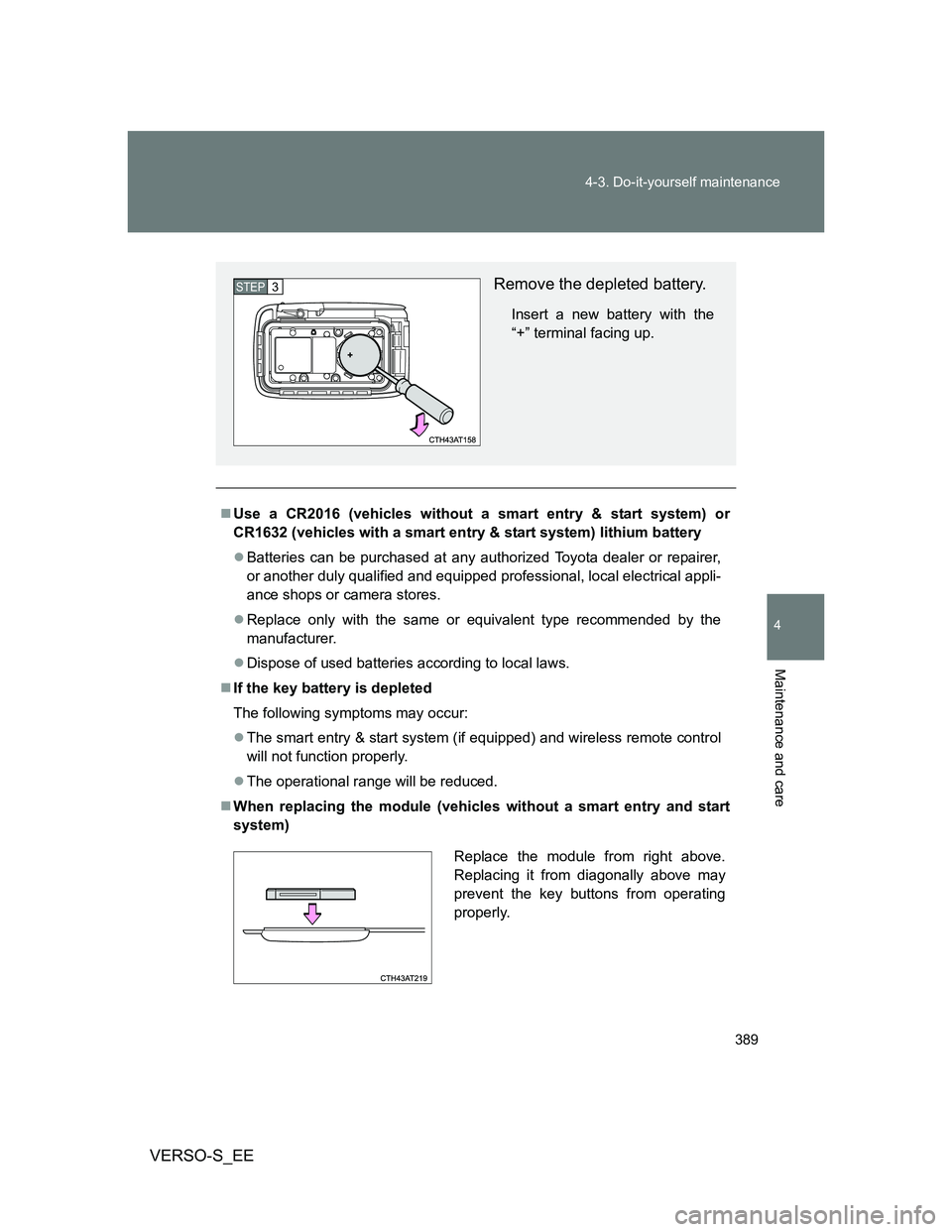
Remove the depleted battery.
Insert a new battery with the
“+” terminal facing up.
STEP3
Replace the module from right above.
Replacing it from diagonally above may
prevent the key buttons from operating
properly.
Page 417 of 540
5When trouble arises
417
VERSO-S_EE
5-1. Essential information
Emergency flashers .......... 418
If your vehicle needs to
be towed ......................... 419
If you think something is
wrong .............................. 427
Fuel pump shut off
system ............................ 428
5-2. Steps to take in an
emergency
If a warning light turns
on or a warning buzzer
sounds... ........................ 429
If you have a flat tire
(vehicles with a
spare tire) ....................... 442
If you have a flat tire
(vehicles with an
emergency tire
puncture repair kit).......... 455
If the engine will not
start ................................ 472
If the shift lever cannot
be shifted from P ............ 475
If the shift lever cannot
be shifted ........................ 476
If you lose your keys ......... 477If the electronic key does
not operate properly ....... 478
If the battery is
discharged ...................... 482
If your vehicle
overheats ........................ 489
If you run out of fuel and
the engine stalls.............. 492
If the vehicle becomes
stuck ............................... 494
If your vehicle has to
be stopped in an
emergency ...................... 496