audio TOYOTA VERSO S 2012 Workshop Manual
[x] Cancel search | Manufacturer: TOYOTA, Model Year: 2012, Model line: VERSO S, Model: TOYOTA VERSO S 2012Pages: 540, PDF Size: 17.43 MB
Page 312 of 540
312
3-2. Using the audio system
VERSO-S_EE
Using the AUX por t
Operating portable audio devices connected to the audio system
The volume can be adjusted using the vehicle's audio controls. All other
adjustments must be made on the portable audio device itself.
When using a portable audio device connected to the power outlet
Noise may occur during playback. Use the power source of the portable
audio device.
: If equipped
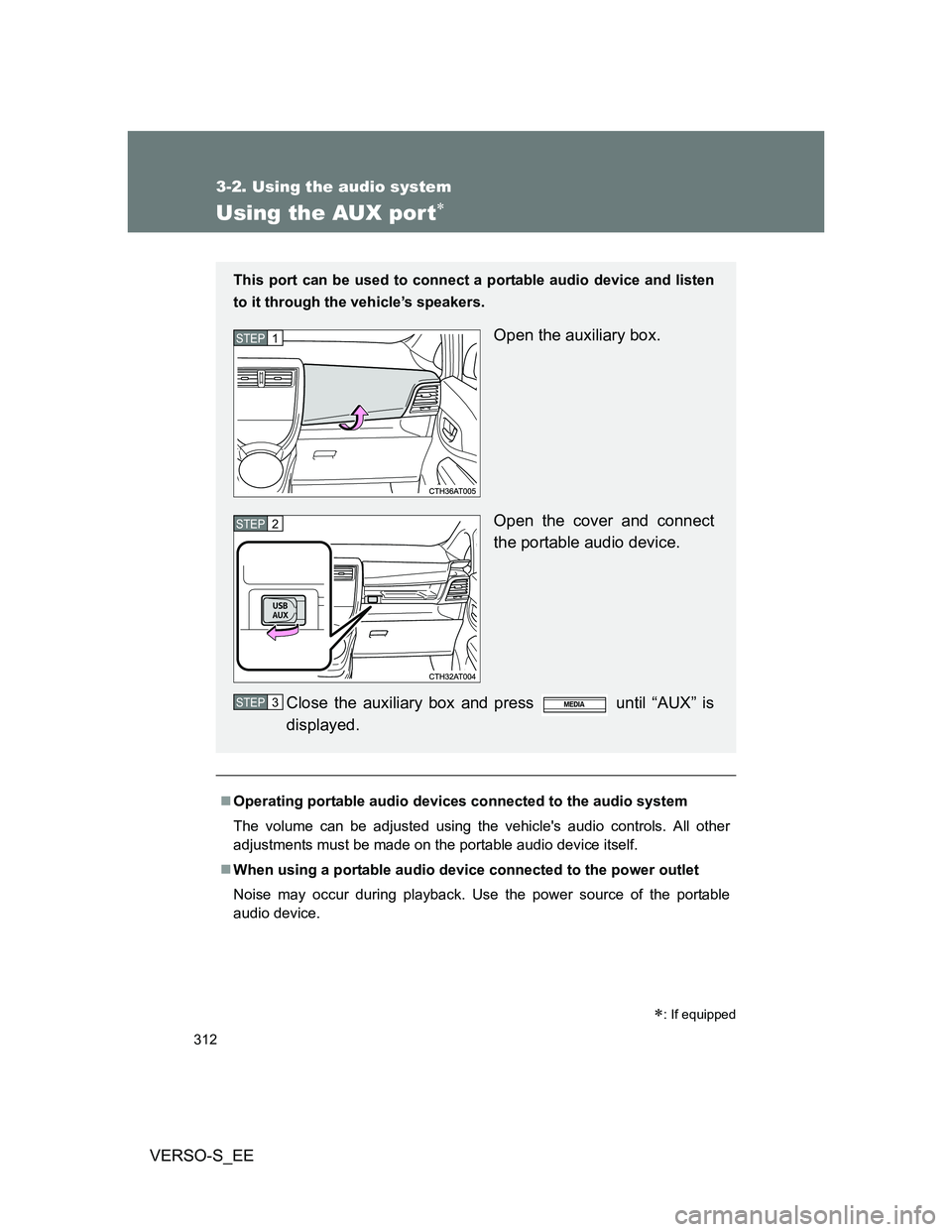
This port can be used to connect a portable audio device and listen
to it through the vehicle’s speakers.
Open the auxiliary box.
Open the cover and connect
the portable audio device.
Close the auxiliary box and press until “AUX” is
displayed.STEP1
STEP2
STEP3
Page 313 of 540
313
3-2. Using the audio system
3
Interior features
VERSO-S_EE
Using the steering wheel audio switches
Turning on the power
Press when the audio system is turned off.
Changing the audio source
Press when the audio system is turned on. The audio source
changes as follows each time is pressed.
AMFMCD modeiPod or USB memory mode*
AUX*AM
*: If equipped
: If equipped
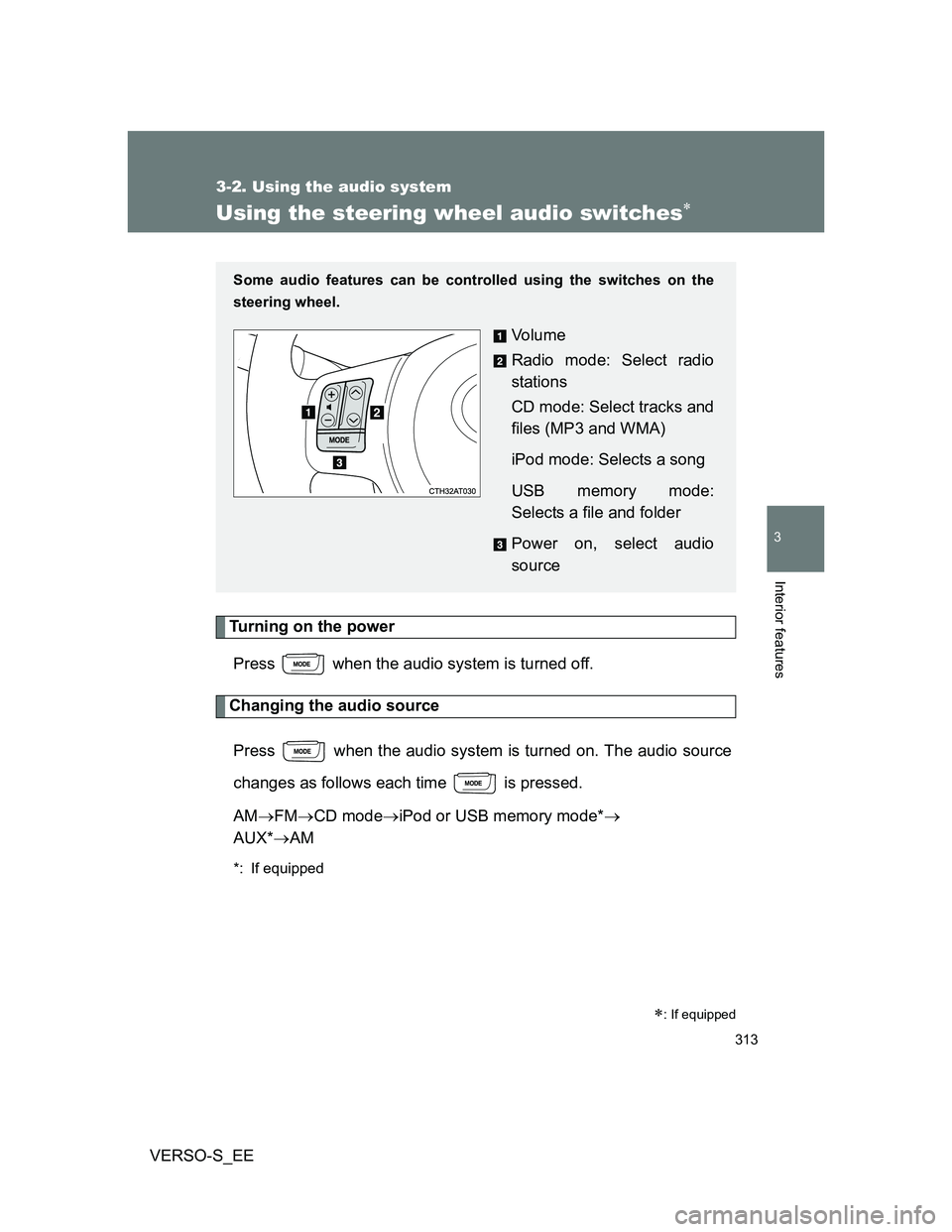
Some audio features can be controlled using the switches on the
steering wheel.
Vo l u m e
Radio mode: Select radio
stations
CD mode: Select tracks and
files (MP3 and WMA)
iPod mode: Selects a song
USB memory mode:
Selects a file and folder
Power on, select audio
source
Page 314 of 540
314 3-2. Using the audio system
VERSO-S_EE
Adjusting the volume
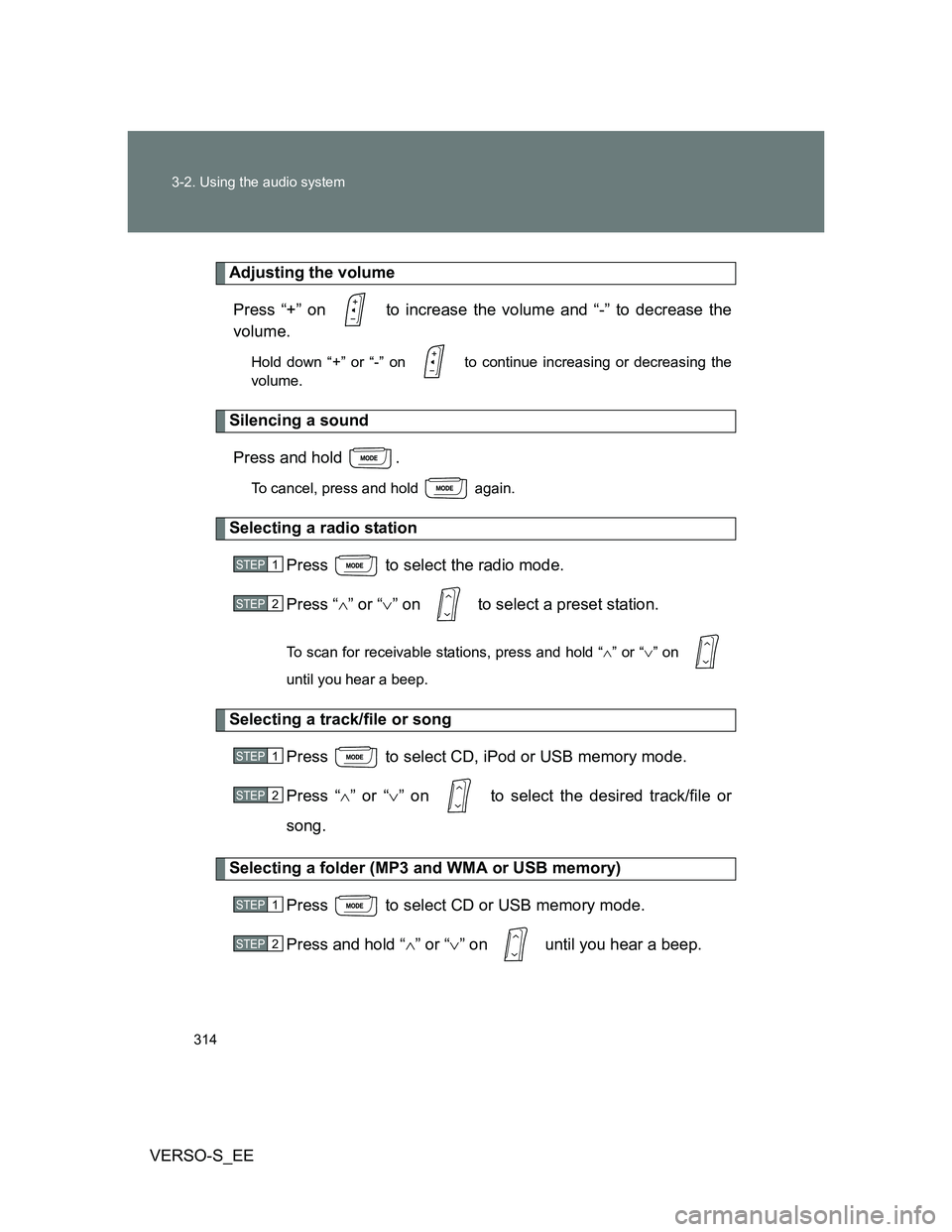
Press “+” on to increase the volume and “-” to decrease the
volume.
Hold down “+” or “-” on to continue increasing or decreasing the
volume.
Silencing a sound
Press and hold .
To cancel, press and hold again.
Selecting a radio station
Press to select the radio mode.
Press “” or “” on to select a preset station.
To scan for receivable stations, press and hold “” or “” on
until you hear a beep.
Selecting a track/file or song
Press to select CD, iPod or USB memory mode.
Press “” or “” on to select the desired track/file or
song.
Selecting a folder (MP3 and WMA or USB memory)
Press to select CD or USB memory mode.
Press and hold “” or “” on until you hear a beep.
STEP1
STEP2
STEP1
STEP2
STEP1
STEP2
Page 315 of 540
315 3-2. Using the audio system
3
Interior features
VERSO-S_EE
CAUTION
To reduce the risk of an accident
Exercise care when operating the audio switches on the steering wheel.
Page 352 of 540
352 4-1. Maintenance and care
VERSO-S_EE
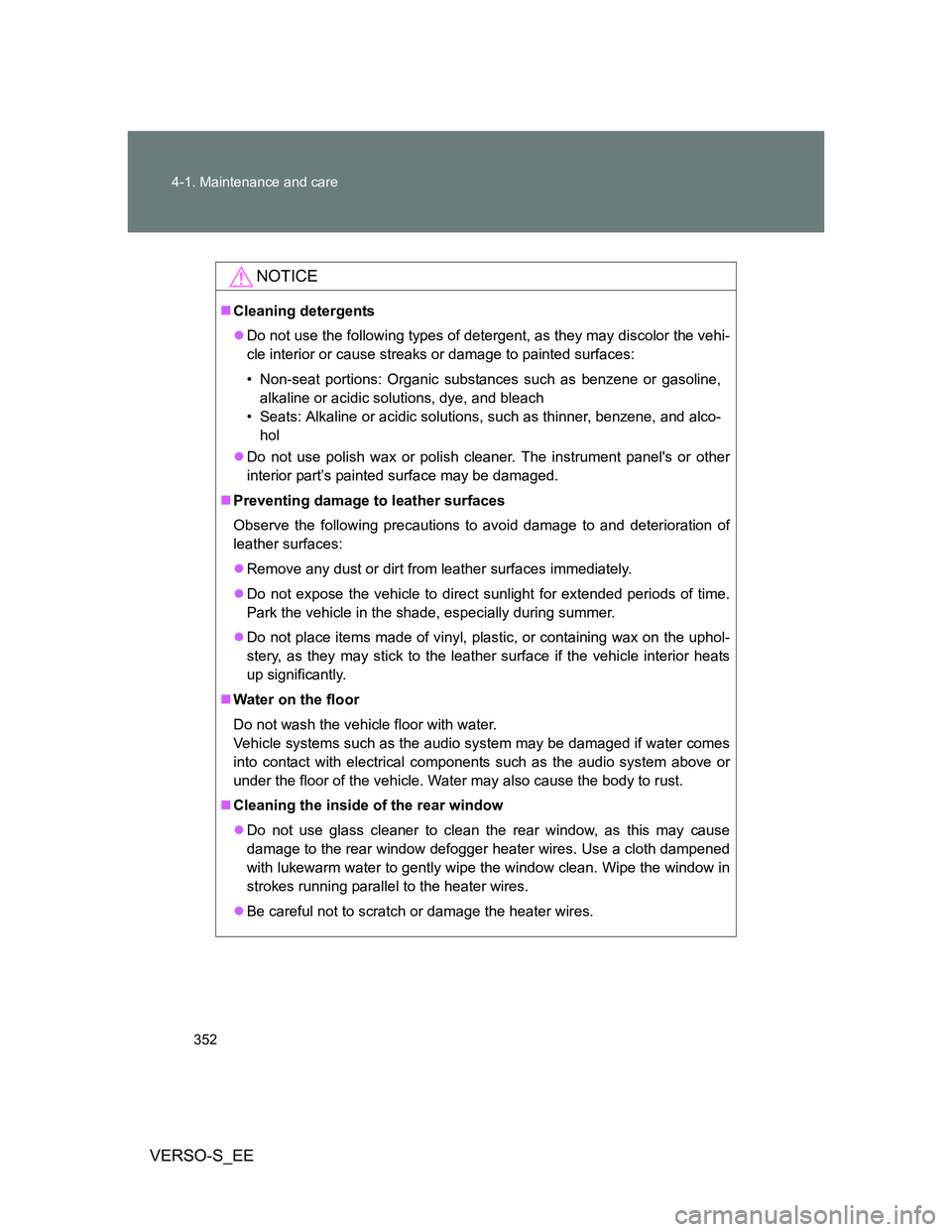
NOTICE
Cleaning detergents
Do not use the following types of detergent, as they may discolor the vehi-
cle interior or cause streaks or damage to painted surfaces:
• Non-seat portions: Organic substances such as benzene or gasoline,
alkaline or acidic solutions, dye, and bleach
• Seats: Alkaline or acidic solutions, such as thinner, benzene, and alco-
hol
Do not use polish wax or polish cleaner. The instrument panel's or other
interior part’s painted surface may be damaged.
Preventing damage to leather surfaces
Observe the following precautions to avoid damage to and deterioration of
leather surfaces:
Remove any dust or dirt from leather surfaces immediately.
Do not expose the vehicle to direct sunlight for extended periods of time.
Park the vehicle in the shade, especially during summer.
Do not place items made of vinyl, plastic, or containing wax on the uphol-
stery, as they may stick to the leather surface if the vehicle interior heats
up significantly.
Water on the floor
Do not wash the vehicle floor with water.
Vehicle systems such as the audio system may be damaged if water comes
into contact with electrical components such as the audio system above or
under the floor of the vehicle. Water may also cause the body to rust.
Cleaning the inside of the rear window
Do not use glass cleaner to clean the rear window, as this may cause
damage to the rear window defogger heater wires. Use a cloth dampened
with lukewarm water to gently wipe the window clean. Wipe the window in
strokes running parallel to the heater wires.
Be careful not to scratch or damage the heater wires.
Page 400 of 540
400 4-3. Do-it-yourself maintenance
VERSO-S_EE
*1: Vehicles with a gasoline engine
*2: Vehicles with a diesel engine
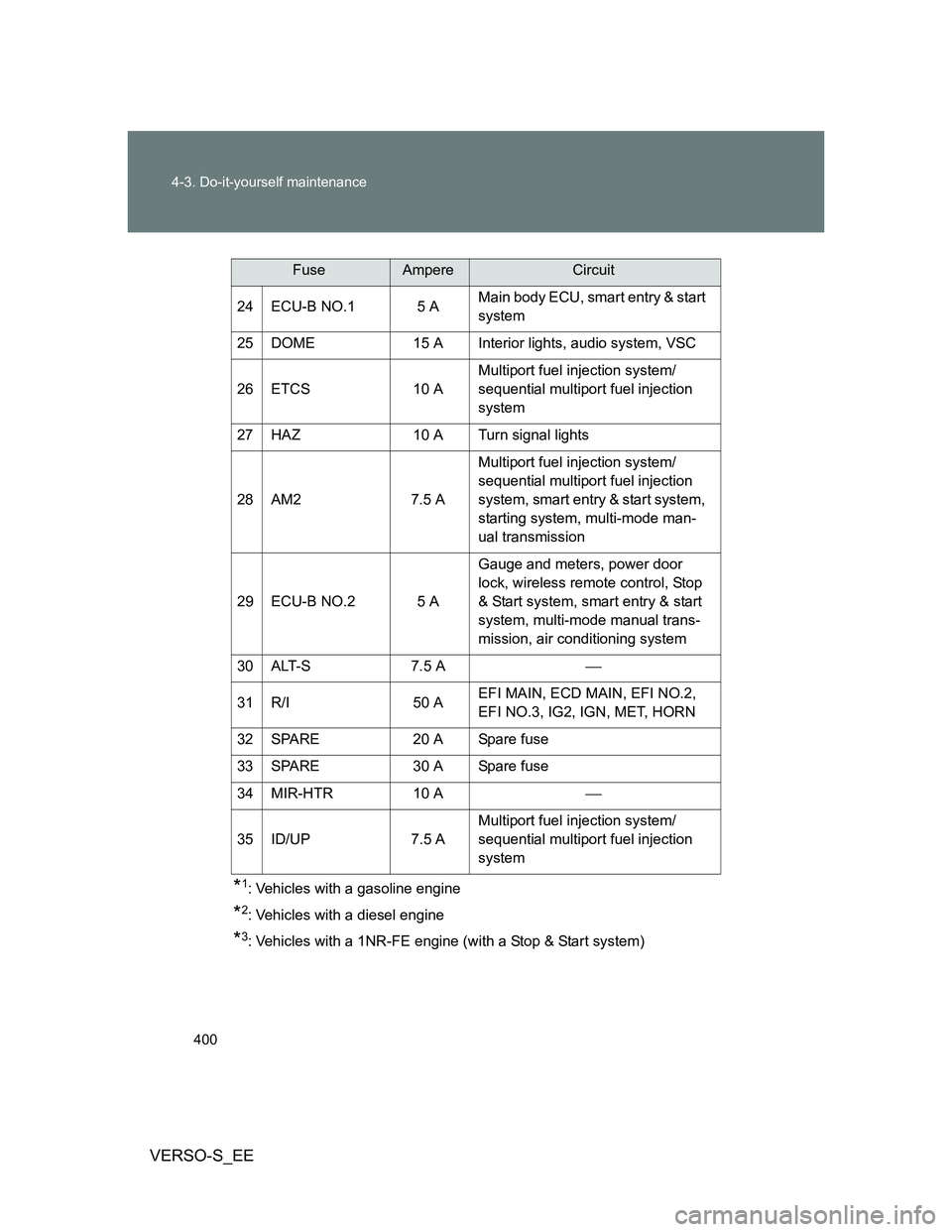
*3: Vehicles with a 1NR-FE engine (with a Stop & Start system) 24 ECU-B NO.1 5 AMain body ECU, smart entry & start
system
25 DOME 15 A Interior lights, audio system, VSC
26 ETCS 10 AMultiport fuel injection system/
sequential multiport fuel injection
system
27 HAZ 10 A Turn signal lights
28 AM2 7.5 AMultiport fuel injection system/
sequential multiport fuel injection
system, smart entry & start system,
starting system, multi-mode man-
ual transmission
29 ECU-B NO.2 5 AGauge and meters, power door
lock, wireless remote control, Stop
& Start system, smart entry & start
system, multi-mode manual trans-
mission, air conditioning system
30 ALT-S 7.5 A
31 R/I 50 AEFI MAIN, ECD MAIN, EFI NO.2,
EFI NO.3, IG2, IGN, MET, HORN
32 SPARE 20 A Spare fuse
33 SPARE 30 A Spare fuse
34 MIR-HTR 10 A
35 ID/UP 7.5 AMultiport fuel injection system/
sequential multiport fuel injection
system
FuseAmpereCircuit
Page 404 of 540
404 4-3. Do-it-yourself maintenance
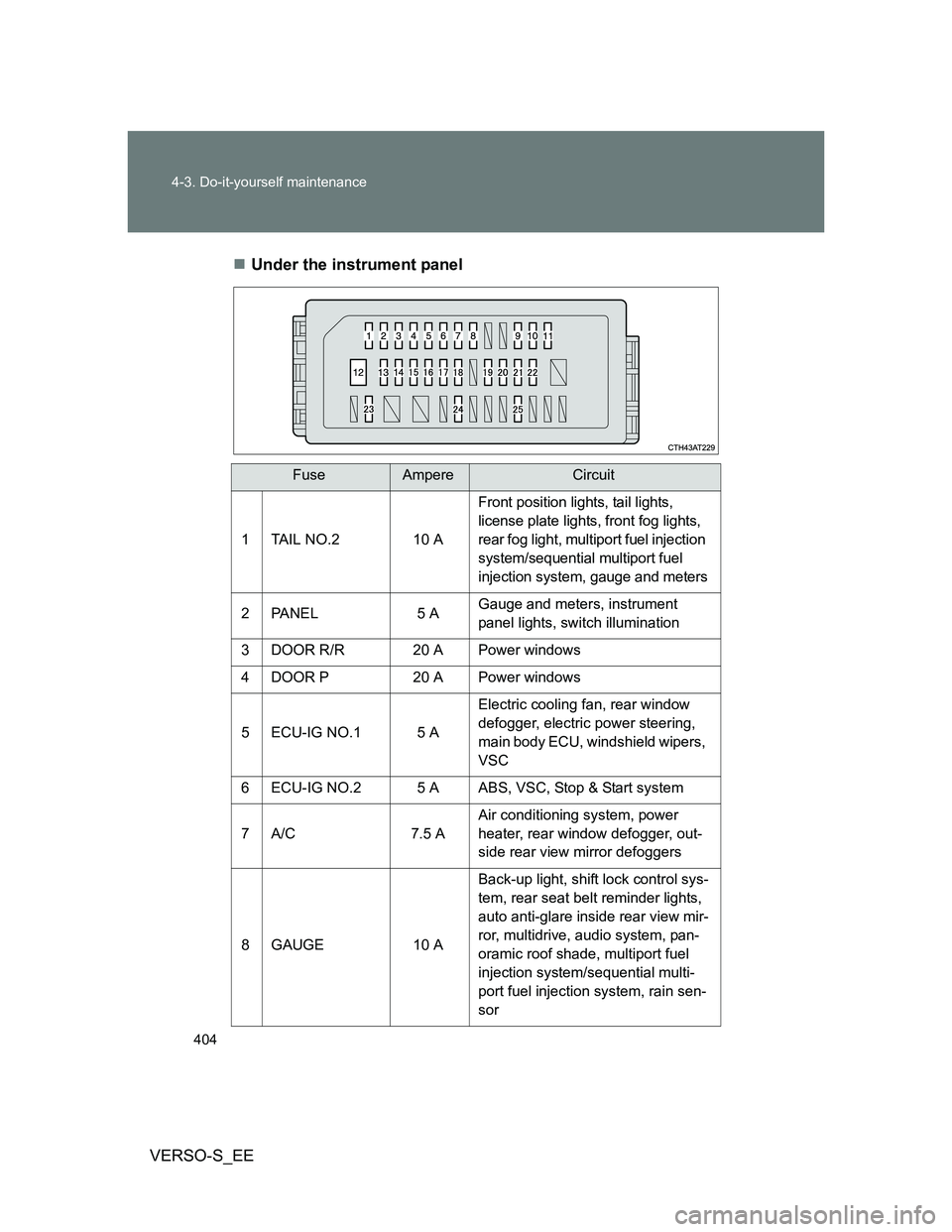
VERSO-S_EEUnder the instrument panel
FuseAmpereCircuit
1 TAIL NO.2 10 A
Front position lights, tail lights,
license plate lights, front fog lights,
rear fog light, multiport fuel injection
system/sequential multiport fuel
injection system, gauge and meters
2 PANEL 5 AGauge and meters, instrument
panel lights, switch illumination
3 DOOR R/R 20 A Power windows
4 DOOR P 20 A Power windows
5 ECU-IG NO.1 5 AElectric cooling fan, rear window
defogger, electric power steering,
main body ECU, windshield wipers,
VSC
6 ECU-IG NO.2 5 A ABS, VSC, Stop & Start system
7A/C 7.5 AAir conditioning system, power
heater, rear window defogger, out-
side rear view mirror defoggers
8 GAUGE 10 ABack-up light, shift lock control sys-
tem, rear seat belt reminder lights,
auto anti-glare inside rear view mir-
ror, multidrive, audio system, pan-
oramic roof shade, multiport fuel
injection system/sequential multi-
port fuel injection system, rain sen-
sor
Page 405 of 540
405 4-3. Do-it-yourself maintenance
4
Maintenance and care
VERSO-S_EE
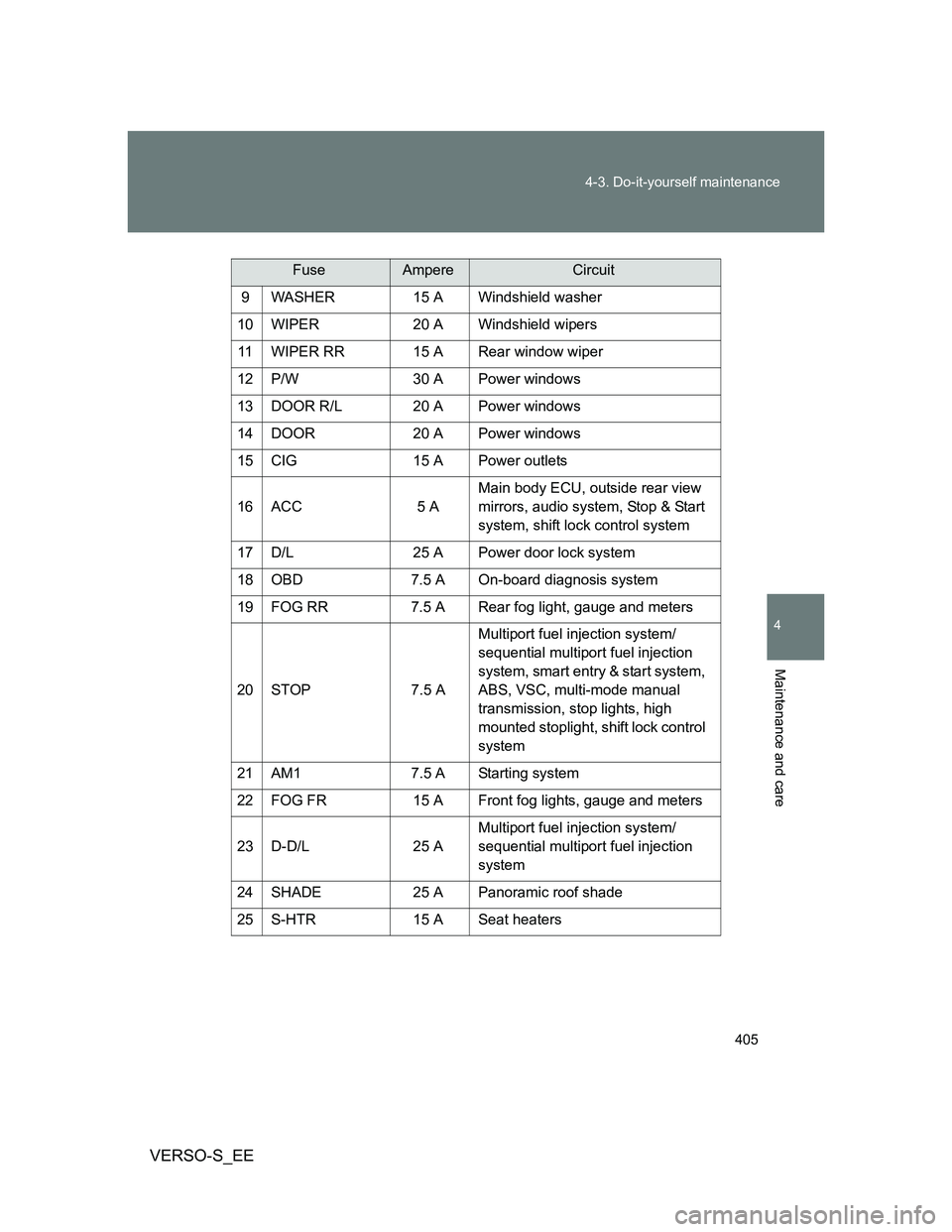
9 WASHER 15 A Windshield washer
10 WIPER 20 A Windshield wipers
11 WIPER RR 15 A Rear window wiper
12 P/W 30 A Power windows
13 DOOR R/L 20 A Power windows
14 DOOR 20 A Power windows
15 CIG 15 A Power outlets
16 ACC 5 AMain body ECU, outside rear view
mirrors, audio system, Stop & Start
system, shift lock control system
17 D/L 25 A Power door lock system
18 OBD 7.5 A On-board diagnosis system
19 FOG RR 7.5 A Rear fog light, gauge and meters
20 STOP 7.5 AMultiport fuel injection system/
sequential multiport fuel injection
system, smart entry & start system,
ABS, VSC, multi-mode manual
transmission, stop lights, high
mounted stoplight, shift lock control
system
21 AM1 7.5 A Starting system
22 FOG FR 15 A Front fog lights, gauge and meters
23 D-D/L 25 AMultiport fuel injection system/
sequential multiport fuel injection
system
24 SHADE 25 A Panoramic roof shade
25 S-HTR 15 A Seat heaters
FuseAmpereCircuit
Page 486 of 540
486 5-2. Steps to take in an emergency
VERSO-S_EE
Starting the engine when the battery is discharged (vehicles with a
Multidrive)
The engine cannot be started by push-starting.
To prevent battery discharge
Turn off the headlights and the audio system while the engine is off.
Turn off any unnecessary electrical components when the vehicle is run-
ning at a low speed for an extended period, such as in heavy traffic.
Charging the battery
The electricity stored in the battery will discharge gradually even when the
vehicle is not in use, due to natural discharge and the draining effects of cer-
tain electrical appliances. If the vehicle is left for a long time, the battery may
discharge, and the engine may be unable to start. (The battery recharges
automatically during driving.)
Precautions when the battery is discharged (vehicles with a smart
entry & start system)
In some cases, it may not be possible to unlock the doors using the smart
entry & start system when the battery is discharged. Use the wireless
remote control or the mechanical key to lock or unlock the doors.
The engine may not start on the first attempt after the battery has
recharged but will start normally after the second attempt. This is not a
malfunction.
The “ENGINE START STOP” switch mode is memorized by the vehicle.
When the battery is reconnected, the system will return to the mode it
was in before the battery was discharged. Before disconnecting the bat-
tery, turn the “ENGINE START STOP” switch off.
If you are unsure what mode the “ENGINE START STOP” switch was in
before the battery discharged, be especially careful when reconnecting
the battery.
Once the engine starts, have the vehicle checked at any autho-
rized Toyota dealer or repairer, or another duly qualified and
equipped professional, as soon as possible.
Page 523 of 540
Index
523
VERSO-S_EE
Abbreviation list ...................... 524
Alphabetical index................... 525
What to do if... ......................... 537
Vehicles with a “touch screen”:
For details of equipment related to the “touch screen”,
such as the audio system, refer to ““touch screen”
Owner's manual”.