key TOYOTA VERSO S 2012 Workshop Manual
[x] Cancel search | Manufacturer: TOYOTA, Model Year: 2012, Model line: VERSO S, Model: TOYOTA VERSO S 2012Pages: 540, PDF Size: 17.43 MB
Page 438 of 540
438 5-2. Steps to take in an emergency
VERSO-S_EE
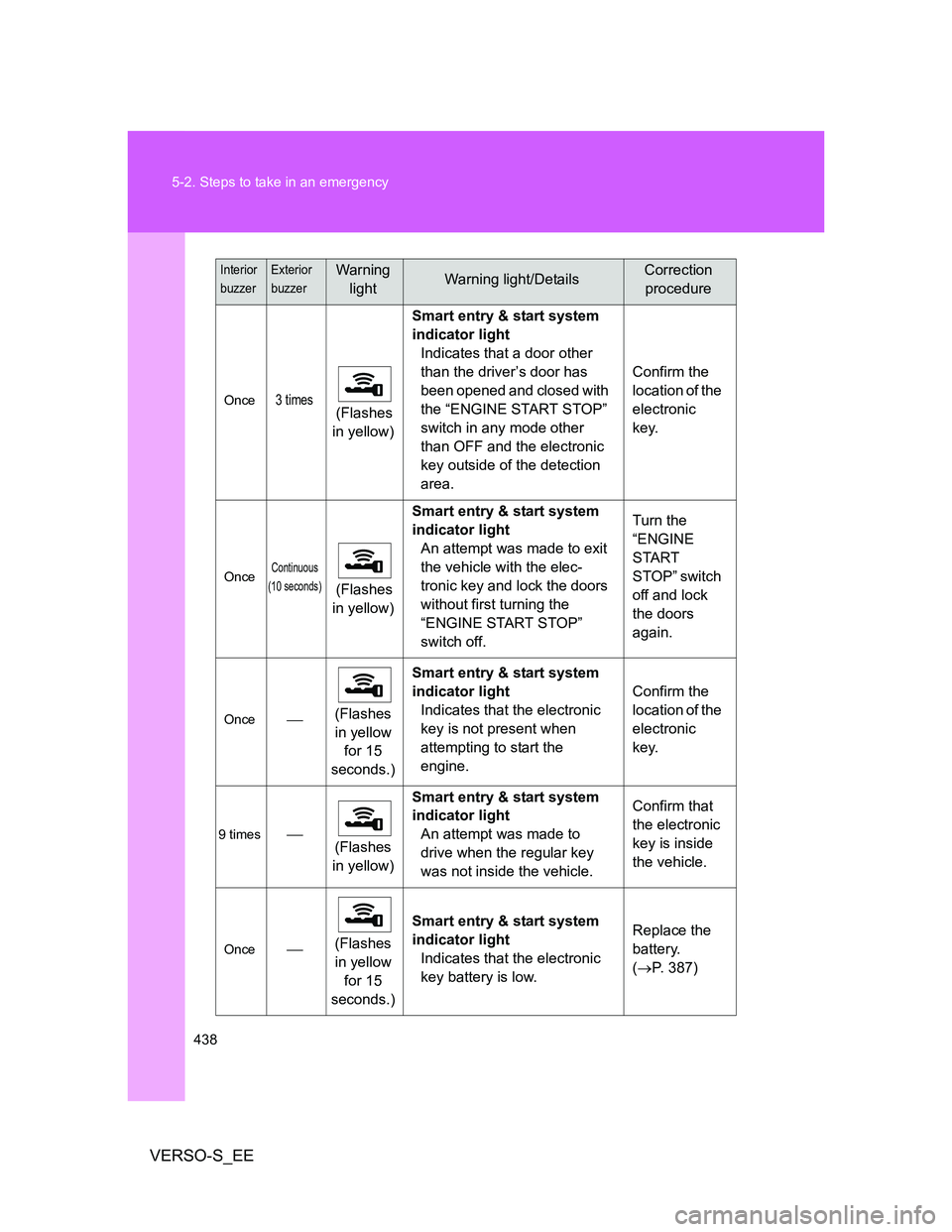
Once3 times (Flashes
in yellow)Smart entry & start system
indicator light
Indicates that a door other
than the driver’s door has
been opened and closed with
the “ENGINE START STOP”
switch in any mode other
than OFF and the electronic
key outside of the detection
area.Confirm the
location of the
electronic
key.
OnceContinuous
(10 seconds)
(Flashes
in yellow)Smart entry & start system
indicator light
An attempt was made to exit
the vehicle with the elec-
tronic key and lock the doors
without first turning the
“ENGINE START STOP”
switch off.Turn the
“ENGINE
START
STOP” switch
off and lock
the doors
again.
Once(Flashes
in yellow
for 15
seconds.)Smart entry & start system
indicator light
Indicates that the electronic
key is not present when
attempting to start the
engine.Confirm the
location of the
electronic
key.
9 times
(Flashes
in yellow)Smart entry & start system
indicator light
An attempt was made to
drive when the regular key
was not inside the vehicle.Confirm that
the electronic
key is inside
the vehicle.
Once(Flashes
in yellow
for 15
seconds.)Smart entry & start system
indicator light
Indicates that the electronic
key battery is low.Replace the
battery.
(P. 387)
Interior
buzzerExterior
buzzerWarning
lightWarning light/DetailsCorrection
procedure
Page 439 of 540
5
439 5-2. Steps to take in an emergency
When trouble arises
VERSO-S_EE
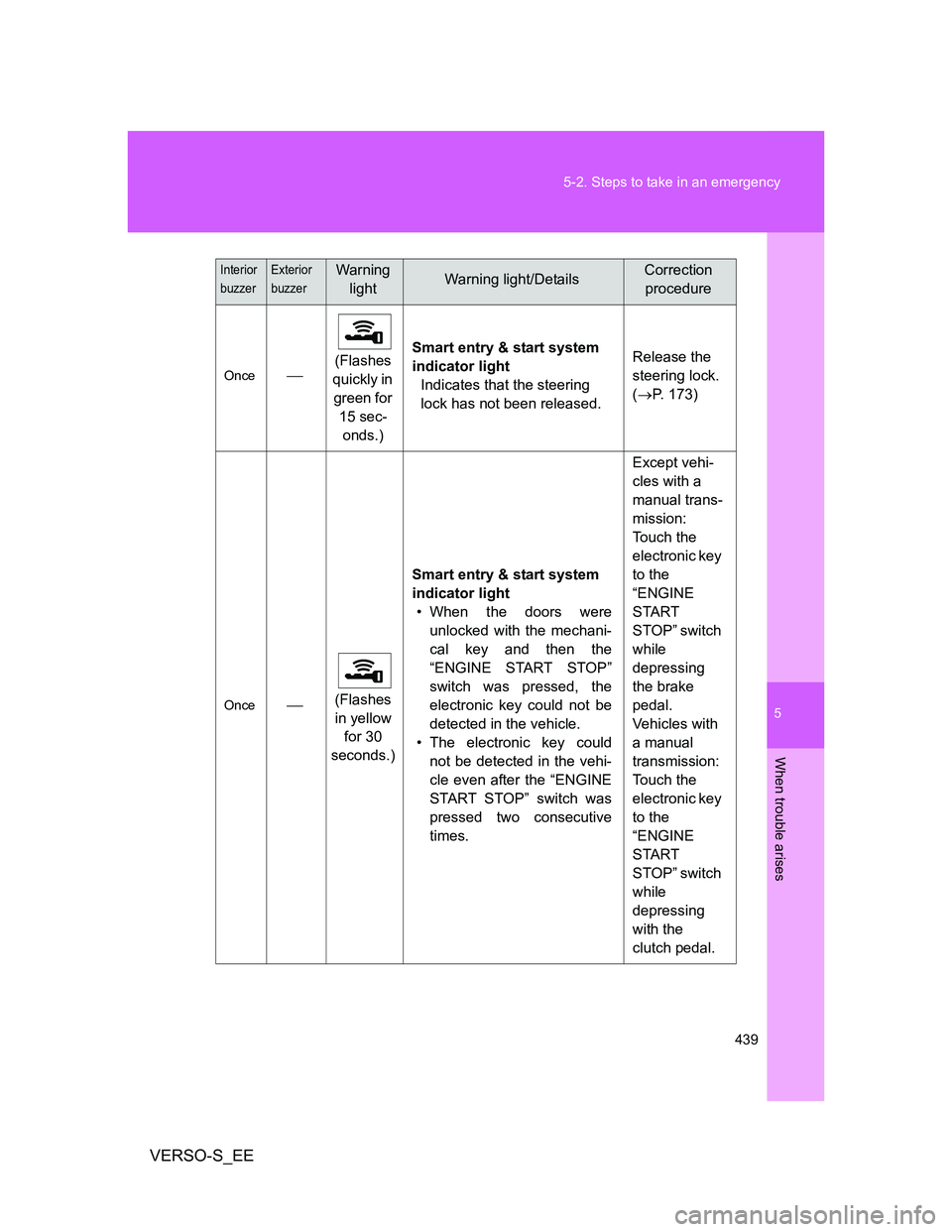
Once(Flashes
quickly in
green for
15 sec-
onds.)Smart entry & start system
indicator light
Indicates that the steering
lock has not been released.Release the
steering lock.
(P. 173)
Once(Flashes
in yellow
for 30
seconds.)Smart entry & start system
indicator light
• When the doors were
unlocked with the mechani-
cal key and then the
“ENGINE START STOP”
switch was pressed, the
electronic key could not be
detected in the vehicle.
• The electronic key could
not be detected in the vehi-
cle even after the “ENGINE
START STOP” switch was
pressed two consecutive
times.Except vehi-
cles with a
manual trans-
mission:
Touch the
electronic key
to the
“ENGINE
START
STOP” switch
while
depressing
the brake
pedal.
Vehicles with
a manual
transmission:
Touch the
electronic key
to the
“ENGINE
START
STOP” switch
while
depressing
with the
clutch pedal.
Interior
buzzerExterior
buzzerWarning
lightWarning light/DetailsCorrection
procedure
Page 477 of 540
5
477
5-2. Steps to take in an emergency
When trouble arises
VERSO-S_EE
If you lose your keys
New genuine Toyota keys can be made by any authorized Toyota
dealer or repairer, and another duly qualified and equipped profes-
sional using the other key and the key number stamped on your key
number plate.
Page 478 of 540
478
5-2. Steps to take in an emergency
VERSO-S_EE
If the electronic key does not operate properly (vehicles with a smart entr y & start system)
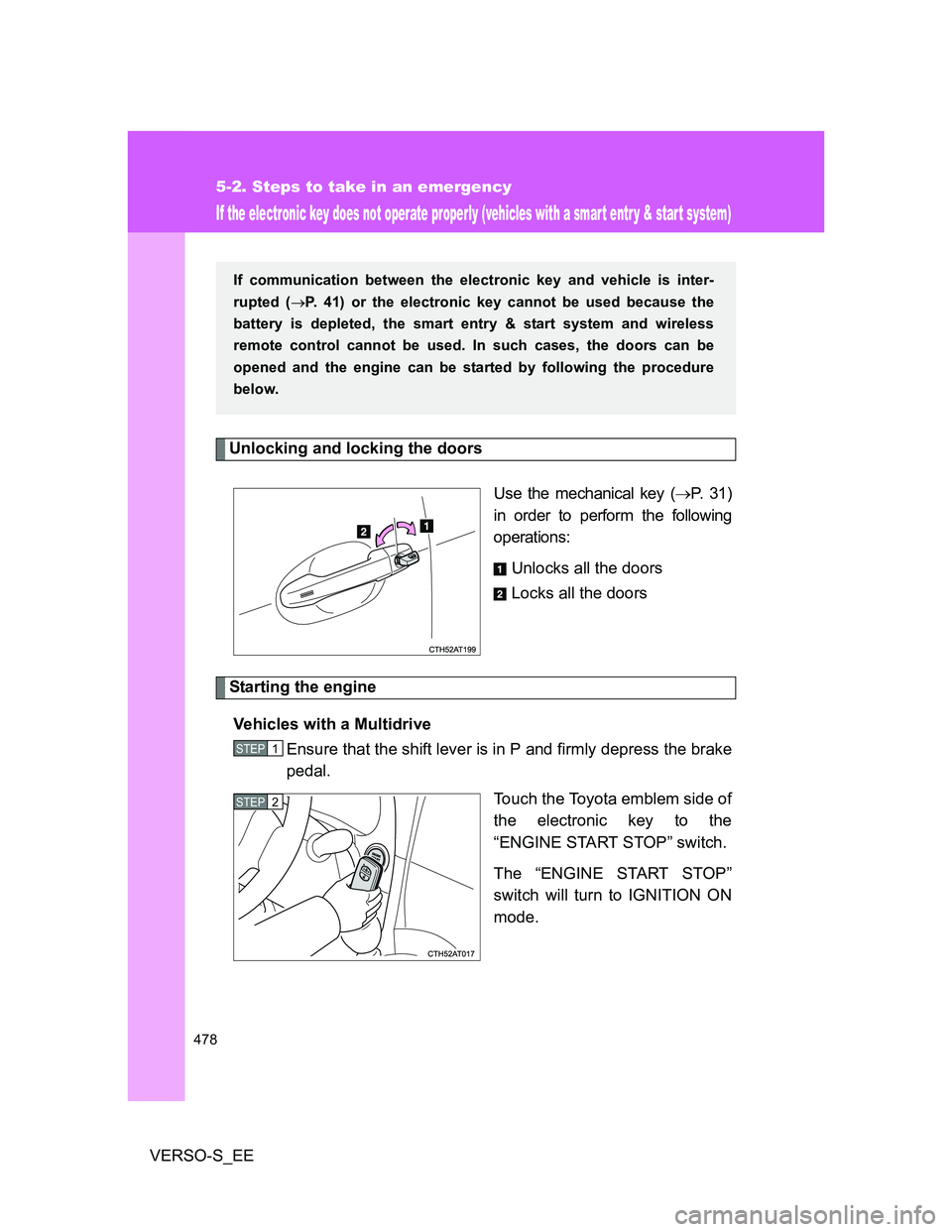
Unlocking and locking the doors
Use the mechanical key (P. 31)
in order to perform the following
operations:
Unlocks all the doors
Locks all the doors
Starting the engine
Vehicles with a Multidrive
Ensure that the shift lever is in P and firmly depress the brake
pedal.
Touch the Toyota emblem side of
the electronic key to the
“ENGINE START STOP” switch.
The “ENGINE START STOP”
switch will turn to IGNITION ON
mode.
If communication between the electronic key and vehicle is inter-
rupted (P. 41) or the electronic key cannot be used because the
battery is depleted, the smart entry & start system and wireless
remote control cannot be used. In such cases, the doors can be
opened and the engine can be started by following the procedure
below.
STEP1
STEP2
Page 479 of 540
5
479 5-2. Steps to take in an emergency
When trouble arises
VERSO-S_EEWhen the smart entry & start system is deactivated in customization
setting, the “ENGINE START STOP” switch will turn to ACCESSORY
mode. Modes can be changed by pressing the “ENGINE START
STOP” switch with the brake pedal released. (The mode changes
each time the switch is pressed.)
Firmly depress the brake pedal and check that the smart entry
& start system indicator light (green) turns on.
Press the “ENGINE START STOP” switch.
In the event that the “ENGINE START STOP” switch still cannot be
operated, contact any authorized Toyota dealer or repairer, or another
duly qualified and equipped professional.
Vehicles with a multi-mode manual transmission
Ensure that the shift lever is in N and firmly depress the brake
pedal.
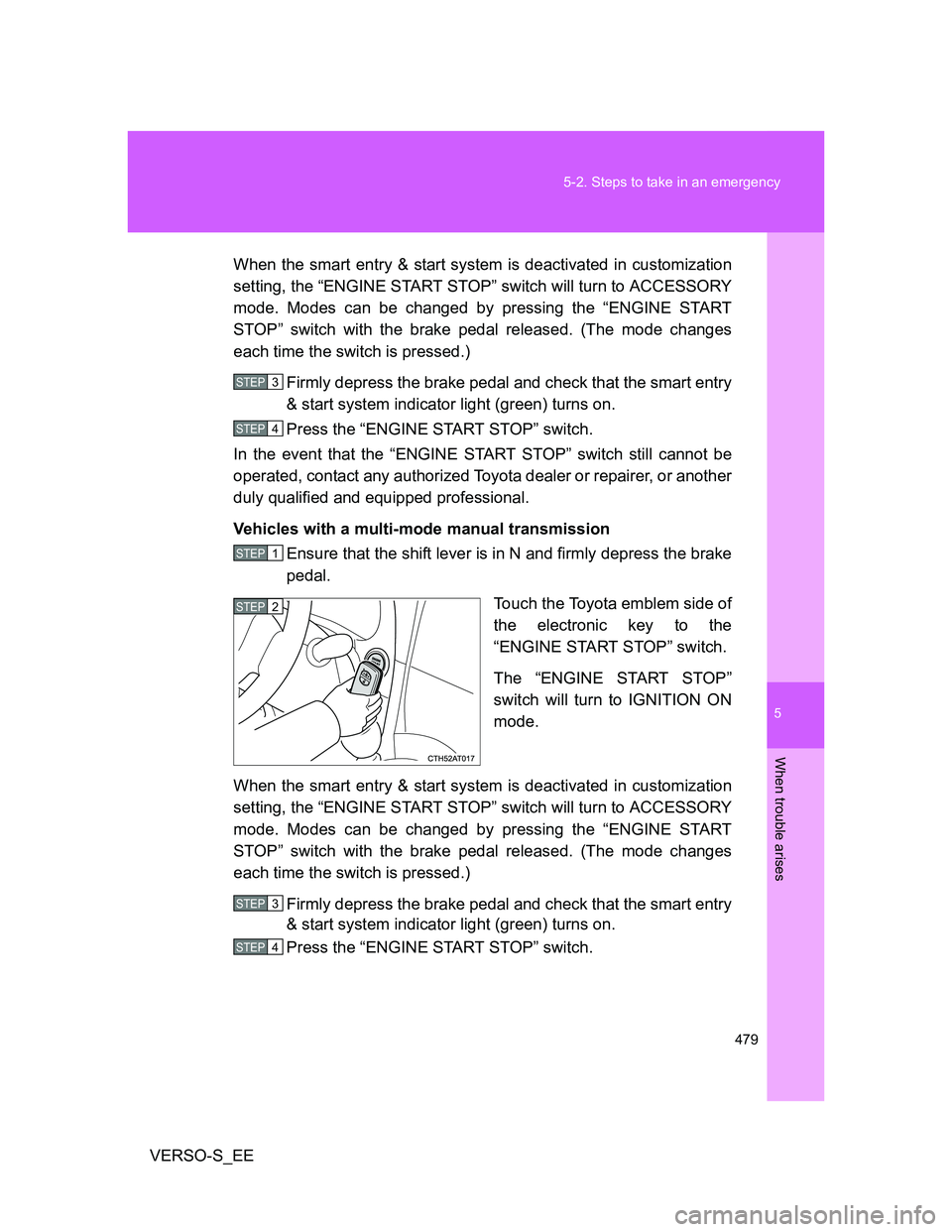
Touch the Toyota emblem side of
the electronic key to the
“ENGINE START STOP” switch.
The “ENGINE START STOP”
switch will turn to IGNITION ON
mode.
When the smart entry & start system is deactivated in customization
setting, the “ENGINE START STOP” switch will turn to ACCESSORY
mode. Modes can be changed by pressing the “ENGINE START
STOP” switch with the brake pedal released. (The mode changes
each time the switch is pressed.)
Firmly depress the brake pedal and check that the smart entry
& start system indicator light (green) turns on.
Press the “ENGINE START STOP” switch.
STEP3
STEP4
STEP1
STEP2
STEP3
STEP4
Page 480 of 540
480 5-2. Steps to take in an emergency
VERSO-S_EEIn the event that the “ENGINE START STOP” switch still cannot be
operated, contact any authorized Toyota dealer or repairer, or another
duly qualified and equipped professional.
Vehicles with a manual transmission
Ensure that the shift lever is in N and depress the clutch
pedal.
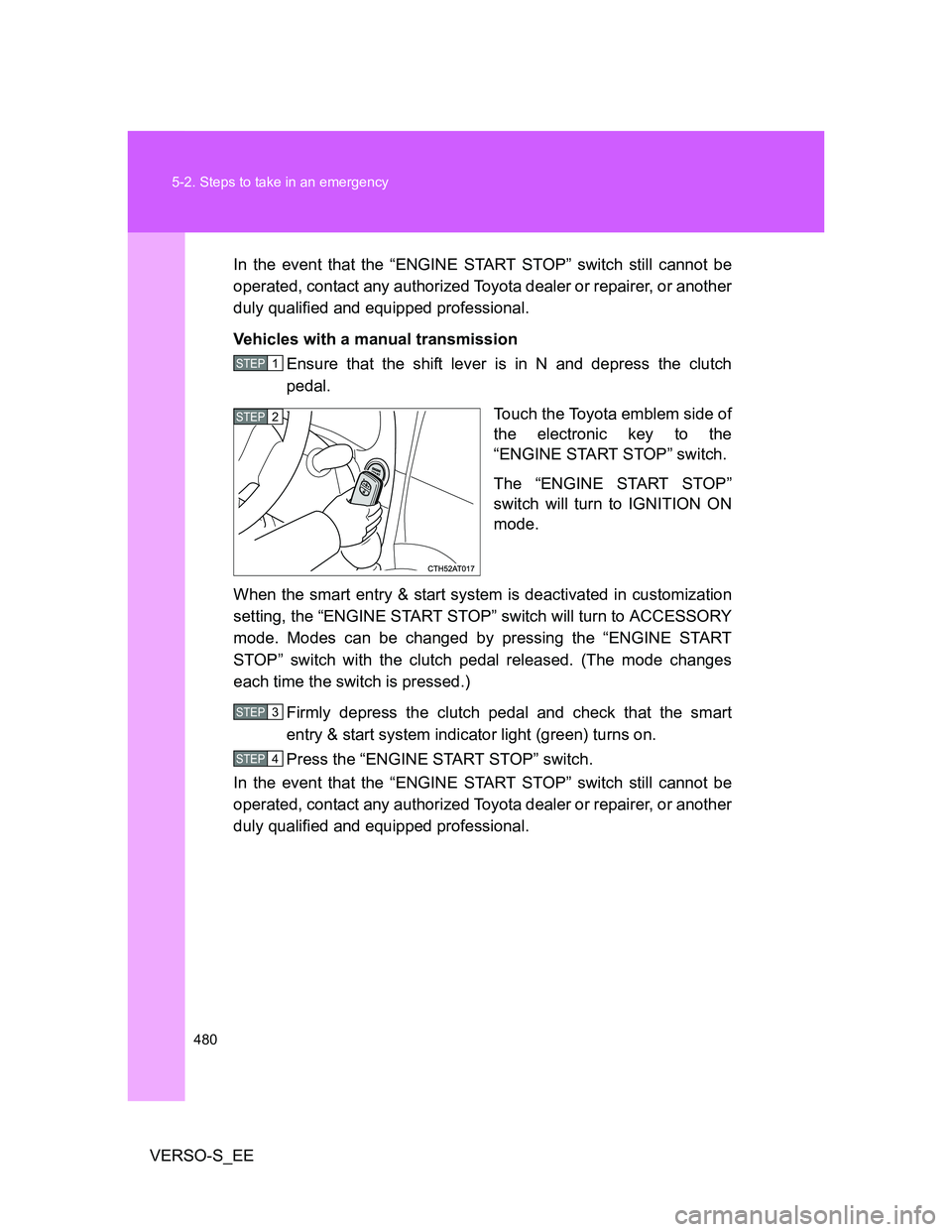
Touch the Toyota emblem side of
the electronic key to the
“ENGINE START STOP” switch.
The “ENGINE START STOP”
switch will turn to IGNITION ON
mode.
When the smart entry & start system is deactivated in customization
setting, the “ENGINE START STOP” switch will turn to ACCESSORY
mode. Modes can be changed by pressing the “ENGINE START
STOP” switch with the clutch pedal released. (The mode changes
each time the switch is pressed.)
Firmly depress the clutch pedal and check that the smart
entry & start system indicator light (green) turns on.
Press the “ENGINE START STOP” switch.
In the event that the “ENGINE START STOP” switch still cannot be
operated, contact any authorized Toyota dealer or repairer, or another
duly qualified and equipped professional.
STEP1
STEP2
STEP3
STEP4
Page 481 of 540
5
481 5-2. Steps to take in an emergency
When trouble arises
VERSO-S_EE
Stopping the engine
Vehicles with a Multidrive: Shift the shift lever to P and press the “ENGINE
START STOP” switch as you normally do when stopping the engine.
Except vehicles with a Multidrive: Shift the shift lever to N and press the
“ENGINE START STOP” switch as you normally do when stopping the
engine.
Replacing the key battery
As the above procedure is a temporary measure, it is recommended that the
electronic key battery be replaced immediately when the battery is depleted.
(P. 387)
Alarm (if equipped)
Using the mechanical key to lock the doors will not set the alarm system.
If a door is unlocked using the mechanical key when the alarm system is set,
the alarm may be triggered. (P. 107)
If the doors cannot be locked or unlocked by the smart entry & start
system
Lock and unlock the doors by the mechanical key or wireless remote control.
When the electronic key does not work properly
Make sure that the smart entry & start system has not been deactivated in
the customization setting. If it is off, turn the function on.
(Customizable features P. 518)
Page 486 of 540
486 5-2. Steps to take in an emergency
VERSO-S_EE
Starting the engine when the battery is discharged (vehicles with a
Multidrive)
The engine cannot be started by push-starting.
To prevent battery discharge
Turn off the headlights and the audio system while the engine is off.
Turn off any unnecessary electrical components when the vehicle is run-
ning at a low speed for an extended period, such as in heavy traffic.
Charging the battery
The electricity stored in the battery will discharge gradually even when the
vehicle is not in use, due to natural discharge and the draining effects of cer-
tain electrical appliances. If the vehicle is left for a long time, the battery may
discharge, and the engine may be unable to start. (The battery recharges
automatically during driving.)
Precautions when the battery is discharged (vehicles with a smart
entry & start system)
In some cases, it may not be possible to unlock the doors using the smart
entry & start system when the battery is discharged. Use the wireless
remote control or the mechanical key to lock or unlock the doors.
The engine may not start on the first attempt after the battery has
recharged but will start normally after the second attempt. This is not a
malfunction.
The “ENGINE START STOP” switch mode is memorized by the vehicle.
When the battery is reconnected, the system will return to the mode it
was in before the battery was discharged. Before disconnecting the bat-
tery, turn the “ENGINE START STOP” switch off.
If you are unsure what mode the “ENGINE START STOP” switch was in
before the battery discharged, be especially careful when reconnecting
the battery.
Once the engine starts, have the vehicle checked at any autho-
rized Toyota dealer or repairer, or another duly qualified and
equipped professional, as soon as possible.
Page 497 of 540
5
497 5-2. Steps to take in an emergency
When trouble arises
VERSO-S_EE
CAUTION
If the engine has to be turned off while driving
Power assist for the brakes and steering wheel will be lost, making the
brake pedal harder to depress and the steering wheel heavier to turn.
Decelerate as much as possible before turning off the engine.
Vehicles without a smart entry & start system: Never attempt to remove
the key, as doing so will lock the steering wheel.
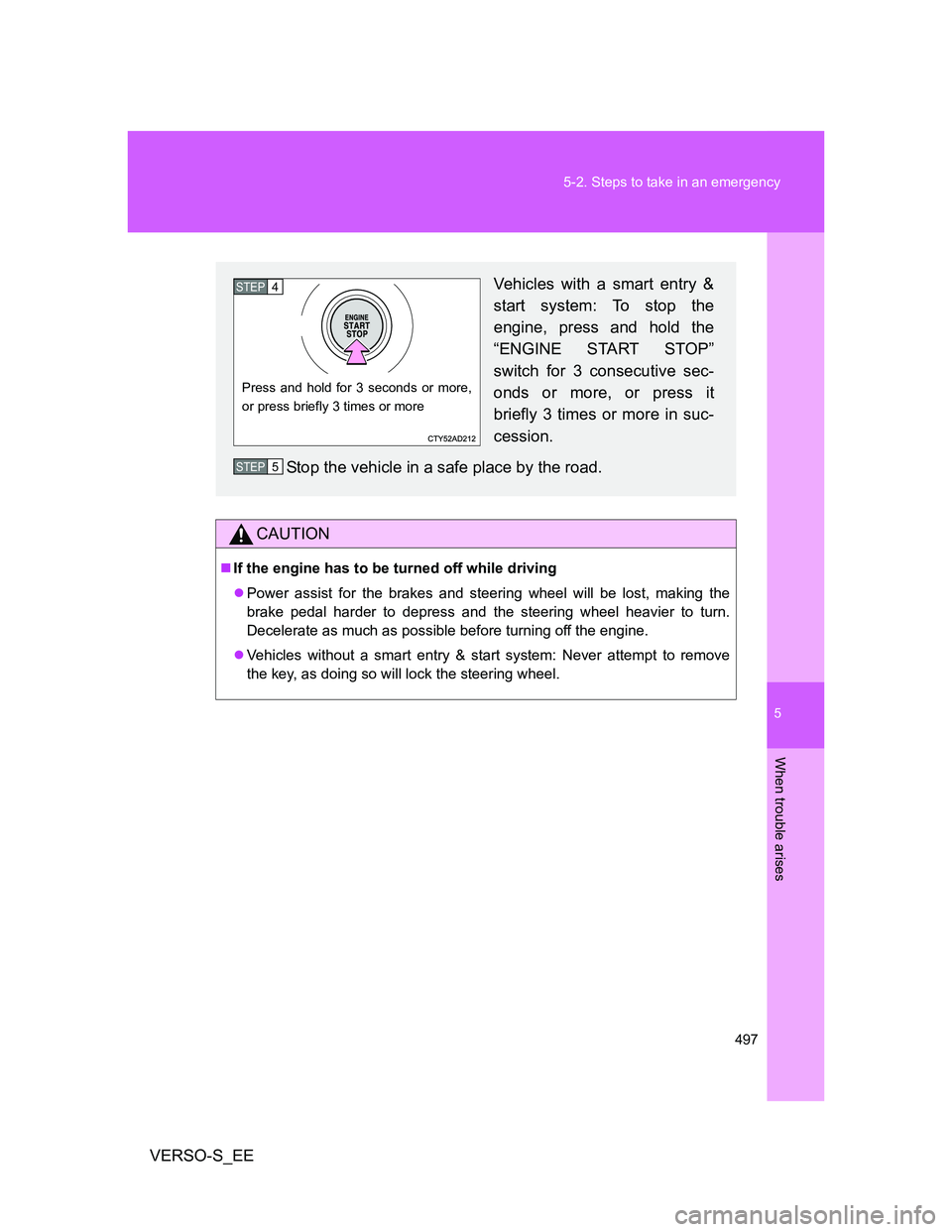
Vehicles with a smart entry &
start system: To stop the
engine, press and hold the
“ENGINE START STOP”
switch for 3 consecutive sec-
onds or more, or press it
briefly 3 times or more in suc-
cession.
Stop the vehicle in a safe place by the road.
Press and hold for 3 seconds or more,
or press briefly 3 times or more
STEP4
STEP5
Page 521 of 540
521 6-2. Customization
6
Vehicle specifications
VERSO-S_EE
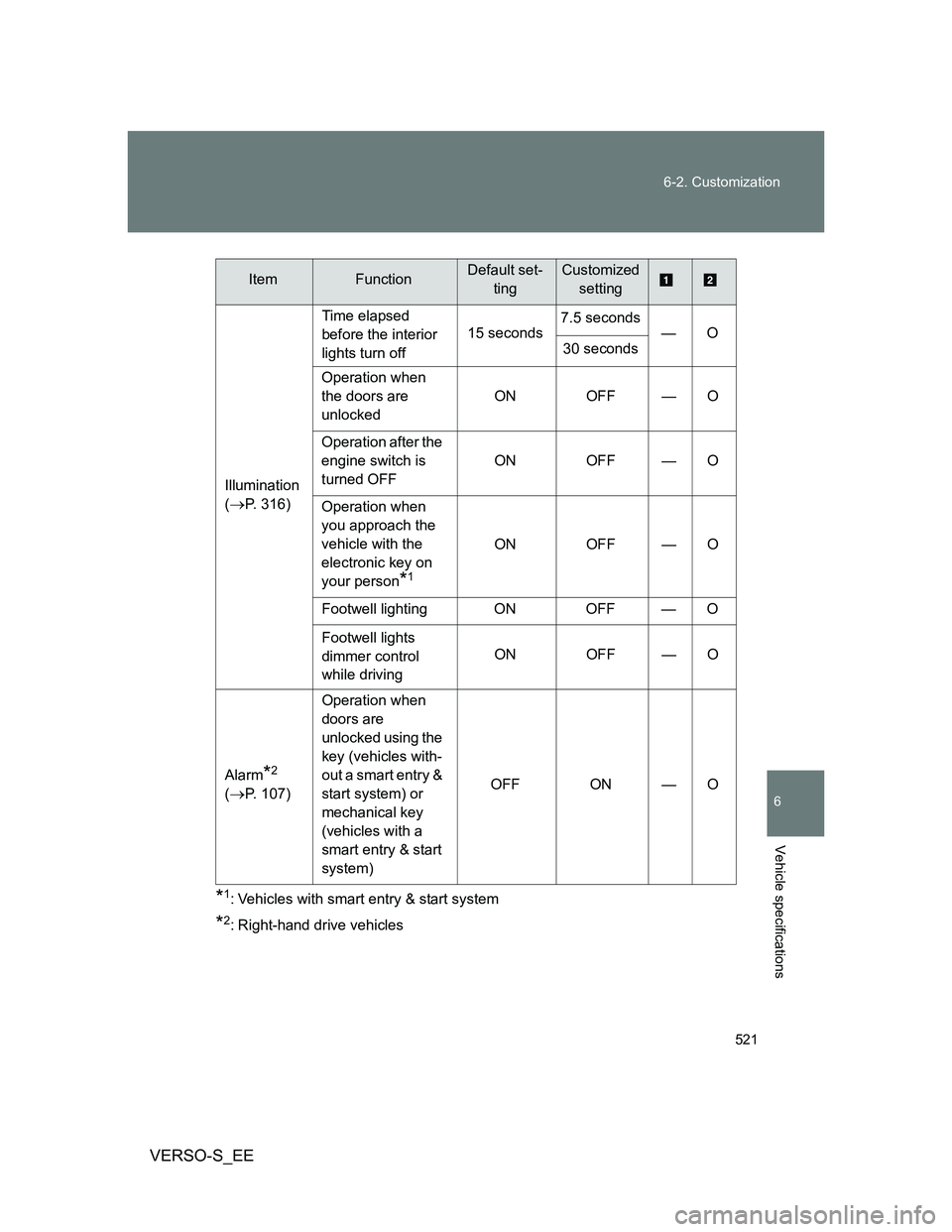
*1: Vehicles with smart entry & start system
*2: Right-hand drive vehicles Illumination
(
P. 316)Time elapsed
before the interior
lights turn off15 seconds7.5 seconds
—O
30 seconds
Operation when
the doors are
unlockedON OFF — O
Operation after the
engine switch is
turned OFFON OFF — O
Operation when
you approach the
vehicle with the
electronic key on
your person
*1
ON OFF — O
Footwell lighting ON OFF — O
Footwell lights
dimmer control
while drivingON OFF — O
Alarm
*2
(P. 107)Operation when
doors are
unlocked using the
key (vehicles with-
out a smart entry &
start system) or
mechanical key
(vehicles with a
smart entry & start
system)OFF ON — O
ItemFunctionDefault set-
tingCustomized
setting