steering TOYOTA VERSO S 2012 Workshop Manual
[x] Cancel search | Manufacturer: TOYOTA, Model Year: 2012, Model line: VERSO S, Model: TOYOTA VERSO S 2012Pages: 540, PDF Size: 17.43 MB
Page 254 of 540
254 2-5. Driving information
VERSO-S_EEIncreasing vehicle-to-vehicle distance
At a speed of 10 km/h (6 mph), the distance to the vehicle running
ahead of you should be equivalent to or greater than the combined
length of your vehicle and trailer. Avoid sudden braking that may
cause skidding. Otherwise, the vehicle may spin out of control.
This is especially true when driving on wet or slippery road sur-
faces.
Sudden acceleration/steering input/cornering
Executing sharp turns when towing may result in the trailer collid-
ing with your vehicle. Decelerate well in advance when approach-
ing turns and take them slowly and carefully to avoid sudden
braking.
Important points regarding turning
The wheels of the trailer will travel closer to the inside of the curve
than the wheels of the vehicle. To make allowance for this, take the
turns wider than you would normally do.
Important points regarding stability
Vehicle movement resulting from uneven road surfaces and strong
crosswinds will affect handling. The vehicle may also be rocked by
passing buses or large trucks. Frequently check behind when mov-
ing alongside such vehicles. As soon as such vehicle movement
occurs, immediately start to decelerate smoothly by slowly apply-
ing the brakes. Always steer the vehicle straight ahead while brak-
ing.
Passing other vehicles
Consider the total combined length of your vehicle and trailer and
ensure that the vehicle-to-vehicle distance is sufficient before exe-
cuting lane changes.
Page 257 of 540
3Interior features
257
VERSO-S_EE
3-1. Using the air conditioning
system and defogger
Manual air conditioning
system ............................ 258
Automatic air conditioning
system ............................ 264
Power heater .................... 270
Rear window and
outside rear view
mirror defoggers ............. 272
3-2. Using the audio system
Audio system types .......... 274
Using the radio ................. 278
Using the CD player ......... 282
Playing back MP3 and
WMA discs...................... 287
Operating an iPod............. 294
Operating a USB
memory........................... 302
Optimal use of the audio
system ............................ 310
Using the AUX port ........... 312
Using the steering wheel
audio switches ................ 3133-3. Using the interior lights
Interior lights list ................ 316
• Personal lights ................ 317
• Personal/interior lights .... 317
• Interior light ..................... 318
3-4. Using the storage
features
List of storage features ..... 319
• Auxiliary box ................... 320
• Glove box ....................... 320
• Bottle holders.................. 322
• Tray ................................ 323
• Cup holders .................... 324
3-5. Other interior features
Sun visors ......................... 325
Vanity mirrors.................... 326
Clock ................................. 327
Outside temperature
display ............................ 328
Power outlets .................... 329
Seat heaters ..................... 331
Armrests ........................... 333
Panoramic roof shade....... 334
Floor mat........................... 337
Luggage compartment
features........................... 339
Page 274 of 540
274
VERSO-S_EE
3-2. Using the audio system
Audio system types
: If equipped
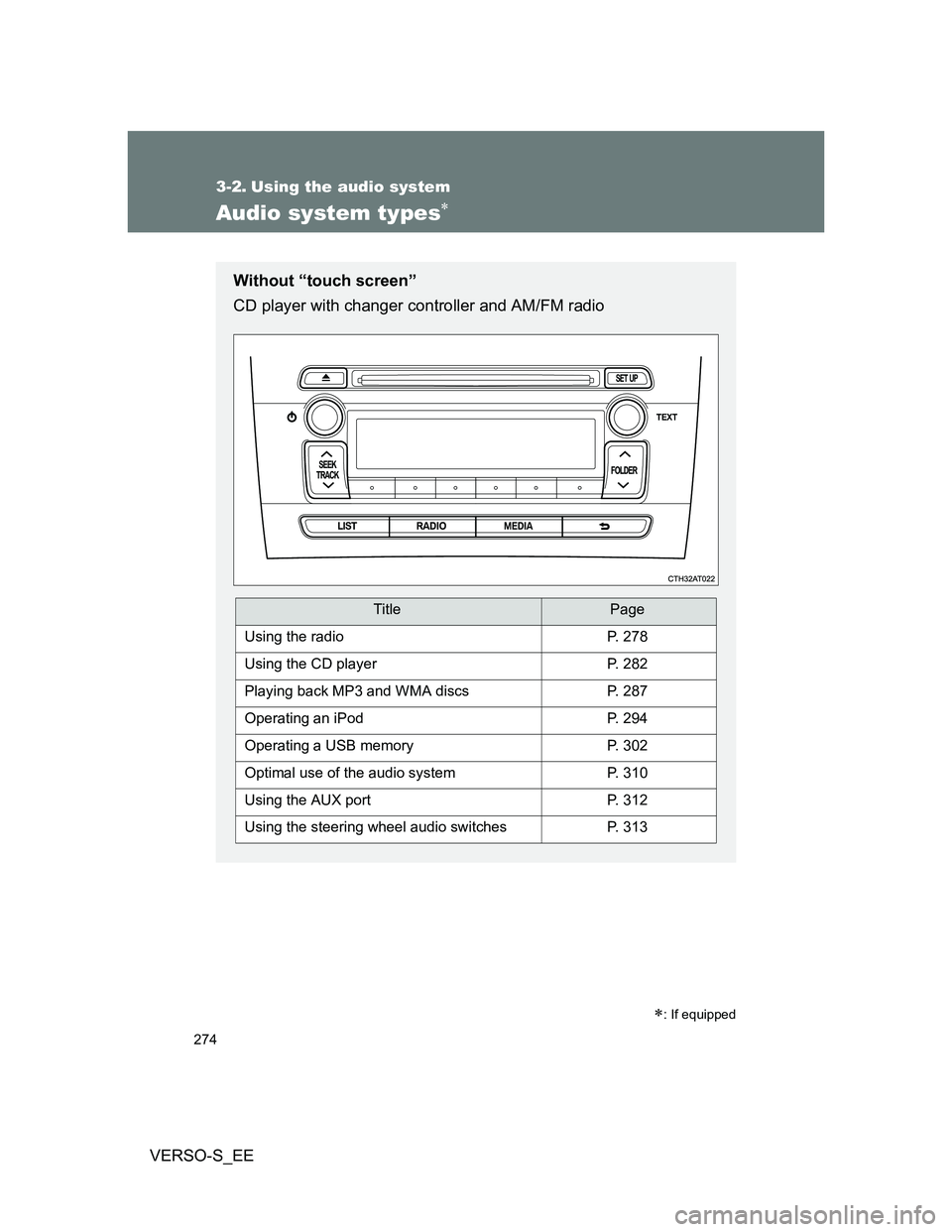
Without “touch screen”
CD player with changer controller and AM/FM radio
TitlePage
Using the radioP. 278
Using the CD playerP. 282
Playing back MP3 and WMA discsP. 287
Operating an iPodP. 294
Operating a USB memoryP. 302
Optimal use of the audio systemP. 310
Using the AUX portP. 312
Using the steering wheel audio switchesP. 313
Page 313 of 540
313
3-2. Using the audio system
3
Interior features
VERSO-S_EE
Using the steering wheel audio switches
Turning on the power
Press when the audio system is turned off.
Changing the audio source
Press when the audio system is turned on. The audio source
changes as follows each time is pressed.
AMFMCD modeiPod or USB memory mode*
AUX*AM
*: If equipped
: If equipped
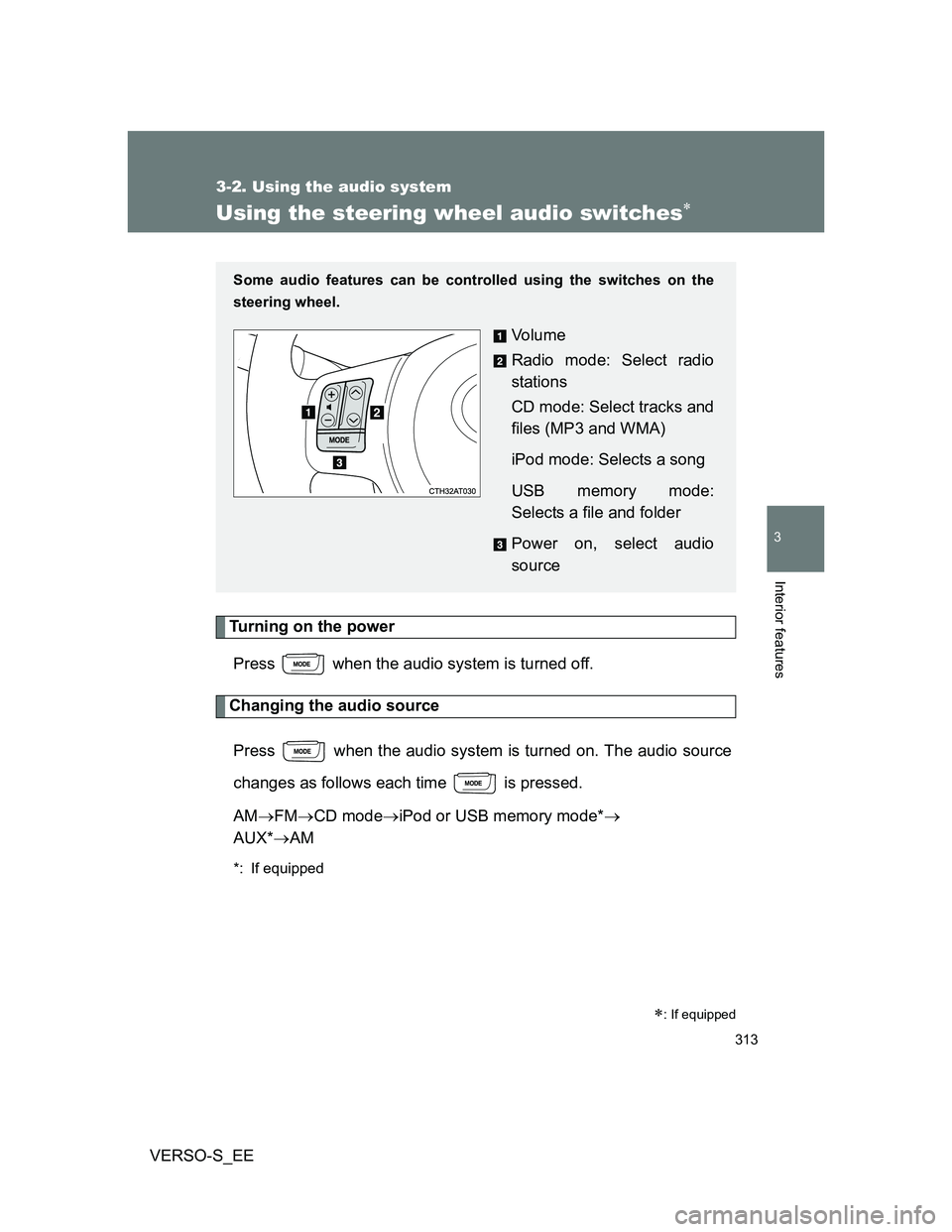
Some audio features can be controlled using the switches on the
steering wheel.
Vo l u m e
Radio mode: Select radio
stations
CD mode: Select tracks and
files (MP3 and WMA)
iPod mode: Selects a song
USB memory mode:
Selects a file and folder
Power on, select audio
source
Page 315 of 540
315 3-2. Using the audio system
3
Interior features
VERSO-S_EE
CAUTION
To reduce the risk of an accident
Exercise care when operating the audio switches on the steering wheel.
Page 399 of 540
399 4-3. Do-it-yourself maintenance
4
Maintenance and care
VERSO-S_EE
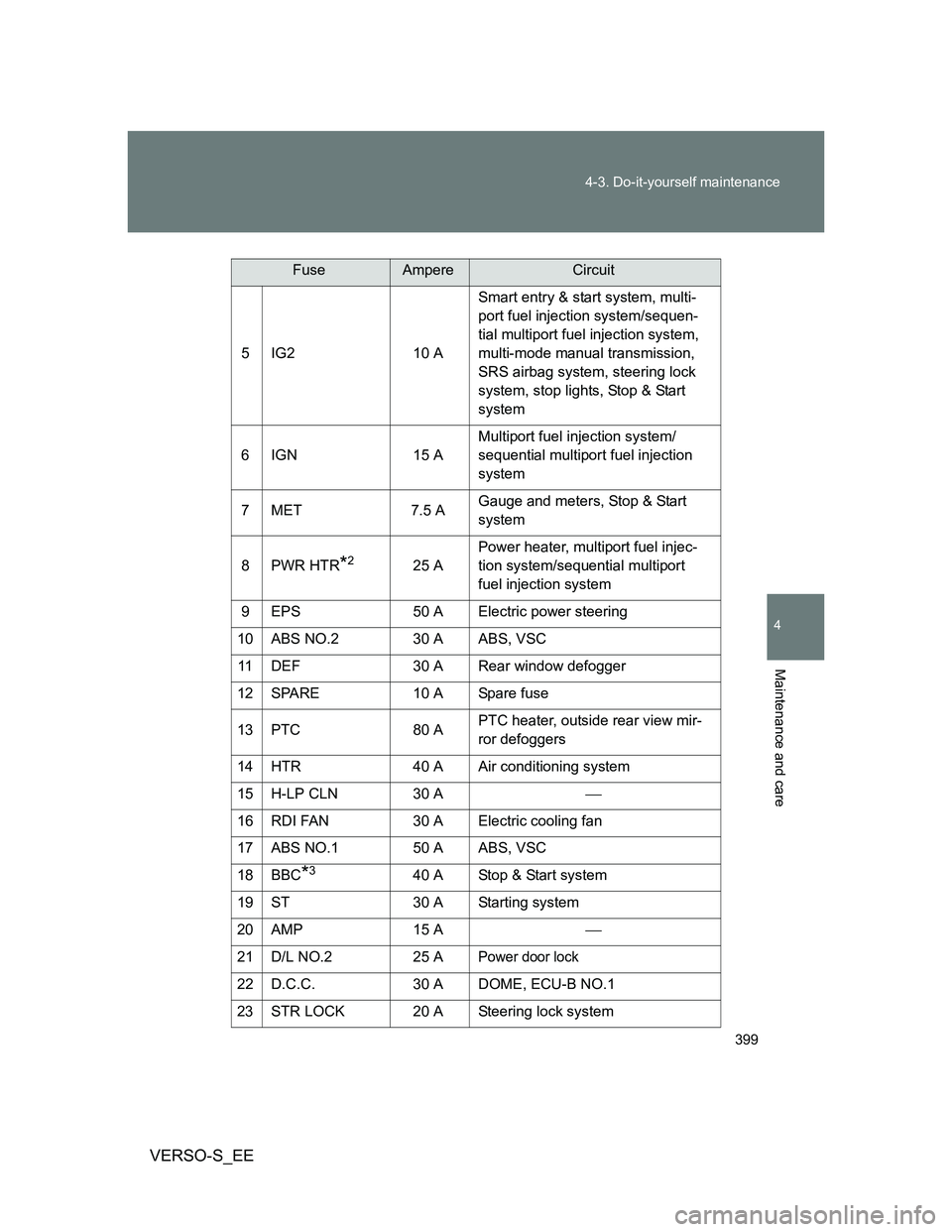
5IG2 10 ASmart entry & start system, multi-
port fuel injection system/sequen-
tial multiport fuel injection system,
multi-mode manual transmission,
SRS airbag system, steering lock
system, stop lights, Stop & Start
system
6IGN 15 AMultiport fuel injection system/
sequential multiport fuel injection
system
7MET 7.5 AGauge and meters, Stop & Start
system
8PWR HTR
*225 APower heater, multiport fuel injec-
tion system/sequential multiport
fuel injection system
9 EPS 50 A Electric power steering
10 ABS NO.2 30 A ABS, VSC
11 DEF 30 A Rear window defogger
12 SPARE 10 A Spare fuse
13 PTC 80 APTC heater, outside rear view mir-
ror defoggers
14 HTR 40 A Air conditioning system
15 H-LP CLN 30 A
16 RDI FAN 30 A Electric cooling fan
17 ABS NO.1 50 A ABS, VSC
18 BBC
*340 A Stop & Start system
19 ST 30 A Starting system
20 AMP 15 A
21 D/L NO.2 25 A
Power door lock
22 D.C.C. 30 A DOME, ECU-B NO.1
23 STR LOCK 20 A Steering lock system
FuseAmpereCircuit
Page 404 of 540
404 4-3. Do-it-yourself maintenance
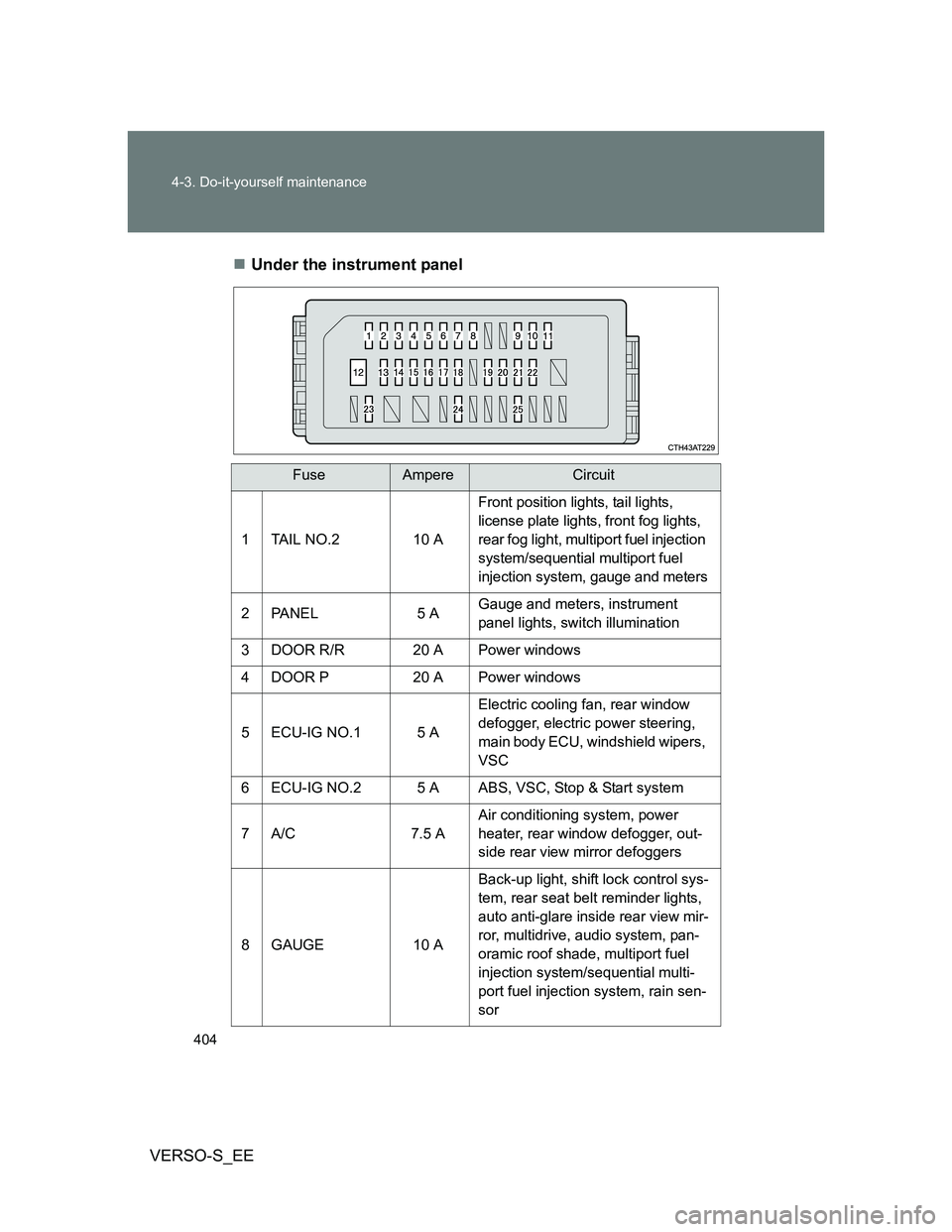
VERSO-S_EEUnder the instrument panel
FuseAmpereCircuit
1 TAIL NO.2 10 A
Front position lights, tail lights,
license plate lights, front fog lights,
rear fog light, multiport fuel injection
system/sequential multiport fuel
injection system, gauge and meters
2 PANEL 5 AGauge and meters, instrument
panel lights, switch illumination
3 DOOR R/R 20 A Power windows
4 DOOR P 20 A Power windows
5 ECU-IG NO.1 5 AElectric cooling fan, rear window
defogger, electric power steering,
main body ECU, windshield wipers,
VSC
6 ECU-IG NO.2 5 A ABS, VSC, Stop & Start system
7A/C 7.5 AAir conditioning system, power
heater, rear window defogger, out-
side rear view mirror defoggers
8 GAUGE 10 ABack-up light, shift lock control sys-
tem, rear seat belt reminder lights,
auto anti-glare inside rear view mir-
ror, multidrive, audio system, pan-
oramic roof shade, multiport fuel
injection system/sequential multi-
port fuel injection system, rain sen-
sor
Page 420 of 540
420 5-1. Essential information
VERSO-S_EE
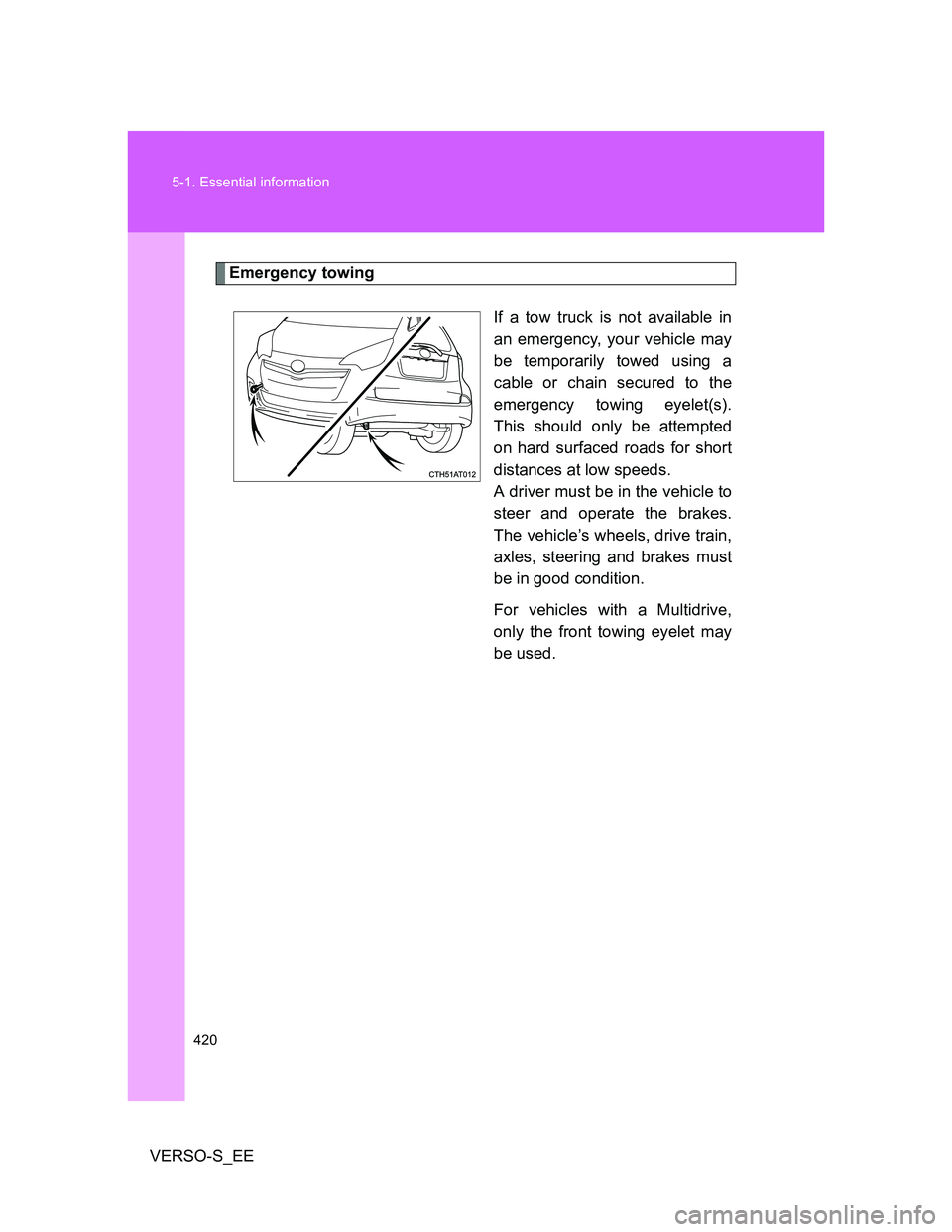
Emergency towing
If a tow truck is not available in
an emergency, your vehicle may
be temporarily towed using a
cable or chain secured to the
emergency towing eyelet(s).
This should only be attempted
on hard surfaced roads for short
distances at low speeds.
A driver must be in the vehicle to
steer and operate the brakes.
The vehicle’s wheels, drive train,
axles, steering and brakes must
be in good condition.
For vehicles with a Multidrive,
only the front towing eyelet may
be used.
Page 425 of 540
5
425 5-1. Essential information
When trouble arises
VERSO-S_EE
CAUTION
Caution while towing
Use extreme caution when towing the vehicle.
Avoid sudden starts or erratic driving maneuvers which place excessive
stress on the emergency towing eyelets and the cables or chains. Always
be cautious of the surroundings and other vehicles while towing.
Vehicles with a smart entry & start system: Do not turn the “ENGINE
START STOP” switch off.
Doing so will lock the steering wheel and prevent operation, possibly caus-
ing an accident and resulting in death or serious injury.
If the engine is not running, the power assist for the brakes and steering
will not function, making steering and braking more difficult.
Installing towing eyelet to the vehicle
Make sure that towing eyelet is installed securely.
If not securely installed, towing eyelet may come loose during towing. This
may lead to accidents that cause serious injury or even death.
Page 426 of 540
426 5-1. Essential information
VERSO-S_EE
NOTICE
To prevent causing serious damage to the transmission when towing
using a wheel-lift type truck (vehicles with a Multidrive)
Never tow this vehicle from the rear with the front wheels on the ground.
To prevent causing serious damage to the Stop & Start system when
towing (vehicles with Stop & Start system)
Never tow this vehicle with four wheels on the ground. Use a flatbed truck, or
lift up front or rear of the vehicle by using a wheel-lift type truck.
To prevent damage to the vehicle when towing using a wheel-lift type
truck (vehicles with a Multidrive)
When raising the vehicle, ensure adequate ground clearance for towing at
the opposite end of the raised vehicle. Without adequate clearance, the
vehicle could be damaged while being towed.
To prevent damage to the vehicle when towing using a wheel-lift type
truck (except vehicles with a Multidrive)
Vehicles without a smart entry & start system: Do not tow the vehicle from
the rear when the engine switch is in the “LOCK” position or the key is
removed. The steering lock mechanism is not strong enough to hold the
front wheels straight.
Vehicles with a smart entry & start system: Do not tow the vehicle from the
rear when the “ENGINE START STOP” switch is off. The steering lock
mechanism is not strong enough to hold the front wheels straight.
When raising the vehicle, ensure adequate ground clearance for towing at
the opposite end of the raised vehicle. Without adequate clearance, the
vehicle could be damaged while being towed.
To prevent body damage when towing with a sling-type truck
Do not tow with a sling-type truck, either from the front or rear.
To prevent causing serious damage to the transmission in emergency
towing
Vehicles with a Multidrive, never tow a vehicle from the rear with four wheels
on the ground. This may cause serious damage to the transmission.