ignition TOYOTA VERSO S 2012 Owners Manual
[x] Cancel search | Manufacturer: TOYOTA, Model Year: 2012, Model line: VERSO S, Model: TOYOTA VERSO S 2012Pages: 540, PDF Size: 17.43 MB
Page 2 of 540
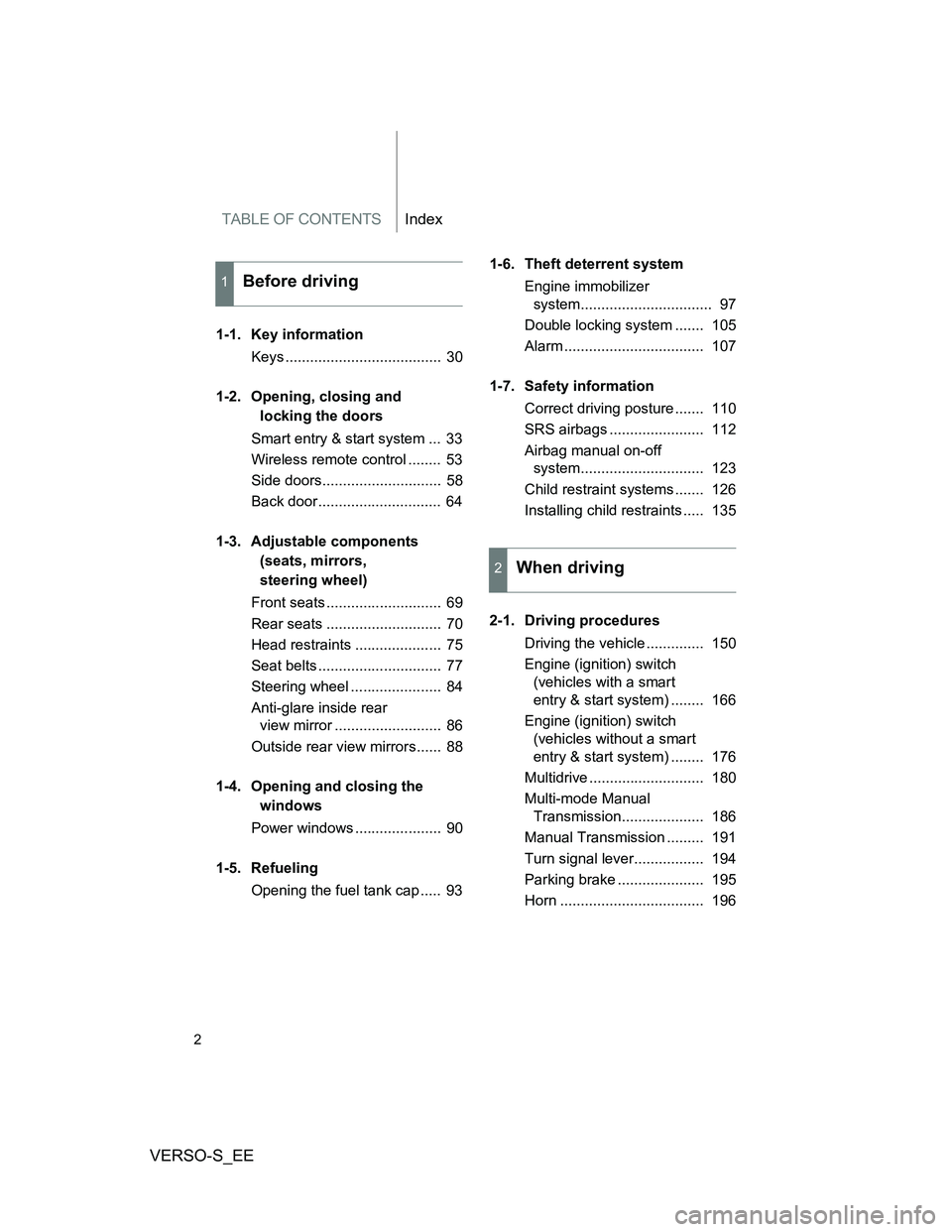
TABLE OF CONTENTSIndex
VERSO-S_EE
2
1-1. Key information
Keys ...................................... 30
1-2. Opening, closing and
locking the doors
Smart entry & start system ... 33
Wireless remote control ........ 53
Side doors............................. 58
Back door.............................. 64
1-3. Adjustable components
(seats, mirrors,
steering wheel)
Front seats ............................ 69
Rear seats ............................ 70
Head restraints ..................... 75
Seat belts .............................. 77
Steering wheel ...................... 84
Anti-glare inside rear
view mirror .......................... 86
Outside rear view mirrors...... 88
1-4. Opening and closing the
windows
Power windows ..................... 90
1-5. Refueling
Opening the fuel tank cap ..... 931-6. Theft deterrent system
Engine immobilizer
system................................ 97
Double locking system ....... 105
Alarm .................................. 107
1-7. Safety information
Correct driving posture ....... 110
SRS airbags ....................... 112
Airbag manual on-off
system.............................. 123
Child restraint systems ....... 126
Installing child restraints ..... 135
2-1. Driving procedures
Driving the vehicle .............. 150
Engine (ignition) switch
(vehicles with a smart
entry & start system) ........ 166
Engine (ignition) switch
(vehicles without a smart
entry & start system) ........ 176
Multidrive ............................ 180
Multi-mode Manual
Transmission.................... 186
Manual Transmission ......... 191
Turn signal lever................. 194
Parking brake ..................... 195
Horn ................................... 196
1Before driving
2When driving
Page 13 of 540
VERSO-S_EE
13
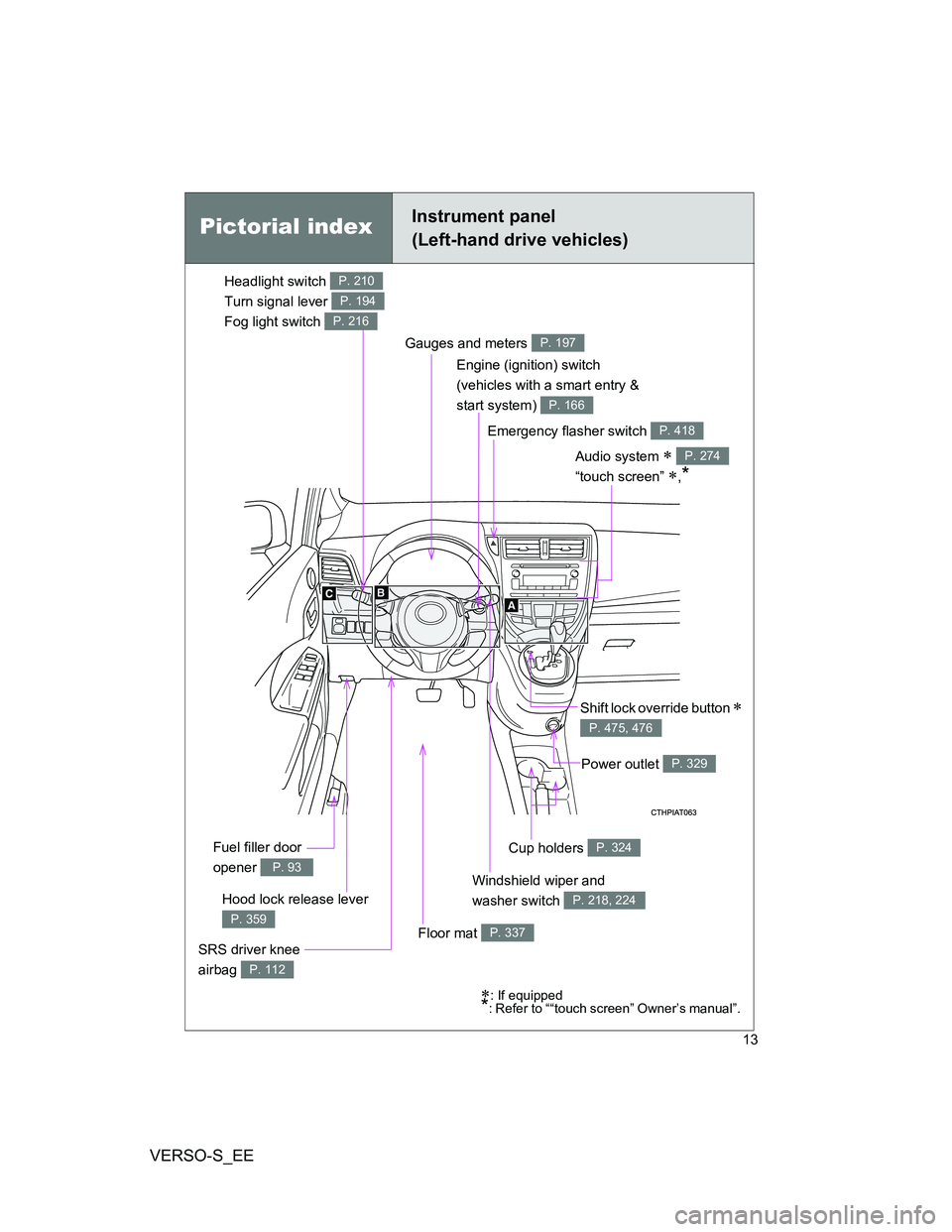
: If equipped*: Refer to ““touch screen” Owner’s manual”.
Emergency flasher switch P. 418
Cup holders P. 324
Windshield wiper and
washer switch
P. 218, 224Hood lock release lever
P. 359
Gauges and meters P. 197
Audio system
“touch screen”
,*
P. 274
Shift lock override button
P. 475, 476
SRS driver knee
airbag
P. 112
Fuel filler door
opener
P. 93
Engine (ignition) switch
(vehicles with a smart entry &
start system)
P. 166
Floor mat P. 337
Power outlet P. 329
Pictorial indexInstrument panel
(Left-hand drive vehicles)
Headlight switch
Turn signal lever
Fog light switch P. 210
P. 194
P. 216
Page 15 of 540
VERSO-S_EE
15
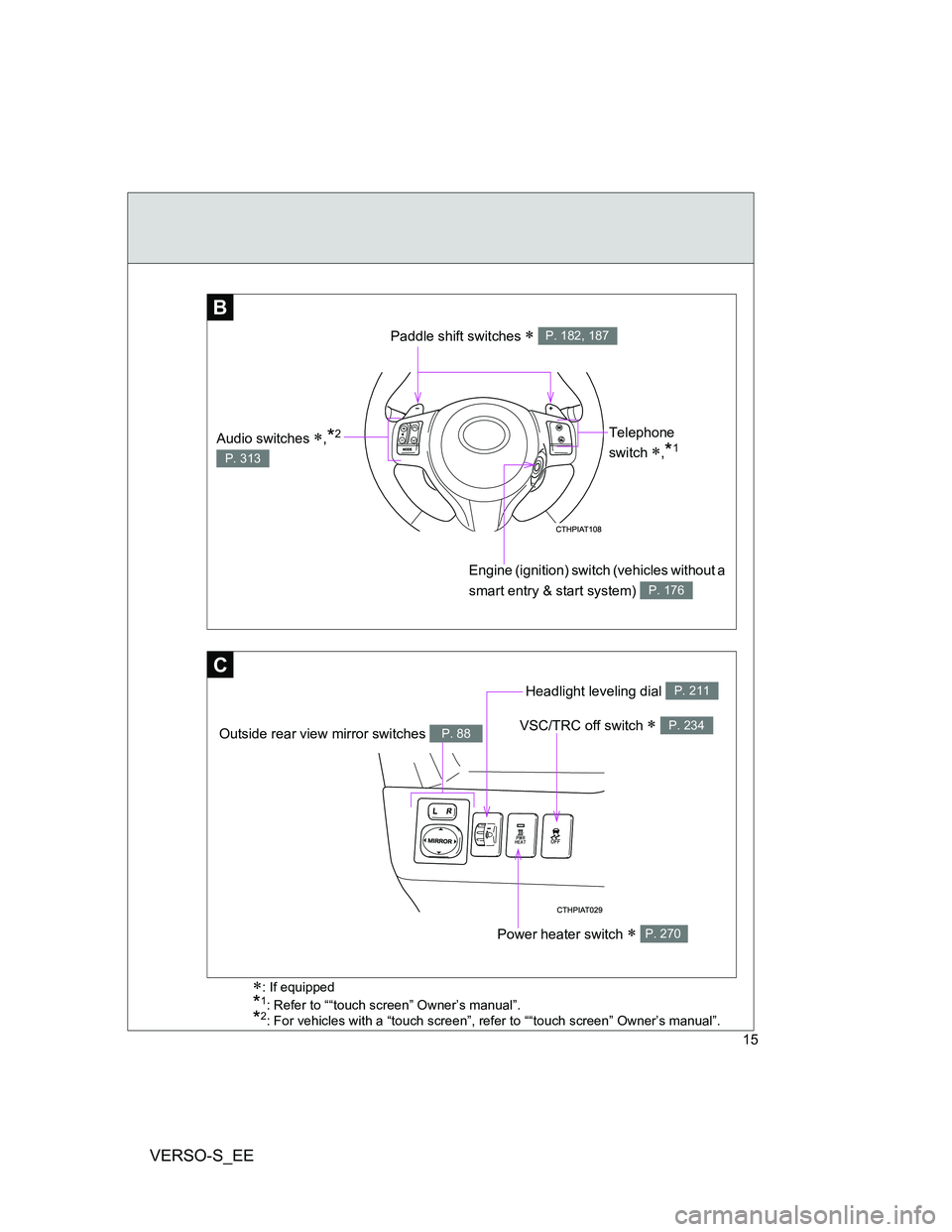
B
Telephone
switch
,*1
Engine (ignition) switch (vehicles without a
smart entry & start system)
P. 176
Paddle shift switches P. 182, 187
Audio switches ,*2
P. 313
C
VSC/TRC off switch P. 234
Headlight leveling dial P. 211
Power heater switch P. 270
Outside rear view mirror switches P. 88
: If equipped
*1: Refer to ““touch screen” Owner’s manual”.
*2: For vehicles with a “touch screen”, refer to ““touch screen” Owner’s manual”.
Page 21 of 540
VERSO-S_EE
21
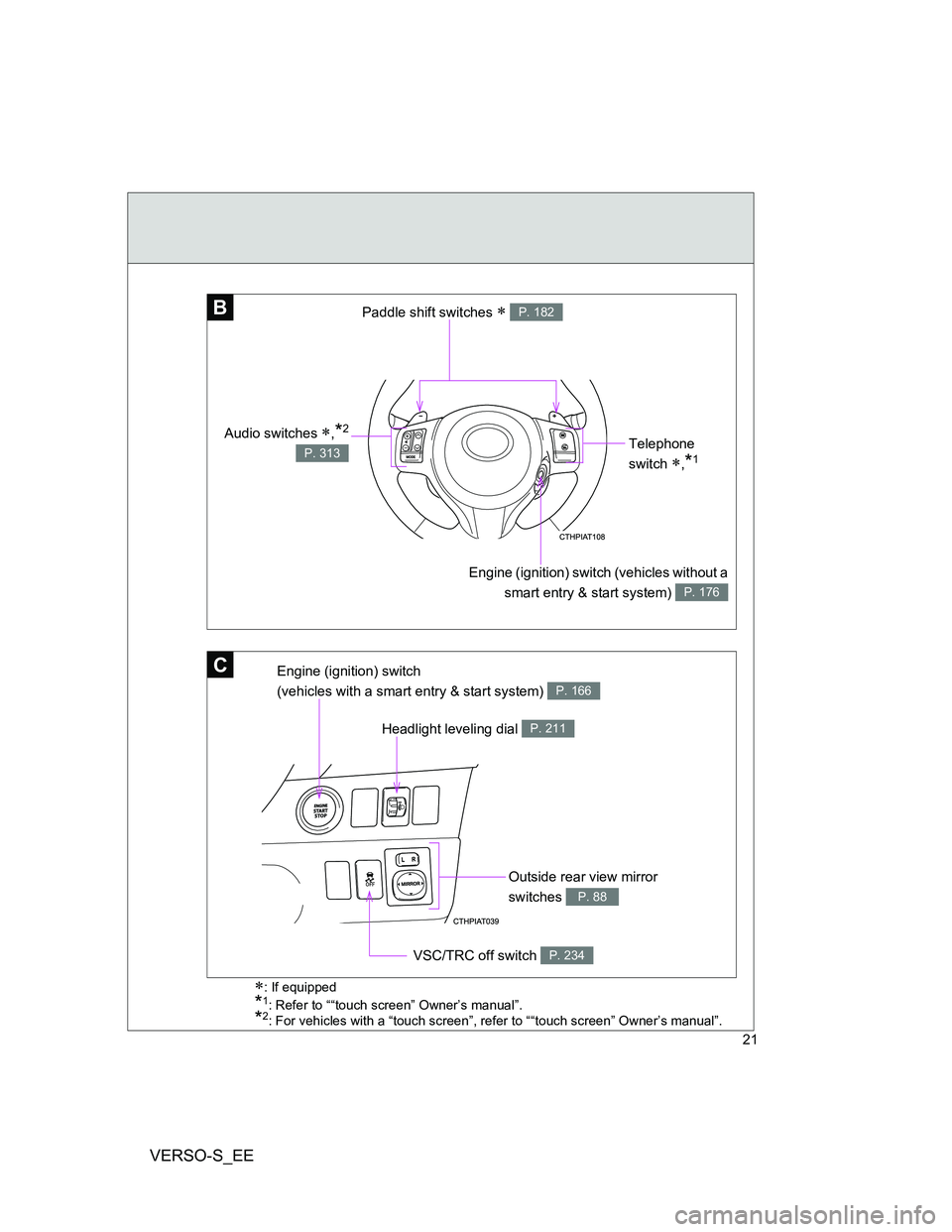
B
Telephone
switch
,*1
Engine (ignition) switch (vehicles without a
smart entry & start system)
P. 176
Paddle shift switches P. 182
Audio switches ,*2
P. 313
C
Headlight leveling dial P. 211
Outside rear view mirror
switches
P. 88
VSC/TRC off switch P. 234
Engine (ignition) switch
(vehicles with a smart entry & start system)
P. 166
: If equipped
*1: Refer to ““touch screen” Owner’s manual”.
*2: For vehicles with a “touch screen”, refer to ““touch screen” Owner’s manual”.
Page 59 of 540
59 1-2. Opening, closing and locking the doors
1
Before driving
VERSO-S_EE
Locking the front doors from the outside without a key
Move the inside lock button to the lock position.
Close the door while pulling the door handle.
Vehicles without a smart entry & start system
The door cannot be locked if the key is in the engine switch.
Vehicles with a smart entry & start system
The door cannot be locked if the “ENGINE START STOP” switch is in
ACCESSORY or IGNITION ON mode, or the electronic key is left
inside the vehicle.
The key may not be detected correctly and the door may be locked.
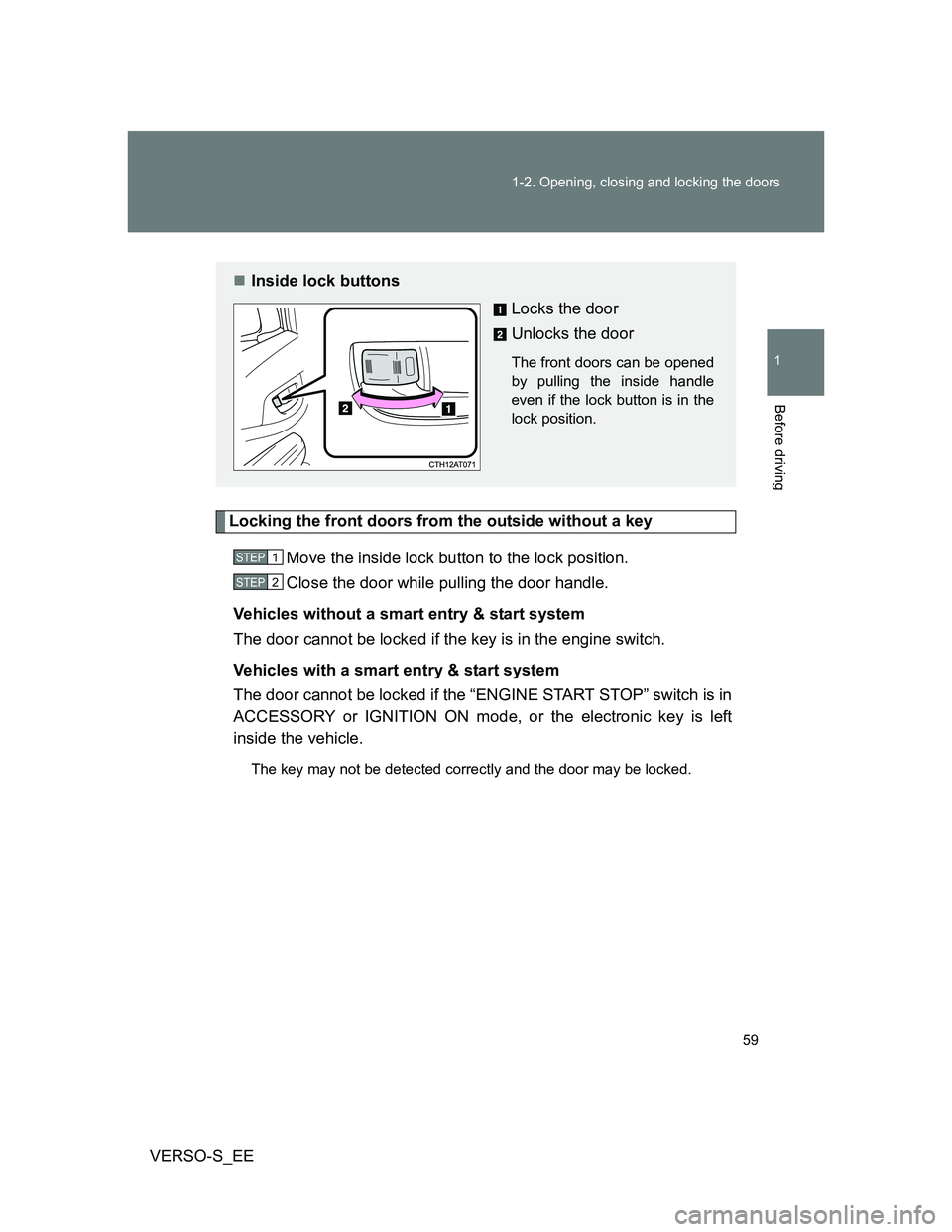
Inside lock buttons
Locks the door
Unlocks the door
The front doors can be opened
by pulling the inside handle
even if the lock button is in the
lock position.
STEP1
STEP2
Page 61 of 540
61 1-2. Opening, closing and locking the doors
1
Before driving
VERSO-S_EE
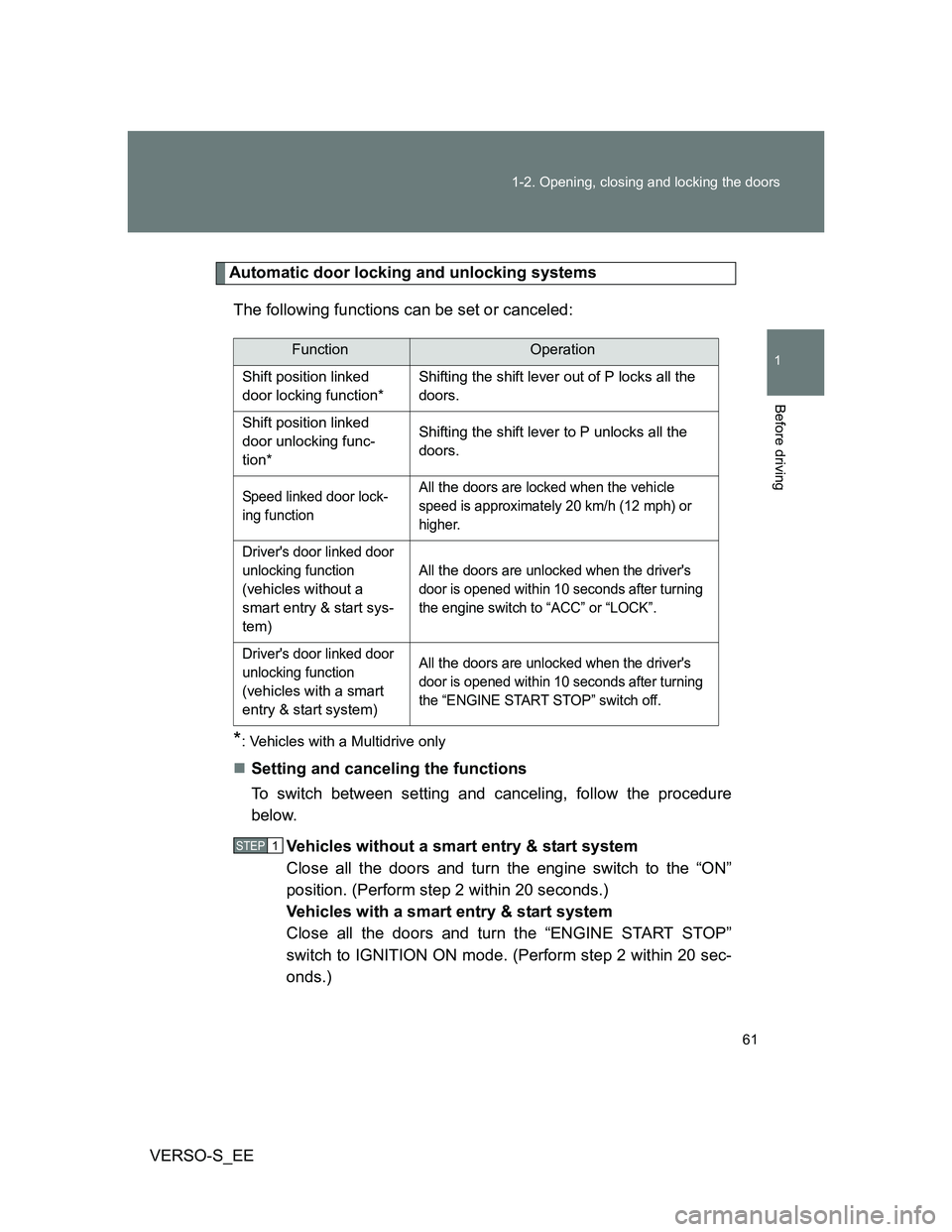
Automatic door locking and unlocking systems
The following functions can be set or canceled:
*: Vehicles with a Multidrive only
Setting and canceling the functions
To switch between setting and canceling, follow the procedure
below.
Vehicles without a smart entry & start system
Close all the doors and turn the engine switch to the “ON”
position. (Perform step 2 within 20 seconds.)
Vehicles with a smart entry & start system
Close all the doors and turn the “ENGINE START STOP”
switch to IGNITION ON mode. (Perform step 2 within 20 sec-
onds.)
FunctionOperation
Shift position linked
door locking function*Shifting the shift lever out of P locks all the
doors.
Shift position linked
door unlocking func-
tion*Shifting the shift lever to P unlocks all the
doors.
Speed linked door lock-
ing functionAll the doors are locked when the vehicle
speed is approximately 20 km/h (12 mph) or
higher.
Driver's door linked door
unlocking function
(
vehicles without a
smart entry & start sys-
tem
)All
the doors are unlocked when the driver's
door is opened within 10 seconds after turning
the engine switch to “ACC” or “LOCK”.
Driver's door linked door
unlocking function
(
vehicles with a smart
entry & start system
)All
the doors are unlocked when the driver's
door is opened within 10 seconds after turning
the “ENGINE START STOP” switch off.
STEP1
Page 86 of 540
86
1-3. Adjustable components (seats, mirrors, steering wheel)
VERSO-S_EE
Anti-glare inside rear view mirror
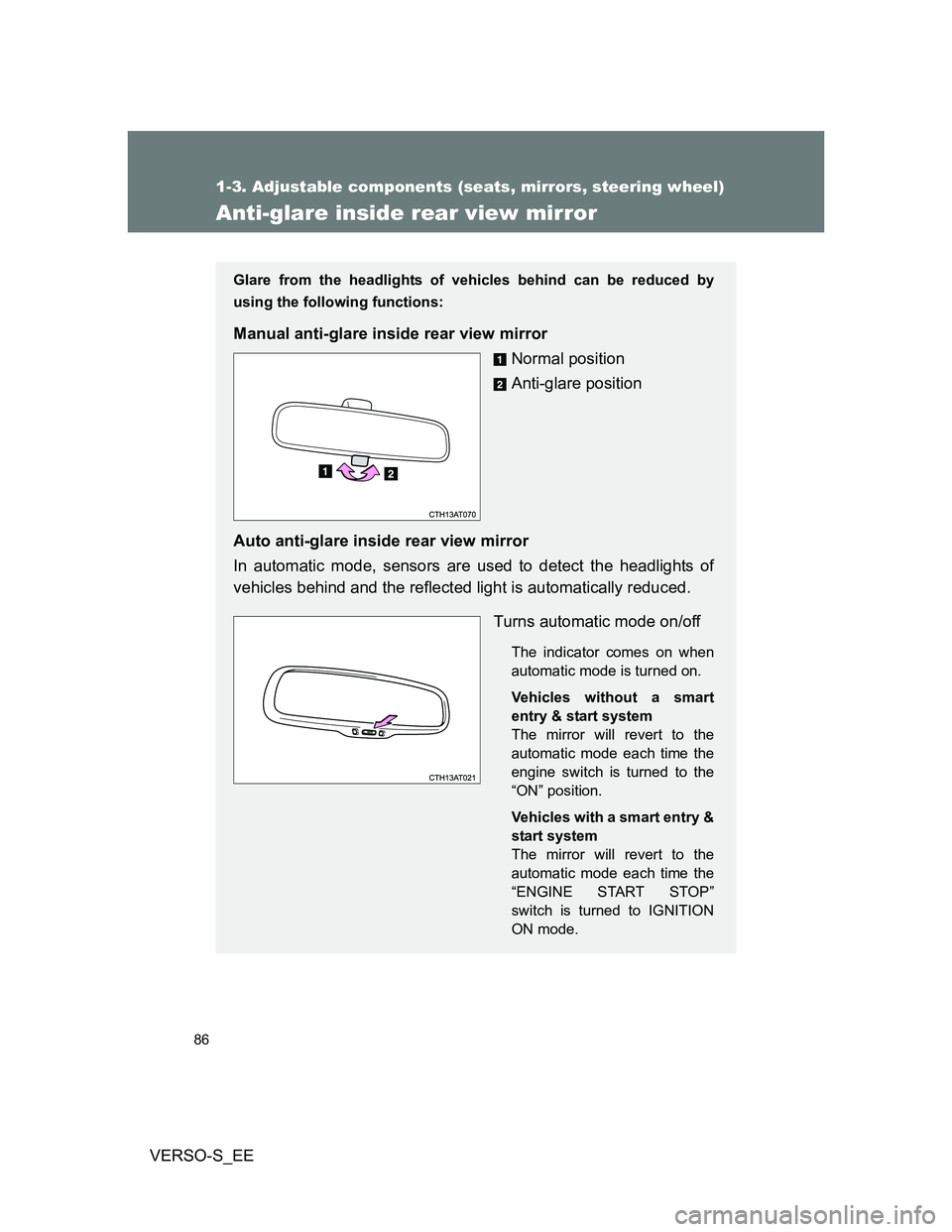
Glare from the headlights of vehicles behind can be reduced by
using the following functions:
Manual anti-glare inside rear view mirror
Normal position
Anti-glare position
Auto anti-glare inside rear view mirror
In automatic mode, sensors are used to detect the headlights of
vehicles behind and the reflected light is automatically reduced.
Turns automatic mode on/off
The indicator comes on when
automatic mode is turned on.
Vehicles without a smart
entry & start system
The mirror will revert to the
automatic mode each time the
engine switch is turned to the
“ON” position.
Vehicles with a smart entry &
start system
The mirror will revert to the
automatic mode each time the
“ENGINE START STOP”
switch is turned to IGNITION
ON mode.
Page 89 of 540
89 1-3. Adjustable components (seats, mirrors, steering wheel)
1
Before driving
VERSO-S_EE
Mirror angle can be adjusted when
Vehicles without a smart entry & start system
The engine switch is in the “ACC” or “ON” position.
Vehicles with a smart entry & start system
The “ENGINE START STOP” switch is in ACCESSORY or IGNITION ON
mode.
When the mirrors are fogged up (vehicles with outside rear view mirror
defoggers)
Turn on the mirror defoggers to defog the mirrors. (P. 272)
CAUTION
When driving the vehicle
Observe the following precautions while driving.
Failure to do so may result in loss of control of the vehicle and cause an
accident, resulting in death or serious injury.
Do not adjust the mirrors while driving.
Do not drive with the mirrors folded.
Both the driver and passenger side mirrors must be extended and properly
adjusted before driving.
When a mirror is moving
To avoid personal injury and mirror malfunction, be careful not to get your
hand caught by the moving mirror.
When the mirror defoggers are operating (vehicles with outside rear
view mirror defoggers)
Do not touch the rear view mirror surfaces, as they can become very hot and
burn you.
Page 90 of 540
90
VERSO-S_EE
1-4. Opening and closing the windows
Power windows
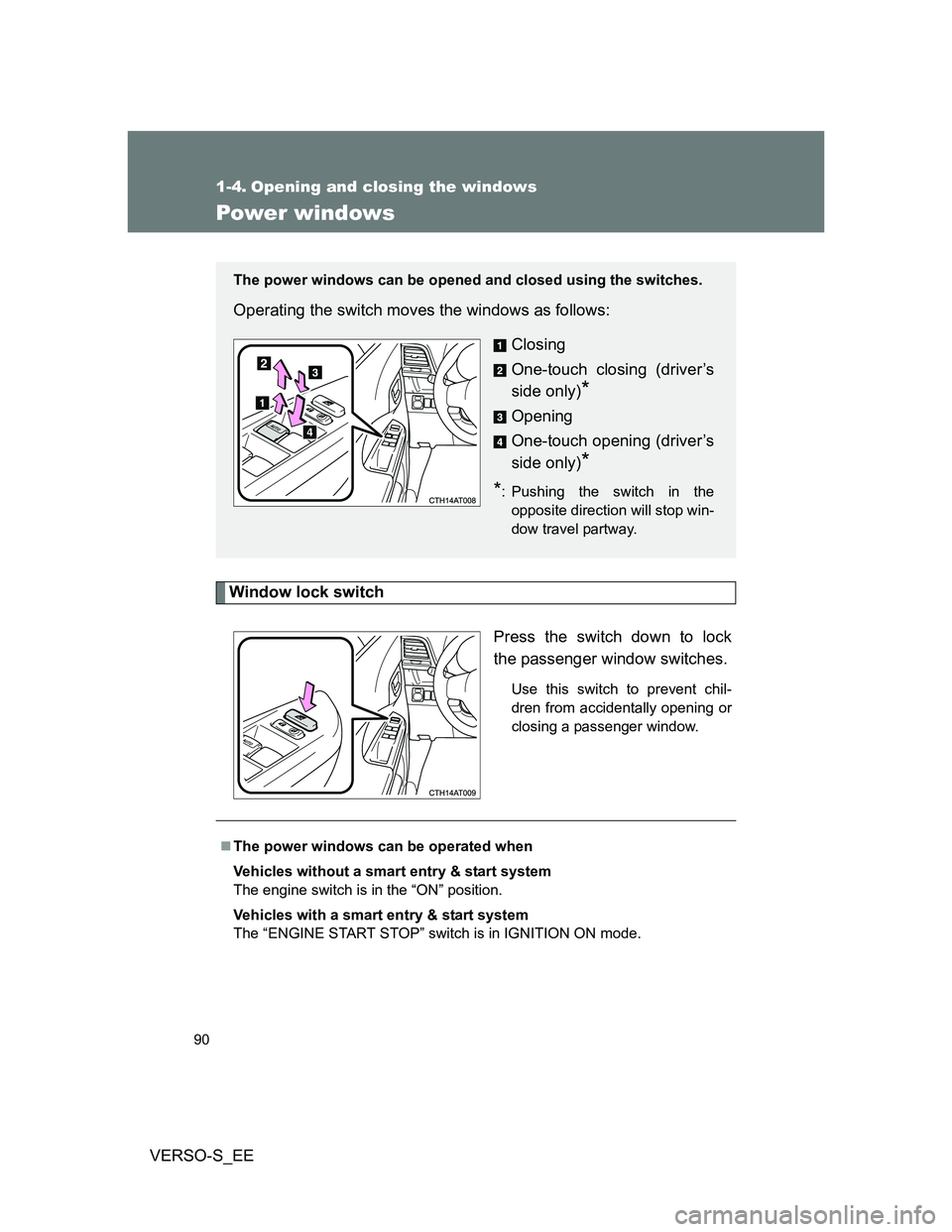
Window lock switch
Press the switch down to lock
the passenger window switches.
Use this switch to prevent chil-
dren from accidentally opening or
closing a passenger window.
The power windows can be opened and closed using the switches.
Operating the switch moves the windows as follows:
Closing
One-touch closing (driver’s
side only)
*
Opening
One-touch opening (driver’s
side only)
*
*: Pushing the switch in the
opposite direction will stop win-
dow travel partway.
The power windows can be operated when
Vehicles without a smart entry & start system
The engine switch is in the “ON” position.
Vehicles with a smart entry & start system
The “ENGINE START STOP” switch is in IGNITION ON mode.
Page 91 of 540
91 1-4. Opening and closing the windows
1
Before driving
VERSO-S_EE
Operating the power windows after turning the engine off
Vehicles without a smart entry & start system
The power windows can be operated for approximately 45 seconds even
after the engine switch is turned to the “ACC” or “LOCK” position. They can-
not, however, be operated once either front door is opened.
Vehicles with a smart entry & start system
The power windows can be operated for approximately 45 seconds even
after the “ENGINE START STOP” switch is turned to ACCESSORY mode or
turned off. They cannot, however, be operated once either front door is
opened.
Jam protection function (driver’s side only)
If an object becomes caught between the window and the window frame,
window travel is stopped and the window is opened slightly.
When the power window does not close normally
If the jam protection function is operating abnormally and a window cannot
be closed, perform the following operations using the power window switch
on the driver’s door.
Vehicles without a smart entry & start system: After stopping the vehicle,
the window can be closed by holding the power window switch in the
one-touch closing position while the engine switch is turned to the “ON”
position.
Vehicles with a smart entry & start system: After stopping the vehicle, the
window can be closed by holding the power window switch in the one-
touch closing position while the “ENGINE START STOP” switch is turned
to IGNITION ON mode.
If the window still cannot be closed even by carrying out the operation
explained above, initialize the function by performing the following proce-
dure.
Hold the power window switch in the one-touch closing position.
Continue holding the switch for a further 6 seconds after the win-
dow has closed.
Hold the power window switch in the one-touch opening position.
Continue holding the switch for a further 2 seconds after the win-
dow has opened completely.
STEP1
STEP2