display TOYOTA VERSO S 2013 Owner's Manual
[x] Cancel search | Manufacturer: TOYOTA, Model Year: 2013, Model line: VERSO S, Model: TOYOTA VERSO S 2013Pages: 552, PDF Size: 15.57 MB
Page 231 of 552
231 2-4. Using other driving systems
2
When driving
VERSO-S_EE
Stop & Start system warning buzzer
If the engine is stopped by the Stop & Start system and either of the following
actions is performed, a buzzer will sound and the Stop & Start indicator will
flash (vehicles with a Multidrive), or a buzzer will sound (vehicles with a
manual transmission). This indicates that the engine is only stopped by the
Stop & Start system, not that the engine has been turned off completely.
Vehicles with a Multidrive: The driver’s door is opened when the shift
lever is in D or M.
Vehicles with a Multidrive: The shift lever is shifted into a position other
than N or P with the brake pedal released.
Vehicles with a manual transmission: The shift lever is shifted into a posi-
tion other than N with the clutch pedal released.
If the Stop & Start cancel indicator light continues to flash
The Stop & Start system may be malfunctioning. Contact any authorized
Toyota dealer or repairer, or another duly qualified and equipped profes-
sional.
If the windshield is fogged up while the engine is stopped by the Stop
& Start system
Vehicles with an automatic air conditioning system: Turn the windshield
defogger on. (The engine will start due to the automatic engine start func-
tion.) (P. 271)
Vehicles with a manual air conditioning system: Restart the engine by
depressing the clutch pedal (vehicles with a manual transmission) or
releasing brake pedal (vehicles with a Multidrive) (P. 227) or by press-
ing the Stop & Start cancel switch, and then set the air outlet selection
dial to . (P. 263)
If the windshield fogs up frequently, press the Stop & Start cancel switch to
deactivate the system.
The Stop & Start system operation time and Stop & Start system total
operation time display
P. 197
Changing mandatory displaying/hiding of the Stop & Start system
operation time
P. 199
Page 261 of 552

3Interior features
261
VERSO-S_EE
3-1. Using the air conditioning
system and defogger
Manual air conditioning
system ............................ 262
Automatic air conditioning
system ............................ 268
Power heater .................... 274
Rear window and
outside rear view
mirror defoggers ............. 276
3-2. Using the audio system
Audio system types .......... 278
Using the radio ................. 282
Using the CD player ......... 286
Playing back MP3 and
WMA discs...................... 291
Operating an iPod............. 298
Operating a USB
memory........................... 306
Optimal use of the audio
system ............................ 314
Using the AUX port ........... 316
Using the steering wheel
audio switches ................ 3173-3. Using the interior lights
Interior lights list ................ 320
• Personal lights ................ 321
• Personal/interior lights .... 321
• Interior light ..................... 322
3-4. Using the storage
features
List of storage features ..... 323
• Auxiliary box ................... 324
• Glove box ....................... 324
• Bottle holders.................. 326
• Tray ................................ 327
• Cup holders .................... 328
3-5. Other interior features
Sun visors ......................... 329
Vanity mirrors.................... 330
Clock ................................. 331
Outside temperature
display ............................ 332
Power outlets .................... 333
Seat heaters ..................... 335
Armrests ........................... 337
Panoramic roof shade....... 338
Assist grips ....................... 341
Floor mat........................... 342
Luggage compartment
features........................... 344
Page 268 of 552
268
3-1. Using the air conditioning system and defogger
VERSO-S_EE
Automatic air conditioning system
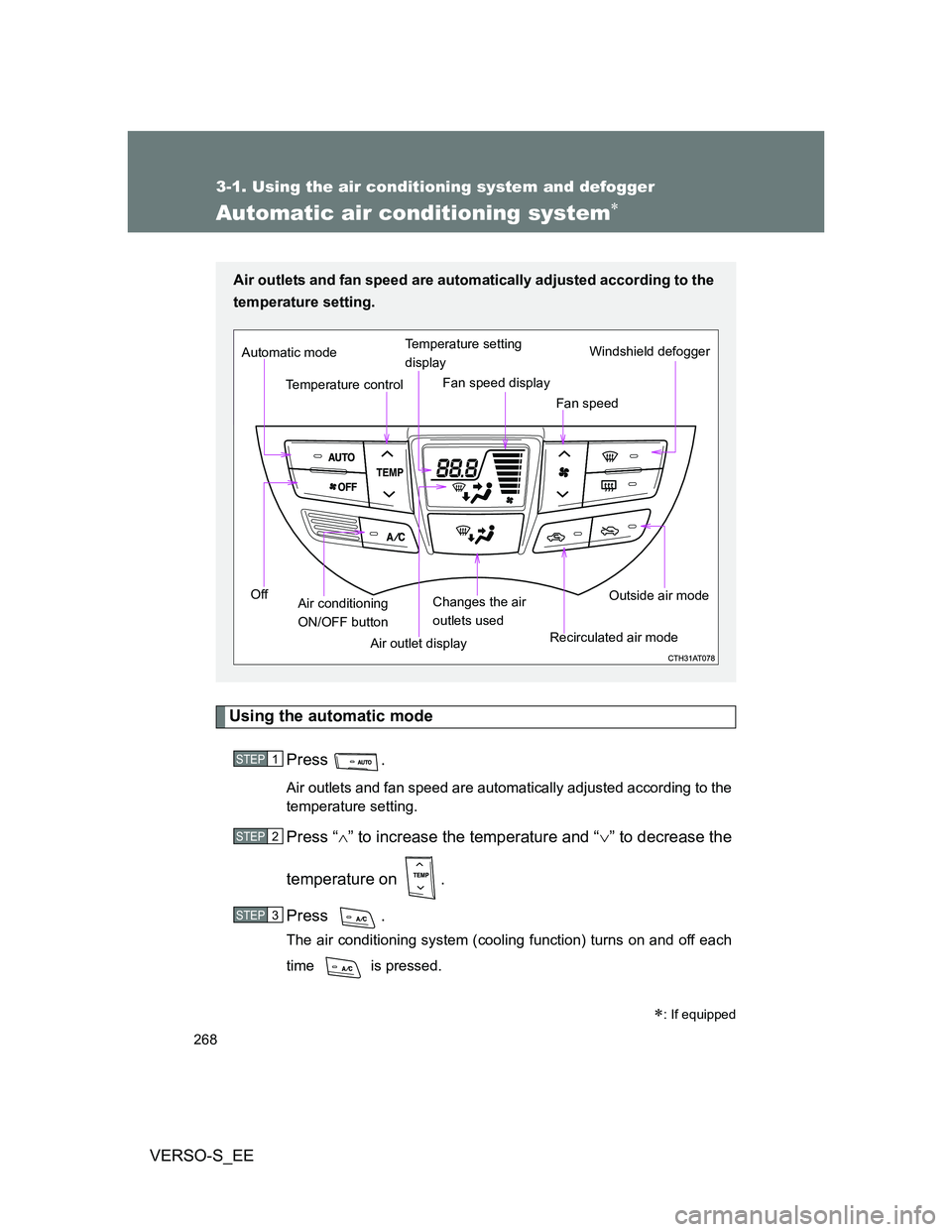
Using the automatic mode
Press .
Air outlets and fan speed are automatically adjusted according to the
temperature setting.
Press “” to increase the temperature and “” to decrease the
temperature on .
Press .
The air conditioning system (cooling function) turns on and off each
time is pressed.
: If equipped
Air outlets and fan speed are automatically adjusted according to the
temperature setting.
Air outlet displayWindshield defogger
Temperature control
Fan speed Temperature setting
display
Off Automatic mode
Changes the air
outlets usedFan speed display
Air conditioning
ON/OFF buttonRecirculated air modeOutside air mode
STEP1
STEP2
STEP3
Page 269 of 552

269 3-1. Using the air conditioning system and defogger
3
Interior features
VERSO-S_EE
Adjusting the settings
Turning the cooling function on and off
Press .
The air conditioning system (cooling function) turns on and off each time
is pressed.
Adjusting the temperature setting
Press “” to increase the temperature and “” to decrease the tem-
perature on .
Adjusting the fan speed
Press “” (increase) or “” (decrease) on .
The fan speed is shown on the display. (7 levels)
Press to turn the fan off.
Changing the air outlets
Press .
The air outlets switch each time is pressed. The air flow shown
on the display indicates the following.
Air flows to the upper body.
Page 282 of 552
282
3-2. Using the audio system
VERSO-S_EE
Using the radio
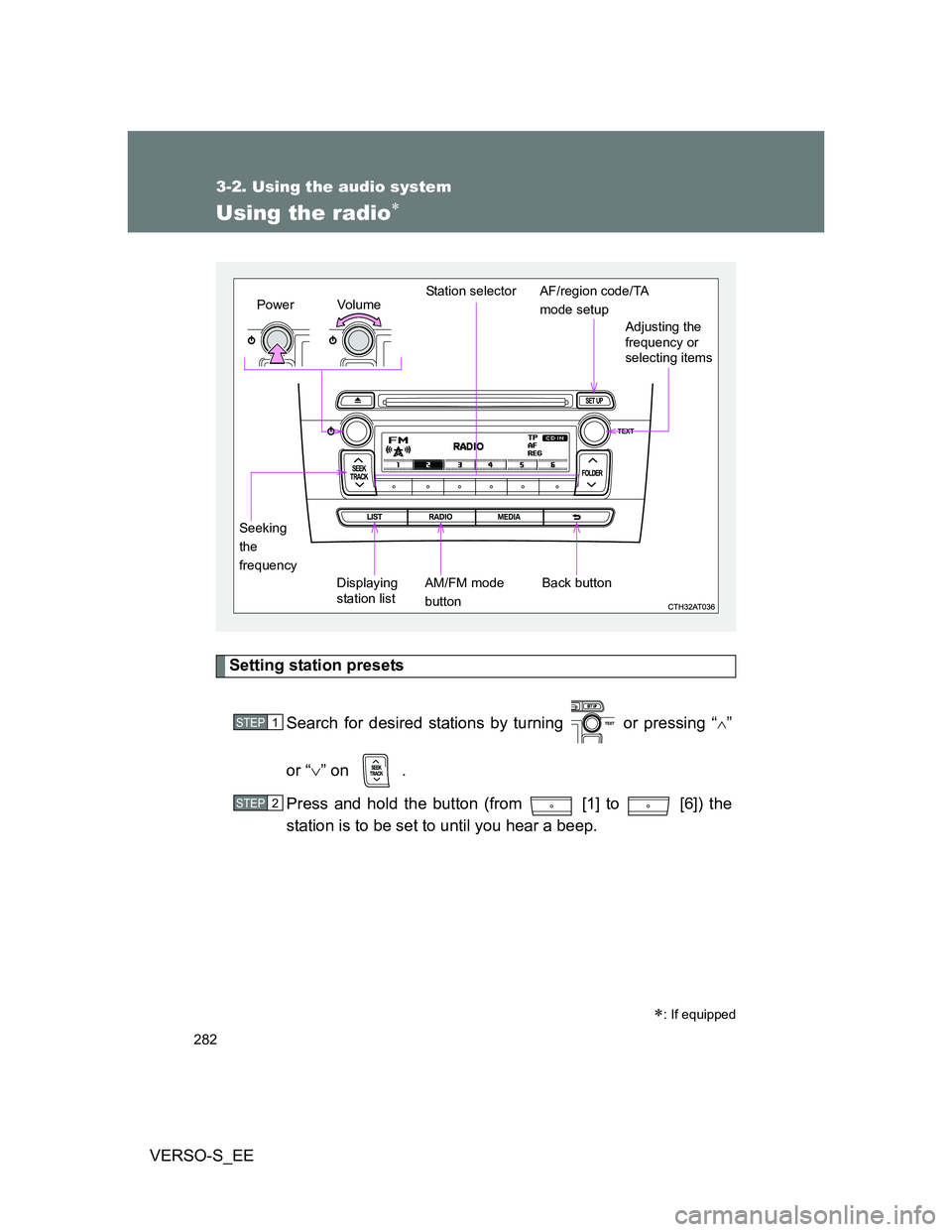
Setting station presets
Search for desired stations by turning or pressing “
”
or “” on .
Press and hold the button (from [1] to [6]) the
station is to be set to until you hear a beep.
: If equipped
Vo lu m e
Displaying
station listStation selector
Seeking
the
frequencyAdjusting the
frequency or
selecting items
AM/FM mode
buttonPowerAF/region code/TA
mode setup
Back button
STEP1
STEP2
Page 283 of 552
283 3-2. Using the audio system
3
Interior features
VERSO-S_EE
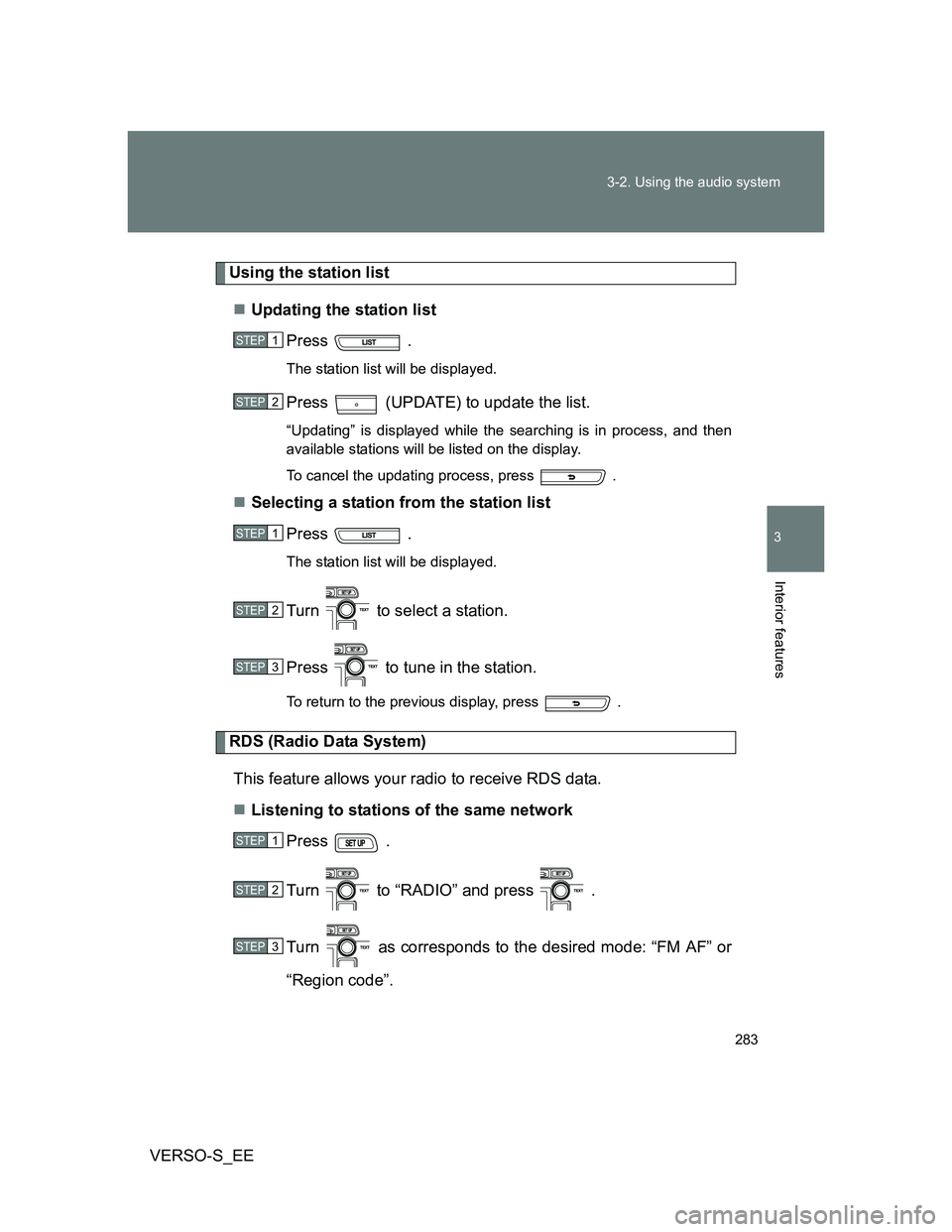
Using the station list
Updating the station list
Press .
The station list will be displayed.
Press (UPDATE) to update the list.
“Updating” is displayed while the searching is in process, and then
available stations will be listed on the display.
To cancel the updating process, press .
Selecting a station from the station list
Press .
The station list will be displayed.
Turn to select a station.
Press to tune in the station.
To return to the previous display, press .
RDS (Radio Data System)
This feature allows your radio to receive RDS data.
Listening to stations of the same network
Press .
Turn to “RADIO” and press .
Turn as corresponds to the desired mode: “FM AF” or
“Region code”.
STEP1
STEP2
STEP1
STEP2
STEP3
STEP1
STEP2
STEP3
Page 286 of 552
286
3-2. Using the audio system
VERSO-S_EE
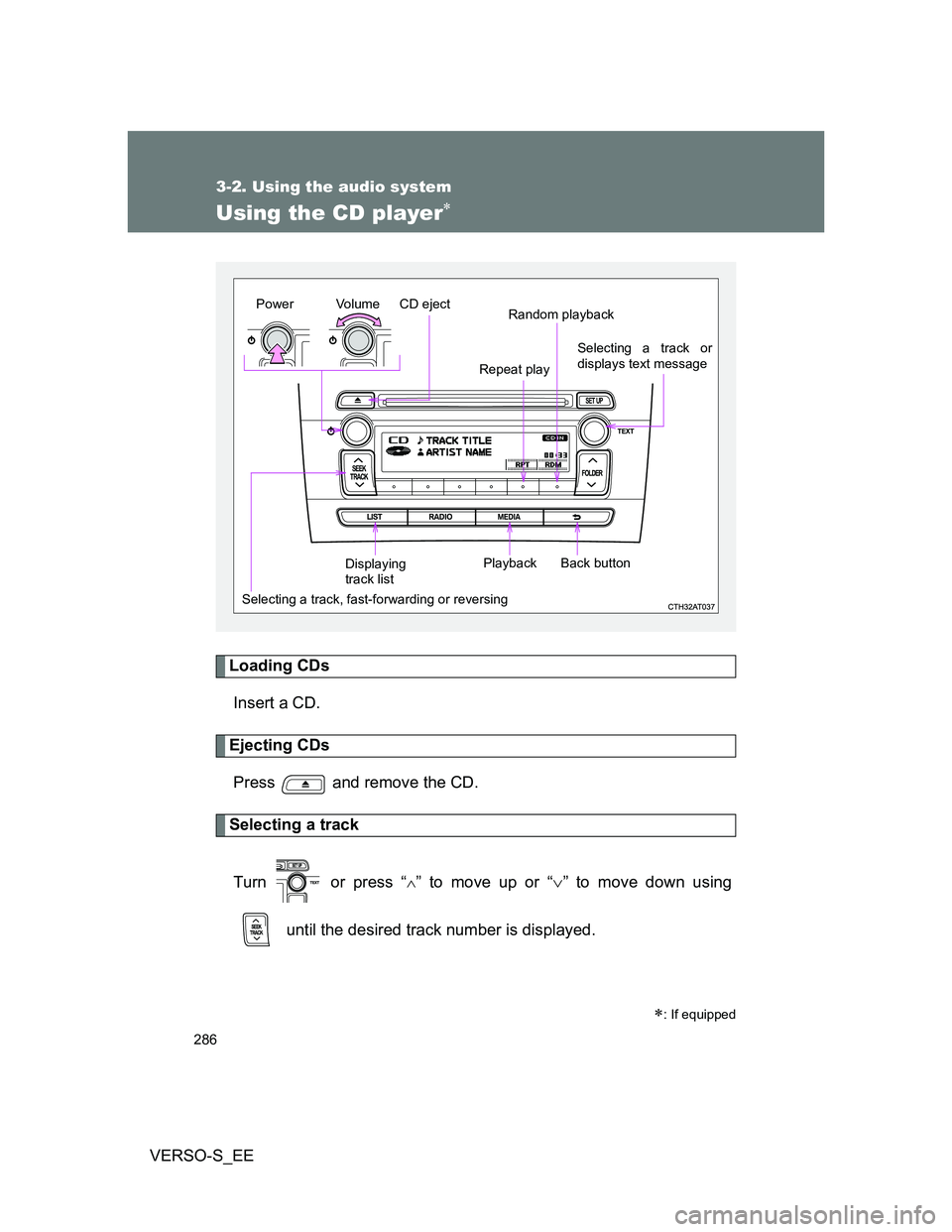
Using the CD player
Loading CDs
Insert a CD.
Ejecting CDs
Press and remove the CD.
Selecting a track
Turn or press “
” to move up or “” to move down using
until the desired track number is displayed.
: If equipped
Vo lu m e
Random playback
Selecting a track, fast-forwarding or reversingRepeat play
Playback PowerCD eject
Selecting a track or
displays text message
Displaying
track listBack button
Page 287 of 552
287 3-2. Using the audio system
3
Interior features
VERSO-S_EE
Selecting a track from a track list
Press .
The track list will be displayed.
Turn and press to select a track.
To return to the previous display, press or .
Fast-forwarding and reversing tracks
To fast-forward or reverse, press and hold “
” or “” on .
Repeat play
Press (RPT).
The current track is played repeatedly until (RPT) is pressed
again.
Random playback
Press (RDM).
Tracks are played in a random order until (RDM) is pressed again.
STEP1
STEP2
Page 288 of 552
288 3-2. Using the audio system
VERSO-S_EE
Switching the display
Press .
Track name, Artist name and CD title are shown on the display.
To return to the previous display, press or .
Display
Up to 24 characters can be displayed.
Depending on the contents recorded, the characters may not be displayed
properly or may not be displayed at all.
Error messages
“ERROR”: This indicates a problem either in the CD or inside the player.
“CD CHECK”: The CD may be dirty, damaged or inserted up-side down.
“WAIT”: Operation has stopped due to a high temperature inside the
player. Wait for a while and then press . Contact
any authorized Toyota dealer or repairer, or another duly
qualified and equipped professional if the CD still cannot be
played.
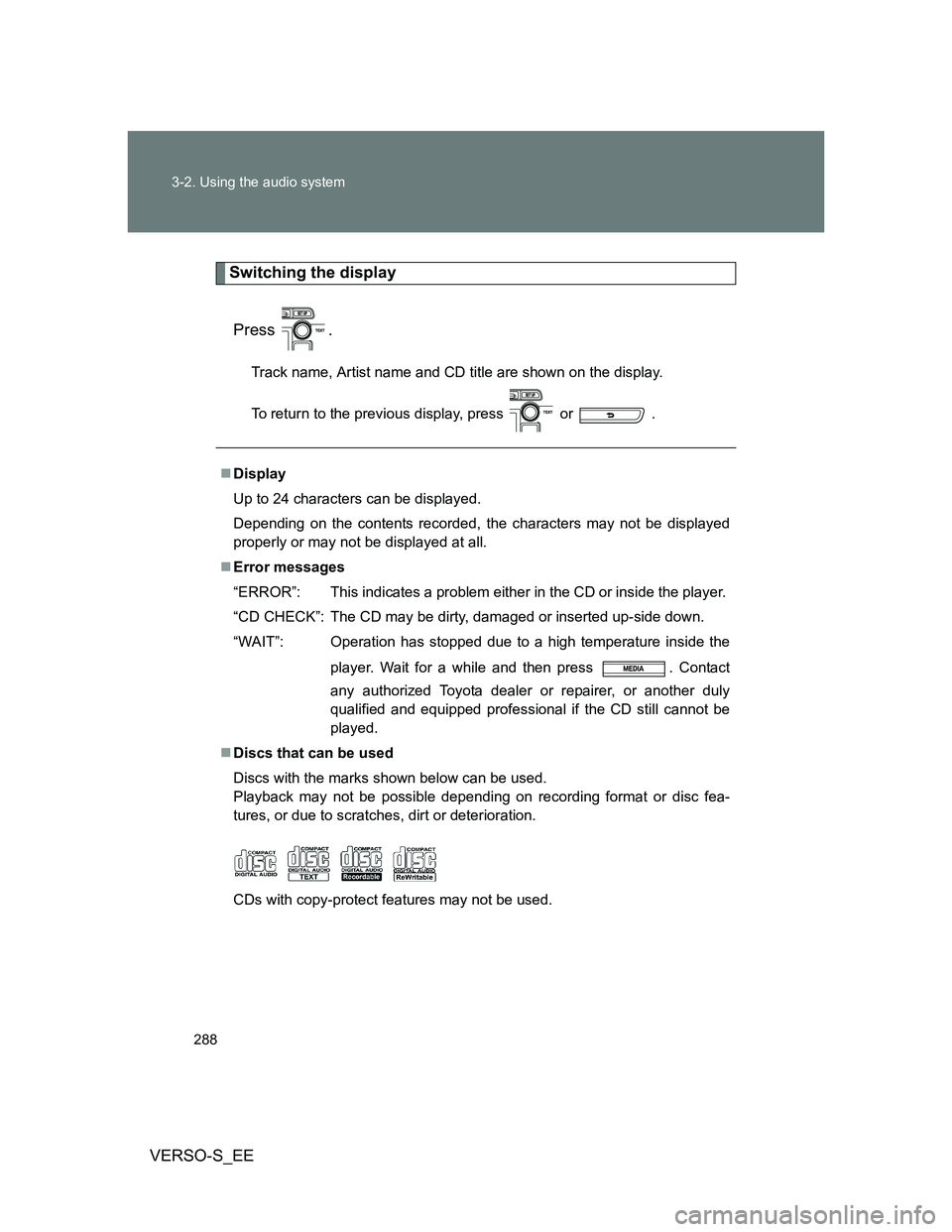
Discs that can be used
Discs with the marks shown below can be used.
Playback may not be possible depending on recording format or disc fea-
tures, or due to scratches, dirt or deterioration.
CDs with copy-protect features may not be used.
Page 291 of 552
291
3-2. Using the audio system
3
Interior features
VERSO-S_EE
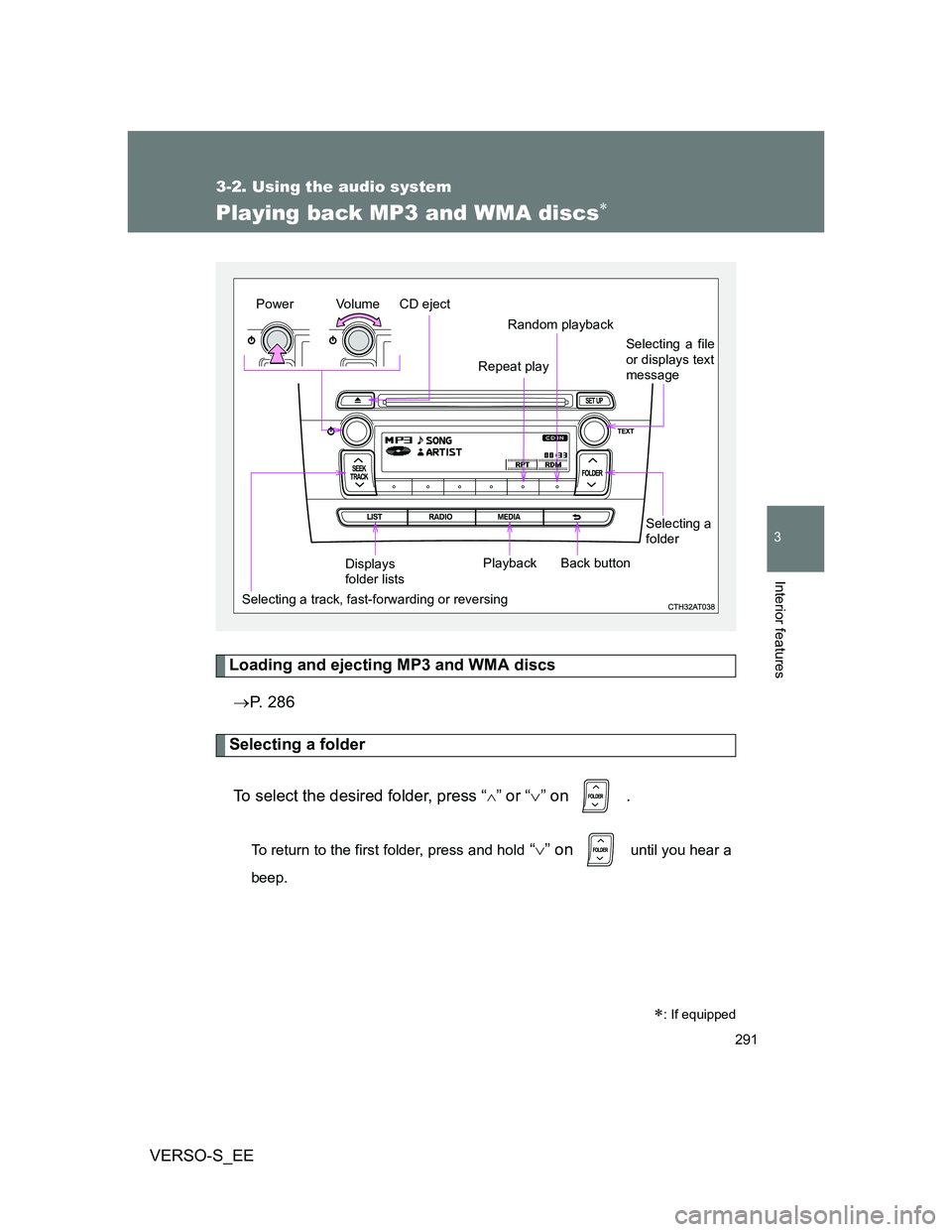
Playing back MP3 and WMA discs
Loading and ejecting MP3 and WMA discs
P. 286
Selecting a folder
To select the desired folder, press “
” or “” on .
To return to the first folder, press and hold “” on until you hear a
beep.
: If equipped
Vo lu m e
Random playback
Selecting a track, fast-forwarding or reversingRepeat play
Playback PowerCD eject
Selecting a file
or displays text
message
Displays
folder listsBack button
Selecting a
folder