navigation TOYOTA VERSO S 2014 Owners Manual
[x] Cancel search | Manufacturer: TOYOTA, Model Year: 2014, Model line: VERSO S, Model: TOYOTA VERSO S 2014Pages: 560, PDF Size: 16.94 MB
Page 11 of 560
VERSO-S_EE
11
: If equipped
*1: For vehicles with a navigation/multimedia system, refer to “Navigation and multime-
dia system Owner’s manual”.
*2: NEVER use a rearward facing child re-
straint on a seat protected by an
ACTIVE AIRBAG in front of it, DEATH
or SERIOUS INJURY to the CHILD can
occur. (P. 156)
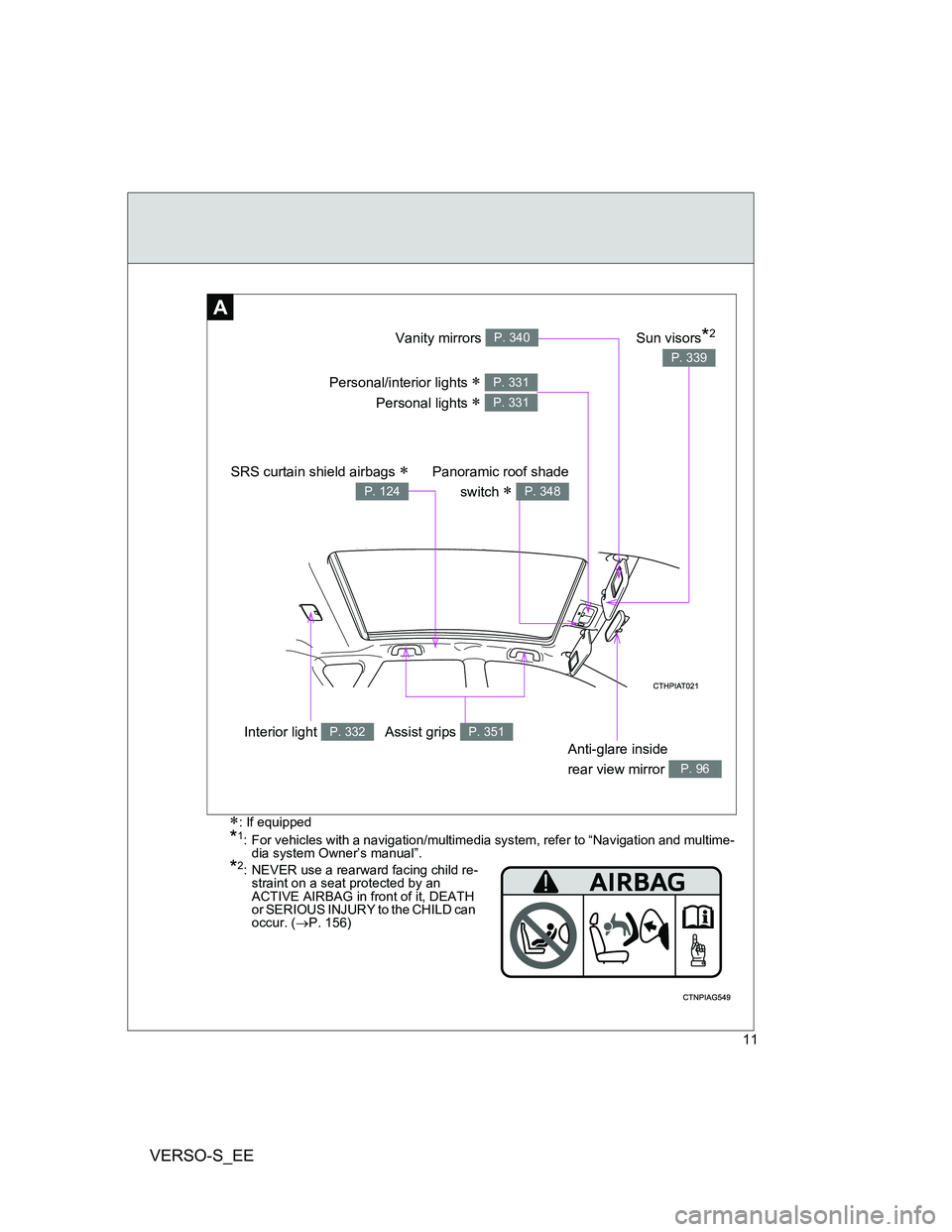
Anti-glare inside
rear view mirror
P. 96
Interior light P. 332
Vanity mirrors P. 340
Personal/interior lights
Personal lights
P. 331
P. 331
A
Panoramic roof shade
switch
P. 348
SRS curtain shield airbags
P. 124
Assist grips P. 351
Sun visors*2
P. 339
Page 13 of 560
VERSO-S_EE
13
: If equipped*: Refer to “Navigation and multimedia system Owner’s manual”.
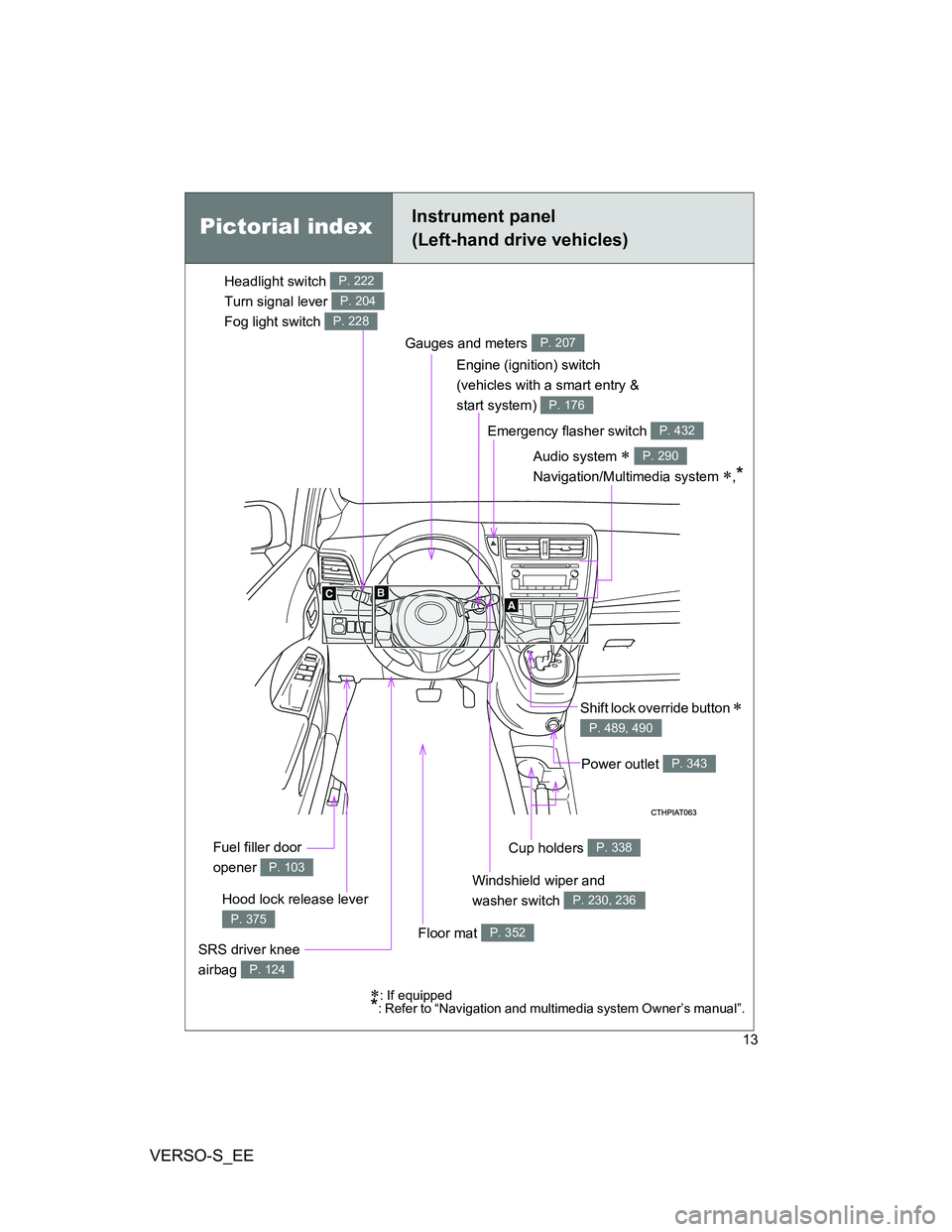
Emergency flasher switch P. 432
Cup holders P. 338
Windshield wiper and
washer switch
P. 230, 236Hood lock release lever
P. 375
Gauges and meters P. 207
Audio system
Navigation/Multimedia system
,*
P. 290
Shift lock override button
P. 489, 490
SRS driver knee
airbag
P. 124
Fuel filler door
opener
P. 103
Engine (ignition) switch
(vehicles with a smart entry &
start system)
P. 176
Floor mat P. 352
Power outlet P. 343
Pictorial indexInstrument panel
(Left-hand drive vehicles)
Headlight switch
Turn signal lever
Fog light switch P. 222
P. 204
P. 228
Page 15 of 560
VERSO-S_EE
15
B
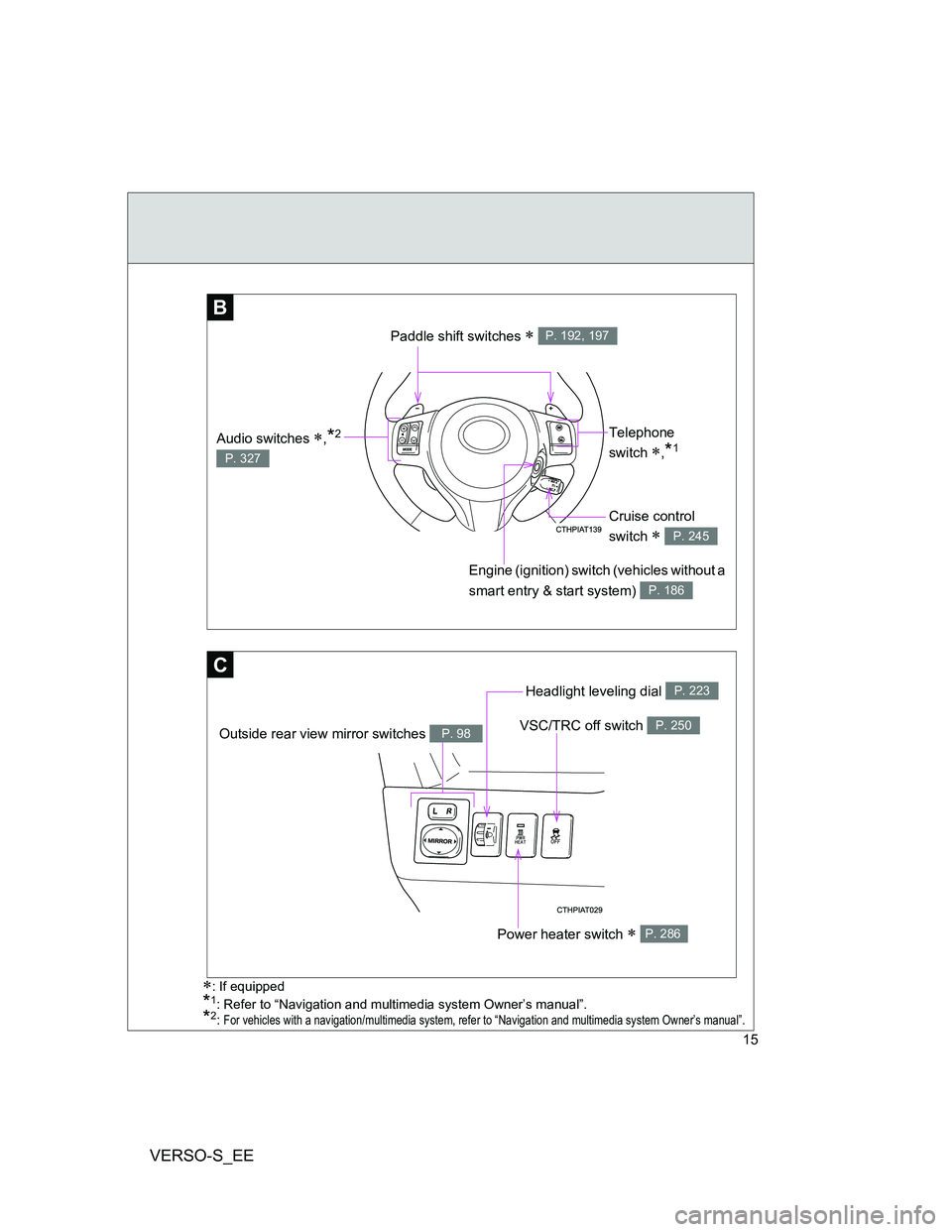
Telephone
switch
,*1
Engine (ignition) switch (vehicles without a
smart entry & start system)
P. 186
Paddle shift switches P. 192, 197
Audio switches ,*2
P. 327
C
VSC/TRC off switch P. 250
Headlight leveling dial P. 223
Power heater switch P. 286
Outside rear view mirror switches P. 98
: If equipped
*1: Refer to “Navigation and multimedia system Owner’s manual”.*2: For vehicles with a navigation/multimedia system, refer to “Navigation and multimedia system Owner’s manual”.
Cruise control
switch
P. 245
Page 17 of 560
VERSO-S_EE
17
*2: NEVER use a rearward facing child re-
straint on a seat protected by an
ACTIVE AIRBAG in front of it, DEATH
or SERIOUS INJURY to the CHILD can
occur. (P. 156)
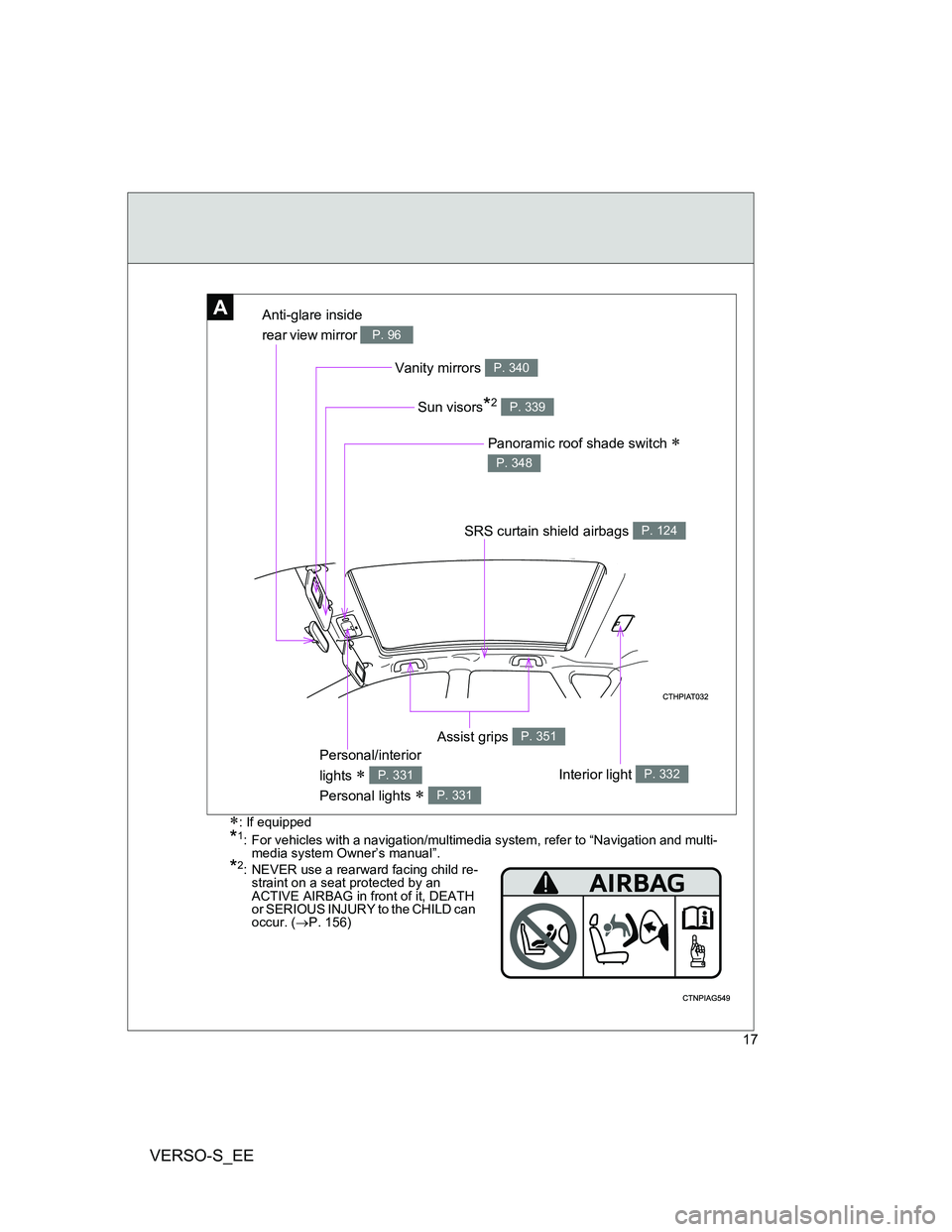
AAnti-glare inside
rear view mirror
P. 96
Panoramic roof shade switch
P. 348
Interior light P. 332
Vanity mirrors P. 340
Personal/interior
lights
Personal lights
P. 331
P. 331
Sun visors*2 P. 339
SRS curtain shield airbags P. 124
: If equipped
*1: For vehicles with a navigation/multimedia system, refer to “Navigation and multi-
media system Owner’s manual”.
Assist grips P. 351
Page 19 of 560
VERSO-S_EE
19
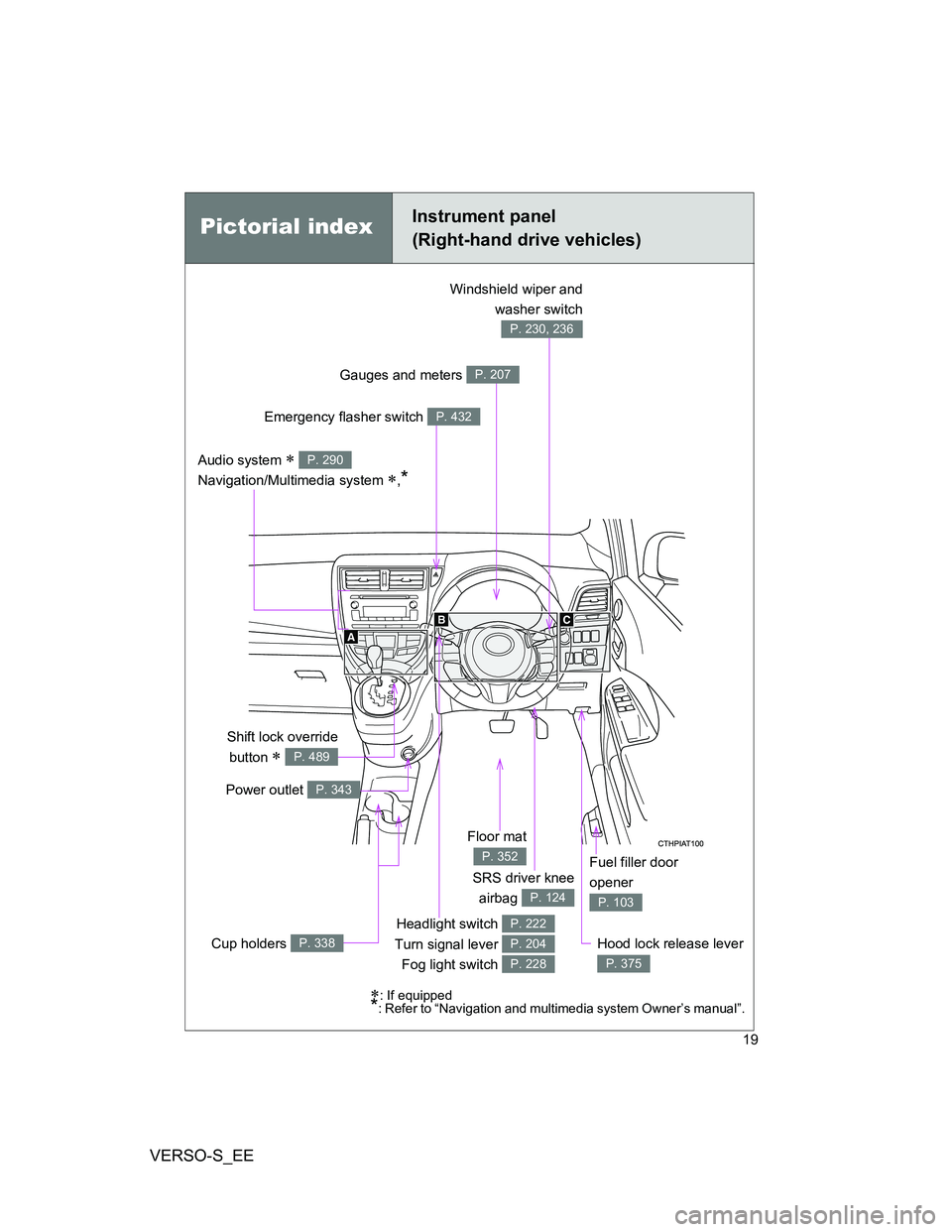
Headlight switch
Turn signal lever
Fog light switch P. 222
P. 204
P. 228
Hood lock release lever
P. 375
SRS driver knee
airbag
P. 124
Audio system
Navigation/Multimedia system
,*
P. 290
Fuel filler door
opener
P. 103
Floor mat
P. 352
Emergency flasher switch P. 432
Gauges and meters P. 207
Windshield wiper and
washer switch
P. 230, 236
Shift lock override
button
P. 489
Power outlet P. 343
: If equipped*: Refer to “Navigation and multimedia system Owner’s manual”.
Cup holders P. 338
Pictorial indexInstrument panel
(Right-hand drive vehicles)
Page 21 of 560
VERSO-S_EE
21
B
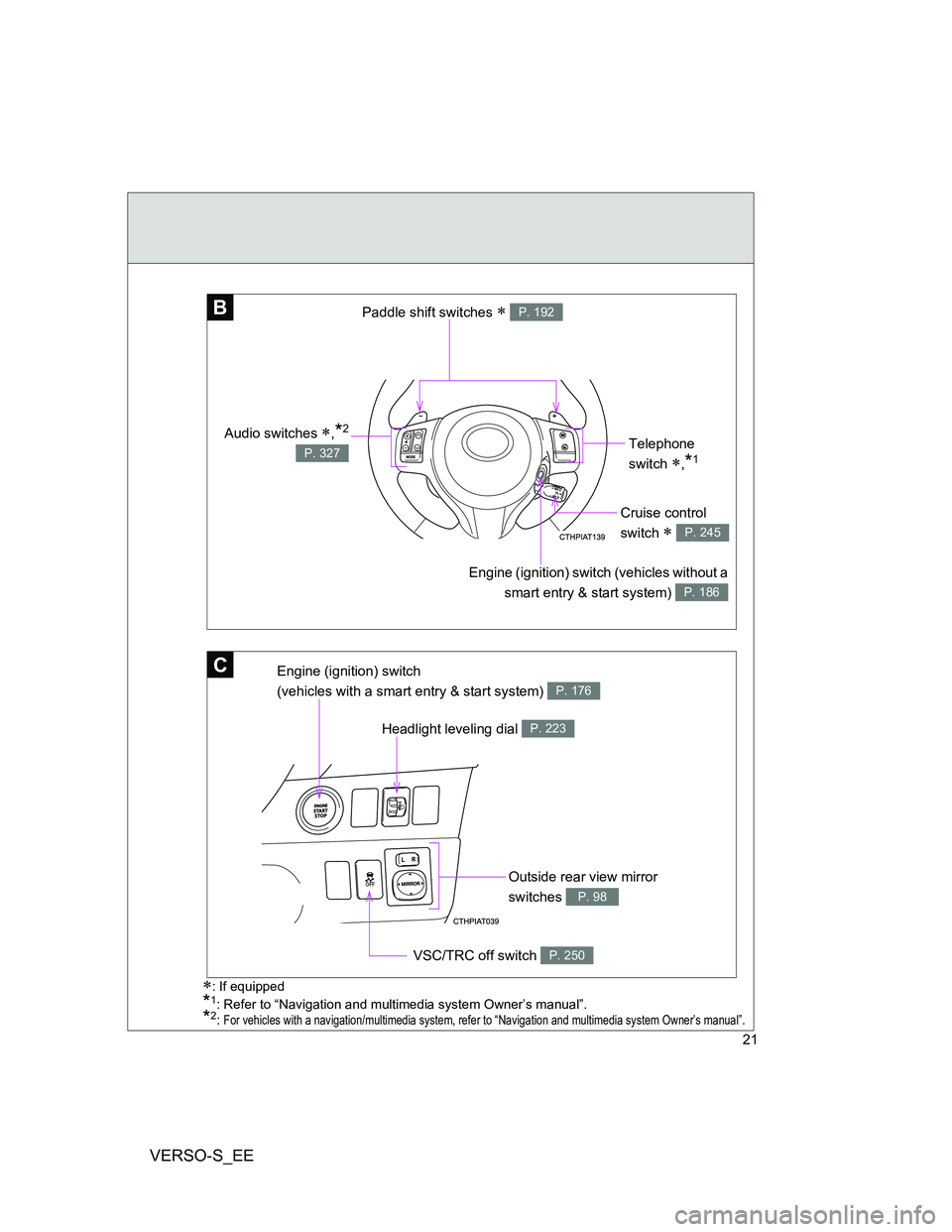
Telephone
switch
,*1
Engine (ignition) switch (vehicles without a
smart entry & start system)
P. 186
Paddle shift switches P. 192
Audio switches ,*2
P. 327
C
Headlight leveling dial P. 223
Outside rear view mirror
switches
P. 98
VSC/TRC off switch P. 250
Engine (ignition) switch
(vehicles with a smart entry & start system)
P. 176
Cruise control
switch
P. 245
: If equipped
*1: Refer to “Navigation and multimedia system Owner’s manual”.*2: For vehicles with a navigation/multimedia system, refer to “Navigation and multimedia system Owner’s manual”.
Page 291 of 560
291 3-2. Using the audio system
3
Interior features
VERSO-S_EE
NOTICE
To prevent battery discharge
Do not leave the audio system on longer than necessary when the engine is
stopped.
To avoid damaging the audio system
Take care not to spill drinks or other fluids over the audio system.
Vehicles with a navigation/multimedia system
Owners of models equipped with a navigation/multimedia system
should refer to the “Navigation and multimedia system Owner's
manual”.
Page 327 of 560
327
3-2. Using the audio system
3
Interior features
VERSO-S_EE
Using the steering wheel audio switches
Turning on the power
Press when the audio system is turned off.
Changing the audio source
Press when the audio system is turned on. The audio source
changes as follows each time is pressed.
AMFMCD modeiPod or USB memory mode*
AUX*AM
*: If equipped
: If equipped
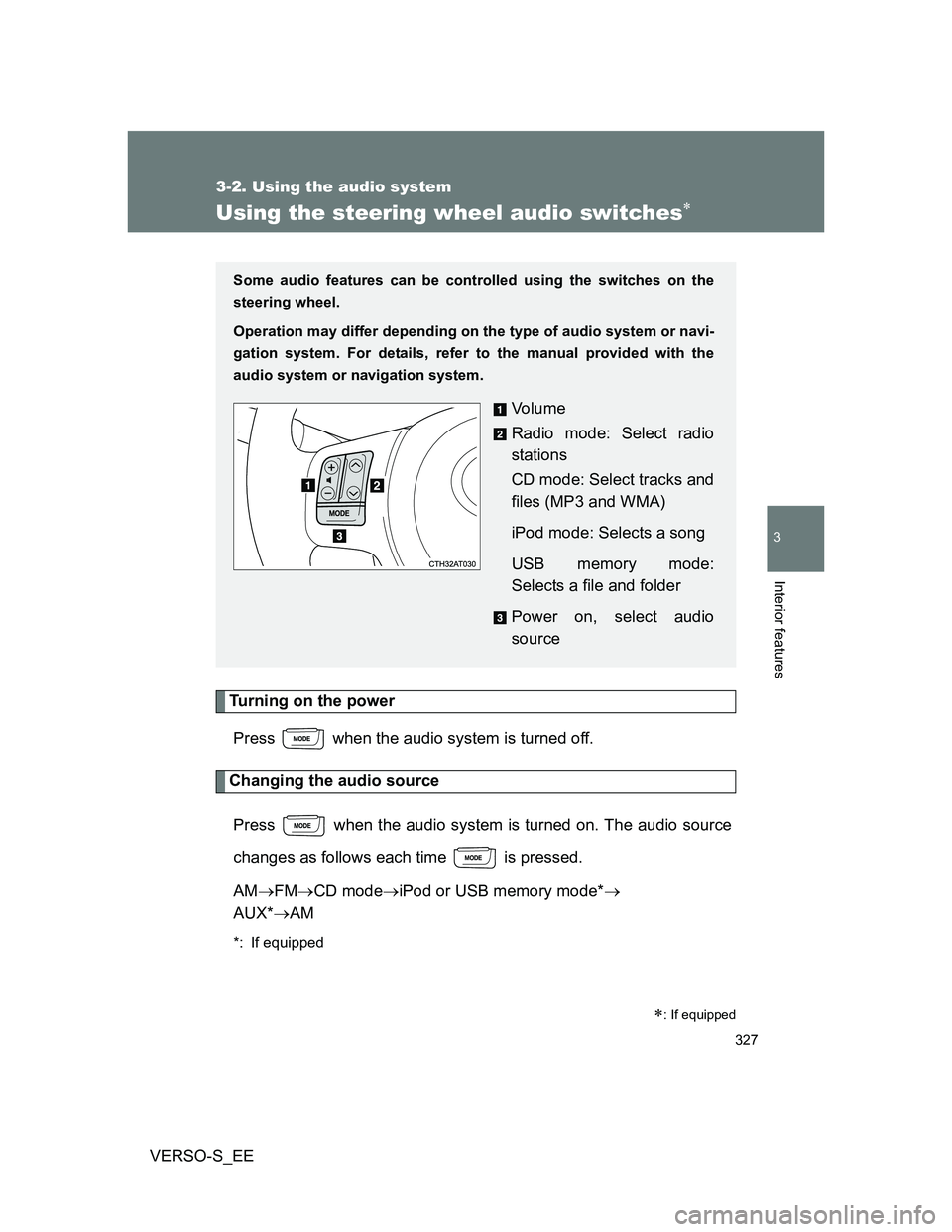
Some audio features can be controlled using the switches on the
steering wheel.
Operation may differ depending on the type of audio system or navi-
gation system. For details, refer to the manual provided with the
audio system or navigation system.
Vo l u m e
Radio mode: Select radio
stations
CD mode: Select tracks and
files (MP3 and WMA)
iPod mode: Selects a song
USB memory mode:
Selects a file and folder
Power on, select audio
source
Page 536 of 560
536
VERSO-S_EE
6-2. Customization
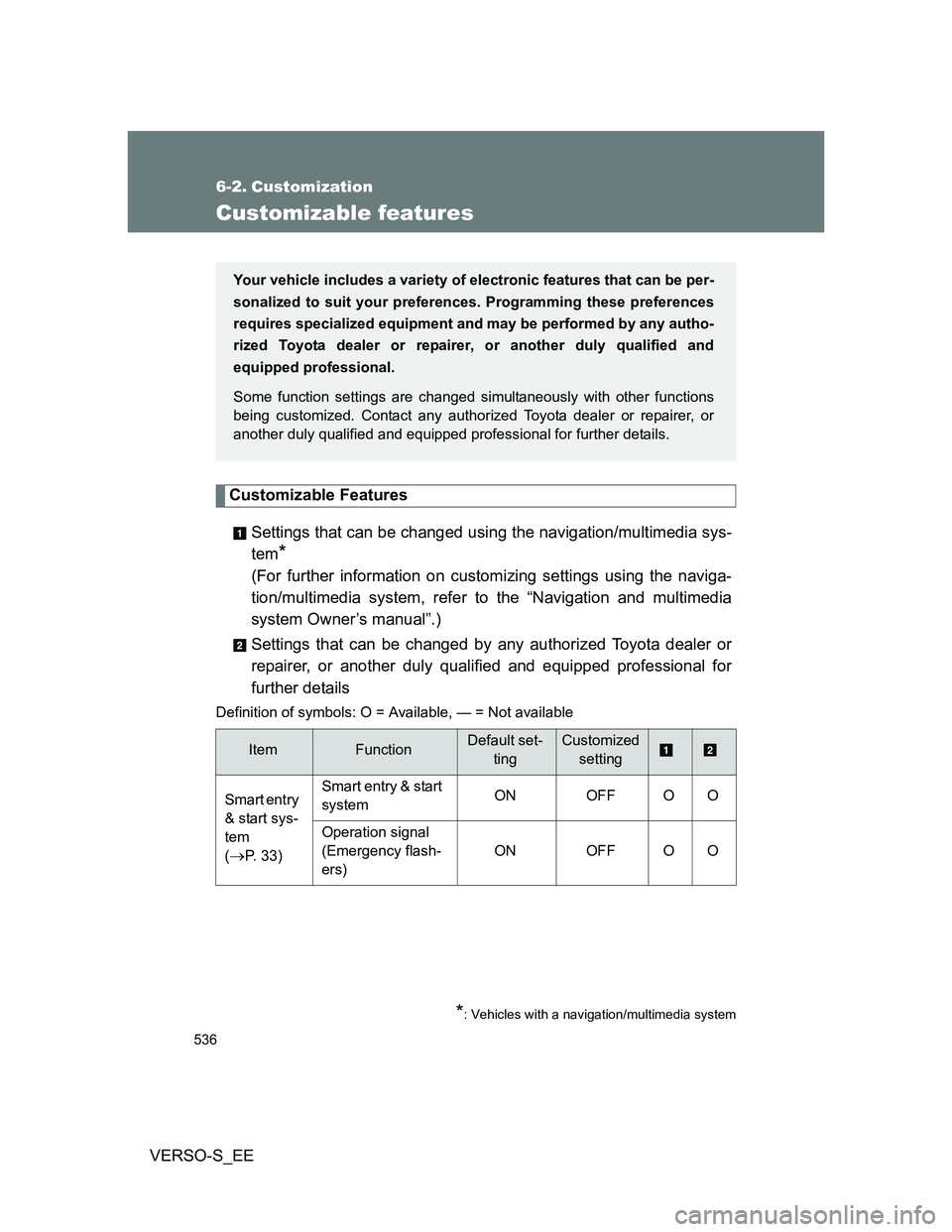
Customizable features
Customizable Features
Settings that can be changed using the navigation/multimedia sys-
tem
*
(For further information on customizing settings using the naviga-
tion/multimedia system, refer to the “Navigation and multimedia
system Owner’s manual”.)
Settings that can be changed by any authorized Toyota dealer or
repairer, or another duly qualified and equipped professional for
further details
Definition of symbols: O = Available, — = Not available
ItemFunctionDefault set-
tingCustomized
setting
Smart entry
& start sys-
tem
(
P. 33)Smart entry & start
systemON OFF O O
Operation signal
(Emergency flash-
ers) ON OFF O O
Your vehicle includes a variety of electronic features that can be per-
sonalized to suit your preferences. Programming these preferences
requires specialized equipment and may be performed by any autho-
rized Toyota dealer or repairer, or another duly qualified and
equipped professional.
Some function settings are changed simultaneously with other functions
being customized. Contact any authorized Toyota dealer or repairer, or
another duly qualified and equipped professional for further details.
*: Vehicles with a navigation/multimedia system
Page 541 of 560
Index
541
VERSO-S_EE
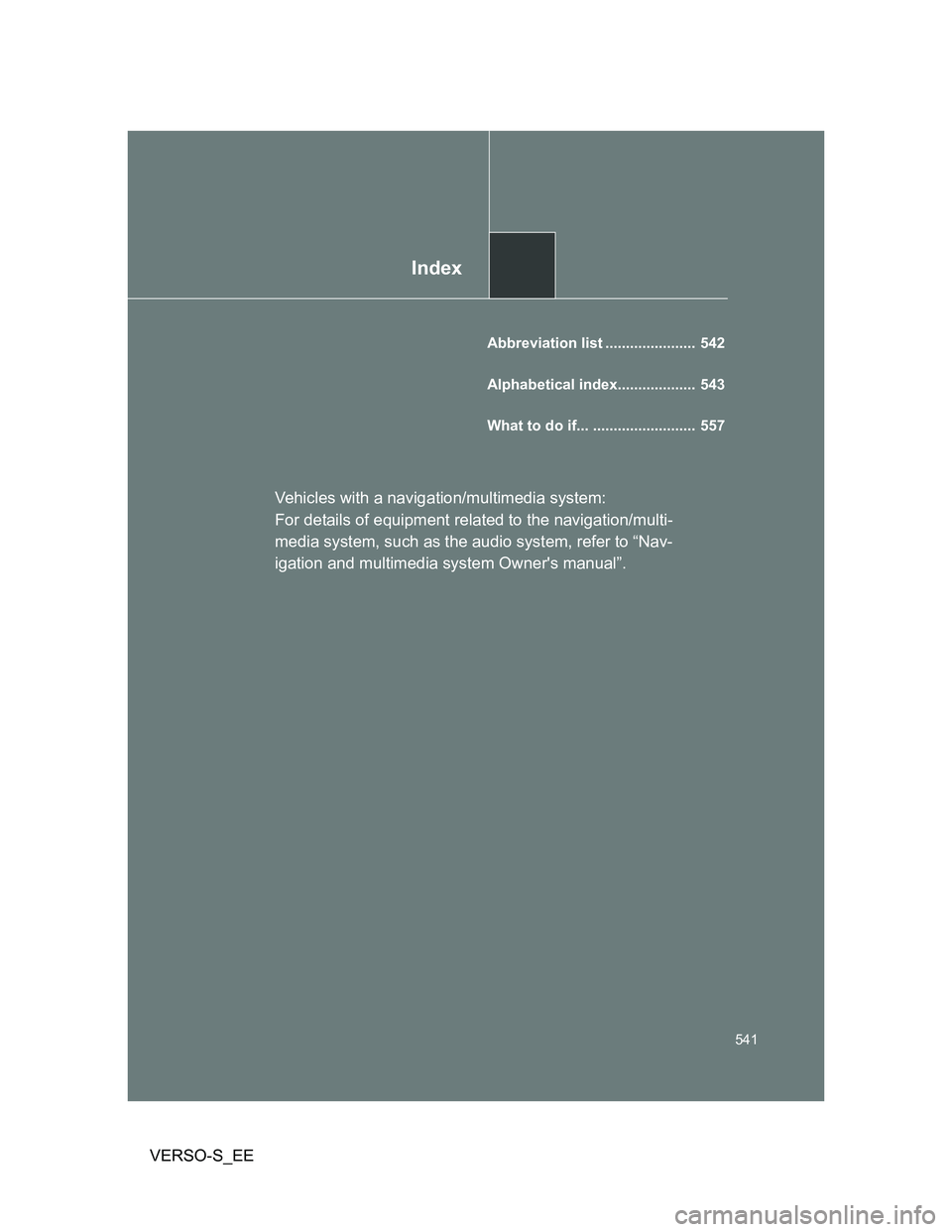
Abbreviation list ...................... 542
Alphabetical index................... 543
What to do if... ......................... 557
Vehicles with a navigation/multimedia system:
For details of equipment related to the navigation/multi-
media system, such as the audio system, refer to “Nav-
igation and multimedia system Owner's manual”.