cruise control TOYOTA xB 2011 Owners Manual (in English)
[x] Cancel search | Manufacturer: TOYOTA, Model Year: 2011, Model line: xB, Model: TOYOTA xB 2011Pages: 372, PDF Size: 9.58 MB
Page 3 of 372
1
2
3
4
5
6
7
3
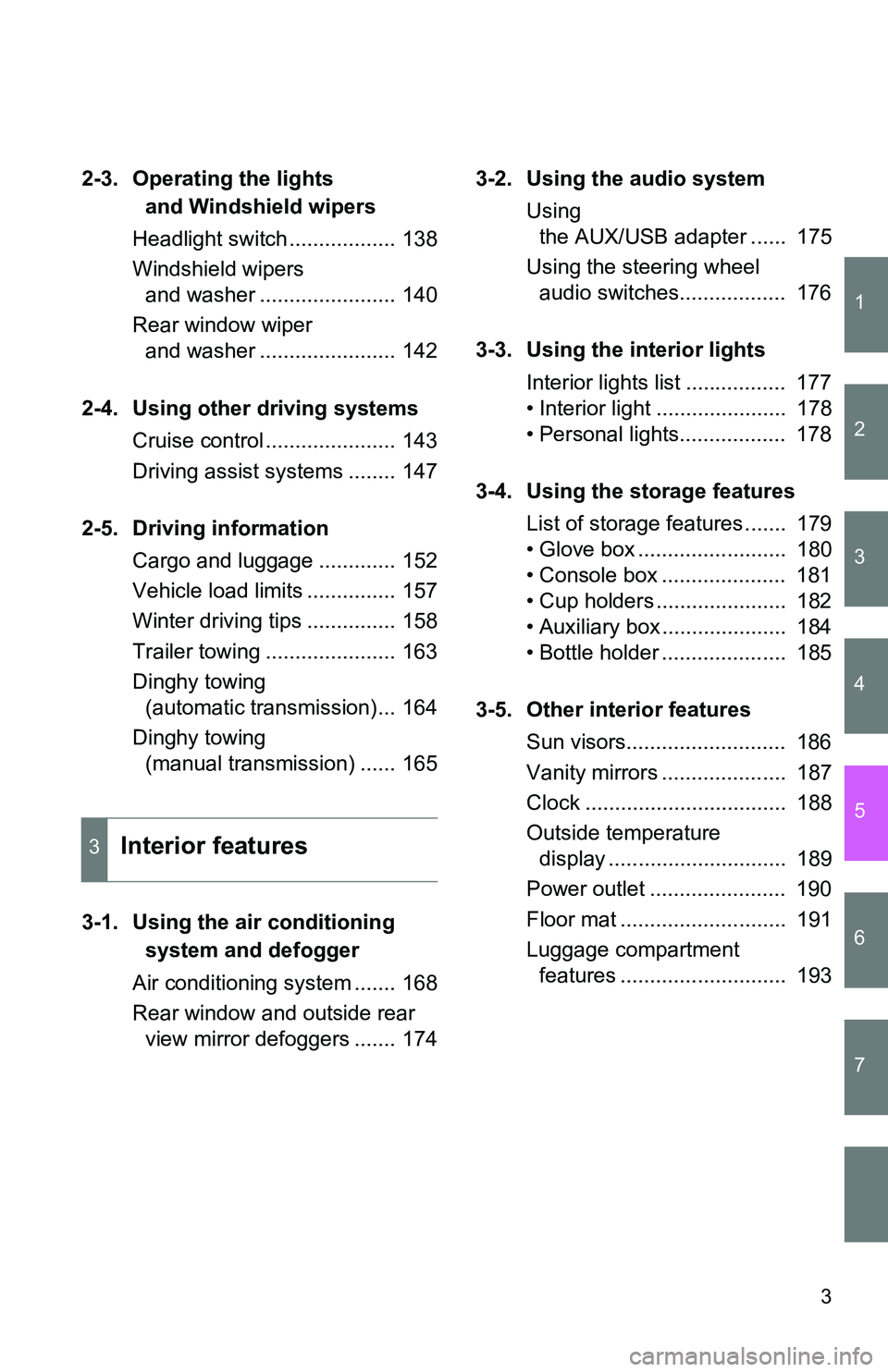
2-3. Operating the lights and Windshield wipers
Headlight switch .................. 138
Windshield wipers and washer ....................... 140
Rear window wiper and washer ....................... 142
2-4. Using other driving systems Cruise control ...................... 143
Driving assist systems ........ 147
2-5. Driving information Cargo and luggage ............. 152
Vehicle load limits ............... 157
Winter driving tips ............... 158
Trailer towing ...................... 163
Dinghy towing (automatic transmission)... 164
Dinghy towing (manual transmission) ...... 165
3-1. Using the air conditioning system and defogger
Air conditioning system ....... 168
Rear window and outside rear view mirror defoggers ....... 174 3-2. Using the audio system
Using the AUX/USB adapter ...... 175
Using the steering wheel audio switches.................. 176
3-3. Using the interior lights Interior lights list ................. 177
• Interior light ...................... 178
• Personal lights.................. 178
3-4. Using the storage features List of storage features ....... 179
• Glove box ......................... 180
• Console box ..................... 181
• Cup holders ...................... 182
• Auxiliary box ..................... 184
• Bottle holder ..................... 185
3-5. Other interior features Sun visors........................... 186
Vanity mirrors ..................... 187
Clock .................................. 188
Outside temperature display .............................. 189
Power outlet ....................... 190
Floor mat ............................ 191
Luggage compartment features ............................ 193
3Interior features
Page 14 of 372
14
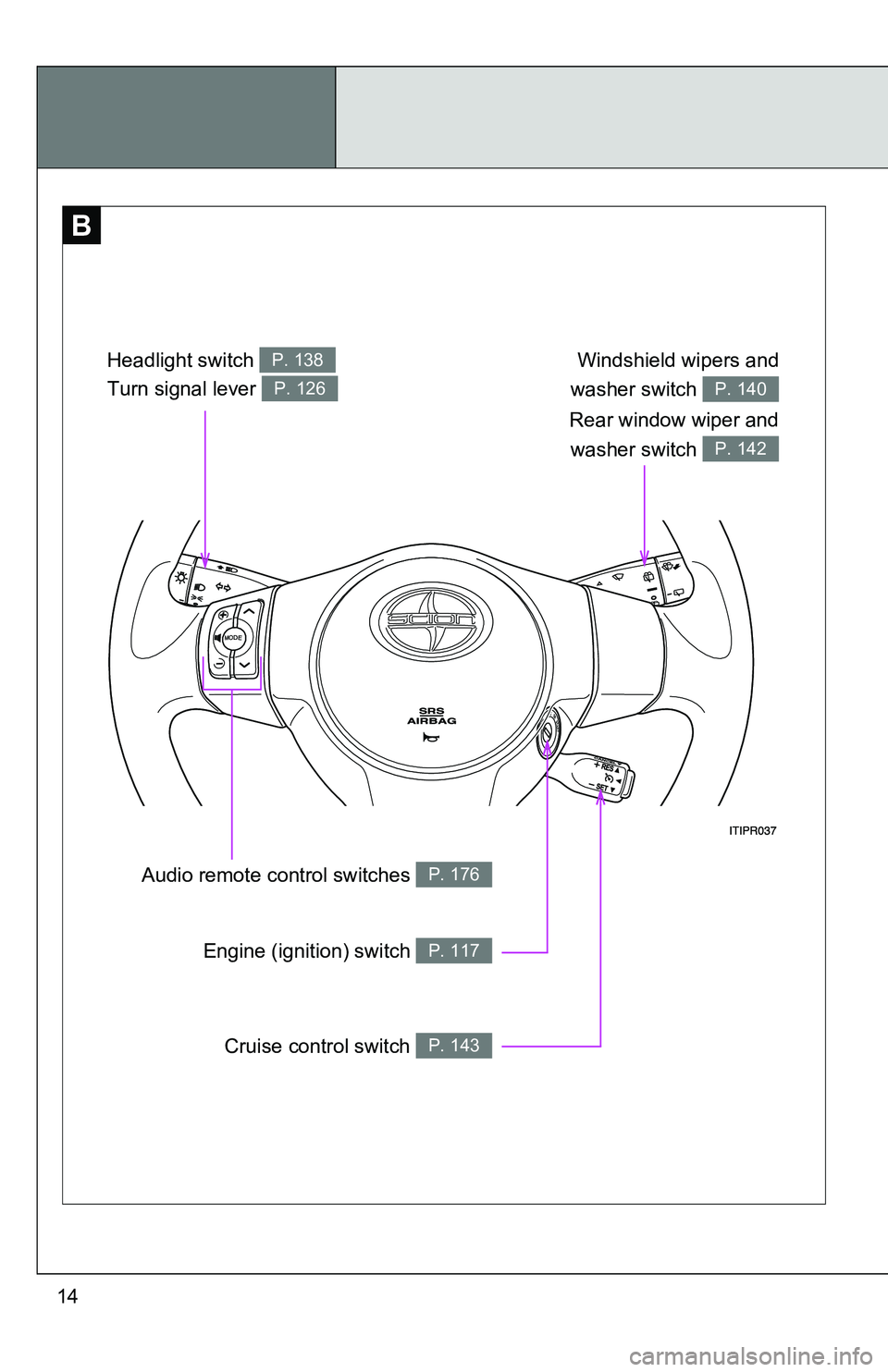
B
Windshield wipers and
washer switch
P. 140
Rear window wiper and washer switch
P. 142
Headlight switch P. 138
Turn signal lever P. 126
Audio remote co ntrol switches P. 176
Engine (ignition) switch P. 117
Cruise control switch P. 143
Page 17 of 372
17
Installation of a mobile two-way radio system
As the installation of a mobile two-way radio system in your vehicle may
affect electronic systems such as the multi-port fuel injection system/sequen-
tial multi-port fuel injection system, cruise control system, anti-lock brake
system, SRS airbag system and seat belt pretensioner system, be sure to
check with your Scion dealer for precautionary measures or special instruc-
tions regarding installation.
Scrapping of your Scion
The SRS airbag and seat belt pretensioner devices in your Scion contain
explosive chemicals. If the vehicle is scrapped with the airbags and seat belt
pretensioners left as they are, this may cause an accident such as fire. Be
sure to have the systems of the SRS airbag and seat belt pretensioner
removed and disposed of by a qualified service shop or by your Scion dealer
before you scrap your vehicle.
Perchlorate Material
Special handling may apply,
See www.dtsc.ca.gov/hazardouswaste/perchlorate.
Your vehicle has components that may contain perchlorate. These compo-
nents may include airbags, seat belt pretensioners, and wireless remote con-
trol batteries.
Page 103 of 372
When driving2
103
2-1. Driving proceduresDriving the vehicle............ 104
Engine (ignition) switch .... 117
Automatic transmission .... 121
Manual transmission ........ 125
Turn signal lever .............. 126
Parking brake ................... 127
Horn ................................. 128
2-2. Instrument cluster Gauges and meters ......... 129
Indicators and warning lights .......... 132
Multi-information display............................ 135 2-3. Operating the lights
and Windshield wipers
Headlight switch ............... 138
Windshield wipers and washer .................... 140
Rear window wiper and washer .................... 142
2-4. Using other driving systems Cruise control ................... 143
Driving assist systems ..... 147
2-5. Driving information Cargo and luggage .......... 152
Vehicle load limits ............ 157
Winter driving tips ............ 158
Trailer towing ................... 163
Dinghy towing (automatic transmission) ................. 164
Dinghy towing (manual transmission) ... 165
Page 124 of 372
124 2-1. Driving procedures
■When driving with the cruise control system
Engine braking will not occur in S mode, even when downshifting to “3”.
(P. 143)
■ If the shift lever cannot be shifted from P
P. 309
■ If the “S” indicator does not come on even after shifting the shift lever
to S
This may indicate a malfunction in the automatic transmission system. Have
the vehicle inspected by your Scion dealer immediately.
(In this situation, the transmission will operate in the same manner as when
the shift lever is in D.)
■ Downshift restriction wa rning buzzer (S mode)
To help ensure safety and driving performance, downshifting operation may
sometimes be restricted. In some circumstances, downshifting may not be
possible even when the shift lever is operated. (A buzzer will sound twice.)
CAUTION
■ When driving on slippery road surfaces
Do not accelerate or shift gears suddenly.
Sudden changes in engine braking may cause the vehicle to spin or skid,
resulting in an accident.
Page 133 of 372
133
2-2. Instrument cluster
2
When driving
■
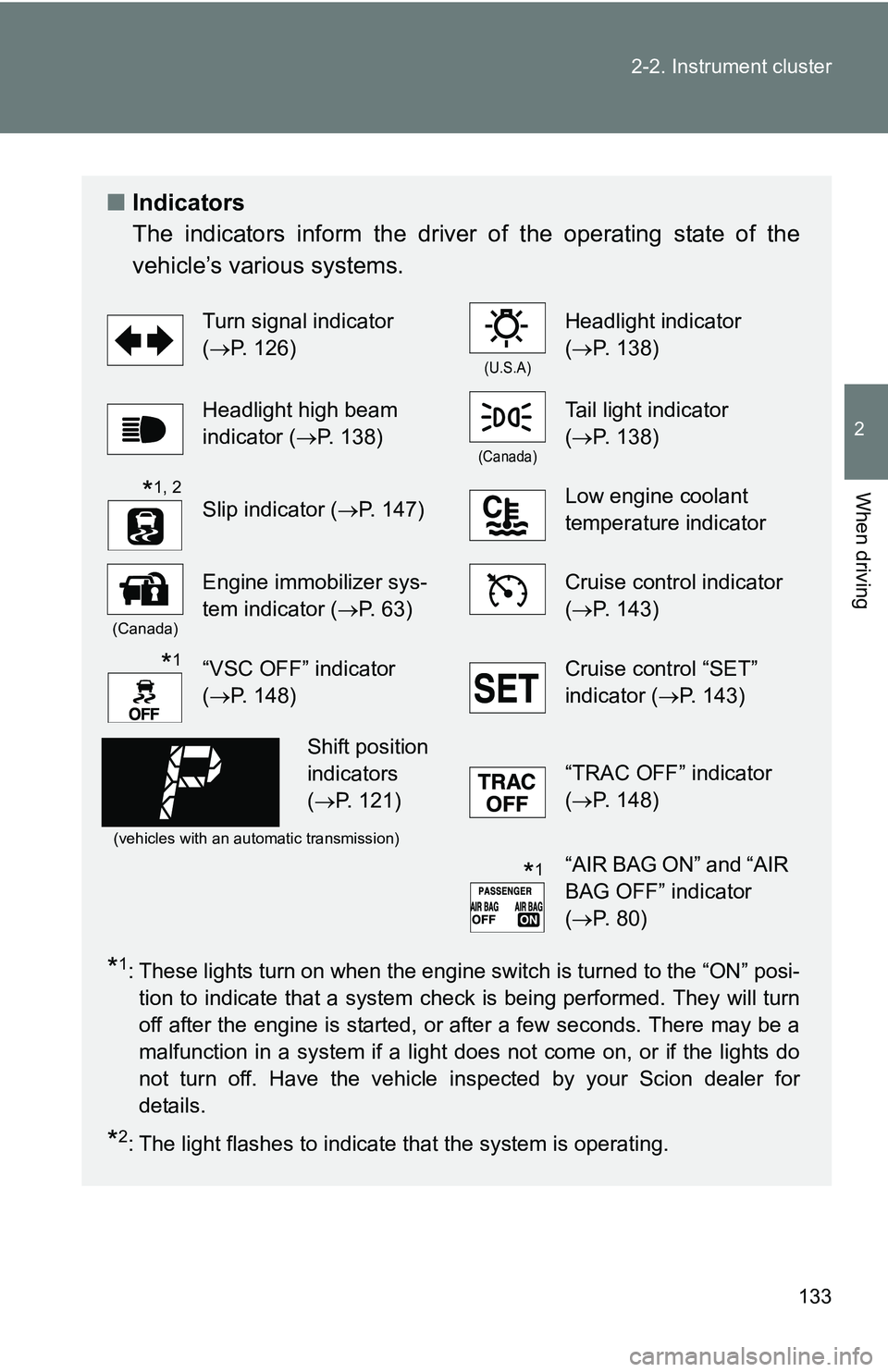
Indicators
The indicators inform the driver of the operating state of the
vehicle’s various systems.
*1: These lights turn on when the engine switch is turned to the “ON” posi-
tion to indicate that a system check is being performed. They will turn
off after the engine is started, or after a few seconds. There may be a
malfunction in a system if a light does not come on, or if the lights do
not turn off. Have the vehicle inspected by your Scion dealer for
details.
*2: The light flashes to indicate that the system is operating.
Turn signal indicator
(P. 126)
(U.S.A)
Headlight indicator
(P. 138)
Headlight high beam
indicator ( P. 138)
(Canada)
Tail light indicator
(P. 138)
Slip indicator ( P. 147)Low engine coolant
temperature indicator
(Canada)
Engine immobilizer sys-
tem indicator (P. 63)Cruise control indicator
(P. 143)
“VSC OFF” indicator
(P. 148)Cruise control “SET”
indicator (P. 143)
(vehicles with an automatic transmission)
“TRAC OFF” indicator
(P. 148)
“AIR BAG ON” and “AIR
BAG OFF” indicator
(P. 80)
*1, 2
*1
Shift position
indicators
( P. 121)
*1
Page 143 of 372
143
2
When driving
2-4. Using other driving systems
Cruise control
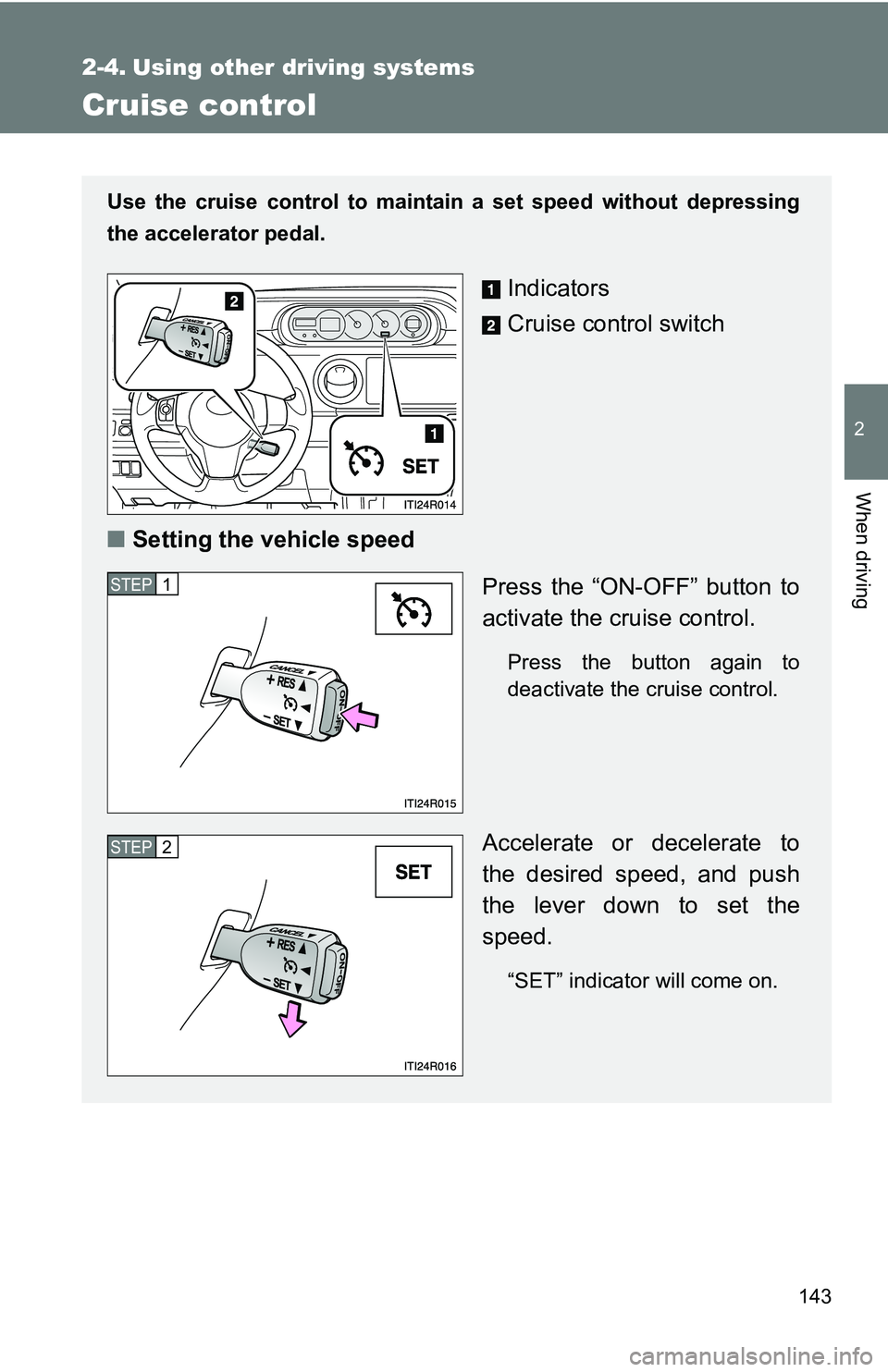
Use the cruise control to maintain a set speed without depressing
the accelerator pedal.
Indicators
Cruise control switch
■ Setting the vehicle speed
Press the “ON-OFF” button to
activate the cruise control.
Press the button again to
deactivate the cruise control.
Accelerate or decelerate to
the desired speed, and push
the lever down to set the
speed.
“SET” indicator will come on.
STEP 1
STEP 2
Page 144 of 372
144 2-4. Using other driving systems
■Cruise control can be set when
●On vehicles with an automatic transmission, the shift lever is in the D or
more than “3” range of S has been selected.
● Vehicle speed is above approximately 25 mph (40 km/h).
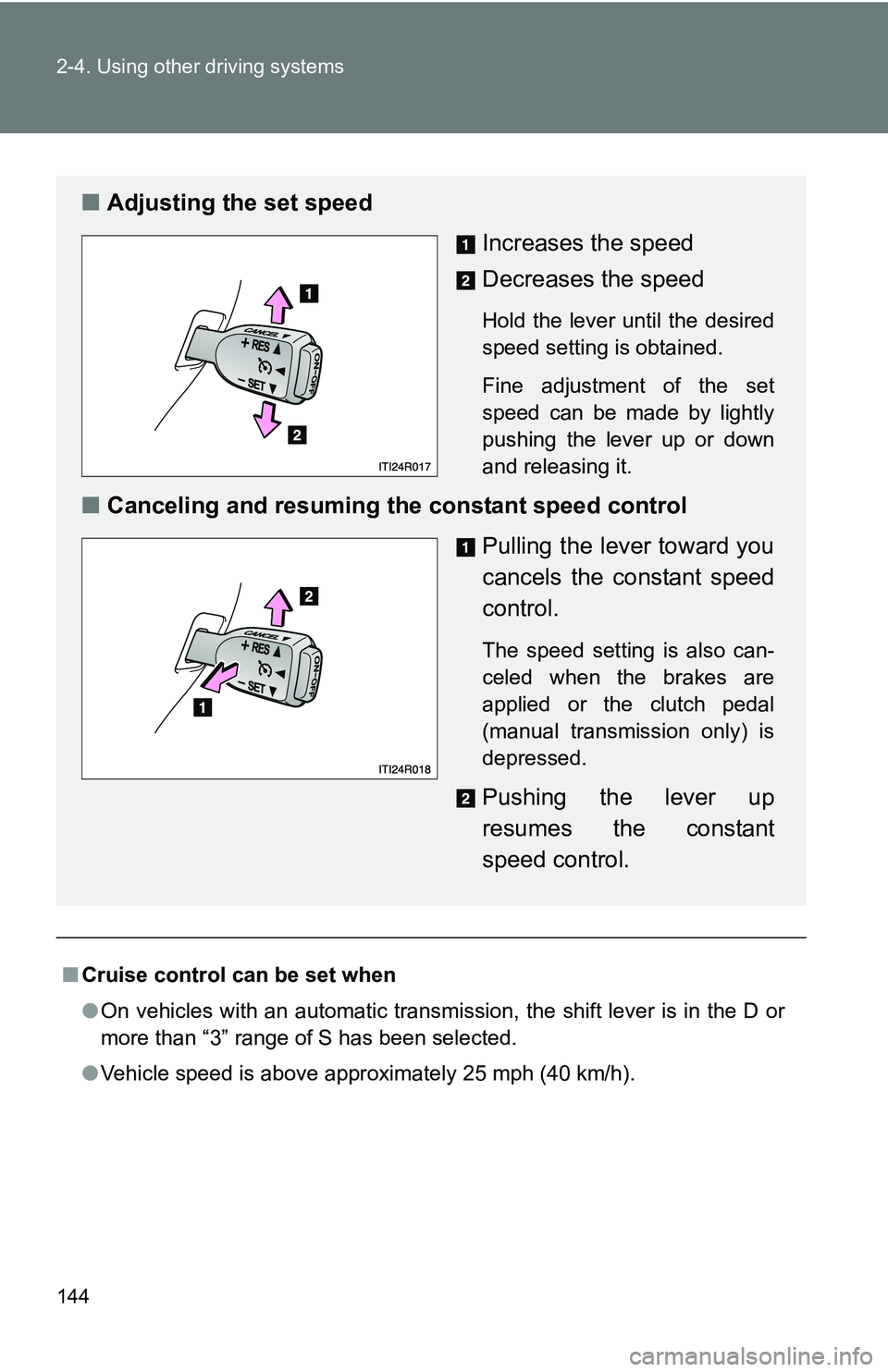
■ Adjusting the set speed
Increases the speed
Decreases the speed
Hold the lever until the desired
speed setting is obtained.
Fine adjustment of the set
speed can be made by lightly
pushing the lever up or down
and releasing it.
■Canceling and resuming the constant speed control
Pulling the lever toward you
cancels the constant speed
control.
The speed setting is also can-
celed when the brakes are
applied or the clutch pedal
(manual transmission only) is
depressed.
Pushing the lever up
resumes the constant
speed control.
Page 145 of 372
145
2-4. Using other
driving systems
2
When driving
■Accelerating
The vehicle can be accelerated normally. After acceleration, the set speed
resumes.
■ Automatic cruise control cancelation
Cruise control will stop maintaining the vehicle speed in any of the following
situations.
●Actual vehicle speed falls more than approximately 10 mph (16 km/h)
below the preset vehicle speed.
At this time, the memorized set speed is not retained.
● Actual vehicle speed is below 25 mph (40 km/h).
● VSC is activated.
■ If the cruise control indicator light flashes
Press the “ON-OFF” button once to deactivate the system, and then press
the button again to reactivate the system.
If the cruise control speed cannot be set or if the cruise control cancels
immediately after being activated, there may be a malfunction in the cruise
control system. Have the vehicle inspected by your Scion dealer.
Page 146 of 372
146 2-4. Using other driving systems
CAUTION
■To avoid operating the cruise control by mistake
Switch the cruise control off using the “ON-OFF” button off when not in use.
■ Situations unsuitable for cruise control
Do not use cruise control in any of the following situations.
Doing so may result in loss of control and could cause an accident resulting
in death or serious injury.
●In heavy traffic
● On roads with sharp bends
● On winding roads
● On slippery roads, such as those covered with rain, ice or snow
● On steep hills
Vehicle speed may exceed the set speed when driving down a steep hill.
● When your vehicle is during emergency towing