buttons TOYOTA xB 2012 Accessories, Audio & Navigation (in English)
[x] Cancel search | Manufacturer: TOYOTA, Model Year: 2012, Model line: xB, Model: TOYOTA xB 2012Pages: 284, PDF Size: 32.36 MB
Page 177 of 284
OTHER FUNCTIONS
176
V573_E
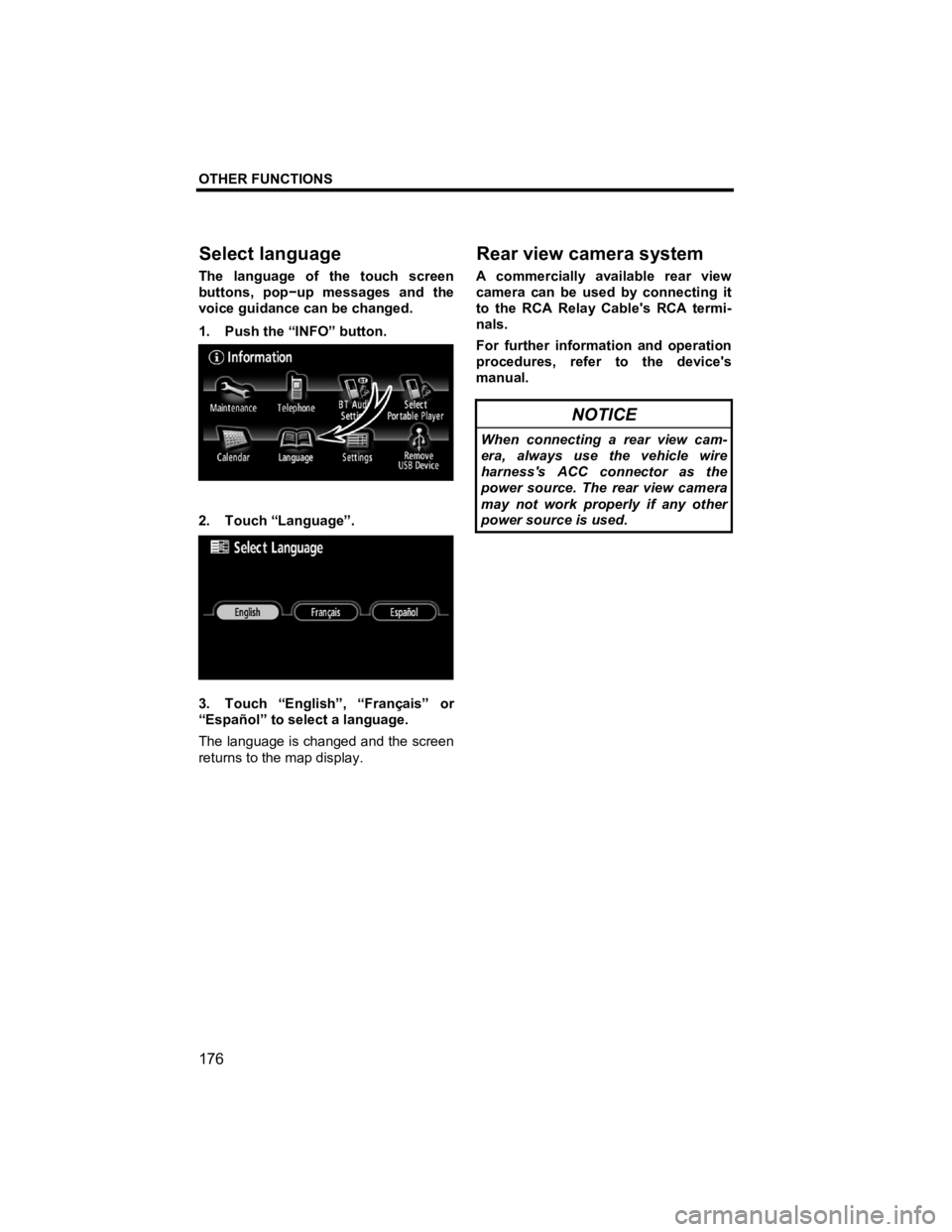
The language of the touch screen
buttons, pop −up messages and the
voice guidance can be changed.
1. Push the “INFO” button.
2. Touch “Language”.
3. Touch “English”, “Français” or
“Español” to select a language.
The language is changed and the screen
returns to the map display.
A commercially available rear view
camera can be used by connecting it
to the RCA Relay Cable's RCA termi-
nals.
For further information and operation
procedures, refer to the device's
manual.
NOTICE
When connecting a rear view cam-
era, always use the vehicle wire
harness's ACC connector as the
power source. The rear view camera
may not work properly if any other
power source is used.
Select lan
guage
Rear view camera system
Page 179 of 284
AUDIO/VIDEO SYSTEM
178
V573_E
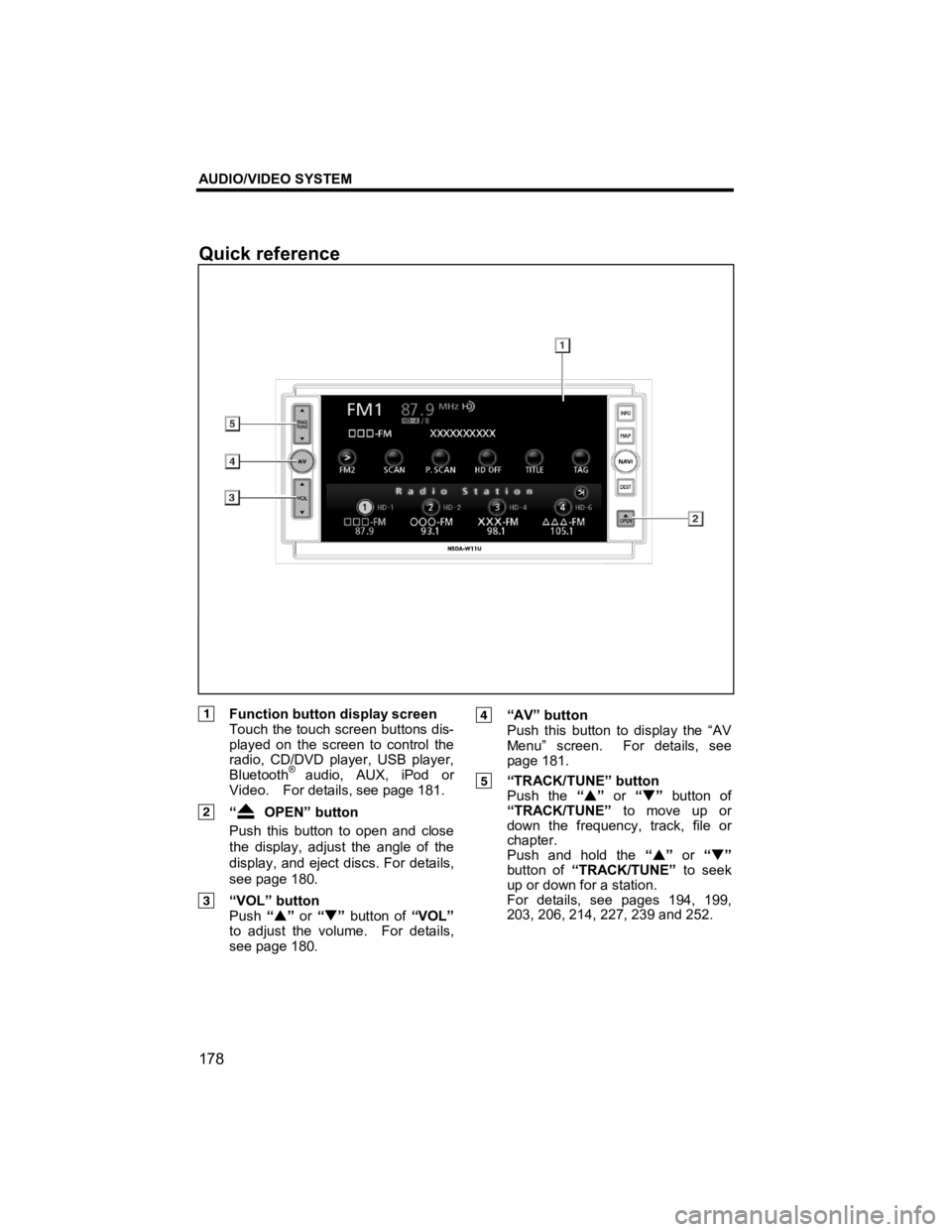
Function button display screen Touch the touch screen buttons dis-
played on the screen to control the
radio, CD/DVD player, USB player,
Bluetooth
® audio, AUX, iPod or
Video. For details, see page 181.
“ OPEN” button
Push this button to open and close
the display, adjust the angle of the
display, and eject discs. For details,
see page 180.
“VOL” button Push “S ” or “T ” button of “VOL”
to adjust the volume. For details,
see page 180.
“AV” button
Push this button to display the “AV
Menu” screen. For details, see
page 181.
“TRACK/TUNE” button Push the “S ” or “T” button of
“TRACK/TUNE” to move up or
down the frequency, track, file or
chapter.
Push and hold the “S ” or “T ”
button of “TRACK/TUNE” to seek
up or down for a station.
For details, see pages 194, 199,
203, 206, 214, 227, 239 and 252.
Quick reference
Page 181 of 284
AUDIO/VIDEO SYSTEM
180
V573_E
z Turning on the power
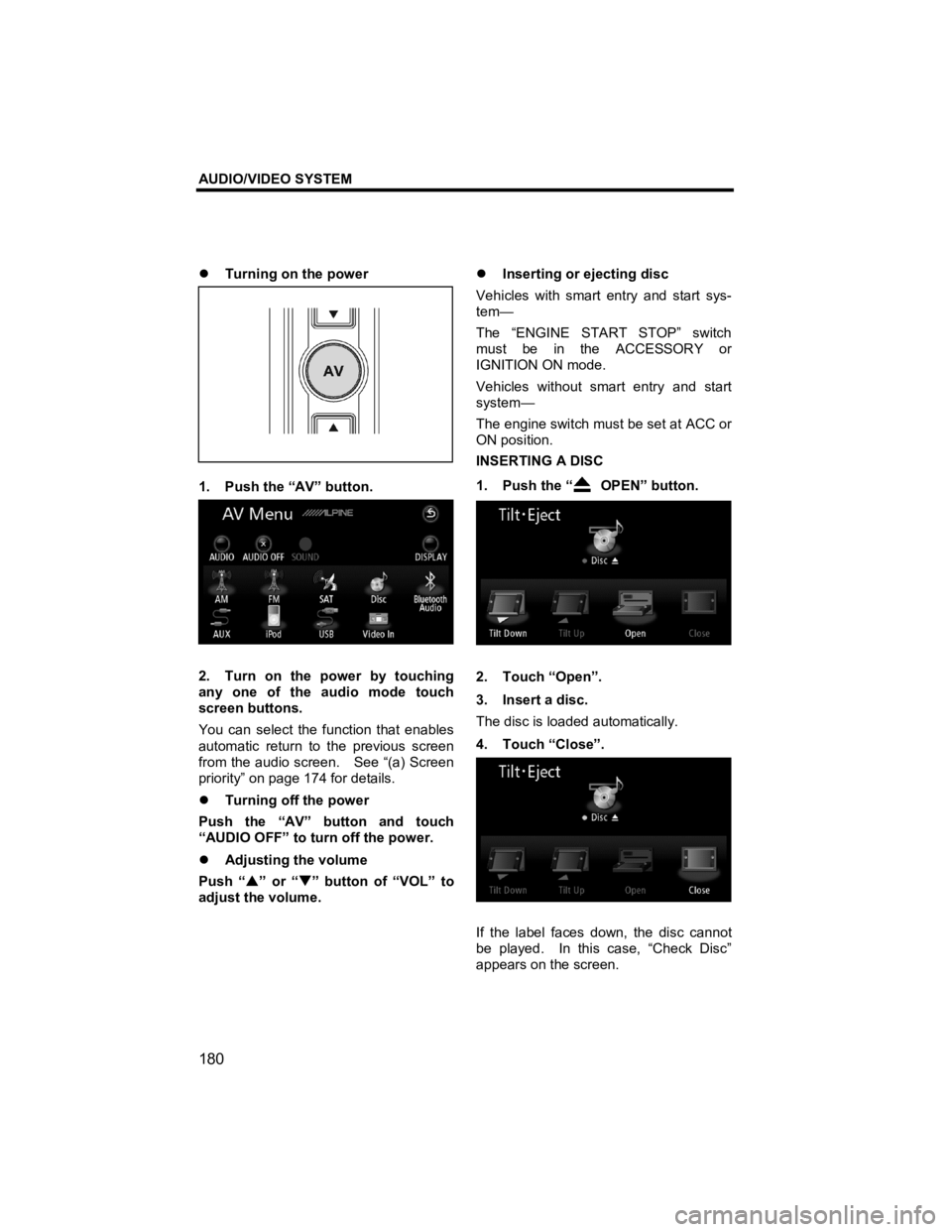
1. Push the “AV” button.
2. Turn on the power by touching
any one of the audio mode touch
screen buttons.
You can select the function that enables
automatic return to the previous screen
from the audio screen. See “(a) Screen
priority” on page 174 for details.
z Turning off the power
Push the “AV” button and touch
“AUDIO OFF” to turn off the power.
z Adjusting the volume
Push “ S” or “ T” button of “VOL” to
adjust the volume.
z
Inserting or ejecting disc
Vehicles with smart entry and start sys-
tem—
The “ENGINE START STOP” switch
must be in the ACCESSORY or
IGNITION ON mode.
Vehicles without smart entry and start
system—
The engine switch must be set at ACC or
ON position.
INSERTING A DISC
1. Push the “
OPEN” button.
2. Touch “Open”.
3. Insert a disc.
The disc is loaded automatically.
4. Touch “Close”.
If the label faces down, the disc cannot
be played. In this case, “Check Disc”
appears on the screen.
Page 182 of 284
AUDIO/VIDEO SYSTEM
181
V573_E
EJECTING A DISC
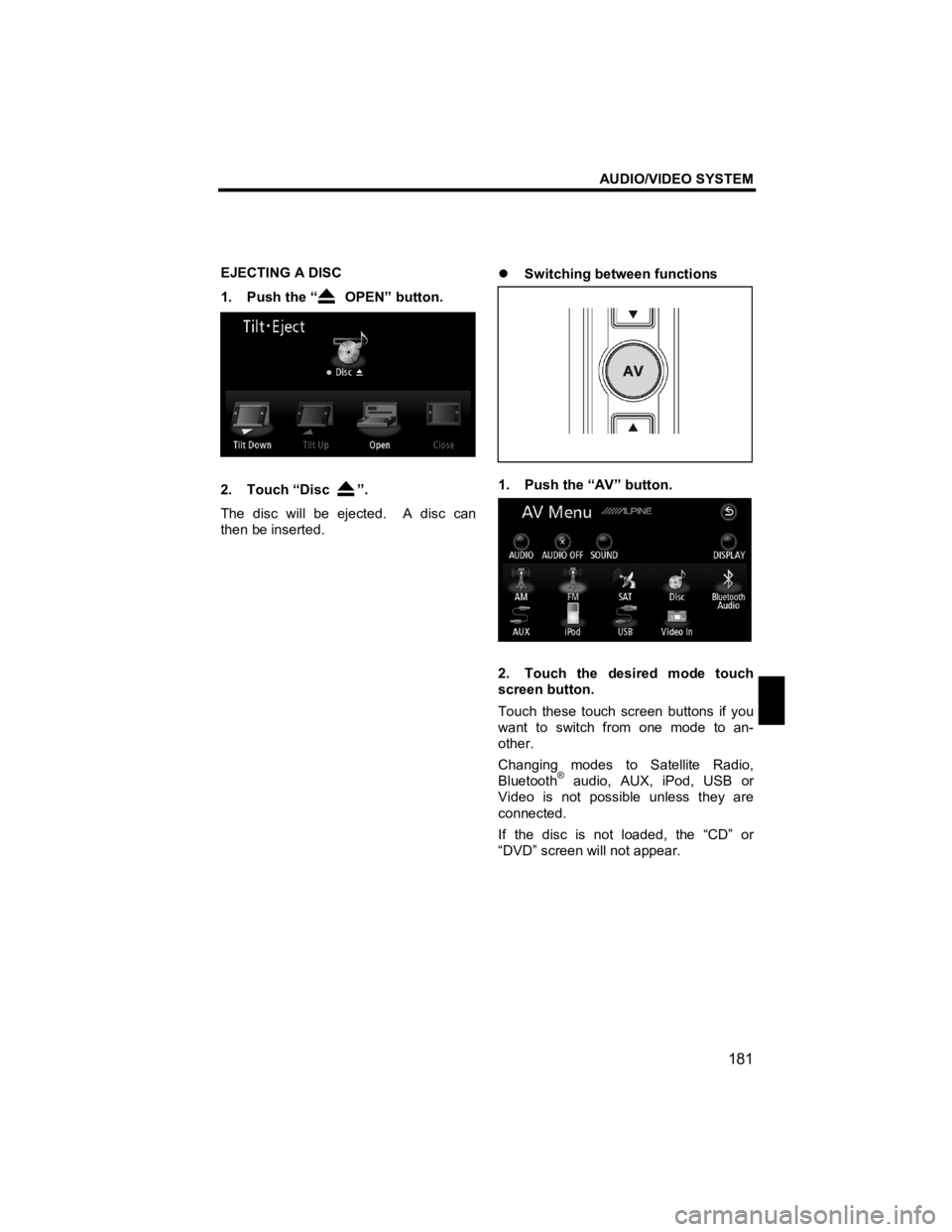
1. Push the “
OPEN” button.
2. Touch “Disc ”.
The disc will be ejected. A disc can
then be inserted.
z
Switching between functions
1. Push the “AV” button.
2. Touch the desired mode touch
screen button.
Touch these touch screen buttons if you
want to switch from one mode to an-
other.
Changing modes to Satellite Radio,
Bluetooth
® audio, AUX, iPod, USB or
Video is not possible unless they are
connected.
If the disc is not loaded, the “CD” or
“DVD” screen will not appear.
Page 185 of 284
AUDIO/VIDEO SYSTEM
184
V573_E
The touch screen buttons for radio,
CD/DVD player, USB player, Bluetooth®
audio, AUX, iPod and Video operation
are displayed on the function button dis-
play screen when the audio operation
mode is selected.
Touch them lightly and directly on the
screen.
The selected touch screen button is
highlighted.
INFORMATION
z If the system does not respond to
a touch of a touch screen button,
move your finger away from the
screen and then touch it again.
z You cannot operate dimmed
touch screen buttons.
z Wipe off fingerprints on the sur-
face of the display using a glass
cleaning cloth.
z Sound menu screen display
The sound quality inside the cabin will be
altered greatly by such factors as the
type of media or music used, and the
vehicle body type. This system allows
you to set the most appropriate sound
quality to suit these factors.
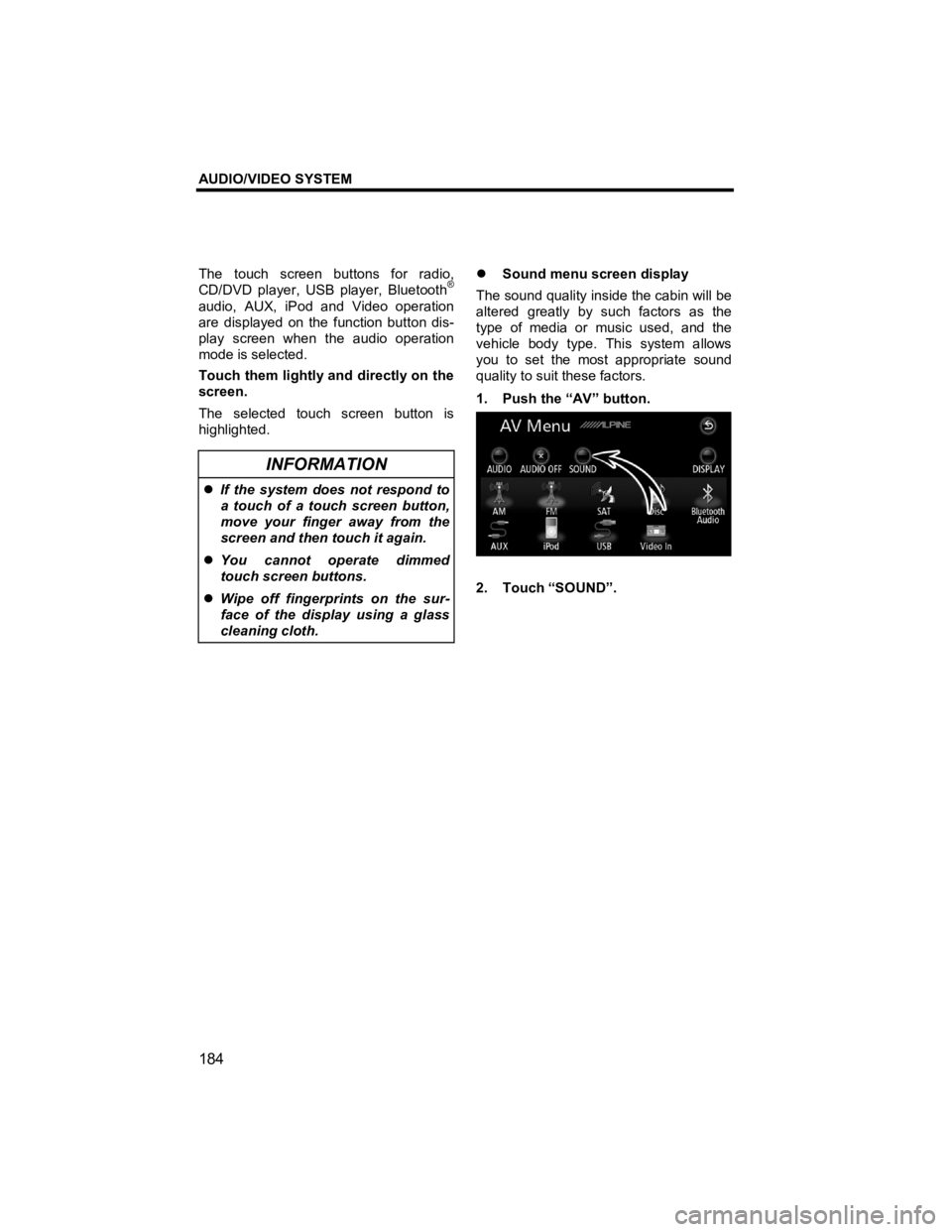
1. Push the “AV” button.
2. Touch “SOUND”.
Page 194 of 284
AUDIO/VIDEO SYSTEM
193
V573_E
z Listening to the radio
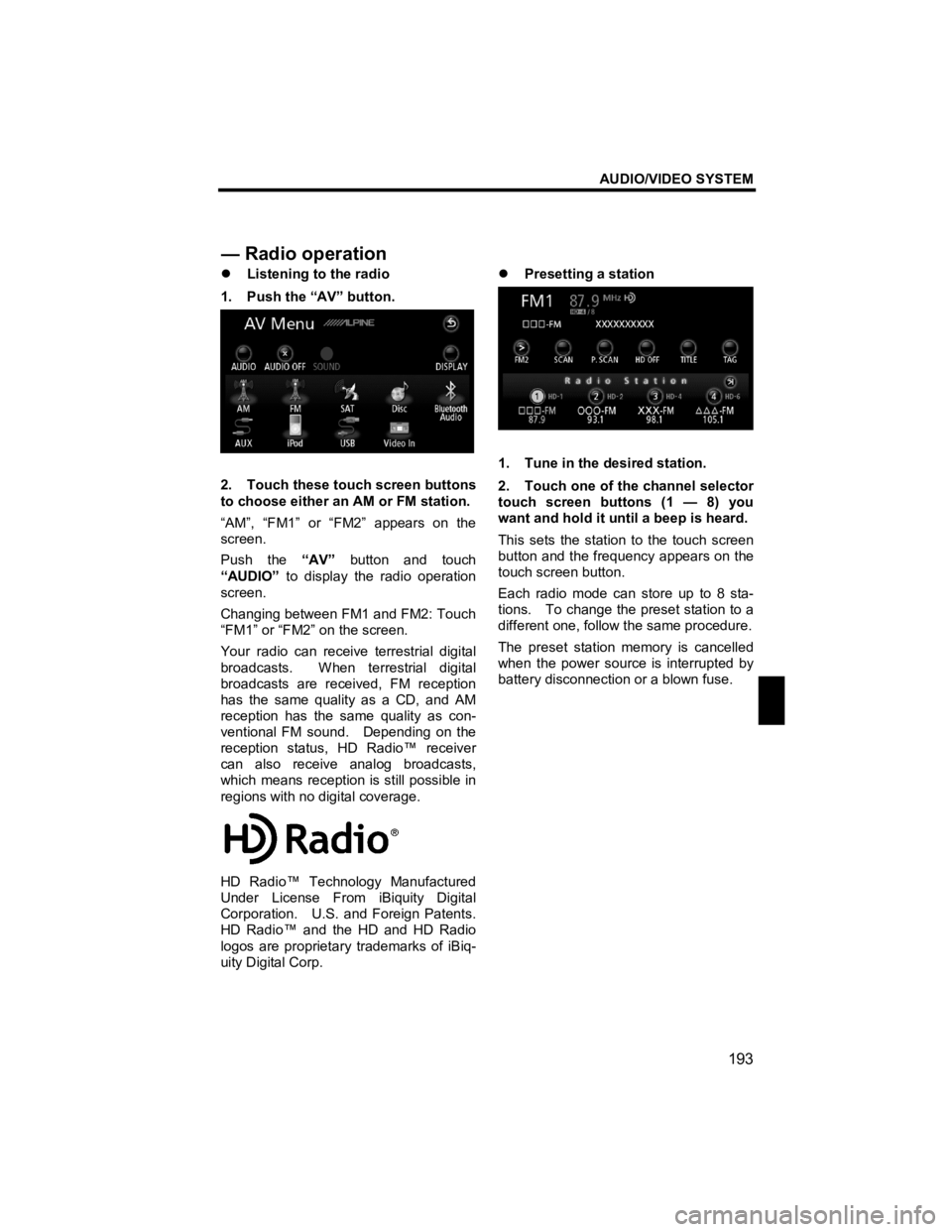
1. Push the “AV” button.
2. Touch these touch screen buttons
to choose either an AM or FM station.
“AM”, “FM1” or “FM2” appears on the
screen.
Push the “AV” button and touch
“AUDIO” to display the radio operation
screen.
Changing between FM1 and FM2: Touch
“FM1” or “FM2” on the screen.
Your radio can receive terrestrial digital
broadcasts. When terrestrial digital
broadcasts are received, FM reception
has the same quality as a CD, and AM
reception has the same quality as con-
ventional FM sound. Depending on the
reception status, HD Radio™ receiver
can also receive analog broadcasts,
which means reception is still possible in
regions with no digital coverage.
HD Radio™ Technology Manufactured
Under License From iBiquity Digital
Corporation. U.S. and Foreign Patents.
HD Radio™ and the HD and HD Radio
logos are proprietary trademarks of iBiq-
uity Digital Corp.
z
Presetting a station
1. Tune in the desired station.
2. Touch one of the channel selector
touch screen buttons (1 — 8) you
want and hold it until a beep is heard.
This sets the station to the touch screen
button and the frequency appears on the
touch screen button.
Each radio mode can store up to 8 sta-
tions. To change the preset station to a
different one, follow the same procedure.
The preset station memory is cancelled
when the power source is interrupted by
battery disconnection or a blown fuse.
— Radio o
peration
Page 199 of 284
AUDIO/VIDEO SYSTEM
198
V573_E
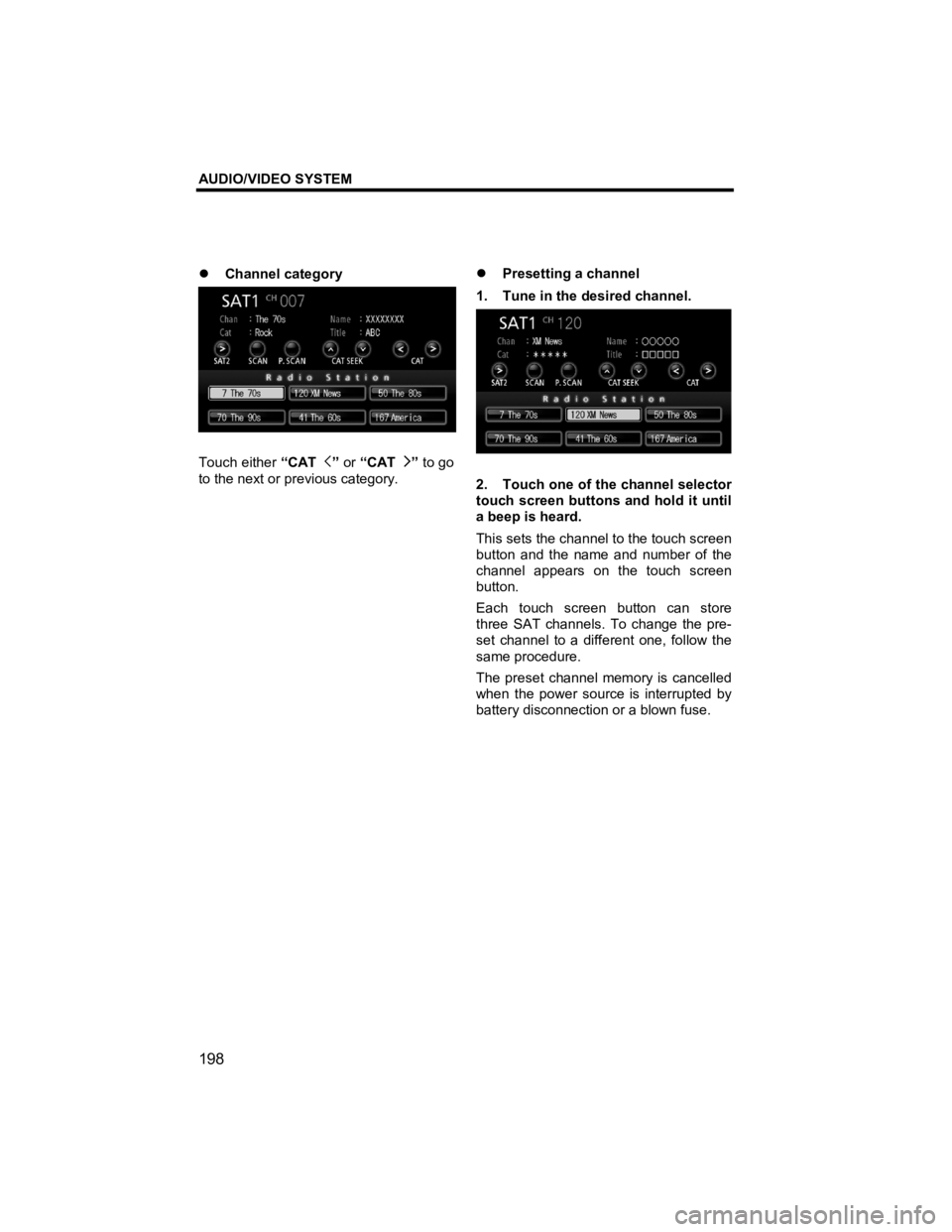
z Channel category
Touch either “CAT ” or “CAT ” to go
to the next or previous category.
z
Presetting a channel
1. Tune in the desired channel.
2. Touch one of the channel selector
touch screen buttons and hold it until
a beep is heard.
This sets the channel to the touch screen
button and the name and number of the
channel appears on the touch screen
button.
Each touch screen button can store
three SAT channels. To change the pre-
set channel to a different one, follow the
same procedure.
The preset channel memory is cancelled
when the power source is interrupted by
battery disconnection or a blown fuse.
Page 212 of 284
AUDIO/VIDEO SYSTEM
211
V573_E
z Playing a DVD video disc
Insert a DVD in the disc slot to auto-
matically turn on the power and play the
DVD. The DVD can also be played by
pushing the “AV” button with a DVD in
the disc slot and then touching “Disc”.
INFORMATION
Please note that there are certain
discs that do not playback auto-
matically, or do not playback unless
an item from the menu recorded on
the disc is selected. “Description of
DVD controls” (See page 212.)
z
Displaying DVD controls
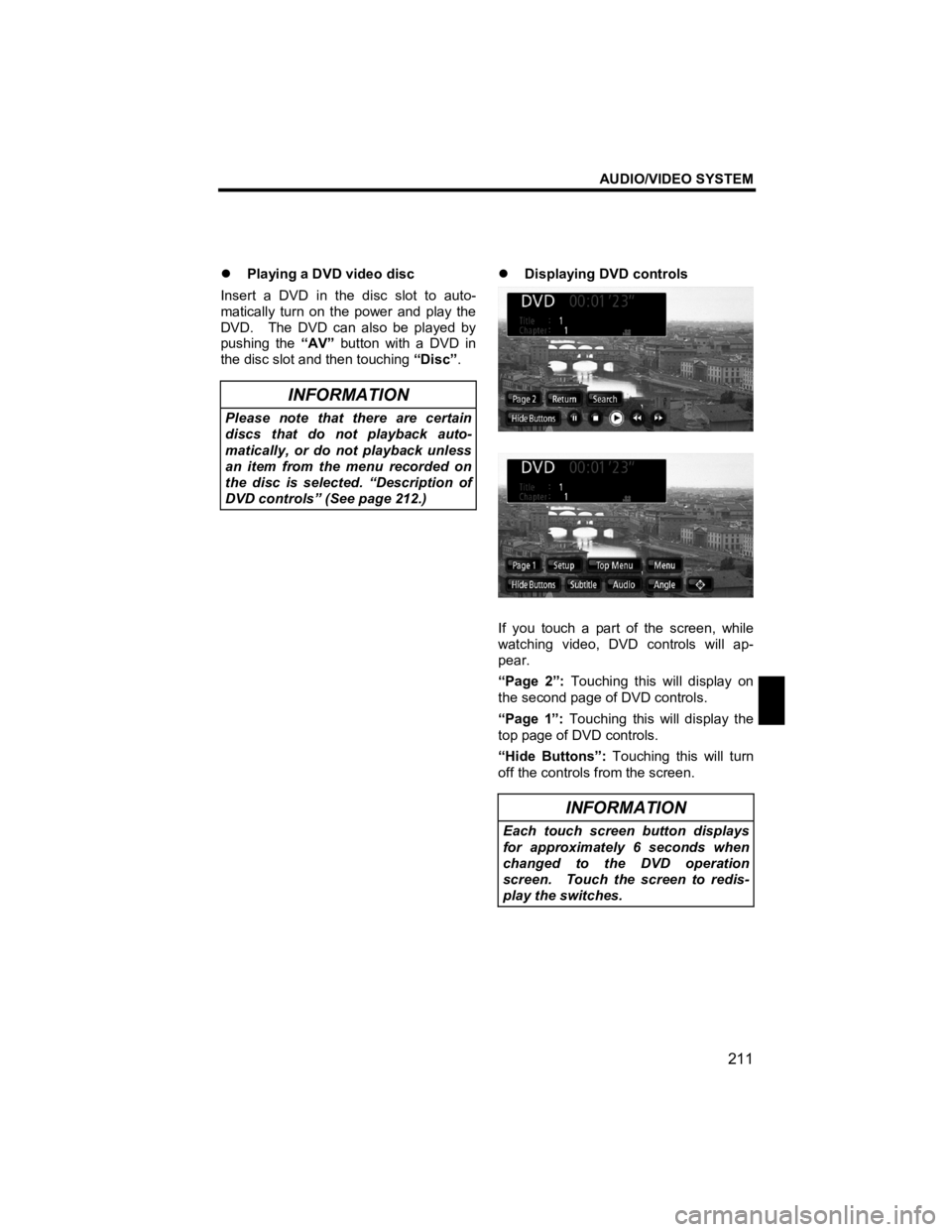
If you touch a part of the screen, while
watching video, DVD controls will ap-
pear.
“Page 2”: Touching this will display on
the second page of DVD controls.
“Page 1”: Touching this will display the
top page of DVD controls.
“Hide Buttons”: Touching this will turn
off the controls from the screen.
INFORMATION
Each touch screen button displays
for approximately 6 seconds when
changed to the DVD operation
screen. Touch the screen to redis-
play the switches.
Page 239 of 284
AUDIO/VIDEO SYSTEM
238
V573_E
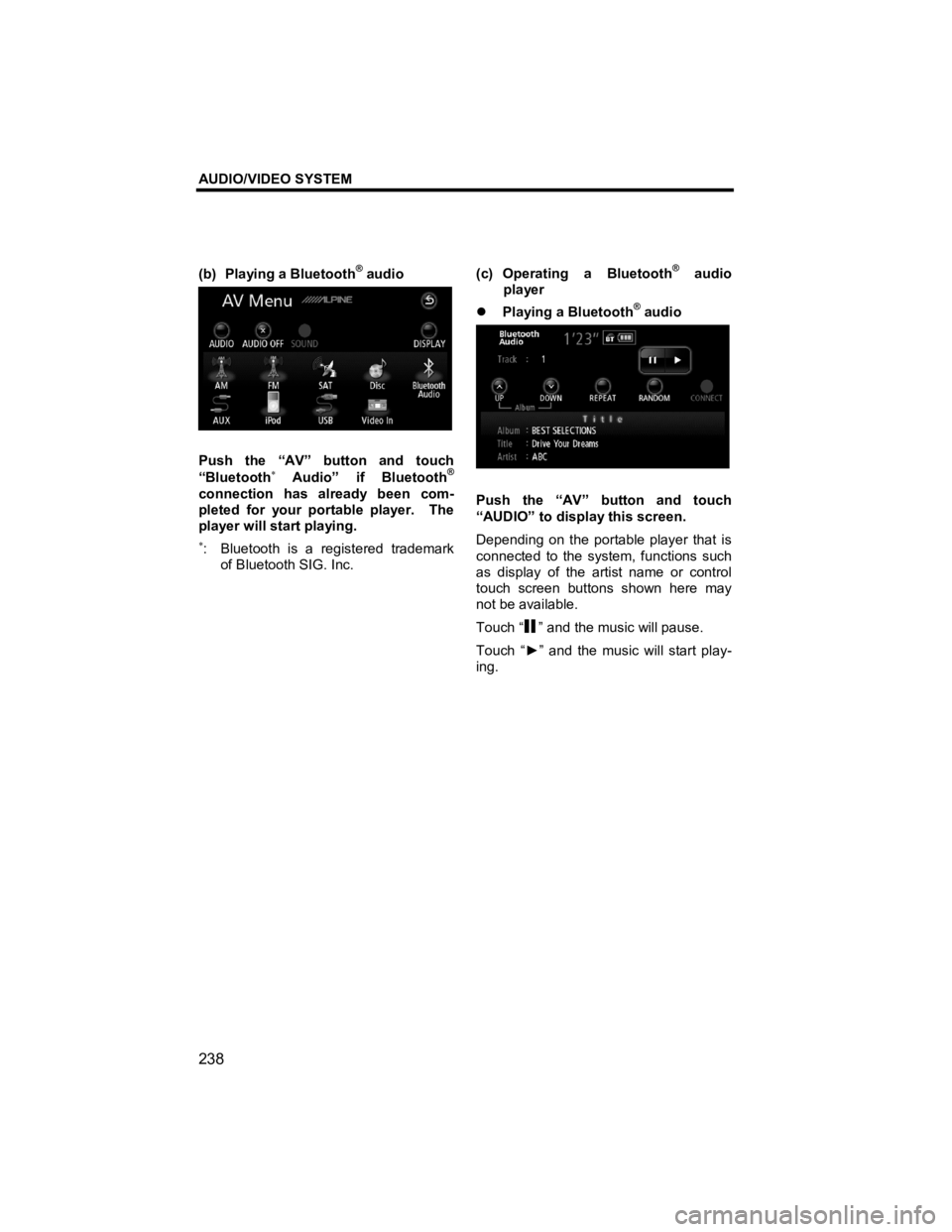
(b) Playing a Bluetooth® audio
Push the “AV” button and touch
“Bluetooth∗ Audio” if Bluetooth®
connection has already been com-
pleted for your portable player. The
player will start playing.
∗: Bluetooth is a registered trademark of Bluetooth SIG. Inc.
(c) Operating a Bluetooth
® audio
player
z Playing a Bluetooth
® audio
Push the “AV” button and touch
“AUDIO” to display this screen.
Depending on the portable player that is
connected to the system, functions such
as display of the artist name or control
touch screen buttons shown here may
not be available.
Touch “
” and the music will pause.
Touch “ ►” and the music will start play-
ing.
Page 253 of 284
AUDIO/VIDEO SYSTEM
252
V573_E
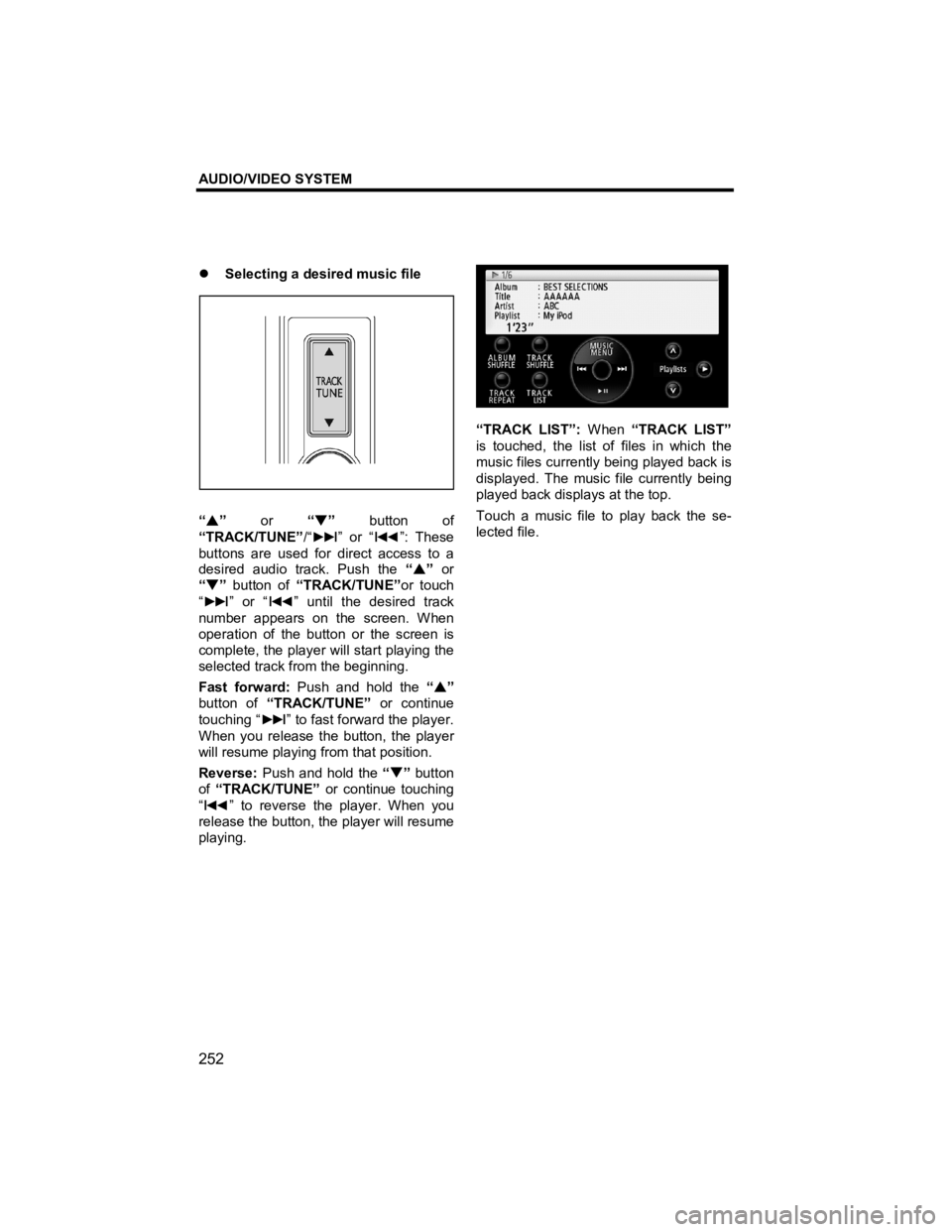
z Selecting a desired music file
“ S ” or “T” button of
“TRACK/TUNE” /“►►
I” or “I◄◄ ”: These
buttons are used for direct access to a
desired audio track. Push the “S ” or
“ T ” button of “TRACK/TUNE” or touch
“ ►►
I” or “I◄◄ ” until the desired track
number appears on the screen. When
operation of the button or the screen is
complete, the player will start playing the
selected track from the beginning.
Fast forward: Push and hold the “S ”
button of “TRACK/TUNE” or continue
touching “ ►►
I” to fast forward the player.
When you release the button, the player
will resume playing from that position.
Reverse: Push and hold the “T ” button
of “TRACK/TUNE” or continue touching
“
I◄◄ ” to reverse the player. When you
release the button, the player will resume
playing.
“TRACK LIST”: When “TRACK LIST”
is touched, the list of files in which the
music files currently being played back is
displayed. The music file currently being
played back displays at the top.
Touch a music file to play back the se-
lected file.