light TOYOTA YARIS 2008 2.G Workshop Manual
[x] Cancel search | Manufacturer: TOYOTA, Model Year: 2008, Model line: YARIS, Model: TOYOTA YARIS 2008 2.GPages: 388, PDF Size: 7.34 MB
Page 145 of 388
145
2
When driving
2-4. Using other driving systems
Driving assist systems
■Sounds and vibrations caused by the ABS
●A sound may be heard from the engine compartment when the engine is
started or just after the vehicle begins to move. This sound does not indi-
cate that a malfunction has occurred in this system.
● Any of the following conditions may occur when the above systems are
operating. None of these indicates that a malfunction has occurred.
• Vibrations may be felt through the vehicle body and steering.
• A motor sound may be heard after the vehicle comes to a stop.
• The brake pedal may pulsate slightly after the ABS is activated.
• The brake pedal may move down slightly after the ABS is activated.
■ EPS operation sound
When the steering wheel operates, a motor sound (whirring sound) may be
heard.
This does not indicate a malfunction.
■ Reduced effectiveness of EPS
The effectiveness of EPS is reduced to prevent the system from overheating
when there is frequent steering input over an extended period of time. The
steering wheel may feel heavy as a result. Should this occur, refrain from
excessive steering input or stop the vehicle and turn the engine off. The sys-
tem should return to normal within 10 minutes.
To help enhance driving safety a nd performance, the following sys-
tems operate automatically in res ponse to various driving situations.
Be aware, however, that these systems are supplementary and
should not be relied upon too heavi ly when operating the vehicle.
■ABS (Anti-lock Brake System) (if equipped)
The anti-lock brake system is designed to automatically help prevent
lock-up of the wheels during a sudden braking or braking on slippery
road surfaces. This assists in providing directional stability and steering
performance of the vehicle under these circumstances.
■EPS (Electric Power Steering)
Employs an electric motor to reduce the amount of effort needed to turn
the steering wheel.
Page 158 of 388
158 2-5. Driving information
Towing a trailerConsult your Toyota dealer for further information about additional
requirements such as a towing kits, etc.
■ Before towing
Check that the following conditions are met:
●Ensure that your vehicle’s tires are properly inflated. ( P. 345)
● Trailer tires should be inflated according to the trailer manufacturer’s rec-
ommendation.
● All trailer lights work to be legal.
● Confirm all lights work each time you connect them.
● Check that your vehicle remains level when a loaded or unloaded trailer
is hitched. Do not drive if the vehicle is not level, and check for improper
tongue load, overloading, worn suspension, or other possible causes.
● Make sure the trailer cargo is securely loaded.
● Check that your rear view mirrors conform to any federal, state/provincial
or local regulations. If they do not, install rear view mirrors appropriate for
towing purposes.
■ Break-in schedule
●Toyota recommends that you do not use a new vehicle or a vehicle with
any new power train components (engine, transmission, differential,
wheel bearings, etc.) to tow a trailer for the first 500 miles (800 km) of
driving.
■ Maintenance
●If you tow a trailer, your vehicle will require more frequent maintenance
due to the additional load. (See “Scheduled Maintenance Guide” or
“Owner’s Manual Supplement”.)
● Retighten the fixing bolts of the towing ball and bracket after approxi-
mately 600 miles (1000 km).
Page 159 of 388
159
2-5. Driving information
2
When driving
CAUTION
■
To avoid accident or injury
●The total trailer weight (trailer weight plus the weight of cargo) must not
exceed 700 lb. (318 kg)
● Do not exceed the trailer hitch assembly weight, gross vehicle weight,
gross axle weight and trailer tongue load capacities.
■ Hitches
Trailer hitch assemblies have different weight capacities established by the
hitch manufacturer. Even though the vehicle may be rated for towing a
higher weight, the operator must never exceed the maximum weight rating
specified for the trailer hitch.
●If you wish to install a trailer hitch, your Toyota dealer should be consulted.
● Use only a hitch that conforms to the total trailer weight requirement.
● Follow the directions supplied by the hitch manufacturer.
● Lubricate the hitch ball with a light coat of grease.
● Remove the trailer hitch whenever you are not towing a trailer to reduce
the possibility of additional damage caused by the hitch if your vehicle is
struck from behind.
■ When towing a trailer
●Never tap into your vehicle’s hydraulic system, as this will lower the vehi-
cle’s braking effectiveness.
● Never tow a trailer without using a safety chain securely attached to both
the trailer and the vehicle. If damage occurs to the coupling unit or hitch
ball, there is danger of the trailer wandering into another lane.
Page 160 of 388

160 2-5. Driving information
Trailer towing tipsYour vehicle will handle differently when towing a trailer. The three
main causes of vehicle-trailer ac cidents are driver error, excessive
speed and improper trailer loading. Keep these in mind when towing.
● Before starting out, check the trailer’s light and the vehicle-trailer
connections. Recheck after driving a short distance.
● Practice turning, stopping and reve rsing with the trailer attached in
an area away from traffic until you become accustomed to the feel
of the vehicle.
NOTICE
■ When installing a trailer hitch
Use only the position recommended by your Toyota dealer. Do not install the
trailer hitch on the bumper; this may cause body damage.
■ Brakes
Toyota recommends trailers with brakes that conform to any applicable fed-
eral and state/provincial regulations.
■ Safety chain
A safety chain must always be used between the towing vehicle and the
trailer. Leave sufficient slack in the chain for turns. The chain should cross
under the trailer tongue to prevent the tongue from dropping to the ground in
the case that it becomes damaged or separated. For the correct safety chain
installation procedure, ask your Toyota dealer.
■ Do not directly splice trailer lights
Directly splicing may damage your vehicle’s electrical system and cause a
malfunction.
Page 167 of 388
Interior features3
167
3-1. Using the air conditioning system and defogger... 168
Air conditioning system .... 168
Rear window defogger ..... 175
3-2. Using the audio system .......................... 176
Audio system types .......... 176
Using the radio ................. 179
Using the cassette player ............................. 182
Using the CD player ......... 185
Playing back MP3 and WMA discs ..................... 192
Optimal use of the audio system ........................... 200
Using the AUX adapter .... 203
3-3. Using the interior lights ............................. 204
Interior lights list ............... 204
• Interior light ..................... 205
• Personal lights ................ 205 3-4. Using the storage
features ......................... 206
List of storage features .... 206
• Glove boxes ................... 206
• Cup holders ................... 208
• Bottle holders ................. 209
• Auxiliary boxes ............... 211
3-5. Other interior features ... 213 Sun visors ........................ 213
Vanity mirrors ................... 214
Clock ................................ 215
Power outlet ..................... 217
Floor mat .......................... 218
Luggage compartment features .......................... 219
Page 175 of 388
175
3-1. Using the air conditioning system and defogger
3
Interior features
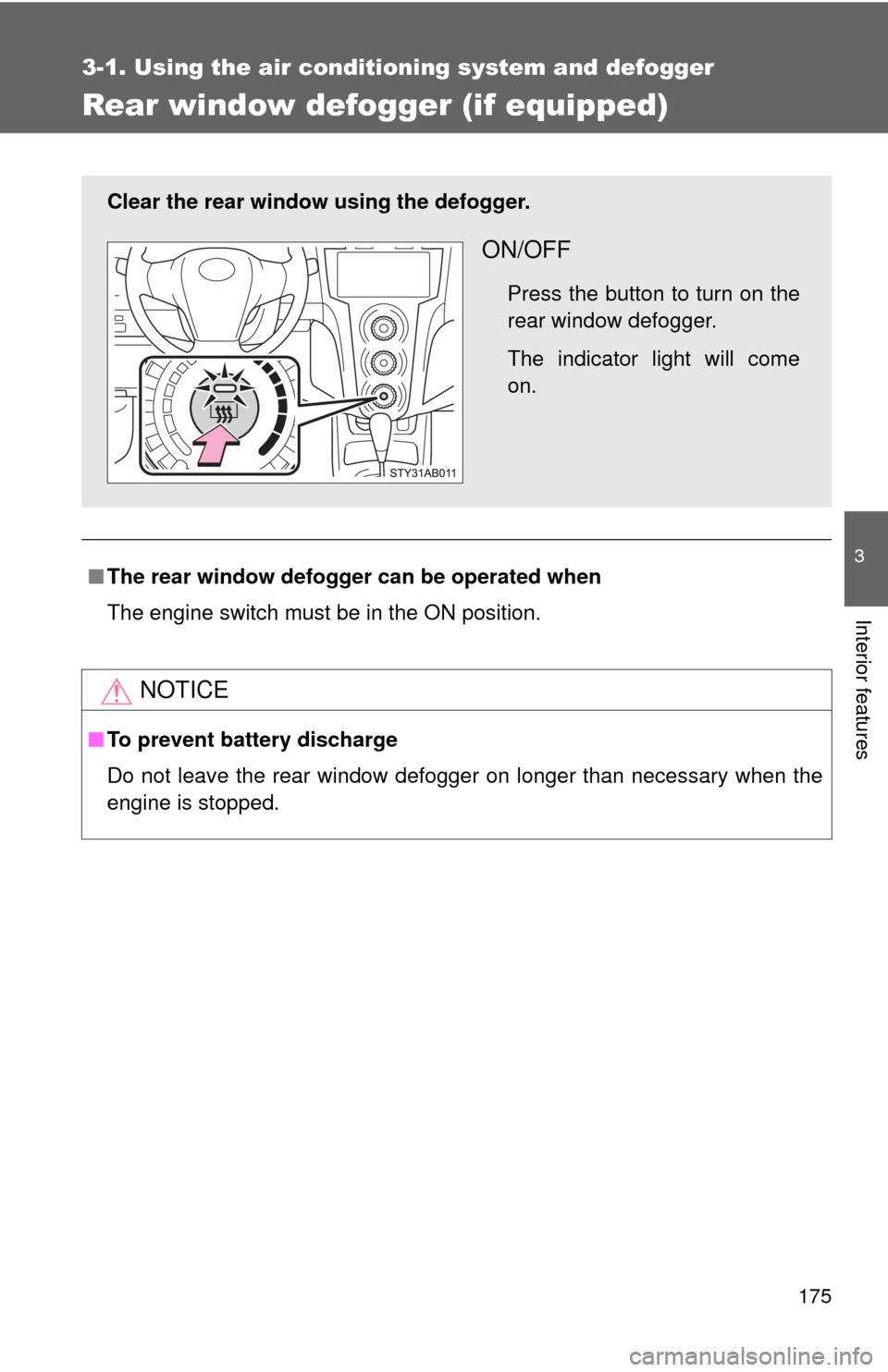
Rear window defogger (if equipped)
■The rear window defogger can be operated when
The engine switch must be in the ON position.
NOTICE
■ To prevent battery discharge
Do not leave the rear window defogger on longer than necessary when the
engine is stopped.
Clear the rear window using the defogger.
ON/OFF
Press the button to turn on the
rear window defogger.
The indicator light will come
on.
Page 184 of 388
184 3-2. Using the audio system
■Cleaning the cassette player
Cassette player components (heads, capstan, pinch rollers) should be
cleaned at least once a month using a cleaning tape to remove dirt and dust
that can easily build up.
■ Using long playing cassette tapes
Avoid using tapes with a length of more than 90 minutes, as the tape used is
very thin and may become tangled in the cassette player.
NOTICE
■Cassette tapes that cannot be used
Do not use a cassette tape if it has been damaged or tangled or if its label is
peeling off. Such tapes may affect playing speed and may also get stuck in
the player.
■ Cassette player precautions
●Store cassette tapes away from direct sunlight.
● Do not insert anything other than cassette tapes into the cassette player.
● Do not apply oil to the cassette player.
Page 191 of 388
191
3-2. Using the audio system
3
Interior features
NOTICE
■
CD player precautions
Failure to follow the precautions below may result in serious damage to the
CDs or the player itself.
●Do not insert anything other than CDs into the CD slot.
● Do not apply oil to the CD player.
● Store CDs away from direct sunlight.
● Never try to disassemble any part of the CD player.
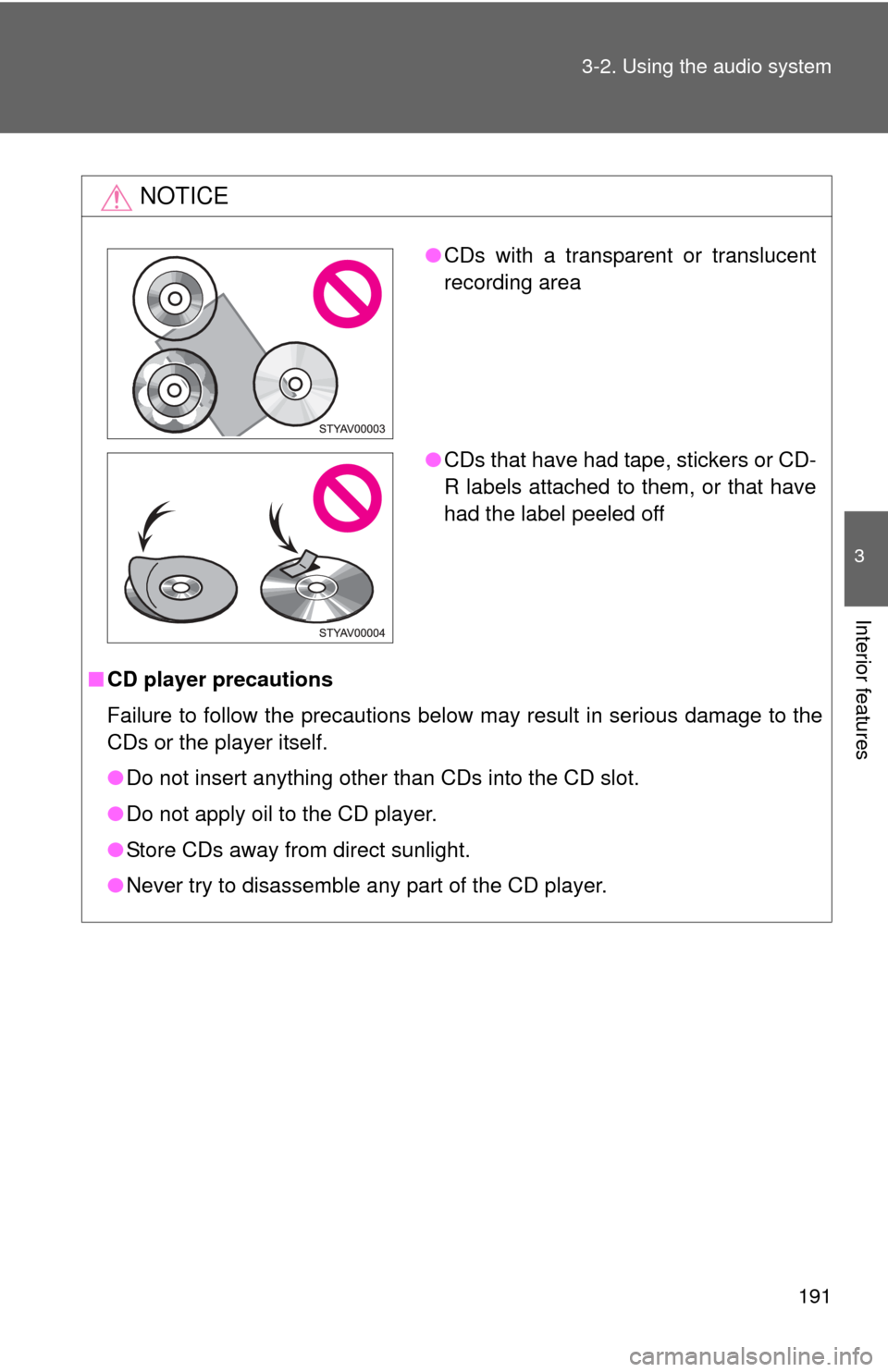
●CDs with a transparent or translucent
recording area
● CDs that have had tape, stickers or CD-
R labels attached to them, or that have
had the label peeled off
Page 204 of 388
204
3-3. Using the interior lights
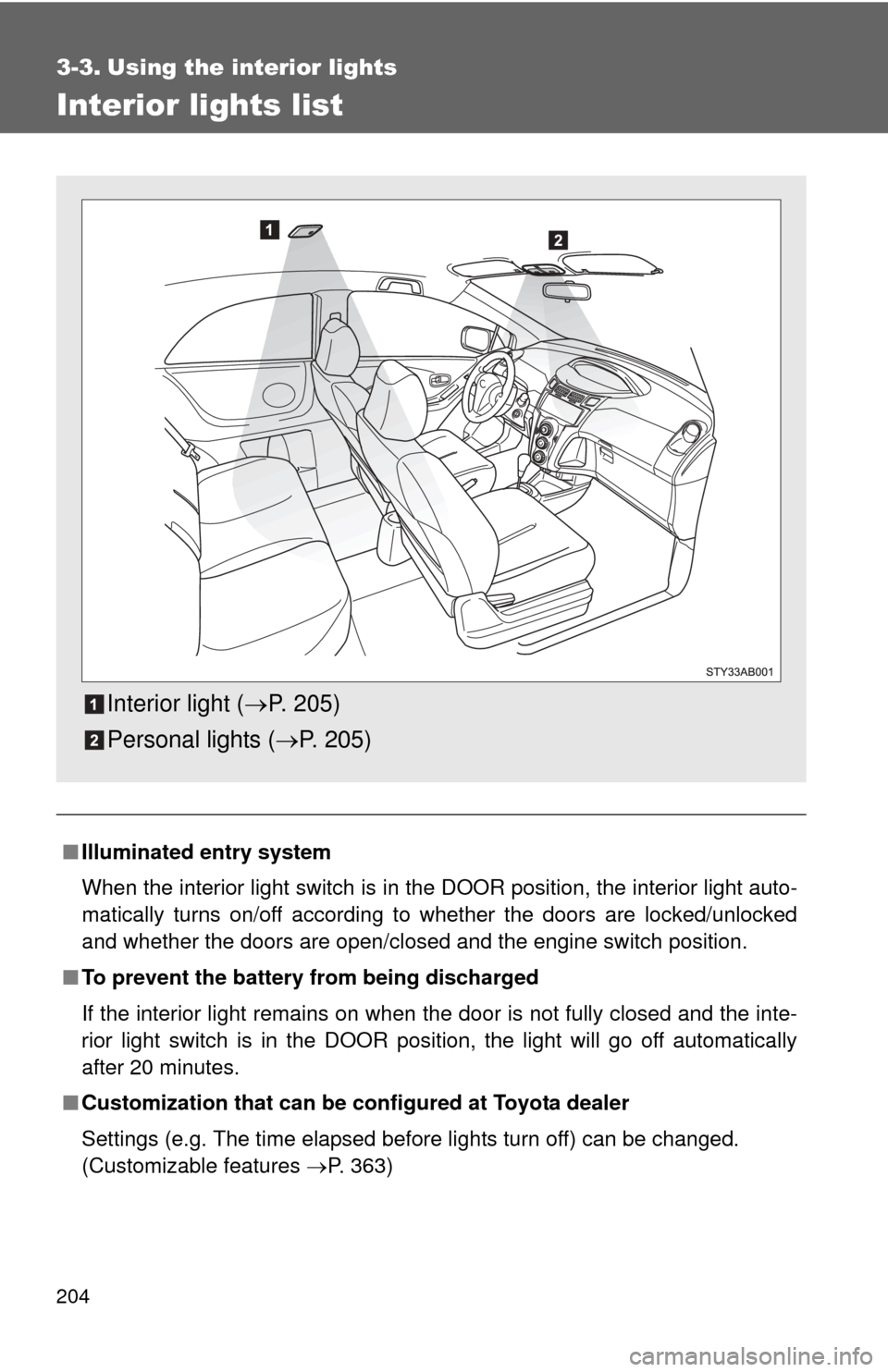
Interior lights list
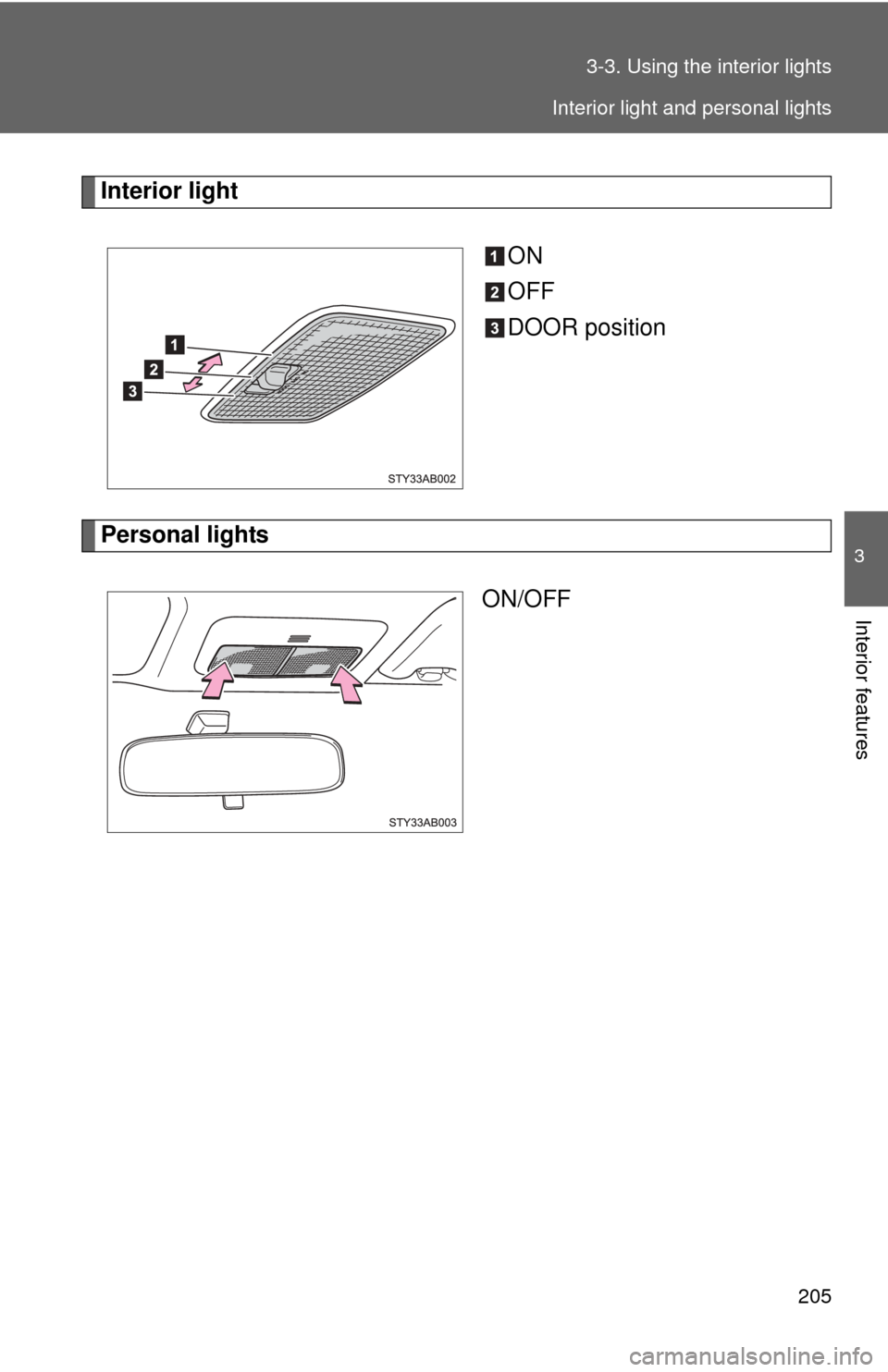
■Illuminated entry system
When the interior light switch is in the DOOR position, the interior light auto-
matically turns on/off according to whether the doors are locked/unlocked
and whether the doors are open/closed and the engine switch position.
■ To prevent the battery from being discharged
If the interior light remains on when the door is not fully closed and the inte-
rior light switch is in the DOOR position, the light will go off automatically
after 20 minutes.
■ Customization that can be co nfigured at Toyota dealer
Settings (e.g. The time elapsed before lights turn off) can be changed.
(Customizable features P. 363)
Interior light (P. 205)
Personal lights ( P. 205)
Page 205 of 388
205
3-3. Using the interior lights
3
Interior features
Interior light
ON
OFF
DOOR position
Personal lightsON/OFF
Interior light and personal lights