Indicator TOYOTA YARIS 2009 2.G Owner's Manual
[x] Cancel search | Manufacturer: TOYOTA, Model Year: 2009, Model line: YARIS, Model: TOYOTA YARIS 2009 2.GPages: 392, PDF Size: 8.52 MB
Page 143 of 392
143
2-2. Instrument cluster
2
When driving
■
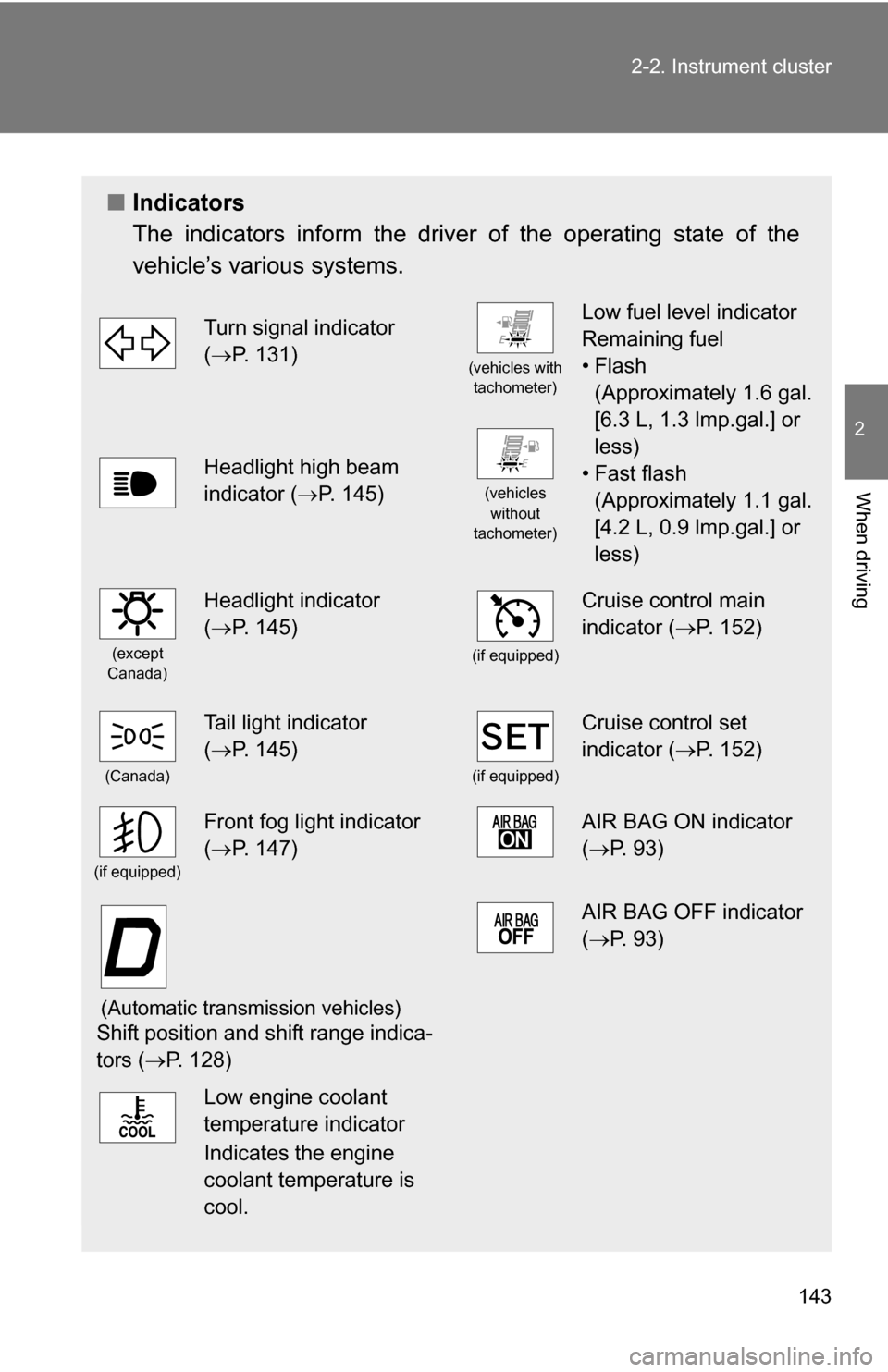
Indicators
The indicators inform the driver of the operating state of the
vehicle’s various systems.
Turn signal indicator
(P. 131)
(vehicles with
tachometer)
Low fuel level indicator
Remaining fuel
•Flash (Approximately 1.6 gal.
[6.3 L, 1.3 lmp.gal.] or
less)
• Fast flash (Approximately 1.1 gal.
[4.2 L, 0.9 lmp.gal.] or
less)
Headlight high beam
indicator ( P. 145)
(vehicles
without
tachometer)
(except
Canada)
Headlight indicator
( P. 145)
(if equipped)
Cruise control main
indicator ( P. 152)
(Canada)
Tail light indicator
(P. 145)
(if equipped)
Cruise control set
indicator ( P. 152)
(if equipped)
Front fog light indicator
(P. 147)AIR BAG ON indicator
( P. 93)
(Automatic transmission vehicles)
Shift position and shift range indica-
tors ( P. 128)
AIR BAG OFF indicator
(P. 93)
Low engine coolant
temperature indicator
Indicates the engine
coolant temperature is
cool.
Page 152 of 392
152
2-4. Using other driving systems
Cruise control (if equipped)
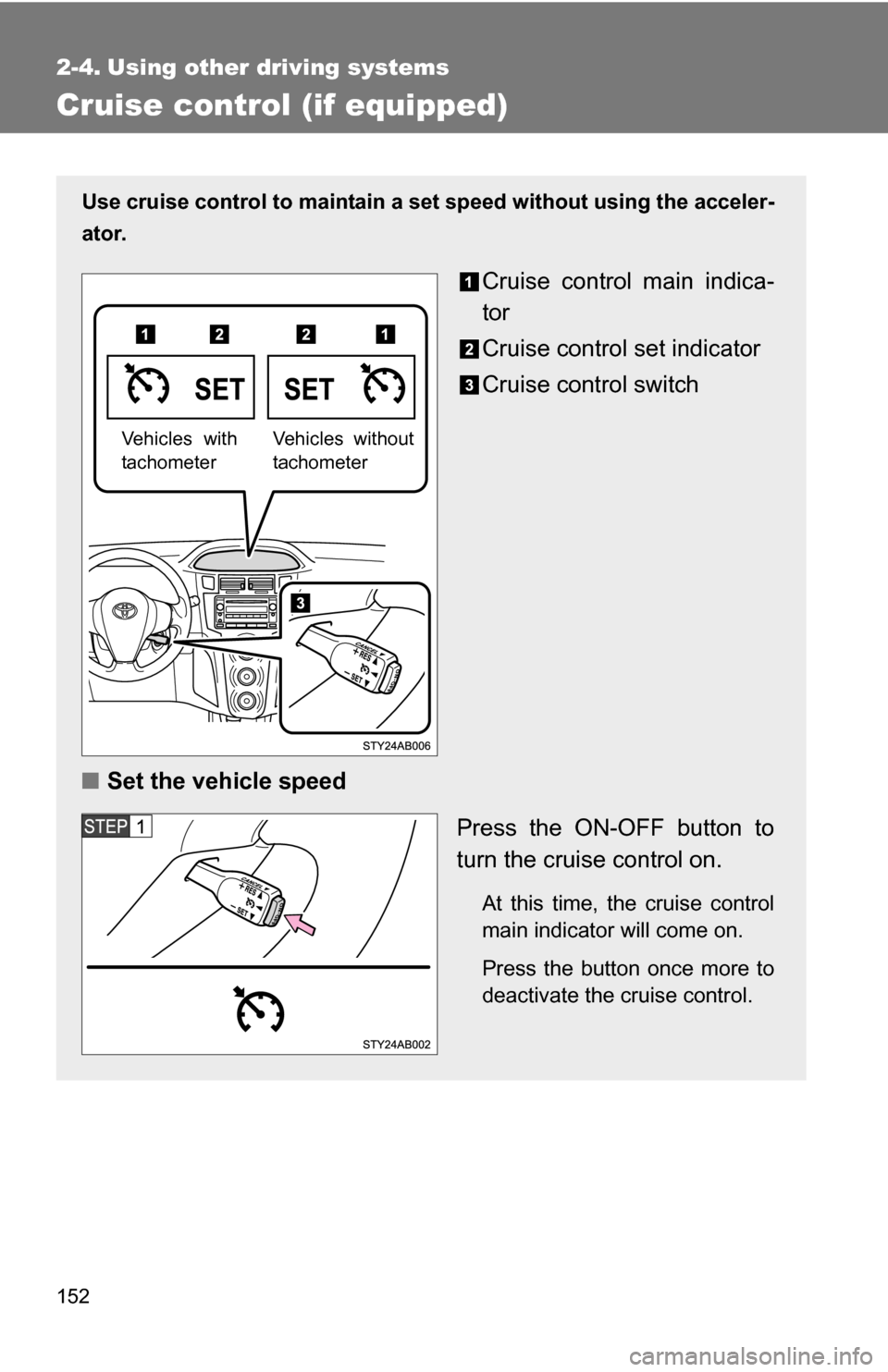
Use cruise control to maintain a set speed without using the acceler-
ator.
Cruise control main indica-
tor
Cruise control set indicator
Cruise control switch
■ Set the vehicle speed
Press the ON-OFF button to
turn the cruise control on.
At this time, the cruise control
main indicator will come on.
Press the button once more to
deactivate the cruise control.
Vehicles without
tachometerVehicles with
tachometer
Page 153 of 392
153
2-4. Using other
driving systems
2
When driving
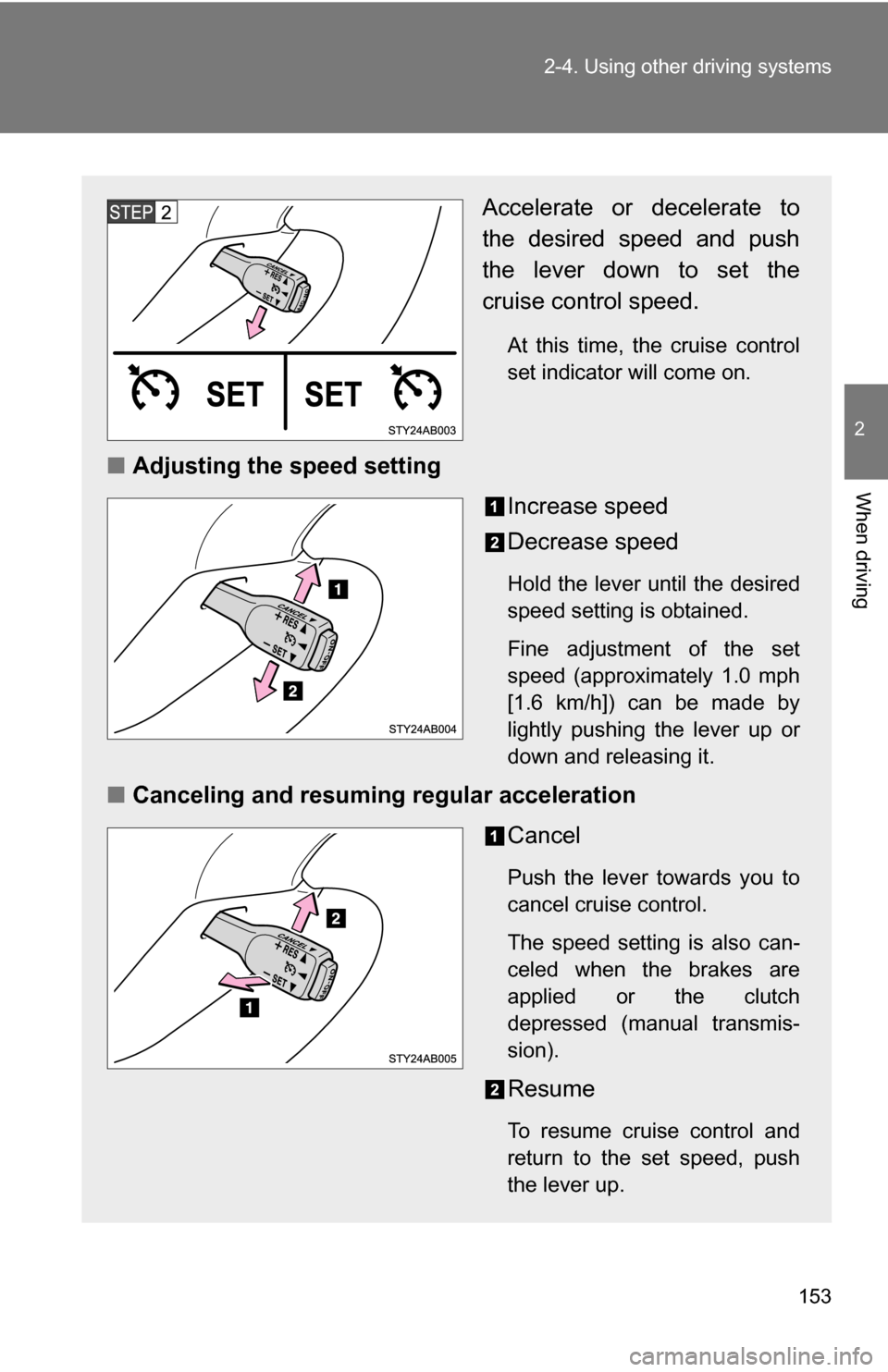
Accelerate or decelerate to
the desired speed and push
the lever down to set the
cruise control speed.
At this time, the cruise control
set indicator will come on.
■Adjusting the speed setting
Increase speed
Decrease speed
Hold the lever until the desired
speed setting is obtained.
Fine adjustment of the set
speed (approximately 1.0 mph
[1.6 km/h]) can be made by
lightly pushing the lever up or
down and releasing it.
■Canceling and resuming regular acceleration
Cancel
Push the lever towards you to
cancel cruise control.
The speed setting is also can-
celed when the brakes are
applied or the clutch
depressed (manual transmis-
sion).
Resume
To resume cruise control and
return to the set speed, push
the lever up.
Page 154 of 392
154 2-4. Using other driving systems
■Cruise control can be set when
●The shift lever is in D or 3 (vehicles with an automatic transmission).
● Vehicle speed is above approximately 25 mph (40 km/h).
■ Accelerating
The vehicle can be accelerated normally. After acceleration, the set speed
resumes.
■ Automatic cruise control cancellation
The set speed is automatically canceled in any of the following situations.
●Actual vehicle speed falls more than 10 mph (16 km/h) below the preset
vehicle speed.
At this time, the memorized set speed is not retained.
● Actual vehicle speed is below 25 mph (40 km/h).
■ If the cruise control main indicator flashes
Press the ON-OFF button to turn the cruise control off, and then reactivate
the system.
If the cruise control speed cannot be set or if the cruise control cancels
immediately after being activated, there may be a malfunction in the cruise
control system. Have the vehicle inspected by your Toyota dealer.
CAUTION
■To avoid operating the cruise control by mistake
Keep the ON-OFF button off when not in use.
■ Situations unsuitable for cruise control
Do not use cruise control in any of the following situations.
Doing so may result in control of the vehicle being lost and could cause seri-
ous or fatal accident.
●In heavy traffic
● On roads with sharp bends
● On winding roads
● On slippery roads, such as those covered with rain, ice or snow
● On steep hills
● When towing a trailer
Page 185 of 392
185
3-1. Using the air conditioning system and defogger
3
Interior features
Rear window and outside rear view mirror defoggers (if equipped)
■The rear window and outside rear vi ew mirror defoggers can be oper-
ated when
The engine switch is in the ON position.
■ Outside rear view mirror defoggers (vehicles with outside rear view
mirror defoggers)
Turning the rear window defogger on will turn the outside rear view mirror
defoggers on.
CAUTION
■ When the outside rear view mirror defoggers are on (vehicles with out-
side rear view mirror defoggers)
Do not touch the rear view mirror surfaces, as they can become very hot and
burn you.
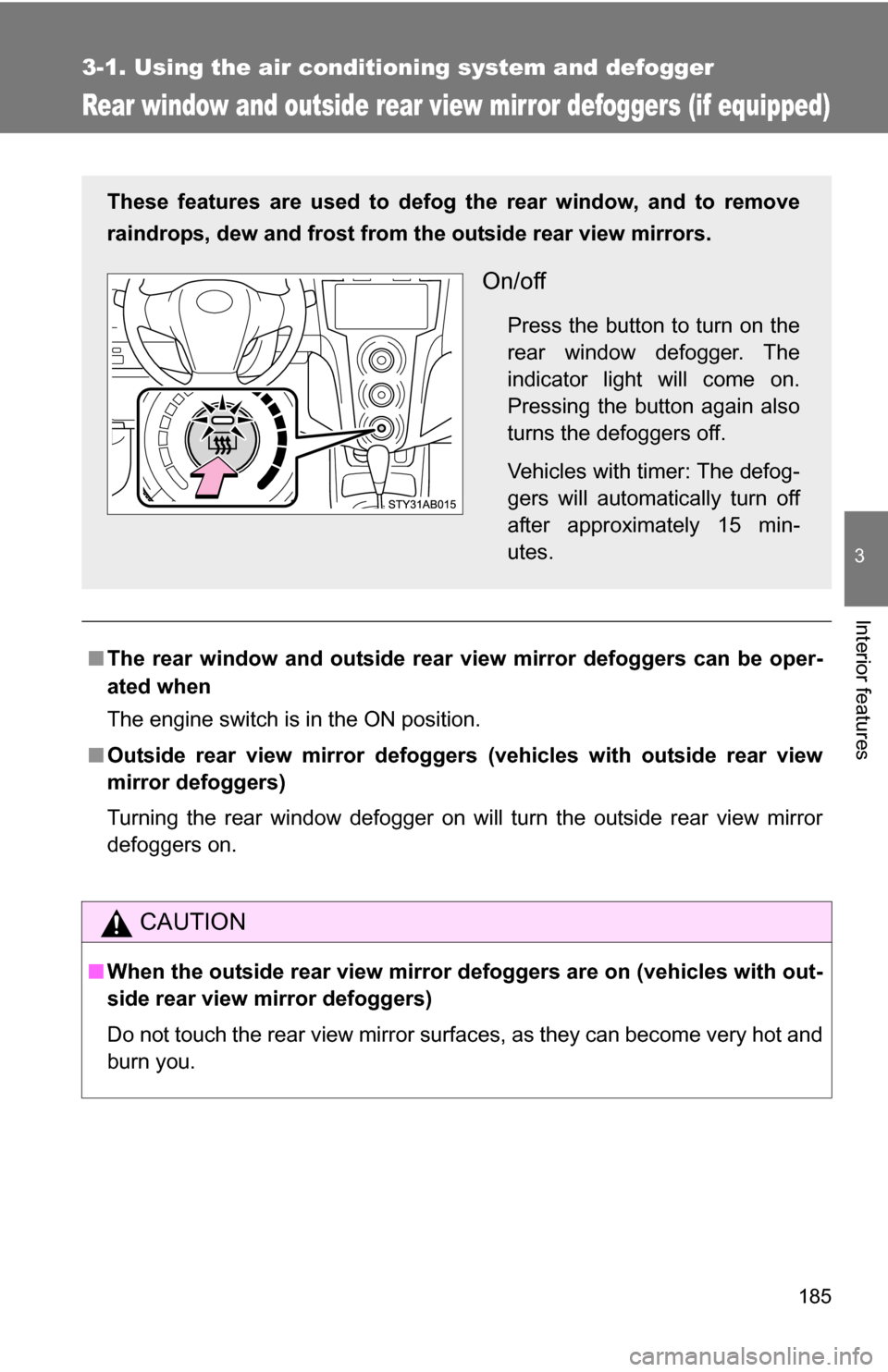
These features are used to defog the rear window, and to remove
raindrops, dew and frost from the outside rear view mirrors.
On/off
Press the button to turn on the
rear window defogger. The
indicator light will come on.
Pressing the button again also
turns the defoggers off.
Vehicles with timer: The defog-
gers will automatically turn off
after approximately 15 min-
utes.
Page 236 of 392
236 4-2. Maintenance
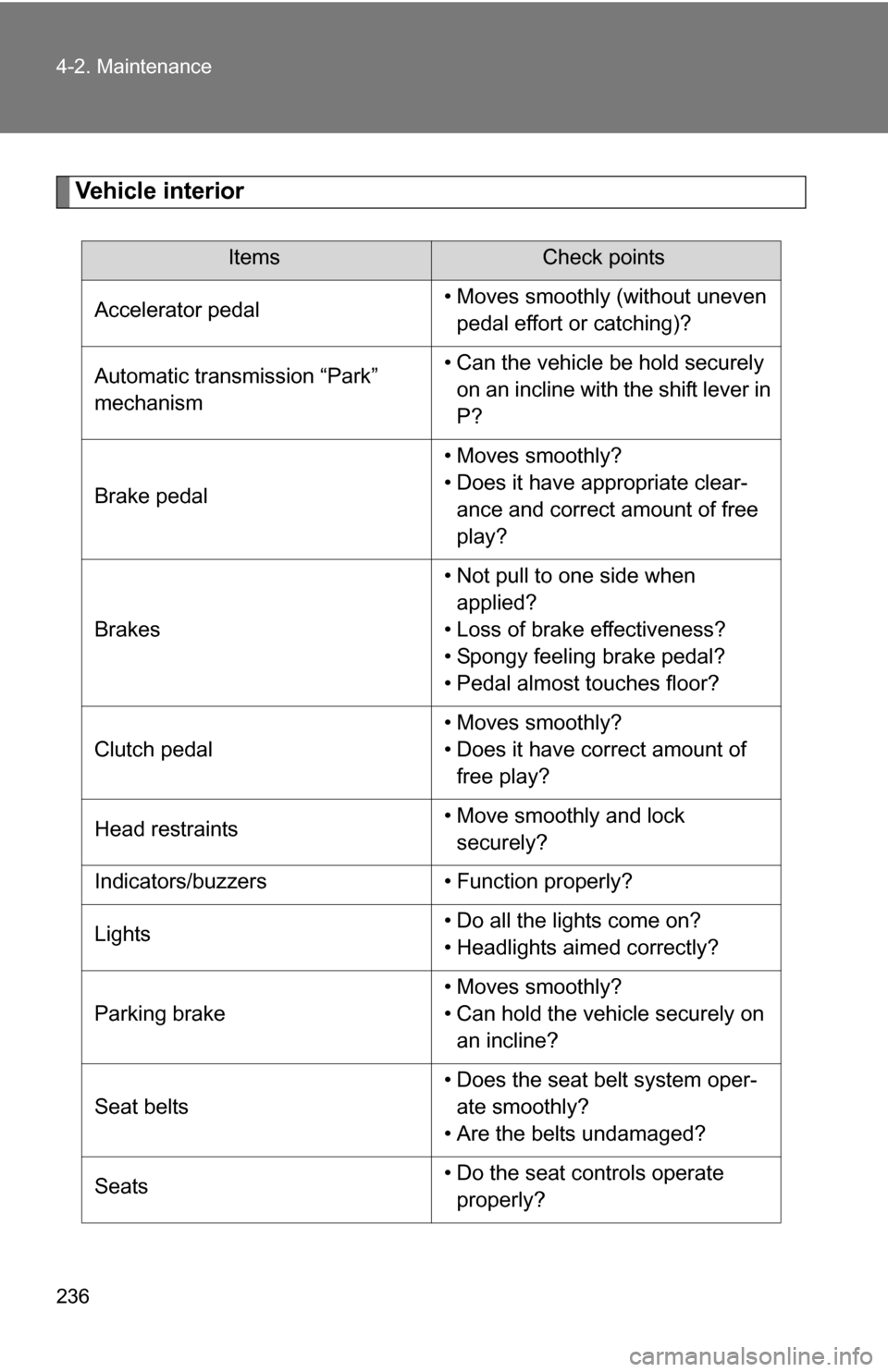
Vehicle interior
ItemsCheck points
Accelerator pedal • Moves smoothly (without uneven
pedal effort or catching)?
Automatic transmission “Park”
mechanism • Can the vehicle be hold securely
on an incline with the shift lever in
P?
Brake pedal • Moves smoothly?
• Does it have appropriate clear-
ance and correct amount of free
play?
Brakes • Not pull to one side when
applied?
• Loss of brake effectiveness?
• Spongy feeling brake pedal?
• Pedal almost touches floor?
Clutch pedal • Moves smoothly?
• Does it have correct amount of
free play?
Head restraints • Move smoothly and lock
securely?
Indicators/buzzers • Function properly?
Lights • Do all the lights come on?
• Headlights aimed correctly?
Parking brake • Moves smoothly?
• Can hold the vehicle securely on
an incline?
Seat belts • Does the seat belt system oper-
ate smoothly?
• Are the belts undamaged?
Seats • Do the seat controls operate
properly?
Page 238 of 392
238
4-2. Maintenance
Emission inspection and maintenance (I/M) programs
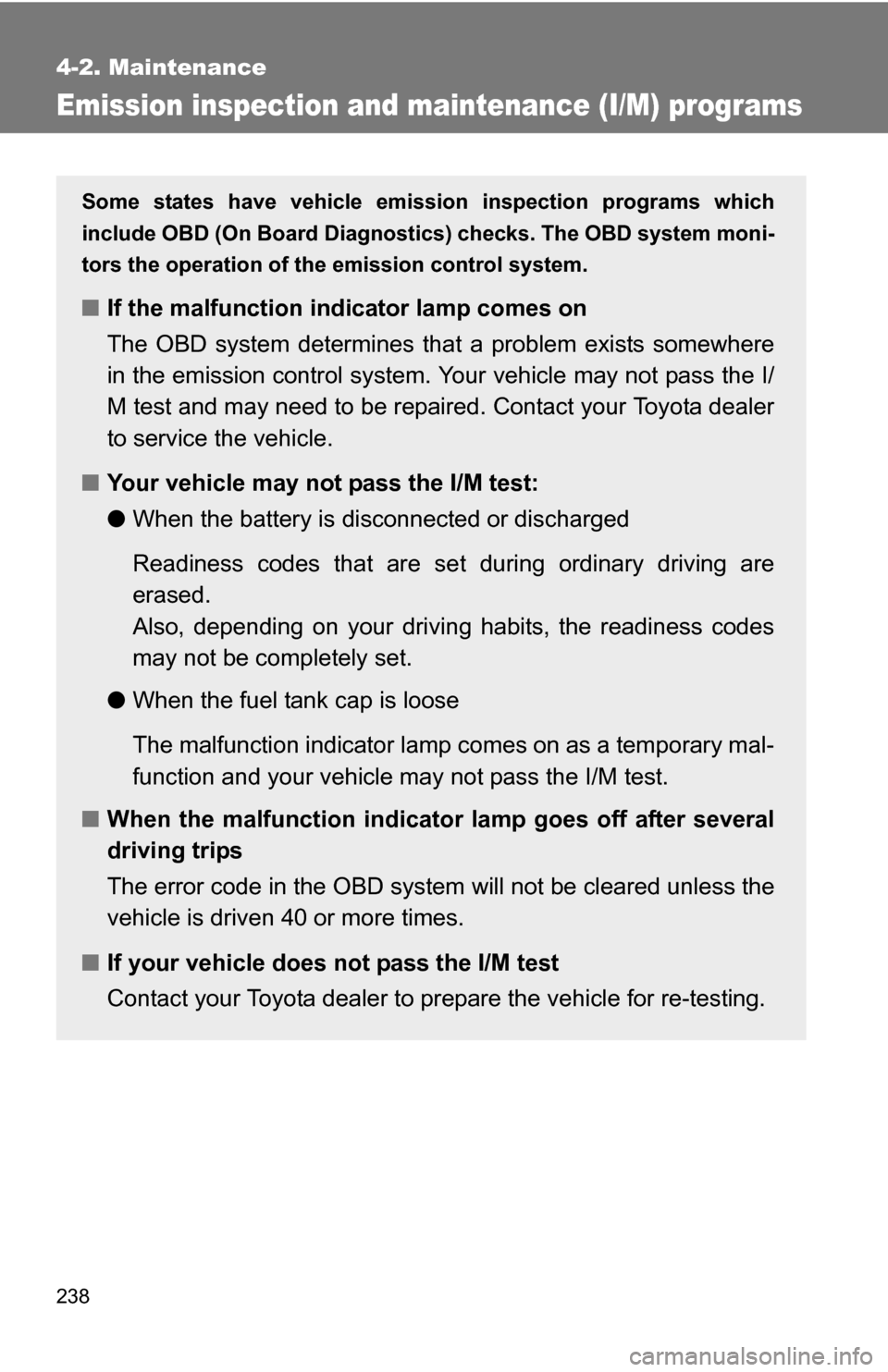
Some states have vehicle emission inspection programs which
include OBD (On Board Diagnostics) checks. The OBD system moni-
tors the operation of th e emission control system.
■If the malfunction indicator lamp comes on
The OBD system determines that a problem exists somewhere
in the emission control system. Your vehicle may not pass the I/
M test and may need to be repaired. Contact your Toyota dealer
to service the vehicle.
■ Your vehicle may not pass the I/M test:
●When the battery is disconnected or discharged
Readiness codes that are se t during ordinary driving are
erased.
Also, depending on your driving habits, the readiness codes
may not be completely set.
● When the fuel tank cap is loose
The malfunction indicator lamp comes on as a temporary mal-
function and your vehicle may not pass the I/M test.
■ When the malfunction indicator lamp goes off after several
driving trips
The error code in the OBD system will not be cleared unless the
vehicle is driven 40 or more times.
■ If your vehicle does not pass the I/M test
Contact your Toyota dealer to prepare the vehicle for re-testing.
Page 254 of 392
254 4-3. Do-it-yourself maintenance
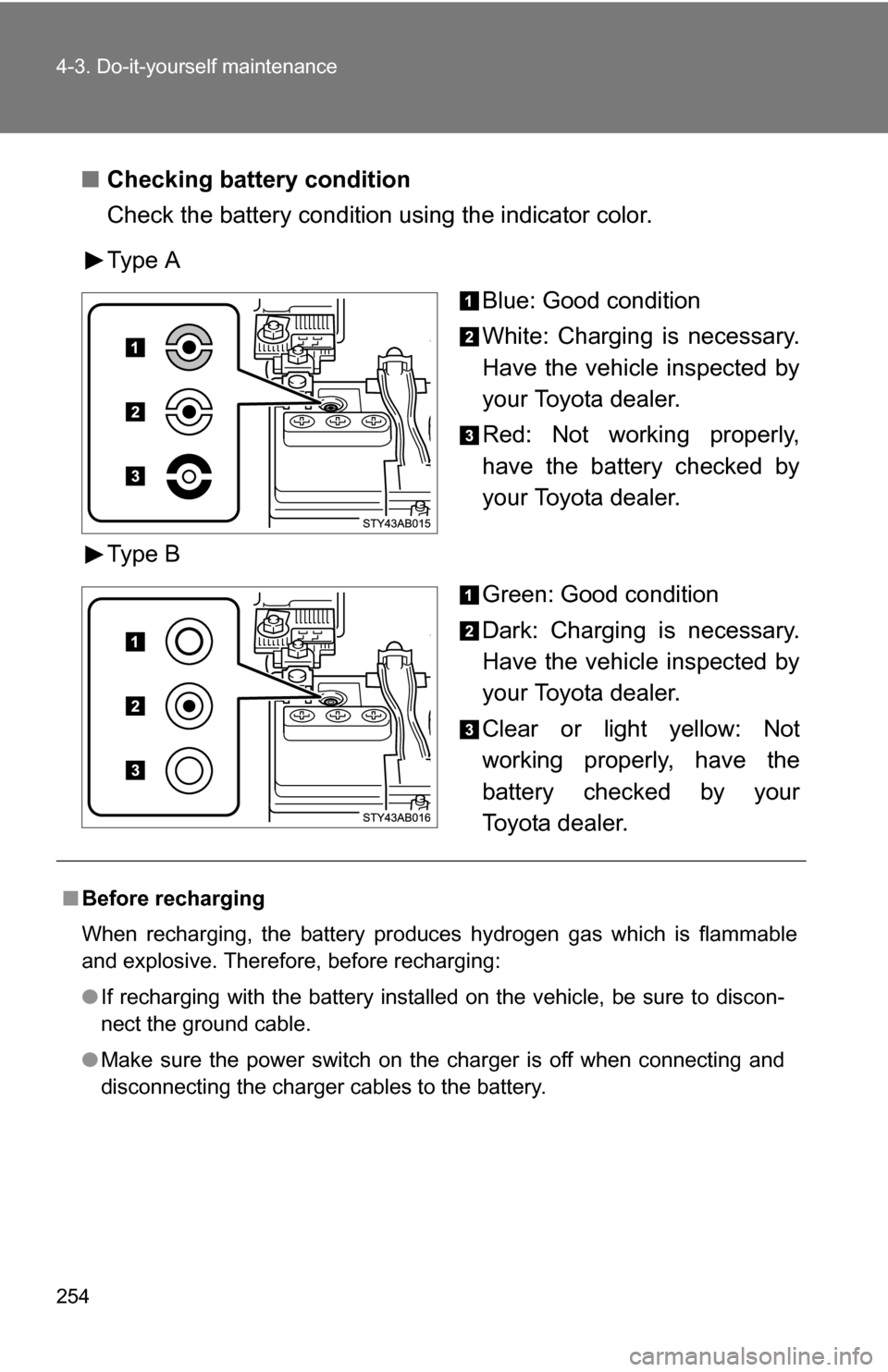
■Checking battery condition
Check the battery condition using the indicator color.
Type A
Blue: Good condition
White: Charging is necessary.
Have the vehicle inspected by
your Toyota dealer.
Red: Not working properly,
have the battery checked by
your Toyota dealer.
Type B Green: Good condition
Dark: Charging is necessary.
Have the vehicle inspected by
your Toyota dealer.
Clear or light yellow: Not
working properly, have the
battery checked by your
Toyota dealer.
■Before recharging
When recharging, the battery produces hydrogen gas which is flammable
and explosive. Therefore, before recharging:
●If recharging with the battery installed on the vehicle, be sure to discon-
nect the ground cable.
● Make sure the power switch on the charger is off when connecting and
disconnecting the charger cables to the battery.
Page 258 of 392
258
4-3. Do-it-yourself maintenance
Tires
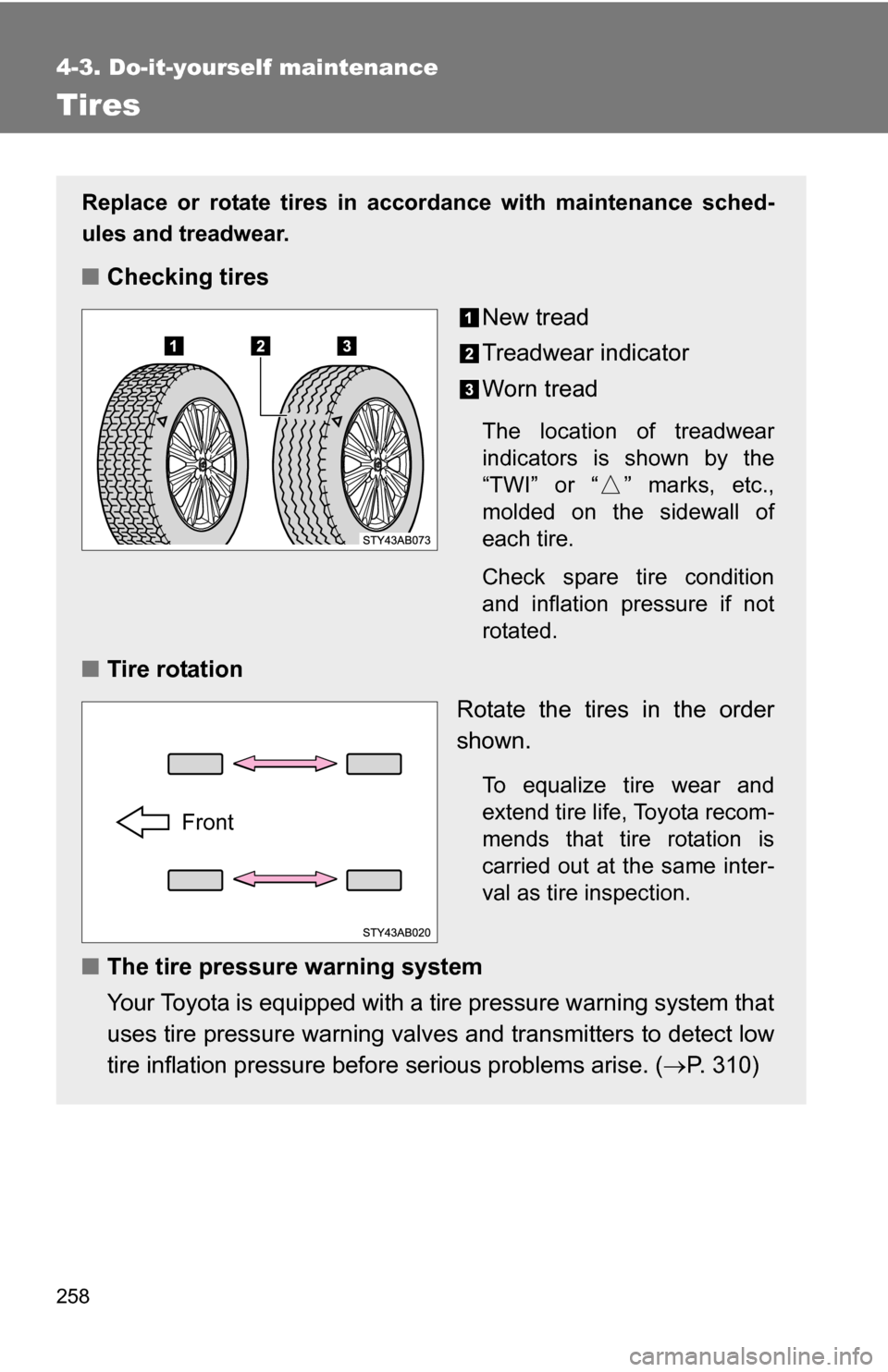
Replace or rotate tires in accordance with maintenance sched-
ules and treadwear.
■Checking tires
New tread
Treadwear indicator
Worn tread
The location of treadwear
indicators is shown by the
“TWI” or “ ” marks, etc.,
molded on the sidewall of
each tire.
Check spare tire condition
and inflation pressure if not
rotated.
■Tire rotation
Rotate the tires in the order
shown.
To equalize tire wear and
extend tire life, Toyota recom-
mends that tire rotation is
carried out at the same inter-
val as tire inspection.
■The tire pressure warning system
Your Toyota is equipped with a tire pressure warning system that
uses tire pressure warning valves and transmitters to detect low
tire inflation pressure before serious problems arise. (P. 310)
Front
Page 303 of 392
5
When trouble arises
303
5-1. Essential information
If you think something is wrong
If you notice any of the following symptoms, your vehicle probably
needs adjustment or repair. Contact your Toyota dealer as soon as
possible.
■ Visible symptoms
●Fluid leaks under the vehicle
(Water dripping from the air cond itioning after use is normal.)
● Flat-looking tires or uneven tire wear
● High engine coolant temperatur e warning light flashes or
comes on
● Low engine coolant temperature indicator comes on or does
not come on continuously
■ Audible symptoms
●Changes in exhaust sound
● Excessive tire squeal when cornering
● Strange noises related to the suspension system
● Pinging or other noises related to the engine
■ Operational symptoms
●Engine missing, stumbling or running rough
● Appreciable loss of power
● Vehicle pulls heavily to one side when braking
● Vehicle pulls heavily to one side when driving on a level road
● Loss of brake effectiveness, s pongy feeling, pedal almost
touches the floor