ECO mode TOYOTA YARIS 2009 2.G Owners Manual
[x] Cancel search | Manufacturer: TOYOTA, Model Year: 2009, Model line: YARIS, Model: TOYOTA YARIS 2009 2.GPages: 392, PDF Size: 8.52 MB
Page 28 of 392
28
1-2. Opening, closing and locking the doors
Wireless remote control (if equipped)
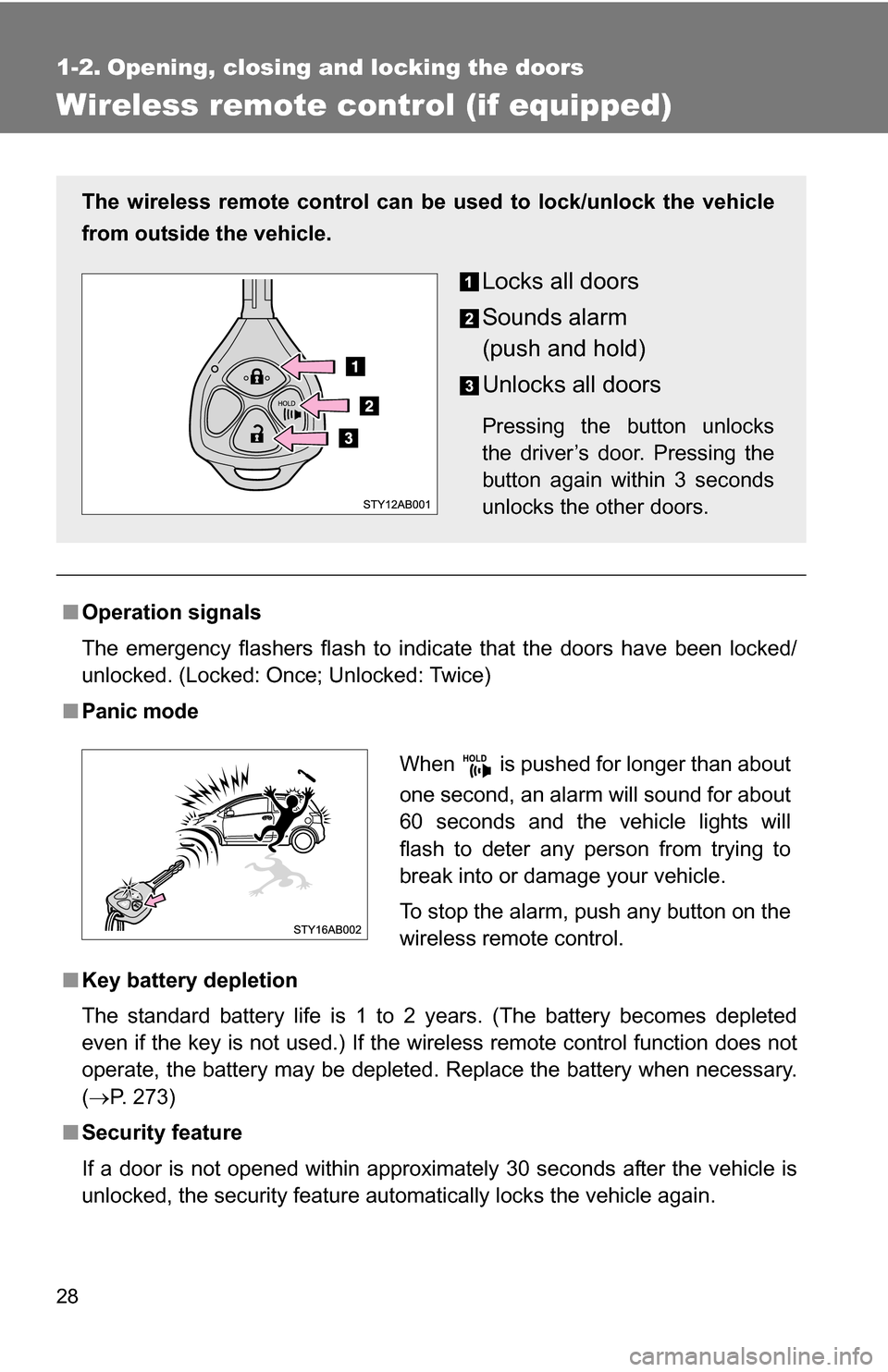
■Operation signals
The emergency flashers flash to indicate that the doors have been locked/
unlocked. (Locked: Once; Unlocked: Twice)
■Panic mode
■Key battery depletion
The standard battery life is 1 to 2 years. (The battery becomes depleted
even if the key is not used.) If the wireless remote control function does not
operate, the battery may be depleted. Replace the battery when necessary.
(P. 273)
■ Security feature
If a door is not opened within approximately 30 seconds after the vehicle is
unlocked, the security feature automatically locks the vehicle again.
The wireless remote control can be used to lock/unlock the vehicle
from outside the vehicle.
Locks all doors
Sounds alarm
(push and hold)
Unlocks all doors
Pressing the button unlocks
the driver’s door. Pressing the
button again within 3 seconds
unlocks the other doors.
When is pushed for longer than about
one second, an alarm will sound for about
60 seconds and the vehicle lights will
flash to deter any person from trying to
break into or damage your vehicle.
To stop the alarm, push any button on the
wireless remote control.
Page 68 of 392
68 1-4. Opening and closing the windows
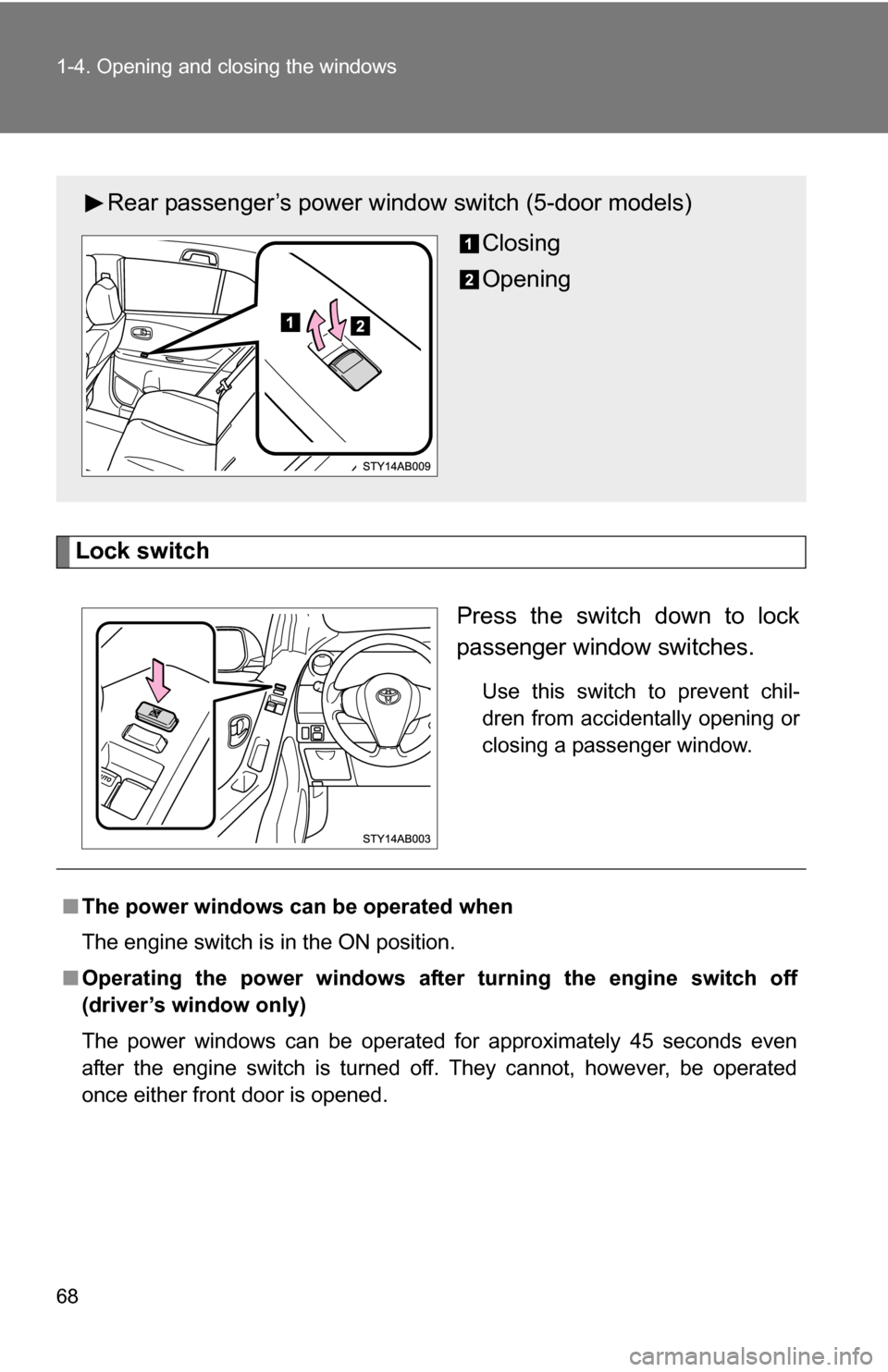
Lock switchPress the switch down to lock
passenger window switches.
Use this switch to prevent chil-
dren from accidentally opening or
closing a passenger window.
Rear passenger’s power window switch (5-door models)Closing
Opening
■The power windows can be operated when
The engine switch is in the ON position.
■ Operating the power windows after turning the engine switch off
(driver’s window only)
The power windows can be operated for approximately 45 seconds even
after the engine switch is turned off. They cannot, however, be operated
once either front door is opened.
Page 189 of 392

Search for desired stations by turning or pressing “
”or
“")
189
3-2. Using the audio system
3
Interior features
Using the radio
\
Setting station presets (excluding XM® Satellite Radio)
Search for desired stations by turning or pressing “
”or
“ ” on .
Press and hold the button (from
to ) that the sta-
tion is to be set to until you hear a beep.
Scanning radio stations (excluding XM® Satellite Radio)
■ Scanning the preset radio stations
Press and hold until you hear a beep.
Preset stations will be played for 5 seconds each.
When the desired station is reached, press the button once
again.
Vo lu m e
Station scan Station selector
Frequency seek Frequency adjust
(AM, FM mode) or
channel (SAT mode)
AM·SAT/FM mode but-Power
Text message display
(SAT mode)
Page 204 of 392
204 3-2. Using the audio system
• Compatible channel modes: stereo, joint stereo, dual channel andmonaural
● WMA file compatibility
• Compatible standards
WMA Ver. 7, 8, 9
• Compatible sampling frequencies 32, 44.1, 48 (kHz)
• Compatible bit rates (only compatible with 2-channel playback) Ver. 7, 8: CBR 48, 64, 80, 96, 128, 160, 192 (kbps)
Ver. 9: CBR 48, 64, 80, 96, 128, 160, 192, 256, 320 (kbps)
● Compatible media
Media that can be used for MP3 and WMA playback are CD-Rs and CD-
RWs.
Playback in some instances may not be possible, depending on the status
of the CD-R or CD-RW. Playback may not be possible or the audio may
jump if the disc is scratched or marked with fingerprints.
● Compatible disc formats
The following disc formats can be used.
• Disc formats: CD-ROM Mode 1 and Mode 2
CD-ROM XA Mode 2, Form 1 and Form 2
• File formats: ISO9660 Level 1, Level 2, (Romeo, Joliet) MP3 and WMA files written in any format other than those listed above
may not play correctly, and their file names and folder names may not
be displayed correctly.
Items related to standards and limitations are as follows.
• Maximum directory hierarchy: 8 levels
• Maximum length of folder names/file names: 32 characters
• Maximum number of folders: 192 (including the root)
• Maximum number of files per disc: 255
● File names
The only files that can be recognized as MP3/WMA and played are those
with the extension .mp3 or .wma.
● Multi-sessions
As the audio system is compatible with multi-sessions, it is possible to play
discs that contain MP3 and WMA files. However, only the first session can
be played.
Page 221 of 392
221
3-5. Other interior features
3
Interior features
Clock
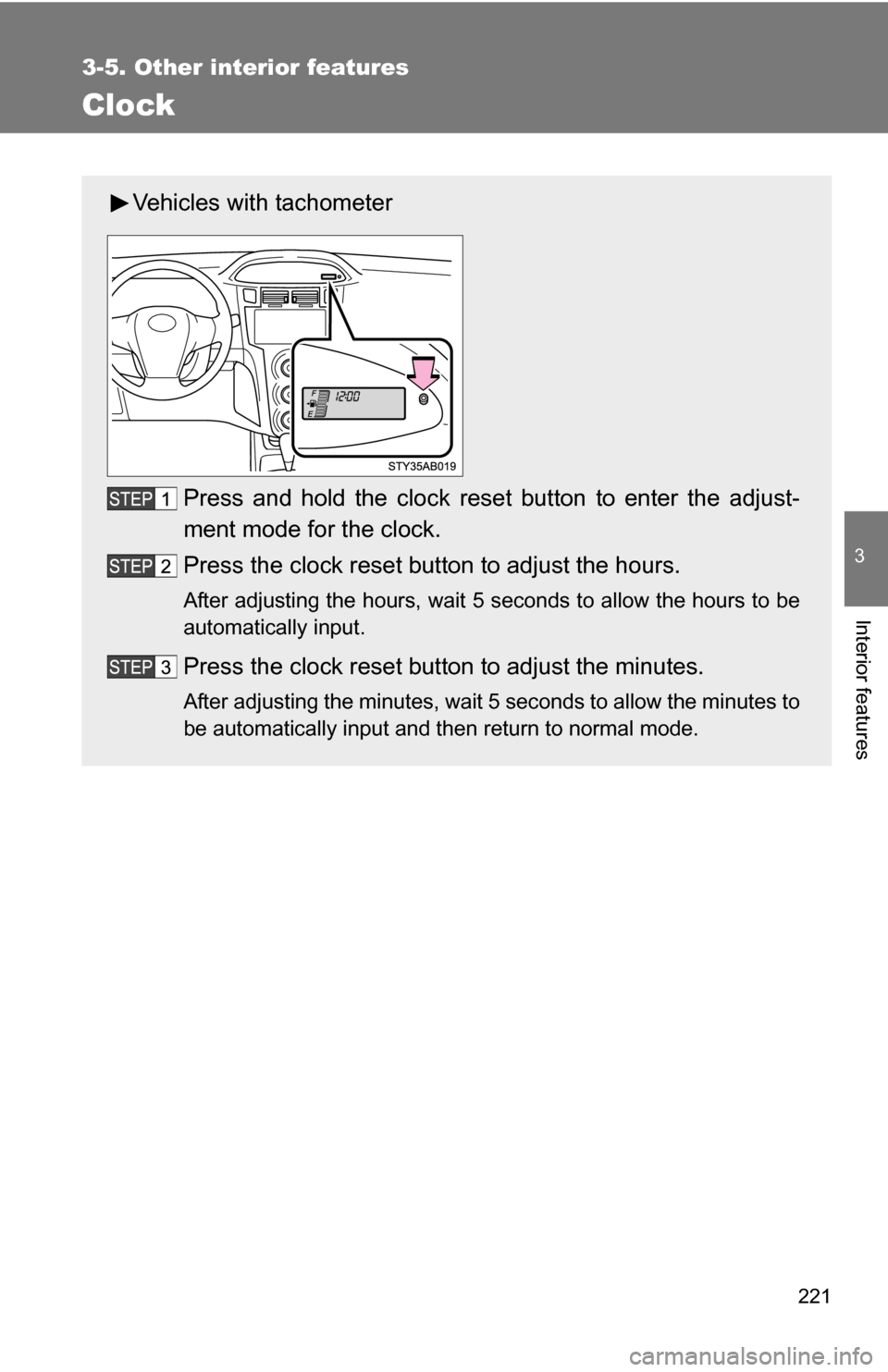
Vehicles with tachometerPress and hold the clock reset button to enter the adjust-
ment mode for the clock.
Press the clock reset button to adjust the hours.
After adjusting the hours, wait 5 seconds to allow the hours to be
automatically input.
Press the clock reset button to adjust the minutes.
After adjusting the minutes, wait 5 seconds to allow the minutes to
be automatically input and then return to normal mode.
Page 222 of 392
222 3-5. Other interior features
■The clock is displayed when
The engine switch is in the ON position.
■ When disconnecting and reco nnecting battery terminals
The time display will automatically be set to 1:00.
■ Adjusting to a full hour (vehicles without tachometer)
If you press the clock reset button, the minute values will be rounded to the
nearest hour. So, minute values from “:00” to “:29” are rounded down, and
values from “:30” to “:59” are rounded up.*
*: e.g.
1:00 to 1:29 1:00
1:30 to 1:59 2:00
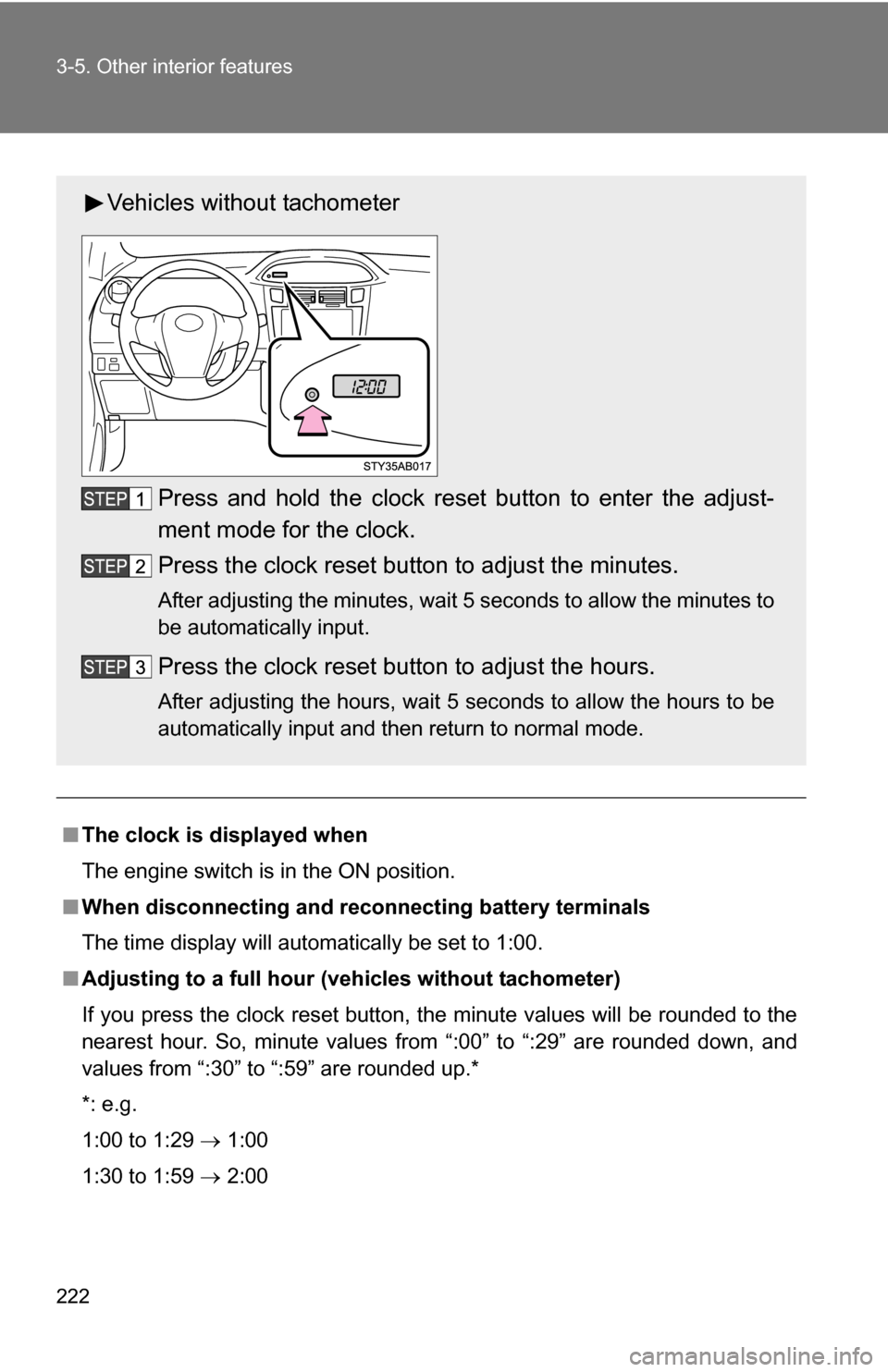
Vehicles without tachometer
Press and hold the clock reset button to enter the adjust-
ment mode for the clock.
Press the clock reset button to adjust the minutes.
After adjusting the minutes, wait 5 seconds to allow the minutes to
be automatically input.
Press the clock reset button to adjust the hours.
After adjusting the hours, wait 5 seconds to allow the hours to be
automatically input and then return to normal mode.
Page 262 of 392
262 4-3. Do-it-yourself maintenance
CAUTION
■Tire pressure warning system operation
The tire pressure warning system may not provide warning immediately
if a tire bursts or if sudden air leakage occurs.
■When inspecting or replacing tires
Observe the following precautions to prevent accidents. Failure to do so
may cause damage to parts of the drive train, as well as dangerous han-
dling characteristics, which may le ad to fatal or injury accidents.
●Do not mix tires of different makes, models, tread patterns or tread-
wear.
●Do not use tire sizes other than those recommended by Toyota.
●Do not mix radial, bias-belted, or bias-ply tires.
●Do not mix summer, all season and winter tires.
●Do not use tires that have been used on another vehicle.
●Do not use tires if you do not know how they were used previously.
Page 366 of 392
366 6-1. Specifications
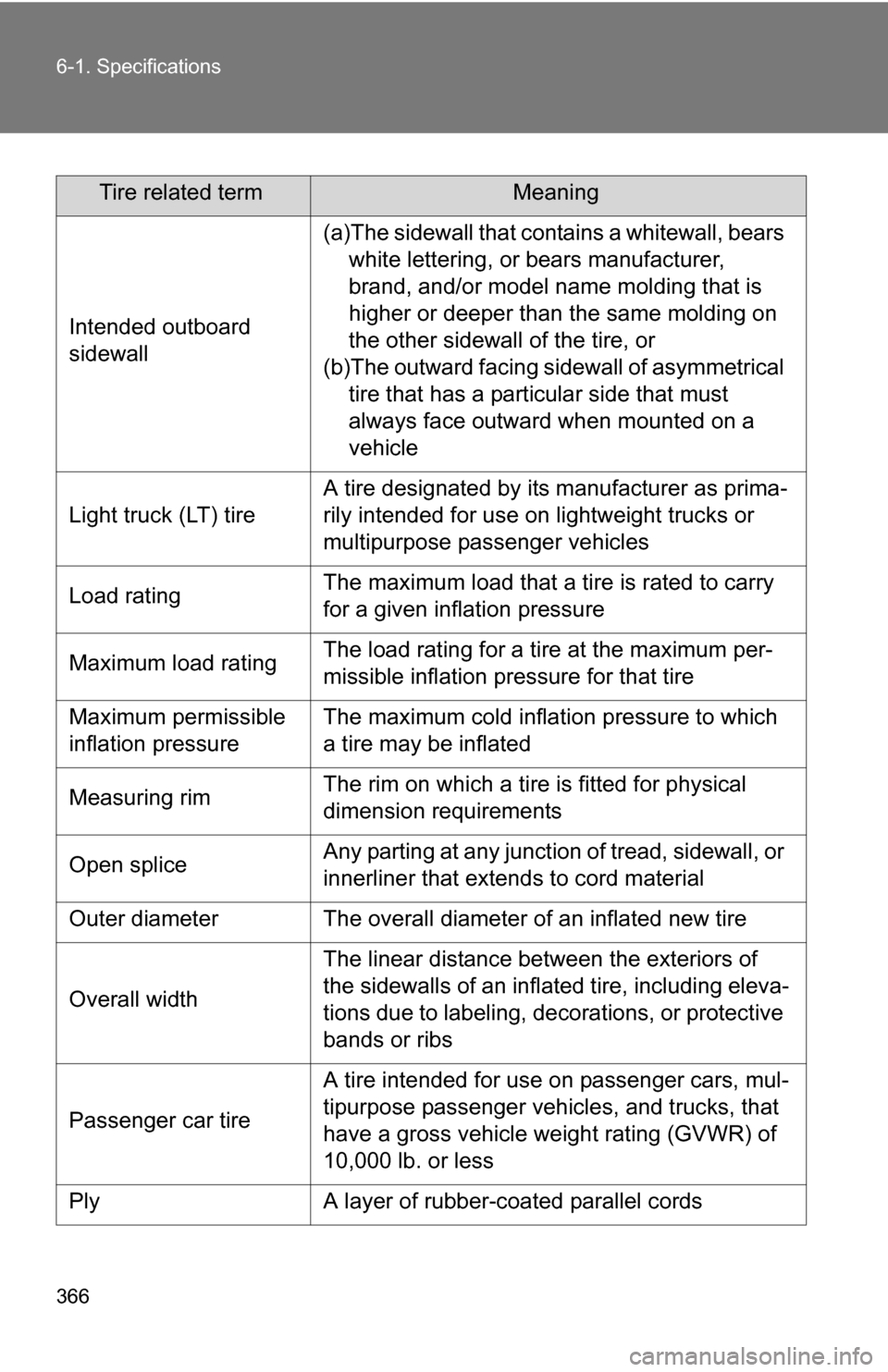
Tire related termMeaning
Intended outboard
sidewall
(a)The sidewall that contains a whitewall, bears white lettering, or bears manufacturer,
brand, and/or model name molding that is
higher or deeper than the same molding on
the other sidewall of the tire, or
(b)The outward facing sidewall of asymmetrical tire that has a particular side that must
always face outward when mounted on a
vehicle
Light truck (LT) tire
A tire designated by its manufacturer as prima-
rily intended for use on lightweight trucks or
multipurpose passenger vehicles
Load ratingThe maximum load that a tire is rated to carry
for a given inflation pressure
Maximum load ratingThe load rating for a tire at the maximum per-
missible inflation pressure for that tire
Maximum permissible
inflation pressureThe maximum cold inflation pressure to which
a tire may be inflated
Measuring rimThe rim on which a tire is fitted for physical
dimension requirements
Open spliceAny parting at any junction of tread, sidewall, or
innerliner that extends to cord material
Outer diameterThe overall diameter of an inflated new tire
Overall width
The linear distance between the exteriors of
the sidewalls of an inflated tire, including eleva-
tions due to labeling, decorations, or protective
bands or ribs
Passenger car tire
A tire intended for use on passenger cars, mul-
tipurpose passenger vehicles, and trucks, that
have a gross vehicle weight rating (GVWR) of
10,000 lb. or less
PlyA layer of rubber-coated parallel cords