wire TOYOTA YARIS 2012 3.G User Guide
[x] Cancel search | Manufacturer: TOYOTA, Model Year: 2012, Model line: YARIS, Model: TOYOTA YARIS 2012 3.GPages: 400, PDF Size: 9.68 MB
Page 34 of 400
34
1-2. Opening, closing and locking the doors
Side doors
The vehicle can be locked and unlocked using the key, wireless
remote control or door lock switch.
■Wireless remote control (if equipped)
P. 3 1
■ Key
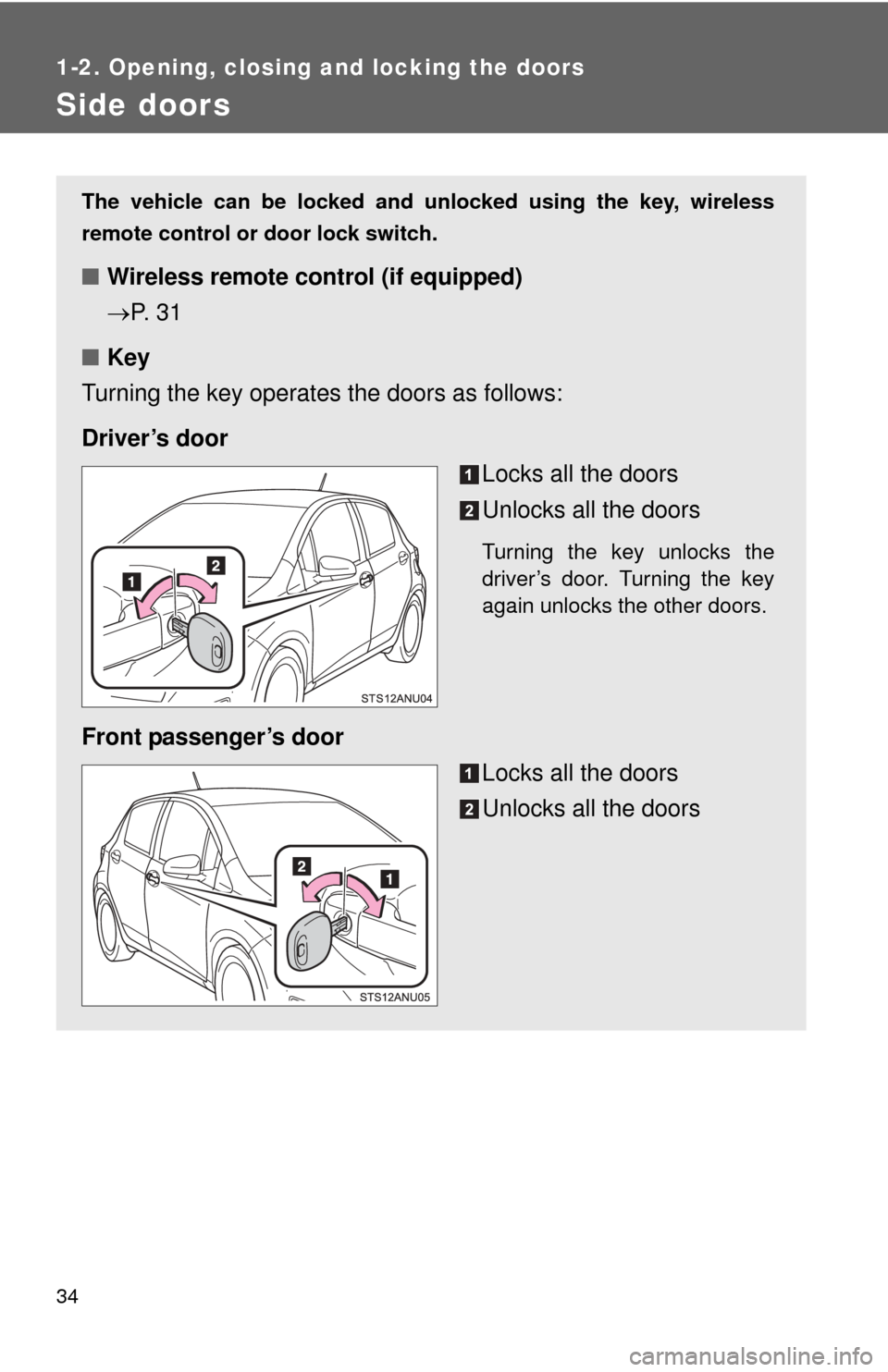
Turning the key operates the doors as follows:
Driver’s door Locks all the doors
Unlocks all the doors
Turning the key unlocks the
driver’s door. Turning the key
again unlocks the other doors.
Front passenger’s door
Locks all the doors
Unlocks all the doors
Page 38 of 400
38
1-2. Opening, closing and locking the doors
Back door
The back door can be locked/unlocked and opened by the following
procedures.
■Locking and unlocking the back door
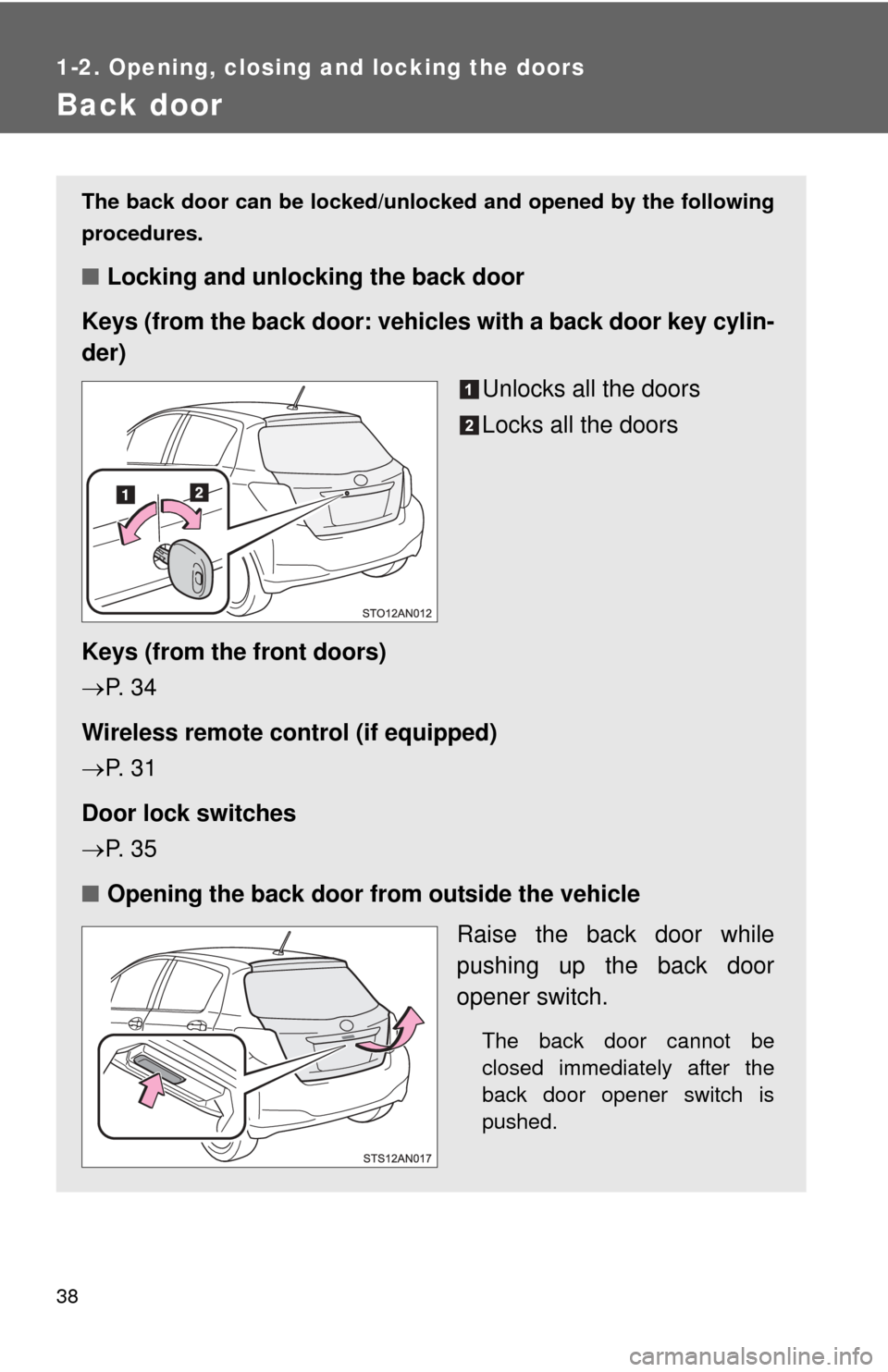
Keys (from the back door: vehicles with a back door key cylin-
der)
Unlocks all the doors
Locks all the doors
Keys (from the front doors)
P. 3 4
Wireless remote control (if equipped)
P. 3 1
Door lock switches
P. 3 5
■ Opening the back door from outside the vehicle
Raise the back door while
pushing up the back door
opener switch.
The back door cannot be
closed immediately after the
back door opener switch is
pushed.
Page 74 of 400
74
1-6. Theft deterrent system
Alarm (Puerto Rico)
The system sounds the alarm and flashes the lights when forced
entry is detected.
■ Triggering of the alarm
The alarm is triggered in the fo llowing situations when the alarm
is set:
● A locked door is unlocked or opened in any way other than
using a key or wireless remote control. (The doors will lock
again automatically.)
● The hood is opened.
● The battery is reconnected.
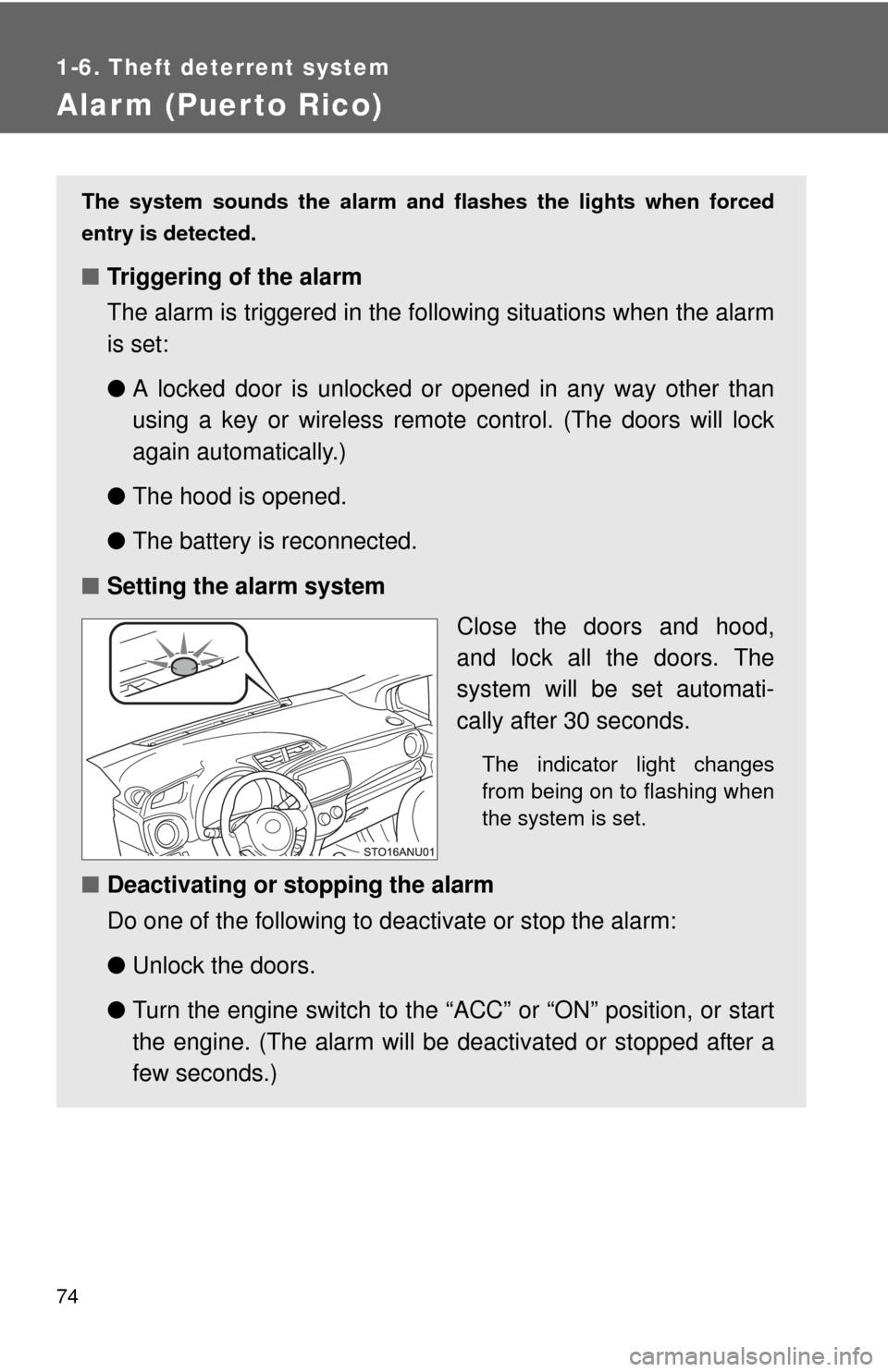
■ Setting the alarm system
Close the doors and hood,
and lock all the doors. The
system will be set automati-
cally after 30 seconds.
The indicator light changes
from being on to flashing when
the system is set.
■Deactivating or stopping the alarm
Do one of the following to deactivate or stop the alarm:
●Unlock the doors.
● Turn the engine switch to the “ACC” or “ON” position, or start
the engine. (The alarm will be deactivated or stopped after a
few seconds.)
Page 219 of 400
Maintenance and care4
219
4-1. Maintenance and careCleaning and protecting the vehicle exterior......... 220
Cleaning and protecting the vehicle interior.......... 223
4-2. Maintenance Maintenance requirements .................. 226
General maintenance....... 228
Emission inspection and maintenance (I/M)
programs........................ 232 4-3. Do-it-yourself maintenance
Do-it-yourself service precautions .................... 233
Hood ................................ 236
Positioning a floor jack ..... 238
Engine compartment ........ 241
Tires ................................. 253
Tire inflation pressure ...... 261
Wheels ............................. 265
Air conditioning filter......... 268
Wireless remote control battery ............................ 270
Checking and replacing fuses .............................. 274
Light bulbs........................ 286
Page 225 of 400
225
4-1. Maintenance and care
4
Maintenance and care
NOTICE
■
Cleaning detergents
●Do not use the following types of detergent, as they may discolor the vehi-
cle interior or cause streaks or damage to painted surfaces:
• Non-seat portions: Organic substances such as benzene or gasoline,
alkaline or acidic solutions, dye, and bleach
• Seats: Alkaline or acidic solutions, such as thinner, benzene, and alco- hol
● Do not use polish wax or polish cleaner. The instrument panel’s or other
interior part’s painted surface may be damaged.
■ Preventing damage to leather surfaces
Observe the following precautions to avoid damage to and deterioration o\
f
leather surfaces:
●Remove any dust or dirt from leather surfaces immediately.
● Do not expose the vehicle to direct sunlight for extended periods of time.
Park the vehicle in the shade, especially during summer.
● Do not place items made of vinyl, plastic, or containing wax on the uphol-
stery, as they may stick to the leather surface if the vehicle interior heats
up significantly.
■ Water on the floor
Do not wash the vehicle floor with water.
Vehicle systems such as the audio system may be damaged if water comes
into contact with electrical components such as the audio system above or
under the floor of the vehicle. Water may also cause the body to rust.
■ Cleaning the inside of the rear window
●Do not use glass cleaner to clean the rear window, as this may cause
damage to the rear window defogger heater wires. Use a cloth dampened
with lukewarm water to gently wipe the window clean. Wipe the window in
strokes running parallel to the heater wires.
● Be careful not to scratch or damage the heater wires.
Page 270 of 400
270
4-3. Do-it-yourself maintenance
Wireless remote control batter y
: If equipped
Replace the battery with a new one if it is depleted.
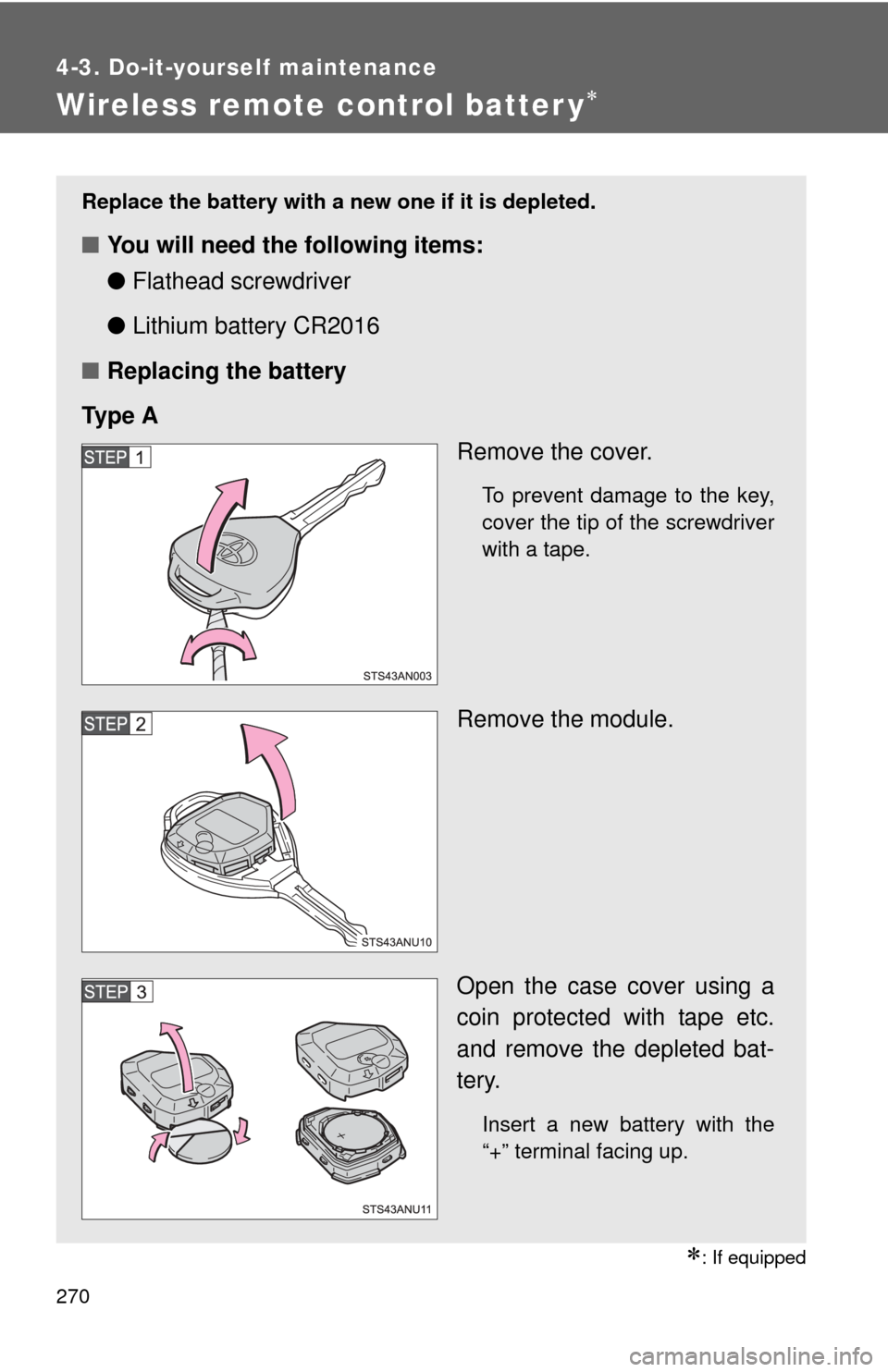
■You will need the following items:
●Flathead screwdriver
● Lithium battery CR2016
■ Replacing the battery
Ty p e A Remove the cover.
To prevent damage to the key,
cover the tip of the screwdriver
with a tape.
Remove the module.
Open the case cover using a
coin protected with tape etc.
and remove the depleted bat-
tery.
Insert a new battery with the
“+” terminal facing up.
Page 272 of 400
272 4-3. Do-it-yourself maintenance
■Use a CR2016 lithium battery
●Batteries can be purchased at your Toyota dealer, local electrical appli-
ance shops or camera stores.
● Replace only with the same or equivalent type recommended by the
manufacturer.
● Dispose of used batteries according to local laws.
■ If the key battery is depleted
The following symptoms may occur:
●The wireless remote control will not function properly.
● The operational range will be reduced.
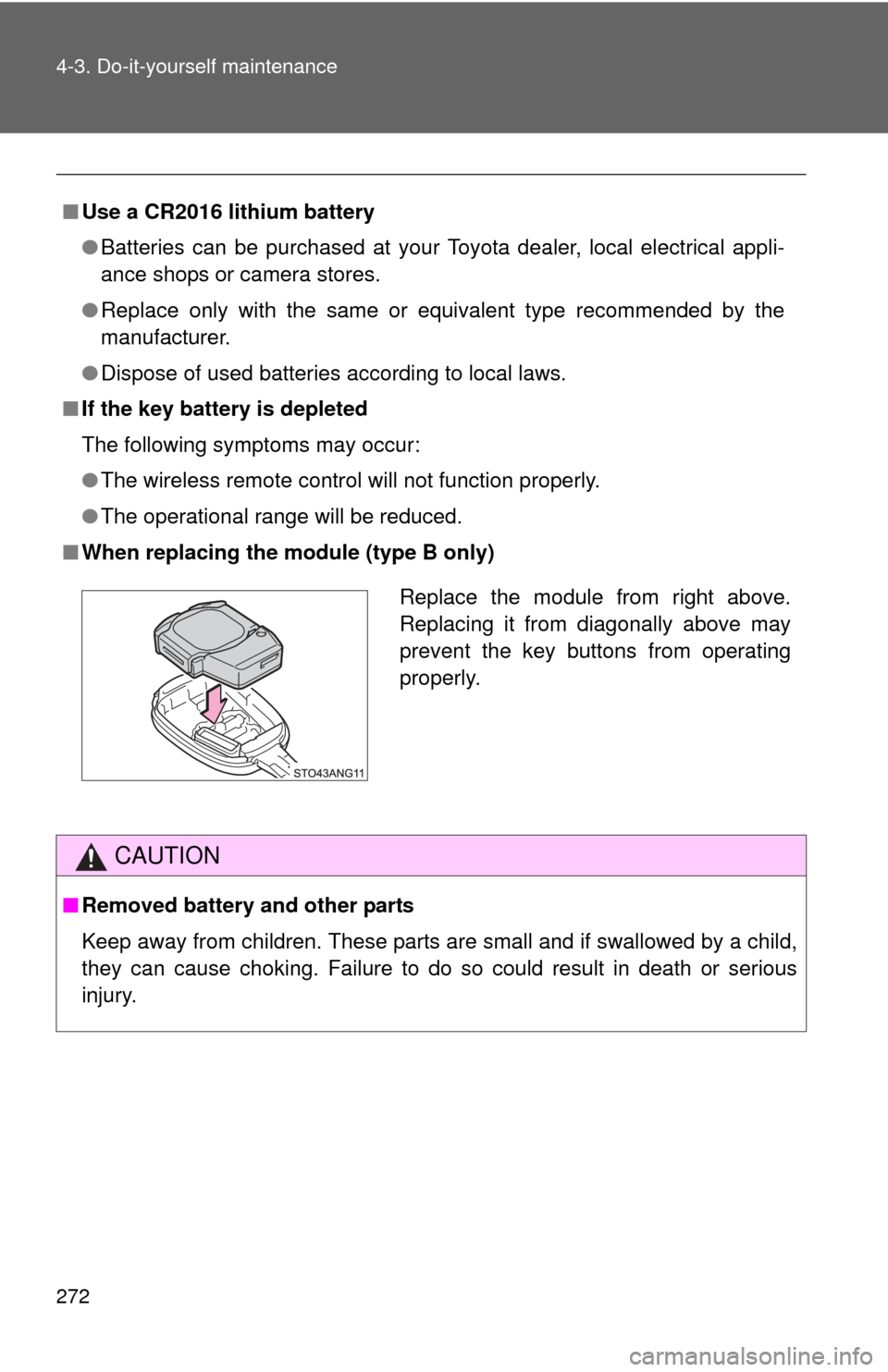
■ When replacing the module (type B only)
CAUTION
■Removed battery and other parts
Keep away from children. These parts are small and if swallowed by a child,
they can cause choking. Failure to do so could result in death or serious
injury.
Replace the module from right above.
Replacing it from diagonally above may
prevent the key buttons from operating
properly.
Page 280 of 400
280 4-3. Do-it-yourself maintenance
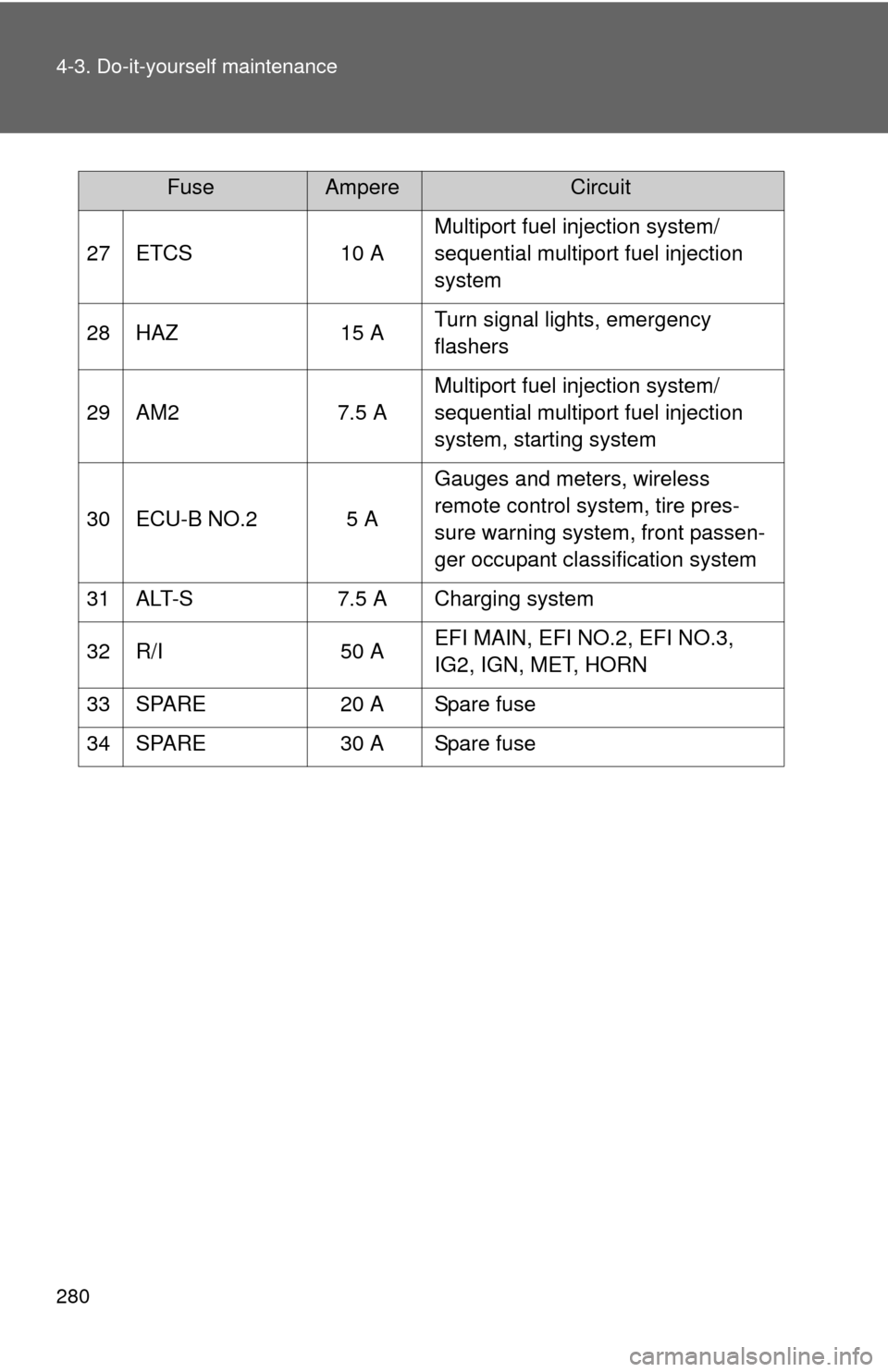
27 ETCS10 AMultiport fuel injection system/
sequential multiport fuel injection
system
28 HAZ 15 ATurn signal lights, emergency
flashers
29 AM2 7.5 AMultiport fuel injection system/
sequential multiport fuel injection
system, starting system
30 ECU-B NO.2 5 A Gauges and meters, wireless
remote control system, tire pres-
sure warning system, front passen-
ger occupant classification system
31 ALT-S 7.5 A Charging system
32 R/I 50 AEFI MAIN, EFI NO.2, EFI NO.3,
IG2, IGN, MET, HORN
33 SPARE 20 A Spare fuse
34 SPARE 30 A Spare fuse
FuseAmpereCircuit
Page 283 of 400
283
4-3. Do-it-yourself maintenance
4
Maintenance and care
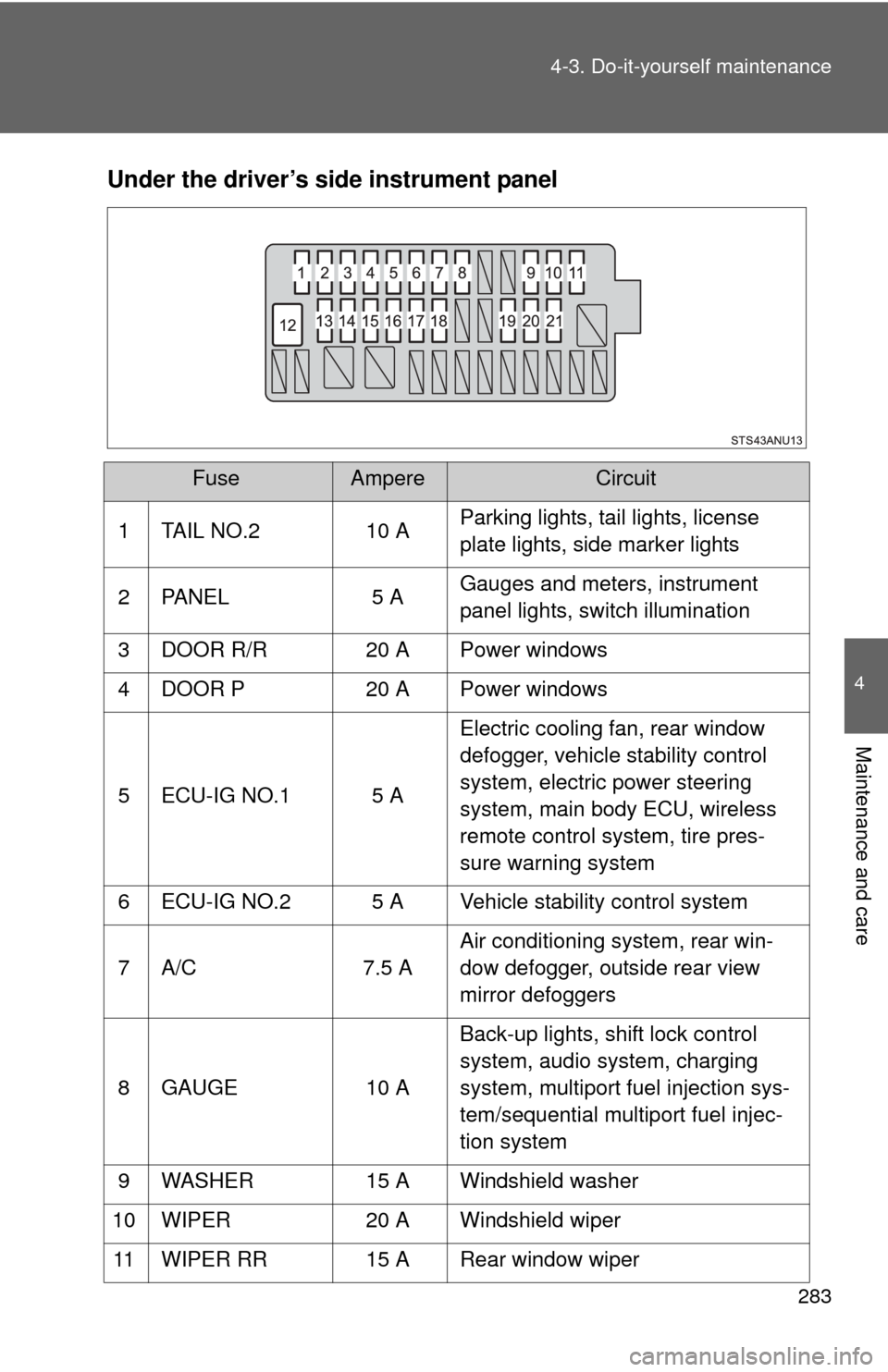
Under the driver’s side instrument panel
FuseAmpereCircuit
1 TAIL NO.2 10 A Parking lights, tail lights, license
plate lights, side marker lights
2 PANEL 5 A Gauges and meters, instrument
panel lights, switch illumination
3 DOOR R/R 20 A Power windows
4 DOOR P 20 A Power windows
5 ECU-IG NO.1 5 A Electric cooling fan, rear window
defogger, vehicle stability control
system, electric power steering
system, main body ECU, wireless
remote control system, tire pres-
sure warning system
6 ECU-IG NO.2 5 A Vehicle stability control system
7 A/C 7.5 AAir conditioning system, rear win-
dow defogger, outside rear view
mirror defoggers
8 GAUGE 10 ABack-up lights, shift lock control
system, audio system, charging
system, multiport fuel injection sys-
tem/sequential multiport fuel injec-
tion system
9 WASHER 15 A Windshield washer
10 WIPER 20 A Windshield wiper
11 WIPER RR 15 A Rear window wiper
Page 285 of 400
285
4-3. Do-it-yourself maintenance
4
Maintenance and care
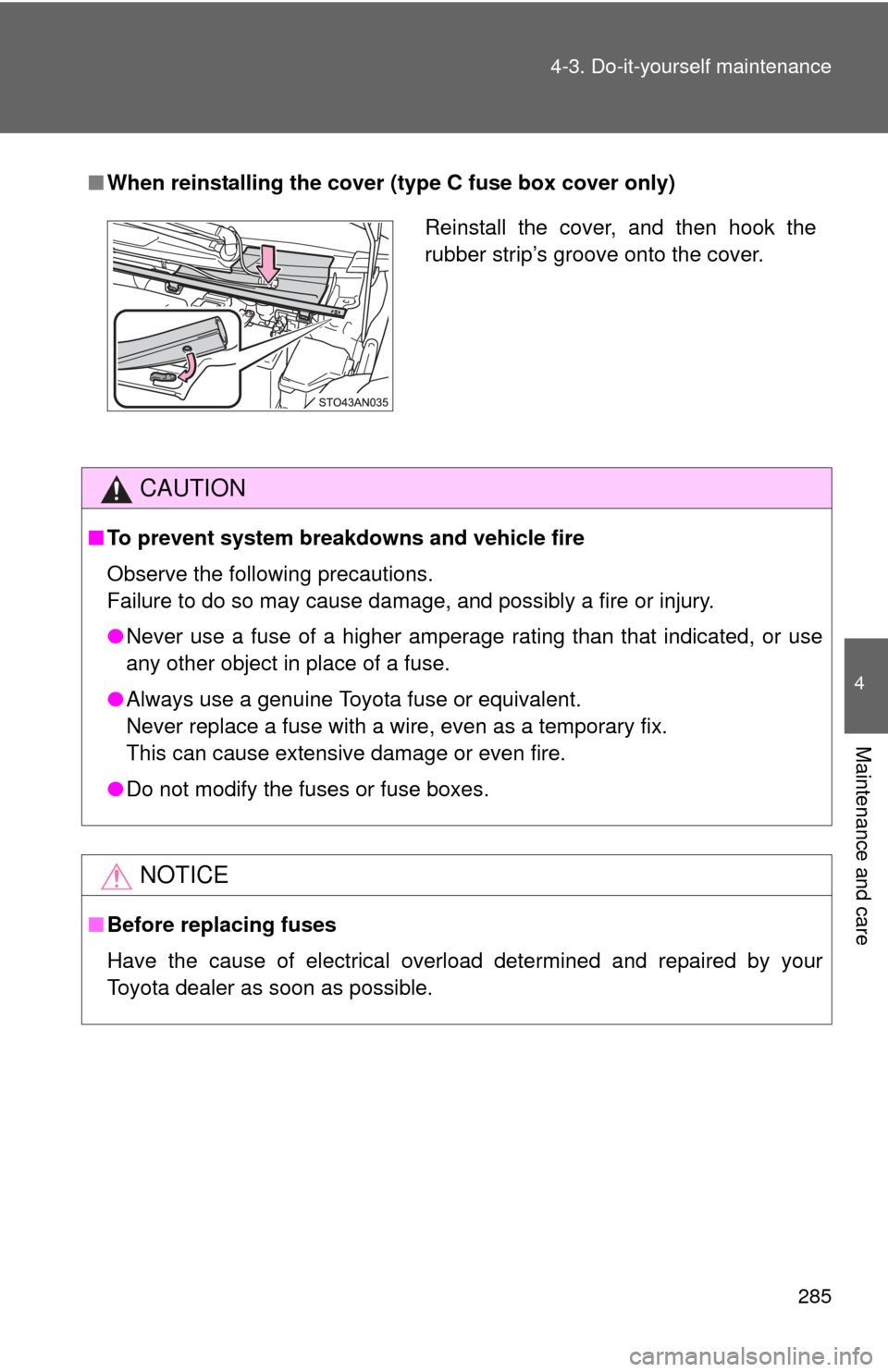
■
When reinstalling the cover (type C fuse box cover only)
CAUTION
■To prevent system breakdowns and vehicle fire
Observe the following precautions.
Failure to do so may cause damage, and possibly a fire or injury.
●Never use a fuse of a higher amperage rating than that indicated, or use
any other object in place of a fuse.
● Always use a genuine Toyota fuse or equivalent.
Never replace a fuse with a wire, even as a temporary fix.
This can cause extensive damage or even fire.
● Do not modify the fuses or fuse boxes.
NOTICE
■Before replacing fuses
Have the cause of electrical overload determined and repaired by your
Toyota dealer as soon as possible.
Reinstall the cover, and then hook the
rubber strip’s groove onto the cover.