power steering TOYOTA YARIS 2012 User Guide
[x] Cancel search | Manufacturer: TOYOTA, Model Year: 2012, Model line: YARIS, Model: TOYOTA YARIS 2012Pages: 704, PDF Size: 27.58 MB
Page 236 of 704
236 2-1. Driving procedures
YARIS_F (including HV)_WE_52C79E
CAUTION
When starting the engine
Always start the engine while sitting in the driver’s seat. Do not depress the
accelerator pedal while starting the engine under any circumstances.
Doing so may cause an accident resulting in death or serious injury.
Caution while driving
If engine failure occurs while the vehicle is moving, do not lock or open the
doors until the vehicle reaches a safe and complete stop. Activation of the
steering lock in this circumstance may lead to an accident, resulting in death
or serious injury.
Stopping the engine in an emergency
If you want to stop the engine in an emergency while driving the vehicle,
press and hold the “ENGINE START STOP” switch for more than 3 seconds,
or press it briefly 3 times or more in succession. (P. 650)
However, do not touch the “ENGINE START STOP” switch while driving
except in an emergency. Turning the engine off while driving will not cause
loss of steering or braking control, but the power assist to these systems will
be lost. This will make it more difficult to steer and brake, so you should pull
over and stop the vehicle as soon as it is safe to do so.
Page 247 of 704
247 2-1. Driving procedures
2
When driving
YARIS_F (including HV)_WE_52C79E
Notes for the entry function
P. 7 9
If the hybrid system does not start
The immobilizer system may not have been deactivated. (P. 155)
Contact any authorized Toyota dealer or repairer, or another duly qualified
and equipped professional.
Steering lock
After turning the “POWER” switch off and opening and closing the doors, the
steering wheel will be locked due to the steering lock function. Operating the
“POWER” switch again automatically cancels the steering lock.
When the steering lock cannot be released
Steering lock motor overheating prevention
To prevent the steering lock motor from overheating, the motor may be sus-
pended if the hybrid system is turned on and off repeatedly in a short period
of time. In this case, refrain from operating the hybrid system. After about 10
seconds, the steering lock motor will resume functioning.
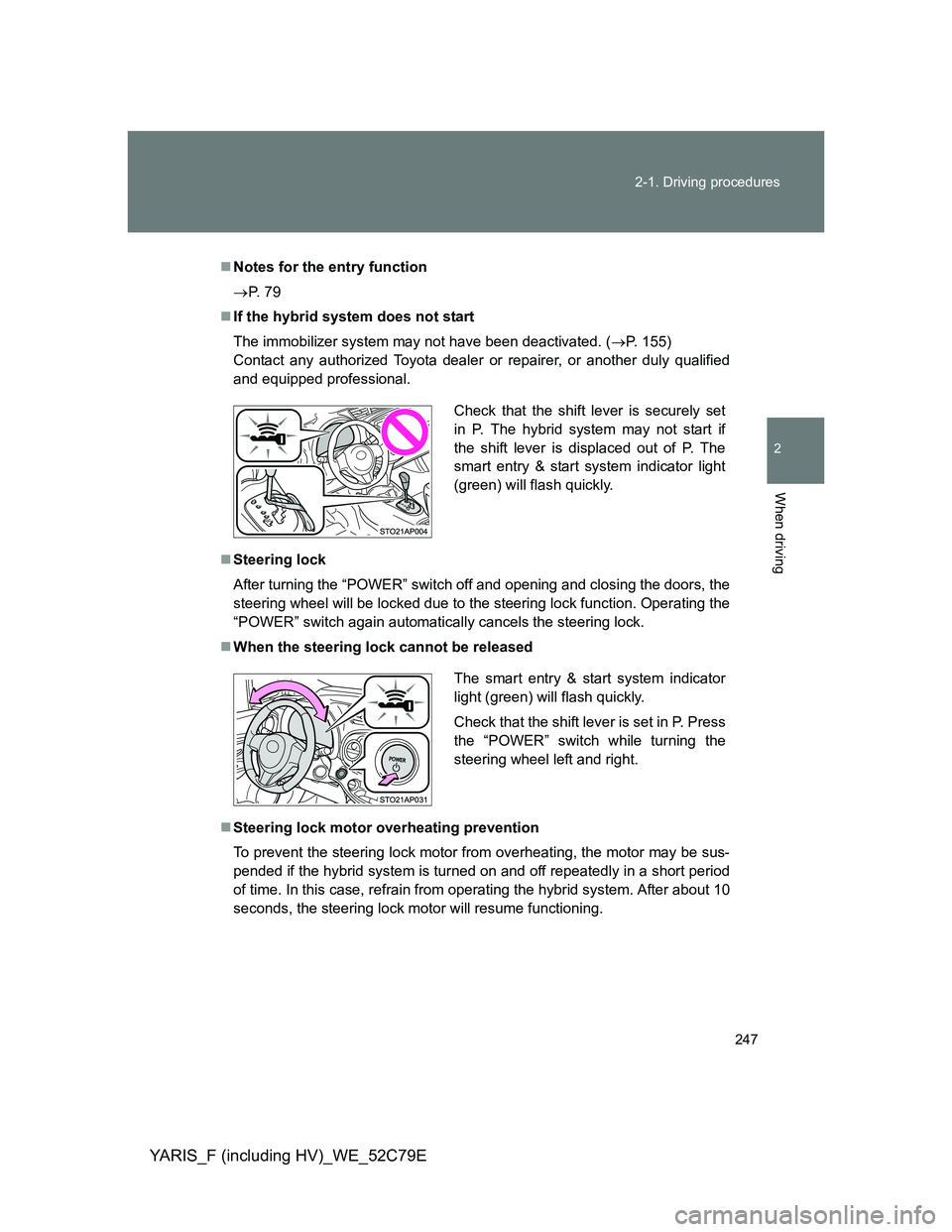
Check that the shift lever is securely set
in P. The hybrid system may not start if
the shift lever is displaced out of P. The
smart entry & start system indicator light
(green) will flash quickly.
The smart entry & start system indicator
light (green) will flash quickly.
Check that the shift lever is set in P. Press
the “POWER” switch while turning the
steering wheel left and right.
Page 248 of 704
248 2-1. Driving procedures
YARIS_F (including HV)_WE_52C79E
If the “READY” indicator does not come on
If the “READY” indicator does not come on when you press the “POWER”
switch with the shift lever in P and the brake pedal depressed, contact any
authorized Toyota dealer or repairer, or another duly qualified and equipped
professional immediately.
If the hybrid system is malfunctioning
P. 566, 568
If the electronic key battery is depleted
P. 505
Operation of the “POWER” switch
When operating the “POWER” switch, one short, firm press is enough. If
the switch is pressed improperly, the hybrid system may not start or the
“POWER” switch mode may not change. It is not necessary to press and
hold the switch.
If attempting to restart the hybrid system immediately after turning the
“POWER” switch off, the hybrid system may not start in some cases.
After turning the “POWER” switch off, please wait a few seconds before
restarting the hybrid system.
If the smart entry & start system or the push-button start system has
been deactivated in a customized setting
P. 682
CAUTION
When starting the hybrid system
Always start the hybrid system while sitting in the driver’s seat. Do not
depress the accelerator pedal while starting the hybrid system under any cir-
cumstances.
Doing so may cause an accident resulting in death or serious injury.
Caution while driving
If a hybrid system failure occurs while the vehicle is moving, do not lock or
open the doors until the vehicle reaches a safe and complete stop. Doing so
may cause activation of the steering lock which may lead to an accident,
resulting in death or serious injury.
Page 249 of 704
249 2-1. Driving procedures
2
When driving
YARIS_F (including HV)_WE_52C79E
CAUTION
Stopping the hybrid system in an emergency
If you want to stop the hybrid system in an emergency while driving the vehi-
cle, press and hold the “POWER” switch for more than 3 seconds, or press it
briefly 3 times or more in succession. (P. 650)
However, do not touch the “POWER” switch while driving except in an emer-
gency. Turning the hybrid system off while driving will not cause loss of
steering or braking control, but the power assist to these systems will be lost.
This will make it more difficult to steer and brake, so you should pull over
and stop the vehicle as soon as it is safe to do so.
NOTICE
To prevent 12-volt battery discharge
Do not leave the “POWER” switch in ACCESSORY or ON mode for long
periods of time without the hybrid system on.
If the smart entry & start system indicator light (green) is illuminated, the
“POWER” switch is not off. When exiting the vehicle, always check that the
“POWER” switch is off.
Do not stop the hybrid system when the shift lever is in a position other
than P. If the hybrid system is stopped in another shift lever position, the
“POWER” switch will not be turned off but instead be turned to ACCES-
SORY mode. If the vehicle is left in ACCESSORY mode, 12-volt battery
discharge may occur.
When starting the hybrid system
If the hybrid system becomes difficult to start, have your vehicle checked by
any authorized Toyota dealer or repairer, or another duly qualified and
equipped professional immediately.
Symptoms indicating a malfunction with the “POWER” switch
If the “POWER” switch seems to be operating somewhat differently than
usual, such as the switch sticking slightly, there may be a malfunction. Con-
tact any authorized Toyota dealer or repairer, or another duly qualified and
equipped professional immediately.
Page 284 of 704
284 2-2. Instrument cluster
YARIS_F (including HV)_WE_52C79E
*1: Except hybrid vehicle: These lights turn on when the engine switch
is turned to the “ON” position (vehicles without a smart entry & start
system) or the “ENGINE START STOP” switch is turned to IGNI-
TION ON mode (vehicles with a smart entry & start system) to indi-
cate that a system check is being performed. They will turn off after
the engine is started, or after a few seconds. There may be a mal-
function in a system if a light does not come on, or if the lights do
not turn off. Have the vehicle inspected by any authorized Toyota
dealer or repairer, or another duly qualified and equipped profes-
sional.
*2: Hybrid vehicle: These lights turn on when the engine switch is
turned to the “ON” position (vehicles without an electronic key) or
the “POWER” switch is turned to ON mode (vehicles with an elec-
tronic key) to indicate that a system check is being performed. They
will turn off after the hybrid system on, or after a few seconds. There
may be a malfunction in a system if a light does not come on, or if
the lights do not turn off. Have the vehicle inspected by any autho-
rized Toyota dealer or repairer, or another duly qualified and
equipped professional.
*3: These lights turn on when the engine switch is turned to the “ON”
position (vehicles without a smart entry & start system) or the
“ENGINE START STOP” switch is turned to IGNITION ON mode
(vehicles with a smart entry & start system) to indicate that a system
check is being performed. They will turn off after the engine is
started, or after a few seconds.
*4: The light flashes in yellow to indicate a malfunction. The light
flashes quickly in green to indicate that the steering lock has not
been released.
*5: Except hybrid vehicle: The light flashes to indicate a malfunction.
*6: The light turns on to indicate a malfunction.
*7: Hybrid vehicle: The light comes in yellow to indicate a malfunction.
Page 322 of 704
322 2-4. Using other driving systems
YARIS_F (including HV)_WE_52C79E
The Stop & Start system protection feature
Vehicles without a smart entry & start system:
When an excessively loud sound is being projected by the audio system, the
audio system may be automatically cut off in order to maintain power for the
Stop & Start system function.
If this occurs, turning the engine switch to the “LOCK” position then to the
“ACC” or “ON” position re-enables the audio system.
Vehicles with a smart entry & start system:
When an excessively loud sound is being projected by the audio system, the
audio system may be automatically cut off in order to maintain power for the
Stop & Start system function.
If this occurs, turning the “ENGINE START STOP” switch off then to ACCES-
SORY mode or IGNITION ON mode re-enables the audio system.
Steering wheel operation
When the engine is stopped by the Stop & Start system, the steering wheel
may become heavier than when driving.
Hood
If the hood is opened while the engine is stopped by the Stop & Start system,
the engine cannot be restarted by the Stop & Start system or by the auto-
matic engine start function. Restart the engine with the engine switch opera-
tion. (P. 224, 228)
Vehicles with a Multidrive: If the hood is opened while the engine is stopped
by the Stop & Start system and the shift lever is in N or P, the engine will
restart.
Hill-start assist control (vehicles with a Multidrive)
On a steep uphill grade, the vehicle may roll backward after hill-start
assist control is released. In this situation, apply the parking brake and
operate the brake pedal when putting the vehicle in motion.
This system operates on flat surfaces as well as steep grades.
When the engine is stopped due to Stop & Start system operation, the
force required to depress the brake pedal may change, but this is not a
malfunction.
When to use the Stop & Start system
Use the Stop & Start system when stopping the vehicle temporarily at red
lights, intersections, etc. When stopping the vehicle for a longer period of
time, turn off the engine completely.
Page 326 of 704
326
2-4. Using other driving systems
YARIS_F (including HV)_WE_52C79E
Driving assist systems
To help enhance driving safety and performance, the following sys-
tems operate automatically in response to various driving situations.
Be aware, however, that these systems are supplementary and
should not be relied upon too heavily when operating the vehicle.
ABS (Anti-lock Brake System)
Helps to prevent wheel lock when the brakes are applied suddenly, or if
the brakes are applied while driving on a slippery road surface
Brake assist
Generates an increased level of braking force after the brake pedal is
depressed when the system detects a panic stop situation
VSC (Vehicle Stability Control) (if equipped)
Helps the driver to control skidding when swerving suddenly or turning
on slippery road surfaces
TRC (Traction Control) (if equipped)
Helps to maintain drive power and prevent the drive wheels from spin-
ning when starting the vehicle or accelerating on slippery roads
Hill-start assist control
Except hybrid vehicle (vehicles with a Stop & Start system and a
Multidrive)
Helps to prevent the vehicle from rolling backward when the brake
pedal is released to restart the engine
Hybrid vehicle
P. 332
EPS (Electric Power Steering)
Employs an electric motor to reduce the amount of effort needed to turn
the steering wheel
Page 330 of 704
330 2-4. Using other driving systems
YARIS_F (including HV)_WE_52C79E
Reduced effectiveness of the EPS system
The effectiveness of the EPS system is reduced to prevent the system from
overheating when there is frequent steering input over an extended period of
time. The steering wheel may feel heavy as a result. Should this occur,
refrain from excessive steering input or stop the vehicle and turn the engine
(except hybrid vehicle) or hybrid system (hybrid vehicle) off. The EPS sys-
tem should return to normal within 10 minutes.
If the slip indicator comes on
It may indicate a malfunction in the driving assist systems. Contact any
authorized Toyota dealer or repairer, or another duly qualified and equipped
professional.
CAUTION
The ABS does not operate effectively when
Tires with inadequate gripping ability are used (such as excessively worn
tires on a snow covered road).
The vehicle hydroplanes while driving at high speed on wet or slick roads.
Stopping distance when the ABS is operating may exceed that of nor-
mal conditions
The ABS is not designed to shorten the vehicle’s stopping distance. Always
maintain a safe distance from the vehicle in front of you in the following situ-
ations:
When driving on dirt, gravel or snow-covered roads
When driving with tire chains
When driving over bumps in the road
When driving over roads with potholes or roads with uneven surfaces
TRC may not operate effectively when
Directional control and power may not be achievable while driving on slip-
pery road surfaces, even if the TRC system is operating.
Do not drive the vehicle in conditions where stability and power may be lost.
Hill-start assist control does not operate effectively when
Do not overly rely on the hill-start assist control. The hill-start assist control
may not operate effectively on steep inclines and roads covered with ice.
Page 355 of 704
3Interior features
355
YARIS_F (including HV)_WE_52C79E
3-1. Using the air conditioning
system and defogger
Manual air conditioning
system ............................ 356
Automatic air conditioning
system ............................ 363
Power heater .................... 372
Rear window and outside
rear view mirror
defoggers ....................... 374
3-2. Using the audio system
Audio system types .......... 376
Using the radio ................. 381
Using the CD player ......... 385
Playing back MP3 and
WMA discs...................... 390
Operating an iPod............. 396
Operating a
USB memory .................. 404
Optimal use of the audio
system ............................ 411
Using the AUX port ........... 413
Using the steering wheel
audio switches ................ 414
3-3. Using the interior lights
Interior lights list................ 417
• Personal lights ................ 418
• Interior light ..................... 4183-4. Using the storage features
List of storage features ..... 420
• Glove box ....................... 421
• Cup holders .................... 422
• Bottle holders.................. 423
3-5. Other interior features
Sun visors ......................... 425
Vanity mirrors.................... 426
Clock ................................. 428
Outside temperature
display ............................ 429
Portable ashtray................ 430
Cigarette lighter ................ 431
Power outlet ...................... 432
Seat heaters ..................... 434
Armrest ............................. 436
Panoramic roof shade....... 437
Assist grips ....................... 438
Floor mat........................... 439
Luggage compartment
features........................... 441
Page 414 of 704
414
3-2. Using the audio system
YARIS_F (including HV)_WE_52C79E
Using the steering wheel audio switches
Turning on the power
Press when the audio system is turned off.
Changing the audio source
Press when the audio system is turned on. The audio source
changes as follows each time is pressed. If a mode cannot be
used, it will be skipped.
AMFMCD modeiPod or USB memory mode
*AUX*
*
: If equipped
: If equipped
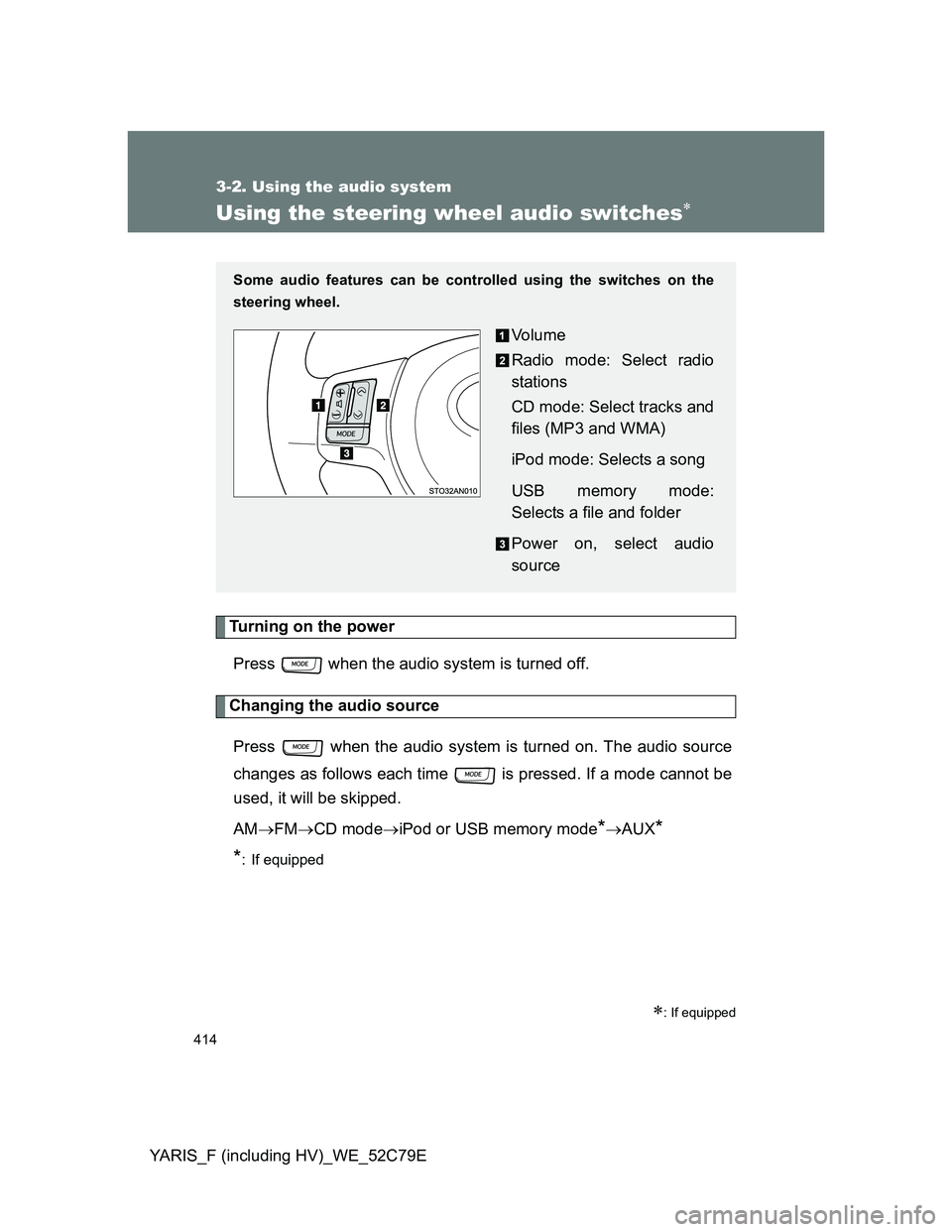
Some audio features can be controlled using the switches on the
steering wheel.
Vo l u m e
Radio mode: Select radio
stations
CD mode: Select tracks and
files (MP3 and WMA)
iPod mode: Selects a song
USB memory mode:
Selects a file and folder
Power on, select audio
source