radio TOYOTA YARIS 2012 User Guide
[x] Cancel search | Manufacturer: TOYOTA, Model Year: 2012, Model line: YARIS, Model: TOYOTA YARIS 2012Pages: 704, PDF Size: 27.58 MB
Page 107 of 704
107 1-3. Opening, closing and locking the doors
1
Before driving
YARIS_F (including HV)_WE_52C79E
When the wireless key is in contact with, or is covered by a metallic
object
When other wireless key (that emit radio waves) is being used nearby
If window tint with a metallic content or metallic objects are attached to
the rear window
Vehicles with a smart entry & start system or a push-button start sys-
tem
P. 7 8
If the wireless remote control does not operate properly (vehicles with
a smart entry & start system or a push-button start system)
Locking and unlocking the doors: Use the mechanical key. (P. 619)
Key battery depletion
If the wireless remote control function does not operate, the battery may be
depleted. Replace the battery when necessary. (P. 505)
Electronic key battery depletion
P. 8 1
When the key battery is fully depleted
P. 505
Confirmation of the registered key number (vehicles with a smart entry
and start system or a push-button start system)
The number of keys already registered to the vehicle can be confirmed. Ask
any authorized Toyota dealer or repairer, or another duly qualified and
equipped professional for details.
Customization that can be configured at any authorized Toyota dealer
or repairer, or another duly qualified and equipped professional
Settings (e.g. wireless remote control system) can be changed.
(Customizable features P. 682)
Page 355 of 704
3Interior features
355
YARIS_F (including HV)_WE_52C79E
3-1. Using the air conditioning
system and defogger
Manual air conditioning
system ............................ 356
Automatic air conditioning
system ............................ 363
Power heater .................... 372
Rear window and outside
rear view mirror
defoggers ....................... 374
3-2. Using the audio system
Audio system types .......... 376
Using the radio ................. 381
Using the CD player ......... 385
Playing back MP3 and
WMA discs...................... 390
Operating an iPod............. 396
Operating a
USB memory .................. 404
Optimal use of the audio
system ............................ 411
Using the AUX port ........... 413
Using the steering wheel
audio switches ................ 414
3-3. Using the interior lights
Interior lights list................ 417
• Personal lights ................ 418
• Interior light ..................... 4183-4. Using the storage features
List of storage features ..... 420
• Glove box ....................... 421
• Cup holders .................... 422
• Bottle holders.................. 423
3-5. Other interior features
Sun visors ......................... 425
Vanity mirrors.................... 426
Clock ................................. 428
Outside temperature
display ............................ 429
Portable ashtray................ 430
Cigarette lighter ................ 431
Power outlet ...................... 432
Seat heaters ..................... 434
Armrest ............................. 436
Panoramic roof shade....... 437
Assist grips ....................... 438
Floor mat........................... 439
Luggage compartment
features........................... 441
Page 377 of 704
377 3-2. Using the audio system
3
Interior features
YARIS_F (including HV)_WE_52C79E
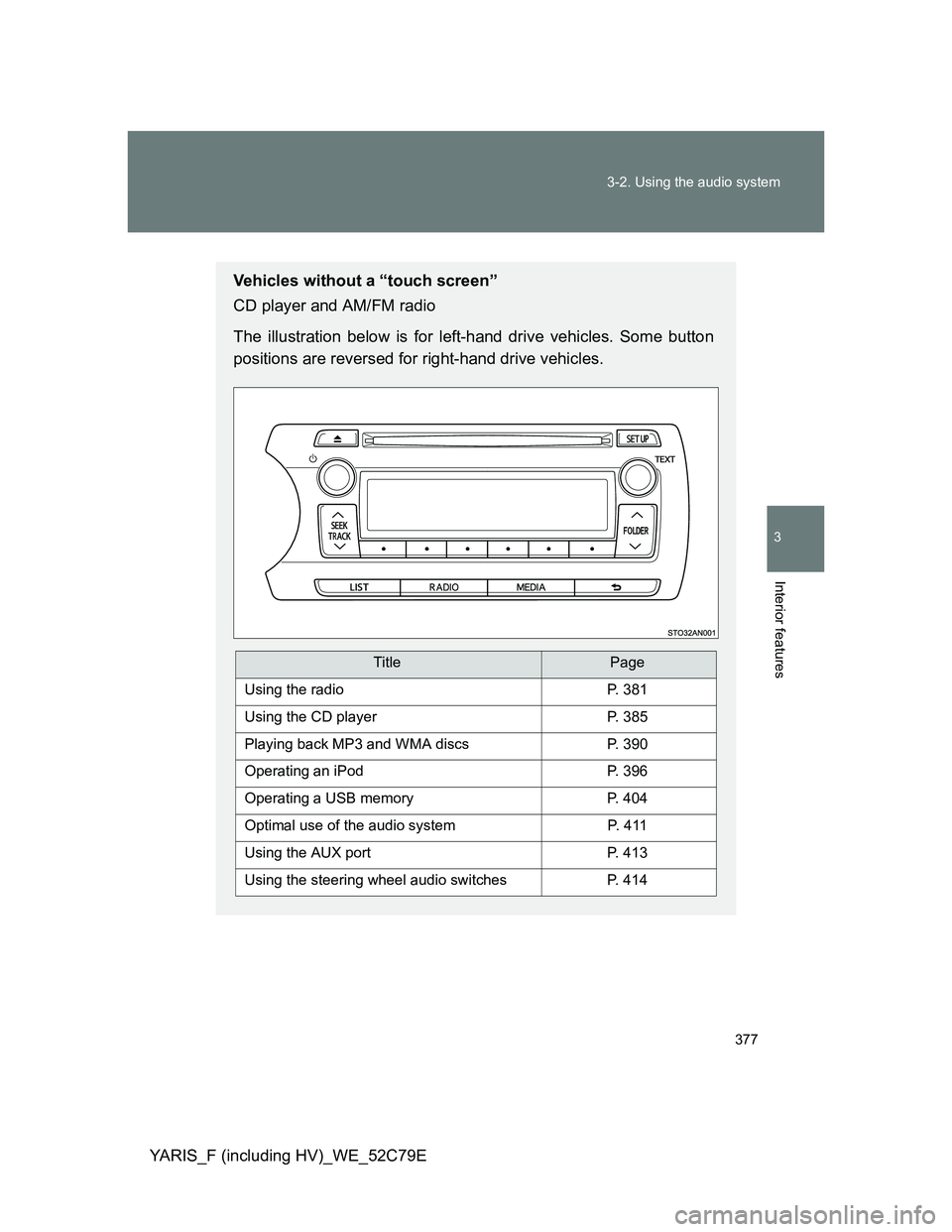
Vehicles without a “touch screen”
CD player and AM/FM radio
The illustration below is for left-hand drive vehicles. Some button
positions are reversed for right-hand drive vehicles.
TitlePage
Using the radioP. 381
Using the CD playerP. 385
Playing back MP3 and WMA discsP. 390
Operating an iPodP. 396
Operating a USB memoryP. 404
Optimal use of the audio systemP. 4 1 1
Using the AUX portP. 413
Using the steering wheel audio switchesP. 414
Page 381 of 704
381
3-2. Using the audio system
3
Interior features
YARIS_F (including HV)_WE_52C79E
Using the radio
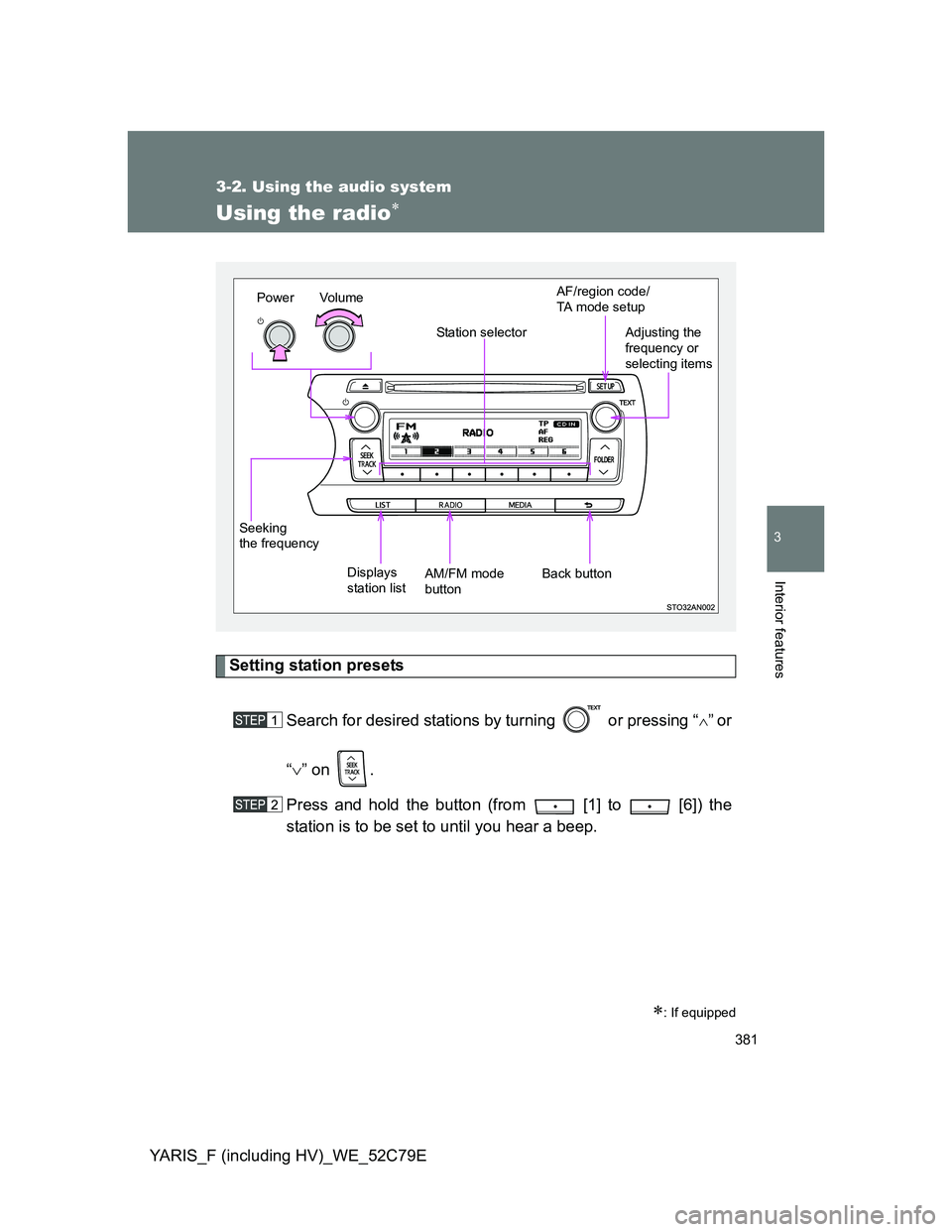
Setting station presets
Search for desired stations by turning or pressing “
”or
“” on .
Press and hold the button (from [1] to [6]) the
station is to be set to until you hear a beep.
: If equipped
Vo l u m e
Displays
station listStation selector
Seeking
the frequencyAdjusting the
frequency or
selecting items
AM/FM mode
buttonPowerAF/region code/
TA mode setup
Back button
Page 382 of 704
382 3-2. Using the audio system
YARIS_F (including HV)_WE_52C79E
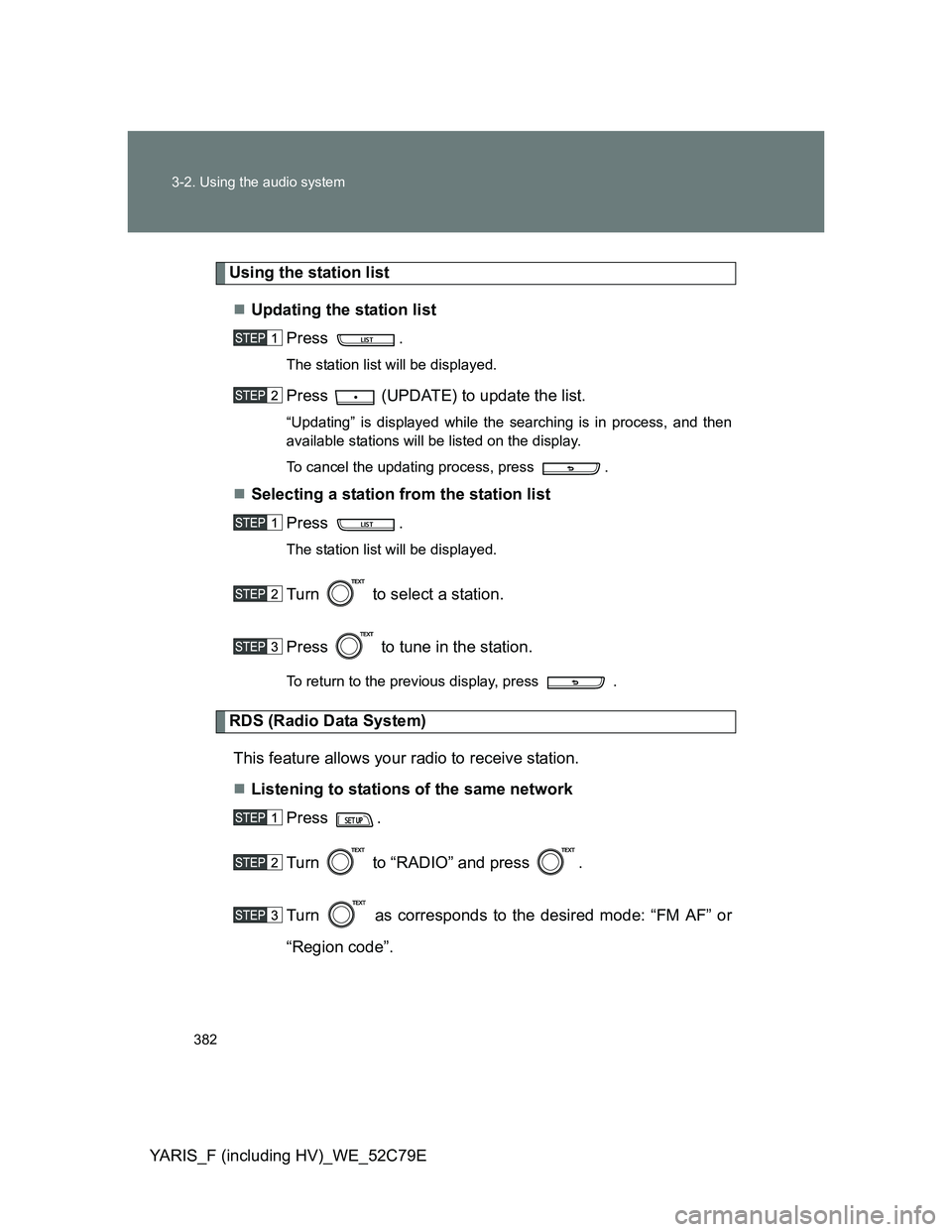
Using the station list
Updating the station list
Press .
The station list will be displayed.
Press (UPDATE) to update the list.
“Updating” is displayed while the searching is in process, and then
available stations will be listed on the display.
To cancel the updating process, press .
Selecting a station from the station list
Press .
The station list will be displayed.
Turn to select a station.
Press to tune in the station.
To return to the previous display, press .
RDS (Radio Data System)
This feature allows your radio to receive station.
Listening to stations of the same network
Press .
Turn to “RADIO” and press .
Turn as corresponds to the desired mode: “FM AF” or
“Region code”.
Page 383 of 704
383 3-2. Using the audio system
3
Interior features
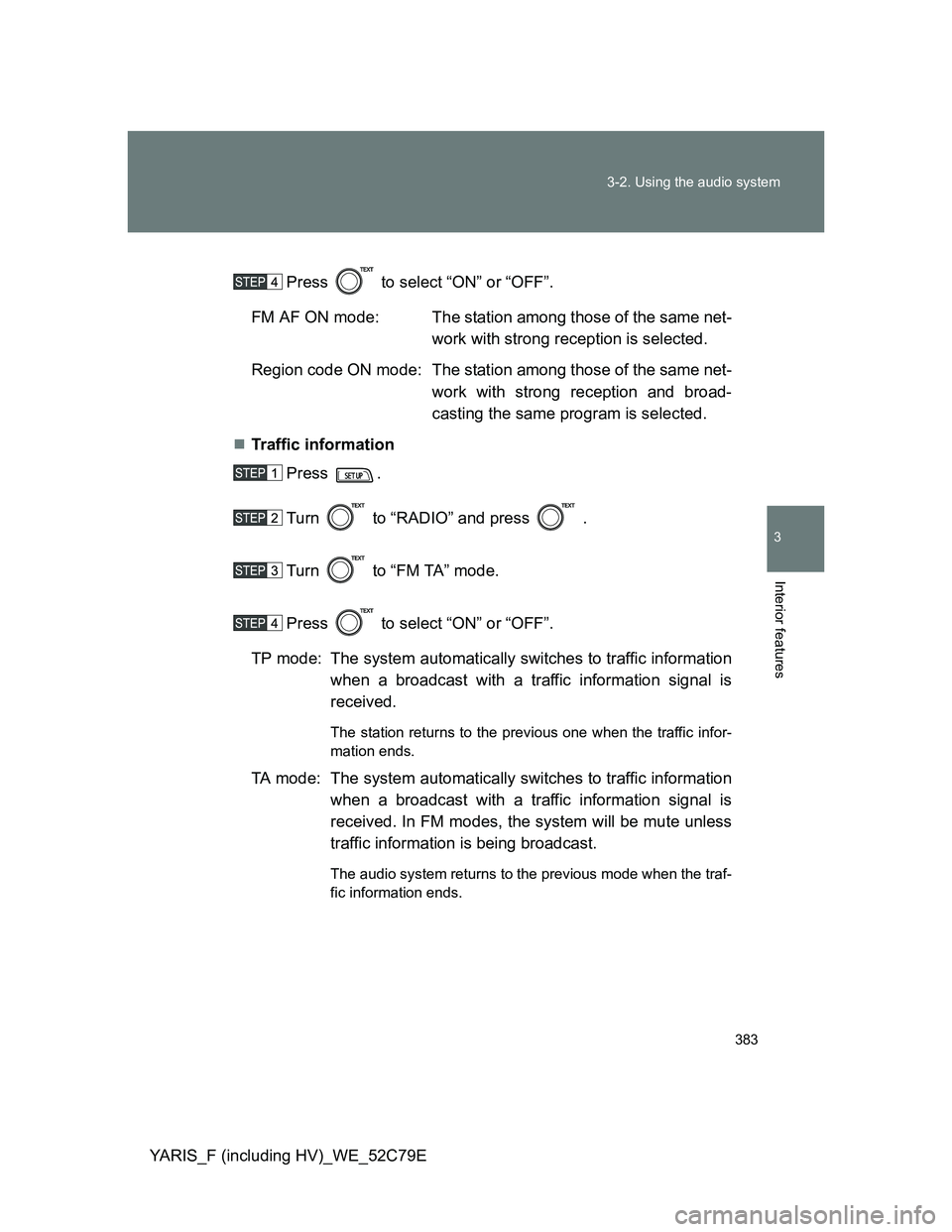
YARIS_F (including HV)_WE_52C79EPress to select “ON” or “OFF”.
FM AF ON mode: The station among those of the same net-
work with strong reception is selected.
Region code ON mode: The station among those of the same net-
work with strong reception and broad-
casting the same program is selected.
Traffic information
Press .
Turn to “RADIO” and press .
Turn to “FM TA” mode.
Press to select “ON” or “OFF”.
TP mode: The system automatically switches to traffic information
when a broadcast with a traffic information signal is
received.
The station returns to the previous one when the traffic infor-
mation ends.
TA mode: The system automatically switches to traffic information
when a broadcast with a traffic information signal is
received. In FM modes, the system will be mute unless
traffic information is being broadcast.
The audio system returns to the previous mode when the traf-
fic information ends.
Page 384 of 704
384 3-2. Using the audio system
YARIS_F (including HV)_WE_52C79E
EON (Enhanced Other Network) system (for traffic announcement
function)
If the RDS station (with EON data) you are listening to is not broadcasting a
traffic information program and the audio system is in the TA (traffic
announcement) mode, the radio will be switched automatically to a station
broadcasting a traffic information program in the EON AF list when traffic
information begins.
When the battery (except hybrid vehicle) or 12-volt battery (hybrid
vehicle) is disconnected
Stations presets are erased.
Reception sensitivity
Maintaining perfect radio reception at all times is difficult due to the con-
tinually changing position of the antenna, differences in signal strength
and surrounding objects, such as trains, transmitters, etc.
The radio antenna is mounted on the rear roof. The antenna can be
removed from the base by turning it.
Digital Audio Broadcast (DAB) radio
The optional radio antenna and tuner are necessary for the use of Digital
Audio Broadcast (DAB) radio.
NOTICE
To prevent damage, remove the antenna in the following cases.
The antenna will touch the ceiling of a garage.
A cover will be put on the roof.
Page 414 of 704
414
3-2. Using the audio system
YARIS_F (including HV)_WE_52C79E
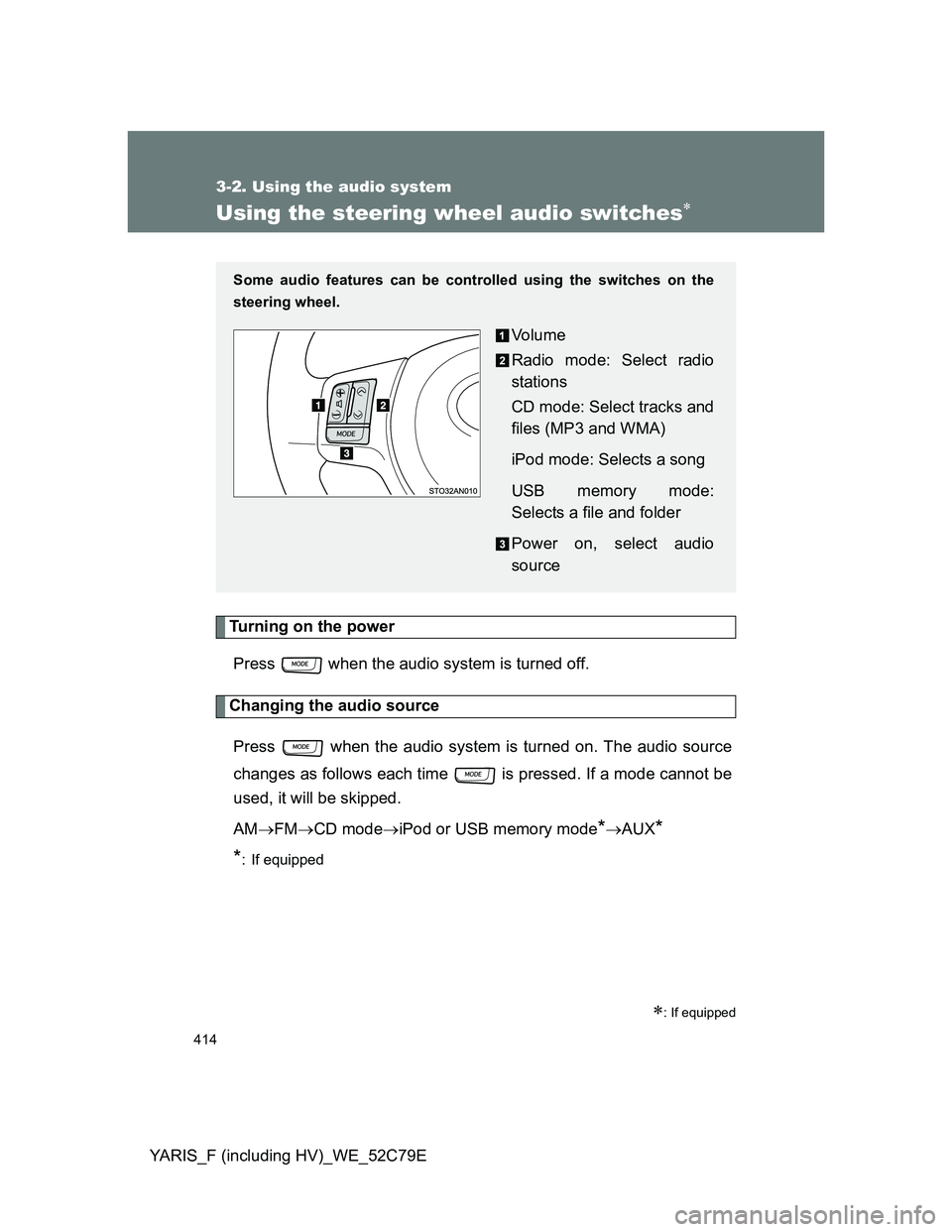
Using the steering wheel audio switches
Turning on the power
Press when the audio system is turned off.
Changing the audio source
Press when the audio system is turned on. The audio source
changes as follows each time is pressed. If a mode cannot be
used, it will be skipped.
AMFMCD modeiPod or USB memory mode
*AUX*
*
: If equipped
: If equipped
Some audio features can be controlled using the switches on the
steering wheel.
Vo l u m e
Radio mode: Select radio
stations
CD mode: Select tracks and
files (MP3 and WMA)
iPod mode: Selects a song
USB memory mode:
Selects a file and folder
Power on, select audio
source
Page 415 of 704
415 3-2. Using the audio system
3
Interior features
YARIS_F (including HV)_WE_52C79E
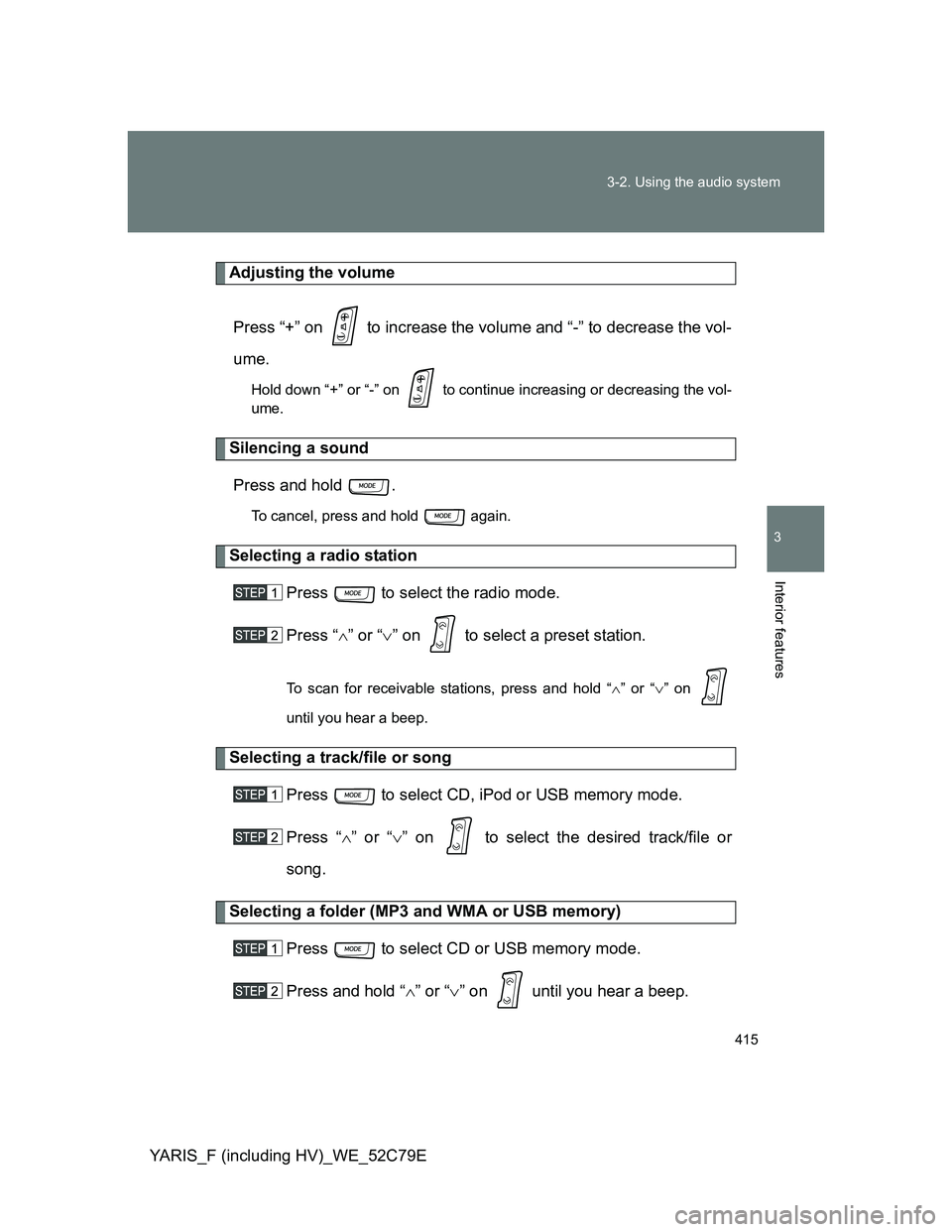
Adjusting the volume
Press “+” on to increase the volume and “-” to decrease the vol-
ume.
Hold down “+” or “-” on to continue increasing or decreasing the vol-
ume.
Silencing a sound
Press and hold .
To cancel, press and hold again.
Selecting a radio station
Press to select the radio mode.
Press “” or “” on to select a preset station.
To scan for receivable stations, press and hold “” or “” on
until you hear a beep.
Selecting a track/file or song
Press to select CD, iPod or USB memory mode.
Press “” or “” on to select the desired track/file or
song.
Selecting a folder (MP3 and WMA or USB memory)
Press to select CD or USB memory mode.
Press and hold “” or “” on until you hear a beep.
Page 686 of 704
686
YARIS_F (including HV)_WE_52C79E
Abbreviation list
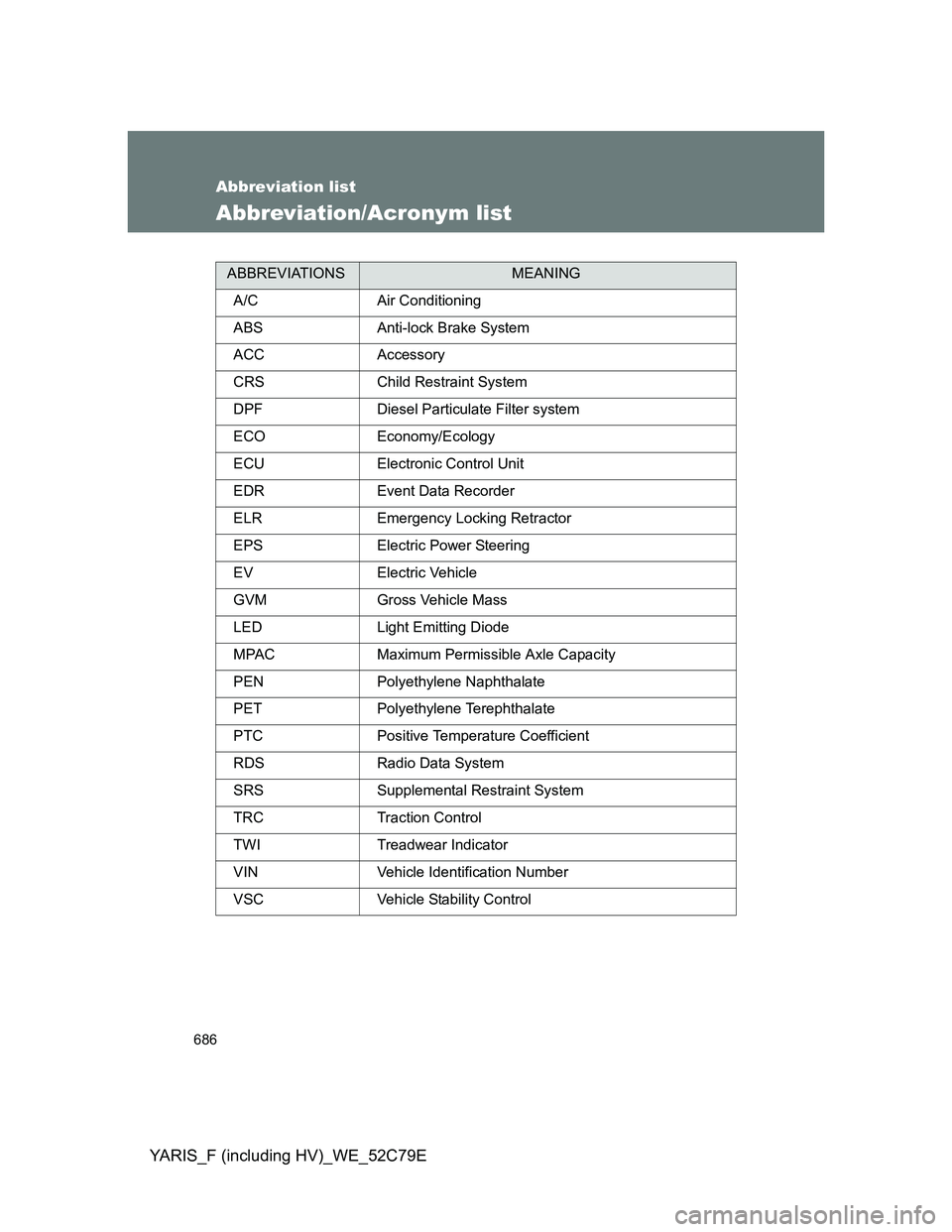
Abbreviation/Acronym list
ABBREVIATIONSMEANING
A/C Air Conditioning
ABS Anti-lock Brake System
ACC Accessory
CRS Child Restraint System
DPF Diesel Particulate Filter system
ECO Economy/Ecology
ECU Electronic Control Unit
EDR Event Data Recorder
ELR Emergency Locking Retractor
EPS Electric Power Steering
EV Electric Vehicle
GVM Gross Vehicle Mass
LED Light Emitting Diode
MPAC Maximum Permissible Axle Capacity
PEN Polyethylene Naphthalate
PET Polyethylene Terephthalate
PTC Positive Temperature Coefficient
RDS Radio Data System
SRS Supplemental Restraint System
TRC Traction Control
TWI Treadwear Indicator
VIN Vehicle Identification Number
VSC Vehicle Stability Control