remote start TOYOTA YARIS 2012 Owner's Manual
[x] Cancel search | Manufacturer: TOYOTA, Model Year: 2012, Model line: YARIS, Model: TOYOTA YARIS 2012Pages: 704, PDF Size: 27.58 MB
Page 163 of 704
163 1-7. Theft deterrent system
1
Before driving
YARIS_F (including HV)_WE_52C79E
Canceling the double locking system
Using the entry function (vehicles with a smart entry & start system):
Hold either front outside door handle or push up the back door
opener switch.
Using the wireless remote control: Press .
CAUTION
Double locking system precaution
Never activate the double locking system when there are people in the vehi-
cle because all the doors cannot be opened from inside the vehicle.
Page 483 of 704
483 4-3. Do-it-yourself maintenance
4
Maintenance and care
YARIS_F (including HV)_WE_52C79E
Before recharging
When recharging, the battery produces hydrogen gas which is flammable
and explosive. Therefore, observe the following before recharging:
If recharging with the battery installed on the vehicle, be sure to discon-
nect the ground cable.
Make sure the power switch on the charger is off when connecting and
disconnecting the charger cables to the battery.
After recharging/reconnecting the battery (vehicles with a smart entry
& start system)
Unlocking the doors using the smart entry & start system may not be
possible immediately after reconnecting the battery. If this happens, use
the wireless remote control or the mechanical key to lock/unlock the
doors.
Start the engine with the “ENGINE START STOP” switch in ACCES-
SORY mode. The engine may not start with the “ENGINE START STOP”
switch turned off. However, the engine will operate normally from the sec-
ond attempt.
The “ENGINE START STOP” switch mode is recorded by the vehicle. If
the battery is reconnected, the vehicle will return the “ENGINE START
STOP” switch mode to the status it was in before the battery was discon-
nected. Make sure to turn off the engine before disconnect the battery.
Take extra care when connecting the battery if the “ENGINE START
STOP” switch mode prior to discharge is unknown.
If the engine will not start even after multiple attempts, contact any autho-
rized Toyota dealer or repairer, or another duly qualified and equipped pro-
fessional.
Page 491 of 704
491 4-3. Do-it-yourself maintenance
4
Maintenance and care
YARIS_F (including HV)_WE_52C79E
Before recharging
When recharging, the 12-volt battery produces hydrogen gas which is flam-
mable and explosive. Therefore, observe the following precautions before
recharging:
If recharging with the 12-volt battery installed on the vehicle, be sure to
disconnect the ground cable.
Make sure the power switch on the charger is off when connecting and
disconnecting the charger cables to the 12-volt battery.
When disconnecting the 12-volt battery terminals
Always disconnect the negative (-) terminal first.
After recharging/reconnecting the 12-volt battery
Unlocking the doors using the smart entry & start system may not be
possible immediately after reconnecting the 12-volt battery. If this hap-
pens, use the wireless remote control or the mechanical key to lock/
unlock the doors.
Vehicles with an electronic key: Start the hybrid system with the
“POWER” switch in ACCESSORY mode. The hybrid system may not
start with the “POWER” switch turned off. However, the hybrid system will
operate normally from the second attempt.
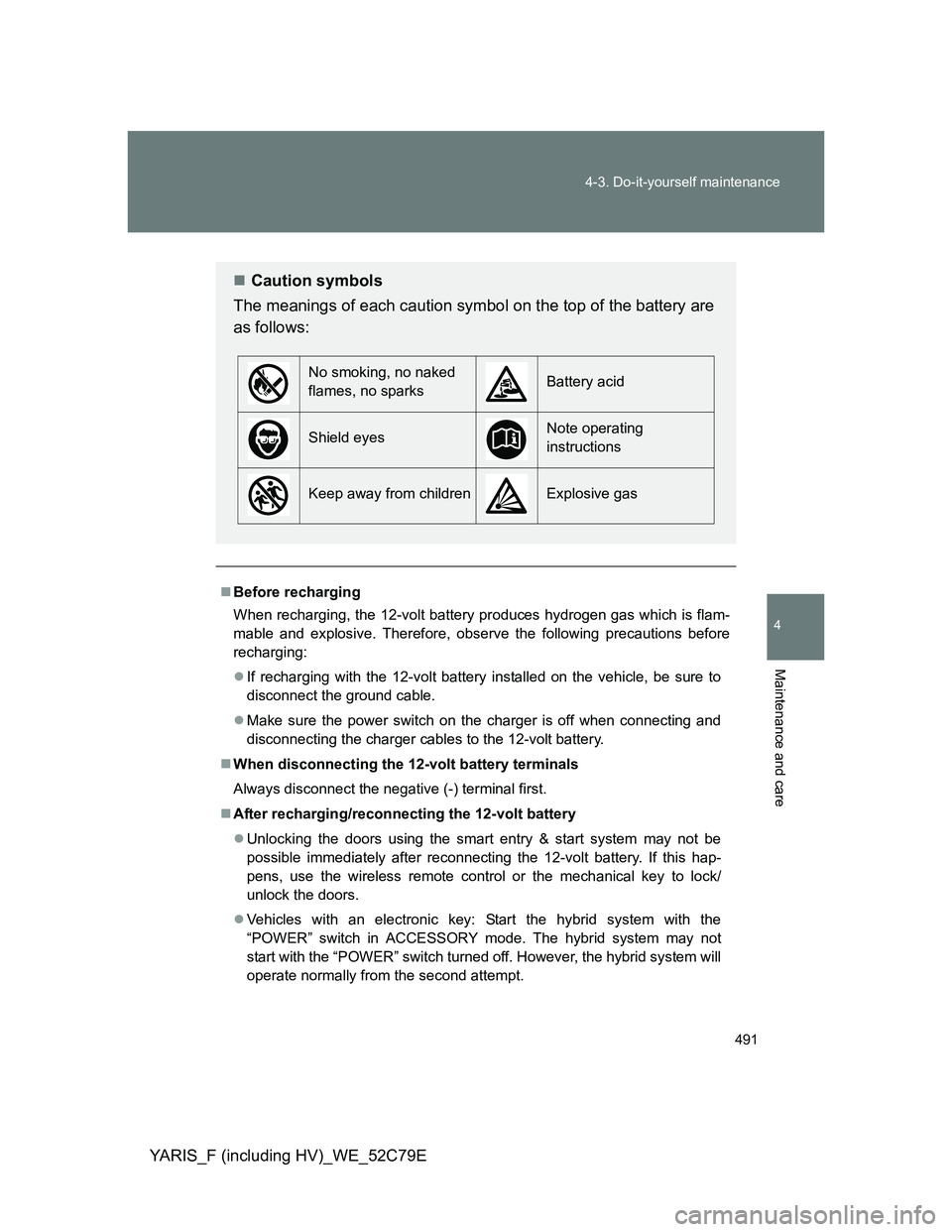
Caution symbols
The meanings of each caution symbol on the top of the battery are
as follows:
No smoking, no naked
flames, no sparksBattery acid
Shield eyesNote operating
instructions
Keep away from childrenExplosive gas
Page 505 of 704
505
4-3. Do-it-yourself maintenance
4
Maintenance and care
YARIS_F (including HV)_WE_52C79E
Wireless remote control/electronic key batter y
Replace the battery with a new one if it is depleted.
You will need the following items:
Flathead screwdriver
Lithium battery CR2016 (vehicles without a smart entry & start
system or a push-button start system), or CR2032 (vehicles
with a smart entry & start system or a push-button start sys-
tem)
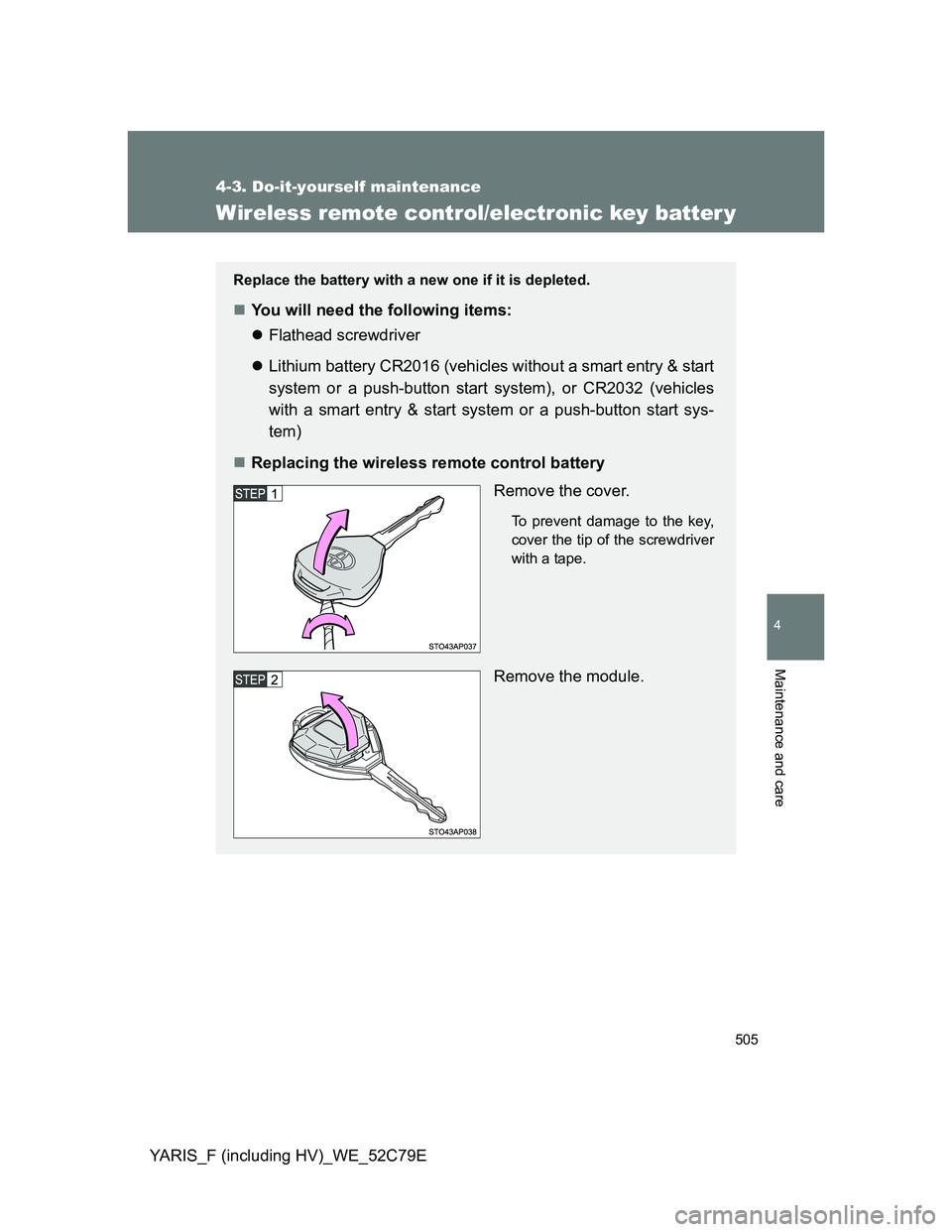
Replacing the wireless remote control battery
Remove the cover.
To prevent damage to the key,
cover the tip of the screwdriver
with a tape.
Remove the module.
Page 508 of 704
508 4-3. Do-it-yourself maintenance
YARIS_F (including HV)_WE_52C79E
Use a CR2016 (vehicles without a smart entry & start system or a push-
button start system) or CR2032 (vehicles with a smart entry & start sys-
tem or a push-button start system) lithium battery
Batteries can be purchased at any authorized Toyota dealer or repairer,
or another duly qualified and equipped professional, local electrical appli-
ance shops or camera stores.
Replace only with the same or equivalent type recommended by the
manufacturer.
Dispose of used batteries according to local laws.
If the key battery is depleted
The following symptoms may occur:
The smart entry & start system (if equipped), push-button start system (if
equipped) and wireless remote control will not function properly.
The operational range will be reduced.
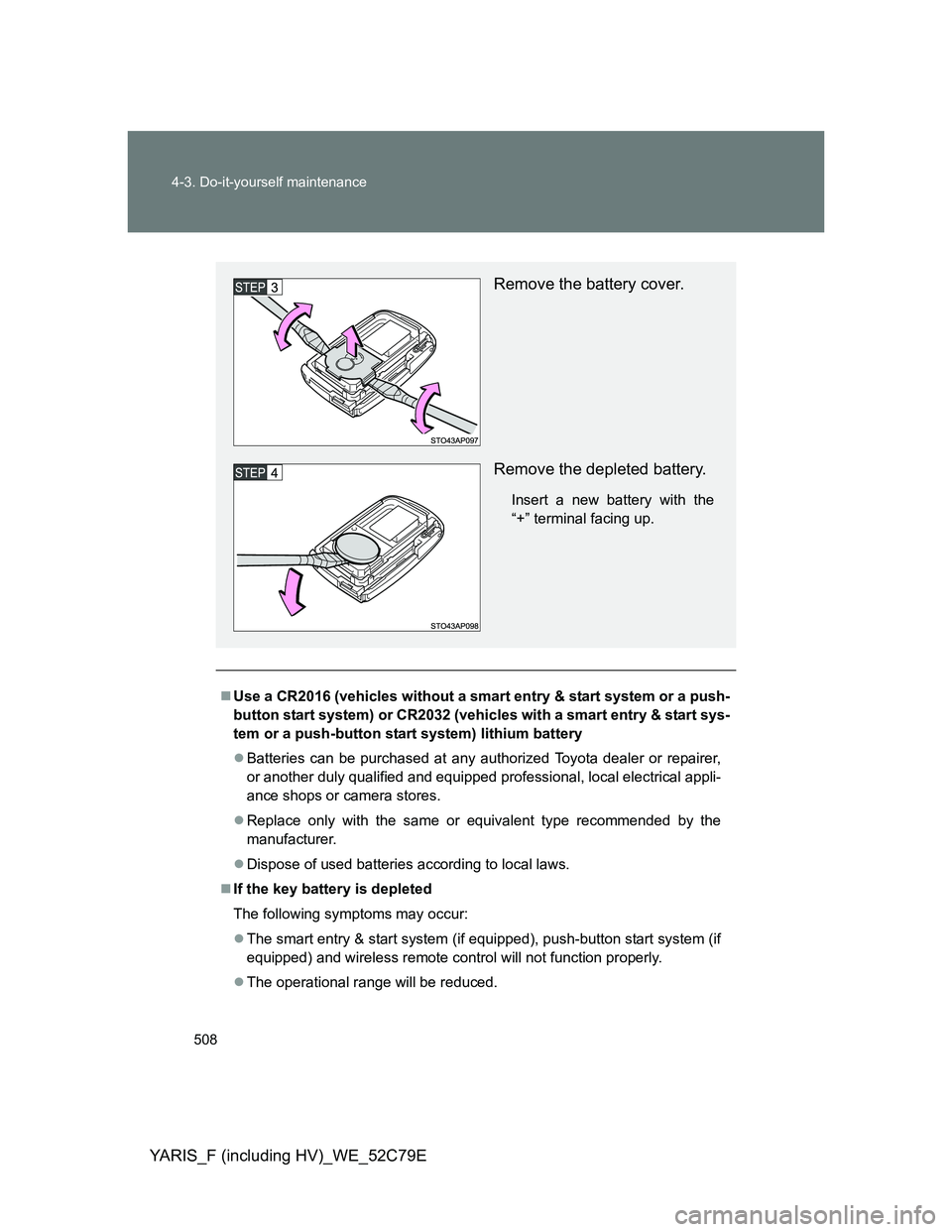
Remove the battery cover.
Remove the depleted battery.
Insert a new battery with the
“+” terminal facing up.
Page 521 of 704
521 4-3. Do-it-yourself maintenance
4
Maintenance and care
YARIS_F (including HV)_WE_52C79E
*1: Gasoline engine
*2: Diesel engine
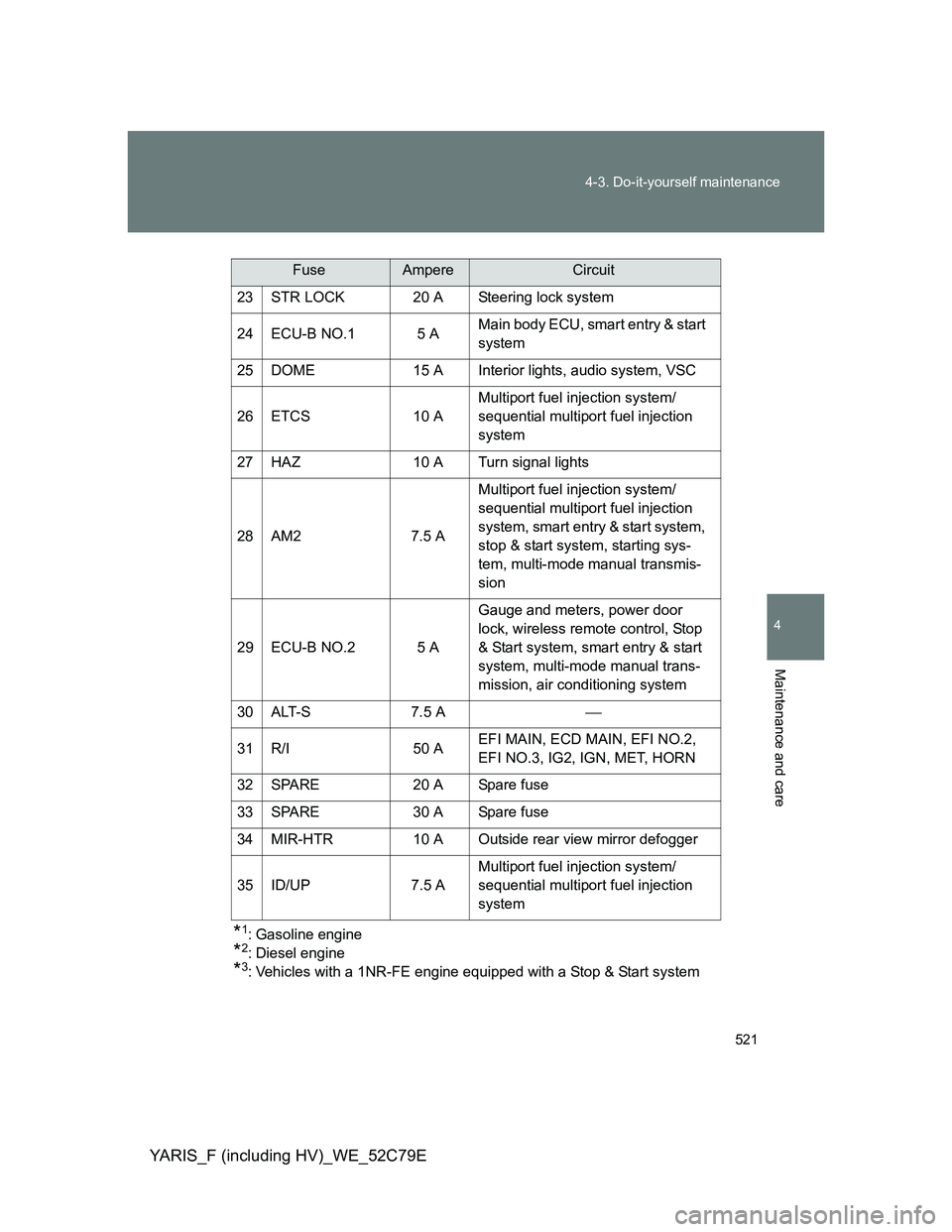
*3: Vehicles with a 1NR-FE engine equipped with a Stop & Start system 23 STR LOCK 20 A Steering lock system
24 ECU-B NO.1 5 AMain body ECU, smart entry & start
system
25 DOME 15 A Interior lights, audio system, VSC
26 ETCS 10 AMultiport fuel injection system/
sequential multiport fuel injection
system
27 HAZ 10 A Turn signal lights
28 AM2 7.5 AMultiport fuel injection system/
sequential multiport fuel injection
system, smart entry & start system,
stop & start system, starting sys-
tem, multi-mode manual transmis-
sion
29 ECU-B NO.2 5 AGauge and meters, power door
lock, wireless remote control, Stop
& Start system, smart entry & start
system, multi-mode manual trans-
mission, air conditioning system
30 ALT-S 7.5 A
31 R/I 50 AEFI MAIN, ECD MAIN, EFI NO.2,
EFI NO.3, IG2, IGN, MET, HORN
32 SPARE 20 A Spare fuse
33 SPARE 30 A Spare fuse
34 MIR-HTR 10 A Outside rear view mirror defogger
35 ID/UP 7.5 AMultiport fuel injection system/
sequential multiport fuel injection
system
FuseAmpereCircuit
Page 619 of 704
5
619
5-2. Steps to take in an emergency
When trouble arises
YARIS_F (including HV)_WE_52C79E
If the electronic key does not operate properly
Unlocking and locking the doors
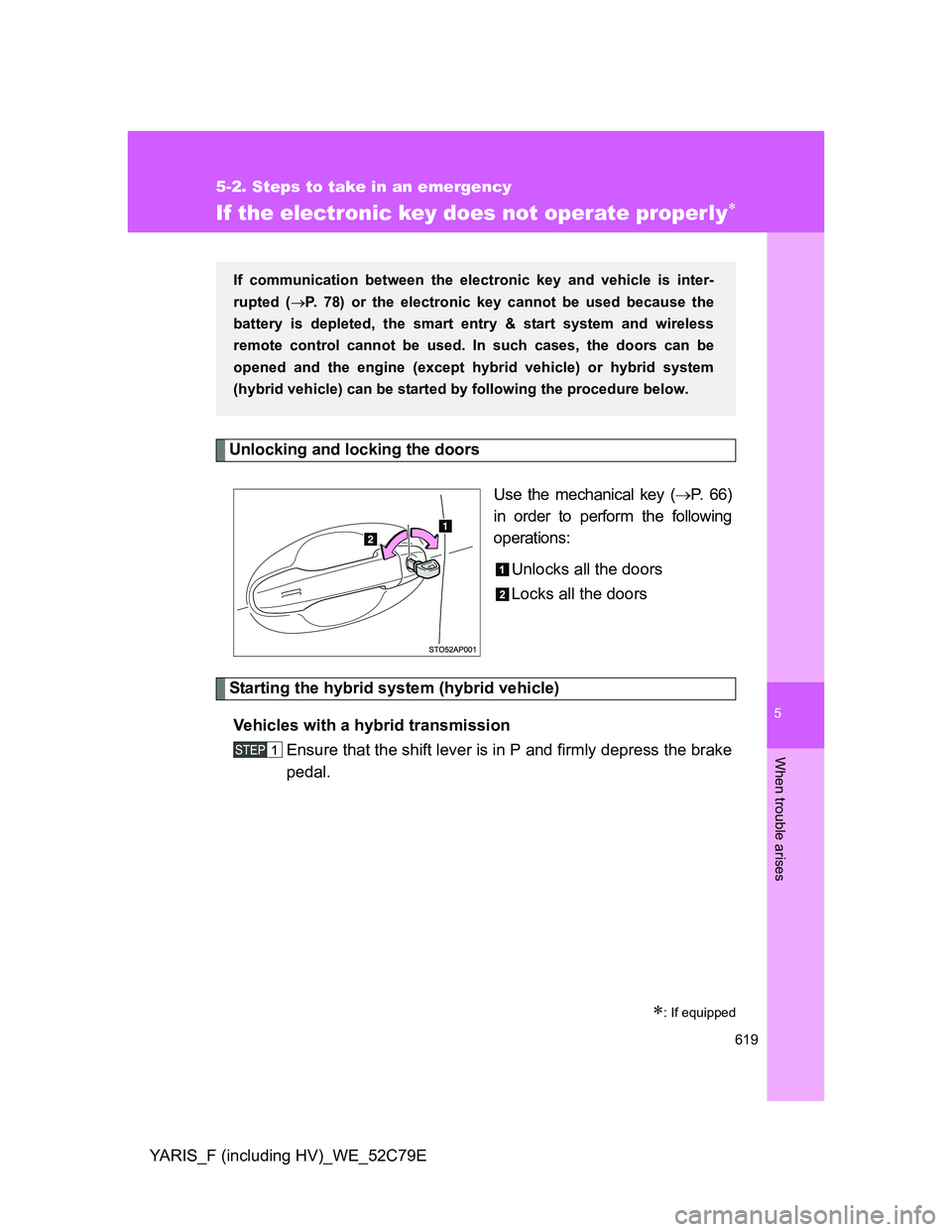
Use the mechanical key (P. 66)
in order to perform the following
operations:
Unlocks all the doors
Locks all the doors
Starting the hybrid system (hybrid vehicle)
Vehicles with a hybrid transmission
Ensure that the shift lever is in P and firmly depress the brake
pedal.
: If equipped
If communication between the electronic key and vehicle is inter-
rupted (P. 78) or the electronic key cannot be used because the
battery is depleted, the smart entry & start system and wireless
remote control cannot be used. In such cases, the doors can be
opened and the engine (except hybrid vehicle) or hybrid system
(hybrid vehicle) can be started by following the procedure below.
Page 623 of 704
5
623 5-2. Steps to take in an emergency
When trouble arises
YARIS_F (including HV)_WE_52C79E
Stopping the engine (except hybrid vehicle)
Vehicles with a Multidrive: Shift the shift lever to P and press the “ENGINE
START STOP” switch as you normally do when stopping the engine.
Except vehicles with a Multidrive: Shift the shift lever to N and press the
“ENGINE START STOP” switch as you normally do when stopping the
engine.
Stopping the hybrid system (hybrid vehicle)
Shift the shift lever to P and press the “POWER” switch as you normally do
when stopping the hybrid system.
Replacing the key battery
As the above procedure is a temporary measure, it is recommended that the
electronic key battery be replaced immediately when the battery is depleted.
(P. 505)
If the doors cannot be locked or unlocked by the smart entry & start
system
Lock and unlock the doors by the mechanical key or wireless remote control.
When the electronic key does not work properly
Make sure that the smart entry & start system has not been deactivated in
the customization setting. If it is off, turn the function on.
(Customizable features P. 682)
Page 628 of 704
628 5-2. Steps to take in an emergency
YARIS_F (including HV)_WE_52C79E
Starting the engine when the battery is discharged (vehicles with a
Multidrive)
The engine cannot be started by push-starting.
To prevent battery discharge
Turn off the headlights and the audio system while the engine is off.
Turn off any unnecessary electrical components when the vehicle is run-
ning at a low speed for an extended period, such as in heavy traffic.
Charging the battery
The electricity stored in the battery will discharge gradually even when the
vehicle is not in use, due to natural discharge and the draining effects of cer-
tain electrical appliances. If the vehicle is left for a long time, the battery may
discharge, and the engine may be unable to start. (The battery recharges
automatically during driving.)
Precautions when the battery is discharged (vehicles with a smart
entry & start system)
In some cases, it may not be possible to unlock the doors using the smart
entry & start system when the battery is discharged. Use the wireless
remote control or the mechanical key to lock or unlock the doors.
The engine may not start on the first attempt after the battery has
recharged but will start normally after the second attempt. This is not a
malfunction.
The “ENGINE START STOP” switch mode is memorized by the vehicle.
When the battery is reconnected, the system will return to the mode it
was in before the battery was discharged. Before disconnecting the bat-
tery, turn the “ENGINE START STOP” switch off.
If you are unsure what mode the “ENGINE START STOP” switch was in
before the battery discharged, be especially careful when reconnecting
the battery.
Page 632 of 704
632 5-2. Steps to take in an emergency
YARIS_F (including HV)_WE_52C79E
Starting the hybrid system when the 12-volt battery is discharged
The hybrid system cannot be started by push-starting.
To prevent 12-volt battery discharge
Turn off the headlights and the audio system while the hybrid system is
off.
Turn off any unnecessary electrical components when the vehicle is run-
ning at a low speed for an extended period, such as in heavy traffic.
Precautions when the 12-volt battery is discharged
In some cases, it may not be possible to unlock the doors using the smart
entry & start system immediately after the 12-volt battery has been dis-
connected and reconnected. Use the wireless remote control or the
mechanical key to lock or unlock the doors.
Open and close any of the doors of your vehicle with the
engine switch (vehicles without an electronic key) or
“POWER” switch (vehicles with an electronic key) off.
Maintain the engine speed of the second vehicle and start
the hybrid system of your vehicle by turning the engine
switch (vehicles without an electronic key) to “ON” position
or “POWER” switch (vehicles with an electronic key) to ON
mode.
Make sure the “READY” indicator comes on. If the indicator
does not come on, contact any authorized Toyota dealer or
repairer, or another duly qualified and equipped profes-
sional.
Once the hybrid system has started, remove the jumper
cables in the exact reverse order from which they were con-
nected.
Once the hybrid system starts, have the vehicle inspected at any
authorized Toyota dealer or repairer, or another duly qualified and
equipped professional as soon as possible.