Speed TOYOTA YARIS 2013 3.G User Guide
[x] Cancel search | Manufacturer: TOYOTA, Model Year: 2013, Model line: YARIS, Model: TOYOTA YARIS 2013 3.GPages: 400, PDF Size: 9 MB
Page 129 of 400
129
2-1. Driving procedures
2
When driving
Manual transmission
: If equipped
■Maximum downshifting speed
Observe the downshifting speeds in the following table to prevent over-
revving the engine.
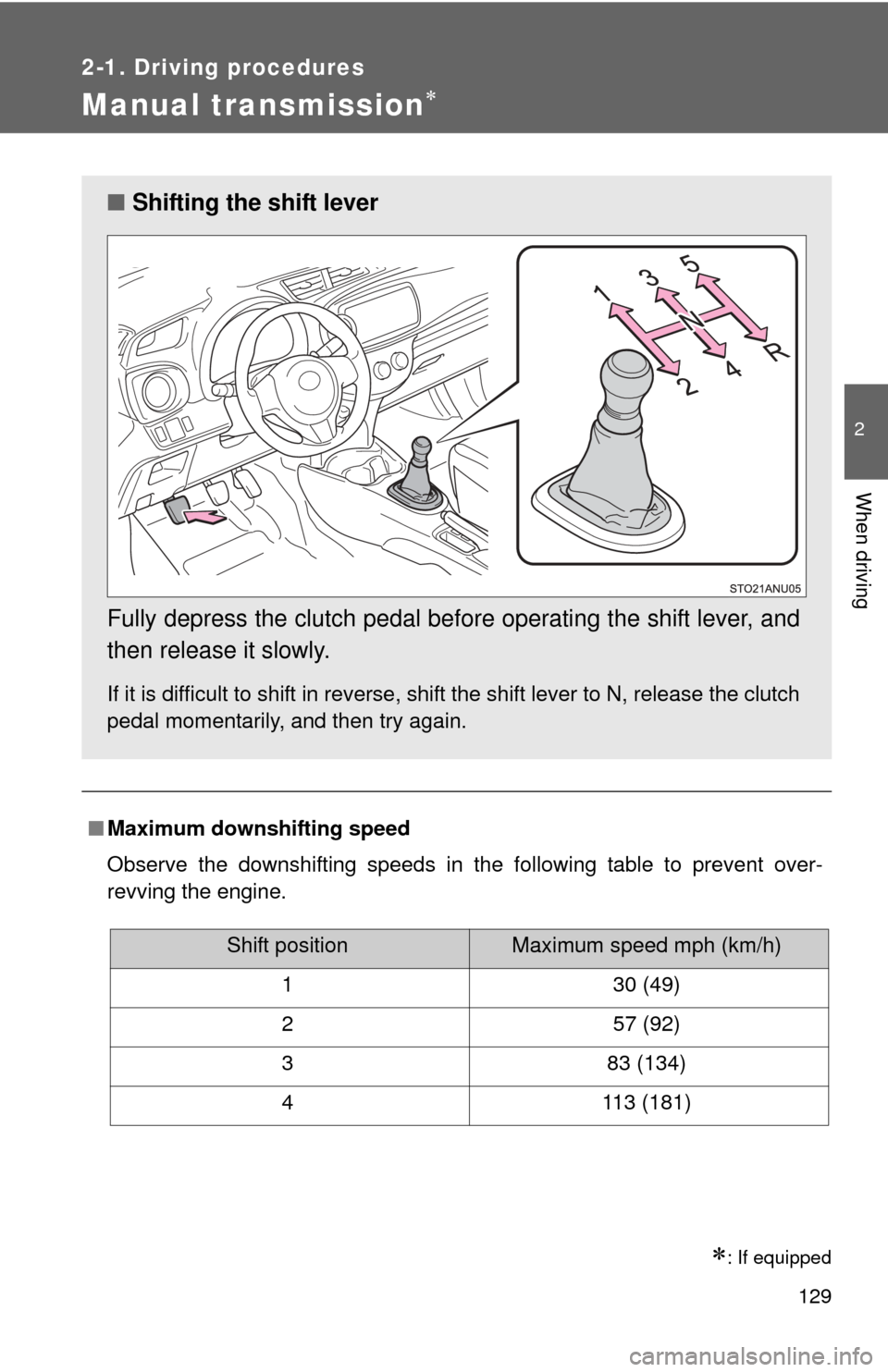
■ Shifting the shift lever
Fully depress the clutch pedal before operating the shift lever, and
then release it slowly.
If it is difficult to shift in reverse, shift the shift lever to N, release the clutch
pedal momentarily, and then try again.
Shift positionMaximum speed mph (km/h)
1 30 (49)
2 57 (92)
3 83 (134)
4 113 (181)
Page 133 of 400
133
2
When driving
2-2. Instrument cluster
Gauges and meters
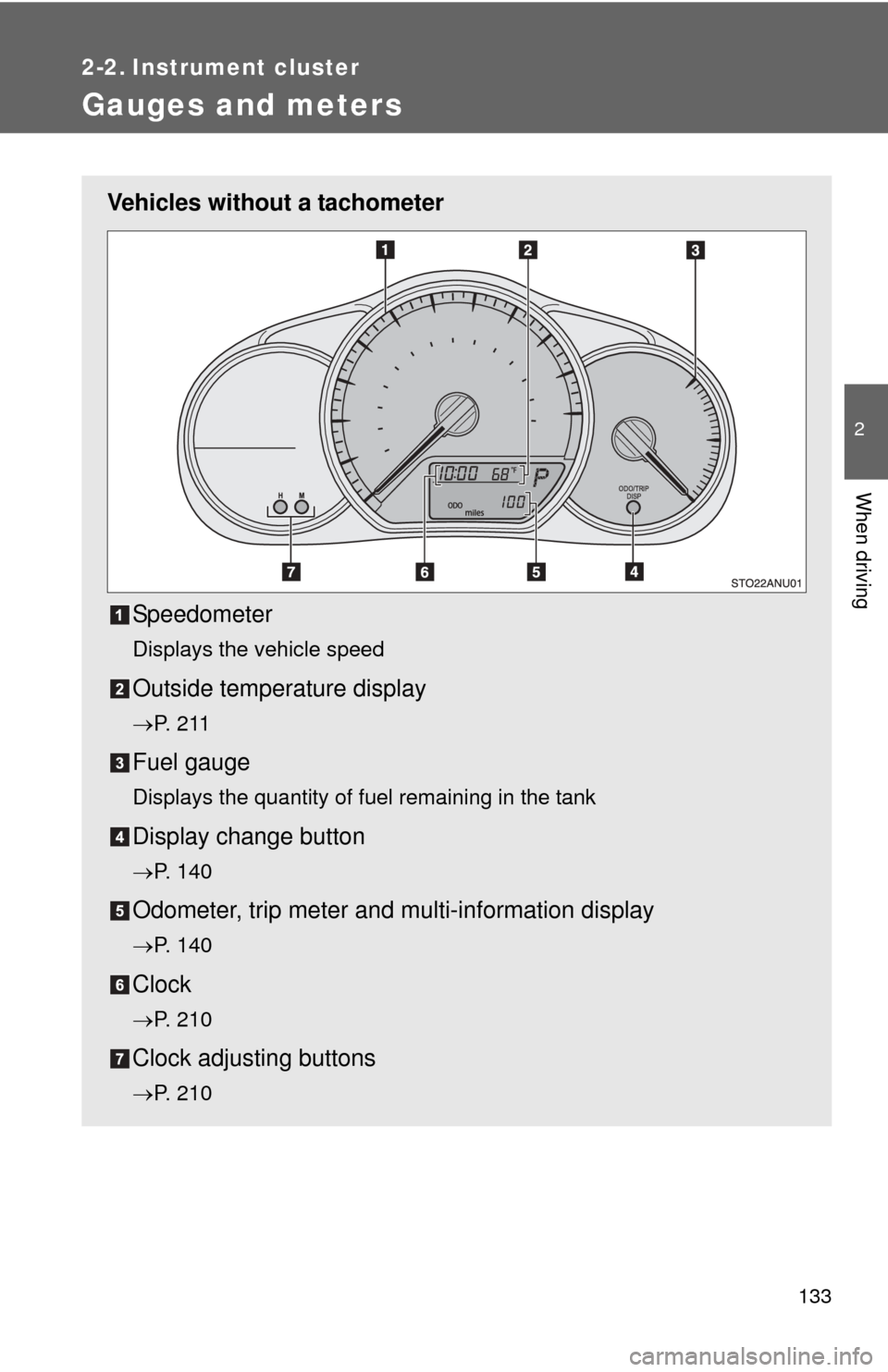
Vehicles without a tachometerSpeedometer
Displays the vehicle speed
Outside temperature display
P. 2 1 1
Fuel gauge
Displays the quantity of fuel remaining in the tank
Display change button
P. 140
Odometer, trip meter and multi-information display
P. 140
Clock
P. 210
Clock adjusting buttons
P. 210
Page 134 of 400
134 2-2. Instrument cluster
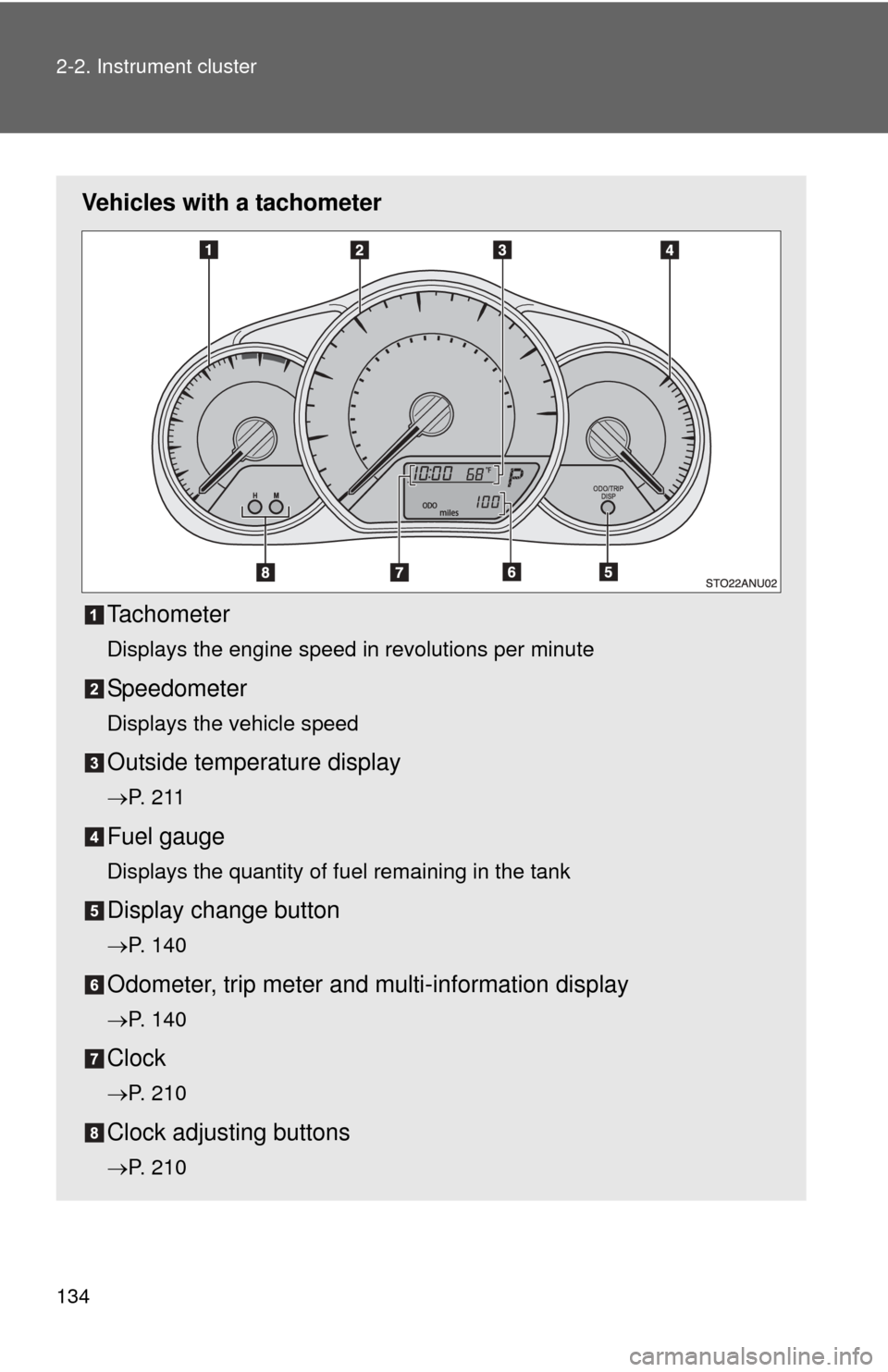
Vehicles with a tachometerTachometer
Displays the engine speed in revolutions per minute
Speedometer
Displays the vehicle speed
Outside temperature display
P. 2 1 1
Fuel gauge
Displays the quantity of fuel remaining in the tank
Display change button
P. 140
Odometer, trip meter and multi-information display
P. 140
Clock
P. 210
Clock adjusting buttons
P. 210
Page 135 of 400
135
2-2. Instrument cluster
2
When driving
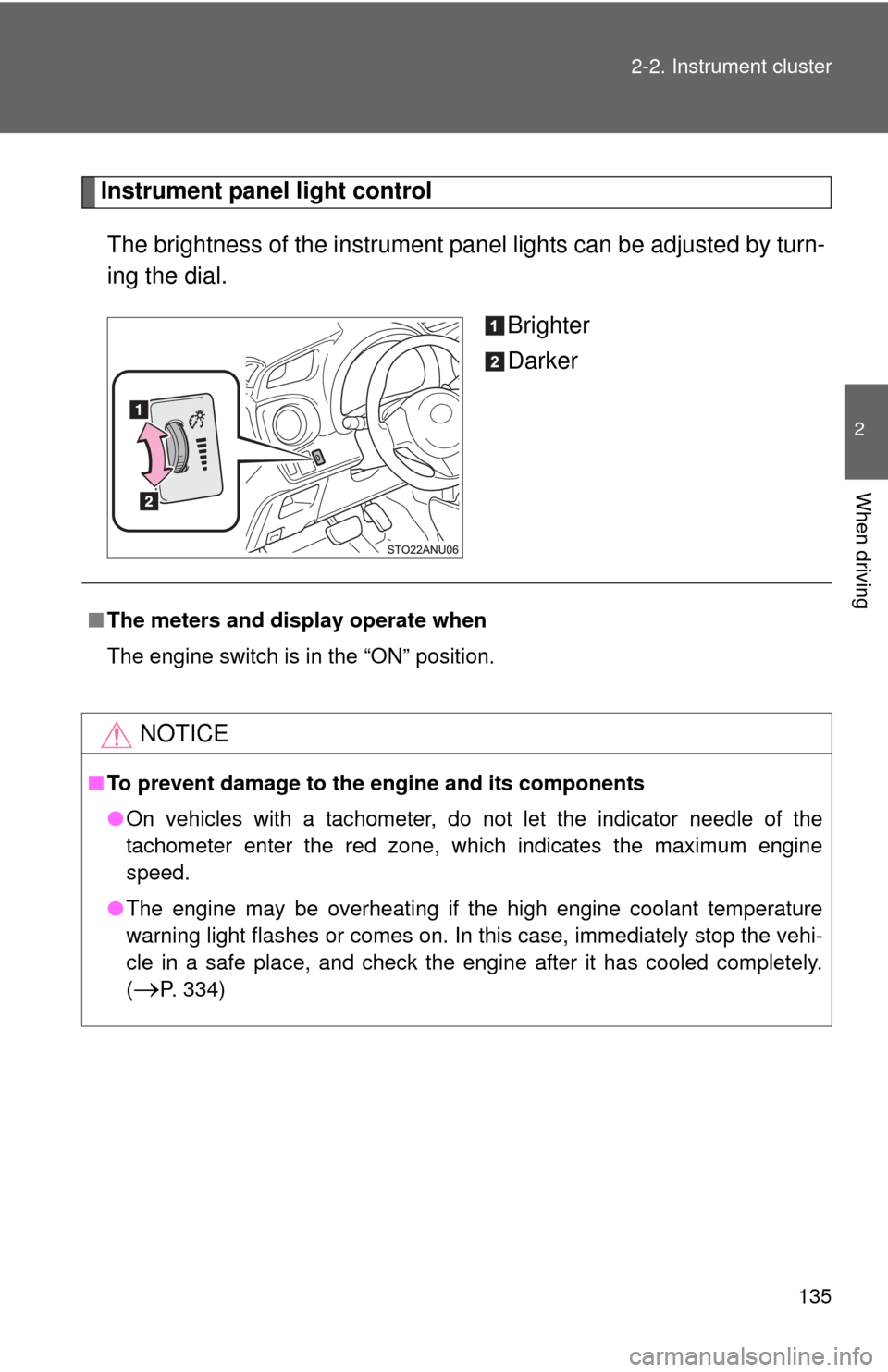
Instrument panel light control
The brightness of the instrument pa nel lights can be adjusted by turn-
ing the dial.
Brighter
Darker
■The meters and display operate when
The engine switch is in the “ON” position.
NOTICE
■To prevent damage to the engine and its components
●On vehicles with a tachometer, do not let the indicator needle of the
tachometer enter the red zone, which indicates the maximum engine
speed.
● The engine may be overheating if the high engine coolant temperature
warning light flashes or comes on. In this case, immediately stop the vehi-
cle in a safe place, and check the engine after it has cooled completely.
(
P. 334)
Page 143 of 400
143
2-2. Instrument cluster
2
When driving
■
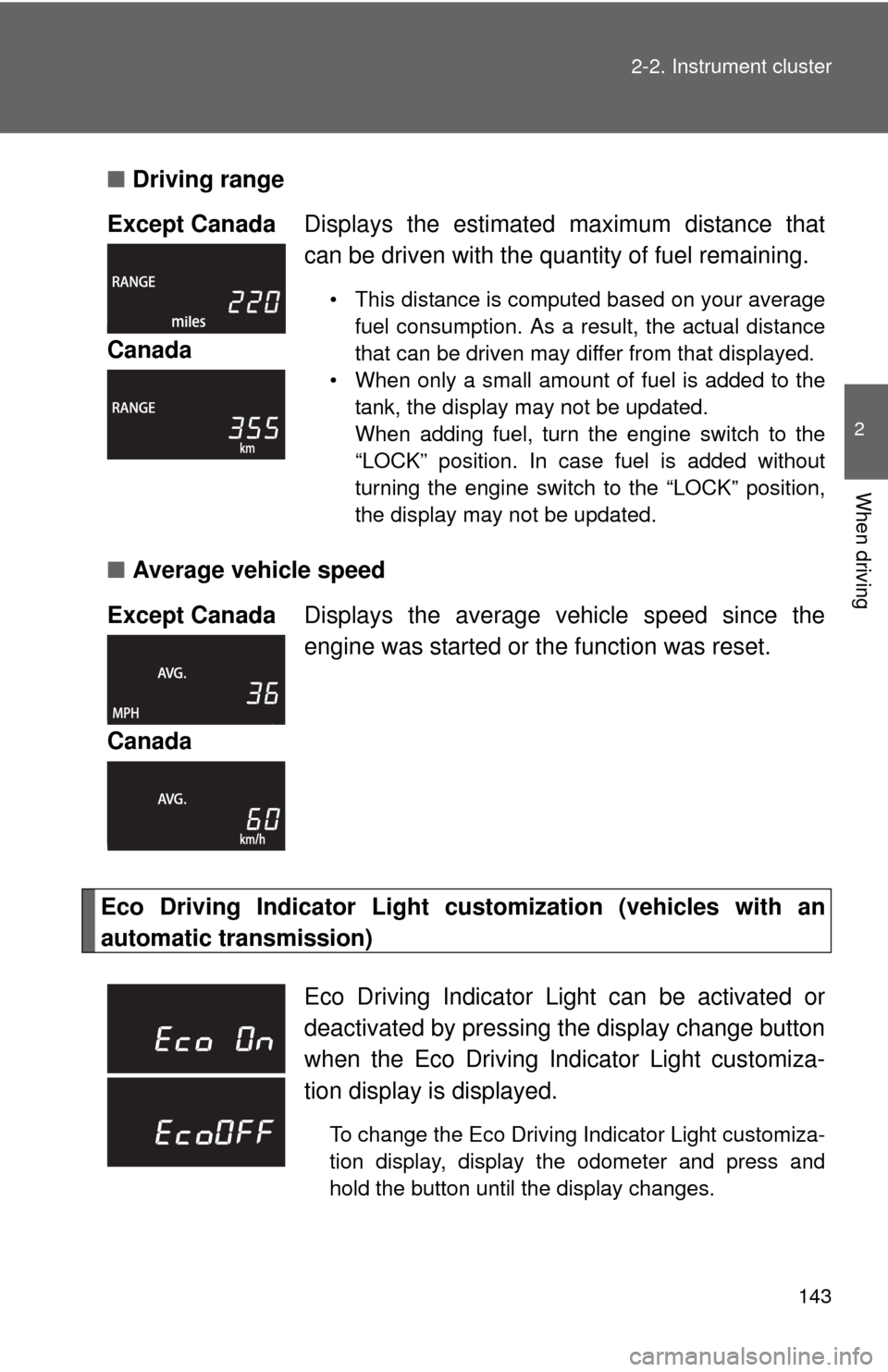
Driving range
■ Average vehicle speed
Eco Driving Indicator Light cu stomization (vehicles with an
automatic transmission) Except Canada
Displays the estimated maximum distance that
can be driven with the quantity of fuel remaining.
• This distance is computed based on your average
fuel consumption. As a result, the actual distance
that can be driven may differ from that displayed.
• When only a small amount of fuel is added to the tank, the display may not be updated.
When adding fuel, turn the engine switch to the
“LOCK” position. In case fuel is added without
turning the engine switch to the “LOCK” position,
the display may not be updated.
Canada
Except Canada Displays the average vehicle speed since the
engine was started or the function was reset.
Canada
Eco Driving Indicator Light can be activated or
deactivated by pressing t he display change button
when the Eco Driving Indicator Light customiza-
tion display is displayed.
To change the Eco Driving Indicator Light customiza-
tion display, display the odometer and press and
hold the button until the display changes.
Page 144 of 400

144 2-2. Instrument cluster
■When disconnecting and reco nnecting battery terminals
The following information data will be reset:
● Average fuel consumption
● Driving range
● Average vehicle speed
NOTICE
■The multi-information disp lay at low temperatures
Allow the interior of the vehicle to warm up before using the liquid crystal
information display. At extremely low temperatures, the information display
monitor may respond slowly, and display changes may be delayed.
Page 150 of 400
150
2-3. Operating the lights and wipers
Windshield wiper and washer
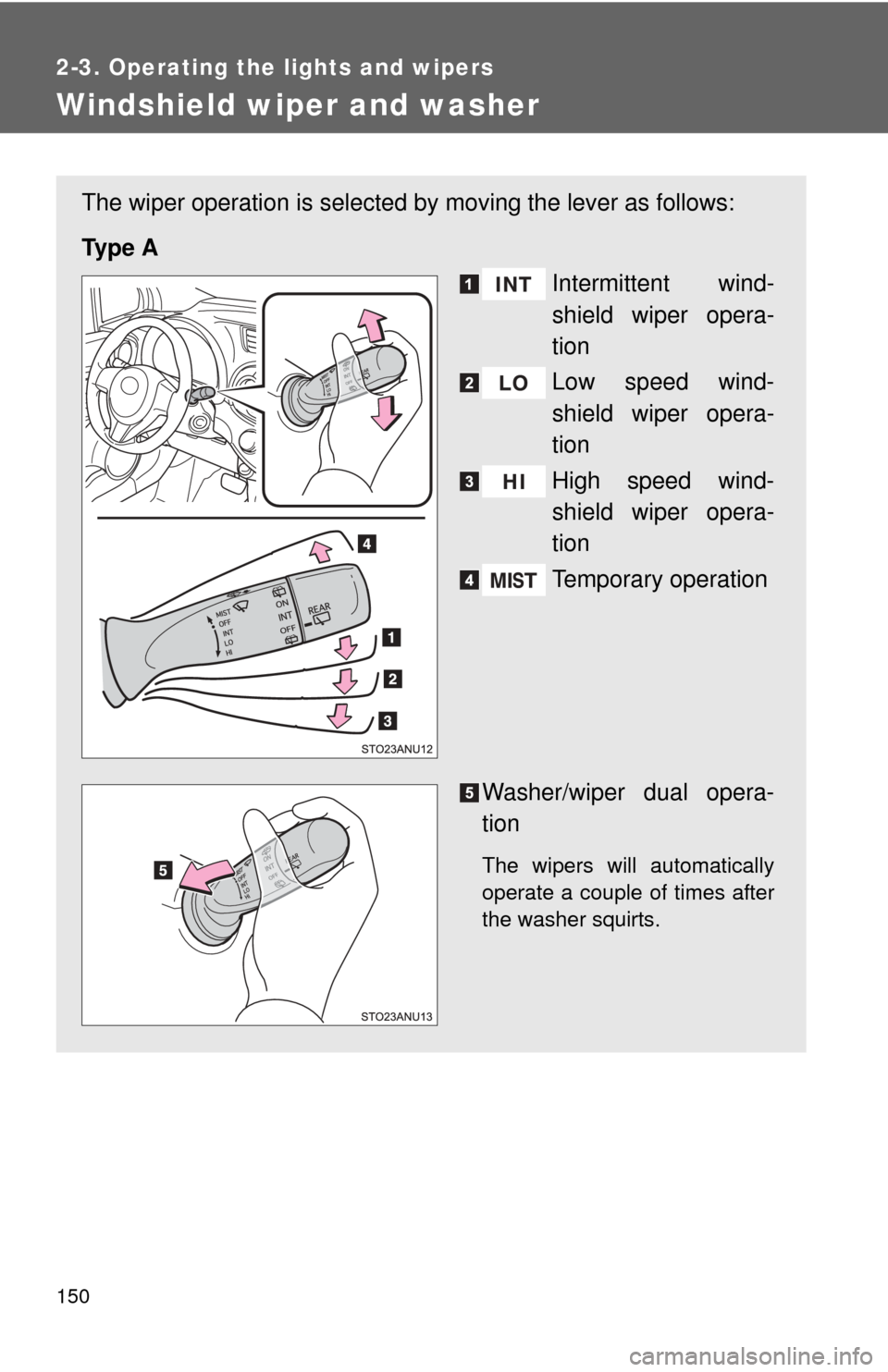
The wiper operation is selected by moving the lever as follows:
Ty p e A Intermittent wind-
shield wiper opera-
tion
Low speed wind-
shield wiper opera-
tion
High speed wind-
shield wiper opera-
tion
Temporary operation
Washer/wiper dual opera-
tion
The wipers will automatically
operate a couple of times after
the washer squirts.
Page 151 of 400
151
2-3. Operating the lights and wipers
2
When driving
■
The windshield wiper and washer can be operated when
The engine switch is in the “ON” position.
■ If no windshield washer fluid sprays
Check that the washer nozzles are not blocked if there is washer fluid in the
windshield washer fluid reservoir.
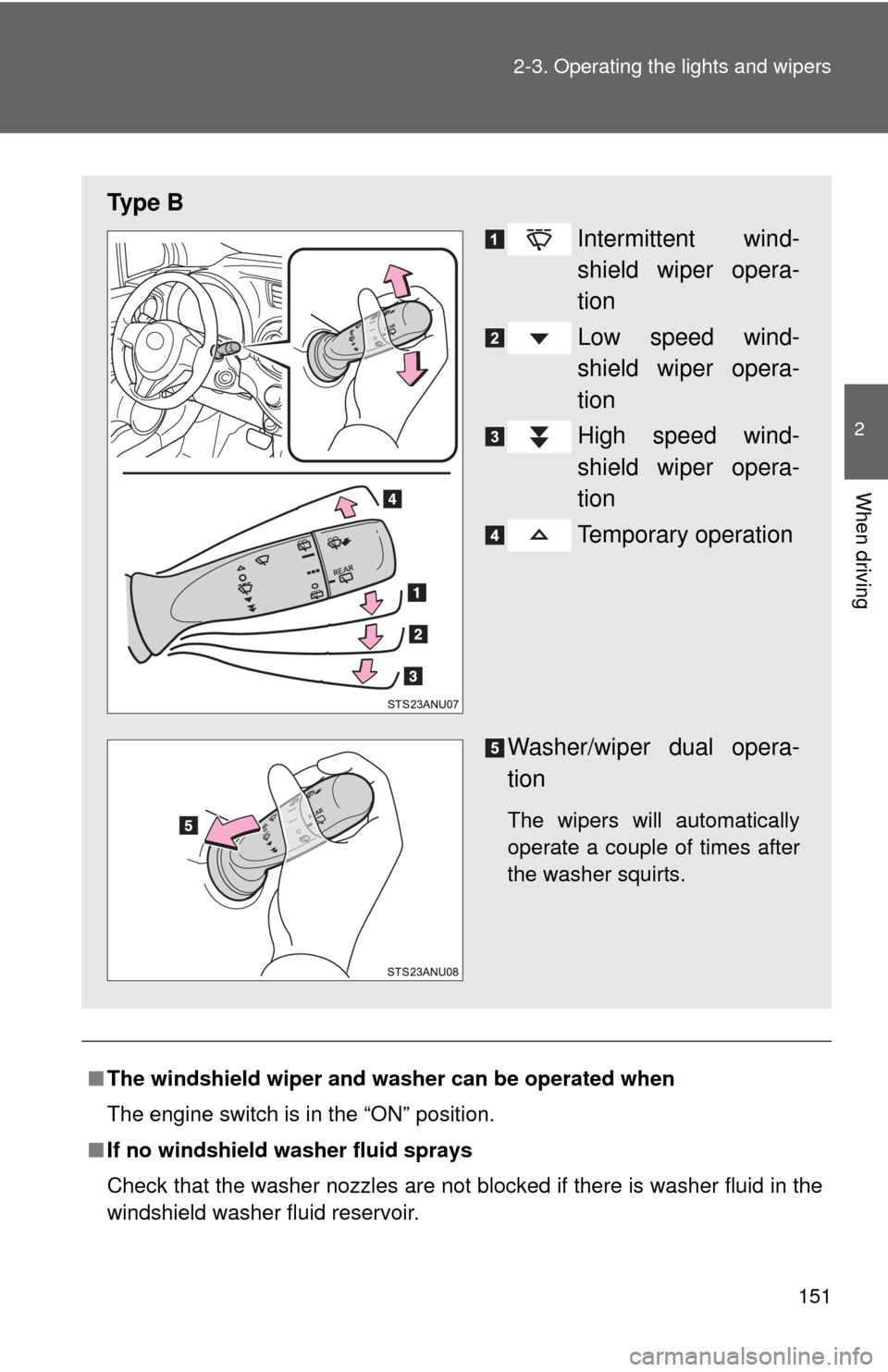
Ty p e B
Intermittent wind-
shield wiper opera-
tion
Low speed wind-
shield wiper opera-
tion
High speed wind-
shield wiper opera-
tion
Temporary operation
Washer/wiper dual opera-
tion
The wipers will automatically
operate a couple of times after
the washer squirts.
Page 158 of 400
158
2-4. Using other driving systems
Cruise control
: If equipped
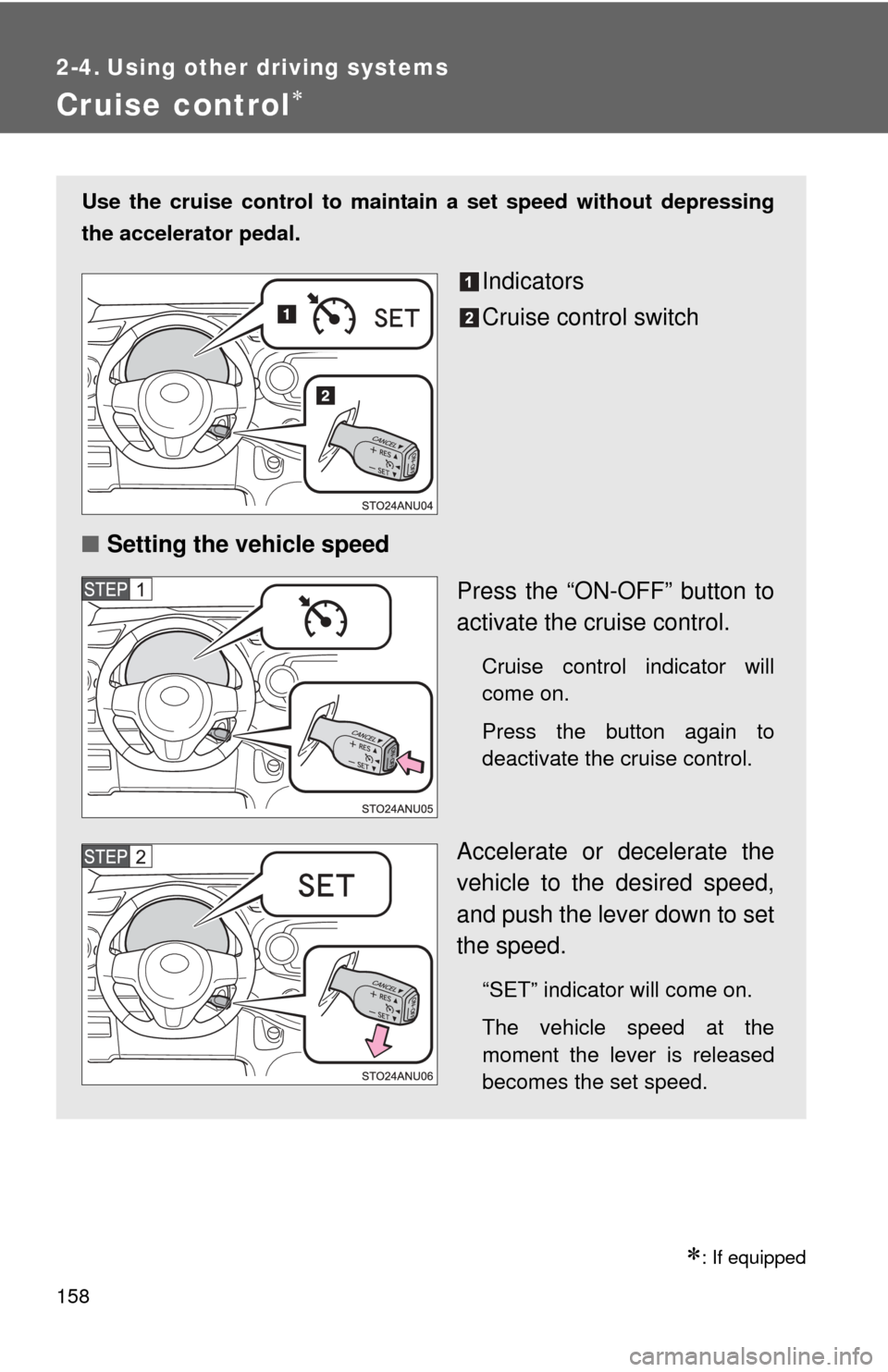
Use the cruise control to maintain a set speed without depressing
the accelerator pedal.
Indicators
Cruise control switch
■ Setting the vehicle speed
Press the “ON-OFF” button to
activate the cruise control.
Cruise control indicator will
come on.
Press the button again to
deactivate the cruise control.
Accelerate or decelerate the
vehicle to the desired speed,
and push the lever down to set
the speed.
“SET” indicator will come on.
The vehicle speed at the
moment the lever is released
becomes the set speed.
Page 159 of 400
159
2-4. Using other
driving systems
2
When driving
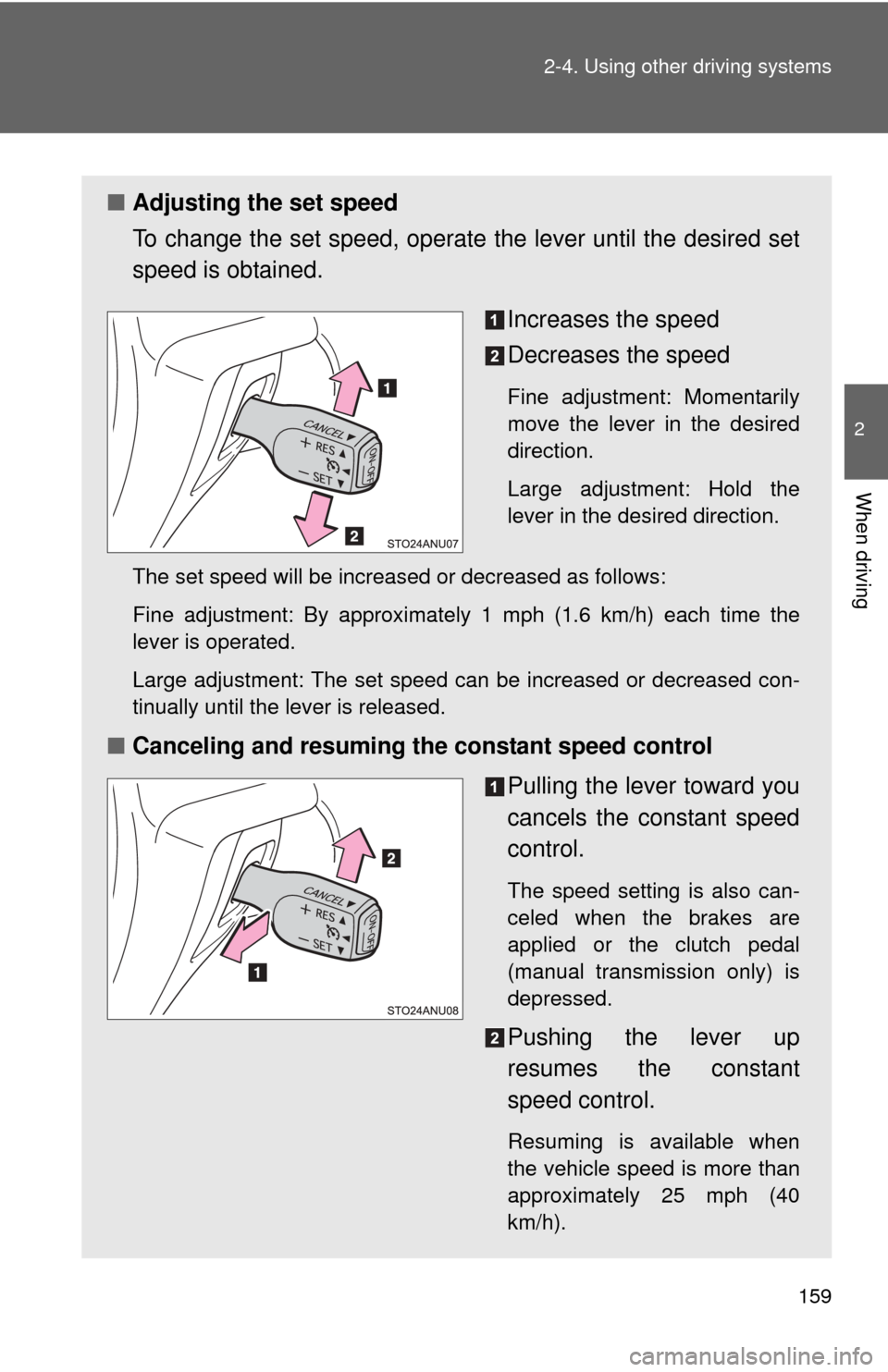
■Adjusting the set speed
To change the set speed, operate the lever until the desired set
speed is obtained.
Increases the speed
Decreases the speed
Fine adjustment: Momentarily
move the lever in the desired
direction.
Large adjustment: Hold the
lever in the desired direction.
The set speed will be increased or decreased as follows:
Fine adjustment: By approximately 1 mph (1.6 km/h) each time the
lever is operated.
Large adjustment: The set speed can be increased or decreased con-
tinually until the lever is released.
■ Canceling and resuming the constant speed control
Pulling the lever toward you
cancels the constant speed
control.
The speed setting is also can-
celed when the brakes are
applied or the clutch pedal
(manual transmission only) is
depressed.
Pushing the lever up
resumes the constant
speed control.
Resuming is available when
the vehicle speed is more than
approximately 25 mph (40
km/h).