key battery TOYOTA YARIS 2013 Owners Manual
[x] Cancel search | Manufacturer: TOYOTA, Model Year: 2013, Model line: YARIS, Model: TOYOTA YARIS 2013Pages: 712, PDF Size: 30.2 MB
Page 5 of 712
1
2
3
4
5
6
YARIS_F(including HV)_WE_52E26E
5
4-1. Maintenance and care
Cleaning and protecting
the vehicle exterior ........... 444
Cleaning and protecting
the vehicle interior ............ 449
4-2. Maintenance
Maintenance
requirements..................... 452
4-3. Do-it-yourself maintenance
Do-it-yourself service
precautions ....................... 455
Hood ................................... 460
Positioning a floor jack ........ 462
Engine compartment........... 465
12-volt battery
(hybrid vehicle) ................. 484
Tires .................................... 490
Tire inflation pressure ......... 494
Wheels ................................ 496
Air conditioning filter ........... 498
Wireless remote control/
electronic key battery........ 501
Checking and replacing
fuses ................................. 506
Light bulbs .......................... 5315-1. Essential information
Emergency flashers ........... 548
If your vehicle needs to
be towed .......................... 549
If you think something
is wrong............................ 559
Fuel pump shut off system
(except hybrid vehicle
[gasoline engine only]) ..... 560
5-2. Steps to take in an emergency
If a warning light turns on
or a warning buzzer
sounds... ......................... 561
If you have a flat tire
(vehicles with a spare
tire) ................................... 578
If you have a flat tire
(vehicles with an
emergency tire
puncture repair kit) ........... 591
If the engine will not start
(except hybrid vehicle) ..... 616
If the hybrid system will not
start (hybrid vehicle)......... 619
If the shift lever cannot be
shifted from P (vehicles
with a hybrid transmission
or a Multidrive) ................. 621
If the shift lever cannot be
shifted (vehicles with a
multi-mode manual
transmission).................... 622
4Maintenance and care5When trouble arises
Page 6 of 712
TABLE OF CONTENTSIndex
YARIS_F(including HV)_WE_52E26E
6
If you lose your keys ........... 623
If the electronic key does
not operate properly ......... 624
If the vehicle battery is
discharged (except hybrid
vehicle) ............................. 629
If the vehicle’s 12-volt
battery is discharged
(hybrid vehicle) ................. 636
If your vehicle overheats
(except hybrid vehicle)...... 642
If your vehicle overheats
(hybrid vehicle) ................. 646
If you run out of fuel and
the engine stalls
(diesel engine only) .......... 651
If the vehicle becomes
stuck ................................. 654
If your vehicle has to be
stopped in an
emergency ....................... 657
6-1. Specifications
Maintenance data
(fuel, oil level, etc.)............ 660
Fuel information .................. 686
6-2. Customization
Customizable features ........ 689Abbreviation list........................ 694
Alphabetical index .................... 695
What to do if... .......................... 705
6Vehicle specifications
Index
Page 66 of 712
66 1-2. Key information
YARIS_F(including HV)_WE_52E26E
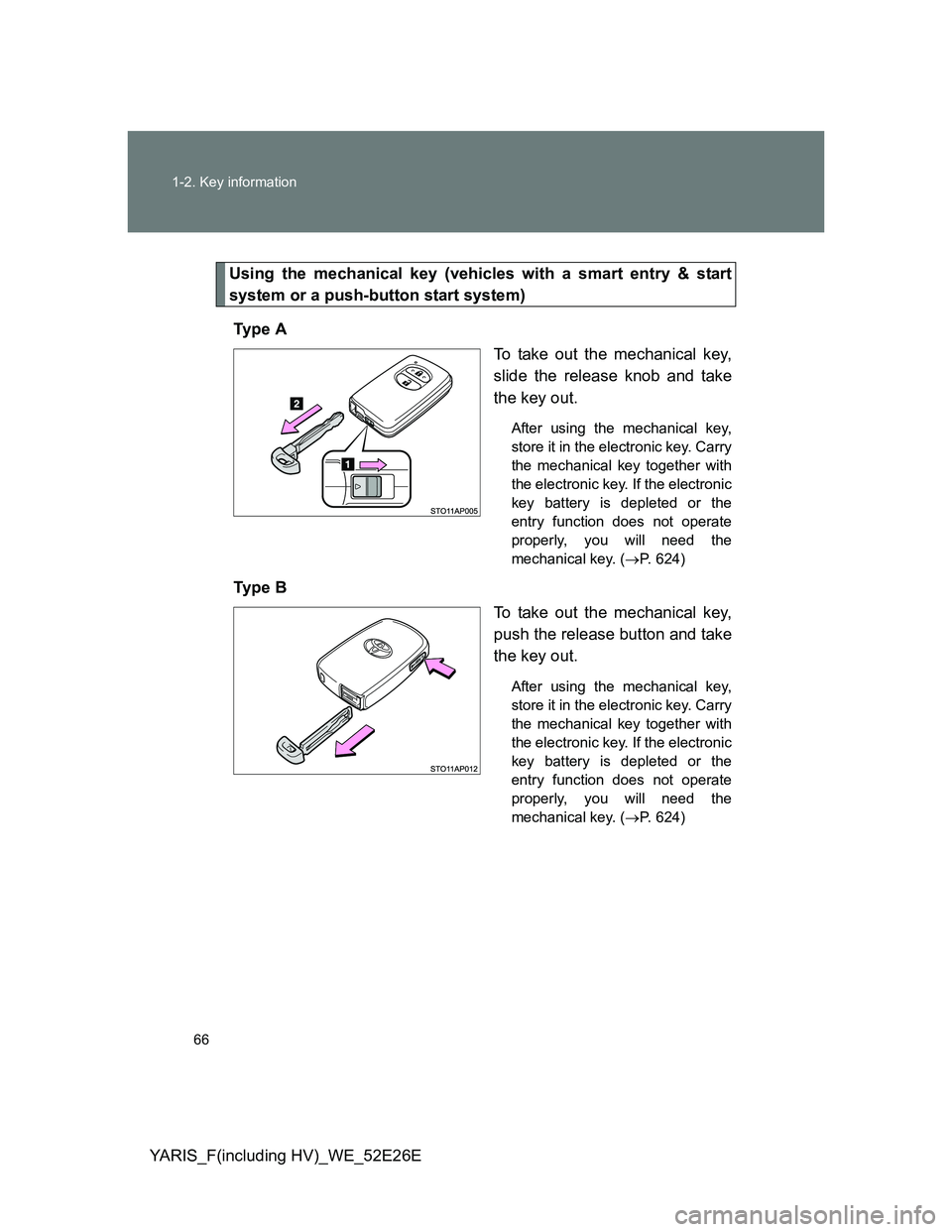
Using the mechanical key (vehicles with a smart entry & start
system or a push-button start system)
Ty p e A
To take out the mechanical key,
slide the release knob and take
the key out.
After using the mechanical key,
store it in the electronic key. Carry
the mechanical key together with
the electronic key. If the electronic
key battery is depleted or the
entry function does not operate
properly, you will need the
mechanical key. (P. 624)
Ty p e B
To take out the mechanical key,
push the release button and take
the key out.
After using the mechanical key,
store it in the electronic key. Carry
the mechanical key together with
the electronic key. If the electronic
key battery is depleted or the
entry function does not operate
properly, you will need the
mechanical key. (P. 624)
Page 77 of 712
77 1-3. Opening, closing and locking the doors
1
Before driving
YARIS_F(including HV)_WE_52E26E
*: Vehicles with a Multidrive only
Security feature
If a door is not opened within approximately 30 seconds after the vehicle is
unlocked, the security feature automatically locks the vehicle again. (How-
ever, depending on the location of the electronic key, the key may be
detected as being in the vehicle. In this case, vehicle may be unlocked.)
Battery-saving function
The battery-saving function will be activated in order to prevent the elec-
tronic key battery and the vehicle battery from being discharged while the
vehicle is not in operation for a long time.
In the following situations, the smart entry & start system may take some
time to unlock the doors.
• The electronic key has been left in an area of approximately 2 m (6 ft.)
of the outside of the vehicle for 10 minutes or longer.
• The smart entry & start system has not been used for 5 days or longer.
If the smart entry & start system has not been used for 14 days or longer,
the doors cannot be unlocked at any doors except the driver’s door.
In this case, take hold of the driver’s door handle, or use the wireless
remote control or the mechanical key, to unlock the doors.
AlarmSituationCorrection procedure
Interior alarm
sounds continu-
ously
*
The driver’s door was
opened while any shift
position other than P was
selected without turning off
the “ENGINE START
STOP” switch.Shift the shift lever
to P.
Page 78 of 712
78 1-3. Opening, closing and locking the doors
YARIS_F(including HV)_WE_52E26E
Conditions affecting operation
The smart entry & start system uses weak radio waves. In the following situ-
ations, the communication between the electronic key and the vehicle may
be affected, preventing the smart entry & start system, wireless remote con-
trol and engine immobilizer system from operating properly.
(Way of coping: P. 624)
When the electronic key battery is depleted
Near a TV tower, electric power plant, gas station, radio station, large dis-
play, airport or other facility that generates strong radio waves or electri-
cal noise
When the electronic key is in contact with, or is covered by the following
metallic objects
• Cards to which aluminum foil is attached
• Cigarette boxes that have aluminum foil inside
• Metallic wallets or bags
• Coins
• Hand warmers made of metal
• Media such as CDs and DVDs
When other wireless key (that emit radio waves) is being used nearby
When carrying the electronic key together with the following devices that
emit radio waves
• A portable radio, cellular phone, cordless phone or other wireless com-
munication device
• Another vehicle’s electronic key or a wireless key that emits radio
waves
• Personal computers or personal digital assistants (PDAs)
• Digital audio players
• Portable game systems
If window tint with a metallic content or metallic objects are attached to
the rear window
When the electronic key is placed near a battery charger or electronic
devices
Page 81 of 712
81 1-3. Opening, closing and locking the doors
1
Before driving
YARIS_F(including HV)_WE_52E26E
Security feature
If a door is not opened within approximately 30 seconds after the vehicle is
unlocked, the security feature automatically locks the vehicle again.
To operate the system properly
Make sure to carry the electronic key when operating the system. Do not get
the electronic key too close to the vehicle when operating the system from
the outside of the vehicle.
Depending on the position and holding condition of the electronic key, the
key may not be detected correctly and the system may not operate properly.
(The alarm may go off accidentally, or the door lock prevention function may
not operate.)
If the smart entry & start system does not operate properly
Locking and unlocking the doors: Use the mechanical key. (P. 624)
Starting the engine (except hybrid vehicle) or the hybrid system (hybrid
vehicle): P. 625, 627
Electronic key battery depletion
The standard battery life is 1 to 2 years.
If the battery becomes low, an alarm will sound in the cabin when the
engine (except hybrid vehicle) or the hybrid system (hybrid vehicle)
stops. (P. 571)
As the electronic key always receives radio waves, the battery will
become depleted even if the electronic key is not used. The following
symptoms indicate that the electronic key battery may be depleted.
Replace the battery when necessary. (P. 501)
• The smart entry & start system or the wireless remote control does not
operate.
• The detection area becomes smaller.
• The LED indicator on the key surface does not turn on.
To avoid serious deterioration, do not leave the electronic key within 1 m
(3 ft.) of the following electrical appliances that produce a magnetic field:
•TVs
• Personal computers
• Cellular phones, cordless phones and battery chargers
• Recharging cellular phones or cordless phones
• Induction cookers
• Table lamps
Page 82 of 712
82 1-3. Opening, closing and locking the doors
YARIS_F(including HV)_WE_52E26E
When the electronic key battery is fully depleted
P. 501
If the smart entry & start system has been deactivated in a customized
setting
Locking and unlocking the doors: Use the wireless remote control or
mechanical key. (P. 105, 624)
Starting the engine and changing “ENGINE START STOP” switch modes
(except hybrid vehicle): P. 625
Starting the hybrid system and changing “POWER” switch mode (hybrid
vehicle): P. 627
Stopping the engine (except hybrid vehicle): P. 229
Stopping the hybrid system (hybrid vehicle):P. 2 4 2
Customization that can be configured at any authorized Toyota dealer
or repairer, or another duly qualified and equipped professional
Settings (e. g. smart entry & start system) can be changed.
(Customizable features: P. 689)
Page 96 of 712
96 1-3. Opening, closing and locking the doors
YARIS_F(including HV)_WE_52E26E
Alarms and warning indicators
A combination of exterior and interior alarms are used to prevent theft of the
vehicle and unforeseeable accidents resulting from erroneous operation.
Take appropriate measures for the warning light that comes on. (P. 571)
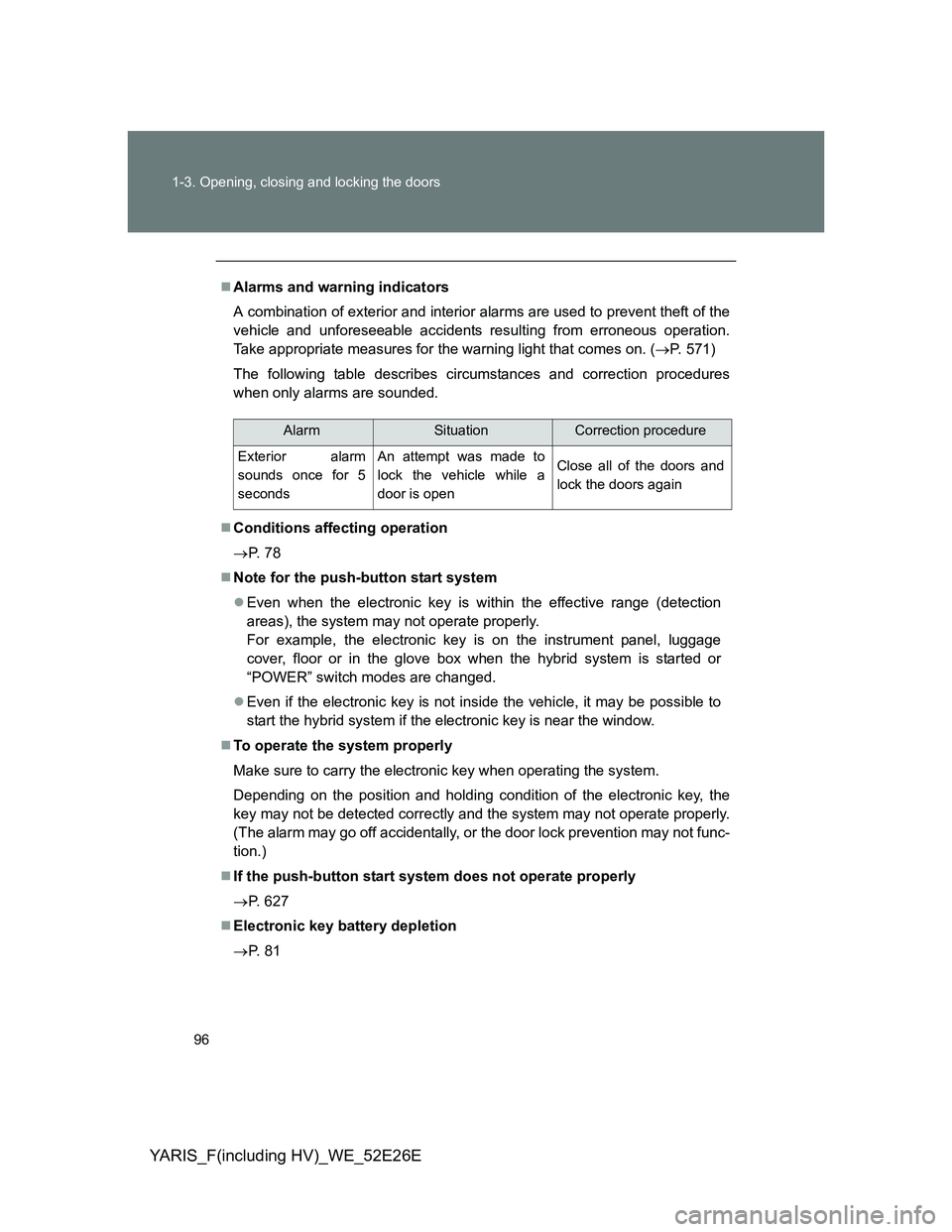
The following table describes circumstances and correction procedures
when only alarms are sounded.
Conditions affecting operation
P. 7 8
Note for the push-button start system
Even when the electronic key is within the effective range (detection
areas), the system may not operate properly.
For example, the electronic key is on the instrument panel, luggage
cover, floor or in the glove box when the hybrid system is started or
“POWER” switch modes are changed.
Even if the electronic key is not inside the vehicle, it may be possible to
start the hybrid system if the electronic key is near the window.
To operate the system properly
Make sure to carry the electronic key when operating the system.
Depending on the position and holding condition of the electronic key, the
key may not be detected correctly and the system may not operate properly.
(The alarm may go off accidentally, or the door lock prevention may not func-
tion.)
If the push-button start system does not operate properly
P. 627
Electronic key battery depletion
P. 8 1
AlarmSituationCorrection procedure
Exterior alarm
sounds once for 5
secondsAn attempt was made to
lock the vehicle while a
door is openClose all of the doors and
lock the doors again
Page 97 of 712
97 1-3. Opening, closing and locking the doors
1
Before driving
YARIS_F(including HV)_WE_52E26E
When the electronic key battery is fully depleted
P. 501
Customization
Settings (e.g. push-button start system) can be changed.
(Customizable features P. 689)
CAUTION
Caution regarding interference with electronic devices
People with implanted pacemakers or cardiac defibrillators should keep
away from the push-button start system antennas. (P. 95)
The radio waves may affect the operation of such devices. If necessary,
the push-button start system can be disabled. Ask any authorized Toyota
dealer or repairer, or another duly qualified and equipped professional for
details, such as the frequency of radio waves and timing of emitting the
radio waves. Then, consult your doctor to see if you should disable the
push-button start system.
Users of any electrical medical device other than implanted pacemakers
and implanted cardiac defibrillators should consult the manufacturer of the
device for information about its operation under the influence of radio
waves. Radio waves could have unexpected effects on the operation of
such medical devices.
Ask any authorized Toyota dealer or repairer, or another duly qualified and
equipped professional for details on disabling the push-button start system.
Page 106 of 712
106 1-3. Opening, closing and locking the doors
YARIS_F(including HV)_WE_52E26E
Operation signals
The emergency flashers flash to indicate that the doors have been locked/
unlocked. (Locked: once; Unlocked: twice)
Door lock buzzer (vehicles with a smart entry & start system or a push-
button start system)
If an attempt to lock the doors is made when a door is not fully closed, a
buzzer sounds continuously. Fully close the door to stop the buzzer, and lock
the vehicle once more.
Security feature
If a door is not opened within approximately 30 seconds after the vehicle is
unlocked, the security feature automatically locks the vehicle again.
Conditions affecting operation
Vehicles without a smart entry & start system or a push-button start
system
The wireless remote control function may not operate normally in the follow-
ing situations:
When the wireless key battery is depleted
Near a TV tower, electric power plant, gas station, radio station, large dis-
play, airport or other facility that generates strong radio waves or electri-
cal noise
When carrying a portable radio, cellular phone or other wireless commu-
nication devices
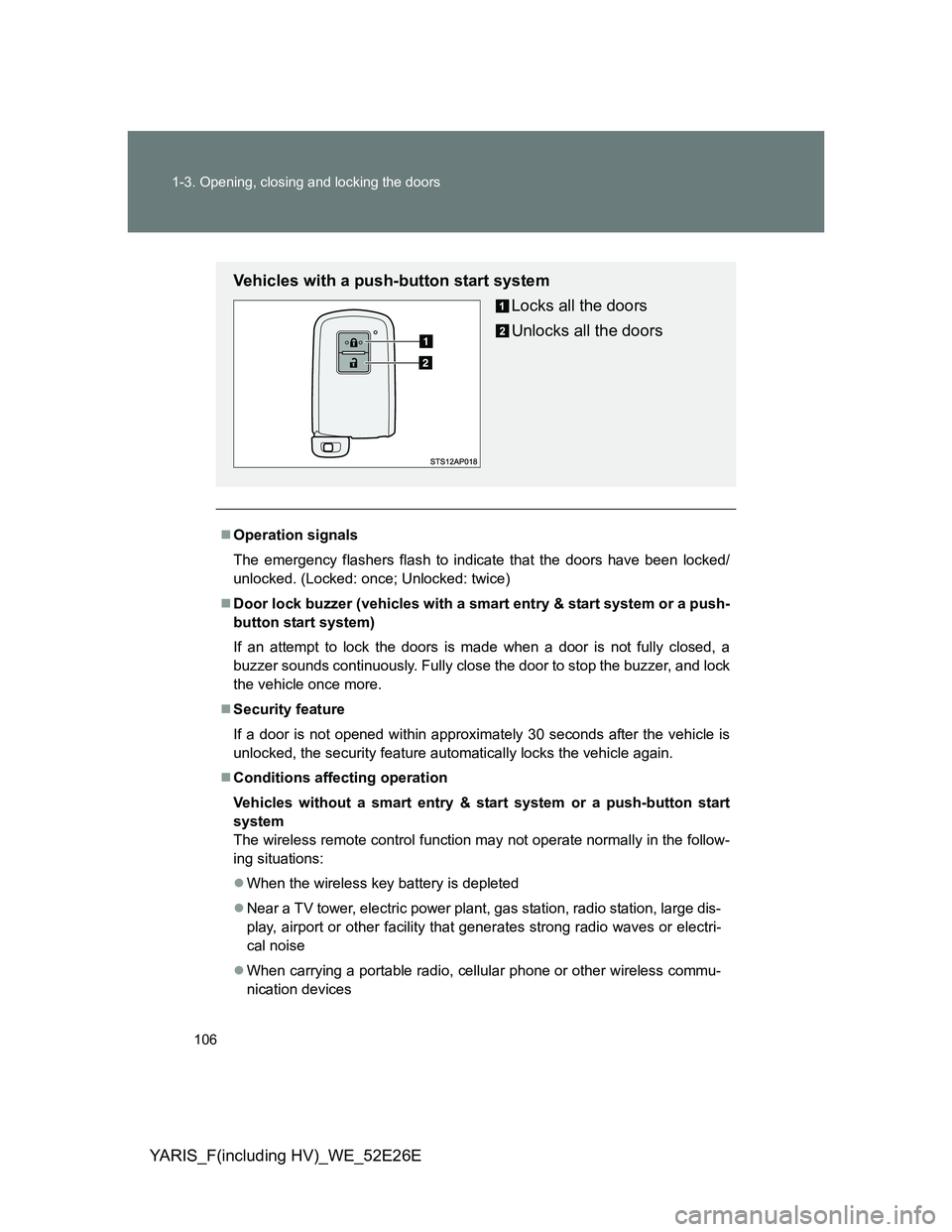
Vehicles with a push-button start system
Locks all the doors
Unlocks all the doors