Mechanical Key TOYOTA YARIS 2014 Owners Manual
[x] Cancel search | Manufacturer: TOYOTA, Model Year: 2014, Model line: YARIS, Model: TOYOTA YARIS 2014Pages: 712, PDF Size: 30.2 MB
Page 65 of 712
65 1-2. Key information
1
Before driving
YARIS_F(including HV)_WE_52E26E
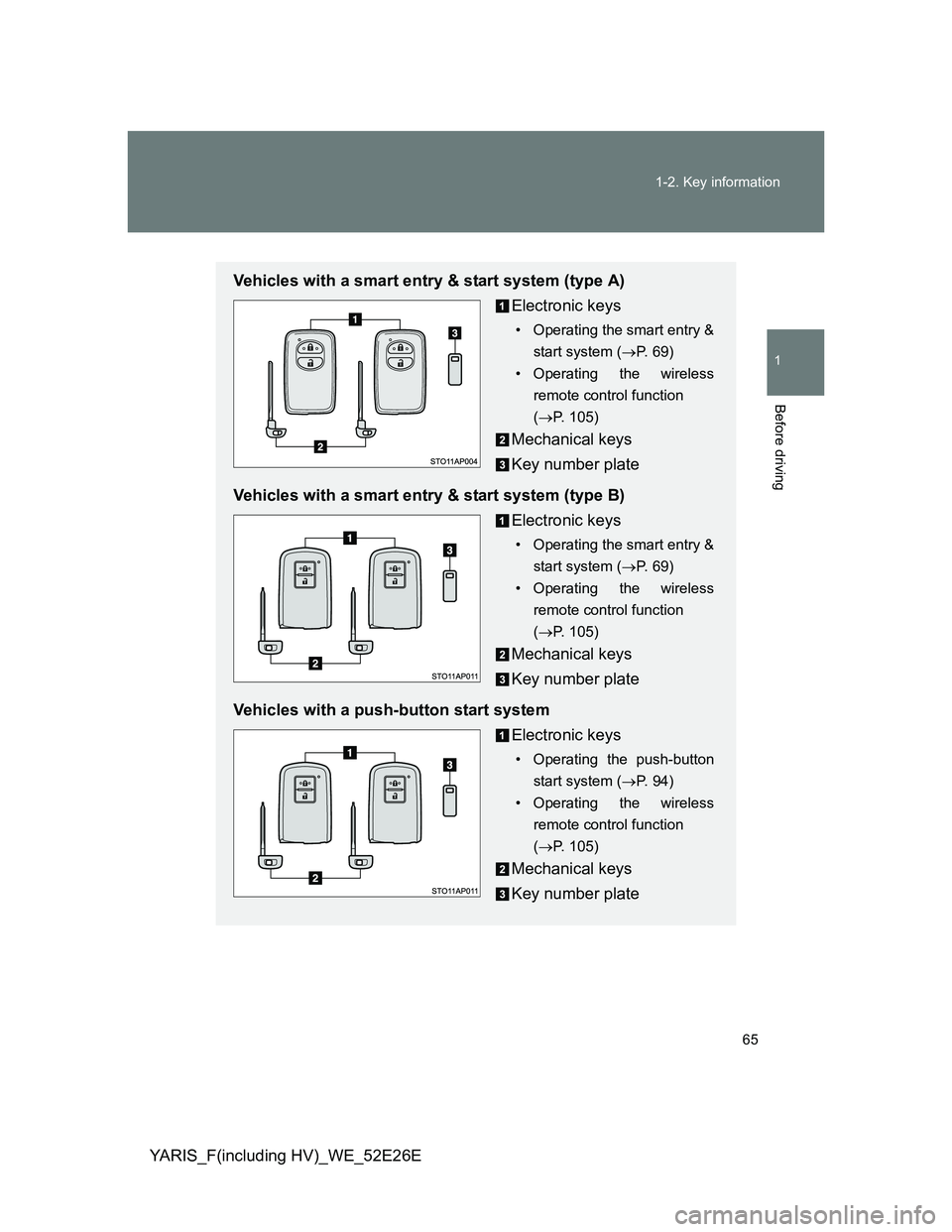
Vehicles with a smart entry & start system (type A)
Electronic keys
• Operating the smart entry &
start system (P. 69)
• Operating the wireless
remote control function
(P. 105)
Mechanical keys
Key number plate
Vehicles with a smart entry & start system (type B)
Electronic keys
• Operating the smart entry &
start system (P. 69)
• Operating the wireless
remote control function
(P. 105)
Mechanical keys
Key number plate
Vehicles with a push-button start system
Electronic keys
• Operating the push-button
start system (P. 94)
• Operating the wireless
remote control function
(P. 105)
Mechanical keys
Key number plate
Page 66 of 712
66 1-2. Key information
YARIS_F(including HV)_WE_52E26E
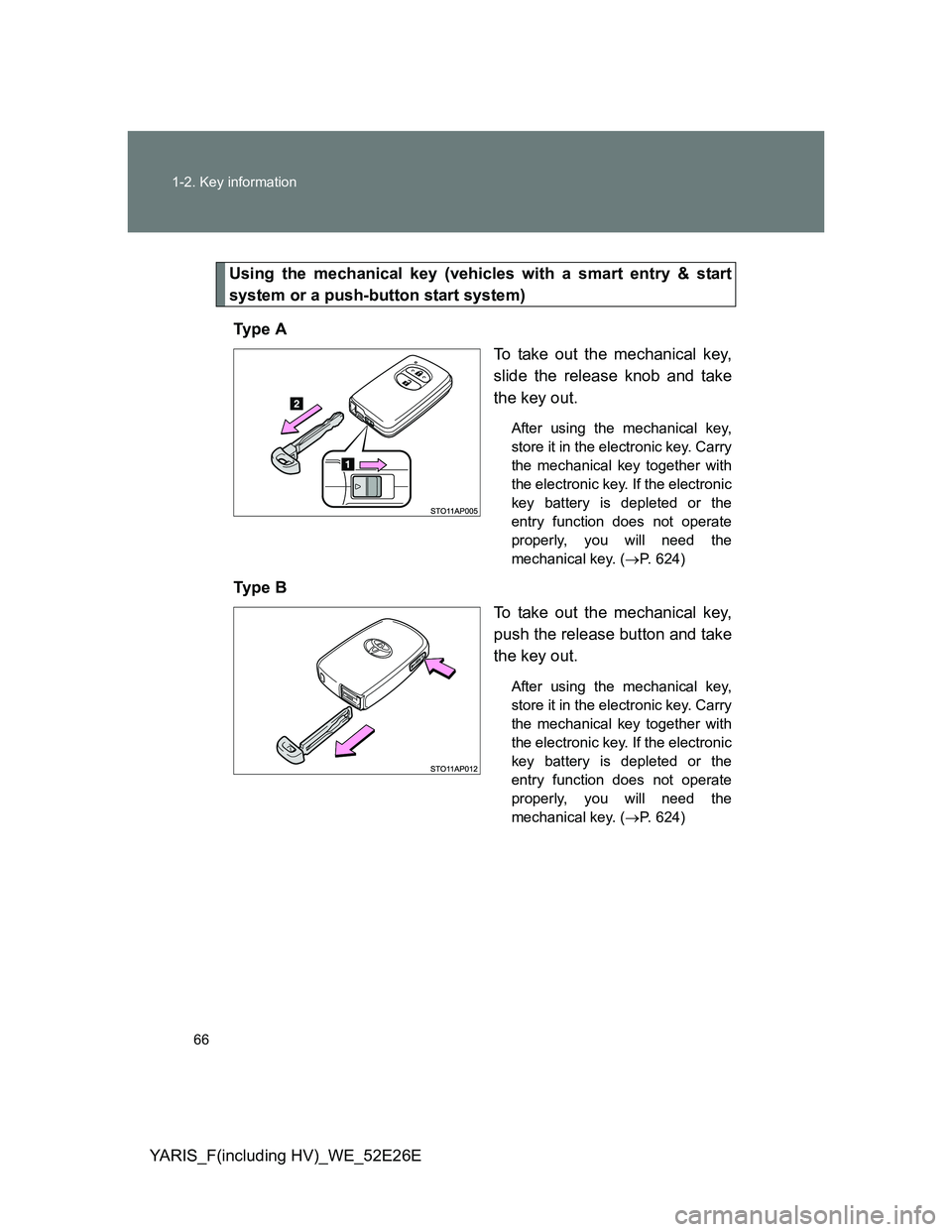
Using the mechanical key (vehicles with a smart entry & start
system or a push-button start system)
Ty p e A
To take out the mechanical key,
slide the release knob and take
the key out.
After using the mechanical key,
store it in the electronic key. Carry
the mechanical key together with
the electronic key. If the electronic
key battery is depleted or the
entry function does not operate
properly, you will need the
mechanical key. (P. 624)
Ty p e B
To take out the mechanical key,
push the release button and take
the key out.
After using the mechanical key,
store it in the electronic key. Carry
the mechanical key together with
the electronic key. If the electronic
key battery is depleted or the
entry function does not operate
properly, you will need the
mechanical key. (P. 624)
Page 67 of 712
67 1-2. Key information
1
Before driving
YARIS_F(including HV)_WE_52E26E
Key number plate
Keep the plate in a safe place such as your wallet, not in the vehicle. In the
event that a key (vehicles without a smart entry & start system or a push-but-
ton start system) or a mechanical key (vehicles with a smart entry & start
system or a push-button start system) is lost, a new key can be made by any
authorized Toyota dealer or repairer, or another duly qualified and equipped
professional using the key number plate. (P. 623)
When riding in an aircraft
When bringing a key with wireless remote control function onto an aircraft,
make sure you do not press any buttons on the key while inside the aircraft
cabin. If you are carrying the key in your bag etc., ensure that the buttons
are not likely to be pressed accidentally. Pressing a button may cause the
key to emit radio waves that could interfere with the operation of the aircraft.
NOTICE
To prevent key damage
Observe the following:
Do not drop the keys, subject them to strong shocks or bend them.
Do not expose the keys to high temperatures for a long period of time.
Do not get the keys wet or wash them in an ultrasonic washer etc.
Vehicles with a smart entry & start system or a push-button start system:
Do not attach metallic or magnetic materials to the keys or place the keys
close to such materials.
Do not disassemble the keys.
Do not attach a sticker or anything else to the surface of the key.
Vehicles with a smart entry & start system or a push-button start system:
Do not place the keys near objects that produce magnetic fields, such as
TVs, audio systems, induction cookers, or medical electrical equipment,
such as low-frequency therapy equipment.
Page 77 of 712
77 1-3. Opening, closing and locking the doors
1
Before driving
YARIS_F(including HV)_WE_52E26E
*: Vehicles with a Multidrive only
Security feature
If a door is not opened within approximately 30 seconds after the vehicle is
unlocked, the security feature automatically locks the vehicle again. (How-
ever, depending on the location of the electronic key, the key may be
detected as being in the vehicle. In this case, vehicle may be unlocked.)
Battery-saving function
The battery-saving function will be activated in order to prevent the elec-
tronic key battery and the vehicle battery from being discharged while the
vehicle is not in operation for a long time.
In the following situations, the smart entry & start system may take some
time to unlock the doors.
• The electronic key has been left in an area of approximately 2 m (6 ft.)
of the outside of the vehicle for 10 minutes or longer.
• The smart entry & start system has not been used for 5 days or longer.
If the smart entry & start system has not been used for 14 days or longer,
the doors cannot be unlocked at any doors except the driver’s door.
In this case, take hold of the driver’s door handle, or use the wireless
remote control or the mechanical key, to unlock the doors.
AlarmSituationCorrection procedure
Interior alarm
sounds continu-
ously
*
The driver’s door was
opened while any shift
position other than P was
selected without turning off
the “ENGINE START
STOP” switch.Shift the shift lever
to P.
Page 81 of 712
81 1-3. Opening, closing and locking the doors
1
Before driving
YARIS_F(including HV)_WE_52E26E
Security feature
If a door is not opened within approximately 30 seconds after the vehicle is
unlocked, the security feature automatically locks the vehicle again.
To operate the system properly
Make sure to carry the electronic key when operating the system. Do not get
the electronic key too close to the vehicle when operating the system from
the outside of the vehicle.
Depending on the position and holding condition of the electronic key, the
key may not be detected correctly and the system may not operate properly.
(The alarm may go off accidentally, or the door lock prevention function may
not operate.)
If the smart entry & start system does not operate properly
Locking and unlocking the doors: Use the mechanical key. (P. 624)
Starting the engine (except hybrid vehicle) or the hybrid system (hybrid
vehicle): P. 625, 627
Electronic key battery depletion
The standard battery life is 1 to 2 years.
If the battery becomes low, an alarm will sound in the cabin when the
engine (except hybrid vehicle) or the hybrid system (hybrid vehicle)
stops. (P. 571)
As the electronic key always receives radio waves, the battery will
become depleted even if the electronic key is not used. The following
symptoms indicate that the electronic key battery may be depleted.
Replace the battery when necessary. (P. 501)
• The smart entry & start system or the wireless remote control does not
operate.
• The detection area becomes smaller.
• The LED indicator on the key surface does not turn on.
To avoid serious deterioration, do not leave the electronic key within 1 m
(3 ft.) of the following electrical appliances that produce a magnetic field:
•TVs
• Personal computers
• Cellular phones, cordless phones and battery chargers
• Recharging cellular phones or cordless phones
• Induction cookers
• Table lamps
Page 82 of 712
82 1-3. Opening, closing and locking the doors
YARIS_F(including HV)_WE_52E26E
When the electronic key battery is fully depleted
P. 501
If the smart entry & start system has been deactivated in a customized
setting
Locking and unlocking the doors: Use the wireless remote control or
mechanical key. (P. 105, 624)
Starting the engine and changing “ENGINE START STOP” switch modes
(except hybrid vehicle): P. 625
Starting the hybrid system and changing “POWER” switch mode (hybrid
vehicle): P. 627
Stopping the engine (except hybrid vehicle): P. 229
Stopping the hybrid system (hybrid vehicle):P. 2 4 2
Customization that can be configured at any authorized Toyota dealer
or repairer, or another duly qualified and equipped professional
Settings (e. g. smart entry & start system) can be changed.
(Customizable features: P. 689)
Page 107 of 712
107 1-3. Opening, closing and locking the doors
1
Before driving
YARIS_F(including HV)_WE_52E26E
When the wireless key is in contact with, or is covered by a metallic
object
When other wireless key (that emit radio waves) is being used nearby
If window tint with a metallic content or metallic objects are attached to
the rear window
Vehicles with a smart entry & start system or a push-button start sys-
tem
P. 7 8
If the wireless remote control does not operate properly (vehicles with
a smart entry & start system or a push-button start system)
Locking and unlocking the doors: Use the mechanical key. (P. 624)
Key battery depletion
If the wireless remote control function does not operate, the battery may be
depleted. Replace the battery when necessary. (P. 501)
Electronic key battery depletion
P. 8 1
When the key battery is fully depleted
P. 501
Confirmation of the registered key number (vehicles with a smart entry
and start system or a push-button start system)
The number of keys already registered to the vehicle can be confirmed. Ask
any authorized Toyota dealer or repairer, or another duly qualified and
equipped professional for details.
Customization that can be configured at any authorized Toyota dealer
or repairer, or another duly qualified and equipped professional
Settings (e.g. wireless remote control system) can be changed.
(Customizable features P. 689)
Page 115 of 712
115 1-3. Opening, closing and locking the doors
1
Before driving
YARIS_F(including HV)_WE_52E26E
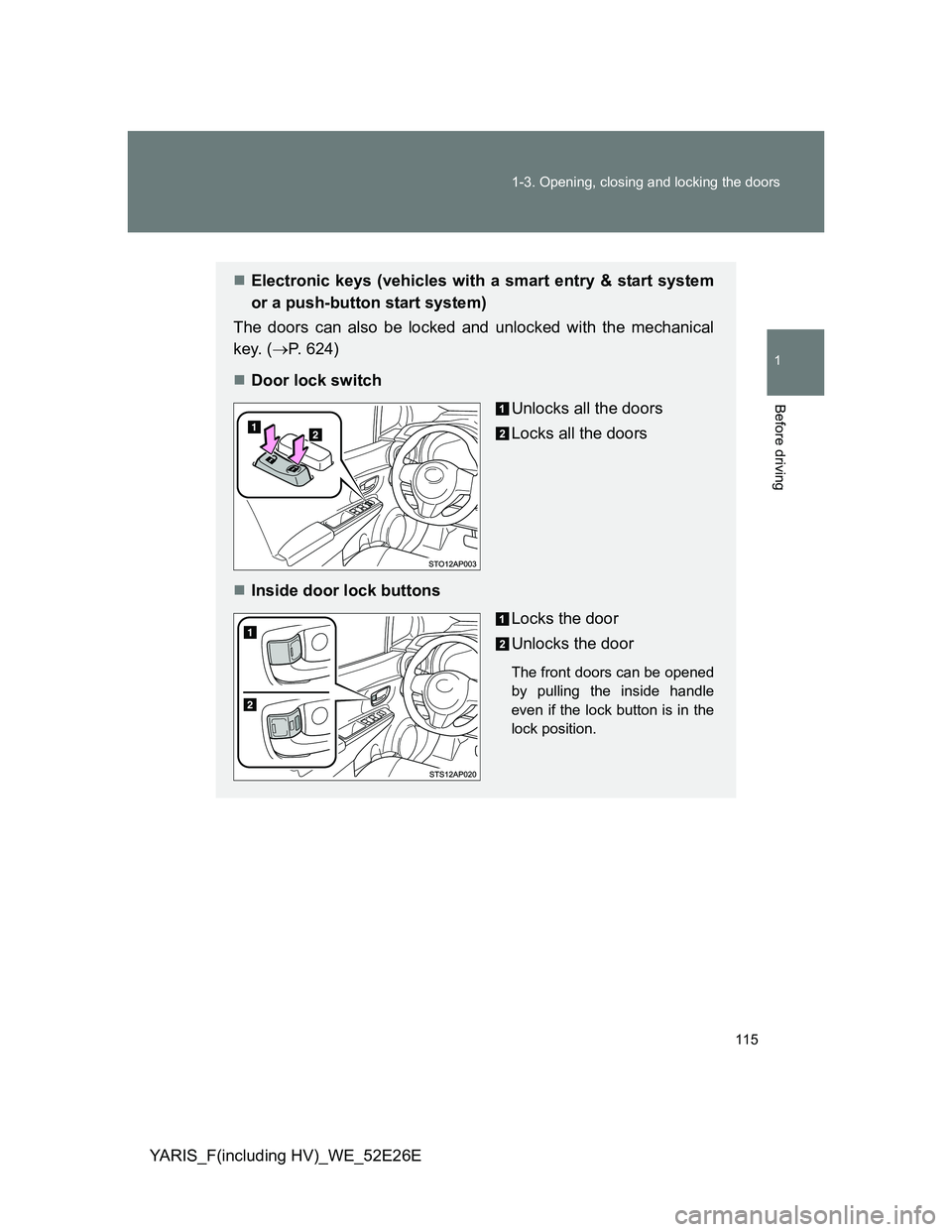
Electronic keys (vehicles with a smart entry & start system
or a push-button start system)
The doors can also be locked and unlocked with the mechanical
key. (P. 624)
Door lock switch
Unlocks all the doors
Locks all the doors
Inside door lock buttons
Locks the door
Unlocks the door
The front doors can be opened
by pulling the inside handle
even if the lock button is in the
lock position.
Page 117 of 712
117 1-3. Opening, closing and locking the doors
1
Before driving
YARIS_F(including HV)_WE_52E26E
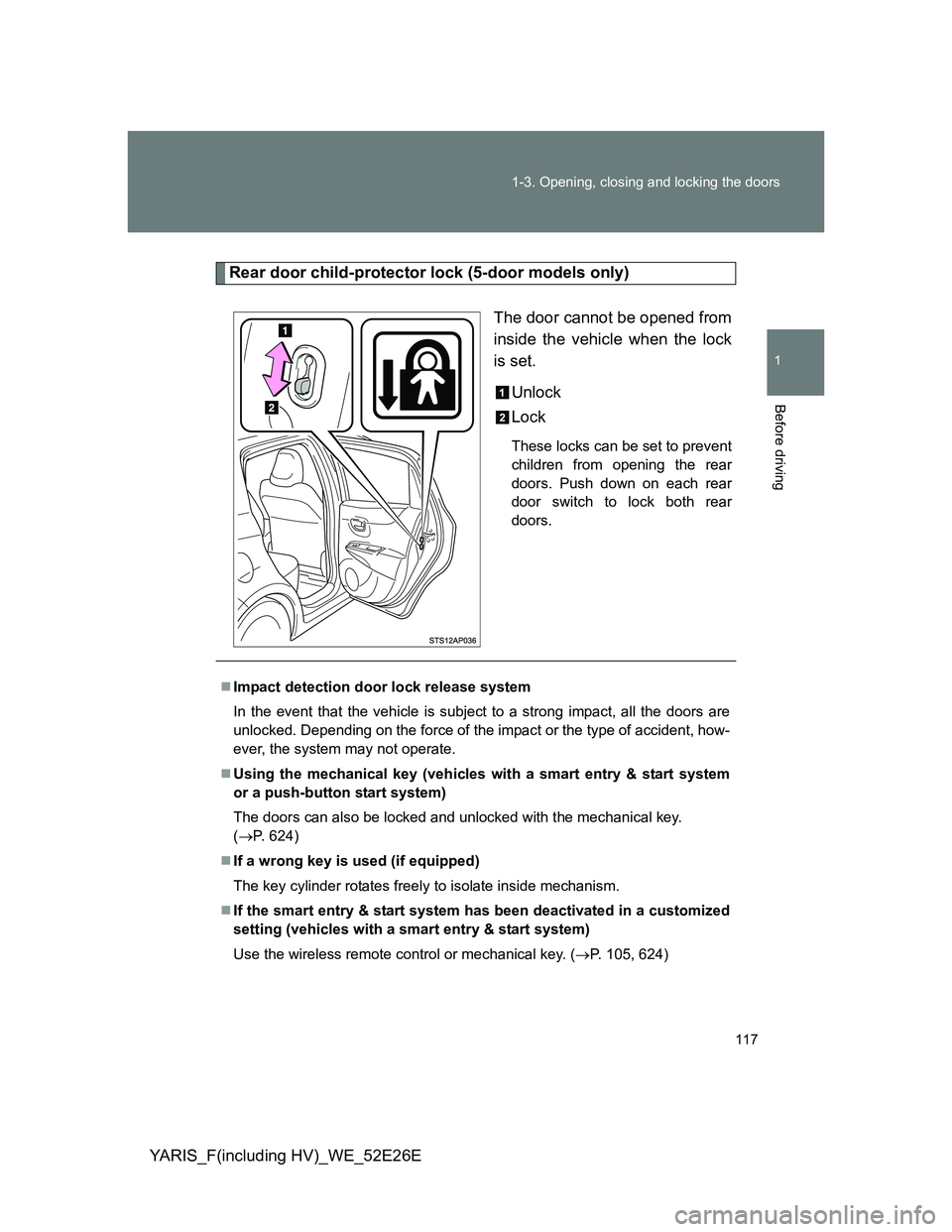
Rear door child-protector lock (5-door models only)
The door cannot be opened from
inside the vehicle when the lock
is set.
Unlock
Lock
These locks can be set to prevent
children from opening the rear
doors. Push down on each rear
door switch to lock both rear
doors.
Impact detection door lock release system
In the event that the vehicle is subject to a strong impact, all the doors are
unlocked. Depending on the force of the impact or the type of accident, how-
ever, the system may not operate.
Using the mechanical key (vehicles with a smart entry & start system
or a push-button start system)
The doors can also be locked and unlocked with the mechanical key.
(P. 624)
If a wrong key is used (if equipped)
The key cylinder rotates freely to isolate inside mechanism.
If the smart entry & start system has been deactivated in a customized
setting (vehicles with a smart entry & start system)
Use the wireless remote control or mechanical key. (P. 105, 624)
Page 120 of 712
120 1-3. Opening, closing and locking the doors
YARIS_F(including HV)_WE_52E26E
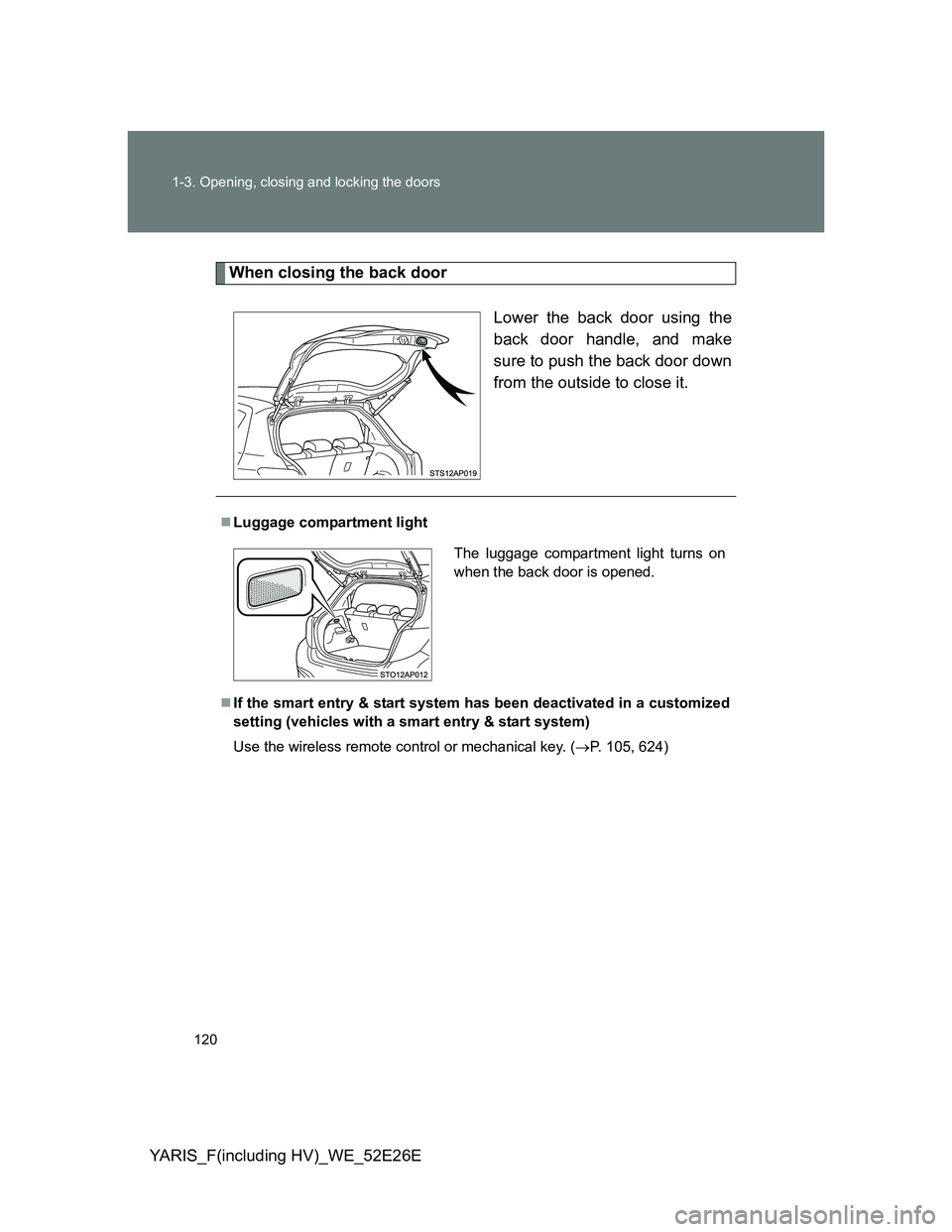
When closing the back door
Lower the back door using the
back door handle, and make
sure to push the back door down
from the outside to close it.
Luggage compartment light
If the smart entry & start system has been deactivated in a customized
setting (vehicles with a smart entry & start system)
Use the wireless remote control or mechanical key. (P. 105, 624)
The luggage compartment light turns on
when the back door is opened.