lock TOYOTA YARIS 2016 3.G User Guide
[x] Cancel search | Manufacturer: TOYOTA, Model Year: 2016, Model line: YARIS, Model: TOYOTA YARIS 2016 3.GPages: 368, PDF Size: 7.86 MB
Page 52 of 368
521-1. For safe use
Safety information for children
●It is recommended that children sit in the rear seats to avoid acci-
dental contact with the shift lever, wiper switch, etc.
● Use the rear door child-protector lock or the window lock switch to
avoid children opening the door while driving or operating the
power window accidentally.
● Do not let small children operate equipment which may catch or
pinch body parts, such as the power window, hood, back door,
seats, etc.
Observe the following precautions when children are in the vehi-
cle.
Use a child restraint system appropriate for the child, until the
child becomes large enough to pr operly wear the vehicle’s seat
belt.
WARNING
Never leave children unattended in the vehicle, and never allow children to
have or use the key.
Children may be able to start the vehicle or shift the vehicle into neutral.
There is also a danger that children may injure themselves by playing with
the cigarette lighter, the windows or other features of the vehicle. In addi-
tion, heat build-up or extremely cold temperatures inside the vehicle can be
fatal to children.
Page 57 of 368
571-1. For safe use
1
For safety and security
Installing child restraints
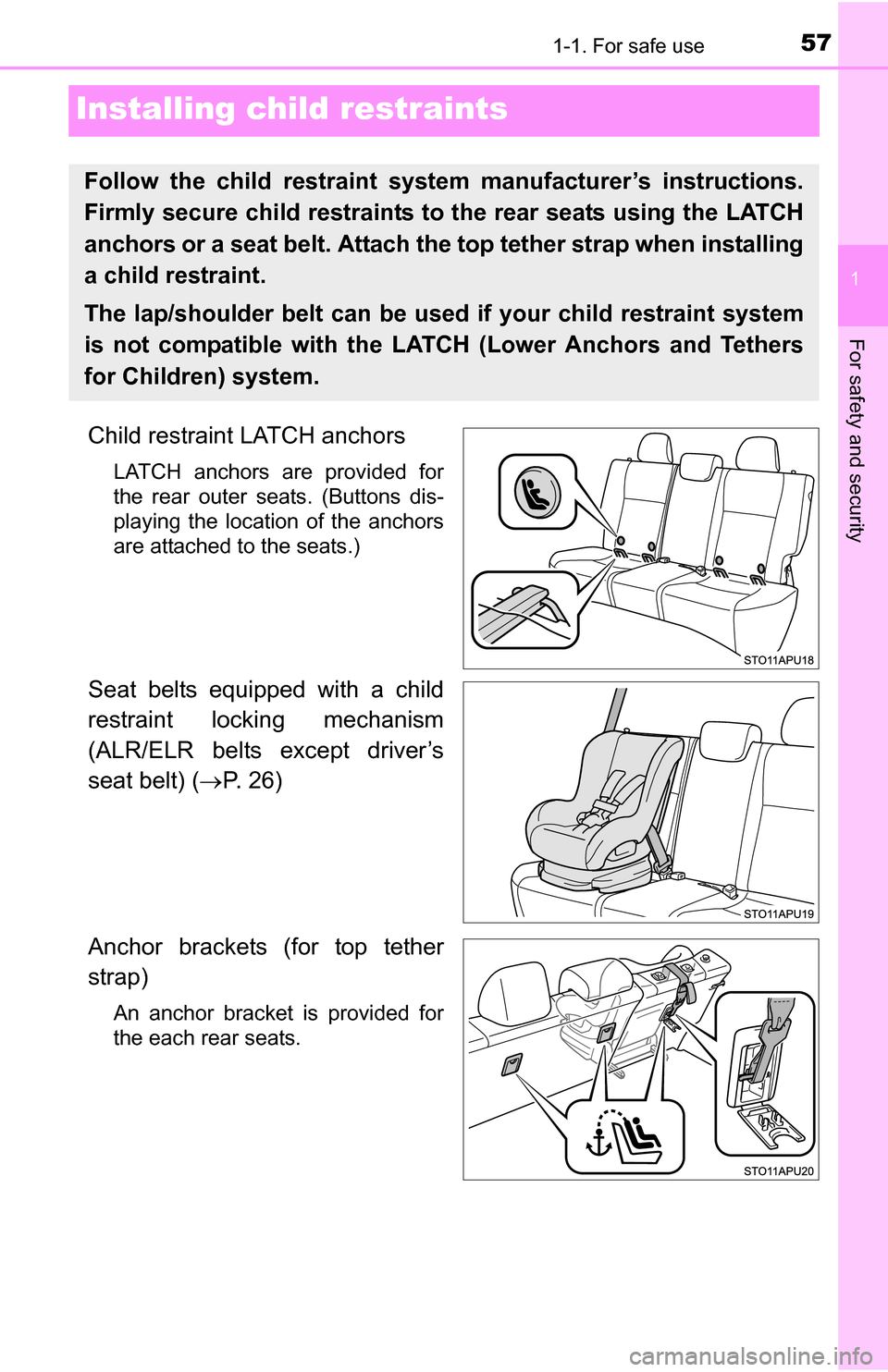
Child restraint LATCH anchors
LATCH anchors are provided for
the rear outer seats. (Buttons dis-
playing the location of the anchors
are attached to the seats.)
Seat belts equipped with a child
restraint locking mechanism
(ALR/ELR belts except driver’s
seat belt) (P. 26)
Anchor brackets (for top tether
strap)
An anchor bracket is provided for
the each rear seats.
Follow the child restraint system manufacturer’s instructions.
Firmly secure child restraints to the rear seats using the LATCH
anchors or a seat belt. Attach the top tether strap when installing
a child restraint.
The lap/shoulder belt can be used if your child restraint system
is not compatible with the LATCH (Lower Anchors and Tethers
for Children) system.
Page 59 of 368
591-1. For safe use
1
For safety and security
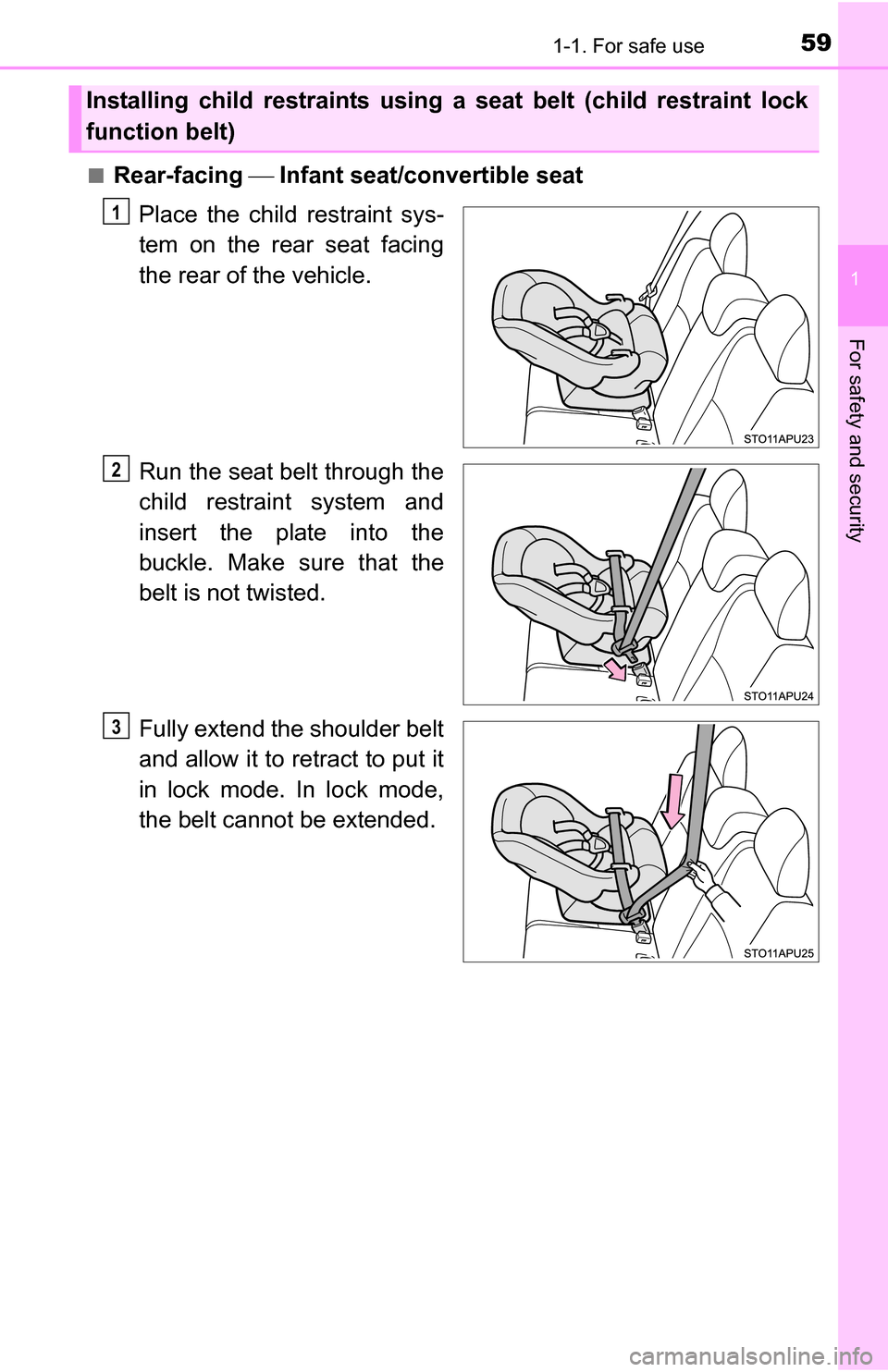
■Rear-facing Infant seat/convertible seat
Place the child restraint sys-
tem on the rear seat facing
the rear of the vehicle.
Run the seat belt through the
child restraint system and
insert the plate into the
buckle. Make sure that the
belt is not twisted.
Fully extend the shoulder belt
and allow it to retract to put it
in lock mode. In lock mode,
the belt cannot be extended.
Installing child restraints using a seat belt (child restraint lock
function belt)
1
2
3
Page 61 of 368
611-1. For safe use
1
For safety and security
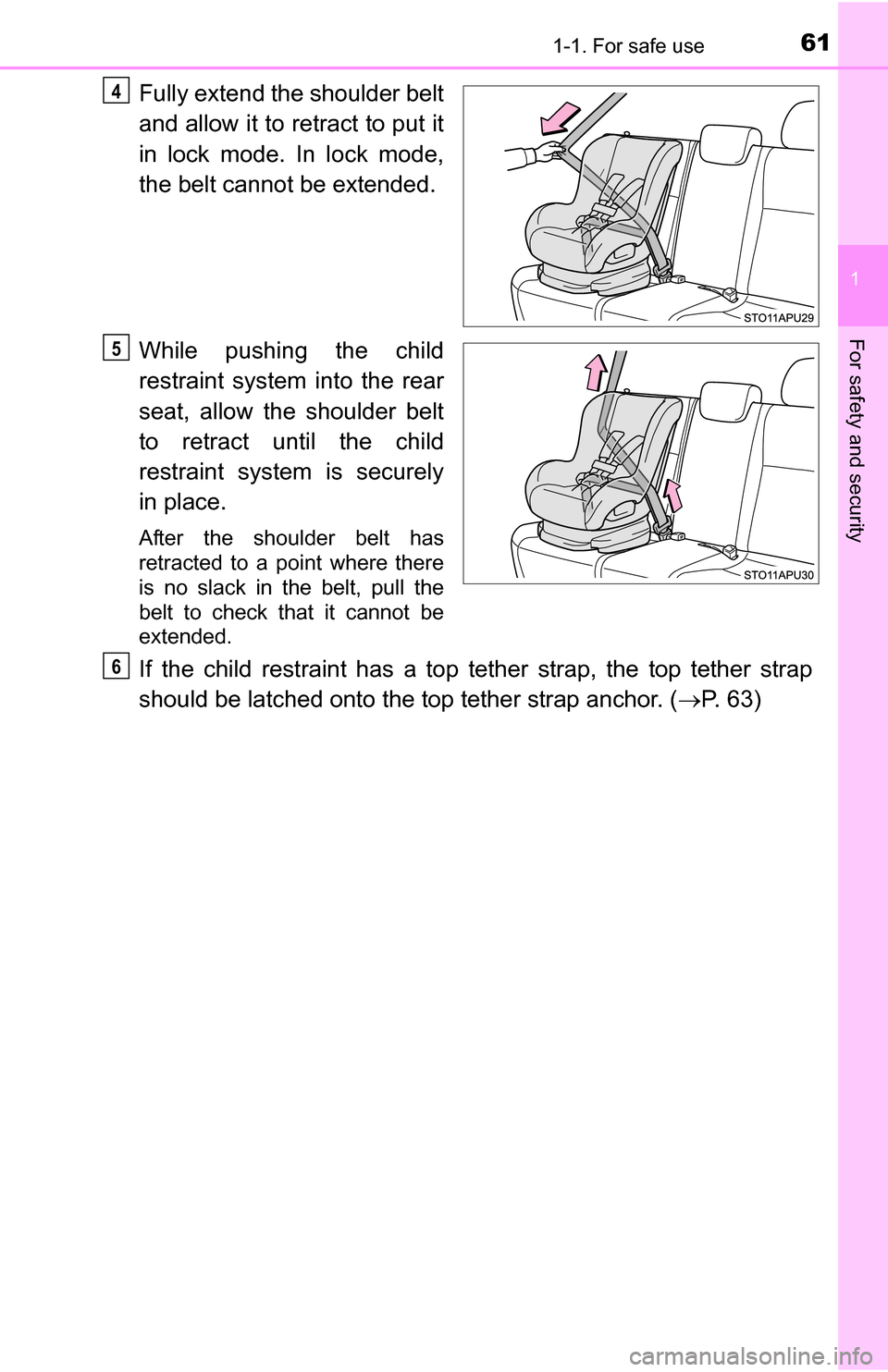
Fully extend the shoulder belt
and allow it to retract to put it
in lock mode. In lock mode,
the belt cannot be extended.
While pushing the child
restraint system into the rear
seat, allow the shoulder belt
to retract until the child
restraint system is securely
in place.
After the shoulder belt has
retracted to a point where there
is no slack in the belt, pull the
belt to check that it cannot be
extended.
If the child restraint has a top tether strap, the top tether strap
should be latched onto the top tether strap anchor. (P. 63)
4
5
6
Page 64 of 368
641-1. For safe use
WARNING
■When installing a booster seat
To prevent the belt from going into ALR lock mode, do not fully extend the
shoulder belt. ALR mode causes the belt to tighten only. This could cause
injury or discomfort to the child. ( P. 29)
■ When installing a child restraint system
Follow the directions given in the child restraint system installation manual
and fix the child restraint system securely in place.
If the child restraint system is not correctly fixed in place, the child or other
passengers may be seriously injured or even killed in the event of a sudden
braking, sudden swerving or an accident.
● When a booster seat is installed, always ensure that the shoulder belt is
positioned across the center of the child’s shoulder. The belt should be
kept away from the child’s neck, but not so that it could fall off the child’s
shoulder. Failure to do so may result in death or serious injury in the event
of a sudden braking, sudden swerving or an accident.
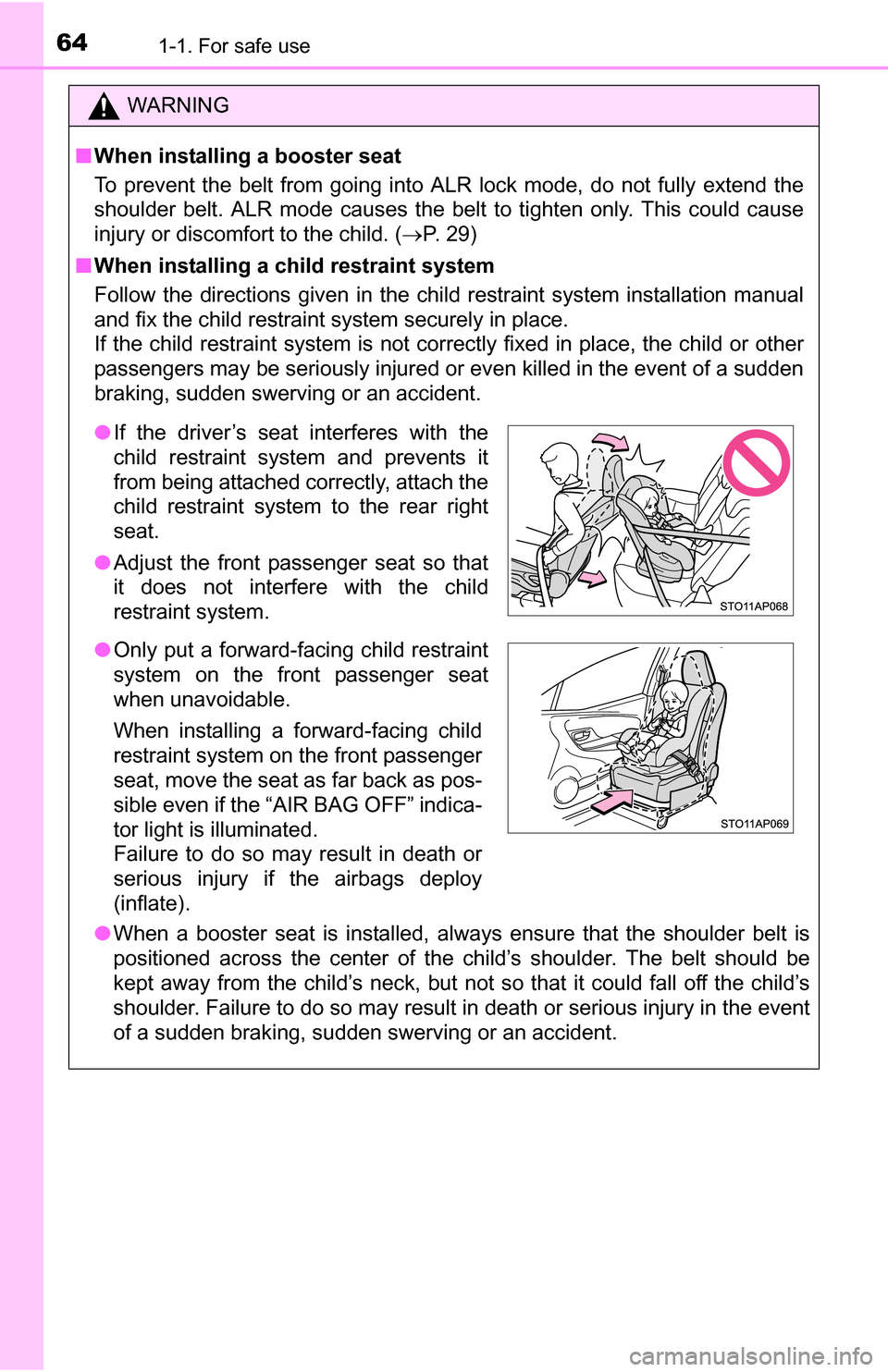
●If the driver’s seat interferes with the
child restraint system and prevents it
from being attached correctly, attach the
child restraint system to the rear right
seat.
● Adjust the front passenger seat so that
it does not interfere with the child
restraint system.
● Only put a forward-facing child restraint
system on the front passenger seat
when unavoidable.
When installing a forward-facing child
restraint system on the front passenger
seat, move the seat as far back as pos-
sible even if the “AIR BAG OFF” indica-
tor light is illuminated.
Failure to do so may result in death or
serious injury if the airbags deploy
(inflate).
Page 65 of 368
651-1. For safe use
1
For safety and security
WARNING
■When installing a child restraint system
● Ensure that the belt and plate are securely locked and the seat belt is not
twisted.
● Shake the child restraint system left and right, and forward and backward
to ensure that it has been securely installed.
● After securing a child restraint system, never adjust the seat.
● Follow all installation instructions provided by the child restraint system
manufacturer.
● When a child restraint system with a top tether strap is installed, do not
install the head restraint. The head restraint may interfere with the top
tether strap preventing secure installation of the child restraint system.
● Make sure to properly store the removed head restraint in a secure place
when you use the child restraint system on the rear seat.
● When securing some types of child restraint systems in rear seats, it may
not be possible to properly use the seat belts in positions next to the child
restraint without interfering with it or affecting seat belt effectiveness. Be
sure your seat belt fits snugly across your shoulder and low on your hips. If
it does not, or if it interferes with the child restraint, move to a different
position. Failure to do so may result in death or serious injury.
■ Do not use a seat belt extender
If a seat belt extender is used when installing a child restraint system, the
seat belt will not securely hold the child restraint system, which could cause
death or serious injury to the child or other passengers in the event of sud-
den braking, sudden swerving or an accident.
■ To correctly attach a child restraint system to the anchors
When using the LATCH anchors, be sure that there are no foreign objects
around the anchors and that the seat belt is not caught behind the child
restraint system. Make sure the child restraint system is securely attached,
or it may cause death or serious injury to the child or other passengers in
the event of a sudden braking, sudden swerve or an accident.
Page 76 of 368
762. Instrument cluster
Gauges and meters
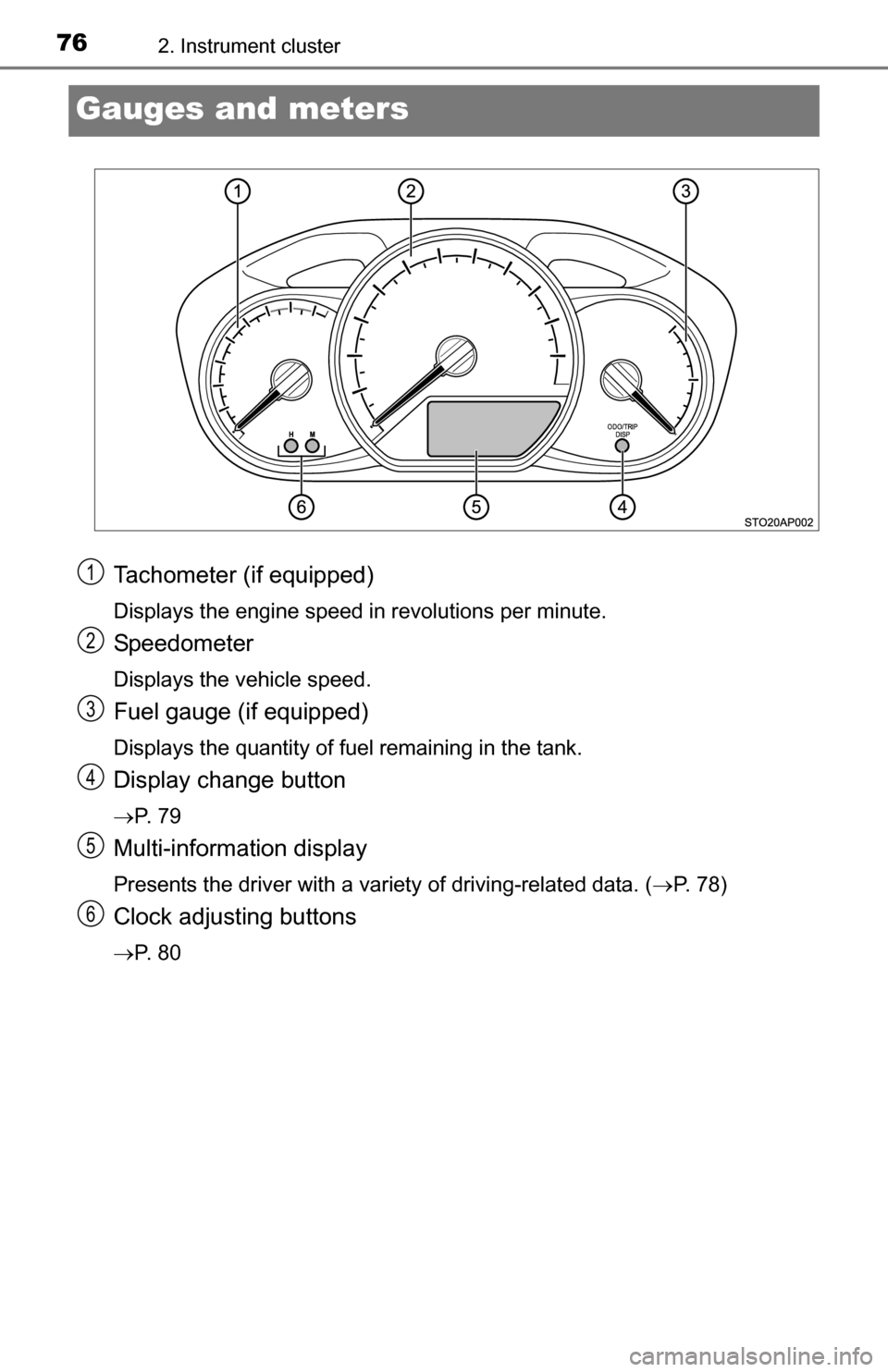
Tachometer (if equipped)
Displays the engine speed in revolutions per minute.
Speedometer
Displays the vehicle speed.
Fuel gauge (if equipped)
Displays the quantity of fuel remaining in the tank.
Display change button
P. 7 9
Multi-information display
Presents the driver with a variety of driving-related data. (P. 78)
Clock adjusting buttons
P. 8 0
1
2
3
4
5
6
Page 78 of 368
782. Instrument cluster
Multi-infor mation display
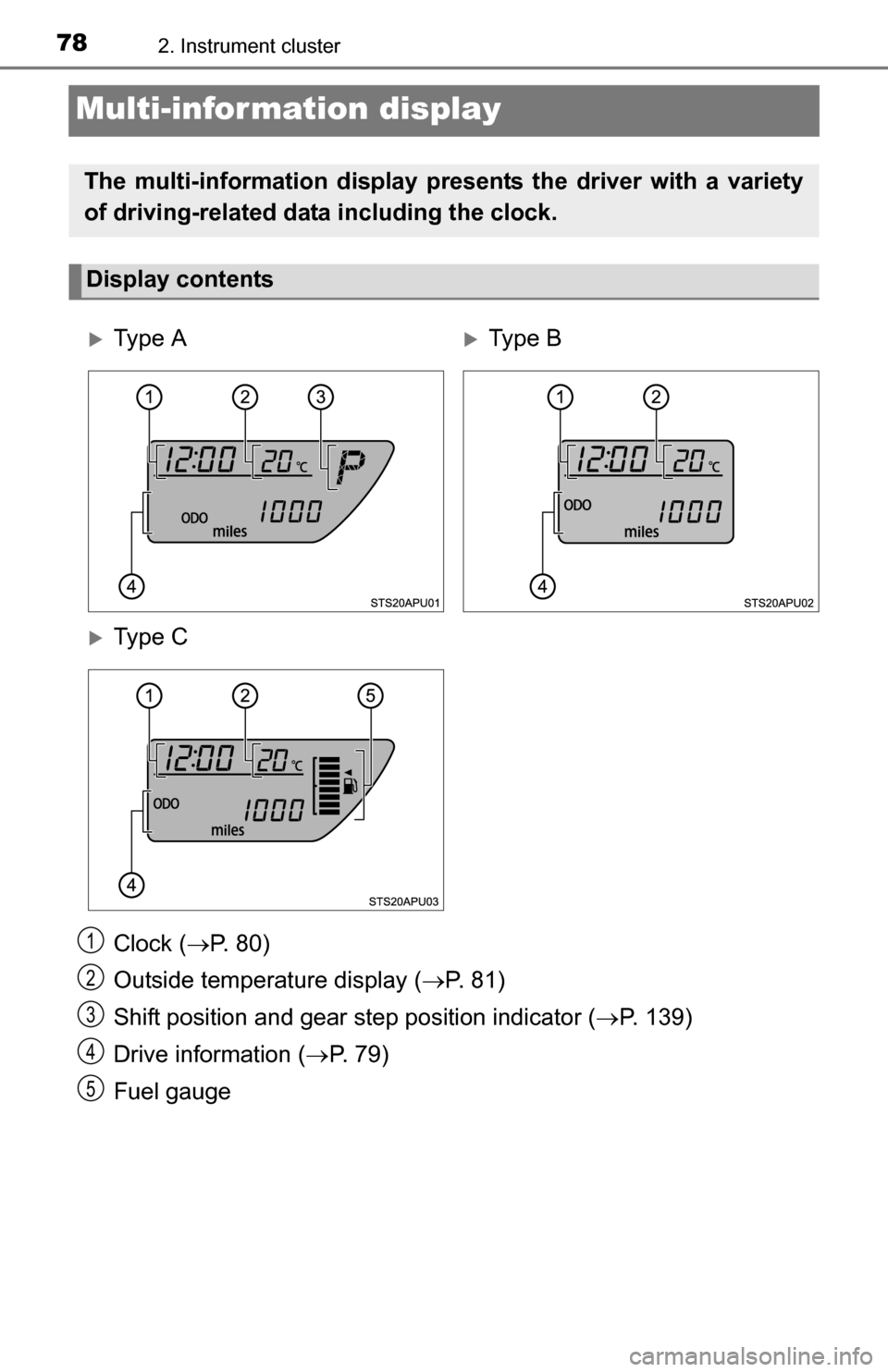
Clock (P. 80)
Outside temperature display ( P. 81)
Shift position and gear step position indicator ( P. 139)
Drive information ( P. 7 9 )
Fuel gauge
The multi-information display presents the driver with a variety
of driving-related data including the clock.
Display contents
Ty p e ATy p e B
Ty p e C
1
2
3
4
5
Page 79 of 368
792. Instrument cluster
2
Instrument cluster
.
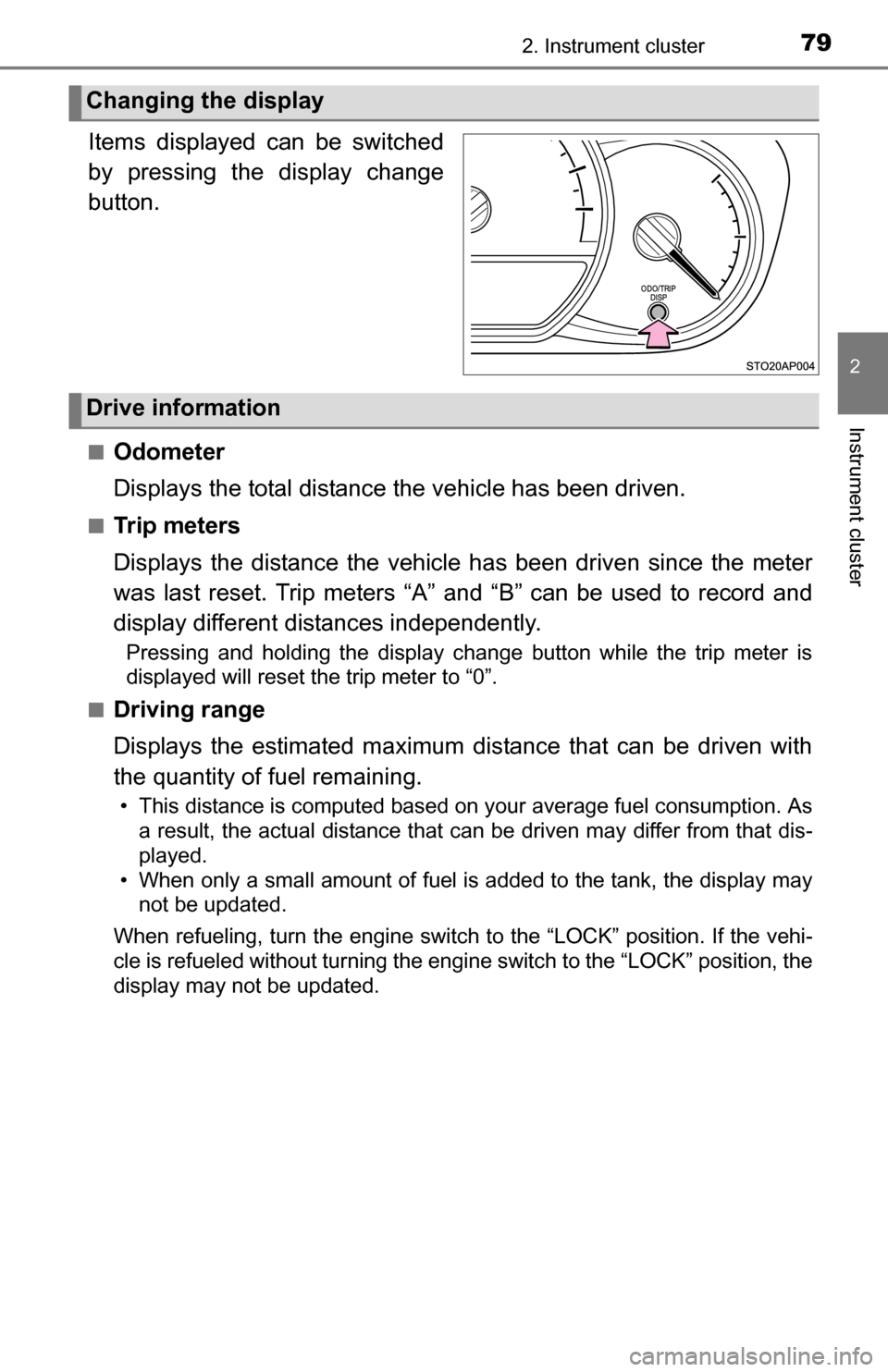
Items displayed can be switched
by pressing the display change
button.
■Odometer
Displays the total distance the vehicle has been driven.
■Tr i p m e t e r s
Displays the distance the vehicle has been driven since the meter
was last reset. Trip meters “A” and “B” can be used to record and
display different distances independently.
Pressing and holding the display change button while the trip meter is
displayed will reset the trip meter to “0”.
■
Driving range
Displays the estimated maximum distance that can be driven with
the quantity of fuel remaining.
• This distance is computed based on your average fuel consumption. As a result, the actual distance that can be driven may differ from that dis-
played.
• When only a small amount of fuel is added to the tank, the display may not be updated.
When refueling, turn the engine switch to the “LOCK” position. If th\
e vehi-
cle is refueled without turning the engine switch to the “LOCK” po\
sition, the
display may not be updated.
Changing the display
Drive information
Page 80 of 368
802. Instrument cluster
■Average fuel consumption
Displays the average fuel consumption since the function was
reset.
• The function can be reset by pressing and holding the display change button when the average fuel consumption is displayed.
• Use the displayed average fuel consumption as a reference.
■
Instantaneous fuel consumption
Displays the instantaneous of fuel consumption.
■Average vehicle speed
Displays the average vehicle speed since the engine was last
started.
Eco Driving Indicator Light can be activated or deactivated by press-
ing the display change button when the Eco Driving Indicator Light
customization display is displayed.
To change the Eco Driving Indicator Light customization display, display the
odometer and press and hold the display change button until the display
changes.
After customization, press the display change button for more than 2 sec-
onds to return to the odometer.
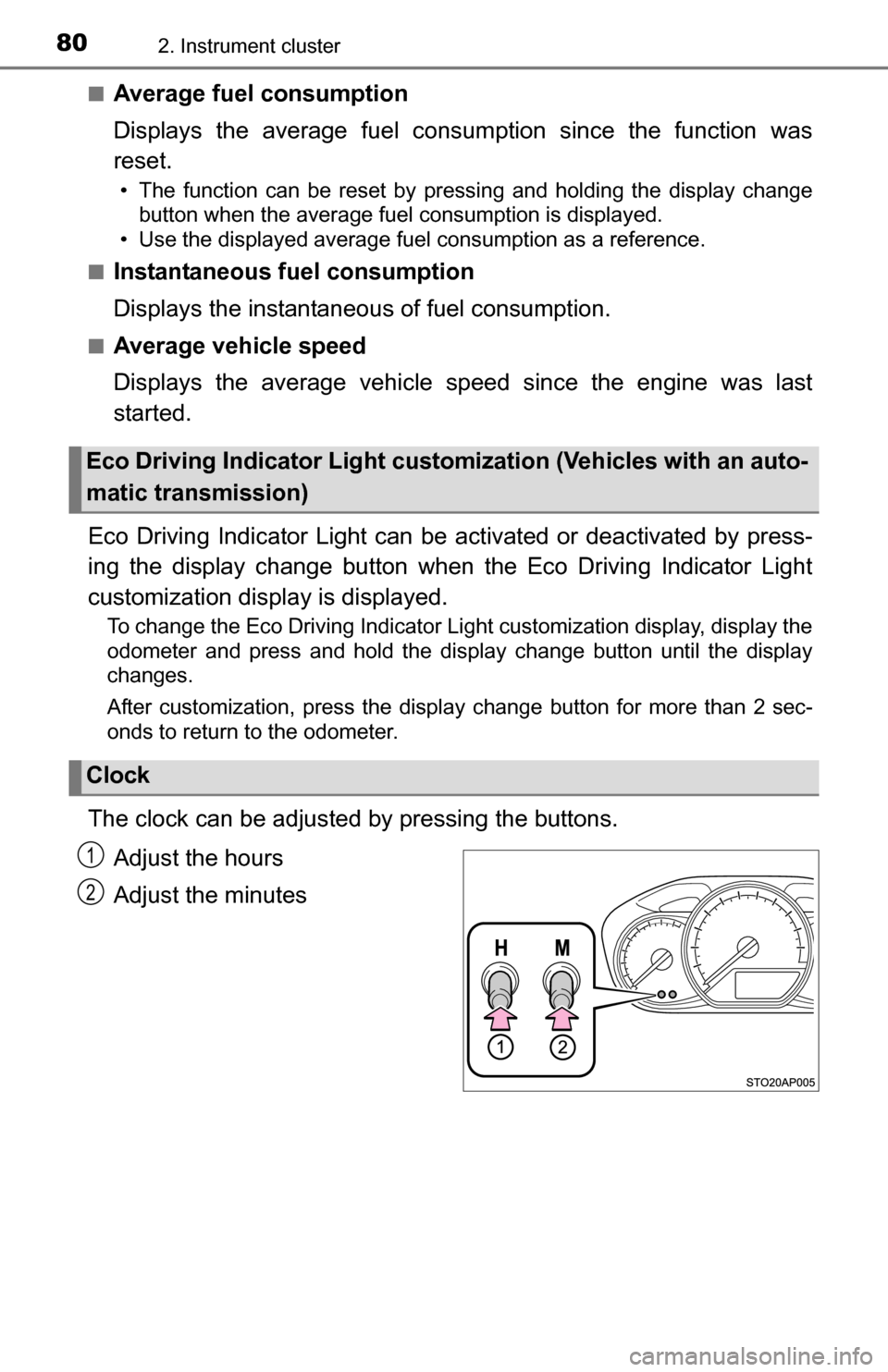
The clock can be adjusted by pressing the buttons.
Adjust the hours
Adjust the minutes
Eco Driving Indicator Light custom ization (Vehicles with an auto-
matic transmission)
Clock
1
2