engine TOYOTA YARIS 2016 Repair Manual
[x] Cancel search | Manufacturer: TOYOTA, Model Year: 2016, Model line: YARIS, Model: TOYOTA YARIS 2016Pages: 592, PDF Size: 10.44 MB
Page 247 of 592
245
YARIS_SEDAN_OM_OM99M18z_(U)
4-2. Audio System
4
Interior Features
Operating Tips for Audio System
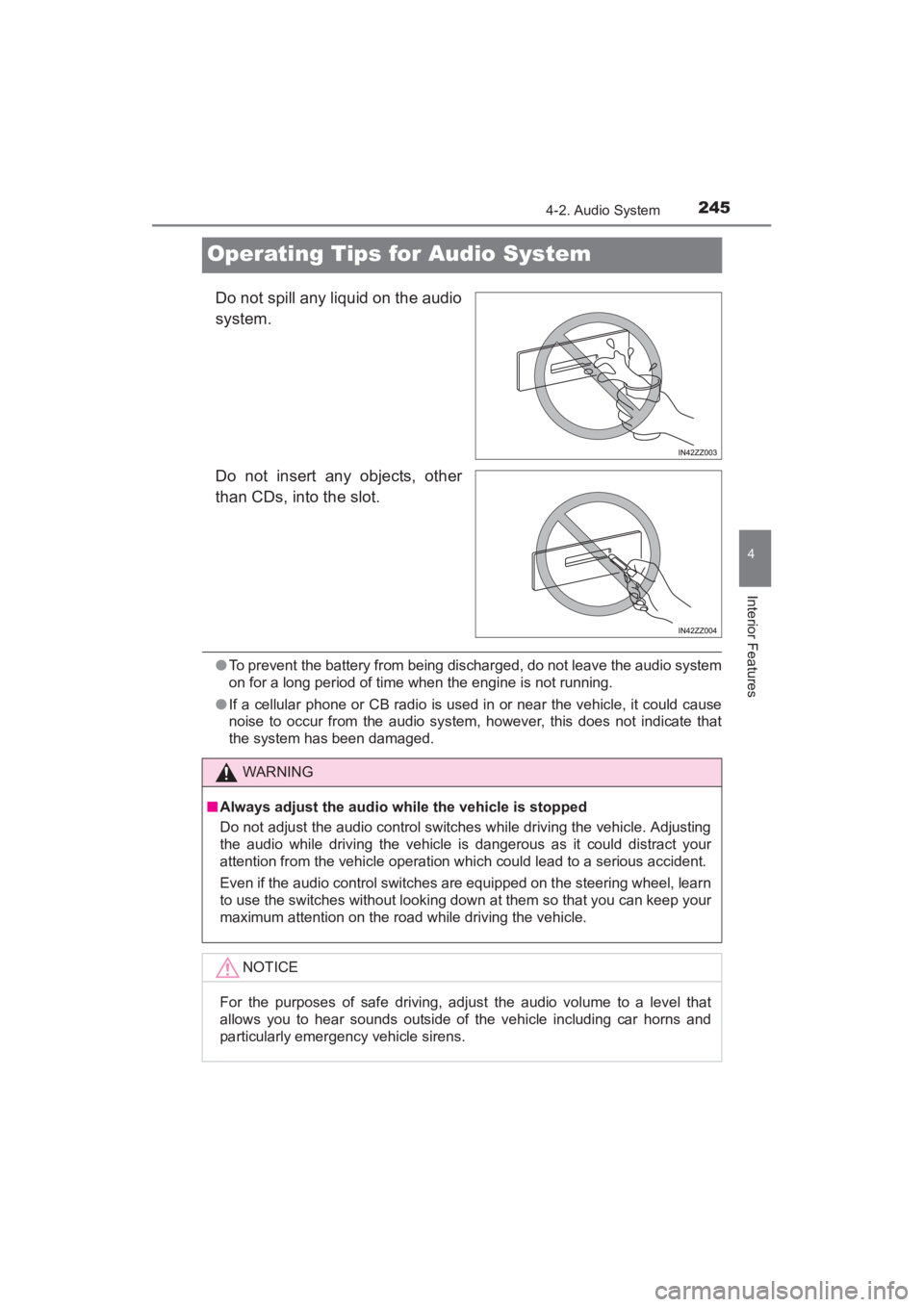
Do not spill any liquid on the audio
system.
Do not insert any objects, other
than CDs, into the slot.
●To prevent the battery from being discharged, do not leave the audio system
on for a long period of time when the engine is not running.
● If a cellular phone or CB radio is used in or near the vehicle, it could cause
noise to occur from the audio system, however, this does not indicate that
the system has been damaged.
WARNING
■ Always adjust the audio while the vehicle is stopped
Do not adjust the audio control switches while driving the vehicle. Adjusting
the audio while driving the vehicle is dangerous as it could distract your
attention from the vehicle operation which could lead to a serious accident.
Even if the audio control switches are equipped on the steering wheel, learn
to use the switches without looking down at them so that you can keep your
maximum attention on the road while driving the vehicle.
NOTICE
For the purposes of safe driving, adjust the audio volume to a level that
allows you to hear sounds outside of the vehicle including car horns and
particularly emergency vehicle sirens.
YARIS_SEDAN_OM_OM99M18z_(U).book Page 245 Monday, June 1, 2015 9:22 PM
Page 305 of 592
YARIS_SEDAN_OM_OM99M18z_(U)
3034-2. Audio System
4
Interior Features
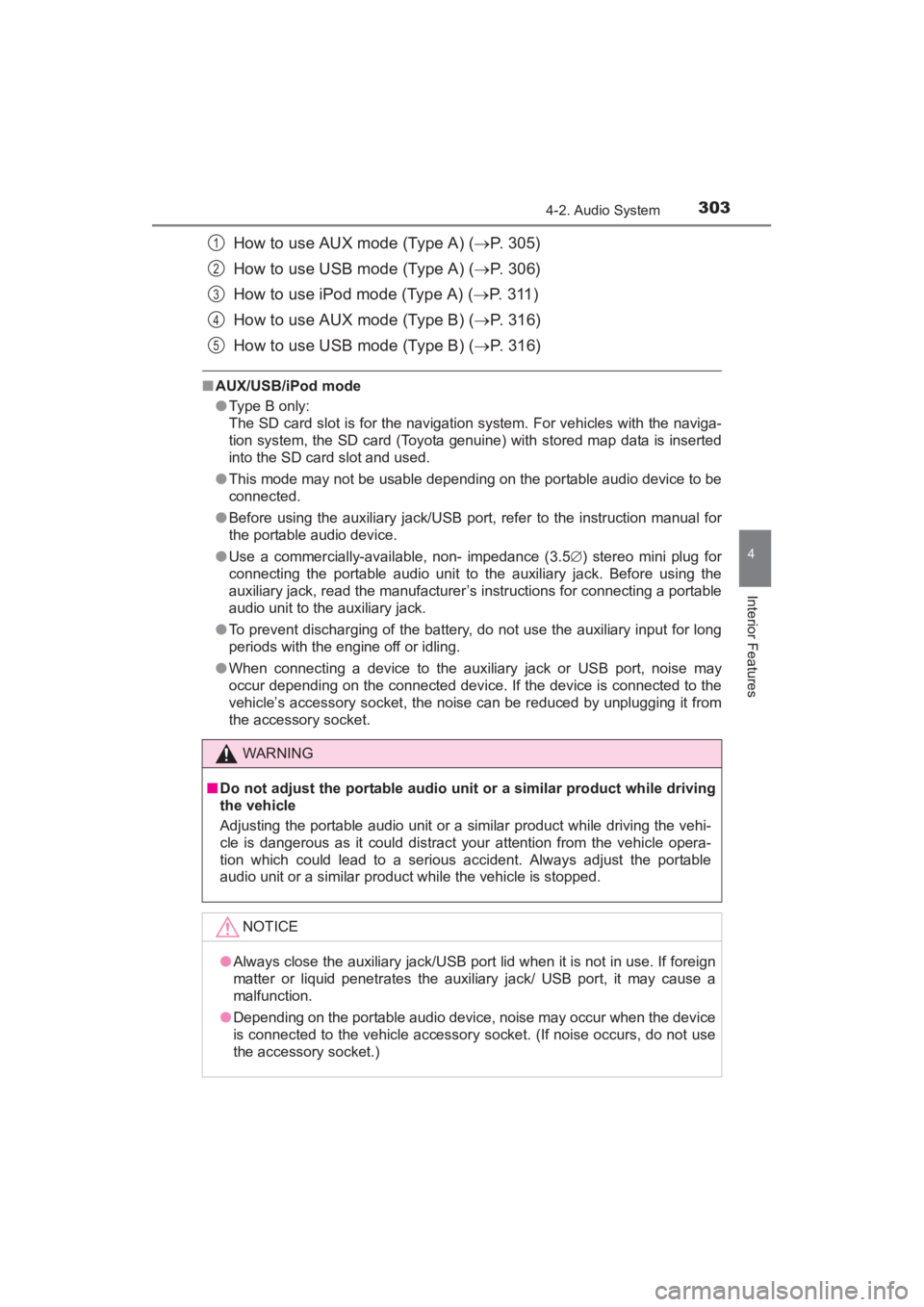
How to use AUX mode (Type A) (→P. 305)
How to use USB mode (Type A) ( →P. 306)
How to use iPod mode (Type A) ( →P. 3 1 1 )
How to use AUX mode (Type B) ( →P. 316)
How to use USB mode (Type B) ( →P. 316)
■AUX/USB/iPod mode
●Type B only:
The SD card slot is for the navigation system. For vehicles with the naviga-
tion system, the SD card (Toyota genuine) with stored map data is inserted
into the SD card slot and used.
● This mode may not be usable depending on the portable audio device to be
connected.
● Before using the auxiliary jack/USB port, refer to the instruction manual for
the portable audio device.
● Use a commercially-available, non- impedance (3.5 ∅) stereo mini plug for
connecting the portable audio unit to the auxiliary jack. Before using the
auxiliary jack, read the manufacturer’s instructions for connecting a portable
audio unit to the auxiliary jack.
● To prevent discharging of the battery, do not use the auxiliary input for long
periods with the engine off or idling.
● When connecting a device to the auxiliary jack or USB port, noise may
occur depending on the connected device. If the device is connected to the
vehicle’s accessory socket, the noise can be reduced by unplugging it from
the accessory socket.
WARNING
■Do not adjust the portable audio unit or a similar product while driving
the vehicle
Adjusting the portable audio unit or a similar product while driving the vehi-
cle is dangerous as it could distract your attention from the vehicle opera-
tion which could lead to a serious accident. Always adjust the portable
audio unit or a similar product while the vehicle is stopped.
NOTICE
●Always close the auxiliary jack/USB port lid when it is not in use. If foreign
matter or liquid penetrates the auxiliary jack/ USB port, it may cause a
malfunction.
● Depending on the portable audio device, noise may occur when the device
is connected to the vehicle accessory socket. (If noise occurs, do not use
the accessory socket.)
1
2
3
4
5
YARIS_SEDAN_OM_OM99M18z_(U).book Page 303 Monday, June 1, 2015 9:22 PM
Page 404 of 592
402
YARIS_SEDAN_OM_OM99M18z_(U)
4-3. Bluetooth®
*1Setting which detects the existence of a device external to the Bluetooth®
unit
●When the OS of the device is updated, the pairing information may be
deleted. If this happens, reprogram the pairing information to the Bluetooth®
unit.
● If you pair your phone which has already been paired to your vehicle more
than once in the past, you need to delete “Toyota” on your mobile device.
Then, execute the Bluetooth
® search on your mobile device once again,
and pair to a newly detected “Toyota”.
● Before you pair your device, make sure that Bluetooth
® is “ON”, both on
your phone and on the vehicle.
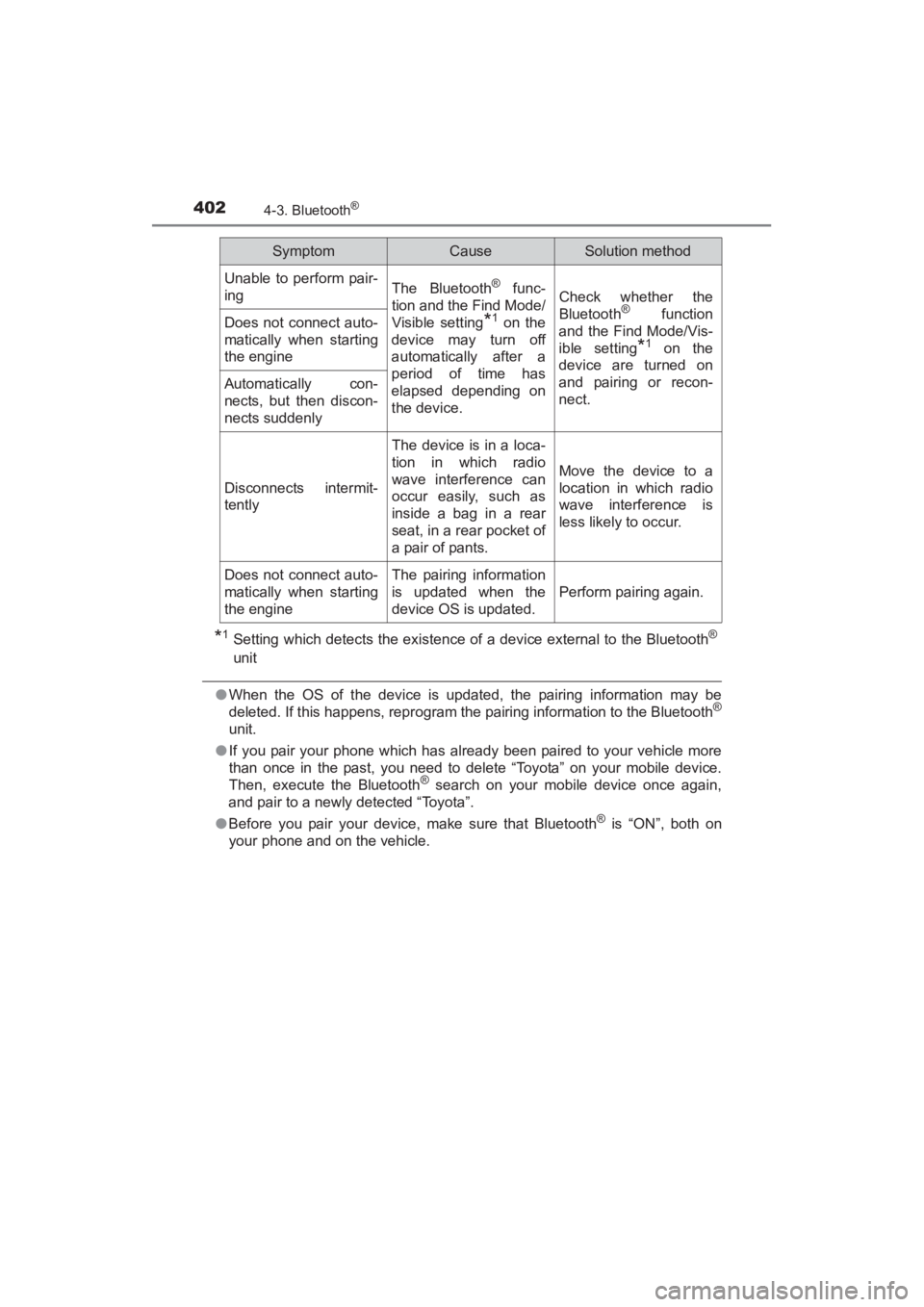
Unable to perform pair-
ingThe Bluetooth® func-
tion and the Find Mode/
Visible setting
*1 on the
device may turn off
automatically after a
period of time has
elapsed depending on
the device.
Check whether the
Bluetooth® function
and the Find Mode/Vis-
ible setting
*1 on the
device are turned on
and pairing or recon-
nect.
Does not connect auto-
matically when starting
the engine
Automatically con-
nects, but then discon-
nects suddenly
Disconnects intermit-
tently
The device is in a loca-
tion in which radio
wave interference can
occur easily, such as
inside a bag in a rear
seat, in a rear pocket of
a pair of pants.
Move the device to a
location in which radio
wave interference is
less likely to occur.
Does not connect auto-
matically when starting
the engineThe pairing information
is updated when the
device OS is updated.
Perform pairing again.
SymptomCauseSolution method
YARIS_SEDAN_OM_OM99M18z_(U).book Page 402 Monday, June 1, 2015 9:22 PM
Page 406 of 592
404
YARIS_SEDAN_OM_OM99M18z_(U)
4-3. Bluetooth®
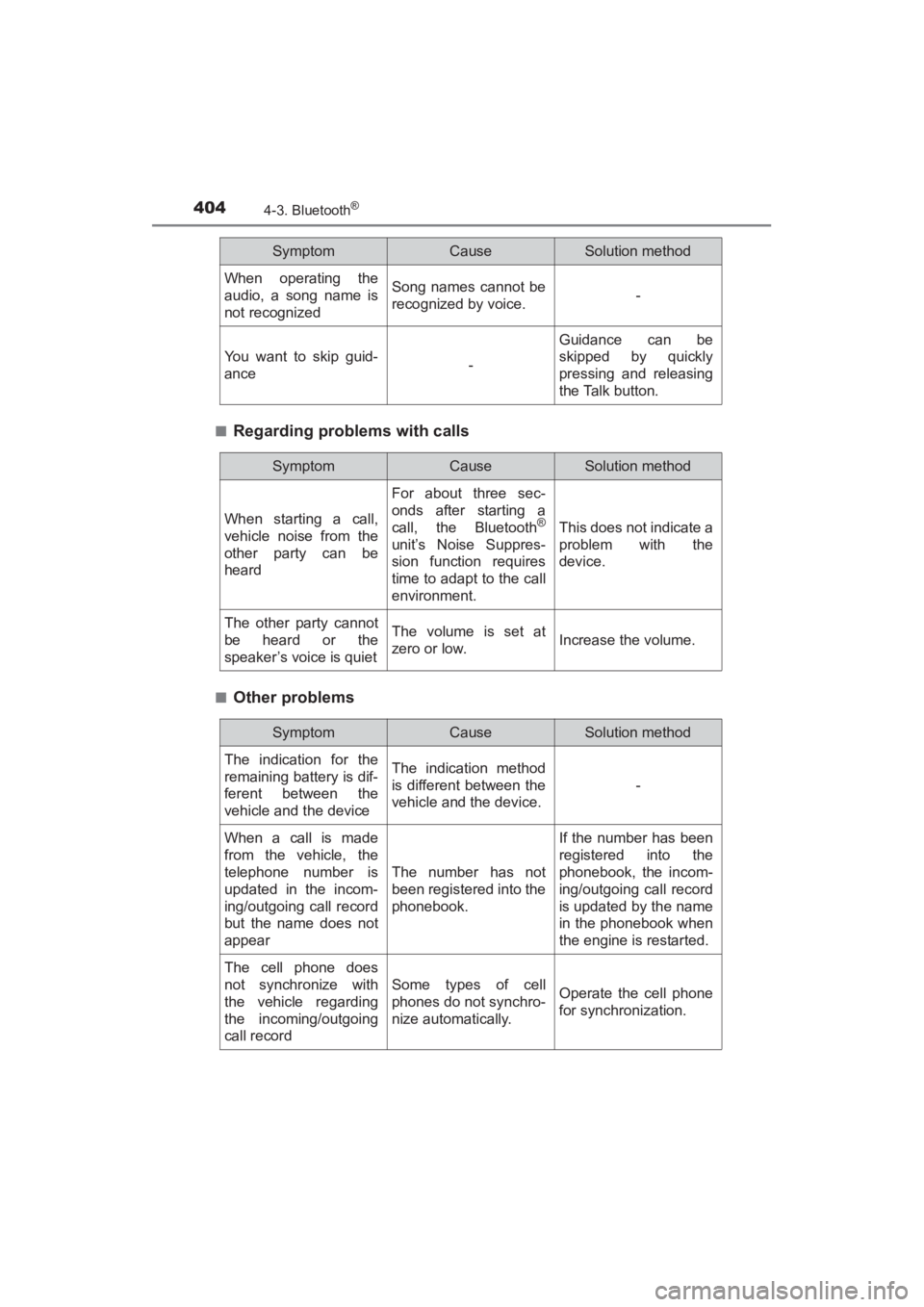
■Regarding problems with calls
■Other problems
When operating the
audio, a song name is
not recognizedSong names cannot be
recognized by voice.-
You want to skip guid-
ance-
Guidance can be
skipped by quickly
pressing and releasing
the Talk button.
SymptomCauseSolution method
SymptomCauseSolution method
When starting a call,
vehicle noise from the
other party can be
heard
For about three sec-
onds after starting a
call, the Bluetooth
®
unit’s Noise Suppres-
sion function requires
time to adapt to the call
environment.
This does not indicate a
problem with the
device.
The other party cannot
be heard or the
speaker’s voice is quietThe volume is set at
zero or low.Increase the volume.
SymptomCauseSolution method
The indication for the
remaining battery is dif-
ferent between the
vehicle and the deviceThe indication method
is different between the
vehicle and the device.
-
When a call is made
from the vehicle, the
telephone number is
updated in the incom-
ing/outgoing call record
but the name does not
appear
The number has not
been registered into the
phonebook.
If the number has been
registered into the
phonebook, the incom-
ing/outgoing call record
is updated by the name
in the phonebook when
the engine is restarted.
The cell phone does
not synchronize with
the vehicle regarding
the incoming/outgoing
call record
Some types of cell
phones do not synchro-
nize automatically.Operate the cell phone
for synchronization.
YARIS_SEDAN_OM_OM99M18z_(U).book Page 404 Monday, June 1, 2015 9:22 PM
Page 410 of 592
408
YARIS_SEDAN_OM_OM99M18z_(U)
4-4. Interior Equipment
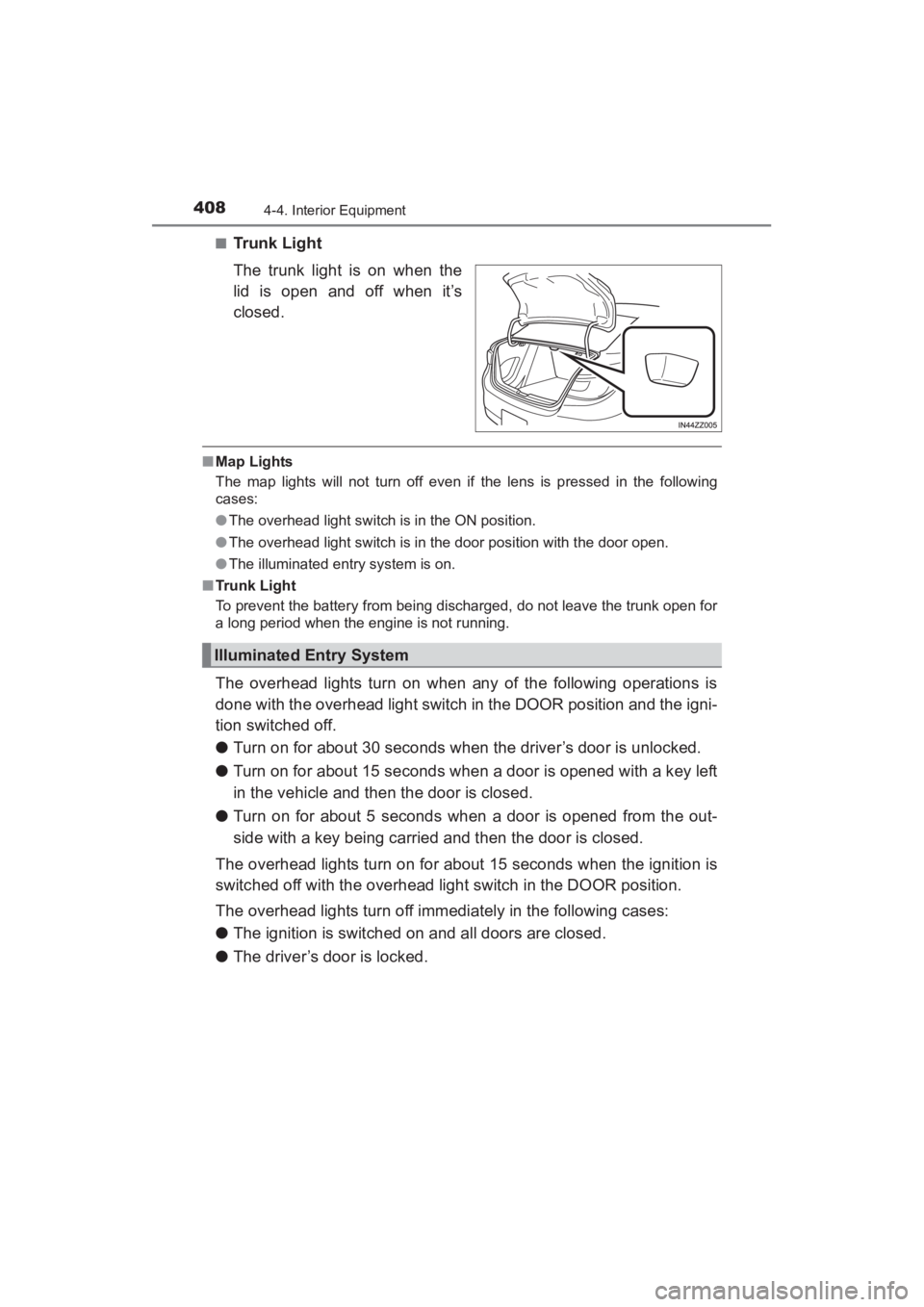
■Trunk Light
The trunk light is on when the
lid is open and off when it’s
closed.
■Map Lights
The map lights will not turn off even if the lens is pressed in the following
cases:
●The overhead light switch is in the ON position.
● The overhead light switch is in the door position with the door open.
● The illuminated entry system is on.
■ Trunk Light
To prevent the battery from being discharged, do not leave the trunk open for
a long period when the engine is not running.
The overhead lights turn on when any of the following operations is
done with the overhead light switch in the DOOR position and the igni-
tion switched off.
● Turn on for about 30 seconds when the driver’s door is unlocked.
● Turn on for about 15 seconds when a door is opened with a key left
in the vehicle and then the door is closed.
● Turn on for about 5 seconds when a door is opened from the out-
side with a key being carried and then the door is closed.
The overhead lights turn on for about 15 seconds when the ignition is
switched off with the overhead light switch in the DOOR position.
The overhead lights turn off immediately in the following cases:
● The ignition is switched on and all doors are closed.
● The driver’s door is locked.
Illuminated Entry System
YARIS_SEDAN_OM_OM99M18z_(U).book Page 408 Monday, June 1, 2015 9:22 PM
Page 412 of 592
410
YARIS_SEDAN_OM_OM99M18z_(U)
4-4. Interior Equipment
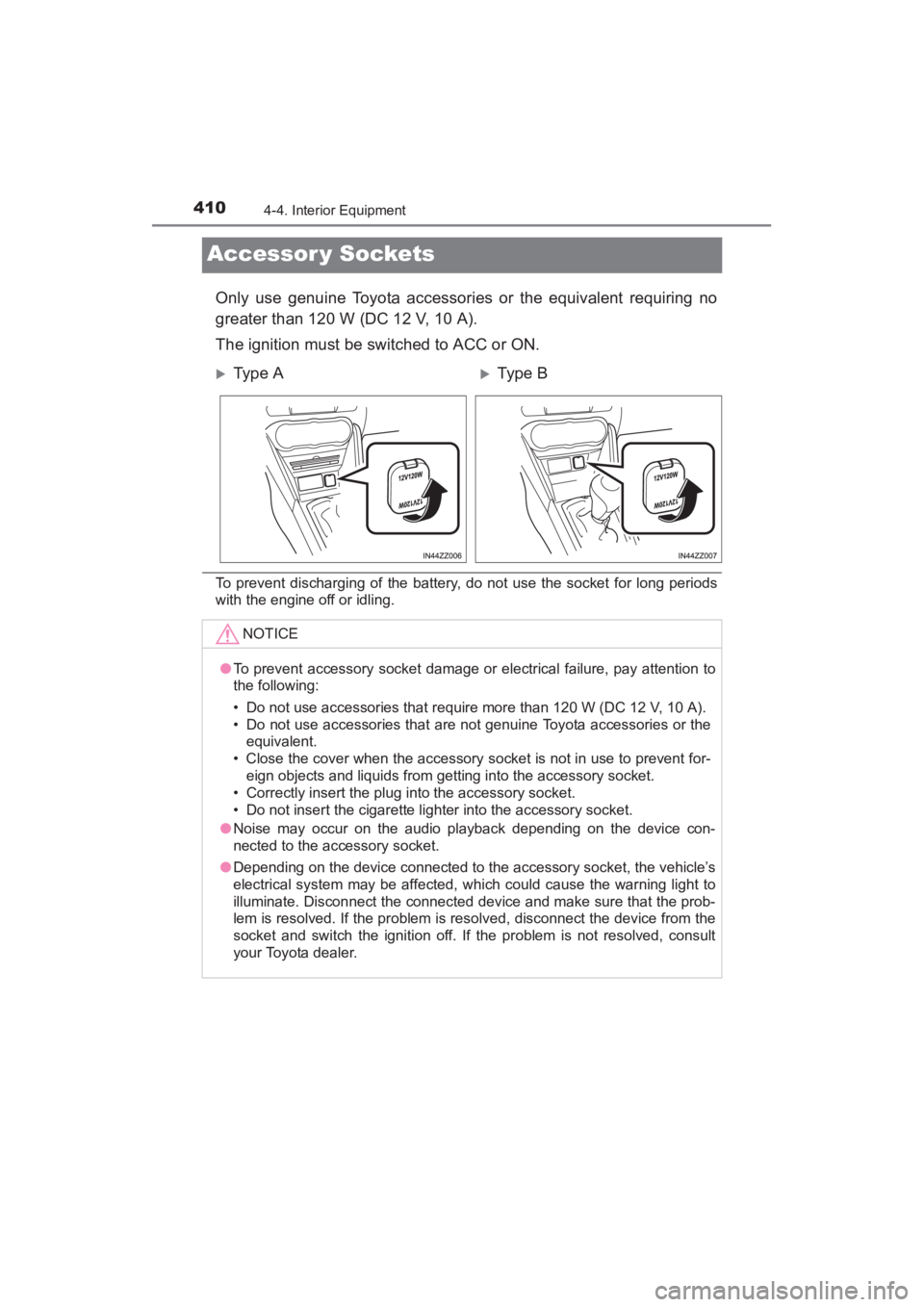
Accessor y Sockets
Only use genuine Toyota accessories or the equivalent requiring no
greater than 120 W (DC 12 V, 10 A).
The ignition must be switched to ACC or ON.
To prevent discharging of the battery, do not use the socket for long periods
with the engine off or idling.
XType AXTy pe B
NOTICE
●To prevent accessory socket damage or electrical failure, pay attention to
the following:
• Do not use accessories that require more than 120 W (DC 12 V, 10 A).
• Do not use accessories that are not genuine Toyota accessories or the
equivalent.
• Close the cover when the accessory socket is not in use to prevent for- eign objects and liquids from getting into the accessory socket.
• Correctly insert the plug into the accessory socket.
• Do not insert the cigarette lighter into the accessory socket.
● Noise may occur on the audio playback depending on the device con-
nected to the accessory socket.
● Depending on the device connected to the accessory socket, the vehicle’s
electrical system may be affected, which could cause the warning light to
illuminate. Disconnect the connected device and make sure that the prob-
lem is resolved. If the problem is resolved, disconnect the device from the
socket and switch the ignition off. If the problem is not resolved, consult
your Toyota dealer.
YARIS_SEDAN_OM_OM99M18z_(U).book Page 410 Monday, June 1, 2015 9:22 PM
Page 419 of 592
417
YARIS_SEDAN_OM_OM99M18z_(U)
5Maintenance and Care
5-1. Essential InformationIntroduction ....................... 418
5-2. Scheduled Maintenance Maintenance Monitor ........ 420
5-3. Owner Maintenance Owner Maintenance Precautions ..................... 424
Hood ................................. 426
Engine Compartment Overview ......................... 428
Engine Oil ......................... 429
Engine Coolant ................. 431
Brake/Clutch Fluid............. 434
Window Washer Fluid ....... 435
Body Lubrication ............... 436
Wiper Blades..................... 437
Battery............................... 440
Key Battery Replacement ................... 443
Tires .................................. 446
Light Bulbs ........................ 451
Fuses ................................ 460
5-4. Appearance Care Exterior Care ..................... 468
Interior Care ...................... 476
YARIS_SEDAN_OM_OM99M18z_(U).book Page 417 Monday, June 1, 2015 9:22 PM
Page 422 of 592
420
YARIS_SEDAN_OM_OM99M18z_(U)
5-2. Scheduled Maintenance
Maintenance Monitor
“Oil Change” with a flexible setting*1 is available. Consult your Autho-
rized Toyota Dealer when you want to change the setting
*2. Once the
system turns on, the wrench indicator light in the instrument cluster
will be illuminated when remaining oil life becomes less than
300 miles (500 km), or remaining days are less than 15 (whichever
comes first).
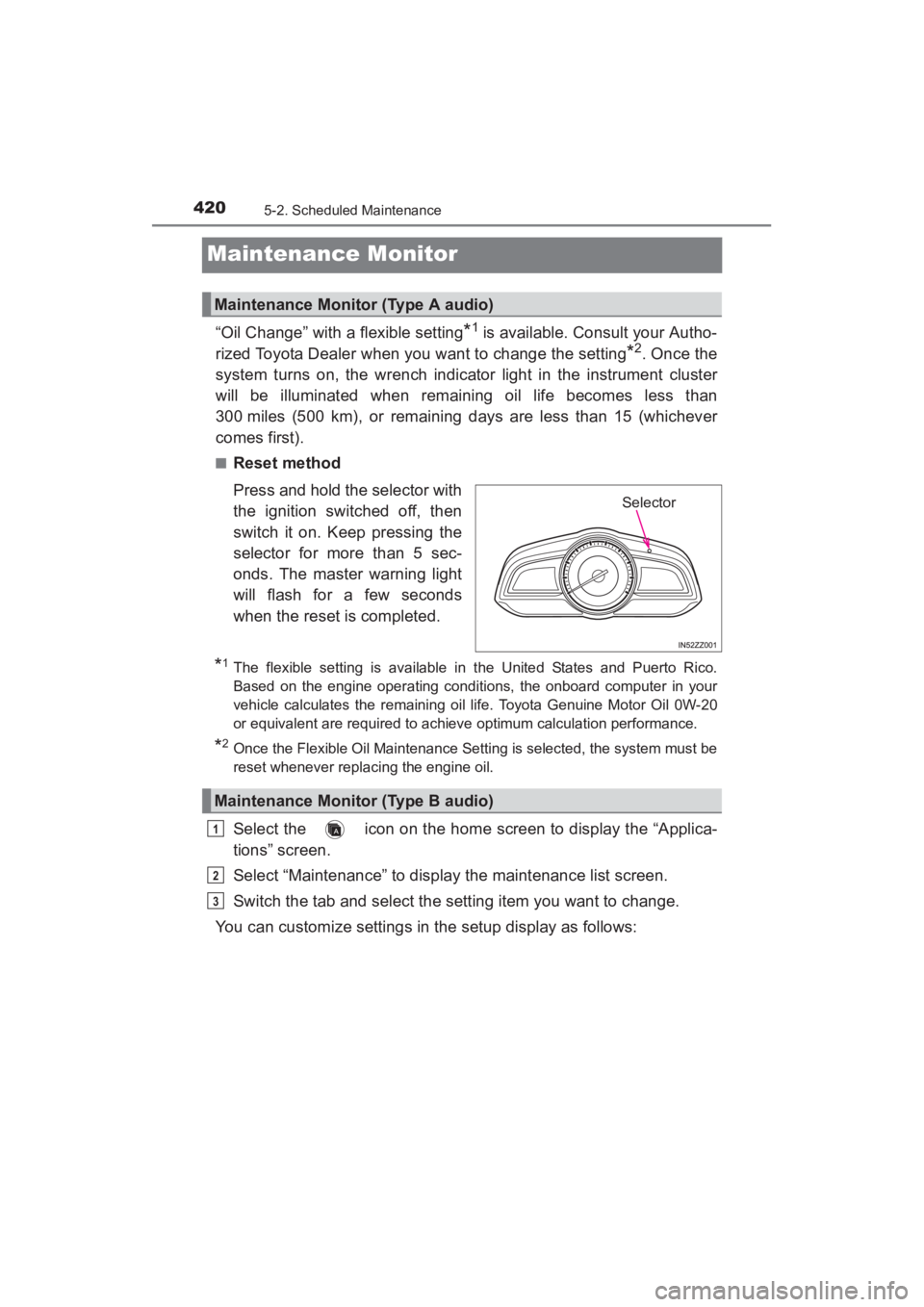
■Reset method
Press and hold the selector with
the ignition switched off, then
switch it on. Keep pressing the
selector for more than 5 sec-
onds. The master warning light
will flash for a few seconds
when the reset is completed.
*1The flexible setting is available in the United States and Puerto Rico.
Based on the engine operating conditions, the onboard computer in your
vehicle calculates the remaining oil life. Toyota Genuine Motor Oil 0W-20
or equivalent are required to achiev e optimum calculation performance.
*2Once the Flexible Oil Maintenance Setting is selected, the system must be
reset whenever replacing the engine oil.
Select the icon on the home screen to display the “Applica-
tions” screen.
Select “Maintenance” to display the maintenance list screen.
Switch the tab and select the setting item you want to change.
You can customize settings in the setup display as follows:
Maintenance Monitor (Type A audio)
Selector
Maintenance Monitor (Type B audio)
1
2
3
YARIS_SEDAN_OM_OM99M18z_(U).book Page 420 Monday, June 1, 2015 9:22 PM
Page 424 of 592
4225-2. Scheduled Maintenance
YARIS_SEDAN_OM_OM99M18z_(U)
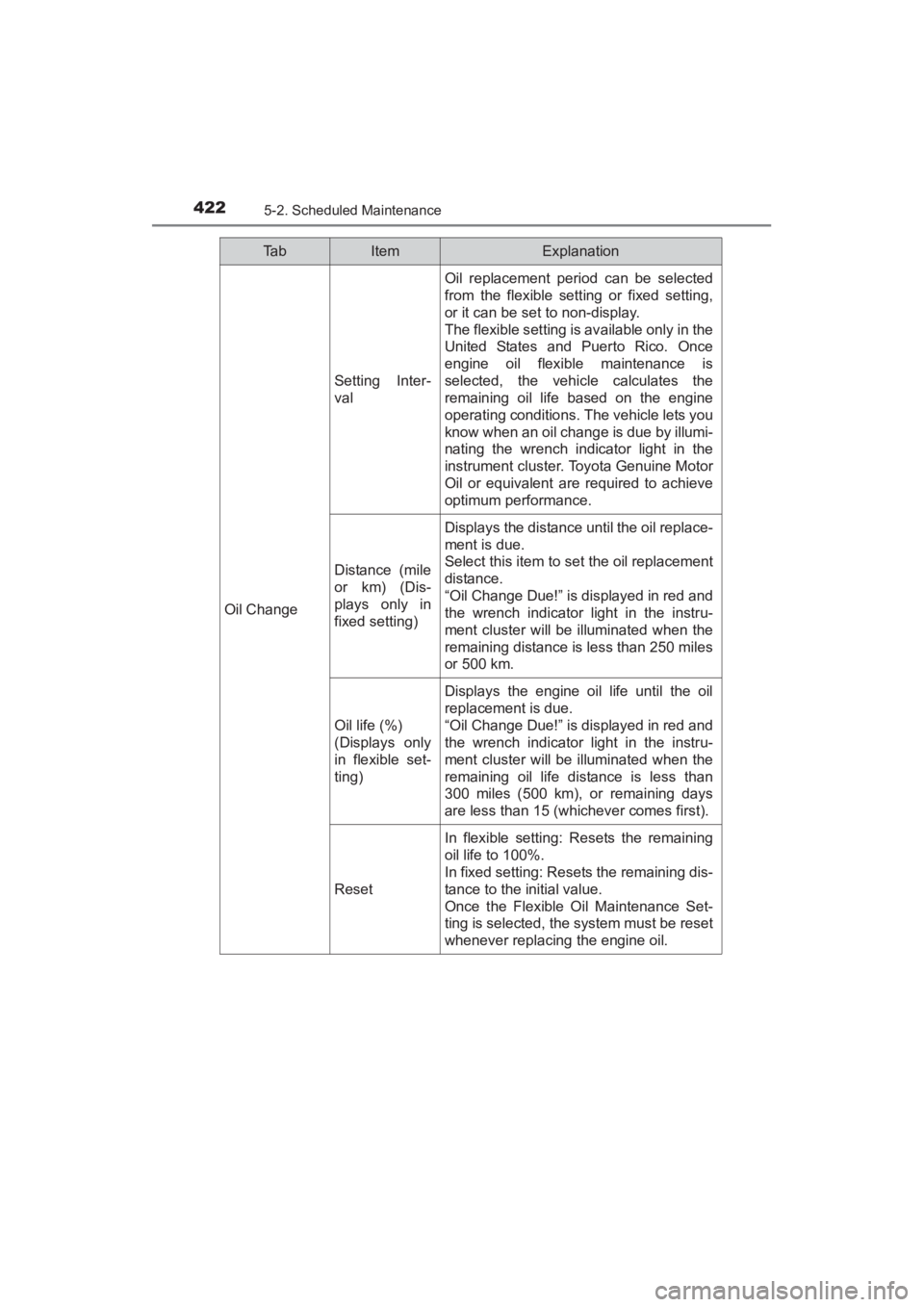
Oil Change
Setting Inter-
val
Oil replacement period can be selected
from the flexible setting or fixed setting,
or it can be set to non-display.
The flexible setting is available only in the
United States and Puerto Rico. Once
engine oil flexible maintenance is
selected, the vehicle calculates the
remaining oil life based on the engine
operating conditions. The vehicle lets you
know when an oil change is due by illumi-
nating the wrench indicator light in the
instrument cluster. Toyota Genuine Motor
Oil or equivalent are required to achieve
optimum performance.
Distance (mile
or km) (Dis-
plays only in
fixed setting)
Displays the distance until the oil replace-
ment is due.
Select this item to set the oil replacement
distance.
“Oil Change Due!” is displayed in red and
the wrench indicator light in the instru-
ment cluster will be illuminated when the
remaining distance is less than 250 miles
or 500 km.
Oil life (%)
(Displays only
in flexible set-
ting)
Displays the engine oil life until the oil
replacement is due.
“Oil Change Due!” is displayed in red and
the wrench indicator light in the instru-
ment cluster will be illuminated when the
remaining oil life distance is less than
300 miles (500 km), or remaining days
are less than 15 (whichever comes first).
Reset
In flexible setting: Resets the remaining
oil life to 100%.
In fixed setting: Resets the remaining dis-
tance to the initial value.
Once the Flexible Oil Maintenance Set-
ting is selected, the system must be reset
whenever replacing the engine oil.
Ta bItemExplanation
YARIS_SEDAN_OM_OM99M18z_(U).book Page 422 Monday, June 1, 2015 9:22 PM
Page 425 of 592
YARIS_SEDAN_OM_OM99M18z_(U)
4235-2. Scheduled Maintenance
5
Maintenance and Care
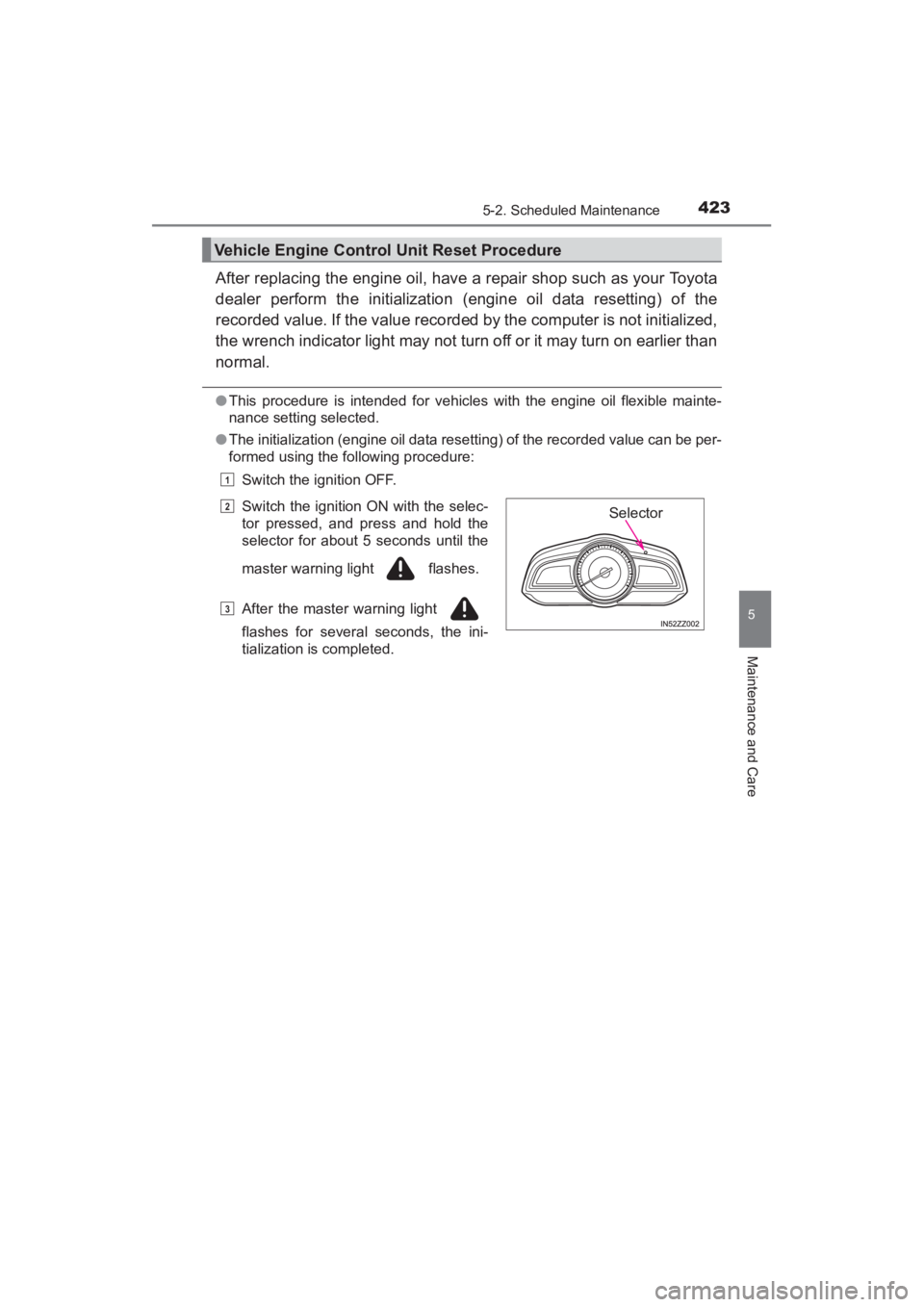
After replacing the engine oil, have a repair shop such as your Toyota
dealer perform the initialization (engine oil data resetting) of the
recorded value. If the value recorded by the computer is not initialized,
the wrench indicator light may not turn off or it may turn on earlier than
normal.
●This procedure is intended for vehicles with the engine oil flexible mainte-
nance setting selected.
● The initialization (engine oil data resetting) of the recorded value can be per-
formed using the following procedure:
Switch the ignition OFF.
Vehicle Engine Control Unit Reset Procedure
Switch the ignition ON with the selec-
tor pressed, and press and hold the
selector for about 5 seconds until the
master warning light flashes.
After the master warning light
flashes for several seconds, the ini-
tialization is completed.
1
2
3
Selector
YARIS_SEDAN_OM_OM99M18z_(U).book Page 423 Monday, June 1, 2015 9:22 PM