clock setting TOYOTA YARIS 2016 Owners Manual
[x] Cancel search | Manufacturer: TOYOTA, Model Year: 2016, Model line: YARIS, Model: TOYOTA YARIS 2016Pages: 592, PDF Size: 10.44 MB
Page 263 of 592
YARIS_SEDAN_OM_OM99M18z_(U)
2614-2. Audio System
4
Interior Features
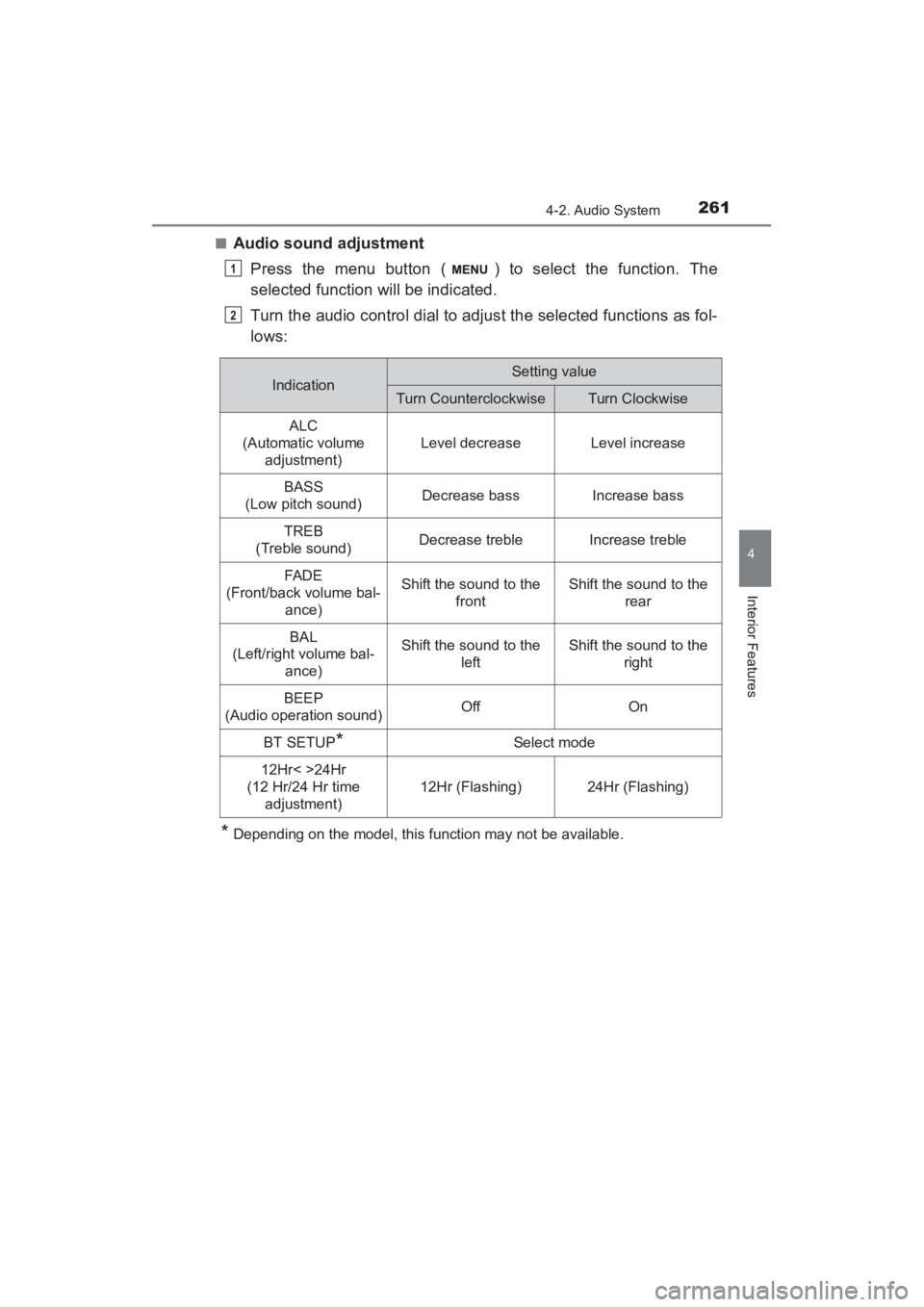
■Audio sound adjustmentPress the menu button ( ) to select the function. The
selected function will be indicated.
Turn the audio control dial to adjust the selected functions as fol-
lows:
*Depending on the model, this function may not be available.
1
2
IndicationSetting value
Turn CounterclockwiseTurn Clockwise
ALC
(Automatic volume adjustment)
Level decreaseLevel increase
BASS
(Low pitch sound)Decrease bassIncrease bass
TREB
(Treble sound)Decrease trebleIncrease treble
FAD E
(Front/back volume bal- ance)Shift the sound to the frontShift the sound to the rear
BAL
(Left/right volume bal-
ance)Shift the sound to the leftShift the sound to the right
BEEP
(Audio operation sound)OffOn
BT SETUP*Select mode
12Hr< >24Hr
(12 Hr/24 Hr time adjustment)
12Hr (Flashing)24Hr (Flashing)
YARIS_SEDAN_OM_OM99M18z_(U).book Page 261 Monday, June 1, 2015 9:22 PM
Page 264 of 592
262
YARIS_SEDAN_OM_OM99M18z_(U)
4-2. Audio System
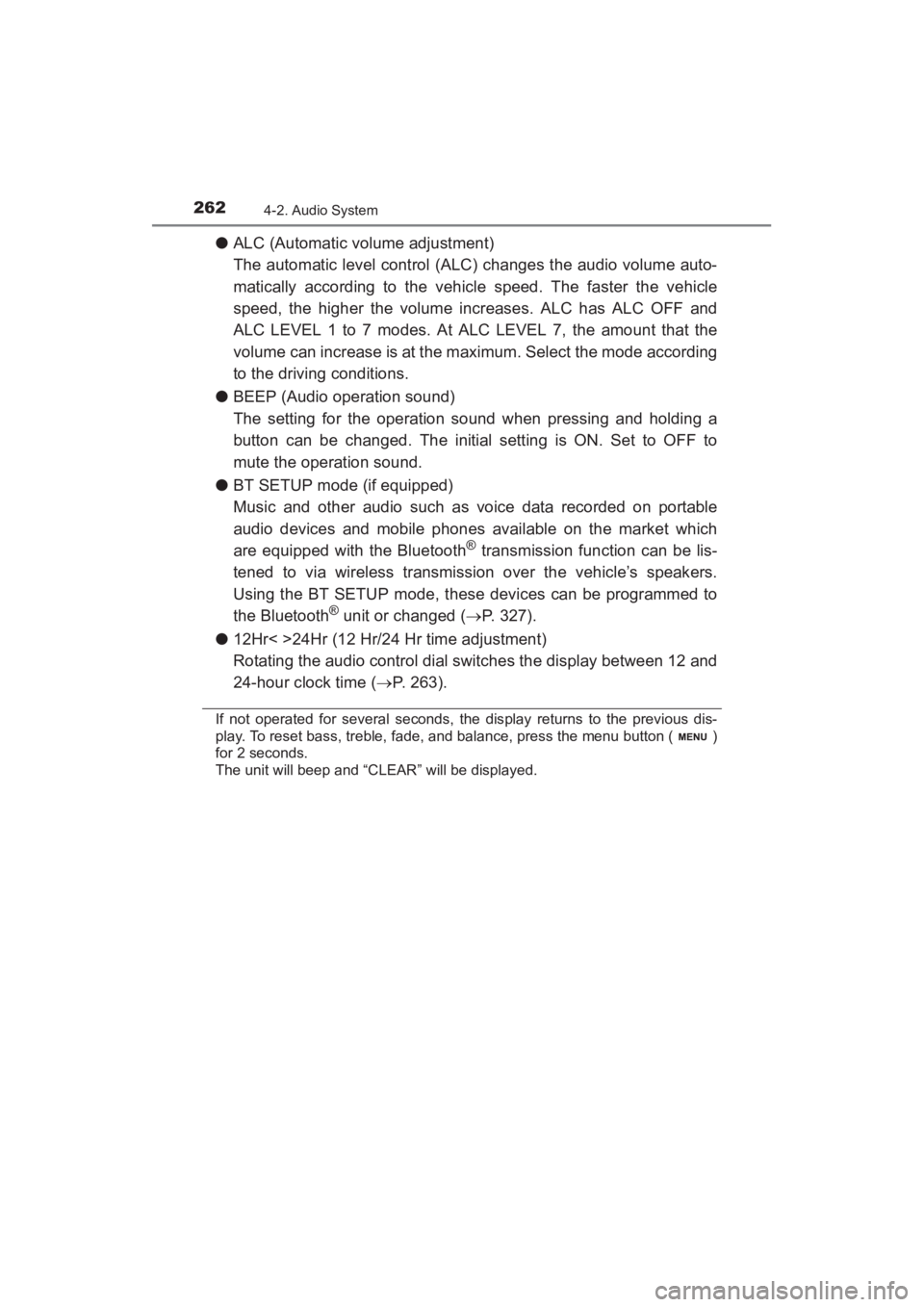
●ALC (Automatic volume adjustment)
The automatic level control (ALC) changes the audio volume auto-
matically according to the vehicle speed. The faster the vehicle
speed, the higher the volume increases. ALC has ALC OFF and
ALC LEVEL 1 to 7 modes. At ALC LEVEL 7, the amount that the
volume can increase is at the maximum. Select the mode according
to the driving conditions.
● BEEP (Audio operation sound)
The setting for the operation sound when pressing and holding a
button can be changed. The initial setting is ON. Set to OFF to
mute the operation sound.
● BT SETUP mode (if equipped)
Music and other audio such as voice data recorded on portable
audio devices and mobile phones available on the market which
are equipped with the Bluetooth
® transmission function can be lis-
tened to via wireless transmission over the vehicle’s speakers.
Using the BT SETUP mode, these devices can be programmed to
the Bluetooth
® unit or changed ( →P. 327).
● 12Hr< >24Hr (12 Hr/24 Hr time adjustment)
Rotating the audio control dial switches the display between 12 and
24-hour clock time ( →P. 263).
If not operated for several seconds, the display returns to the previous dis-
play. To reset bass, treble, fade, and balance, press the menu button ( )
for 2 seconds.
The unit will beep and “CLEAR” will be displayed.
YARIS_SEDAN_OM_OM99M18z_(U).book Page 262 Monday, June 1, 2015 9:22 PM
Page 265 of 592
YARIS_SEDAN_OM_OM99M18z_(U)
2634-2. Audio System
4
Interior Features
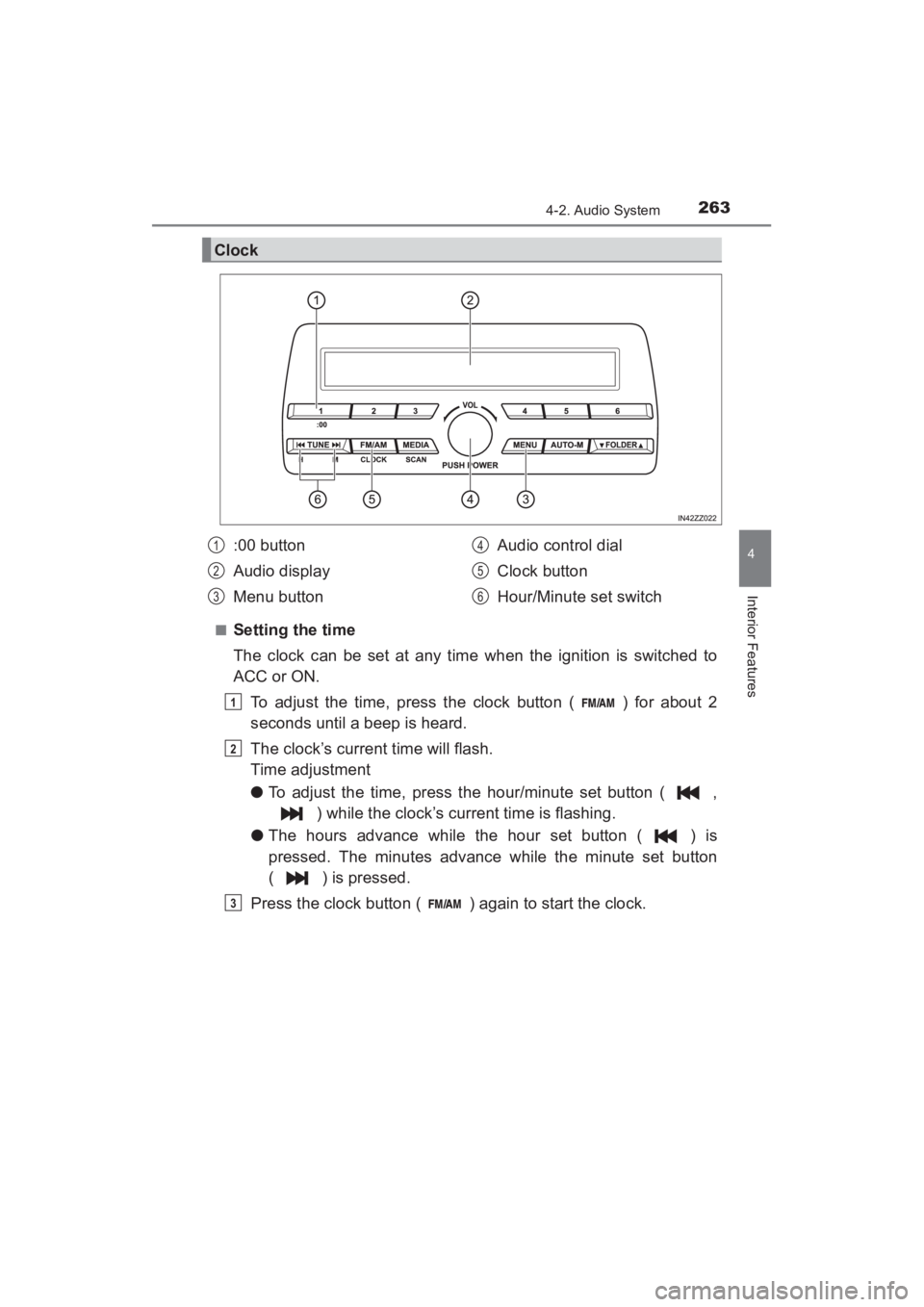
■Setting the time
The clock can be set at any time when the ignition is switched to
ACC or ON.To adjust the time, press the clock button ( ) for about 2
seconds until a beep is heard.
The clock’s current time will flash.
Time adjustment
● To adjust the time, press the hour/minute set button ( ,
) while the clock’s current time is flashing.
● The hours advance while the hour set button ( ) is
pressed. The minutes advance while the minute set button
( ) is pressed.
Press the clock button ( ) again to start the clock.
Clock
:00 button
Audio display
Menu button Audio control dial
Clock button
Hour/Minute set switch1
2
3
4
5
6
1
2
3
YARIS_SEDAN_OM_OM99M18z_(U).book Page 263 Monday, June 1, 2015 9:22 PM
Page 266 of 592
264
YARIS_SEDAN_OM_OM99M18z_(U)
4-2. Audio System
■Time resettingPress the clock button ( ) for about 2 seconds until a beep
is heard.
Press the :00 button (1).
When the button is pressed, the time will be reset as follows:
(Example) 12:01 - 12:29 →12:00
12:30 - 12:59 →1:00
●When the :00 button (1) is pressed, the seconds will start at “00”.
● Switching between 12 and 24-hour clock time:
Press the menu button ( ) several times until 12 and 24-hour clock time
are displayed. Turn the audio control dial in either direction, select the
desired clock setting while the preferred clock time is flashing.
■
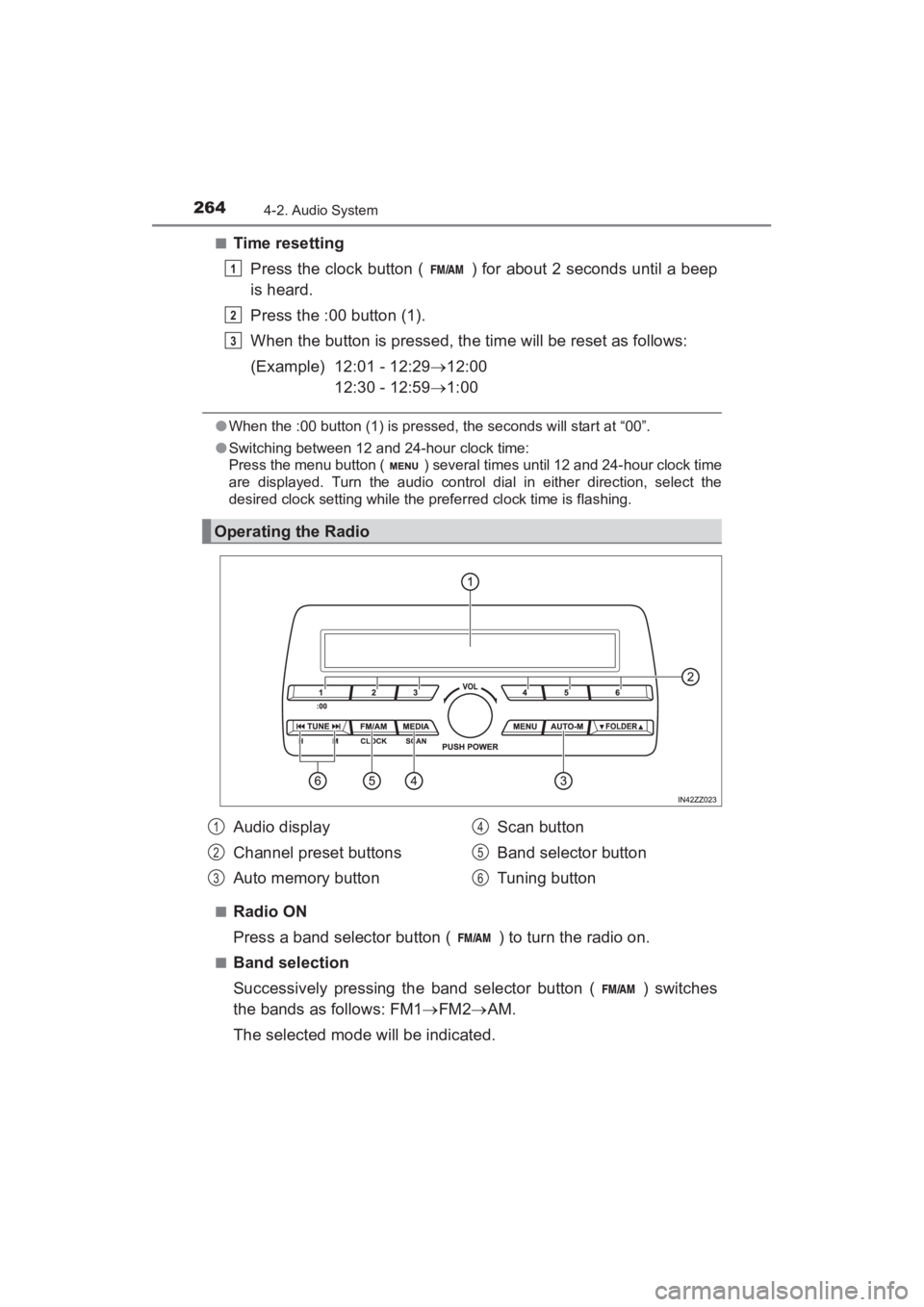
Radio ON
Press a band selector button ( ) to turn the radio on.
■Band selection
Successively pressing the band selector button ( ) switches
the bands as follows: FM1 →FM2 →AM.
The selected mode will be indicated.
Operating the Radio
1
2
3
Audio display
Channel preset buttons
Auto memory button Scan button
Band selector button
Tuning button1
2
3
4
5
6
YARIS_SEDAN_OM_OM99M18z_(U).book Page 264 Monday, June 1, 2015 9:22 PM
Page 282 of 592
280
YARIS_SEDAN_OM_OM99M18z_(U)
4-2. Audio System
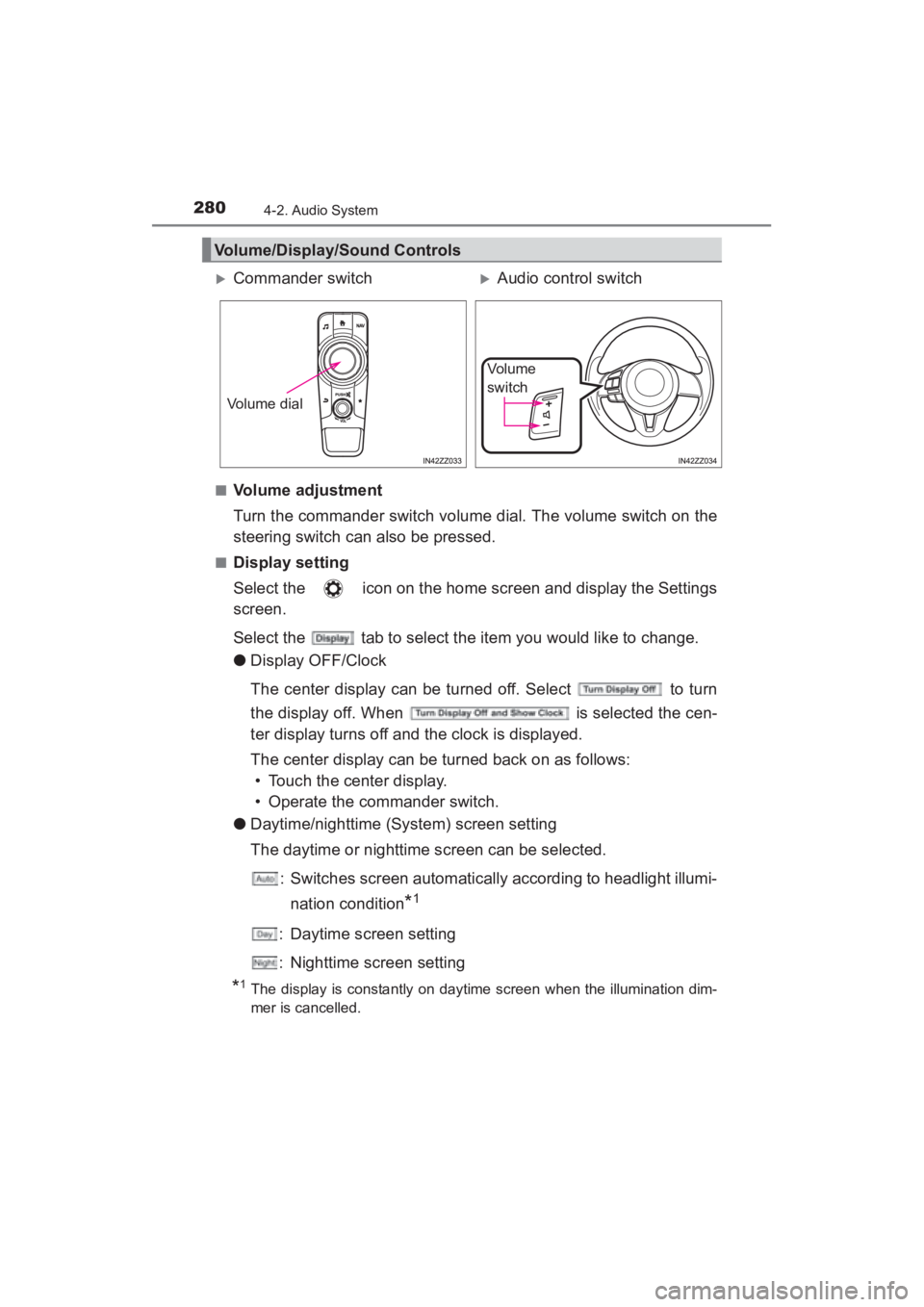
■Volume adjustment
Turn the commander switch volume dial. The volume switch on the
steering switch can also be pressed.
■Display setting
Select the icon on the home screen and display the Settings
screen.
Select the tab to select the item you would like to change.
●Display OFF/Clock
The center display can be turned off. Select to turn
the display off. When is selected the cen-
ter display turns off and the clock is displayed.
The center display can be turned back on as follows:
• Touch the center display.
• Operate the commander switch.
● Daytime/nighttime (System) screen setting
The daytime or nighttime screen can be selected.
: Switches screen automatically according to headlight illumi-nation condition
*1
: Daytime screen setting
: Nighttime screen setting
*1The display is constantly on daytime screen when the illumination dim-
mer is cancelled.
Volume/Display/Sound Controls
XCommander switchXAudio control switch
Volume dial
Vo l u m e
switch
YARIS_SEDAN_OM_OM99M18z_(U).book Page 280 Monday, June 1, 2015 9:22 PM
Page 298 of 592
296
YARIS_SEDAN_OM_OM99M18z_(U)
4-2. Audio System
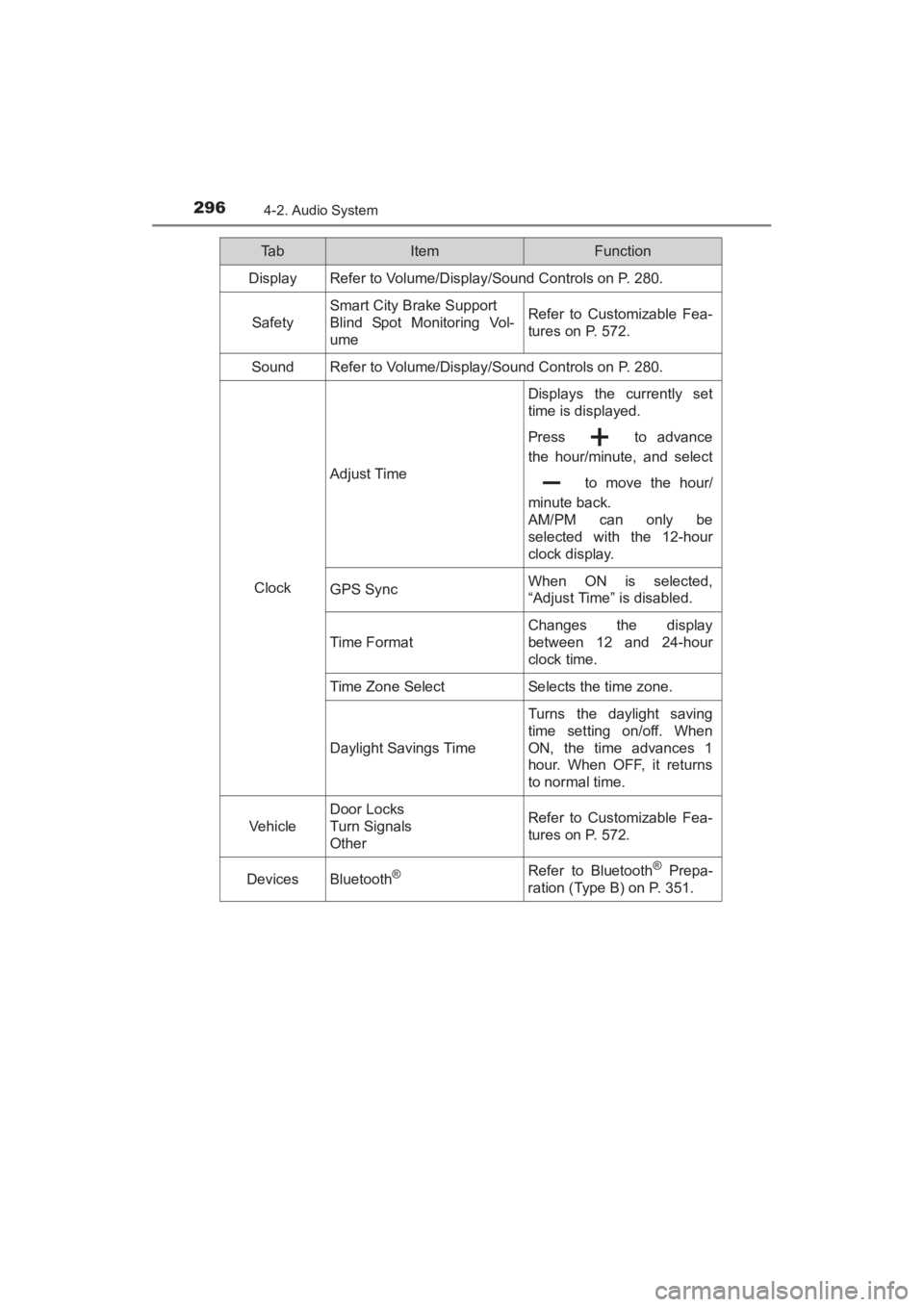
Ta bItemFunction
Display Refer to Volume/Display/Sound Controls on P. 280.
Safety
Smart City Brake Support
Blind Spot Monitoring Vol-
umeRefer to Customizable Fea-
tures on P. 572.
SoundRefer to Volume/Display/Sound Controls on P. 280.
Clock
Adjust Time
Displays the currently set
time is displayed.
Press to advance
the hour/minute, and select to move the hour/
minute back.
AM/PM can only be
selected with the 12-hour
clock display.
GPS SyncWhen ON is selected,
“Adjust Time” is disabled.
Time F ormat
Changes the display
between 12 and 24-hour
clock time.
Time Zone SelectSelects the time zone.
Daylight Savings Time
Turns the daylight saving
time setting on/off. When
ON, the time advances 1
hour. When OFF, it returns
to normal time.
Vehicle
Door Locks
Turn Signals
OtherRefer to Customizable Fea-
tures on P. 572.
DevicesBluetooth®Refer to Bluetooth® Prepa-
ration (Type B) on P. 351.
YARIS_SEDAN_OM_OM99M18z_(U).book Page 296 Monday, June 1, 2015 9:22 PM