warning TOYOTA YARIS 2016 Owners Manual
[x] Cancel search | Manufacturer: TOYOTA, Model Year: 2016, Model line: YARIS, Model: TOYOTA YARIS 2016Pages: 540, PDF Size: 34.12 MB
Page 269 of 540
2694-7. Driving tips
4
Driving
YARIS_F_WE_52G04E
■Tire chain installation
Observe the following precautions when installing and removing chains:
● Install and remove tire chains in a safe location.
● Install tire chains on the front tires only. Do not install tire chains on the rear
tires.
● Install tire chains on front tires as tightly as possible. Retighten chains after
driving 0.5 1.0 km (1/4 1/2 mile).
● Install tire chains following the instructions provided with the tire chains.
● If wheel ornaments are used, they will be scratched by the chain band, so
remove the ornaments before putting on the chains. ( P. 450)
WARNING
■Driving with snow tires
Observe the following precautions to reduce the risk of accidents.
Failure to do so may result in a loss of vehicle control and cause death or
serious injury.
● Use tires of the specified size.
● Maintain the recommended level of air pressure.
● Do not drive at speeds in excess of the speed limit or the speed limit spec-
ified for the snow tires being used.
● Use snow tires on all, not just some wheels.
● Do not use tires of noticeably different wear level.
■ Driving with tire chains
Observe the following precautions to reduce the risk of accidents.
Failure to do so may result in the vehicle being unable to be driven safely,
and may cause death or serious injury.
● Do not drive in excess of the speed limit specified for the tire chains being
used, or 50 km/h (30 mph), whichever is lower.
● Avoid driving on bumpy road surfaces or over potholes.
● Avoid sudden acceleration, abrupt steering, sudden braking and shifting
operations that cause sudden engine braking.
● Slow down sufficiently before entering a curve to ensure that vehicle con-
trol is maintained.
● Do not use LDA (Lane Departure Alert) (if equipped).
Page 274 of 540
2745-1. Basic Operations
YARIS_F_WE_52G04E
Steering wheel audio switches
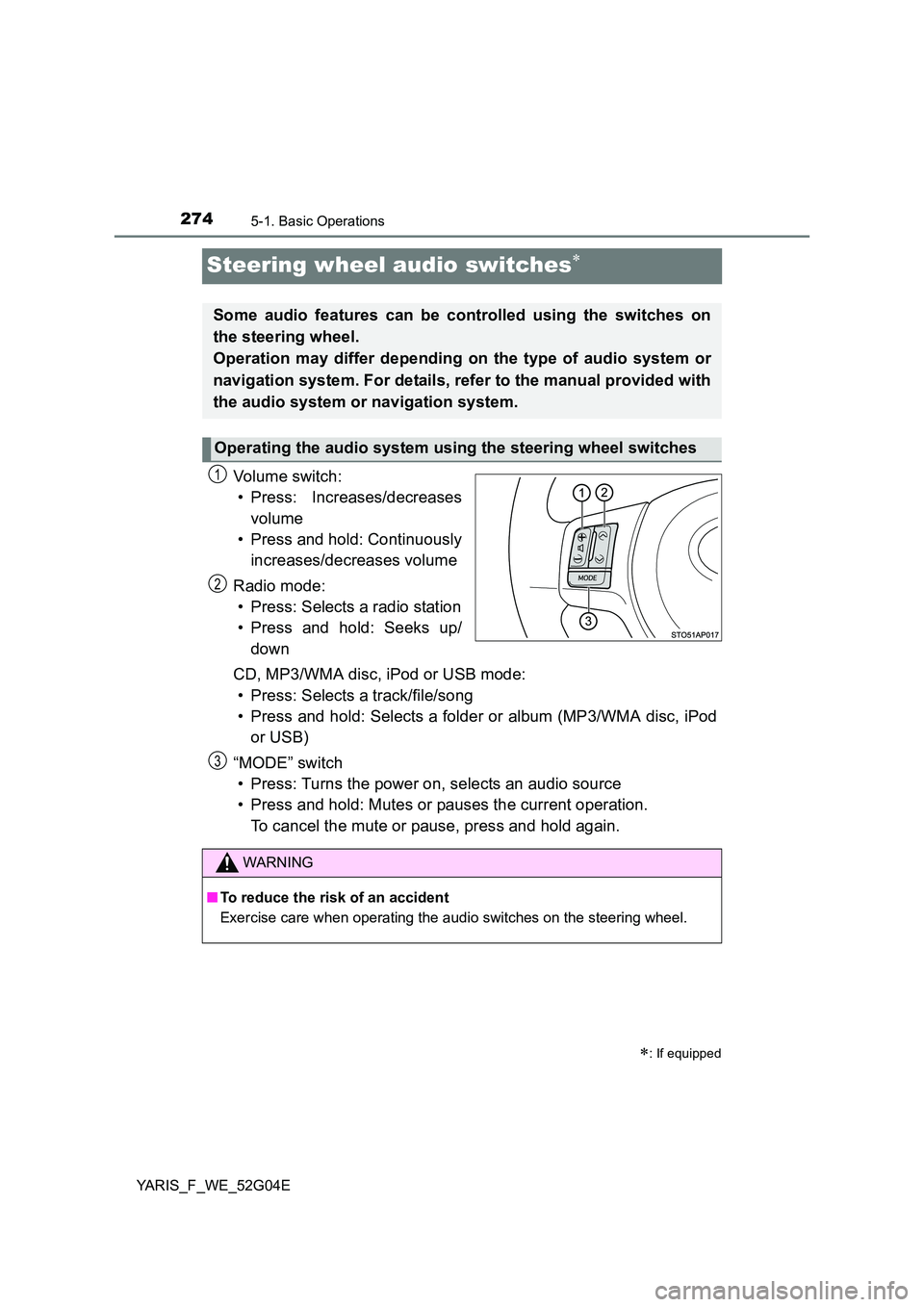
Vo lu m e swi tc h :
• Press: Increases/decreases
volume
• Press and hold: Continuously
increases/decreases volume
Radio mode:
• Press: Selects a radio station
• Press and hold: Seeks up/
down
CD, MP3/WMA disc, iPod or USB mode:
• Press: Selects a track/file/song
• Press and hold: Selects a folder or album (MP3/WMA disc, iPod
or USB)
“MODE” switch
• Press: Turns the power on, selects an audio source
• Press and hold: Mutes or pauses the current operation.
To cancel the mute or pause, press and hold again.
: If equipped
Some audio features can be controlled using the switches on
the steering wheel.
Operation may differ depending on the type of audio system or
navigation system. For details, refer to the manual provided with
the audio system or navigation system.
Operating the audio system using the steering wheel switches
1
2
WARNING
■ To reduce the risk of an accident
Exercise care when operating the audio switches on the steering wheel.
3
Page 275 of 540
275
5
5-1. Basic Operations
Audio system
YARIS_F_WE_52G04E
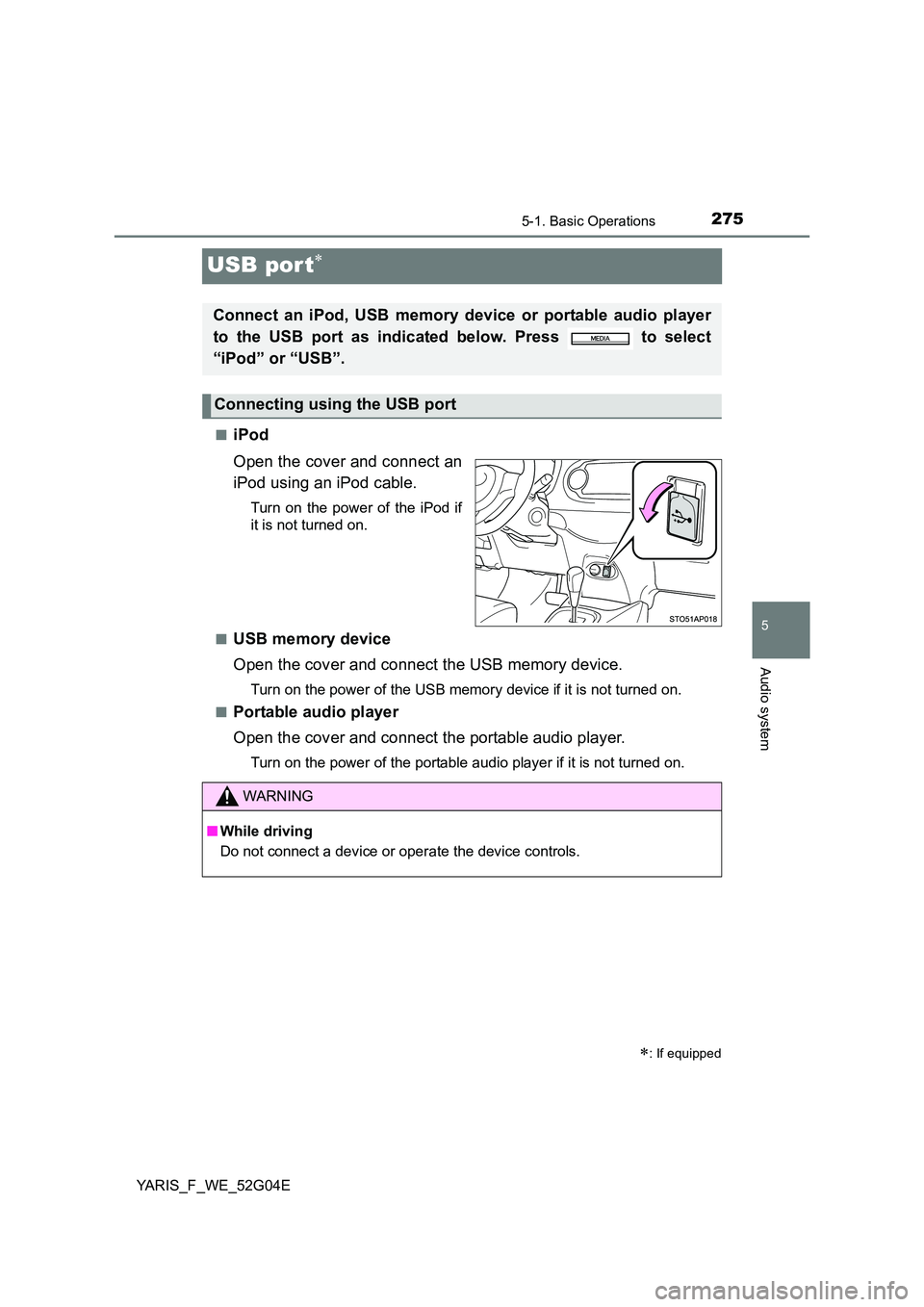
USB por t
■iPod
Open the cover and connect an
iPod using an iPod cable.
Turn on the power of the iPod if
it is not turned on.
■USB memory device
Open the cover and connect the USB memory device.
Turn on the power of the USB memory device if it is not turned on.
■Portable audio player
Open the cover and connect the portable audio player.
Turn on the power of the portable audio player if it is not turned on.
: If equipped
Connect an iPod, USB memory device or portable audio player
to the USB port as indicated below. Press to select
“iPod” or “USB”.
Connecting using the USB port
WARNING
■ While driving
Do not connect a device or operate the device controls.
Page 290 of 540
2905-4. Playing audio CDs and MP3/WMA discs
YARIS_F_WE_52G04E
WARNING
■Certification for the CD player
This product is a class I laser product.
● Do not open the cover of the player or attempt to repair the unit yourself.
Refer servicing to qualified personnel.
● Laser power: No hazardous
Page 298 of 540
2985-5. Using an external device
YARIS_F_WE_52G04E
WARNING
■Caution while driving
Do not connect iPod or operate the controls.
NOTICE
■ To prevent damage to iPod
● Do not leave iPod in the vehicle. The temperature inside the vehicle may
become high, resulting in damage to the iPod.
● Do not push down on or apply unnecessary pressure to the iPod while it is
connected as this may damage the iPod or its terminal.
● Do not insert foreign objects into the port as this may damage the iPod or
its terminal.
Page 304 of 540
3045-5. Using an external device
YARIS_F_WE_52G04E
● Playback
• To play MP3 files with steady s ound quality, we recommend a fixed bit
rate of at least 128 kbps and a sampling frequency of 44.1 kHz.
• There is a wide variety of freeware and other encoding software for MP3
and WMA files on the market, and depending on the status of the encod-
ing and the file format, poor sound quality or noise at the start of playback
may result. In some cases, playback may not be possible at all.
• Microsoft, Windows, and Windows Media are registered trademarks of
Microsoft Corporation in the U.S.A. and other countries.
WARNING
■ Caution while driving
Do not connect USB memory or operate the controls.
NOTICE
■ To prevent damage to USB memory
● Do not leave USB memory in the vehicle. The temperature inside the vehi-
cle may become high, resulting in damage to the player.
● Do not push down on or apply unnecessary pressure to the USB memory
while it is connected as this may damage the USB memory or its terminal.
● Do not insert foreign objects into the port as this may damage the USB
memory or its terminal.
Page 312 of 540
3126-1. Using the air conditioning system and defogger
YARIS_F_WE_52G04E
WARNING
■To prevent the windshield from fogging up
Do not set the air outlet selector dial to during cool air operation in
extremely humid weather. The differenc e between the temperature of the
outside air and that of the windshield can cause the outer surface of the
windshield to fog up, blocking your vision.
■ When the outside rear view mirror defoggers (if equipped) are on
Do not touch the outside surface of the rear view mirrors, as they can
become very hot and burn you.
NOTICE
■ To prevent battery discharge
Do not leave the air conditioning syst em on longer than necessary when the
engine is stopped.
Page 320 of 540
3206-1. Using the air conditioning system and defogger
YARIS_F_WE_52G04E
■ Ventilation and air conditioning odors
● To let fresh air in, set the air conditioning system to the outside air mode.
● During use, various odors from inside and outside the vehicle may enter into
and accumulate in the air conditioning system. This may then cause odor to
be emitted from the vents.
● To reduce potential odors from occurring:
• It is recommended that the air condi tioning system be set to outside air
mode prior to turning the vehicle off.
• The start timing of the blower may be delayed for a short period of time
immediately after the air conditioning system is started in AUTO mode.
■ Air conditioning system operations when the engine is stopped due to
the Stop & Start system (vehicles with a Stop & Start system)
When the engine is stopped due to Stop & Start system operations, the auto-
matic air conditioning cooling, heating and dehumidification functions turn off
and the fan speed is decreased according to the outside temperature etc. or
air blowing stops. To stop the air conditioning system from turning off, press
the Stop & Start cancel switch and refrain from using the Stop & Start system.
■ An odor comes from the air conditioning system due to the Stop & Start
system operation (vehicles with a Stop & Start system)
When the engine is stopped due to the Stop & Start system, an odor caused
by moisture may be detected. This does not indicate a malfunction.
■ Air conditioning filter
P. 392
WARNING
■To prevent the windshield from fogging up
Do not use during cool air operation in extremely humid weather. The
difference between the temperature of the outside air and that of the wind-
shield can cause the outer surface of the windshield to fog up, blocking your
vision.
■ When the outside rear view mirror defoggers (if equipped) are on
Do not touch the outside surface of the rear view mirrors, as they can
become very hot and burn you.
NOTICE
■ To prevent battery discharge
Do not leave the air conditioning syst em on longer than necessary when the
engine is stopped.
Page 322 of 540
3226-1. Using the air conditioning system and defogger
YARIS_F_WE_52G04E
WARNING
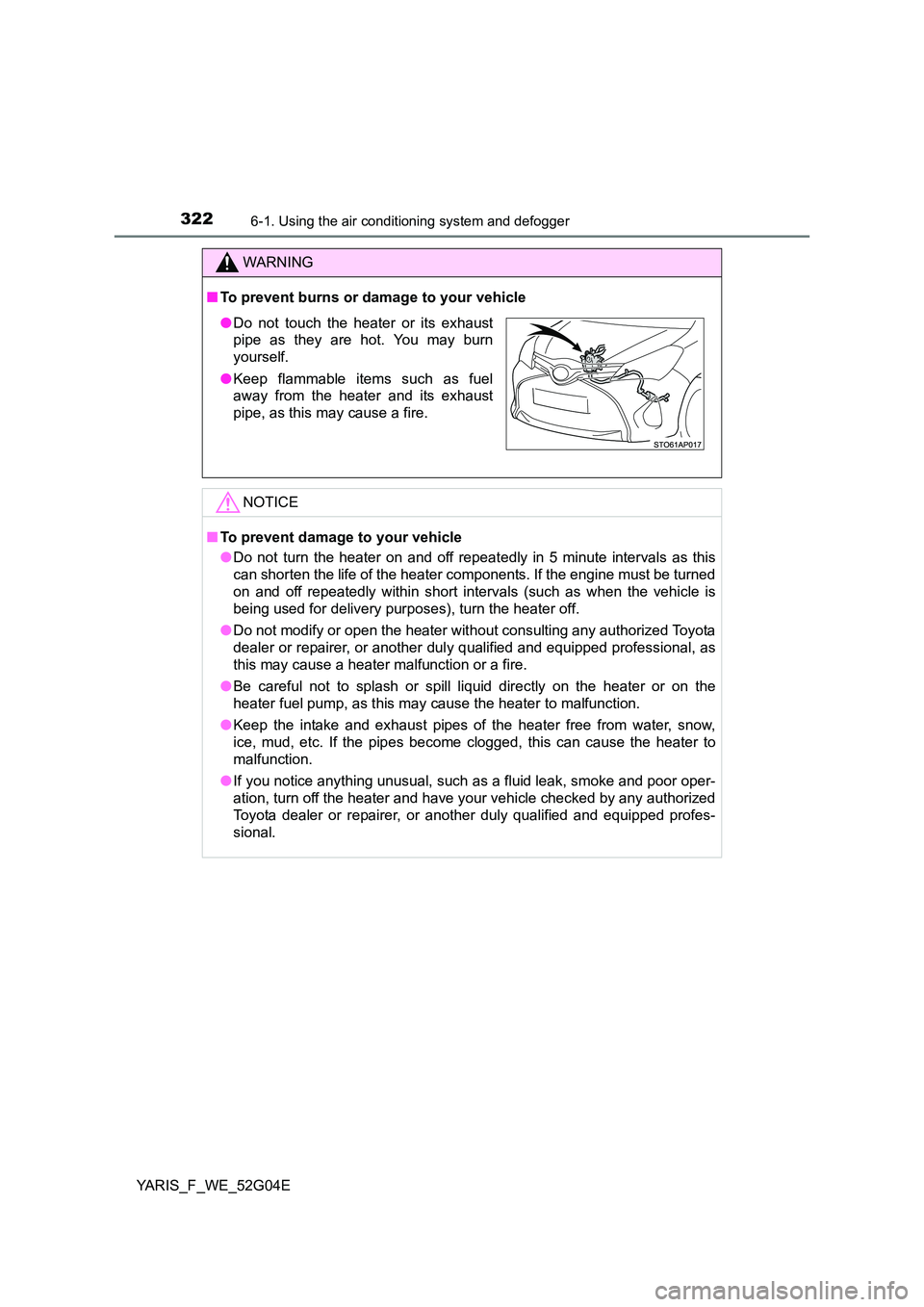
■To prevent burns or damage to your vehicle
NOTICE
■To prevent damage to your vehicle
● Do not turn the heater on and off repeatedly in 5 minute intervals as this
can shorten the life of the heater components. If the engine must be turned
on and off repeatedly within short intervals (such as when the vehicle is
being used for delivery purposes), turn the heater off.
● Do not modify or open the heater without consulting any authorized Toyota
dealer or repairer, or another dul y qualified and equipped professional, as
this may cause a heater malfunction or a fire.
● Be careful not to splash or spill liquid directly on the heater or on the
heater fuel pump, as this may cause the heater to malfunction.
● Keep the intake and exhaust pipes of the heater free from water, snow,
ice, mud, etc. If the pipes become clogged, this can cause the heater to
malfunction.
● If you notice anything unusual, such as a fluid leak, smoke and poor oper-
ation, turn off the heater and have your vehicle checked by any authorized
Toyota dealer or repairer, or another duly qualified and equipped profes-
sional.
● Do not touch the heater or its exhaust
pipe as they are hot. You may burn
yourself.
● Keep flammable items such as fuel
away from the heater and its exhaust
pipe, as this may cause a fire.
Page 324 of 540
3246-1. Using the air conditioning system and defogger
YARIS_F_WE_52G04E
WARNING
■Burns
● Use caution when seating the following persons in a seat with the seat
heater on to avoid the possibility of burns:
• Babies, small children, the elderly, the sick and the physically chal-
lenged
• Persons with sensitive skin
• Persons who are fatigued
• Persons who have taken alcohol or drugs that induce sleep (sleeping
drugs, cold remedies, etc.)
● Do not cover the seat with anything when using the seat heater.
Using the seat heater with a blanket or cushion increases the temperature
of the seat and may lead to overheating.
● Do not use the seat heater more than necessary. Doing so may cause
minor burns or overheating.
NOTICE
■ To prevent seat heater damage
Do not put heavy objects that have an uneven surface on the seat and do
not stick sharp objects (needles, nails, etc.) into the seat.
■ To prevent battery discharge
Turn the seat heaters off when the engine is not running.