remote control TOYOTA YARIS 2016 Owner's Manual
[x] Cancel search | Manufacturer: TOYOTA, Model Year: 2016, Model line: YARIS, Model: TOYOTA YARIS 2016Pages: 540, PDF Size: 34.12 MB
Page 134 of 540
1343-2. Opening, closing and locking the doors
YARIS_F_WE_52G04E
■ Notes for the unlocking function
● A sudden approach to the effective range or door handle may prevent the
doors from being unlocked. In this case, return the door handle to the origi-
nal position and check that the doors unlock before pulling the door handle
again.
● Gripping the door handle when wearing a glove may not unlock the door.
Remove the gloves and touch the sensor on the back of the handle again.
● If the door handle becomes wet while the electronic key is within the effec-
tive range, the door may lock and unlock repeatedly. Place the key in a posi-
tion 2 m (6 ft.) or more separate from the vehicle while the vehicle is being
washed. (Take care to ensure that the key is not stolen.)
● If there is another electronic key in the detection area, it may take slightly
longer to unlock the doors after the door handle is gripped.
■ When the vehicle is not driven for extended periods
● To prevent theft of the vehicle, do not leave the electronic key within 2 m
(6 ft.) of the vehicle.
● The smart entry & start system can be deactivated in advance. (P. 515)
■ To operate the system properly
Make sure to carry the electronic key when operating the system. Do not get
the electronic key too close to the vehicle when operating the system from the
outside of the vehicle.
Depending on the position and holding condition of the electronic key, the key
may not be detected correctly and the system may not operate properly. (The
alarm may go off accidentally, or the door lock prevention function may not
operate.)
■ If the smart entry & start system does not operate properly
● Locking and unlocking the doors: Use the mechanical key. (P. 478)
● Starting the engine: P. 478
■ Customization
Settings (e. g. smart entry & start system) can be changed.
(Customizable features: P. 515)
■ If the smart entry & start system has been deactivated in a customized
setting
● Locking and unlocking the doors:
Use the wireless remote control or mechanical key. ( P. 117, 478)
● Starting the engine and changing engine switch modes: P. 478
● Stopping the engine: P. 188
Page 341 of 540
341
7Maintenance and care
YARIS_F_WE_52G04E
7-1. Maintenance and care
Cleaning and protecting
the vehicle exterior .......... 342
Cleaning and protecting
the vehicle interior ........... 345
7-2. Maintenance
Maintenance
requirements.................... 348
7-3. Do-it-yourself maintenance
Do-it-yourself service
precautions ...................... 351
Hood .................................. 354
Positioning a floor jack ....... 356
Engine compartment.......... 358
Tires ................................... 373
Tire inflation pressure ........ 387
Wheels ............................... 389
Air conditioning filter .......... 392
Wireless remote control/
electronic key battery....... 394
Checking and replacing
fuses ................................ 397
Light bulbs ......................... 403
Page 369 of 540
3697-3. Do-it-yourself maintenance
7
Maintenance and care
YARIS_F_WE_52G04E
■Before recharging
When recharging, the battery produces hydrogen gas which is flammable and
explosive. Therefore, observe the following before recharging:
● If recharging with the battery installed on the vehicle, be sure to disconnect
the ground cable.
● Make sure the power switch on the charger is off when connecting and dis-
connecting the charger cables to the battery.
■ After recharging/reconnecting the battery (vehicles with a smart entry &
start system)
● Unlocking the doors using the smart entry & start system may not be possi-
ble immediately after reconnecting the battery. If this happens, use the wire-
less remote control or the mechanical key to lock/unlock the doors.
● Start the engine with the engine switch in ACCESSORY mode. The engine
may not start with the engine switch turned off. However, the engine will
operate normally from the second attempt.
● The engine switch mode is recorded by the vehicle. If the battery is recon-
nected, the vehicle will return the engine switch mode to the status it was in
before the battery was disconnected. Make sure to turn off the engine
before disconnect the battery. Take extra care when connecting the battery
if the engine switch mode prior to discharge is unknown.
If the engine will not start even after multiple attempts, contact any authorized
Toyota dealer or repairer, or another duly qualified and equipped professional.
WARNING
■Chemicals in the battery
Batteries contain poisonous and corrosive sulfuric acid and may produce
hydrogen gas which is flammable and explosive. To reduce the risk of death
or serious injury, take the following precautions while working on or near the
battery:
● Do not cause sparks by touching the battery terminals with tools.
● Do not smoke or light a match near the battery.
● Avoid contact with eyes, skin and clothes.
● Never inhale or swallow electrolyte.
● Wear protective safety glasses when working near the battery.
● Keep children away from the battery.
Page 394 of 540
3947-3. Do-it-yourself maintenance
YARIS_F_WE_52G04E
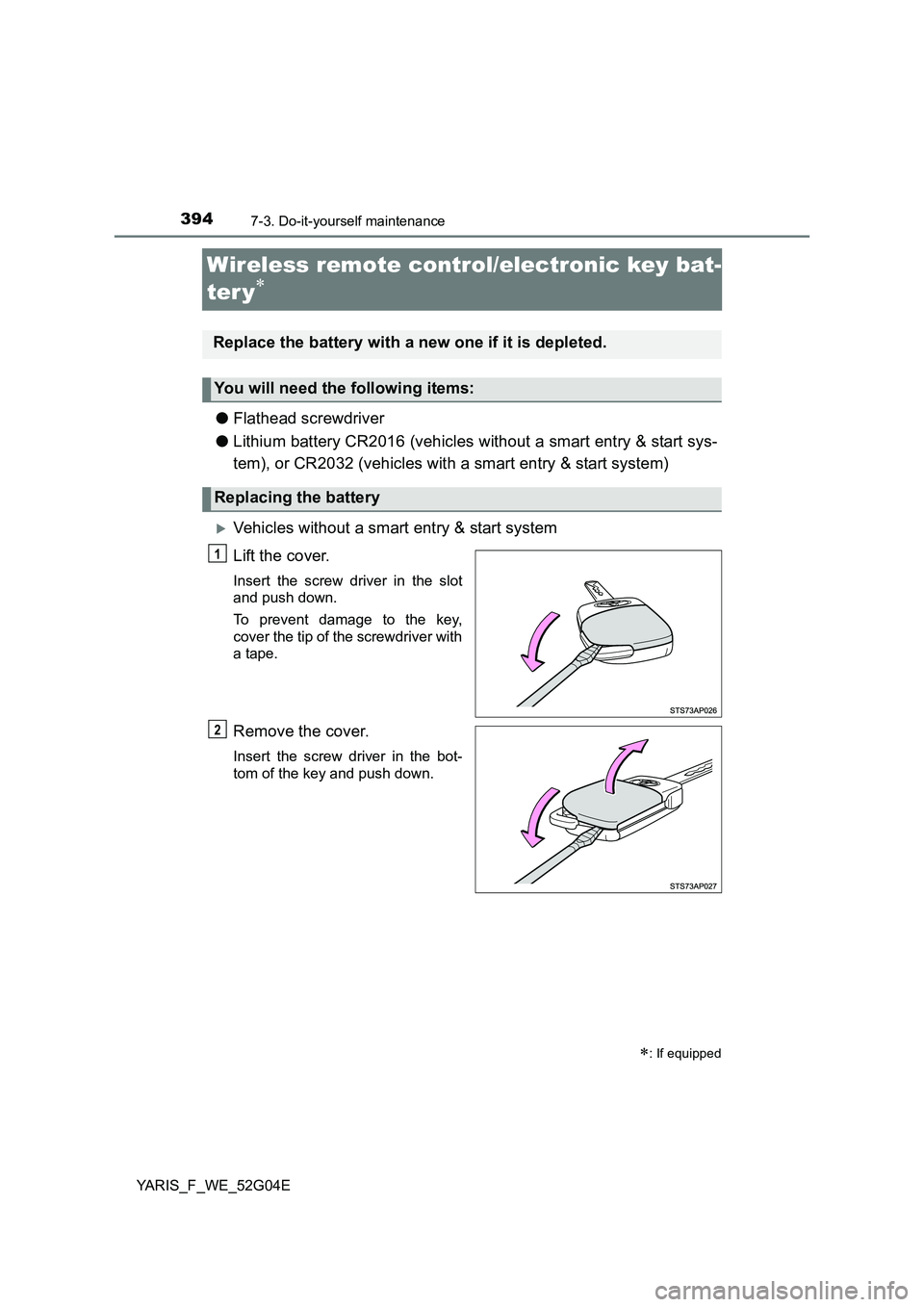
Wireless remote control/electronic key bat-
ter y
● Flathead screwdriver
● Lithium battery CR2016 (vehicles without a smart entry & start sys-
tem), or CR2032 (vehicles with a smart entry & start system)
Vehicles without a smart entry & start system
Lift the cover.
Insert the screw driver in the slot
and push down.
To prevent damage to the key,
cover the tip of the screwdriver with
a tape.
Remove the cover.
Insert the screw driver in the bot-
tom of the key and push down.
: If equipped
Replace the battery with a new one if it is depleted.
You will need the following items:
Replacing the battery
1
2
Page 396 of 540
3967-3. Do-it-yourself maintenance
YARIS_F_WE_52G04E
■Use a CR2016 (vehicles without a smart entry & start system) or CR2032
(vehicles with a smart entry & start system) lithium battery
● Batteries can be purchased at any authorized Toyota dealer or repairer, or
another duly qualified and equipped professional, local electrical appliance
shops or camera stores.
● Replace only with the same or equivalent type recommended by the manu-
facturer.
● Dispose of used batteries according to local laws.
■ If the key battery is depleted
The following symptoms may occur:
● The smart entry & start system (if equipped) and wireless remote control will
not function properly.
● The operational range will be reduced.
WARNING
■Removed battery and other parts
These parts are small and if swallowed by a child, they can cause choking.
Keep away from children. Failure to do so could result in death or serious
injury.
■ Certification for the lithium battery
CAUTION: RISK OF EXPLOSION IF BATTERY IS REPLACED BY AN
INCORRECT TYPE. DISPOSE OF USED BATTERIES ACCORDING TO
THE INSTRUCTIONS
NOTICE
■ For normal operation after replacing the battery
Observe the following precautions to prevent accidents:
● Always work with dry hands.
Moisture may cause the battery to rust.
● Do not touch or move any other component inside the remote control.
● Do not bend either of the battery terminals.
Page 478 of 540
4788-2. Steps to take in an emergency
YARIS_F_WE_52G04E
If the electronic key does not operate properly
(vehicles with a smart entr y & start system)
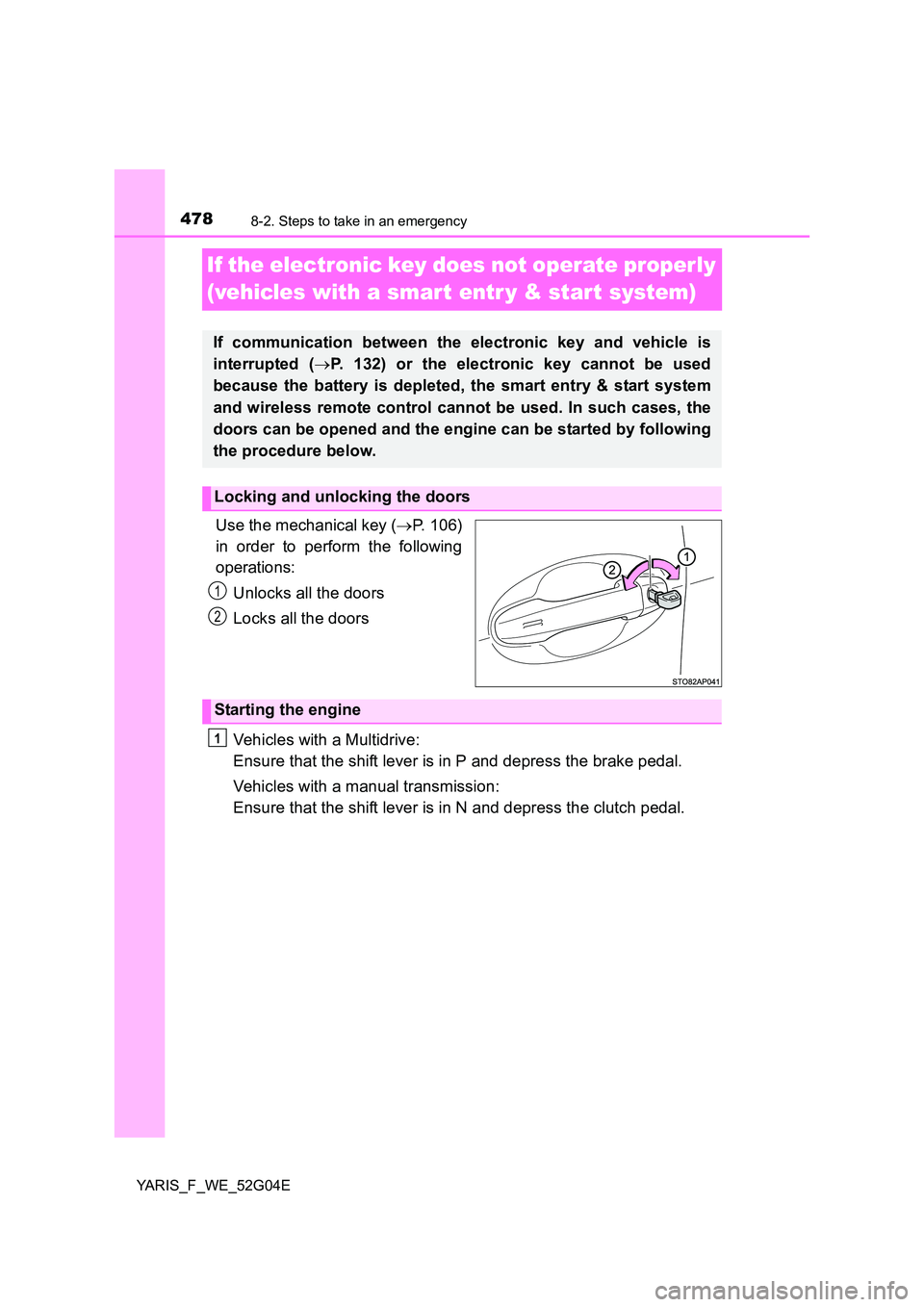
Use the mechanical key ( P. 106)
in order to perform the following
operations:
Unlocks all the doors
Locks all the doors
Vehicles with a Multidrive:
Ensure that the shift lever is in P and depress the brake pedal.
Vehicles with a manual transmission:
Ensure that the shift lever is in N and depress the clutch pedal.
If communication between the electronic key and vehicle is
interrupted ( P. 132) or the electronic key cannot be used
because the battery is depleted, the smart entry & start system
and wireless remote control cannot be used. In such cases, the
doors can be opened and the engine can be started by following
the procedure below.
Locking and unlocking the doors
1
2
Starting the engine
1
Page 483 of 540
4838-2. Steps to take in an emergency
8
When trouble arises
YARIS_F_WE_52G04E
Once the vehicle’s engine has started, remove the jumper cables in
the exact reverse order from which they were connected.
Once the engine starts, have the vehicle inspected at any authorized
Toyota dealer or repairer, or another duly qualified and equipped pro-
fessional as soon as possible.
■ Starting the engine when the battery is discharged (vehicles with a Multi-
drive)
The engine cannot be started by push-starting.
■ To prevent battery discharge
● Turn off the headlights and the audio system while the engine is off.
● Turn off any unnecessary electrical components when the vehicle is running
at a low speed for an extended period, such as in heavy traffic.
■ Charging the battery
The electricity stored in the battery will discharge gradually even when the
vehicle is not in use, due to natural discharge and the draining effects of cer-
tain electrical appliances. If the vehicle is left for a long time, the battery may
discharge, and the engine may be unable to start. (The battery recharges
automatically during driving.)
■ Precautions when the battery is discharged (vehicles with a smart entry
& start system)
● In some cases, it may not be possible to unlock the doors using the smart
entry & start system when the battery is discharged. Use the wireless
remote control or the mechanical key to lock or unlock the doors.
● The engine may not start on the first attempt after the battery has recharged
but will start normally after the second attempt. This is not a malfunction.
● The engine switch mode is memorized by the vehicle. When the battery is
reconnected, the system will return to the mode it was in before the battery
was discharged. Before disconnecting the battery, turn the engine switch off.
If you are unsure what mode the engine switch was in before the battery dis-
charged, be especially careful when reconnecting the battery.
6
Page 516 of 540
5169-2. Customization
YARIS_F_WE_52G04E
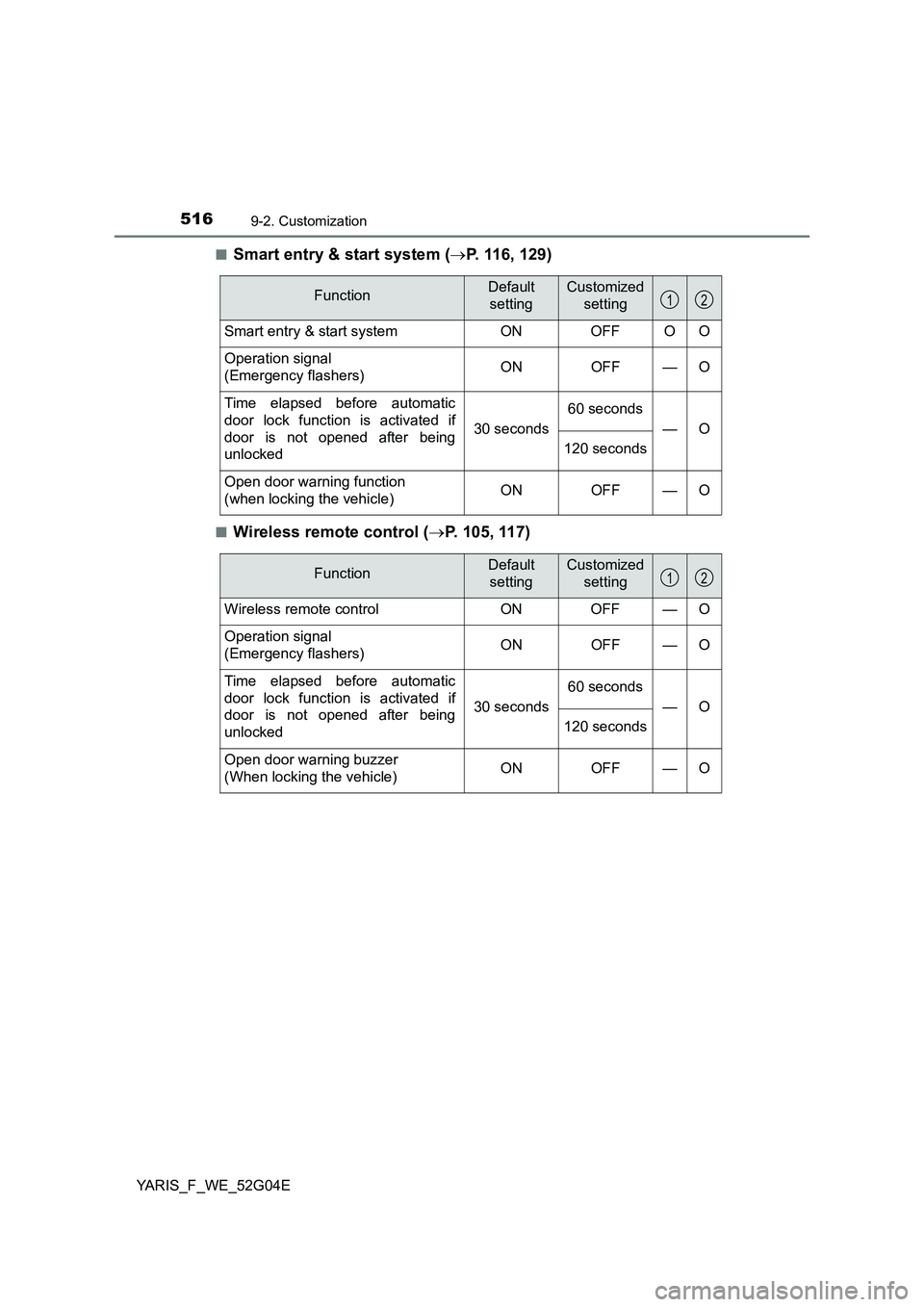
■Smart entry & start system ( P. 116, 129)
■Wireless remote control (P. 105, 117)
FunctionDefault
setting
Customized
setting
Smart entry & start system ON OFF O O
Operation signal
(Emergency flashers) ON OFF — O
Time elapsed before automatic
door lock function is activated if
door is not opened after being
unlocked
30 seconds
60 seconds
—O
120 seconds
Open door warning function
(when locking the vehicle) ON OFF — O
12
FunctionDefault
setting
Customized
setting
Wireless remote control ON OFF — O
Operation signal
(Emergency flashers) ON OFF — O
Time elapsed before automatic
door lock function is activated if
door is not opened after being
unlocked
30 seconds
60 seconds
—O
120 seconds
Open door warning buzzer
(When locking the vehicle) ON OFF — O
12
Page 529 of 540
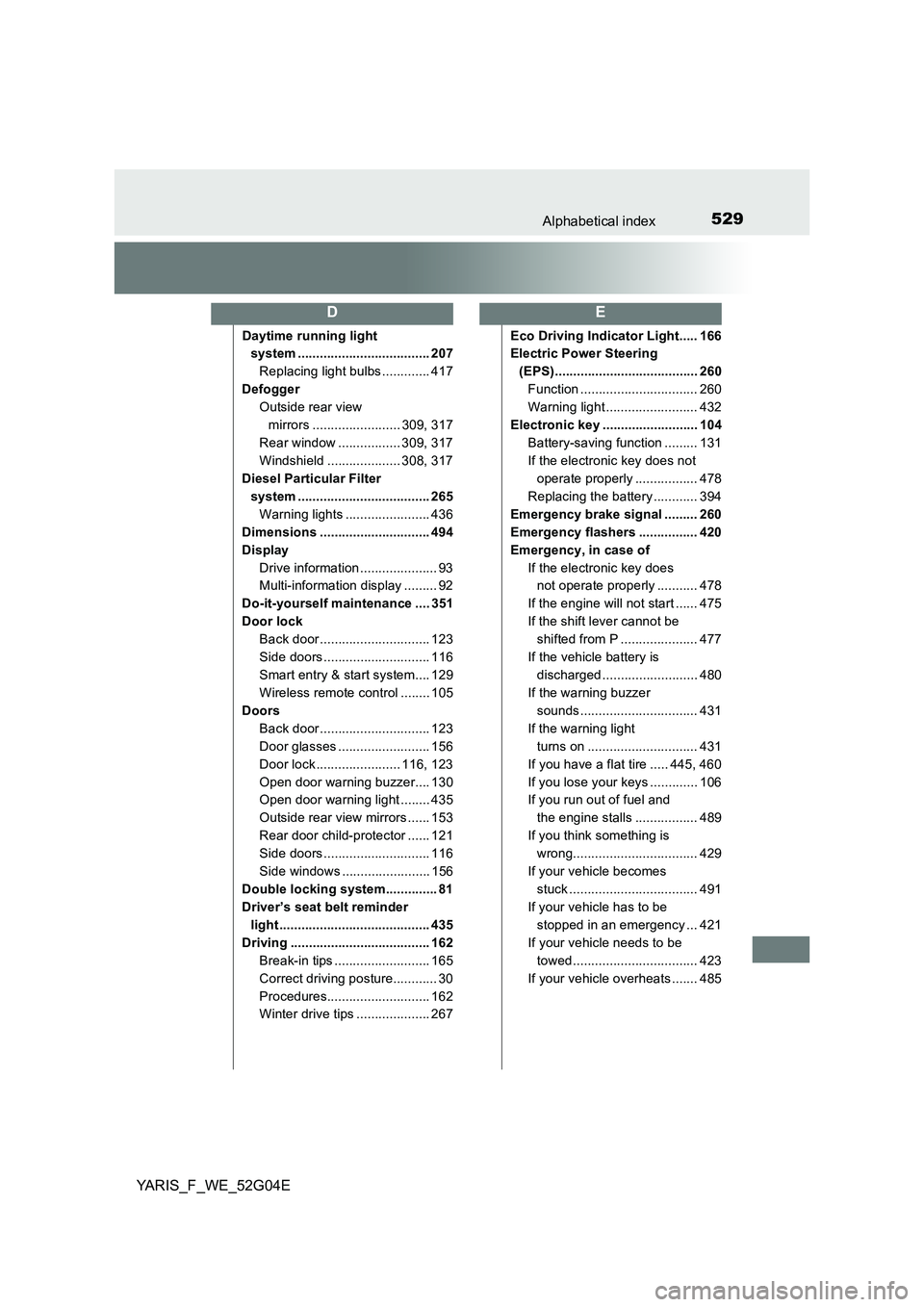
529Alphabetical index
YARIS_F_WE_52G04E
Daytime running light
system .................................... 207
Replacing light bulbs ............. 417
Defogger
Outside rear view
mirrors ........................ 309, 317
Rear window ................. 309, 317
Windshield .................... 308, 317
Diesel Particular Filter
system .................................... 265
Warning lights ....................... 436
Dimensions .............................. 494
Display
Drive information ..................... 93
Multi-information display ......... 92
Do-it-yourself maintenance .... 351
Door lock
Back door .............................. 123
Side doors ............................. 116
Smart entry & start system.... 129
Wireless remote control ........ 105
Doors
Back door .............................. 123
Door glasses ......................... 156
Door lock ....................... 116, 123
Open door warning buzzer.... 130
Open door warning light ........ 435
Outside rear view mirrors ...... 153
Rear door child-protector ...... 121
Side doors ............................. 116
Side windows ........................ 156
Double locking system.............. 81
Driver’s seat belt reminder
light ......................................... 435
Driving ...................................... 162
Break-in tips .......................... 165
Correct driving posture............ 30
Procedures............................ 162
Winter drive tips .................... 267
Eco Driving Indicator Light..... 166
Electric Power Steering
(EPS)....................................... 260
Function ................................ 260
Warning light ......................... 432
Electronic key .......................... 104
Battery-saving function ......... 131
If the electronic key does not
operate properly ................. 478
Replacing the battery ............ 394
Emergency brake signal ......... 260
Emergency flashers ................ 420
Emergency, in case of
If the electronic key does
not operate properly ........... 478
If the engine will not start ...... 475
If the shift lever cannot be
shifted from P ..................... 477
If the vehicle battery is
discharged .......................... 480
If the warning buzzer
sounds................................ 431
If the warning light
turns on .............................. 431
If you have a flat tire ..... 445, 460
If you lose your keys ............. 106
If you run out of fuel and
the engine stalls ................. 489
If you think something is
wrong.................................. 429
If your vehicle becomes
stuck ................................... 491
If your vehicle has to be
stopped in an emergency ... 421
If your vehicle needs to be
towed .................................. 423
If your vehicle overheats ....... 485
DE
Page 532 of 540
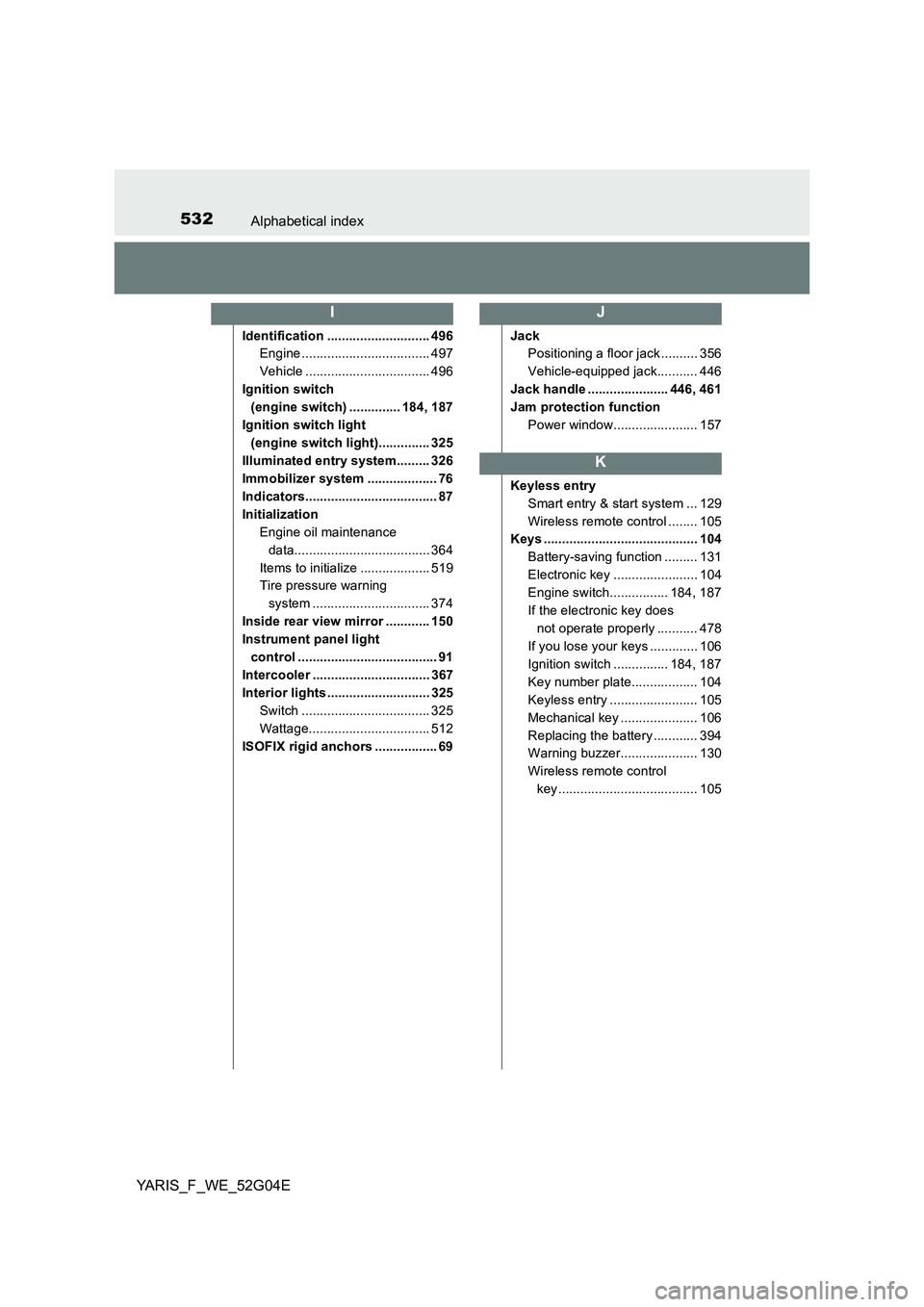
532Alphabetical index
YARIS_F_WE_52G04E
Identification ............................ 496
Engine ................................... 497
Vehicle .................................. 496
Ignition switch
(engine switch) .............. 184, 187
Ignition switch light
(engine switch light).............. 325
Illuminated entry system......... 326
Immobilizer system ................... 76
Indicators.................................... 87
Initialization
Engine oil maintenance
data..................................... 364
Items to initialize ................... 519
Tire pressure warning
system ................................ 374
Inside rear view mirror ............ 150
Instrument panel light
control ...................................... 91
Intercooler ................................ 367
Interior lights ............................ 325
Switch ................................... 325
Wattage................................. 512
ISOFIX rigid anchors ................. 69
Jack
Positioning a floor jack .......... 356
Vehicle-equipped jack........... 446
Jack handle ...................... 446, 461
Jam protection function
Power window....................... 157
Keyless entry
Smart entry & start system ... 129
Wireless remote control ........ 105
Keys .......................................... 104
Battery-saving function ......... 131
Electronic key ....................... 104
Engine switch................ 184, 187
If the electronic key does
not operate properly ........... 478
If you lose your keys ............. 106
Ignition switch ............... 184, 187
Key number plate.................. 104
Keyless entry ........................ 105
Mechanical key ..................... 106
Replacing the battery ............ 394
Warning buzzer..................... 130
Wireless remote control
key...................................... 105
IJ
K