fog light TOYOTA YARIS 2017 3.G User Guide
[x] Cancel search | Manufacturer: TOYOTA, Model Year: 2017, Model line: YARIS, Model: TOYOTA YARIS 2017 3.GPages: 396, PDF Size: 7.08 MB
Page 175 of 396
1754-5. Toyota Safety Sense C
4
Driving
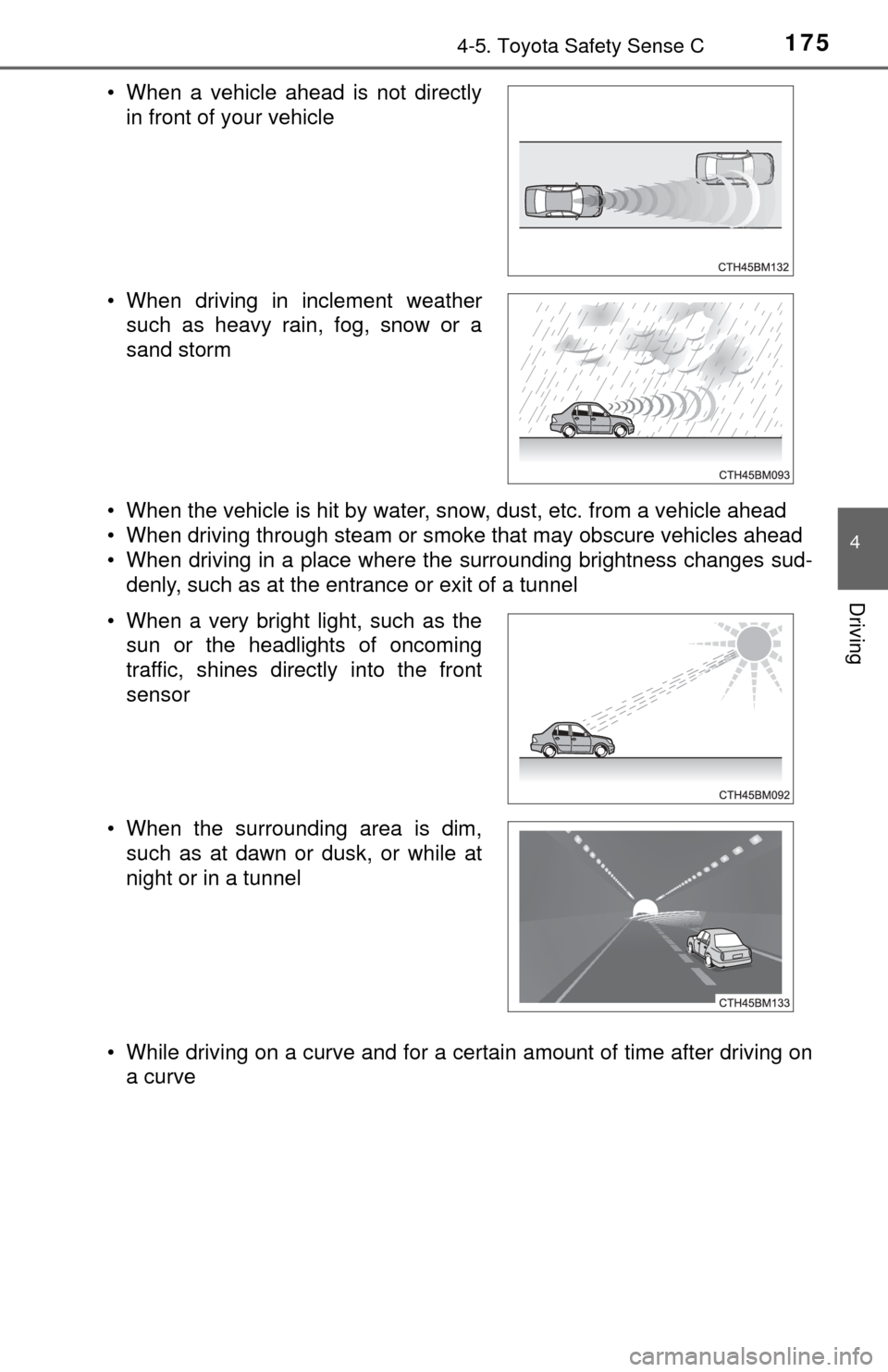
• When the vehicle is hit by water, snow, dust, etc. from a vehicle ahead
• When driving through steam or smoke that may obscure vehicles ahead
• When driving in a place where the surrounding brightness changes sud-denly, such as at the entrance or exit of a tunnel
• While driving on a curve and for a certain amount of time after driving on a curve
• When a vehicle ahead is not directly
in front of your vehicle
• When driving in inclement weather such as heavy rain, fog, snow or a
sand storm
• When a very bright light, such as the sun or the headlights of oncoming
traffic, shines directly into the front
sensor
• When the surrounding area is dim, such as at dawn or dusk, or while at
night or in a tunnel
Page 177 of 396

1774-5. Toyota Safety Sense C
4
Driving
■If the PCS warning light flashes or illuminates
The pre-collision system may be tempor arily unavailable or there may be a
malfunction in the system.
● In the following situations, the warning light will be cleared and the system
will become operational when normal operating conditions return:
• When the area around the front sensor is hot, such as after the vehicle
has been parked in the sun
• When the windshield is fogged up or covered with condensation or ice (→ P. 205)
• When the front sensor or the area around either sensor is cold, such as in
an extremely cold environment
• If the area in front of the front sensor is obstructed, such as when the hood is open
● If the PCS warning light continues to flash or illuminate, the system may be
malfunctioning. Have the vehicle inspected by your Toyota dealer immedi-
ately.
■ If VSC is disabled
●If TRC and VSC are disabled (→P. 194), the pre-collision brake assist and
pre-collision braking functions are also disabled. However, the pre-collision
warning function will still operate.
● The PCS warning light illuminates.
Page 181 of 396

1814-5. Toyota Safety Sense C
4
Driving
●When the lane markers are on a curb etc.
● When lane markers are obscured or partially obscured by sand, dirt, etc.
● When there are shadows on the road running parallel with lane markers, or
if a shadow covers the lane markers
● When driving on a particularly bright road surface, such as concrete
● When driving on a road surface that is bright due to reflected light
● When driving in a location where the light level changes rapidly, such as the
entrance to or exit from a tunnel
● When sunlight or the headlights of oncoming vehicles are shining directly
into the camera lens
● When driving on roads that are branching or merging
● When driving on a road surface that is wet due to rain, previous rainfall,
standing water, etc.
● When the vehicle experiences strong up-and-down motion such as when
driving on an extremely rough road or on a seam in the pavement
● When headlight brightness at nighttime is reduced due to dirt on the lenses,
or when the headlights are misaligned
● When driving on winding roads or roads that are uneven
● When driving on rough or unpaved roads
● When the windshield is dirty, or if raindrops, condensation or ice are adher-
ing to the windshield
● When the heater is blowing to the feet, the upper part of the windshield may
get fogged up and have a negative effect
● When cleaning the inside of the windshield, touching the lens or getting
glass cleaner on the lens may have a negative effect
■ When changing the tires
Depending on the tires used, sufficient performance may not be maintainable.
■ If the LDA indicator comes on in yellow
It may indicate a malfunction in the system. Contact your Toyota dealer.
Page 185 of 396
1854-5. Toyota Safety Sense C
4
Driving
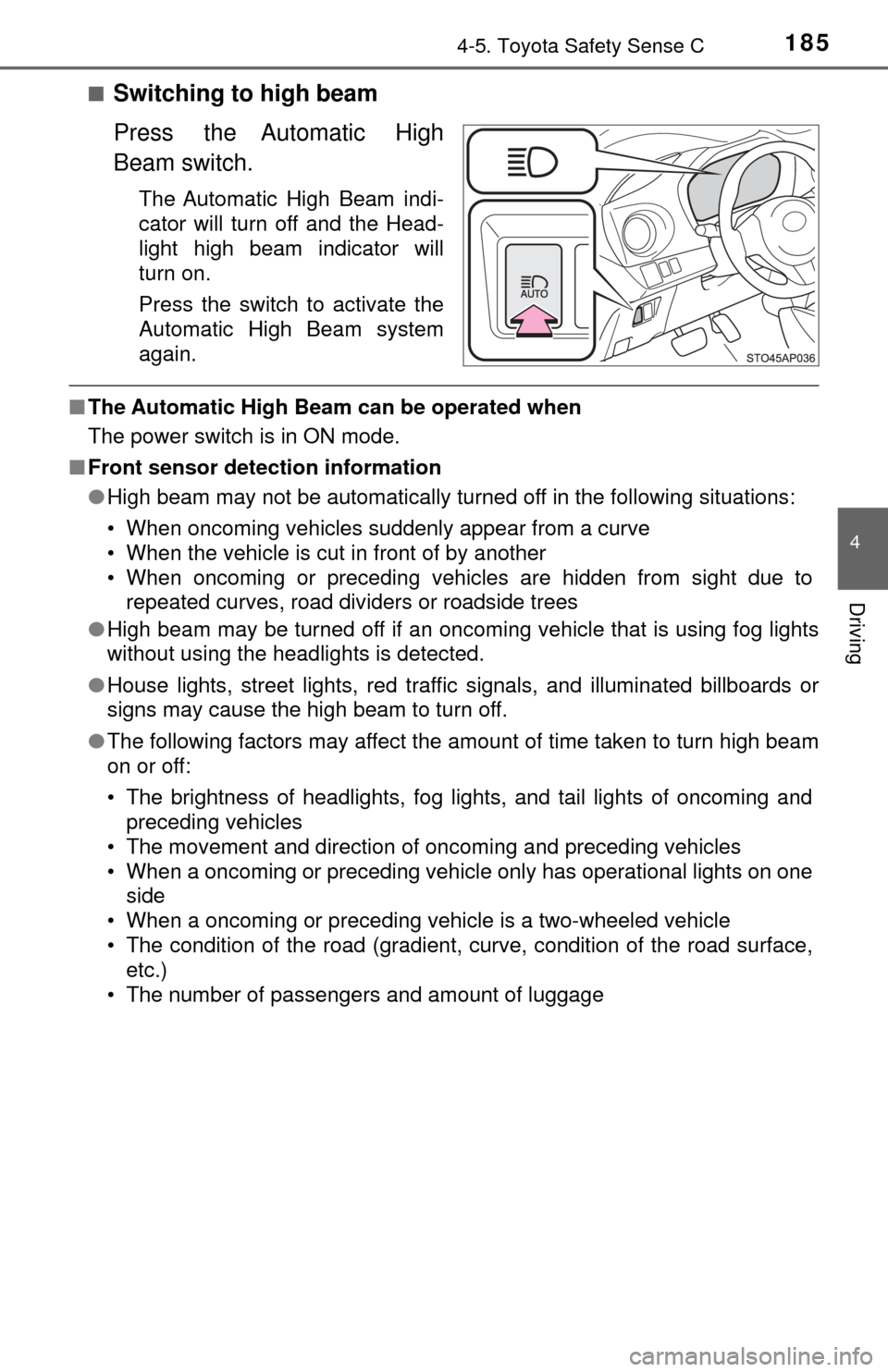
■Switching to high beam
Press the Automatic High
Beam switch.
The Automatic High Beam indi-
cator will turn off and the Head-
light high beam indicator will
turn on.
Press the switch to activate the
Automatic High Beam system
again.
■The Automatic High Beam can be operated when
The power switch is in ON mode.
■ Front sensor detection information
●High beam may not be automatically turned off in the following situations:
• When oncoming vehicles suddenly appear from a curve
• When the vehicle is cut in front of by another
• When oncoming or preceding vehicles are hidden from sight due to
repeated curves, road dividers or roadside trees
● High beam may be turned off if an oncoming vehicle that is using fog lights
without using the headlights is detected.
● House lights, street lights, red traf fic signals, and illuminated billboards or
signs may cause the high beam to turn off.
● The following factors may affect the amount of time taken to turn high beam
on or off:
• The brightness of headlights, fog lights, and tail lights of oncoming and
preceding vehicles
• The movement and direction of oncoming and preceding vehicles
• When a oncoming or preceding vehicle only has operational lights on one side
• When a oncoming or preceding vehicle is a two-wheeled vehicle
• The condition of the road (gradient, curve, condition of the road surface, etc.)
• The number of passengers and amount of luggage
Page 186 of 396
1864-5. Toyota Safety Sense C
●High beam may be turned on or off when unexpected by the driver.
● In the situations below, the system may not be able to correctly detect the
surrounding brightness levels, and may flash or expose nearby pedestrians
to the high beam. Therefore, you should consider turning the high beams on
or off manually rather than relying on the Automatic High Beam system.
• In bad weather (rain, snow, fog, sandstorms, etc.)
• The windshield is obscured by fog, mist, ice, dirt, etc.
• The windshield is cracked or damaged.
• The front sensor is deformed or dirty.
• The front sensor temperature is extremely high.
• Surrounding brightness levels are equal to those of headlights, tail lights
or fog lights.
• Vehicles ahead have headlights or tail lights that are either switched off, dirty, are changing color, or are not aimed properly.
• When driving through an area of in termittently changing brightness and
darkness.
• When frequently and repeatedly driving ascending/descending roads, or
roads with rough, bumpy or uneven surfaces (such as stone-paved
roads, gravel tracks, etc.).
• When frequently and repeatedly taking curves or driving on a winding
road.
• There is a highly reflective object ahead of the vehicle, such as a sign or a mirror.
• The back of a vehicle ahead is highly reflective, such as a container on a truck.
• The vehicle’s headlights are damaged or dirty.
• The vehicle is listing or titling, due to a flat tire, a trailer being towed, etc.
• The driver believes that the high beam may be causing problems or dis- tress to other drivers or pedestrians nearby.
■ If the Automatic High Beam indicator comes on in yellow
It may indicate a malfunction in the system. Contact your Toyota dealer.
■ Temporarily lowering sensor sensitivity
The sensitivity of the sensor can be temporarily lowered.
Turn the engine switch off while the following conditions are met.
• The headlight switch is in .
• The headlight switch lever is in low beam position.
• Automatic High Beam switch is on.
Turn the engine switch to the “ON” position.
Within 30 seconds after , repeat pulling the headlight switch lever to the
original position then pushing it to the high beam position quickly 10 times,
then leave the lever in high beam position.
If the sensitivity is changed, the Automatic High Beam indicator is turn on
and off 3 times.
Automatic High Beam (headlights) may turn on even the vehicle is stopped.
1
2
32
4
Page 201 of 396

201
5Interior features
5-1. Using the air conditioning system and defogger
Air conditioning system ..... 202
5-2. Using the audio system Steering wheel audio switches .......................... 210
AUX port/USB port ............ 211
5-3. Using the interior lights Interior lights list ................ 212• Interior light ................... 212
• Personal lights .............. 213
5-4. Using the storage features List of storage features ..... 214• Glove box...................... 215
• Cup holders .................. 215
• Bottle holders ................ 216
• Auxiliary box ................. 217
Luggage compartment features ........................... 218
5-5. Using the other interior features
Other interior features ....... 220 • Sun visors ..................... 220
• Vanity mirrors................ 220
• Power outlet .................. 221
• Assist grips ................... 222
Page 208 of 396
2085-1. Using the air conditioning system and defogger
■Fogging up of the windows
●Vehicles with the button: The windows will easily fog up when the
humidity in the vehicle is high. Turning on will dehumidify the air from
the outlets and defog the windshield effectively.
● Vehicles with the button: If you turn off, the windows may fog up
more easily.
● The windows may fog up if the recirculated air mode is used.
■ Outside/recirculated air mode
When driving on dusty roads such as tunnels or in heavy traffic, set the out-
side/recirculated air mode button to the recirculated air mode. This is effective
in preventing outside air from entering the vehicle interior. During cooling
operation, setting the recirculated air mode will also cool the vehicle interior
effectively.
■ When the indicator light on goes off by itself (vehicles with the
button)
Press to turn off the dehumidification function and turn it on again. There
may be a problem in the air conditioning system if the indicator light goes off
again. Turn the air conditioning system off and have it inspected by your Toy-
ota dealer.
■ When the outside temperature falls to nearly 32 °F (0 °C) (vehicles with
the button)
The dehumidification function may not operate even when is pressed.
■ Ventilation and air conditioning odors
●To let fresh air in, set the air conditioning system to the outside air m\
ode.
● During use, various odors from inside and outside the vehicle may enter into
and accumulate in the air conditioning system. This may then cause odor to
be emitted from the vents.
● To reduce potential odors from occurring:
It is recommended that the air conditioning system be set to outside air
mode prior to turning the vehicle off.
■ Air conditioning filter
→P. 268
Page 229 of 396
2296-1. Maintenance and care
6
Maintenance and care
NOTICE
■Cleaning detergents
● Do not use the following types of detergent, as they may discolor the vehi-
cle interior or cause streaks or damage to painted surfaces:
• Non-seat portions: Organic substances such as benzene or gasoline,
alkaline or acidic solutions, dye, and bleach
• Seats: Alkaline or acidic solutions, such as thinner, benzene, and alco-
hol
● Do not use a polish wax or polish cleaner. The instrument panel’s or other
interior part’s painted surface may be damaged.
■ Preventing damage to leather surfaces
Observe the following precautions to avoid damage to and deterioration of
leather surfaces:
● Remove any dust or dirt from leather surfaces immediately.
● Do not expose the vehicle to direct sunlight for extended periods of time.
Park the vehicle in the shade, especially during summer.
● Do not place items made of vinyl, plastic, or containing wax on the uphol-
stery, as they may stick to the leather surface if the vehicle interior heats
up significantly.
■ Water on the floor
Do not wash the vehicle floor with water.
Vehicle systems such as the audio system may be damaged if water comes
into contact with electrical components such as the audio system above or
under the floor of the vehicle. Water may also cause the body to rust.
■ When cleaning the inside of the wi ndshield (vehicles with front sensor)
Be careful not to touch the front sensor ( →P. 161).
If the camera is accidentally scratched or hit, PCS, LDA and Automatic High
Beam may not operate properly or may cause a malfunction.
■ Cleaning the inside of the rear window
● Do not use glass cleaner to clean the rear window, as this may cause
damage to the rear window defogger heater wires. Use a cloth dampened
with lukewarm water to gently wipe the window clean. Wipe the window in
strokes running parallel to the heater wires.
● Be careful not to scratch or damage the heater wires.
Page 278 of 396
2786-3. Do-it-yourself maintenance
Light bulbs
Check the wattage of the light bulb to be replaced. (→P. 346)
■Front
You may replace the following bulbs by yourself. The difficulty
level of replacement varies de pending on the bulb. If necessary
bulb replacement seems difficult to perform, contact your Toy-
ota dealer.
For more information about replacing other light bulbs, contact
your Toyota dealer.
Preparing for light bulb replacement
Bulb locations
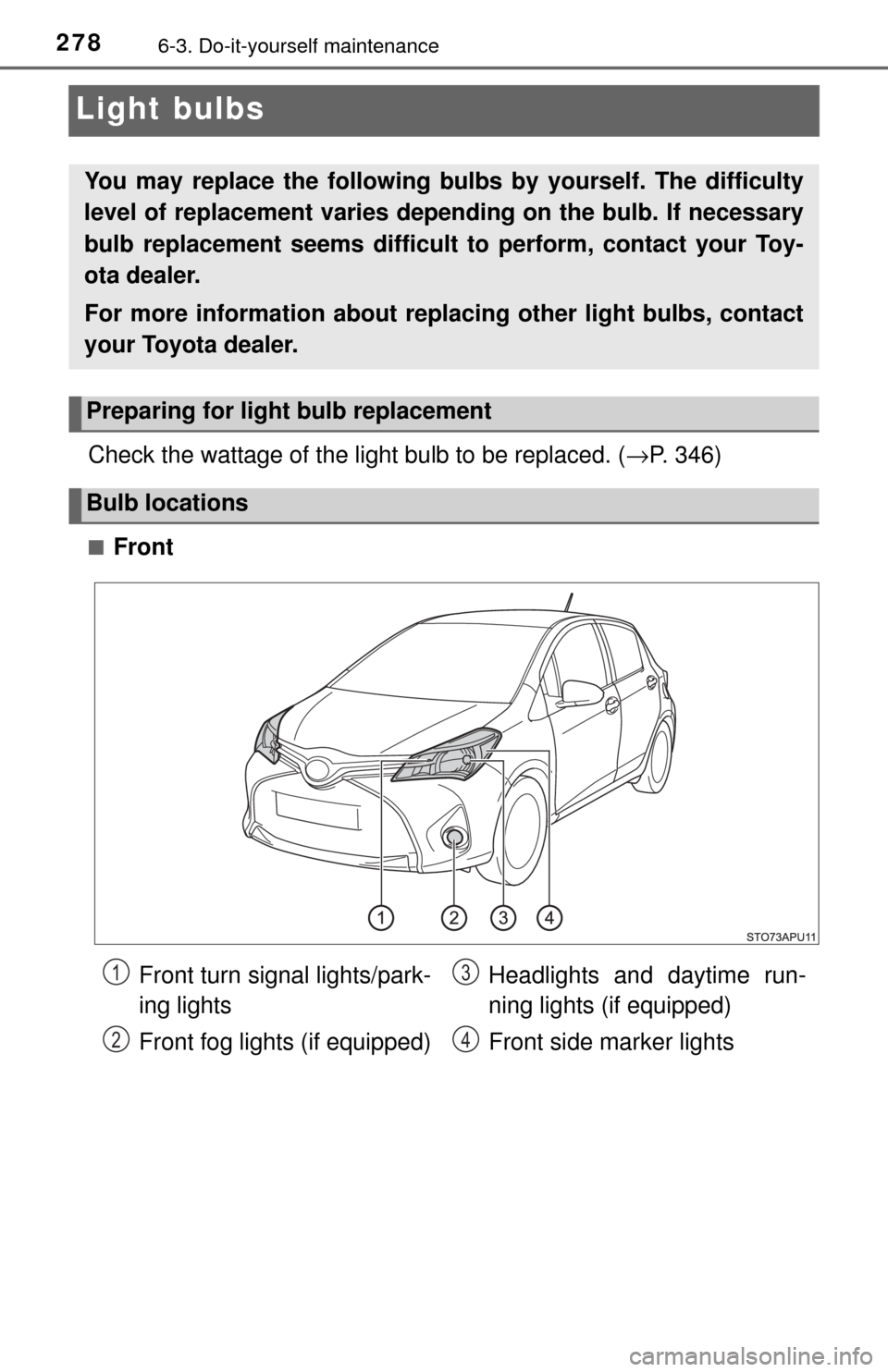
Front turn signal lights/park-
ing lights
Front fog lights (if equipped) Headlights and daytime run-
ning lights (if equipped)
Front side marker lights1
2
3
4
Page 281 of 396
2816-3. Do-it-yourself maintenance
6
Maintenance and care
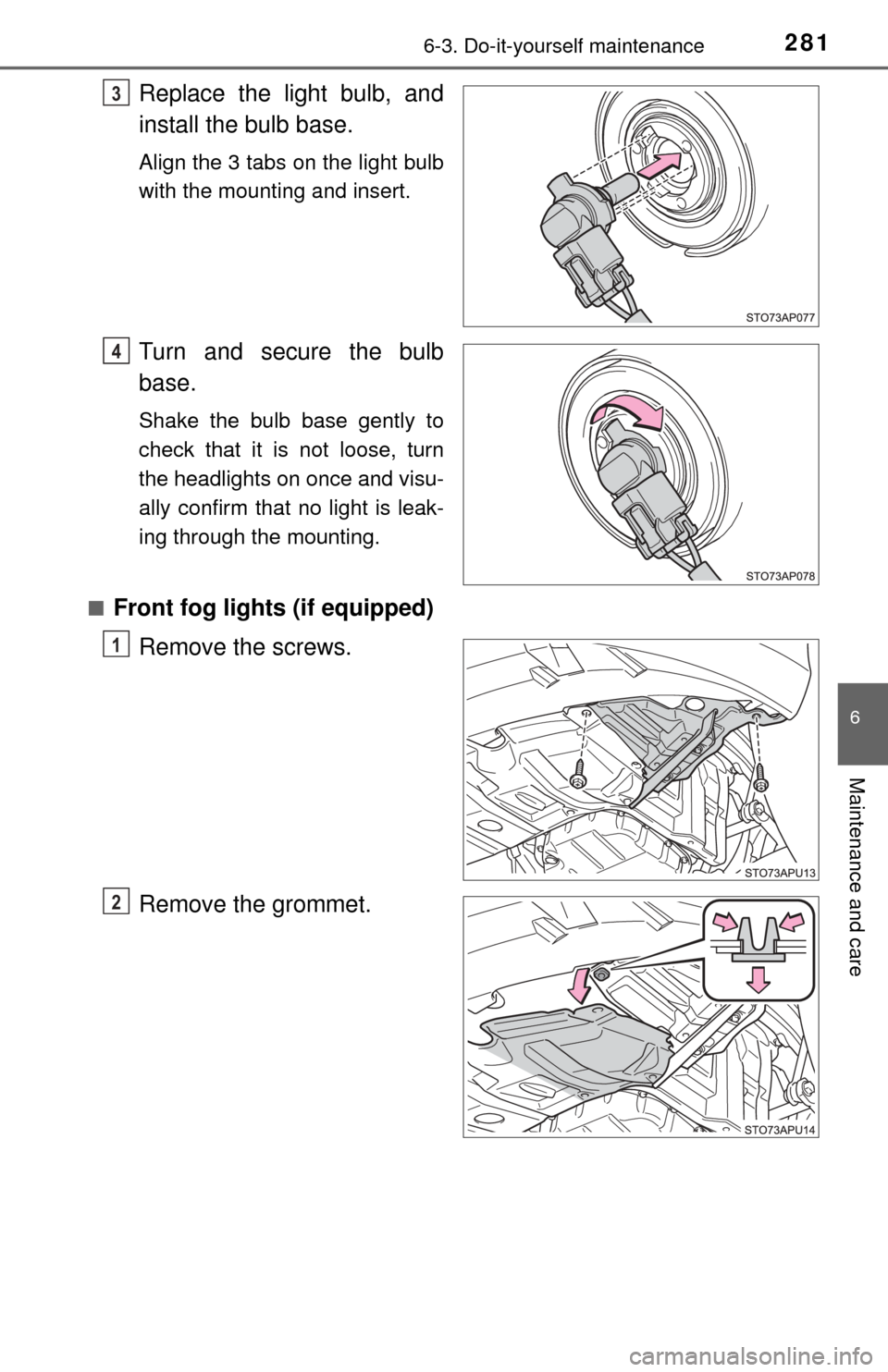
Replace the light bulb, and
install the bulb base.
Align the 3 tabs on the light bulb
with the mounting and insert.
Turn and secure the bulb
base.
Shake the bulb base gently to
check that it is not loose, turn
the headlights on once and visu-
ally confirm that no light is leak-
ing through the mounting.
■
Front fog lights (if equipped) Remove the screws.
Remove the grommet.
3
14
1
2