warning light TOYOTA YARIS 2017 3.G Owner's Manual
[x] Cancel search | Manufacturer: TOYOTA, Model Year: 2017, Model line: YARIS, Model: TOYOTA YARIS 2017 3.GPages: 396, PDF Size: 7.08 MB
Page 71 of 396

71
Instrument cluster2
2. Instrument clusterWarning lights and indicators .......................... 72
Gauges and meters ............ 77
Multi-information display ..... 79
Page 72 of 396
722. Instrument cluster
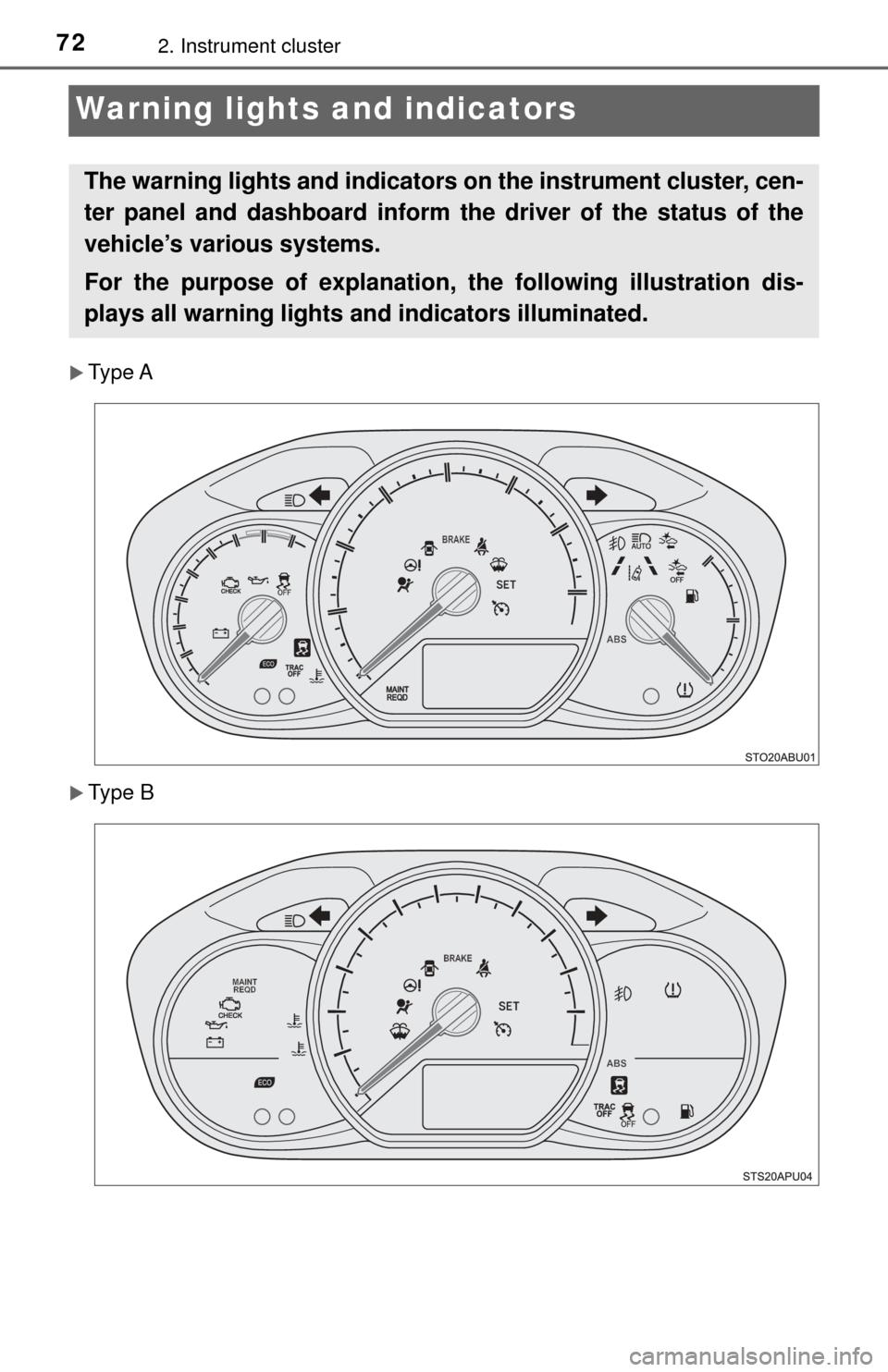
Warning lights and indicators
Type A
Type B
The warning lights and indicators on the instrument cluster, cen-
ter panel and dashboard inform th e driver of the status of the
vehicle’s various systems.
For the purpose of explanation, the following illustration dis-
plays all warning lights a nd indicators illuminated.
Page 73 of 396
732. Instrument cluster
2
Instrument cluster
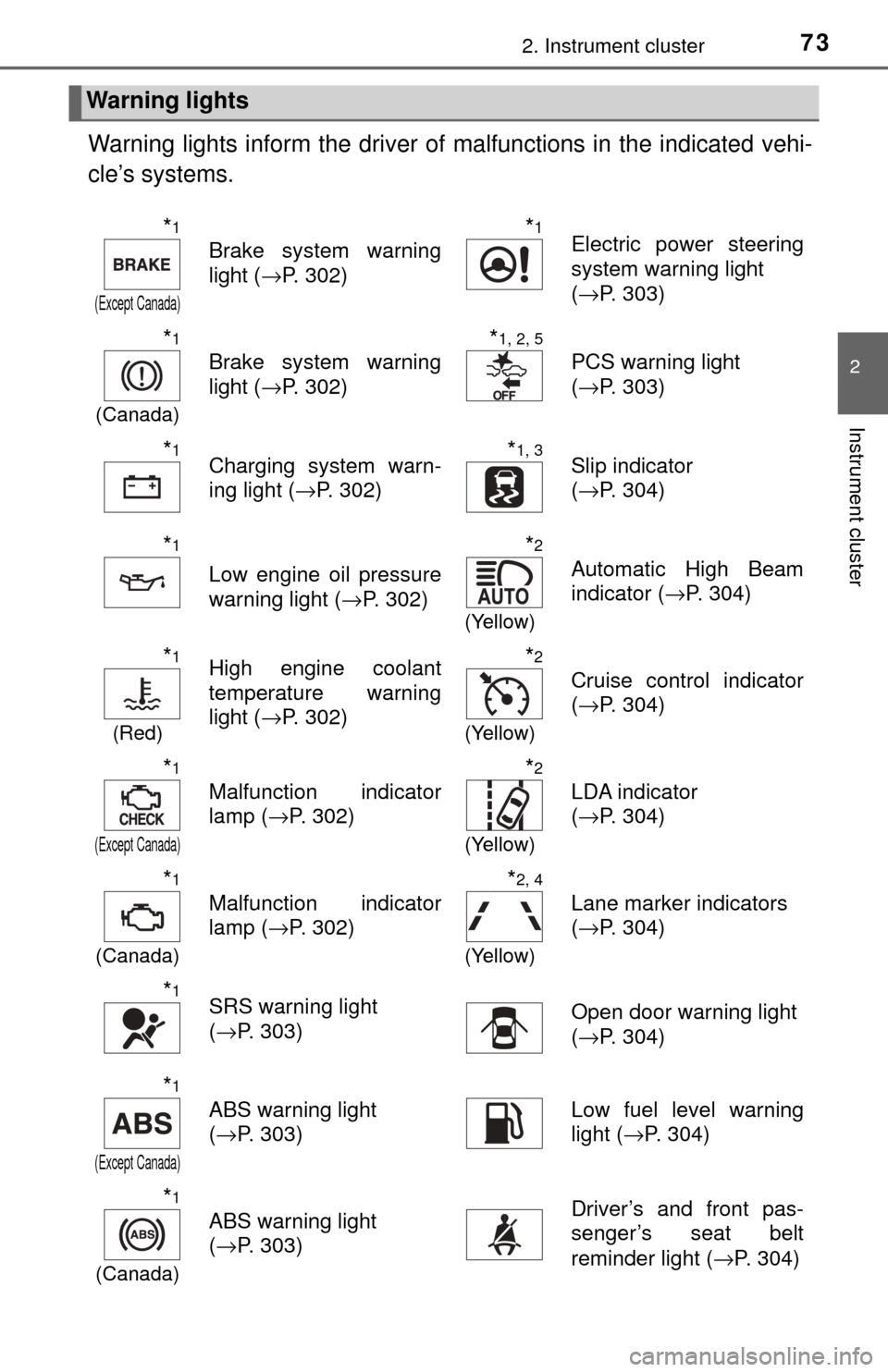
Warning lights inform the driver of malfunctions in the indicated vehi-
cle’s systems.
Warning lights
*1
(Except Canada)
Brake system warning
light ( →P. 302)
*1Electric power steering
system warning light
(→P. 303)
*1
(Canada)
Brake system warning
light ( →P. 302)
*1, 2, 5
PCS warning light
(→P. 303)
*1Charging system warn-
ing light ( →P. 302)*1, 3Slip indicator
(→P. 304)
*1
Low engine oil pressure
warning light ( →P. 302)
*2
(Yellow)
Automatic High Beam
indicator ( →P. 304)
*1
(Red)
High engine coolant
temperature warning
light ( →P. 302)*2
(Yellow)
Cruise control indicator
(→P. 304)
*1
(Except Canada)
Malfunction indicator
lamp ( →P. 302)
*2
(Yellow)
LDA indicator
(→P. 304)
*1
(Canada)
Malfunction indicator
lamp ( →P. 302)
*2, 4
(Yellow)
Lane marker indicators
(→P. 304)
*1SRS warning light
(→P. 303)Open door warning light
(→P. 304)
*1
(Except Canada)
ABS warning light
(→P. 303)Low fuel level warning
light ( →P. 304)
*1
(Canada)
ABS warning light
(→P. 303)Driver’s and front pas-
senger’s seat belt
reminder light ( →P. 304)
Page 74 of 396
742. Instrument cluster
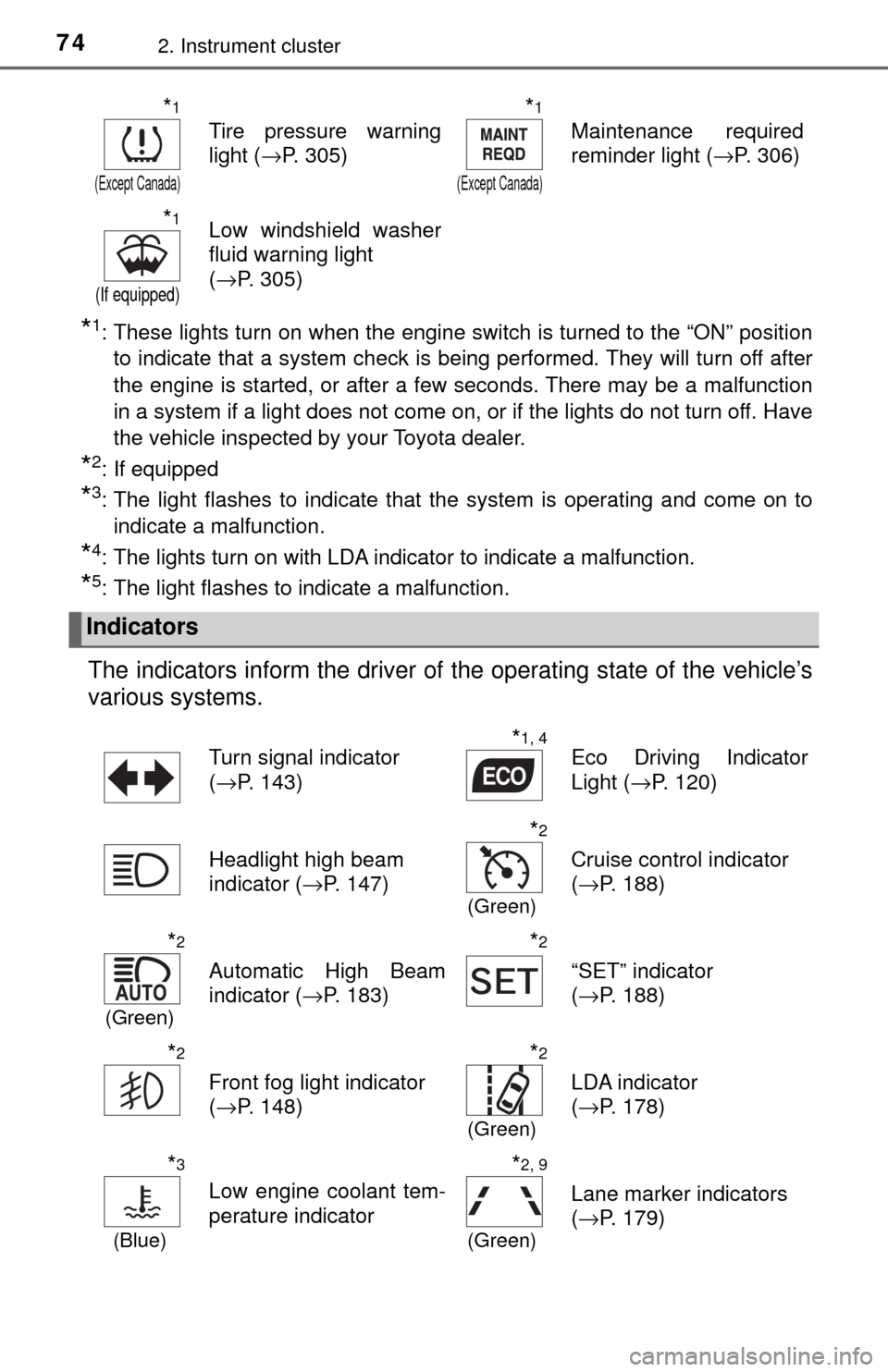
*1: These lights turn on when the engine switch is turned to the “ON” positionto indicate that a system check is being performed. They will turn off after
the engine is started, or after a few seconds. There may be a malfunction
in a system if a light does not come on, or if the lights do not turn off. Have
the vehicle inspected by your Toyota dealer.
*2: If equipped
*3: The light flashes to indicate that the system is operating and come on toindicate a malfunction.
*4: The lights turn on with LDA indicator to indicate a malfunction.
*5: The light flashes to indicate a malfunction.
The indicators inform the driver of the operating state of the vehicle’s
various systems.
*1
(Except Canada)
Tire pressure warning
light ( →P. 305)
*1
(Except Canada)
Maintenance required
reminder light ( →P. 306)
*1
(If equipped)
Low windshield washer
fluid warning light
(→P. 305)
Indicators
Turn signal indicator
(→P. 143)*1, 4Eco Driving Indicator
Light ( →P. 120)
Headlight high beam
indicator ( →P. 147)
*2
(Green)
Cruise control indicator
(→P. 188)
*2
(Green)
Automatic High Beam
indicator ( →P. 183)
*2
“SET” indicator
(→P. 188)
*2
Front fog light indicator
(→P. 148)
*2
(Green)
LDA indicator
(→P. 178)
*3
(Blue)
Low engine coolant tem-
perature indicator
*2, 9
(Green)
Lane marker indicators
(→P. 179)
Page 75 of 396
752. Instrument cluster
2
Instrument cluster
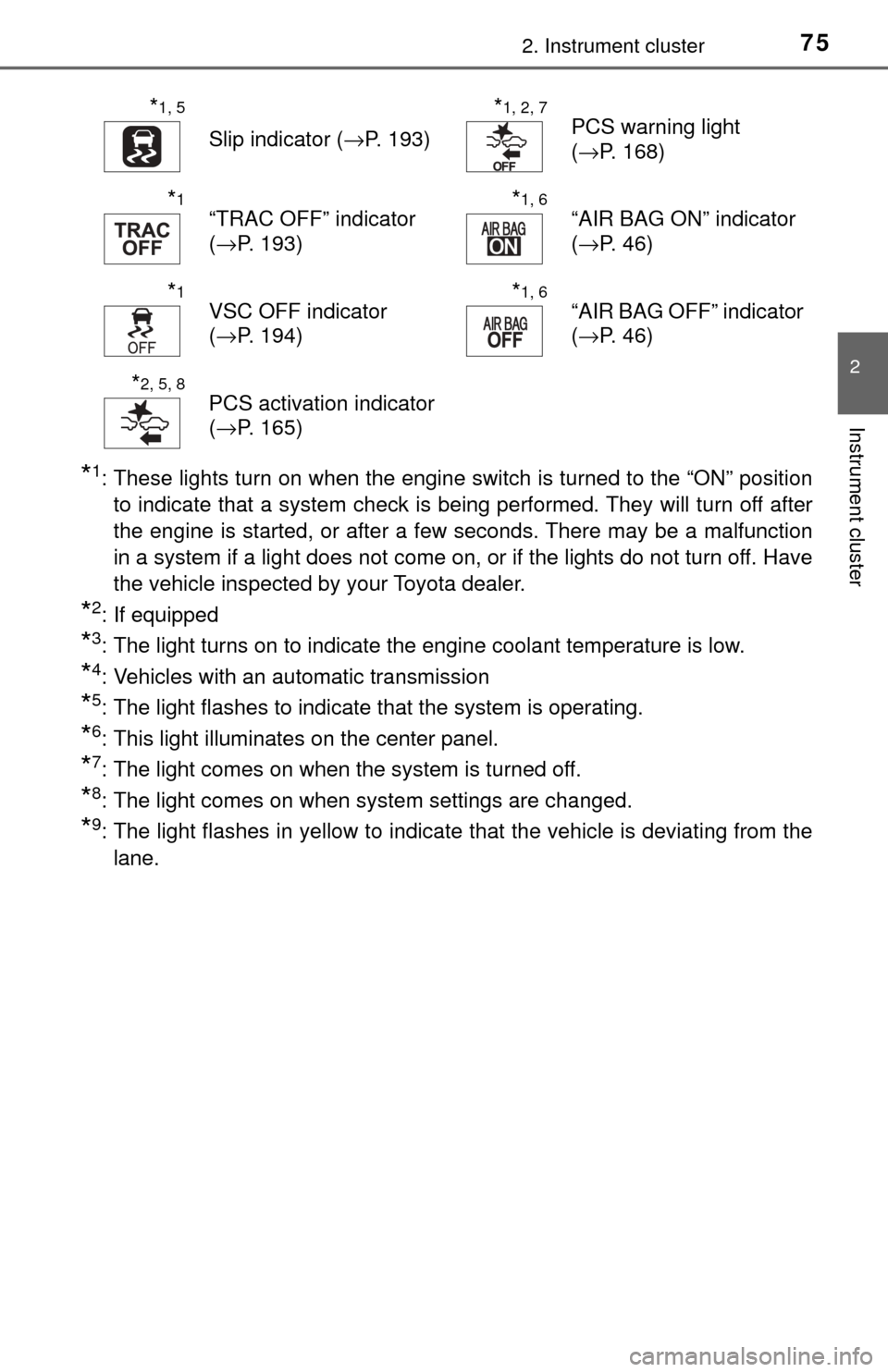
*1: These lights turn on when the engine switch is turned to the “ON” positionto indicate that a system check is being performed. They will turn off after
the engine is started, or after a few seconds. There may be a malfunction
in a system if a light does not come on, or if the lights do not turn off. Have
the vehicle inspected by your Toyota dealer.
*2: If equipped
*3: The light turns on to indicate the engine coolant temperature is low.
*4: Vehicles with an automatic transmission
*5: The light flashes to indicate that the system is operating.
*6: This light illuminates on the center panel.
*7: The light comes on when the system is turned off.
*8: The light comes on when system settings are changed.
*9: The light flashes in yellow to indicate that the vehicle is deviating from thelane.
*1, 5
Slip indicator ( →P. 193)
*1, 2, 7PCS warning light
(→P. 168)
*1“TRAC OFF” indicator
(→P. 193)*1, 6“AIR BAG ON” indicator
(→P. 46)
*1VSC OFF indicator
(→P. 194)*1, 6“AIR BAG OFF” indicator
(→P. 46)
*2, 5, 8PCS activation indicator
(→P. 165)
Page 76 of 396
762. Instrument cluster
WARNING
■If a safety system warning light does not come on
Should a safety system light such as the ABS and SRS warning light not
come on when you start the engine, this could mean that these systems are
not available to help protect you in an accident, which could result in death
or serious injury. Have the vehicle inspected by your Toyota dealer immedi-
ately if this occurs.
NOTICE
■ To prevent damage to the engine and its components
The engine may be overheating if the high engine coolant temperature
warning light flashes or turns on. In this case, immediately stop the vehicle
in a safe place, and check the engine after it has cooled completely.
( →P. 330)
Page 82 of 396
822. Instrument cluster
The temperature display shows temperatures within the range of
-40°F (-40°C) and 122°F (50°C).
■Display
In the following situations, the correct outside temperature may not
be displayed, or the display may take longer than normal to change:
●When the vehicle is stopped, or moving at low speeds (less than
16 mph [25 km/h])
● When the outside temperature has changed suddenly (at the
entrance/exit of a ga rage, tunnel, etc.)
■When “− −” or “E” is displayed
The system may be malfunctioning. Take your vehicle to your Toy-
ota dealer.
■ When disconnecting and reco nnecting battery terminals
The following information data will be reset.
● Driving range
● Average fuel consumption
● Average vehicle speed
● Clock data
■ Liquid crystal display
Small spots or light spots may appear on the display. This phenomenon is
characteristic of liquid crystal displa y, and there is no problem continuing to
use the display.
■ Changing the pre-collision warning timing
→P. 168
Outside temperature display
NOTICE
■The multi-information disp lay at low temperatures
Allow the interior of the vehicle to warm up before using the liquid crystal
information display. At extremely low temperatures, the display monitor may
respond slowly, and display changes may be delayed.
Page 95 of 396
953-2. Opening, closing and locking the doors
3
Operation of each component
■Operation signals (vehicles with a wireless remote control)
→P. 9 0
■ Security feature (vehicles with a wireless remote control)
→P. 9 0
■ Luggage compartment light
The luggage compartment lights turn on when the back door is opened.
WARNING
Observe the following precautions.
Failure to do so may result in death or serious injury.
■Before driving
● Make sure that the back door is fully closed. If the back door is not fully
closed, it may open unexpectedly while driving and hit near-by objects or
luggage in the luggage compartment may be thrown out, causing an acci-
dent.
● Do not allow children to play in the luggage compartment.
If a child is accidentally locked in the luggage compartment, they could
have heat exhaustion or other injuries.
● Do not allow a child to open or close the back door.
Doing so may cause the back door to open unexpectedly, or cause the
child’s hands, head, or neck to be caught by the closing back door.
■ Important points while driving
● Keep the back door closed while driving.
If the back door is left open, it may hit near-by objects or luggage in the
luggage compartment may be thrown out, causing an accident.
● Never let anyone sit in the luggage compartment. In the event of sudden
braking or a collision, they are susceptible to death or serious injury.
Page 96 of 396
963-2. Opening, closing and locking the doors
WARNING
■Operating the back door
Observe the following precautions.
Failure to do so may cause parts of the body to be caught, resulting in death
or serious injury.
● Remove any heavy loads, such as snow and ice, from the back door
before opening it. Failure to do so may cause the back door to suddenly
shut again after it is opened.
● When opening or closing the back door, thoroughly check to make sure
the surrounding area is safe.
● If anyone is in the vicinity, make sure they are safe and let them know that
the back door is about to open or close.
● Use caution when opening or closing the back door in windy weather as it
may move abruptly in strong wind.
● Do not pull on the back door damper stay to close the back door, and do
not hang on the back door damper stay.
Doing so may cause hands to be caught or the back door damper stay to
break, causing an accident.
● If a bicycle carrier or similar heavy object is attached to the back door, it
may suddenly shut again after being opened, causing someone’s hands,
head or neck to be caught and injured. When installing an accessory part
to the back door, using a genuine Toyota part is recommended.
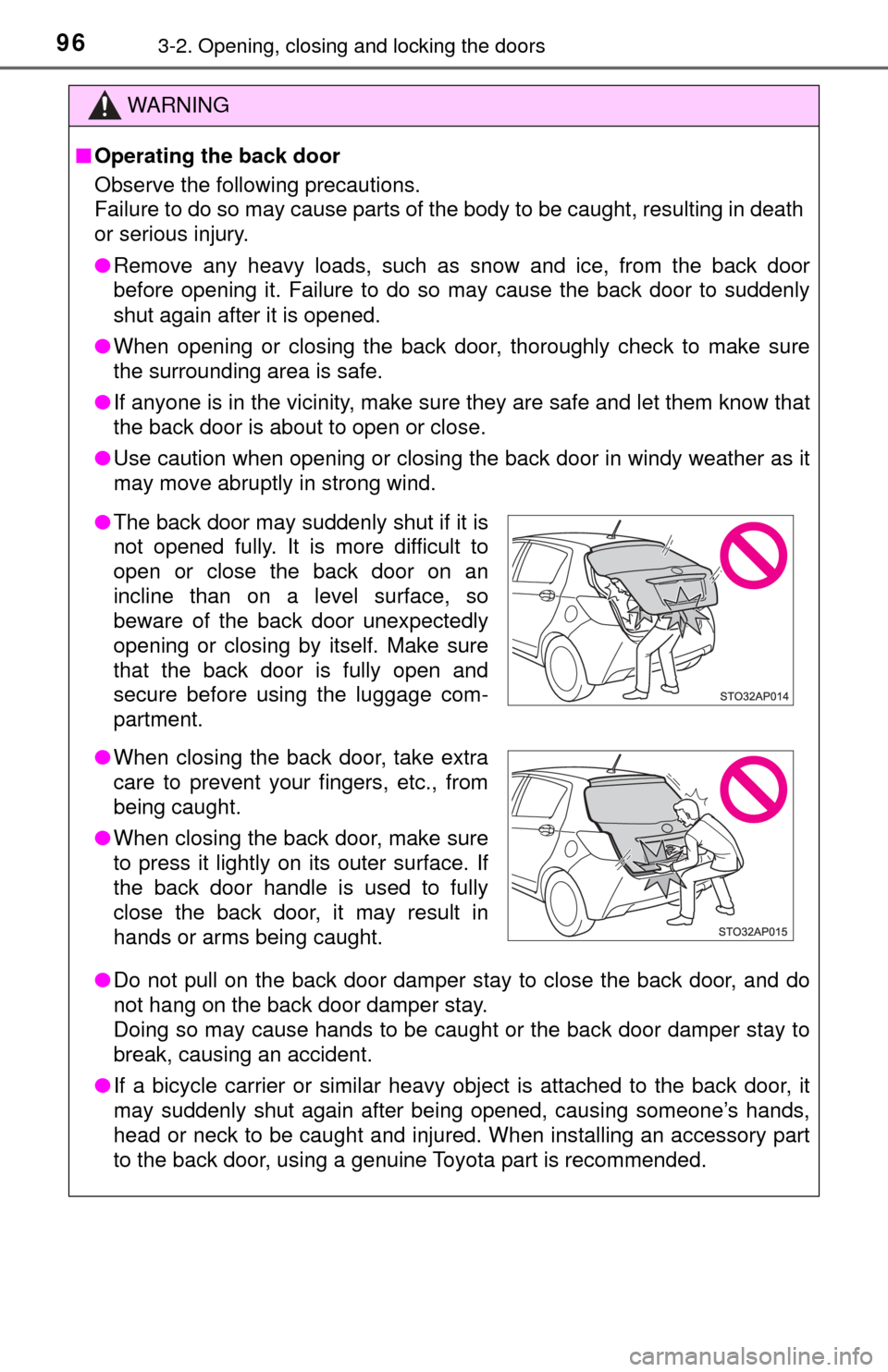
●The back door may suddenly shut if it is
not opened fully. It is more difficult to
open or close the back door on an
incline than on a level surface, so
beware of the back door unexpectedly
opening or closing by itself. Make sure
that the back door is fully open and
secure before using the luggage com-
partment.
● When closing the back door, take extra
care to prevent your fingers, etc., from
being caught.
● When closing the back door, make sure
to press it lightly on its outer surface. If
the back door handle is used to fully
close the back door, it may result in
hands or arms being caught.
Page 103 of 396
1033-3. Adjusting the seats
3
Operation of each component
WARNING
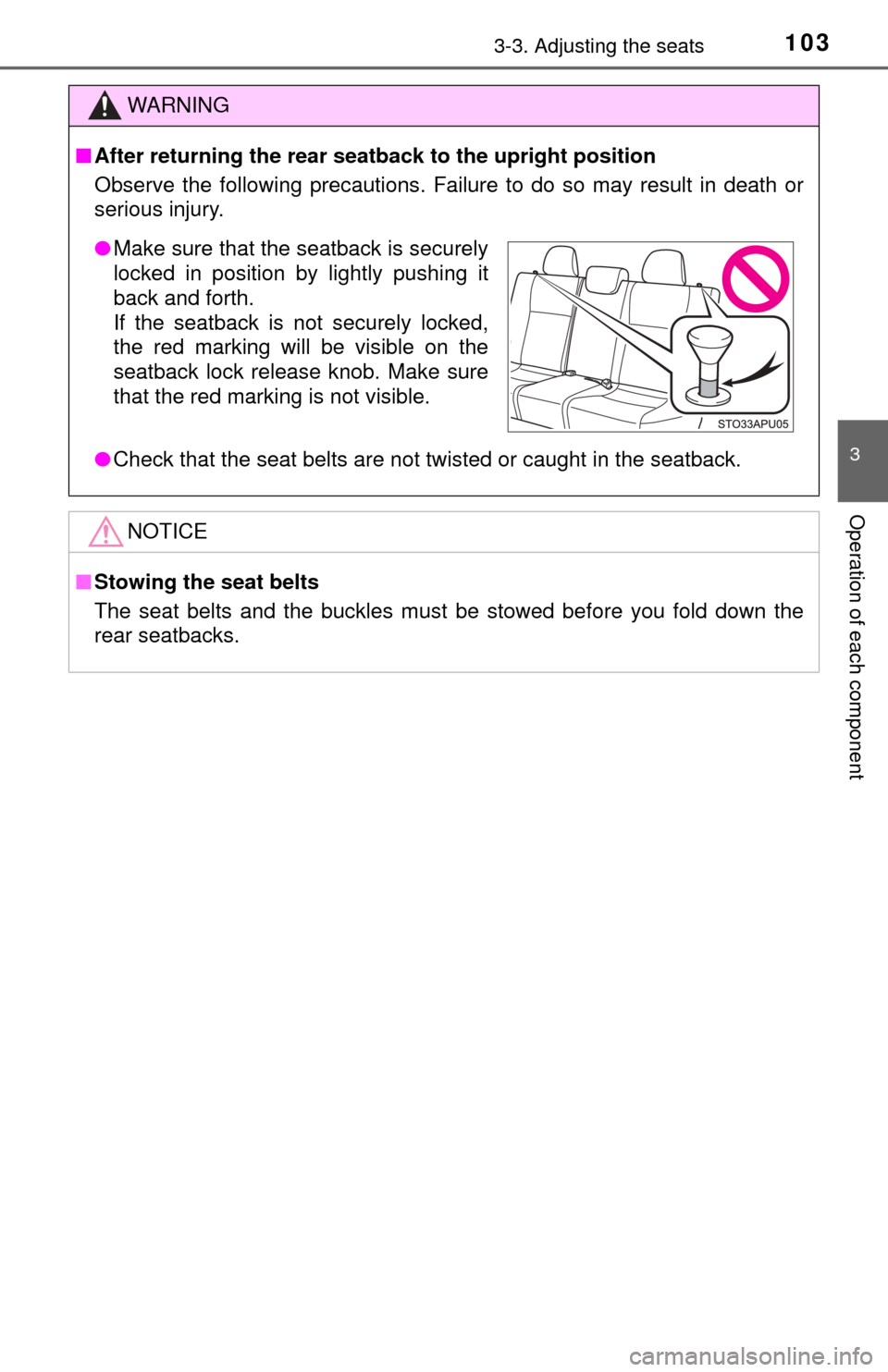
■After returning the rear seat back to the upright position
Observe the following precautions. Failure to do so may result in death or
serious injury.
● Check that the seat belts are not twisted or caught in the seatback.
NOTICE
■Stowing the seat belts
The seat belts and the buckles must be stowed before you fold down the
rear seatbacks.
● Make sure that the seatback is securely
locked in position by lightly pushing it
back and forth.
If the seatback is not securely locked,
the red marking will be visible on the
seatback lock release knob. Make sure
that the red marking is not visible.