light TOYOTA YARIS 2017 3.G Manual PDF
[x] Cancel search | Manufacturer: TOYOTA, Model Year: 2017, Model line: YARIS, Model: TOYOTA YARIS 2017 3.GPages: 396, PDF Size: 7.08 MB
Page 181 of 396

1814-5. Toyota Safety Sense C
4
Driving
●When the lane markers are on a curb etc.
● When lane markers are obscured or partially obscured by sand, dirt, etc.
● When there are shadows on the road running parallel with lane markers, or
if a shadow covers the lane markers
● When driving on a particularly bright road surface, such as concrete
● When driving on a road surface that is bright due to reflected light
● When driving in a location where the light level changes rapidly, such as the
entrance to or exit from a tunnel
● When sunlight or the headlights of oncoming vehicles are shining directly
into the camera lens
● When driving on roads that are branching or merging
● When driving on a road surface that is wet due to rain, previous rainfall,
standing water, etc.
● When the vehicle experiences strong up-and-down motion such as when
driving on an extremely rough road or on a seam in the pavement
● When headlight brightness at nighttime is reduced due to dirt on the lenses,
or when the headlights are misaligned
● When driving on winding roads or roads that are uneven
● When driving on rough or unpaved roads
● When the windshield is dirty, or if raindrops, condensation or ice are adher-
ing to the windshield
● When the heater is blowing to the feet, the upper part of the windshield may
get fogged up and have a negative effect
● When cleaning the inside of the windshield, touching the lens or getting
glass cleaner on the lens may have a negative effect
■ When changing the tires
Depending on the tires used, sufficient performance may not be maintainable.
■ If the LDA indicator comes on in yellow
It may indicate a malfunction in the system. Contact your Toyota dealer.
Page 182 of 396
1824-5. Toyota Safety Sense C
WARNING
■Before using the LDA system
Do not rely solely on the LDA system. The LDA system does not drive the
vehicle automatically, nor does it reduce the amount of care you need to
take. As such, the driver must always assume full responsibility for under-
standing his/her surroundings, for operating the steering wheel to correct
the driving line, and for driving safely.
Inappropriate or negligent driving could lead to an accident.
■ To avoid operating the LDA by mistake
Switch the LDA system off using the LDA switch when not in use.
NOTICE
■To prevent damage to or incorr ect operation of the LDA system
● Do not modify the headlights or attach stickers to the surface of the lights.
● Do not modify the suspension. If your suspension needs repairs, contact
your Toyota dealer.
● Do not install or place anything on the hood or the grille. Also, do not install
a grille guard (bull bars, kangaroo bar etc.).
Page 183 of 396
1834-5. Toyota Safety Sense C
4
Driving
Automatic High Beam∗
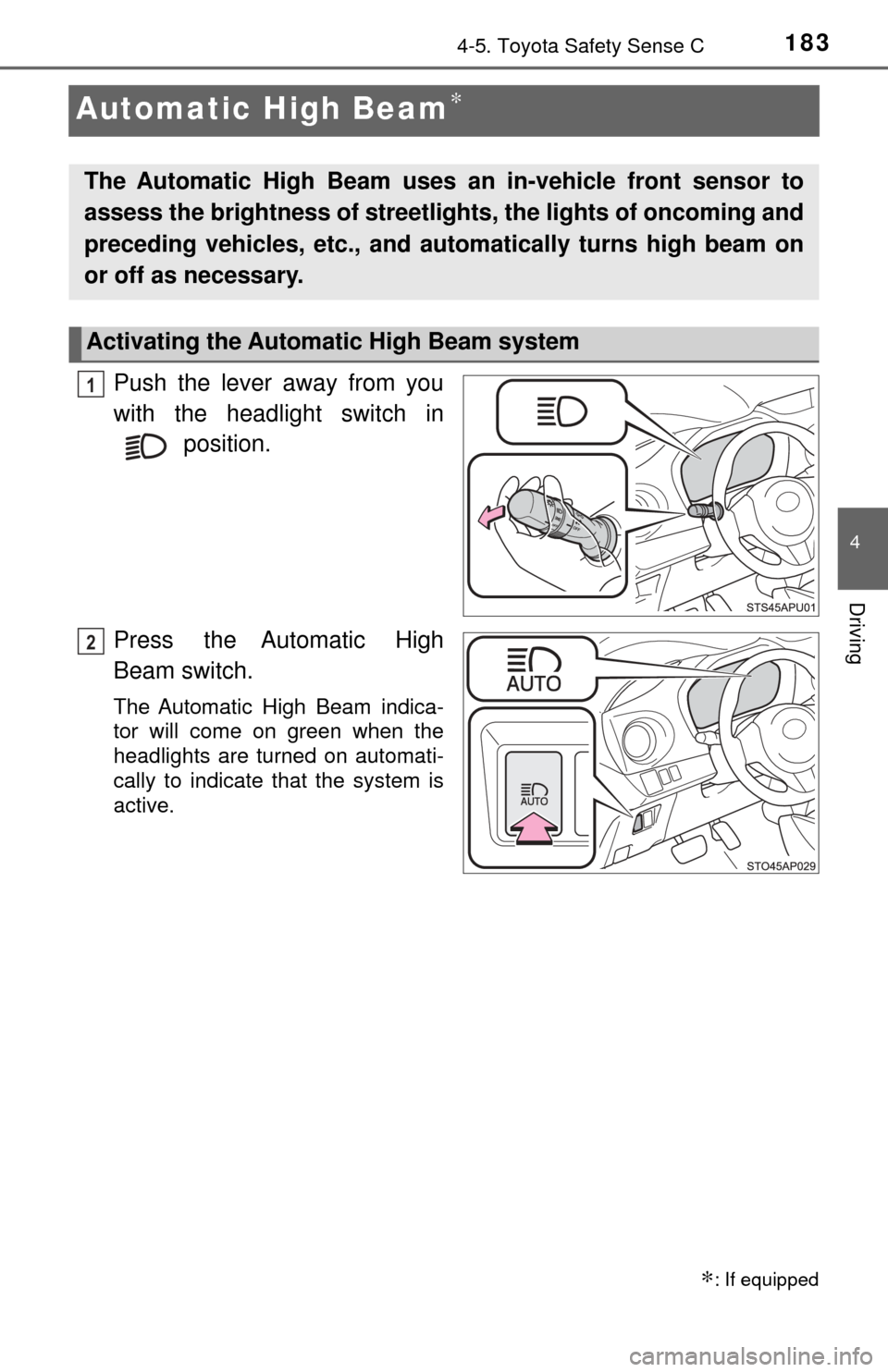
Push the lever away from you
with the headlight switch in position.
Press the Automatic High
Beam switch.
The Automatic High Beam indica-
tor will come on green when the
headlights are turned on automati-
cally to indicate that the system is
active.
∗: If equipped
The Automatic High Beam uses an in-vehicle front sensor to
assess the brightness of streetli ghts, the lights of oncoming and
preceding vehicles, etc., and au tomatically turns high beam on
or off as necessary.
Activating the Automatic High Beam system
1
2
Page 184 of 396
1844-5. Toyota Safety Sense C
When all of the following conditions are fulfilled, high beam will be
automatically turned on:
●Vehicle speed is above appr oximately 25 mph (40 km/h).
● The area ahead of the vehicle is dark.
● There are no oncoming or preceding vehicles with headlights or tail
lights turned on.
● There are few streetlights on the road ahead.
If any of the following conditions are fulfilled, high beam will be auto-
matically turned off:
● Vehicle speed drops below ap proximately 19 mph (30 km/h).
● The area ahead of the vehicle is not dark.
● Oncoming or preceding vehicles have headlights or tail lights
turned on.
● There are many streetlights on the road ahead.
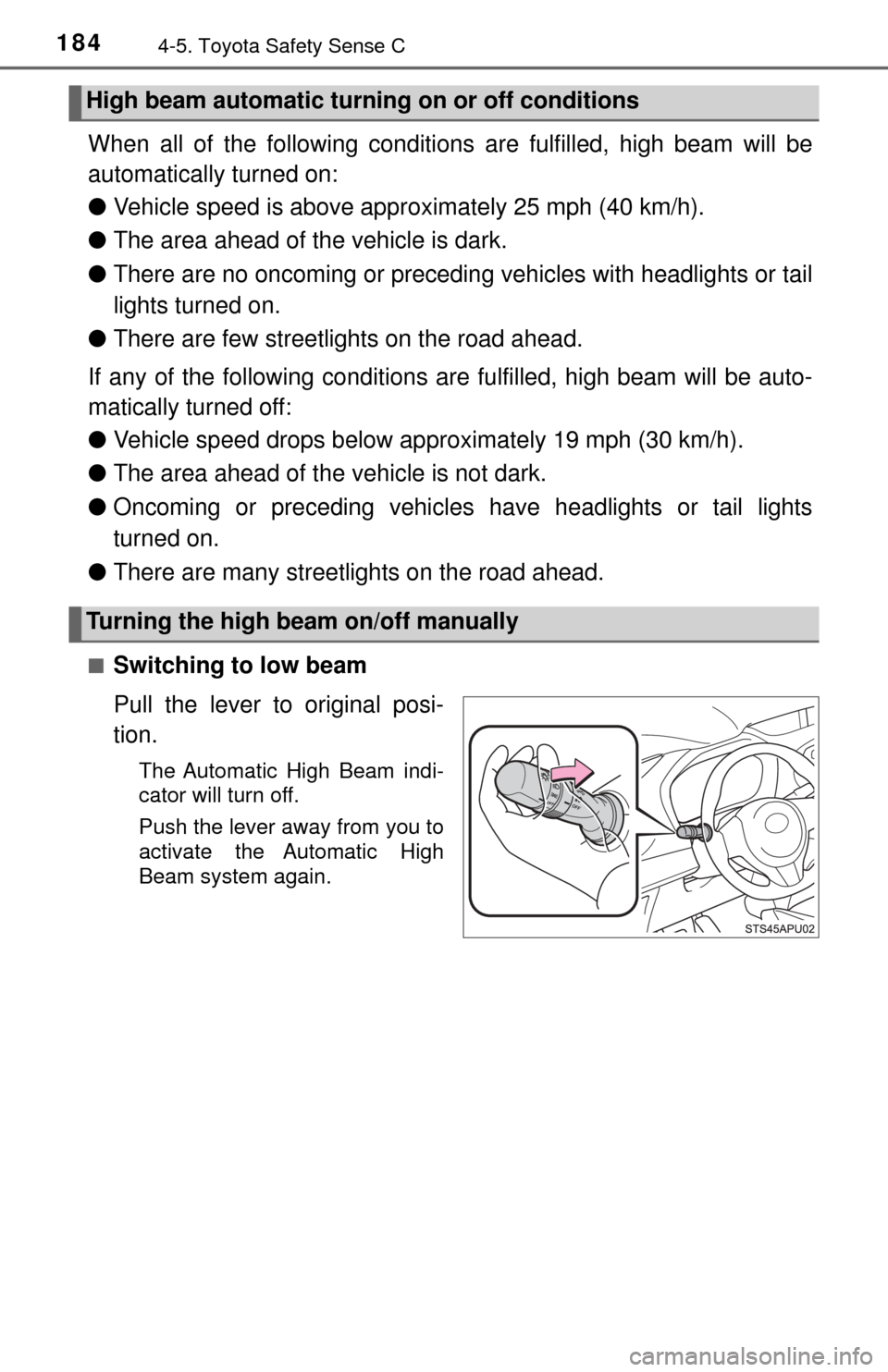
■Switching to low beam
Pull the lever to original posi-
tion.
The Automatic High Beam indi-
cator will turn off.
Push the lever away from you to
activate the Automatic High
Beam system again.
High beam automatic turning on or off conditions
Turning the high beam on/off manually
Page 185 of 396
1854-5. Toyota Safety Sense C
4
Driving
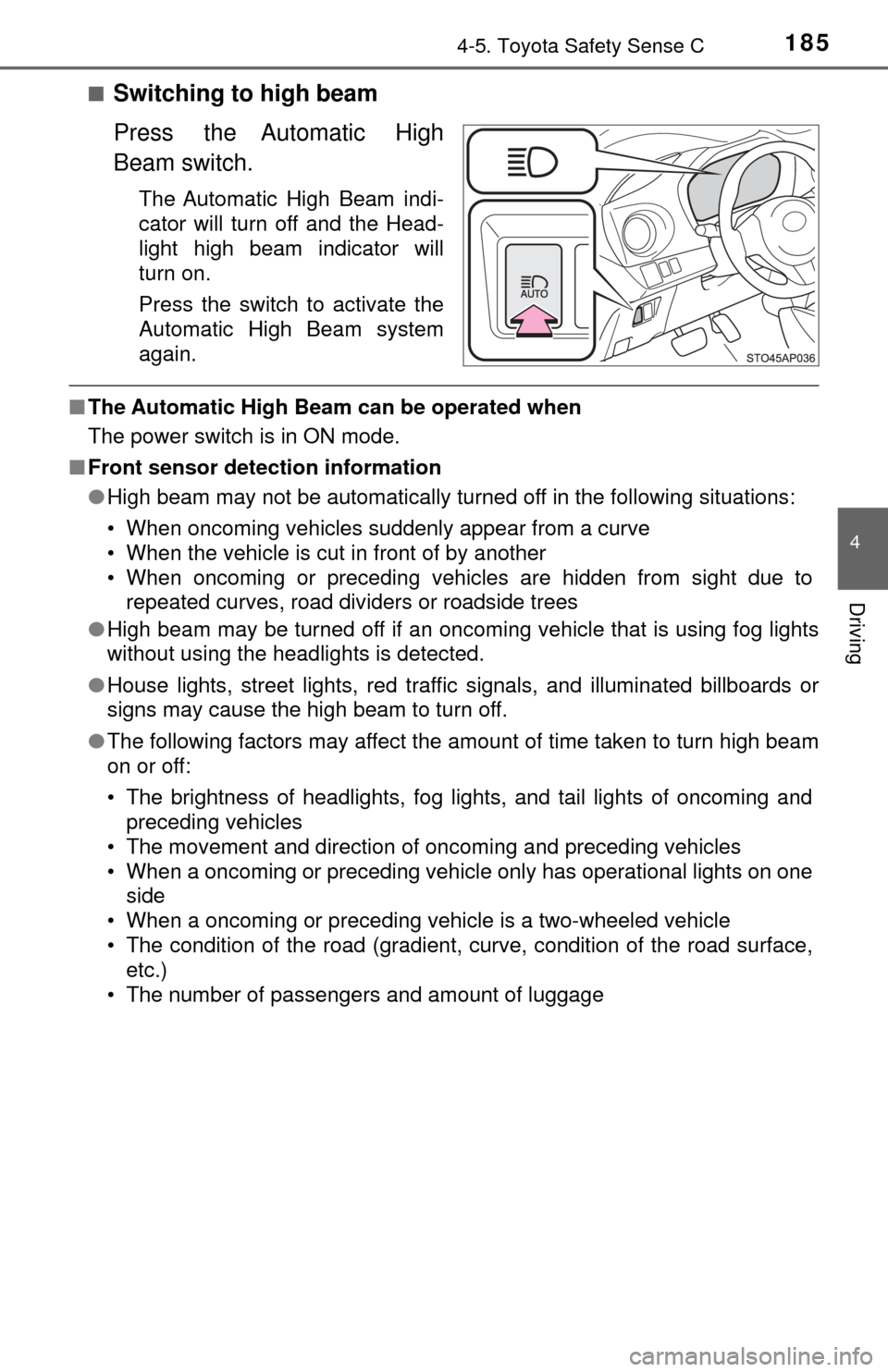
■Switching to high beam
Press the Automatic High
Beam switch.
The Automatic High Beam indi-
cator will turn off and the Head-
light high beam indicator will
turn on.
Press the switch to activate the
Automatic High Beam system
again.
■The Automatic High Beam can be operated when
The power switch is in ON mode.
■ Front sensor detection information
●High beam may not be automatically turned off in the following situations:
• When oncoming vehicles suddenly appear from a curve
• When the vehicle is cut in front of by another
• When oncoming or preceding vehicles are hidden from sight due to
repeated curves, road dividers or roadside trees
● High beam may be turned off if an oncoming vehicle that is using fog lights
without using the headlights is detected.
● House lights, street lights, red traf fic signals, and illuminated billboards or
signs may cause the high beam to turn off.
● The following factors may affect the amount of time taken to turn high beam
on or off:
• The brightness of headlights, fog lights, and tail lights of oncoming and
preceding vehicles
• The movement and direction of oncoming and preceding vehicles
• When a oncoming or preceding vehicle only has operational lights on one side
• When a oncoming or preceding vehicle is a two-wheeled vehicle
• The condition of the road (gradient, curve, condition of the road surface, etc.)
• The number of passengers and amount of luggage
Page 186 of 396

1864-5. Toyota Safety Sense C
●High beam may be turned on or off when unexpected by the driver.
● In the situations below, the system may not be able to correctly detect the
surrounding brightness levels, and may flash or expose nearby pedestrians
to the high beam. Therefore, you should consider turning the high beams on
or off manually rather than relying on the Automatic High Beam system.
• In bad weather (rain, snow, fog, sandstorms, etc.)
• The windshield is obscured by fog, mist, ice, dirt, etc.
• The windshield is cracked or damaged.
• The front sensor is deformed or dirty.
• The front sensor temperature is extremely high.
• Surrounding brightness levels are equal to those of headlights, tail lights
or fog lights.
• Vehicles ahead have headlights or tail lights that are either switched off, dirty, are changing color, or are not aimed properly.
• When driving through an area of in termittently changing brightness and
darkness.
• When frequently and repeatedly driving ascending/descending roads, or
roads with rough, bumpy or uneven surfaces (such as stone-paved
roads, gravel tracks, etc.).
• When frequently and repeatedly taking curves or driving on a winding
road.
• There is a highly reflective object ahead of the vehicle, such as a sign or a mirror.
• The back of a vehicle ahead is highly reflective, such as a container on a truck.
• The vehicle’s headlights are damaged or dirty.
• The vehicle is listing or titling, due to a flat tire, a trailer being towed, etc.
• The driver believes that the high beam may be causing problems or dis- tress to other drivers or pedestrians nearby.
■ If the Automatic High Beam indicator comes on in yellow
It may indicate a malfunction in the system. Contact your Toyota dealer.
■ Temporarily lowering sensor sensitivity
The sensitivity of the sensor can be temporarily lowered.
Turn the engine switch off while the following conditions are met.
• The headlight switch is in .
• The headlight switch lever is in low beam position.
• Automatic High Beam switch is on.
Turn the engine switch to the “ON” position.
Within 30 seconds after , repeat pulling the headlight switch lever to the
original position then pushing it to the high beam position quickly 10 times,
then leave the lever in high beam position.
If the sensitivity is changed, the Automatic High Beam indicator is turn on
and off 3 times.
Automatic High Beam (headlights) may turn on even the vehicle is stopped.
1
2
32
4
Page 194 of 396

1944-6. Using the driving support systems
■Turning off both TRAC and VSC systems
To turn the TRAC and VSC systems off, press and hold the VSC OFF switch
for more than 3 seconds while the vehicle is stopped.
The “TRAC OFF” indicator and VS C OFF indicator will come on.
Press the switch again to turn the systems back on.
On vehicles with Pre-collision system, Pre-collision brake assist and Pre-colli-
sion braking will also be disabled. The PCS warning light will come on.
( →P. 177)
■ When the “TRAC OFF” indicator comes on even if th e VSC OFF switch
has not been pressed
TRAC system cannot be operated. Contact your Toyota dealer.
■ Sounds and vibrations caused by the ABS, brake assist, TRAC and VSC
systems
● A sound may be heard from the engine compartment when the engine is
started or just after the vehicle begins to move. This sound does not indicate
that a malfunction has occurred in any of these systems.
● Any of the following conditions may occur when the above systems are
operating. None of these indicates that a malfunction has occurred.
• Vibrations may be felt through the vehicle body and steering.
• A motor sound may be heard after the vehicle comes to a stop.
• The brake pedal may pulsate slightly after the ABS is activated.
• The brake pedal may move down slightly after the ABS is activated.
■ EPS operation sound
When the steering wheel is operated, a motor sound (whirring sound) may be
heard. This does not indicate a malfunction.
■ Automatic reactivation of TRAC and VSC systems
After turning the TRAC and VSC systems off, the systems will be automati-
cally re-enabled in the following situations:
● When the engine switch is turned to the “LOCK” position
● If only the TRAC system is turned off, the TRAC will turn on when vehicle
speed increases
If both the TRAC and VSC systems are turned off, automatic re-enabling will
not occur when vehicle speed increases.
Page 196 of 396

1964-6. Using the driving support systems
WARNING
■When the VSC is activated
The slip indicator flashes. Always drive carefully. Reckless driving may
cause an accident. Exercise particular care when the indicator light flashes.
■ When the TRAC/VSC syst ems are turned off
Be especially careful and drive at a speed appropriate to the road condi-
tions. As these are the systems to help ensure vehicle stability and driving
force, do not turn the TRAC/VSC systems off unless necessary.
■
Replacing tires
Make sure that all tires are of the specified size, brand, tread pattern
and total load capacity. In addition, make sure that the tires are inflated
to the recommended tire inflation pressure level.
The ABS, TRAC and VSC systems will not function correctly if different
tires are installed on the vehicle.
Contact your Toyota dealer for furt her information when replacing tires
or wheels.
■Handling of tires and the suspension
Using tires with any kind of problem or modifying the suspension will
affect the driving assist systems, and may cause a system to malfunc-
tion.
Page 197 of 396
1974-7. Driving tips
4
Driving
Winter driving tips
●Use fluids that are appropriate to the prevailing outside tempera-
tures. • Engine oil
• Engine coolant
• Washer fluid
● Have a service technician ins pect the condition of the battery.
● Have the vehicle fitted with four snow tires or purchase a set of tire
chains for the front tires.
Ensure that all tires are the same size and brand and that their wear
level is not noticeably different with each other. Also make sure that
chains match the size of the tires.
Perform the following accordin g to the driving conditions:
● Do not try to forcibly open a window or move a wiper that is frozen.
Pour warm water over the frozen area to melt the ice. Wipe away
the water immediately to prevent it from freezing.
● To ensure proper operation of the climate control system fan,
remove any snow that has accumulated on the air inlet vents in
front of the windshield.
● Check for and remove any excess ice or snow that may have accu-
mulated on the exterior lights, vehicle’s roof, chassis, around the
tires or on the brakes.
● Remove any snow or mud from the bottom of your shoes before
getting in the vehicle.
Accelerate the vehicle slowly, keep a safe distance between you and
the vehicle ahead, and drive at a reduced speed suitable to road con-
ditions.
Carry out the necessary preparations and inspections before
driving the vehicle in winter. Al ways drive the vehicle in a man-
ner appropriate to the prevailing weather conditions.
Preparation for winter
Before driving the vehicle
When driving the vehicle
Page 201 of 396

201
5Interior features
5-1. Using the air conditioning system and defogger
Air conditioning system ..... 202
5-2. Using the audio system Steering wheel audio switches .......................... 210
AUX port/USB port ............ 211
5-3. Using the interior lights Interior lights list ................ 212• Interior light ................... 212
• Personal lights .............. 213
5-4. Using the storage features List of storage features ..... 214• Glove box...................... 215
• Cup holders .................. 215
• Bottle holders ................ 216
• Auxiliary box ................. 217
Luggage compartment features ........................... 218
5-5. Using the other interior features
Other interior features ....... 220 • Sun visors ..................... 220
• Vanity mirrors................ 220
• Power outlet .................. 221
• Assist grips ................... 222