clock TOYOTA YARIS 2017 Owners Manual
[x] Cancel search | Manufacturer: TOYOTA, Model Year: 2017, Model line: YARIS, Model: TOYOTA YARIS 2017Pages: 549, PDF Size: 33.09 MB
Page 90 of 549
902. Instrument cluster
YARIS_F_OM_Europe_OM52J20E
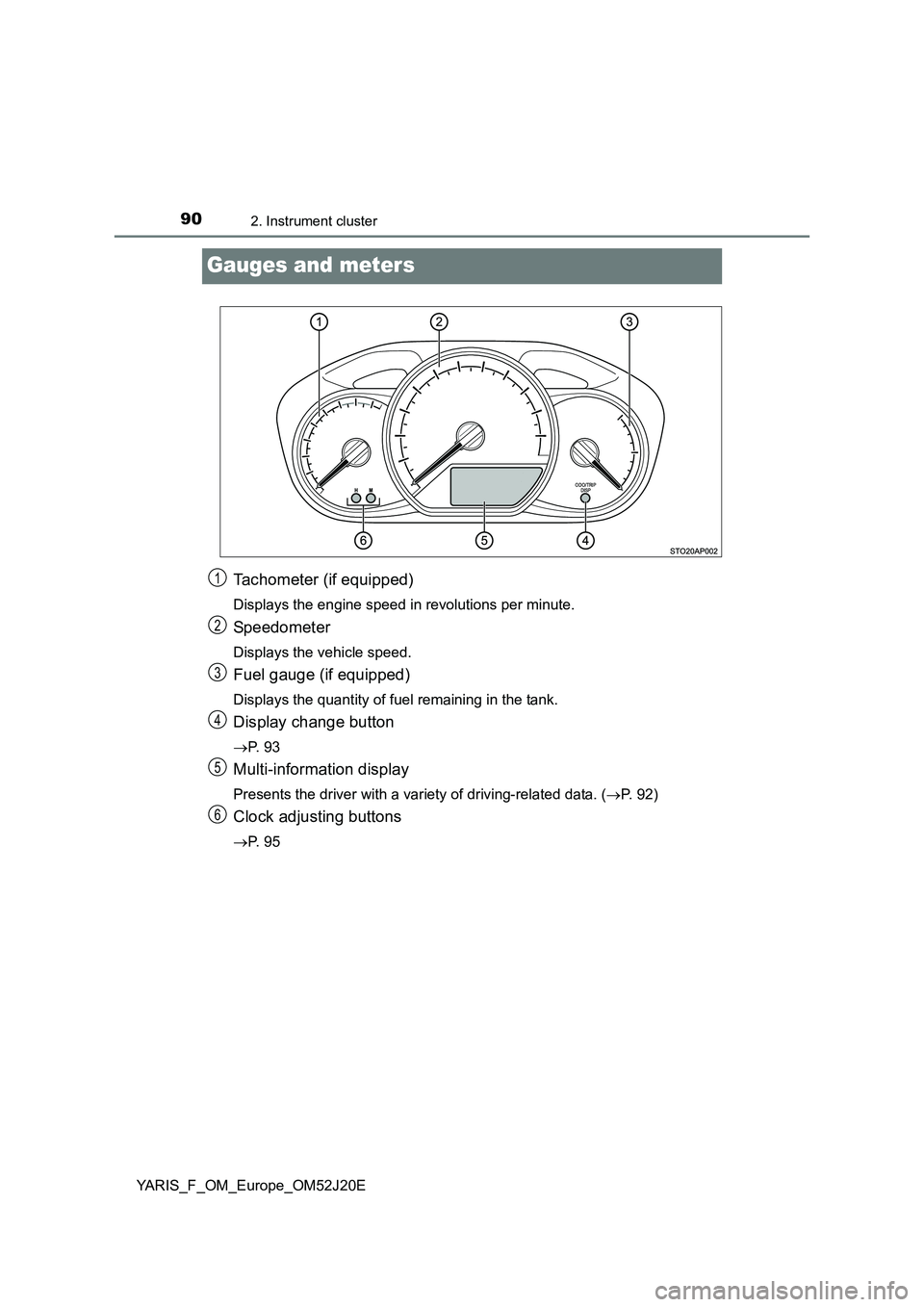
Gauges and meters
Tachometer (if equipped)
Displays the engine speed in revolutions per minute.
Speedometer
Displays the vehicle speed.
Fuel gauge (if equipped)
Displays the quantity of fuel remaining in the tank.
Display change button
P. 9 3
Multi-information display
Presents the driver with a variety of driving-related data. (P. 92)
Clock adjusting buttons
P. 9 5
1
2
3
4
5
6
Page 92 of 549
922. Instrument cluster
YARIS_F_OM_Europe_OM52J20E
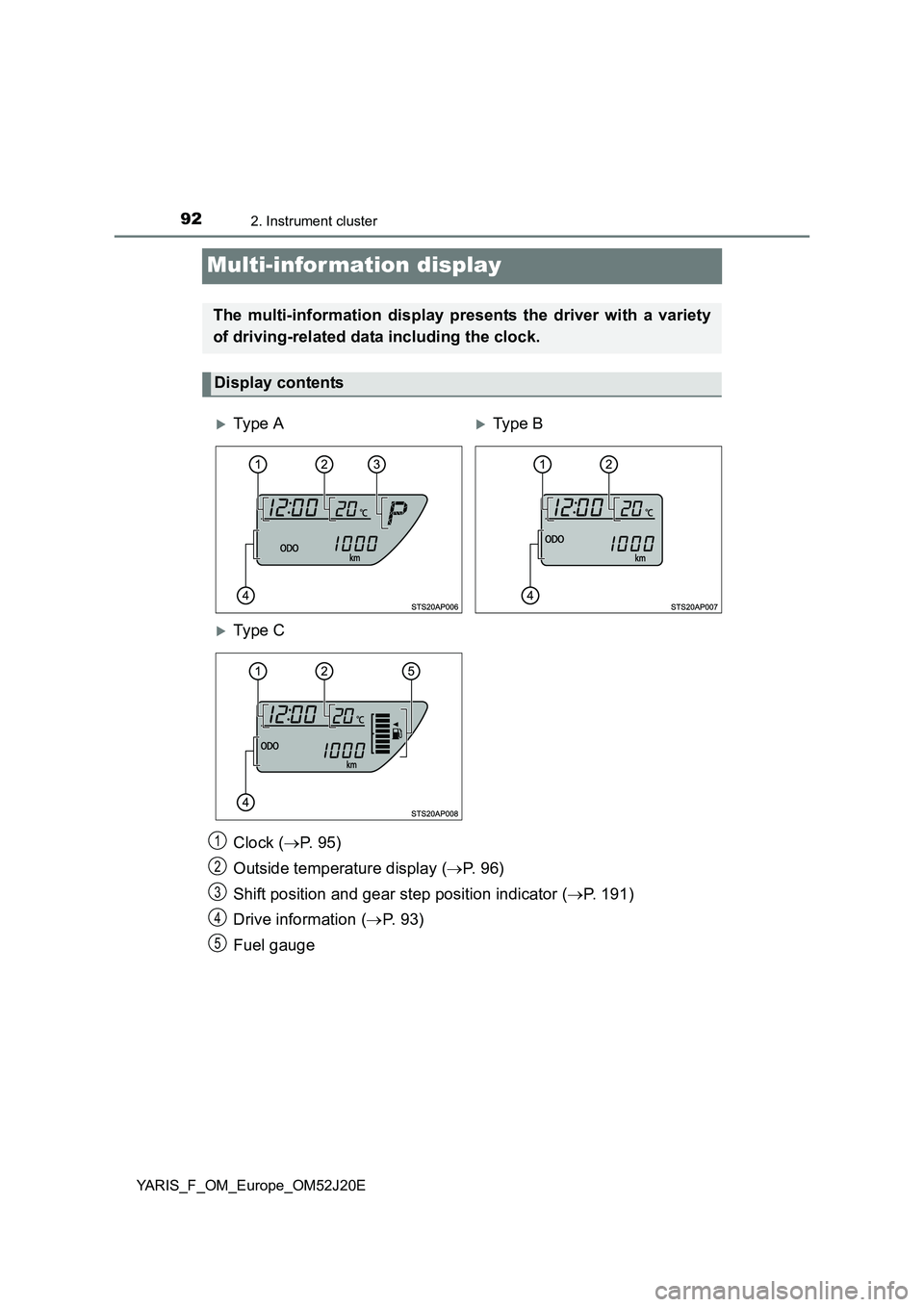
Multi-information display
Clock (P. 9 5 )
Outside temperature display ( P. 9 6 )
Shift position and gear step position indicator ( P. 191)
Drive information ( P. 9 3 )
Fuel gauge
The multi-information display presents the driver with a variety
of driving-related data including the clock.
Display contents
Ty pe ATy pe B
Ty pe C
1
2
3
4
5
Page 95 of 549
952. Instrument cluster
2
Instrument cluster
YARIS_F_OM_Europe_OM52J20E
Eco Driving Indicator Light can be activated or deactivated by press-
ing the display change button when the Eco Driving Indicator Light
customization display is displayed.
To change the Eco Driving Indicator Light customization display, display
the odometer and press and hold the display change button until the dis-
play changes.
After customization, press the display change button for more than 2 sec-
onds to return to the odometer.
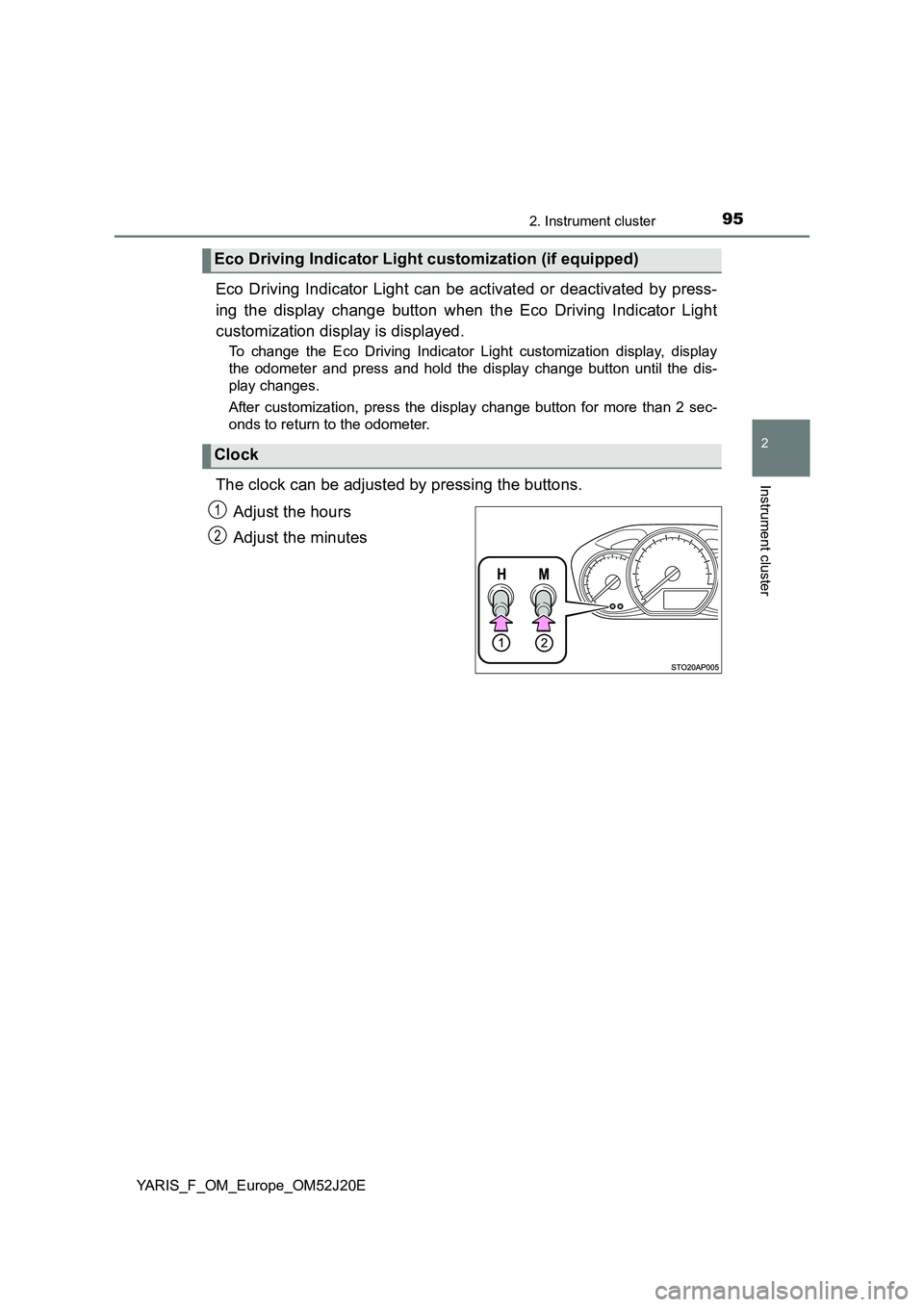
The clock can be adjusted by pressing the buttons.
Adjust the hours
Adjust the minutes
Eco Driving Indicator Light customization (if equipped)
Clock
1
2
Page 96 of 549
962. Instrument cluster
YARIS_F_OM_Europe_OM52J20E
The temperature display shows temperatures within the range of
-40°C (-40°F) and 50°C (122°F).
■Display
In the following situations, the correct outside temperature may not
be displayed, or the display may take longer than normal to
change:
● When the vehicle is stopped, or moving at low speeds (less than
25 km/h [16 mph])
● When the outside temperature has changed suddenly (at the
entrance/exit of a garage, tunnel, etc.)
■When “ ” or “E” is displayed
The system may be malfunctioning. Take your vehicle to any autho-
rized Toyota dealer or repairer, or another duly qualified and
equipped professional.
■ When disconnecting and reconnecting battery terminals
The following information data will be reset:
● Driving range
● Average fuel consumption
● Stop & Start system total operation time (if equipped)
● Average vehicle speed
● Clock data
■ Liquid crystal display
Small spots or light spots may appear on the display. This phenomenon is
characteristic of liquid crystal display, and there is no problem continuing to
use the display.
■ Changing the pre-crash warning timing
P. 229
Outside temperature display
Page 179 of 549
1794-1. Before driving
4
Driving
YARIS_F_OM_Europe_OM52J20E
Your vehicle will handle differently when towing a trailer. In order to
avoid accident, death or serious injury, keep the following in mind
when towing:
■Checking connections between trailer and lights
Stop the vehicle and check the operation of the connection
between the trailer and lights after driving for a brief period as well
as before starting off.
■Practicing driving with a coupled trailer
● Get the feel for turning, stopping and reversing with the trailer
coupled by practicing in an area with no or light traffic.
● When reversing with a coupled trailer, hold the section of the
steering wheel nearest to you and rotate clockwise to turn the
trailer left or counterclockwise to turn it right. Always rotate a little
at a time to prevent steering error. Have someone guide you
when reversing to lessen the risk of an accident.
■Increasing vehicle-to-vehicle distance
At a speed of 10 km/h (6 mph), the distance to the vehicle running
ahead of you should be equivalent to or greater than the combined
length of your vehicle and trailer. Avoid sudden braking that may
cause skidding. Otherwise, the vehicle may spin out of control. This
is especially true when driving on wet or slippery road surfaces.
■Sudden acceleration/steering input/cornering
Executing sharp turns when towing may result in the trailer colliding
with your vehicle. Decelerate well in advance when approaching
turns and take them slowly and carefully to avoid sudden braking.
■Important points regarding turning
The wheels of the trailer will travel closer to the inside of the curve
than the wheels of the vehicle. To make allowance for this, take the
turns wider than you would normally do.
Guidance
Page 298 of 549
2985-5. Using an external device
YARIS_F_OM_Europe_OM52J20E
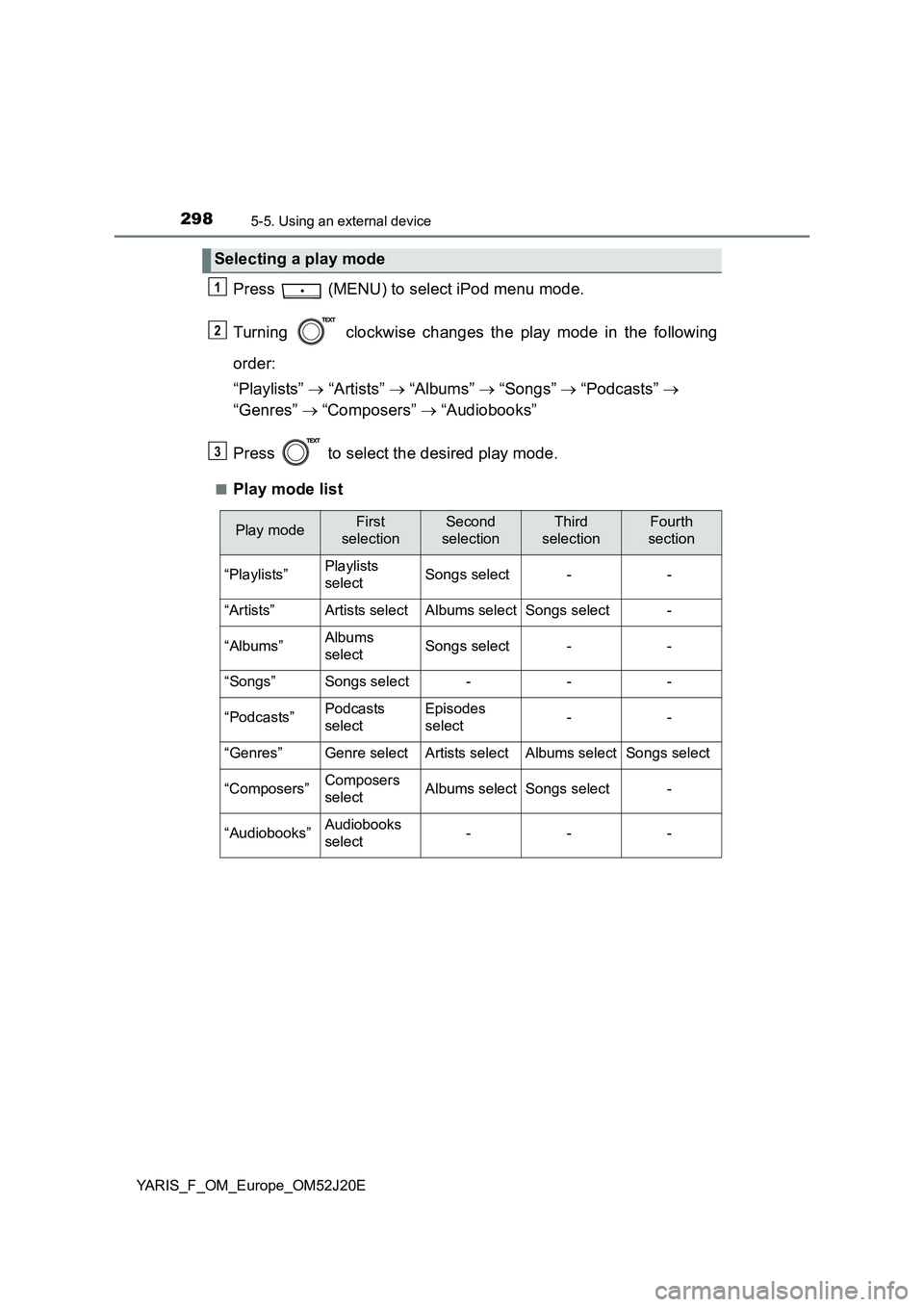
Press (MENU) to select iPod menu mode.
Turning clockwise changes the play mode in the following
order:
“Playlists” “Artists” “Albums” “Songs” “Podcasts”
“Genres” “Composers” “Audiobooks”
Press to select the desired play mode.
■Play mode list
Selecting a play mode
1
2
3
Play modeFirst
selection
Second
selection
Third
selection
Fourth
section
“Playlists”Playlists
selectSongs select--
“Artists”Artists selectAlbums selectSongs select-
“Albums”Albums
selectSongs select--
“Songs”Songs select---
“Podcasts”Podcasts
select
Episodes
select--
“Genres”Genre selectArtists selectAlbums selectSongs select
“Composers”Composers
selectAlbums selectSongs select-
“Audiobooks”Audiobooks
select---
Page 313 of 549
3136-1. Using the air conditioning system and defogger
6
Interior features
YARIS_F_OM_Europe_OM52J20E
■Adjusting the temperature setting
Vehicles without the button
Turn the temperature control dial clockwise to increase the temper-
ature.
Vehicles with the button
To adjust the temperature setting, turn the temperature control dial
clockwise (warm) or counterclockwise (cool).
If is not pressed, the system will blow ambient temperature air or
heated air.
■Fan speed setting
To adjust the fan speed, turn the fan speed control dial clockwise
(increase) or counterclockwise (decrease).
Turning the dial to “0” turns off the fan.
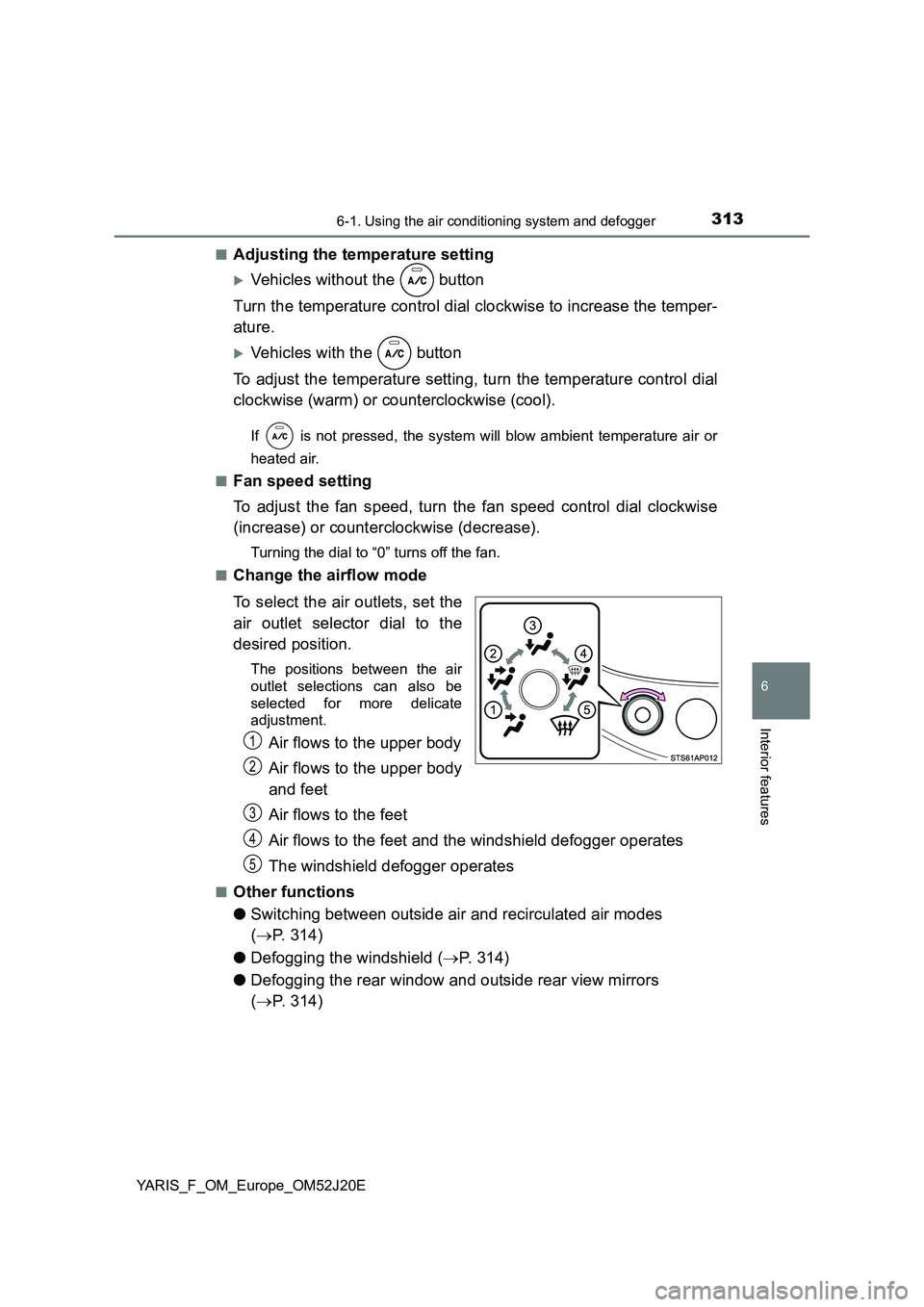
■Change the airflow mode
To select the air outlets, set the
air outlet selector dial to the
desired position.
The positions between the air
outlet selections can also be
selected for more delicate
adjustment.
Air flows to the upper body
Air flows to the upper body
and feet
Air flows to the feet
Air flows to the feet and the windshield defogger operates
The windshield defogger operates
■Other functions
● Switching between outside air and recirculated air modes
( P. 314)
● Defogging the windshield (P. 314)
● Defogging the rear window and outside rear view mirrors
( P. 314)
1
2
3
4
5
Page 321 of 549
3216-1. Using the air conditioning system and defogger
6
Interior features
YARIS_F_OM_Europe_OM52J20E
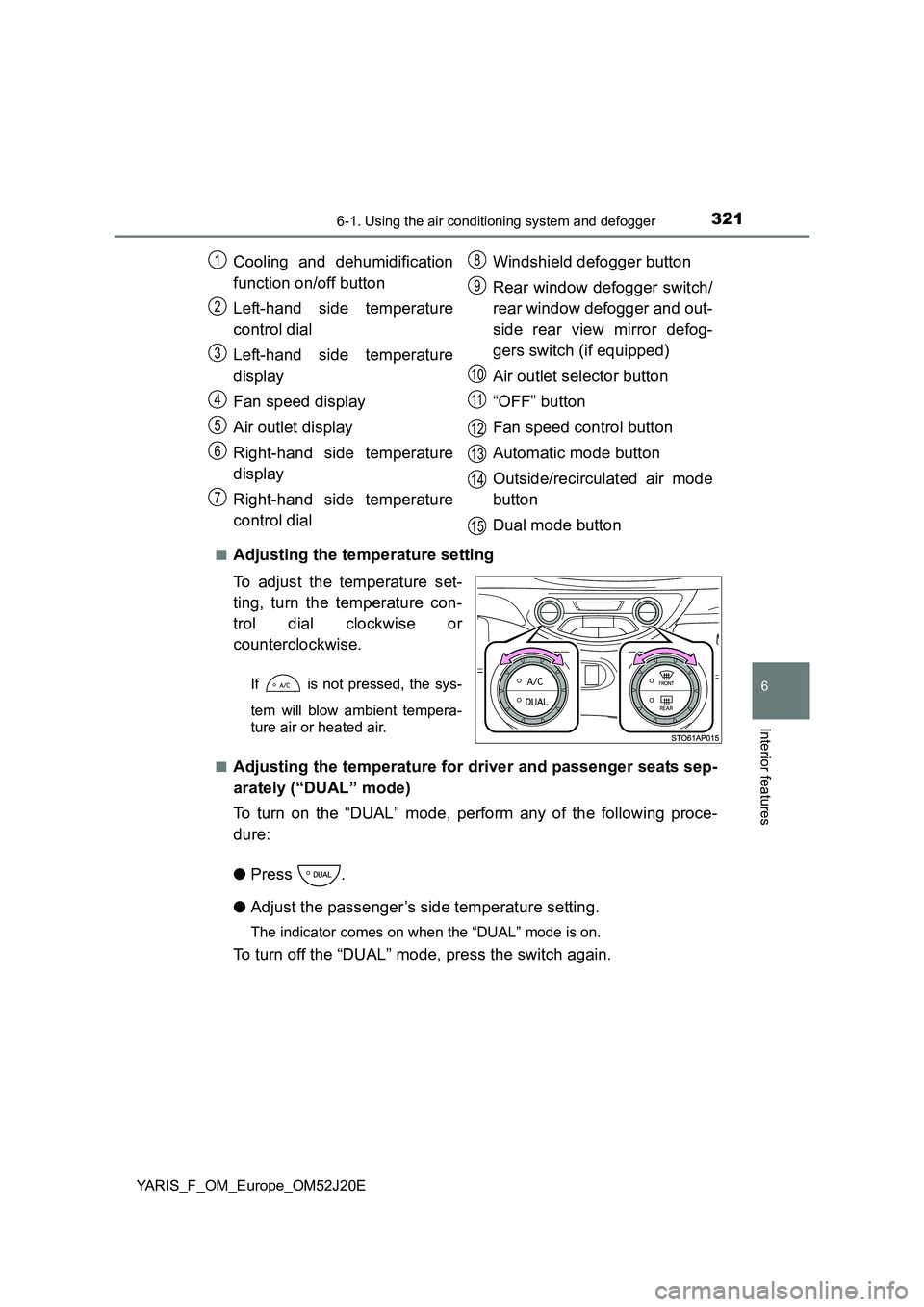
■Adjusting the temperature setting
To adjust the temperature set-
ting, turn the temperature con-
trol dial clockwise or
counterclockwise.
If is not pressed, the sys-
tem will blow ambient tempera-
ture air or heated air.
■Adjusting the temperature for driver and passenger seats sep-
arately (“DUAL” mode)
To turn on the “DUAL” mode, perform any of the following proce-
dure:
● Press .
● Adjust the passenger’s side temperature setting.
The indicator comes on when the “DUAL” mode is on.
To turn off the “DUAL” mode, press the switch again.
Cooling and dehumidification
function on/off button
Left-hand side temperature
control dial
Left-hand side temperature
display
Fan speed display
Air outlet display
Right-hand side temperature
display
Right-hand side temperature
control dial
Windshield defogger button
Rear window defogger switch/
rear window defogger and out-
side rear view mirror defog-
gers switch (if equipped)
Air outlet selector button
“OFF” button
Fan speed control button
Automatic mode button
Outside/recirculated air mode
button
Dual mode button
1
2
3
4
5
6
7
8
9
10
11
12
13
14
15
Page 371 of 549
3717-3. Do-it-yourself maintenance
7
Maintenance and care
YARIS_F_OM_Europe_OM52J20E
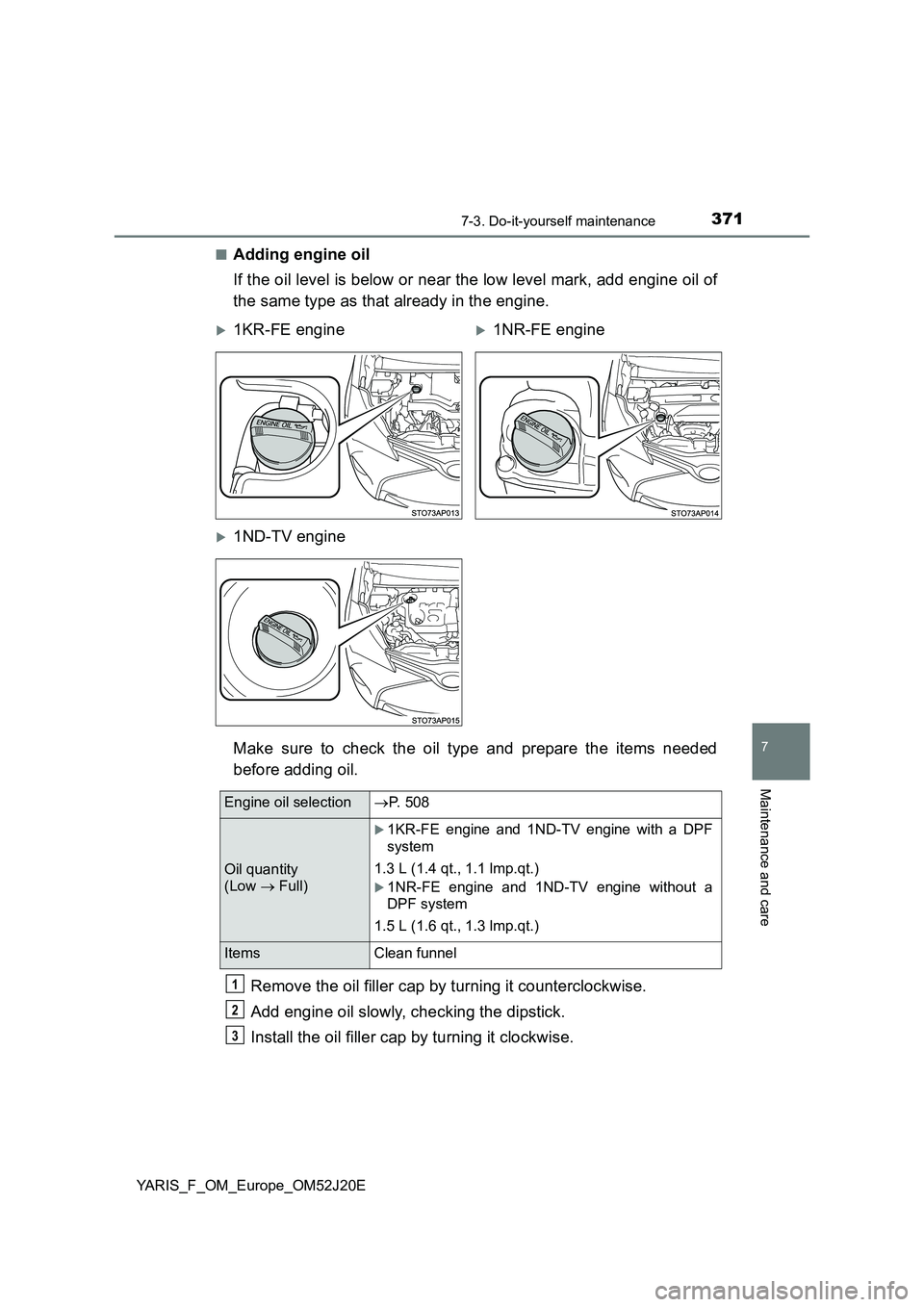
■Adding engine oil
If the oil level is below or near the low level mark, add engine oil of
the same type as that already in the engine.
Make sure to check the oil type and prepare the items needed
before adding oil.
Remove the oil filler cap by turning it counterclockwise.
Add engine oil slowly, checking the dipstick.
Install the oil filler cap by turning it clockwise.
1KR-FE engine1NR-FE engine
1ND-TV engine
Engine oil selection P. 508
Oil quantity
(Low Full)
1KR-FE engine and 1ND-TV engine with a DPF
system
1.3 L (1.4 qt., 1.1 lmp.qt.)
1NR-FE engine and 1ND-TV engine without a
DPF system
1.5 L (1.6 qt., 1.3 lmp.qt.)
Items Clean funnel
1
2
3
Page 380 of 549
3807-3. Do-it-yourself maintenance
YARIS_F_OM_Europe_OM52J20E
You may drain the fuel filter yourself. However, as the operation is dif-
ficult, we recommend having it drained by any authorized Toyota
dealer or repairer, or another duly qualified and equipped profes-
sional. Even if you decide to drain it yourself, contact any authorized
Toyota dealer or repairer, or another duly qualified and equipped pro-
fessional.
The water in the fuel filter needs to be drained if the fuel filter warning
light comes on. (P. 442)
Turn the engine switch to the “LOCK” position (vehicles without a
smart entry & start system) or off (vehicles with a smart entry &
start system).
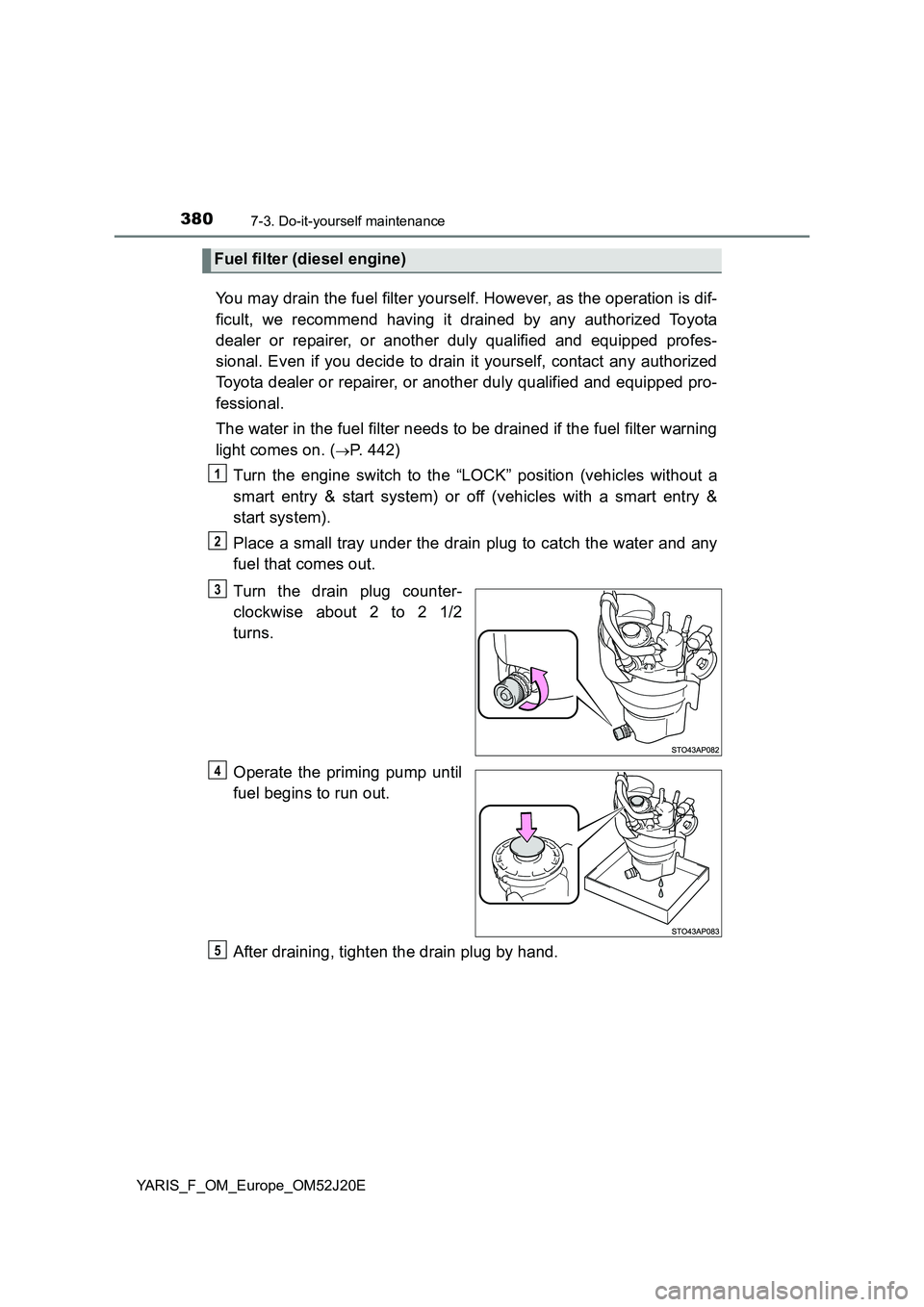
Place a small tray under the drain plug to catch the water and any
fuel that comes out.
Turn the drain plug counter-
clockwise about 2 to 2 1/2
turns.
Operate the priming pump until
fuel begins to run out.
After draining, tighten the drain plug by hand.
Fuel filter (diesel engine)
1
2
3
4
5