reset TOYOTA YARIS 2017 Owners Manual
[x] Cancel search | Manufacturer: TOYOTA, Model Year: 2017, Model line: YARIS, Model: TOYOTA YARIS 2017Pages: 549, PDF Size: 33.09 MB
Page 15 of 549
15Pictorial index
YARIS_F_OM_Europe_OM52J20E
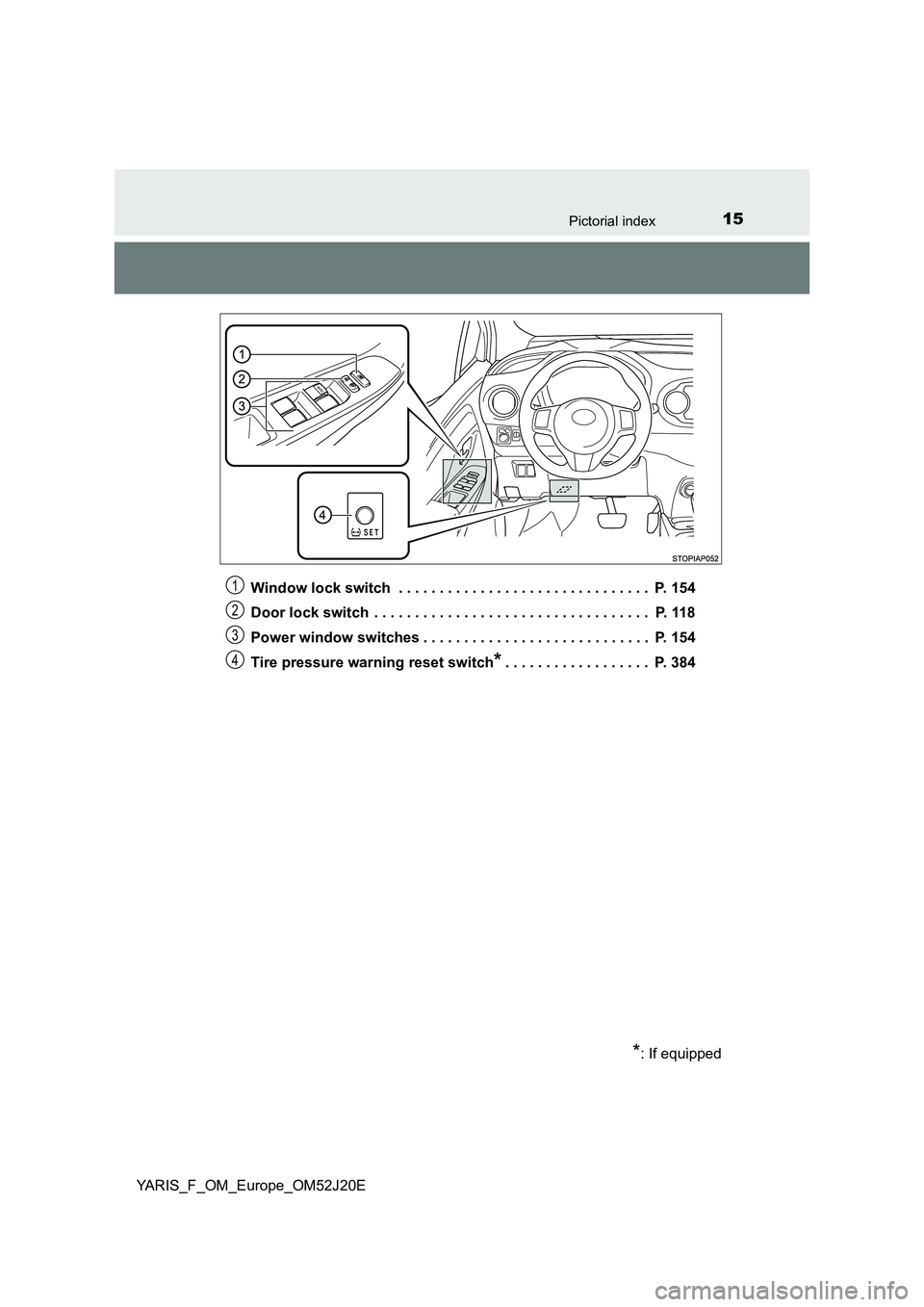
Window lock switch . . . . . . . . . . . . . . . . . . . . . . . . . . . . . . . P. 154
Door lock switch . . . . . . . . . . . . . . . . . . . . . . . . . . . . . . . . . . P. 118
Power window switches . . . . . . . . . . . . . . . . . . . . . . . . . . . . P. 154
Tire pressure warning reset switch*. . . . . . . . . . . . . . . . . . P. 384
*: If equipped
1
2
3
4
Page 22 of 549
22Pictorial index
YARIS_F_OM_Europe_OM52J20E
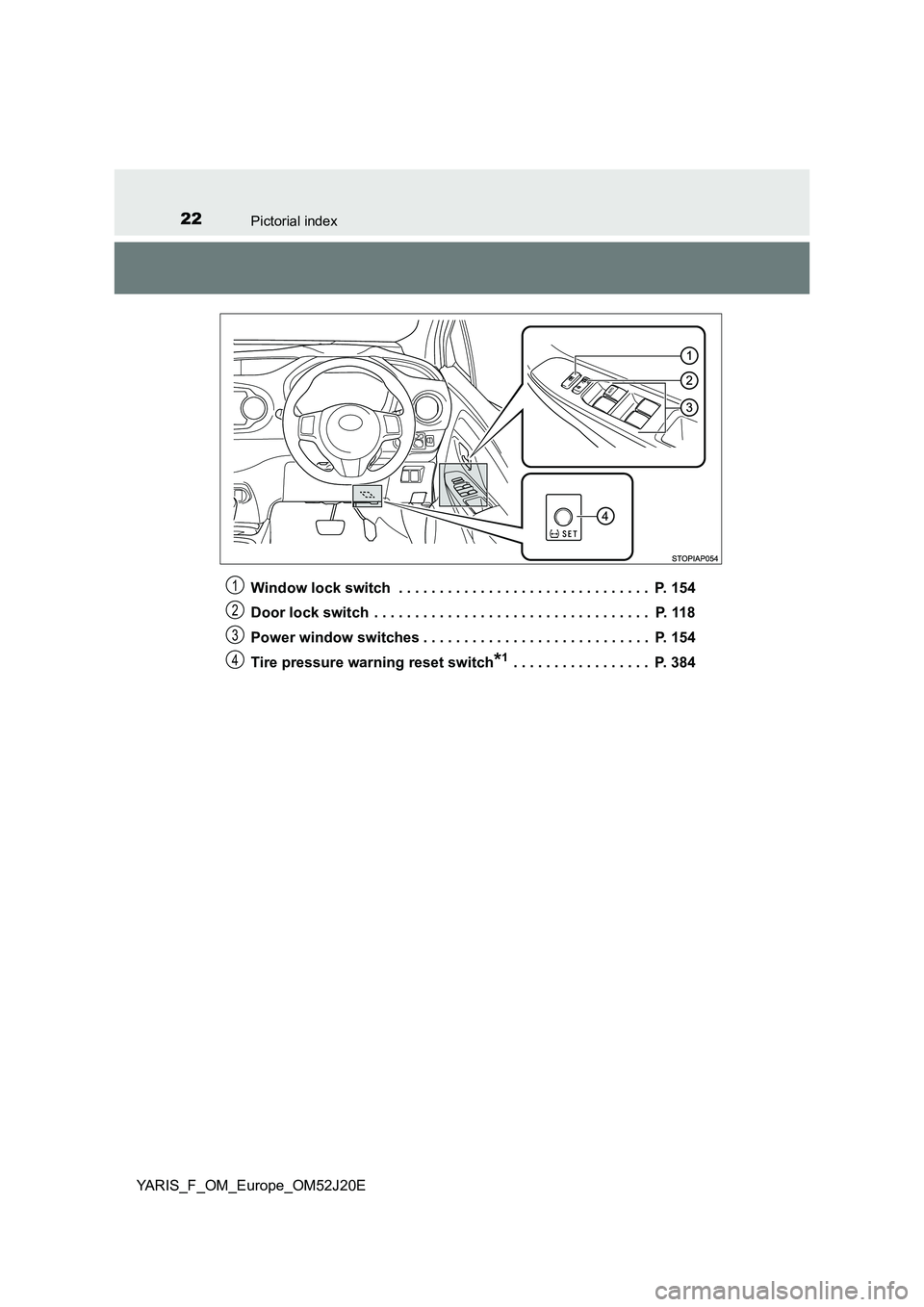
Window lock switch . . . . . . . . . . . . . . . . . . . . . . . . . . . . . . . P. 154
Door lock switch . . . . . . . . . . . . . . . . . . . . . . . . . . . . . . . . . . P. 118
Power window switches . . . . . . . . . . . . . . . . . . . . . . . . . . . . P. 154
Tire pressure warning reset switch*1 . . . . . . . . . . . . . . . . . P. 384
1
2
3
4
Page 93 of 549
932. Instrument cluster
2
Instrument cluster
YARIS_F_OM_Europe_OM52J20E
.
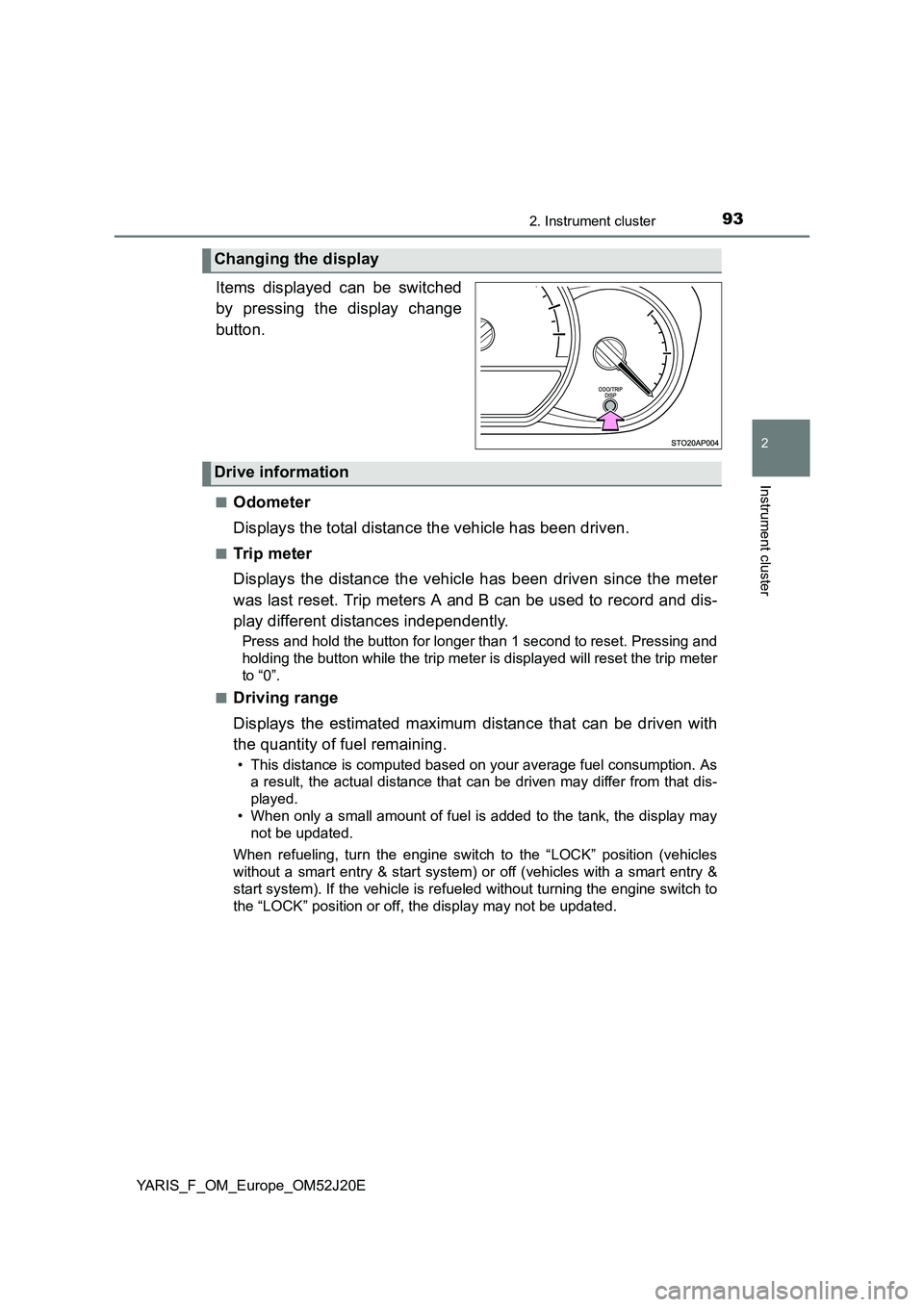
Items displayed can be switched
by pressing the display change
button.
■Odometer
Displays the total distance the vehicle has been driven.
■Trip meter
Displays the distance the vehicle has been driven since the meter
was last reset. Trip meters A and B can be used to record and dis-
play different distances independently.
Press and hold the button for longer than 1 second to reset. Pressing and
holding the button while the trip meter is displayed will reset the trip meter
to “0”.
■Driving range
Displays the estimated maximum distance that can be driven with
the quantity of fuel remaining.
• This distance is computed based on your average fuel consumption. As
a result, the actual distance that can be driven may differ from that dis-
played.
• When only a small amount of fuel is added to the tank, the display may
not be updated.
When refueling, turn the engine switch to the “LOCK” position (vehicles
without a smart entry & start system) or off (vehicles with a smart entry &
start system). If the vehicle is refueled without turning the engine switch to
the “LOCK” position or off, the display may not be updated.
Changing the display
Drive information
Page 94 of 549
942. Instrument cluster
YARIS_F_OM_Europe_OM52J20E
■Average fuel consumption
Displays the average rate of fuel consumption.
• The function can be reset by pressing the button for longer than 1 sec-
ond when the average fuel consumption is displayed.
• Use the displayed average fuel consumption as a reference.
■Instantaneous fuel consumption
Displays the instantaneous of fuel consumption.
Use the displayed instantaneous fuel consumption as a reference.
■Average vehicle speed
Displays the average vehicle speed since the engine was last
started.
■Stop & Start system operation time (if equipped)
Displays the amount of time the engine was stopped due to opera-
tion of the Stop & Start system during the current trip.
Vehicles without a smart entry & start system:
From the engine switch in the “ON” position to the engine switch in
the “LOCK” position.
Vehicles with a smart entry & start system:
From the engine switch in IGNITION ON mode to the engine switch
off.
■Stop & Start system total operation time (if equipped)
Displays the total amount of time that the engine has been stopped
due to operation of the Stop & Start system since the system was
last reset.
Press and hold the button to reset.
Page 96 of 549
962. Instrument cluster
YARIS_F_OM_Europe_OM52J20E
The temperature display shows temperatures within the range of
-40°C (-40°F) and 50°C (122°F).
■Display
In the following situations, the correct outside temperature may not
be displayed, or the display may take longer than normal to
change:
● When the vehicle is stopped, or moving at low speeds (less than
25 km/h [16 mph])
● When the outside temperature has changed suddenly (at the
entrance/exit of a garage, tunnel, etc.)
■When “ ” or “E” is displayed
The system may be malfunctioning. Take your vehicle to any autho-
rized Toyota dealer or repairer, or another duly qualified and
equipped professional.
■ When disconnecting and reconnecting battery terminals
The following information data will be reset:
● Driving range
● Average fuel consumption
● Stop & Start system total operation time (if equipped)
● Average vehicle speed
● Clock data
■ Liquid crystal display
Small spots or light spots may appear on the display. This phenomenon is
characteristic of liquid crystal display, and there is no problem continuing to
use the display.
■ Changing the pre-crash warning timing
P. 229
Outside temperature display
Page 99 of 549
992. Instrument cluster
2
Instrument cluster
YARIS_F_OM_Europe_OM52J20E
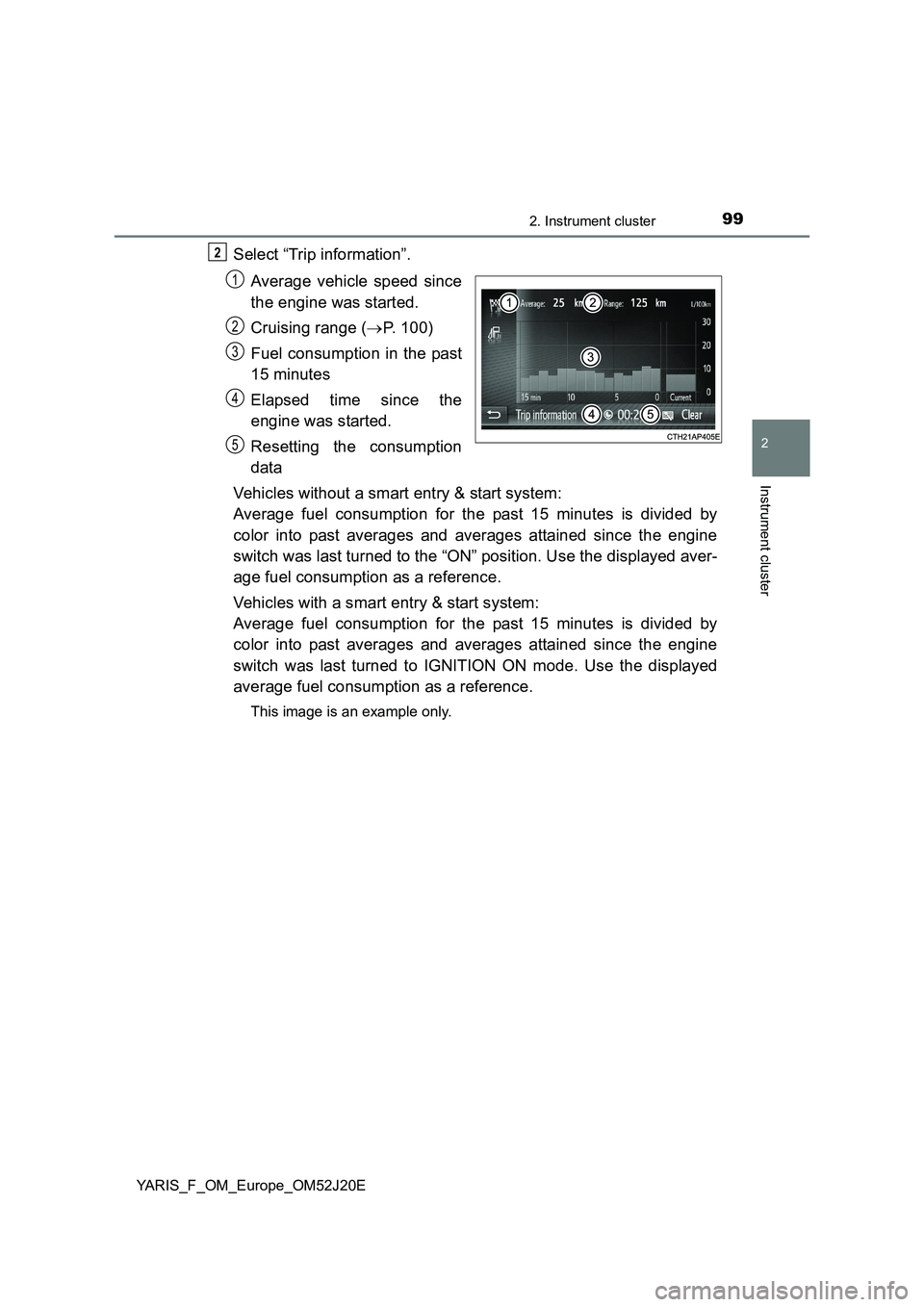
Select “Trip information”.
Average vehicle speed since
the engine was started.
Cruising range ( P. 100)
Fuel consumption in the past
15 minutes
Elapsed time since the
engine was started.
Resetting the consumption
data
Vehicles without a smart entry & start system:
Average fuel consumption for the past 15 minutes is divided by
color into past averages and averages attained since the engine
switch was last turned to the “ON” position. Use the displayed aver-
age fuel consumption as a reference.
Vehicles with a smart entry & start system:
Average fuel consumption for the past 15 minutes is divided by
color into past averages and averages attained since the engine
switch was last turned to IGNITION ON mode. Use the displayed
average fuel consumption as a reference.
This image is an example only.
2
1
2
3
4
5
Page 100 of 549
1002. Instrument cluster
YARIS_F_OM_Europe_OM52J20E
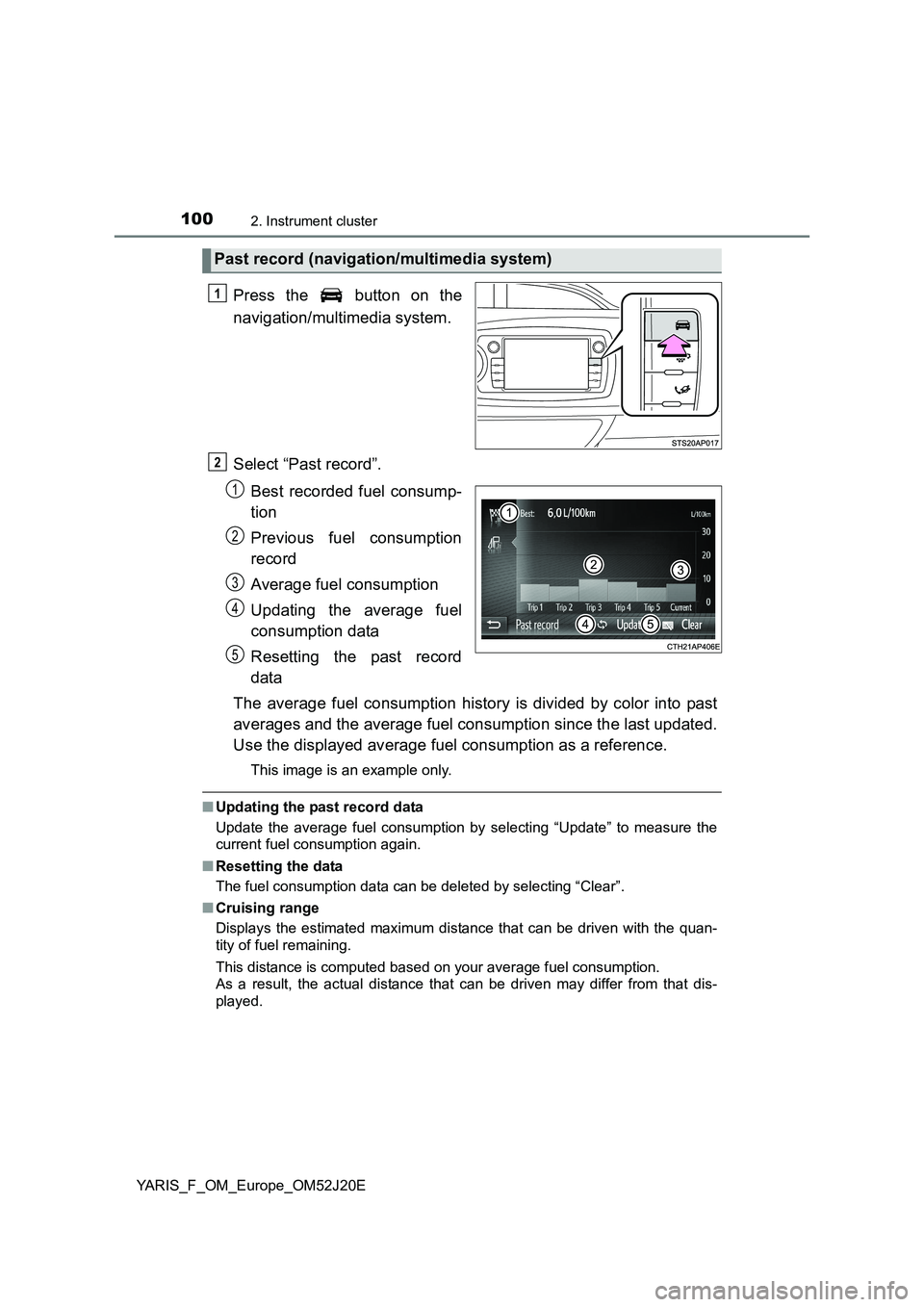
Press the button on the
navigation/multimedia system.
Select “Past record”.
Best recorded fuel consump-
tion
Previous fuel consumption
record
Average fuel consumption
Updating the average fuel
consumption data
Resetting the past record
data
The average fuel consumption history is divided by color into past
averages and the average fuel consumption since the last updated.
Use the displayed average fuel consumption as a reference.
This image is an example only.
■ Updating the past record data
Update the average fuel consumption by selecting “Update” to measure the
current fuel consumption again.
■ Resetting the data
The fuel consumption data can be deleted by selecting “Clear”.
■ Cruising range
Displays the estimated maximum distance that can be driven with the quan-
tity of fuel remaining.
This distance is computed based on your average fuel consumption.
As a result, the actual distance that can be driven may differ from that dis-
played.
Past record (navigation/multimedia system)
1
2
1
2
3
4
5
Page 251 of 549
2514-6. Using the driving support systems
4
Driving
YARIS_F_OM_Europe_OM52J20E
■Cruise control can be set when
Vehicles with a Multidrive
● The shift lever is in the D or range 4 or higher of M has been selected.
● Range 4 or higher has been selected by using the paddle shift.
● Vehicle speed is above approximately 40 km/h (25 mph).
Vehicles with a manual transmission
● Vehicle speed is above approximately 40 km/h (25 mph).
■ Accelerating after setting the vehicle speed
● The vehicle can be accelerated normally. After acceleration, the set speed
resumes.
● Even without canceling the cruise control, the set speed can be increased
by first accelerating the vehicle to the desired speed and then pushing the
lever down to set the new speed.
■ Automatic cruise control cancelation
Cruise control will stop maintaining the vehicle speed in any of the following
situations.
● Actual vehicle speed falls more than approximately 16 km/h (10 mph) below
the preset vehicle speed.
At this time, the memorized set speed is not retained.
● Actual vehicle speed is below approximately 40 km/h (25 mph).
● VSC is activated (if equipped).
● Speed limiter is activated (if equipped).
■ If the cruise control indicator comes in yellow
Press the “ON-OFF” button once to deactivate the system, and then press
the button again to reactivate the system.
If the cruise control speed cannot be set or if the cruise control cancels imme-
diately after being activated, there may be a malfunction in the cruise control
system. Have the vehicle inspected by any authorized Toyota dealer or
repairer, or another duly qualified and equipped professional.
Page 285 of 549
![TOYOTA YARIS 2017 Owners Manual 2855-3. Using the radio
5
Audio system
YARIS_F_OM_Europe_OM52J20E
Search for a desired station by turning or pressing “” or “”
on .
Press and hold the button (from [1] to [6]) th](/img/14/49190/w960_49190-284.png "TOYOTA YARIS 2017 Owners Manual 2855-3. Using the radio
5
Audio system
YARIS_F_OM_Europe_OM52J20E
Search for a desired station by turning or pressing “” or “”
on .
Press and hold the button (from [1] to [6]) th")
2855-3. Using the radio
5
Audio system
YARIS_F_OM_Europe_OM52J20E
Search for a desired station by turning or pressing “” or “”
on .
Press and hold the button (from [1] to [6]) the station
is to be set to until you hear a beep.
■Updating the station list
Press .
The station list will be displayed.
Press (UPDATE) to update the list.
“Updating” is displayed while the searching is in process, and then avail-
able stations will be listed on the display.
To cancel the updating process, press .
■Selecting a station from the station list
Press .
The station list will be displayed.
Turn to select a station.
Press to tune in the station.
To return to the previous display, press .
Setting station presets
Using the station list
1
2
1
2
1
2
3
Page 288 of 549
2885-3. Using the radio
YARIS_F_OM_Europe_OM52J20E
■EON (Enhanced Other Network) system (for traffic announcement func-
tion)
If the RDS station (with EON data) you are listening to is not broadcasting a
traffic information program and the audio system is in the TA (traffic
announcement) mode, the radio will be switched automatically to a station
broadcasting a traffic information program in the EON AF list when traffic
information begins.
■ When the battery is disconnected
Stations presets are erased.
■ Reception sensitivity
● Maintaining perfect radio reception at all times is difficult due to the continu-
ally changing position of the antenna, differences in signal strength and sur-
rounding objects, such as trains, transmitters, etc.
● The radio antenna is mounted on the rear roof. The antenna can be
removed from the base by turning it.
■ Digital Audio Broadcast (DAB) radio
The optional radio antenna and tuner are necessary for the use of Digital
Audio Broadcast (DAB) radio.
NOTICE
■ To prevent damage, remove the antenna in the following cases
● The antenna will touch the ceiling of a garage.
● A cover will be put on the roof.