fog light TOYOTA YARIS 2018 User Guide
[x] Cancel search | Manufacturer: TOYOTA, Model Year: 2018, Model line: YARIS, Model: TOYOTA YARIS 2018Pages: 632, PDF Size: 44.1 MB
Page 244 of 632
2444-3. Operating the lights and wipers
YARIS_HV_OM_Europe_OM52J66E
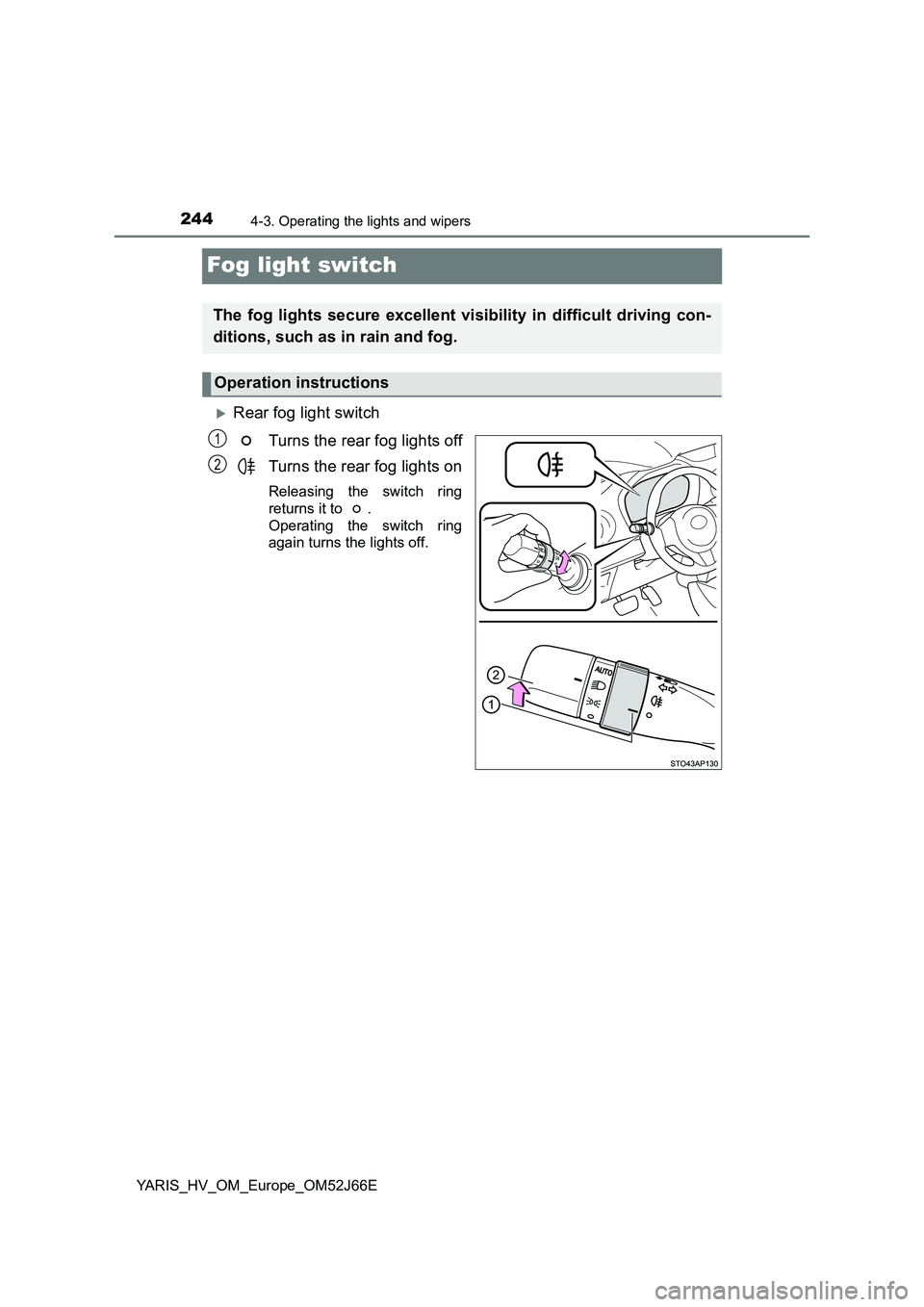
Fog light switch
Rear fog light switch
Turns the rear fog lights off
Turns the rear fog lights on
Releasing the switch ring
returns it to .
Operating the switch ring
again turns the lights off.
The fog lights secure excellent visibility in difficult driving con-
ditions, such as in rain and fog.
Operation instructions
1
2
Page 245 of 632
2454-3. Operating the lights and wipers
4
Driving
YARIS_HV_OM_Europe_OM52J66E
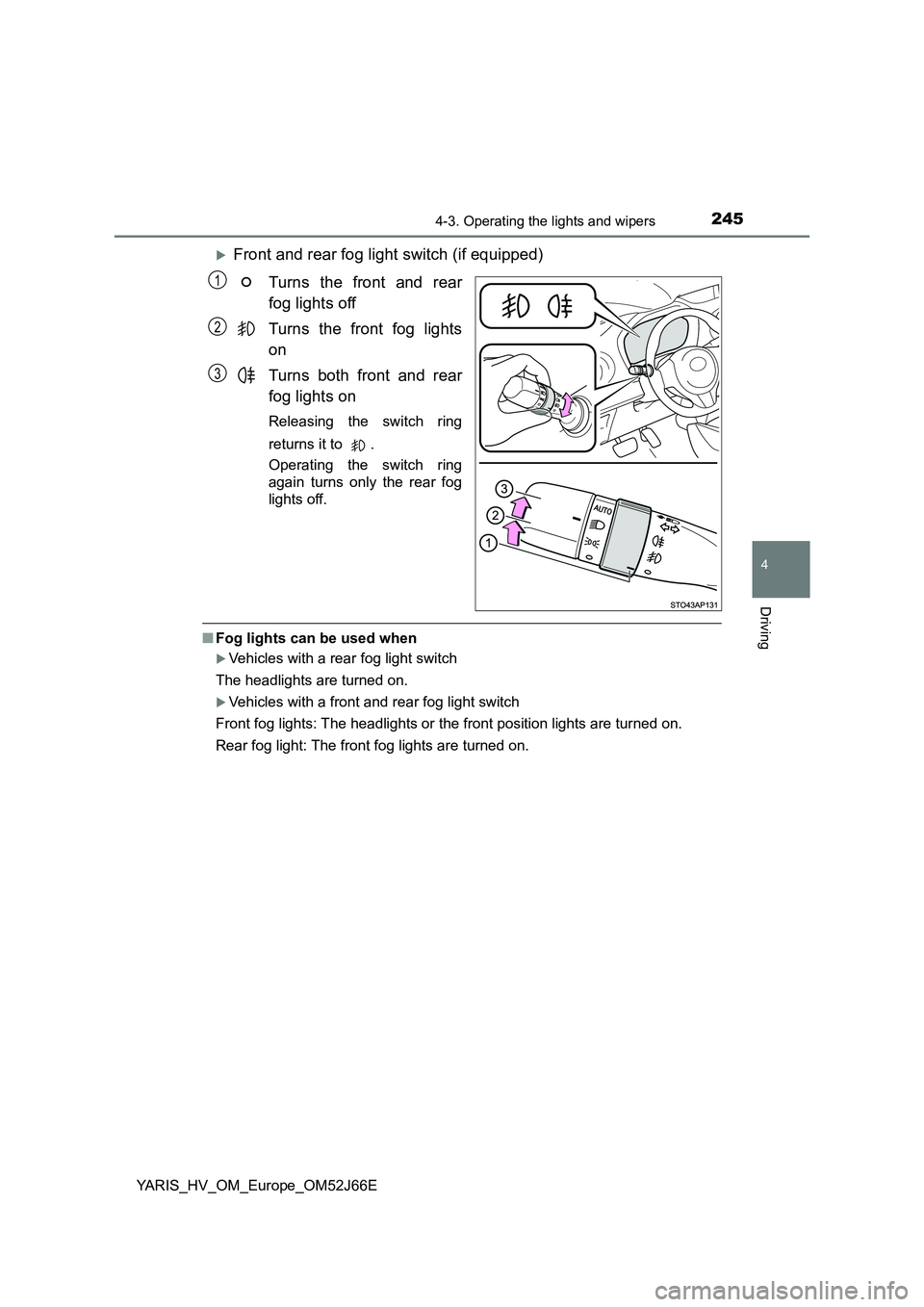
Front and rear fog light switch (if equipped)
Turns the front and rear
fog lights off
Turns the front fog lights
on
Turns both front and rear
fog lights on
Releasing the switch ring
returns it to .
Operating the switch ring
again turns only the rear fog
lights off.
■ Fog lights can be used when
Vehicles with a rear fog light switch
The headlights are turned on.
Vehicles with a front and rear fog light switch
Front fog lights: The headlights or the front position lights are turned on.
Rear fog light: The front fog lights are turned on.
1
2
3
Page 260 of 632
2604-5. Toyota Safety Sense
YARIS_HV_OM_Europe_OM52J66E
WARNING
●If there is a large difference in temperature between the inside and outside
of the vehicle, such as in winter, t he windshield is likely to fog up easily. If
the part of the windshield in front of the front sensor is fogged up or cov-
ered with condensation or ice, the PCS warning light may illuminate and
the system may be temporarily disabled. In this case, use the windshield
defogger to remove the fog, etc. ( P. 390)
● If the area of the windshield in front of the front sensor is covered with
water droplets, use the windshield wipers to remove them.
If the water droplets are not sufficiently removed, the performance of the
front sensor may be reduced.
● If water droplets cannot be properly removed from the area of the wind-
shield in front of the front sensor by the windshield wipers, replace the
wiper insert or wiper blade.
If the wiper inserts or wiper blades need to be replaced, contact any autho-
rized Toyota retailer or Toyota authorized repairer, or any reliable repairer.
● Do not attach window tinting to the windshield.
● Replace the windshield if it is damaged or cracked.
If the windshield needs to be replaced, contact any authorized Toyota
retailer or Toyota authorized repairer, or any reliable repairer.
● Do not install an antenna in front of the sensor.
● Do not get the front sensor wet.
● Do not allow bright lights to shine into the front sensor.
● Do not dirty or damage the front sensor.
When cleaning the inside of the windshi eld, do not allow glass cleaner to
contact the lens. Also, do not touch the lens.
If the lens is dirty or damaged, contact any authorized Toyota retailer or
Toyota authorized repairer, or any reliable repairer.
Page 261 of 632
2614-5. Toyota Safety Sense
4
Driving
YARIS_HV_OM_Europe_OM52J66E
WARNING
●Do not subject the front sensor to a strong impact.
● Do not change the installation position or direction of the front sensor or
remove it.
● Do not disassemble the front sensor.
● Do not install an electronic device or device that emits strong electric
waves near the front sensor.
● Do not modify any components of the vehicle around the front sensor
(inside rear view mirror, sun visors, etc.) or ceiling.
● Do not attach any accessories that may obstruct the front sensor to the
hood, front grille or front bumper. C ontact any authorized Toyota retailer or
Toyota authorized repairer, or any reliable repairer for details.
● If a surfboard or other long object is to be mounted on the roof, make sure
that it will not obstruct the front sensor.
● Do not modify the headlights or other lights.
● Do not attach anything to or place anything on the dashboard.
■ Installation area of front sensor on windshield
When the windshield is fogging up easily, the glass around the front sensor
may be hot due to the heater running. If the glass is touched, it may result in
burns.
Page 275 of 632
2754-5. Toyota Safety Sense
4
Driving
YARIS_HV_OM_Europe_OM52J66E
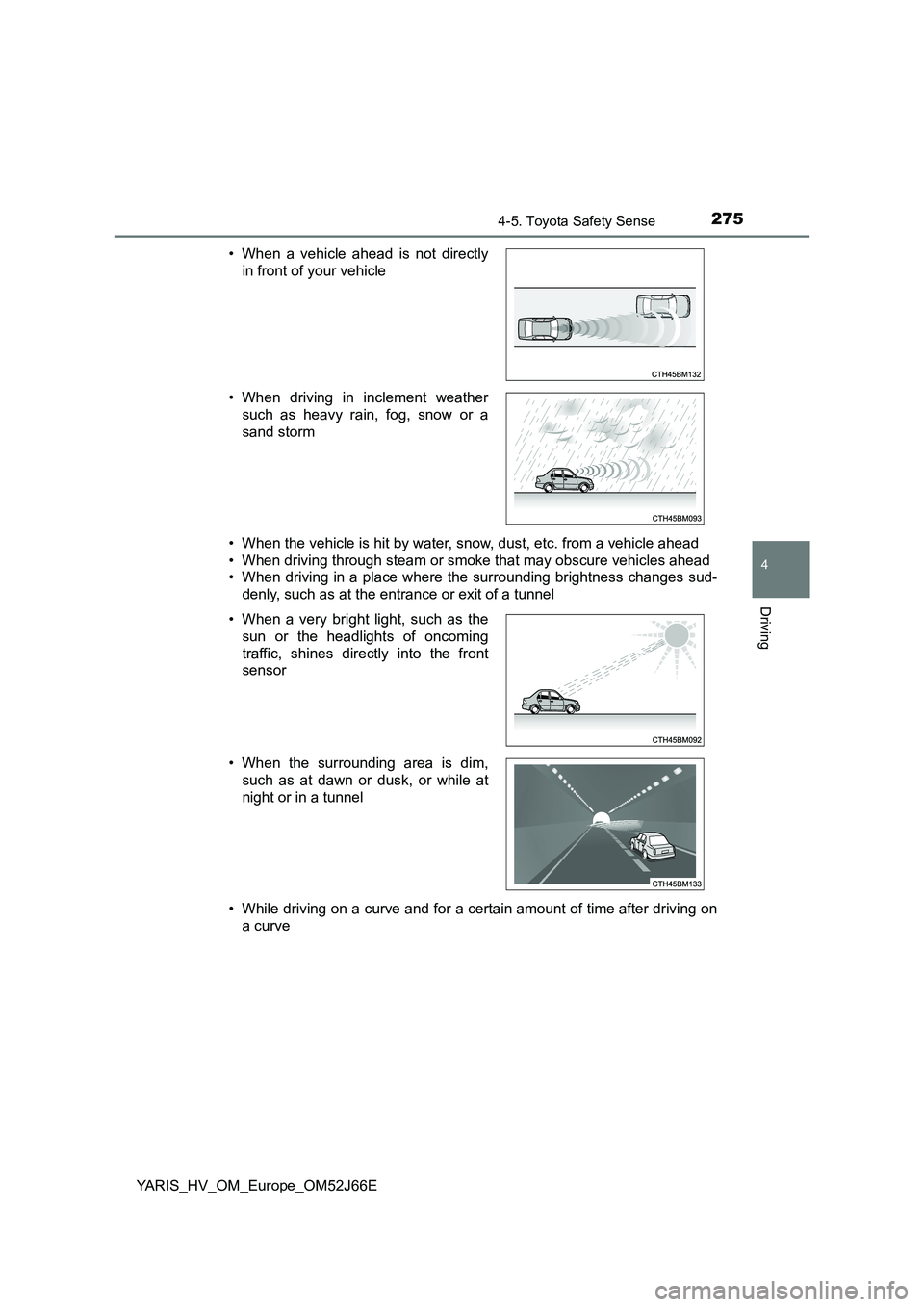
• When the vehicle is hit by water, snow, dust, etc. from a vehicle ahead
• When driving through steam or smoke that may obscure vehicles ahead
• When driving in a place where the surrounding brightness changes sud-
denly, such as at the entrance or exit of a tunnel
• While driving on a curve and for a certain amount of time after driving on
a curve
• When a vehicle ahead is not directly
in front of your vehicle
• When driving in inclement weather
such as heavy rain, fog, snow or a
sand storm
• When a very bright light, such as the
sun or the headlights of oncoming
traffic, shines directly into the front
sensor
• When the surrounding area is dim,
such as at dawn or dusk, or while at
night or in a tunnel
Page 277 of 632
2774-5. Toyota Safety Sense
4
Driving
YARIS_HV_OM_Europe_OM52J66E
■ If the PCS warning light flashes or illuminates (vehicles with mono-
chrome display)
The pre-crash safety system may be temporarily unavailable or there may be
a malfunction in the system.
● In the following situations, the warning light will be cleared and the system
will become operational when normal operating conditions return:
• When the area around the front sensor is hot, such as after the vehicle
has been parked in the sun
• When the windshield is fogged up or covered with condensation or ice
( P. 390)
• When driving in conditions where the front sensor cannot detect an
object, such as in the dark (at night on a road without street lights or other
lights, etc.), when bright light is shining into the sensor, or in snow or fog.
• When the front sensor or the area around either sensor is cold, such as in
an extremely cold environment
• If the area in front of the front sens or is obstructed, such as when the
hood is open
● If the PCS warning light continues to flash or illuminate, the system may be
malfunctioning. Have the vehicle inspected by any authorized Toyota retailer
or Toyota authorized repairer, or any reliable repairer immediately.
■ If the PCS warning light flashes or illuminates and a warning message is
displayed on the multi-information di splay (vehicles with color display)
The pre-crash safety system may be temporarily unavailable or there may be
a malfunction in the system.
● In the following situations, the warning light will turn off, the message will
disappear and the system will beco me operational when normal operating
conditions return:
• When the area around the front sensor is hot, such as in the sun
• When the windshield is fogged up or covered with condensation or ice
( P. 390)
• When driving in conditions where the front sensor cannot detect an
object, such as in the dark (at night on a road without street lights or other
lights, etc.), when bright light is shining into the sensor, or in snow or fog.
• When the front sensor or the area around either sensor is cold, such as in
an extremely cold environment
• If the area in front of the front sens or is obstructed, such as when the
hood is open
● If the PCS warning light continues to flash or illuminate or the warning mes-
sage does not disappear, the system may be malfunctioning. Have the vehi-
cle inspected by any authorized Toyota retailer or Toyota authorized
repairer, or any reliable repairer immediately.
Page 284 of 632
2844-5. Toyota Safety Sense
YARIS_HV_OM_Europe_OM52J66E
● When the lane markers are yellow (These may be more difficult for the sys-
tem to recognize compared to white markers.)
● When the lane markers are broken, Botts’ dots (raised pavement markers)
or stones
● When the lane markers are on a curb etc.
● When lane markers are obscured or partially obscured by sand, dirt, etc.
● When there are shadows on the road running parallel with lane markers, or
if a shadow covers the lane markers
● When driving on a particularly bright road surface, such as concrete
● When driving on a road surface that is bright due to reflected light
● When driving in a location where the light level changes rapidly, such as the
entrance to or exit from a tunnel
● When sunlight or the headlights of oncoming vehicles are shining directly
into the camera lens
● When driving on roads that are branching or merging
● When driving on a road surface that is wet due to rain, previous rainfall,
standing water, etc.
● When the vehicle experiences strong up-and-down motion such as when
driving on an extremely rough road or on a seam in the pavement
● When headlight brightness at nighttime is reduced due to dirt on the lenses,
or when the headlights are misaligned
● When driving on winding roads or roads that are uneven
● When driving on rough or unpaved roads
● When the windshield is dirty, or if raindrops, condensation or ice are adher-
ing to the windshield
● When the heater is blowing to the feet, the upper part of the windshield may
get fogged up and have a negative effect
● When cleaning the inside of the windshield, touching the lens or getting
glass cleaner on the lens may have a negative effect
Page 290 of 632
2904-5. Toyota Safety Sense
YARIS_HV_OM_Europe_OM52J66E
■The Automatic High Beam can be operated when
Vehicles without a smart entry & start system
The power switch is in the “ON” position.
Vehicles with a smart entry & start system
The power switch is in ON mode.
■ Front sensor detection information
● High beam may not be automatically turned off in the following situations:
• When oncoming vehicles suddenly appear from a curve
• When the vehicle is cut in front of by another
• When oncoming or preceding vehicles are hidden from sight due to
repeated curves, road divi ders or roadside trees
● High beam may be turned off if an oncoming vehicle that is using fog lights
without using the headlights is detected.
● House lights, street lights, red traffic signals, and illuminated billboards or
signs may cause the high beam to turn off.
● The following factors may affect the amount of time taken to turn high beam
on or off:
• The brightness of headlights, fog lights, and tail lights of oncoming and
preceding vehicles
• The movement and direction of oncoming and preceding vehicles
• When a oncoming or preceding vehicl e only has operational lights on one
side
• When a oncoming or preceding vehi cle is a two-wheeled vehicle
• The condition of the road (gradient, curve, condition of the road surface,
etc.)
• The number of passengers and amount of luggage
● High beam may be turned on or off when unexpected by the driver.
Page 291 of 632
2914-5. Toyota Safety Sense
4
Driving
YARIS_HV_OM_Europe_OM52J66E
● In the situations below, the system may not be able to correctly detect the
surrounding brightness levels, and may flash or expose nearby pedestrians
to the high beam. Therefore, you should consider turning the high beams on
or off manually rather than relying on the Automatic High Beam system.
• In bad weather (rain, snow, fog, sandstorms, etc.)
• The windshield is obscured by fog, mist, ice, dirt, etc.
• The windshield is cracked or damaged.
• The front sensor is deformed or dirty.
• The front sensor temperature is extremely high.
• Surrounding brightness levels are equal to those of headlights, tail lights
or fog lights.
• Vehicles ahead have headlights or tail lights that are either switched off,
dirty, are changing color, or are not aimed properly.
• When driving through an area of intermittently changing brightness and
darkness.
• When frequently and repeatedly driving ascending/descending roads, or
roads with rough, bumpy or uneven surfaces (such as stone-paved
roads, gravel tracks, etc.).
• When frequently and repeatedly taking curves or driving on a winding
road.
• There is a highly reflective object ahead of the vehicle, such as a sign or
a mirror.
• The back of a vehicle ahead is highly reflective, such as a container on a
truck.
• The vehicle’s headlights are damaged or dirty.
• The vehicle is listing or titling, due to a flat tire, a trailer being towed, etc.
• The driver believes that the high beam may be causing problems or dis-
tress to other drivers or pedestrians nearby.
■ If the Automatic High Beam indicator comes on in yellow (vehicles with
monochrome display)
It may indicate a malfunction in the system. Contact any authorized Toyota
retailer or Toyota authorized repairer, or any reliable repairer.
■ If “Headlight system malfunction. Visit your dealer.” is displayed on the
multi-information display ( vehicles with color display)
The system may be malfunctioning. Have the vehicle inspected by any autho-
rized Toyota retailer or Toyota authorized repairer, or any reliable repairer.
Page 297 of 632
2974-5. Toyota Safety Sense
4
Driving
YARIS_HV_OM_Europe_OM52J66E
■ Conditions in which the function may not operate or detect correctly
In the following situations, RSA does not operate normally and may not rec-
ognize signs, display the incorrect sign, etc. However, this does not indicate a
malfunction.
● The front sensor is misaligned due to a strong impact being applied to the
sensor, etc.
● Dirt, snow, stickers, etc., are on the windshield near the front sensor.
● In inclement weather such as heavy rain, fog, snow or sand storms
● Light from an oncoming vehicle, the sun, etc., enters the front sensor.
● The sign is small, dirty, faded, tilted or bent, and if an electronic sign, the
contrast is poor.
● All or part of the sign is hidden by the leaves of a tree, a pole, etc.
● The sign is only visible to the front sensor for a short amount of time.
● The driving scene (turning, lane change, etc.) is judged incorrectly.
● Even if it is a sign not appropriate for the currently traveled lane, such a sign
exists directly after a freeway branches, or in an adjacent lane just before
merging.
● Stickers are attached to the rear of the preceding vehicle.
● A sign resembling a system compatible sign is recognized.
● The vehicle is driven in a country with a different direction of traffic.
● Side road speed signs may be detected and displayed (if positioned in sight
of the front sensor) while the vehicle is traveling on the main road.
● Roundabout exit road speed signs may be detected and displayed (if posi-
tioned in sight of the front sensor) while traveling on a roundabout.
● The speed information displayed on the meter and that displayed on the
Navigation system (if equipped) may be different due to the Navigation sys-
tem using map data.