fuel TOYOTA YARIS 2018 User Guide
[x] Cancel search | Manufacturer: TOYOTA, Model Year: 2018, Model line: YARIS, Model: TOYOTA YARIS 2018Pages: 632, PDF Size: 44.1 MB
Page 114 of 632
1142. Instrument cluster
YARIS_HV_OM_Europe_OM52J66E
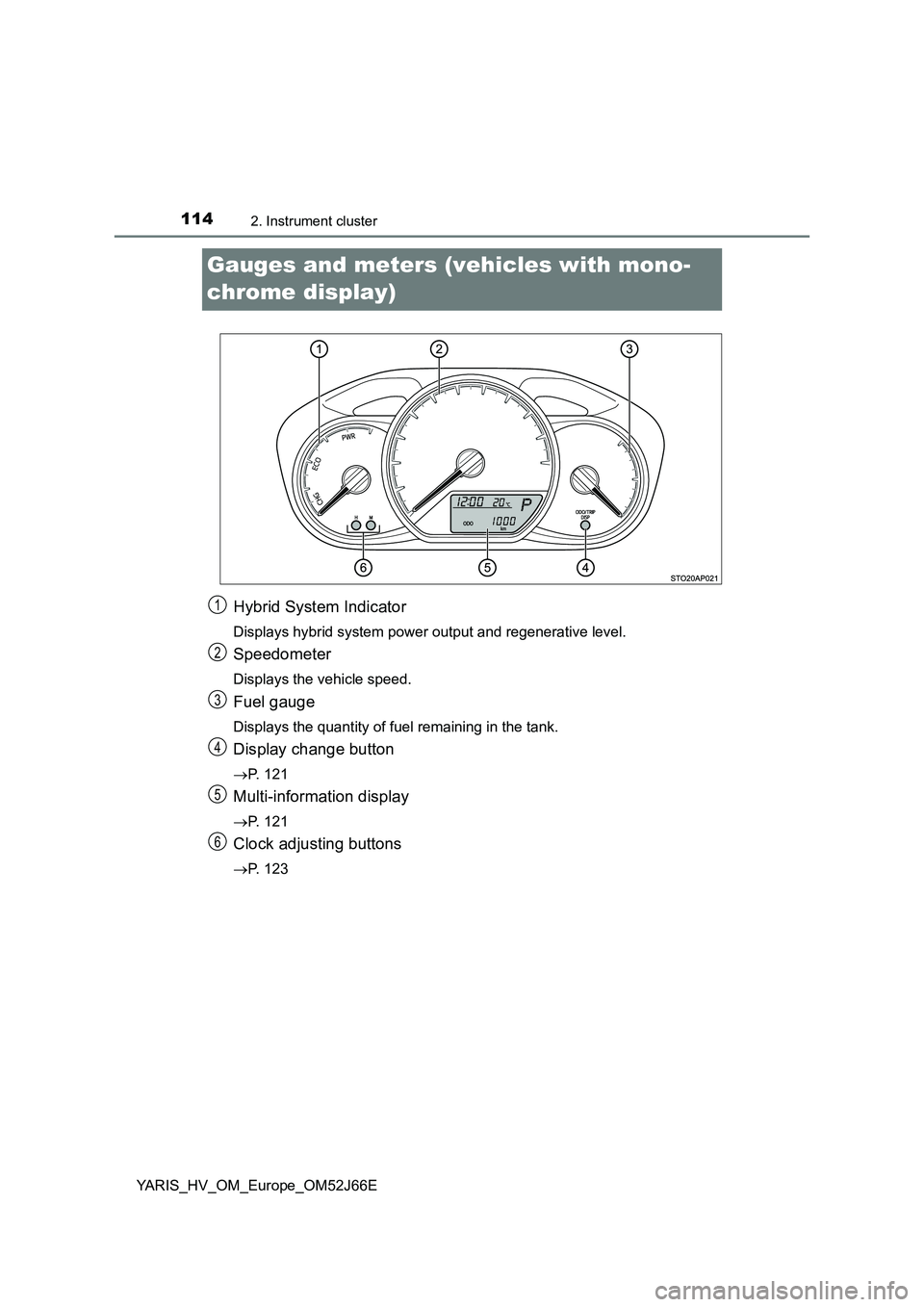
Gauges and meters (vehicles with mono-
chrome display)
Hybrid System Indicator
Displays hybrid system power output and regenerative level.
Speedometer
Displays the vehicle speed.
Fuel gauge
Displays the quantity of fuel remaining in the tank.
Display change button
P. 121
Multi-information display
P. 121
Clock adjusting buttons
P. 123
1
2
3
4
5
6
Page 116 of 632
1162. Instrument cluster
YARIS_HV_OM_Europe_OM52J66E
● By keeping the indicator needle within Eco area, more Eco-friendly driving
can be achieved.
● Charge area indicates regeneration* status. Regenerated energy will be
used to charge the hybrid battery (traction battery).
*: When used in this manual, “regeneration” refers to the conversion of
energy created by the movement of the vehicle into electrical energy.
■ Engine speed
On hybrid vehicles, engine speed is precisely controlled in order to help
improve fuel efficiency and reduce exhaust emissions, etc.
There are times when the engine speed that is displayed may differ even
when vehicle operation and driving conditions are the same.
■ Outside temperature display
● In the following situations, the correct outside temperature may not be dis-
played, or the display may take longer than normal to change.
• When stopped, or driving at low speeds (less than 25 km/h [16 mph])
• When the outside temperature has changed suddenly (at the entrance/
exit of a garage, tunnel, etc.)
● When “- -” or “E” is displayed, the system may be malfunctioning.
Take your vehicle to any authorized Toyota retailer or Toyota authorized
repairer, or any reliable repairer.
● The temperature range that can be displayed is from -40°C (-40°F) to 50°C
(122°F).
NOTICE
■ To prevent damage to the engine and its components
The engine may be overheating if the high engine coolant temperature
warning light flashes or comes on. In this case, immediately stop the vehicle
in a safe place, and check the engine after it has cooled completely.
( P. 5 8 1 )
Page 117 of 632
117
2
2. Instrument cluster
Instrument cluster
YARIS_HV_OM_Europe_OM52J66E
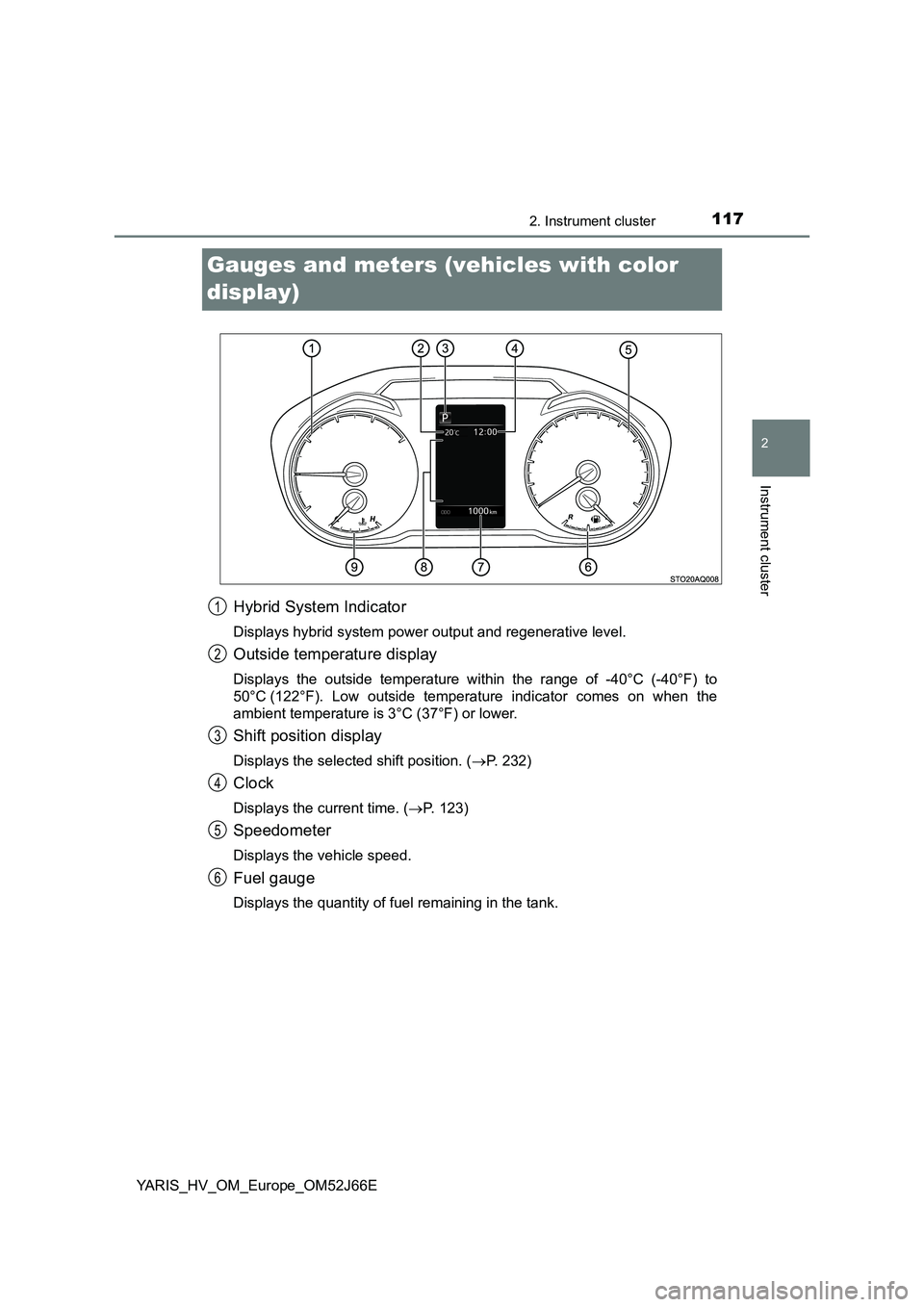
Gauges and meters (vehicles with color
display)
Hybrid System Indicator
Displays hybrid system power output and regenerative level.
Outside temperature display
Displays the outside temperature within the range of -40°C (-40°F) to
50°C (122°F). Low outside temperature indicator comes on when the
ambient temperature is 3°C (37°F) or lower.
Shift position display
Displays the selected shift position. ( P. 232)
Clock
Displays the current time. (P. 123)
Speedometer
Displays the vehicle speed.
Fuel gauge
Displays the quantity of fuel remaining in the tank.
1
2
3
4
5
6
Page 119 of 632
1192. Instrument cluster
2
Instrument cluster
YARIS_HV_OM_Europe_OM52J66E
■The meters and display illuminate when
Vehicles without a smart entry & start system
The power switch is in the “ON” position.
Vehicles with a smart entry & start system
The power switch is in ON mode.
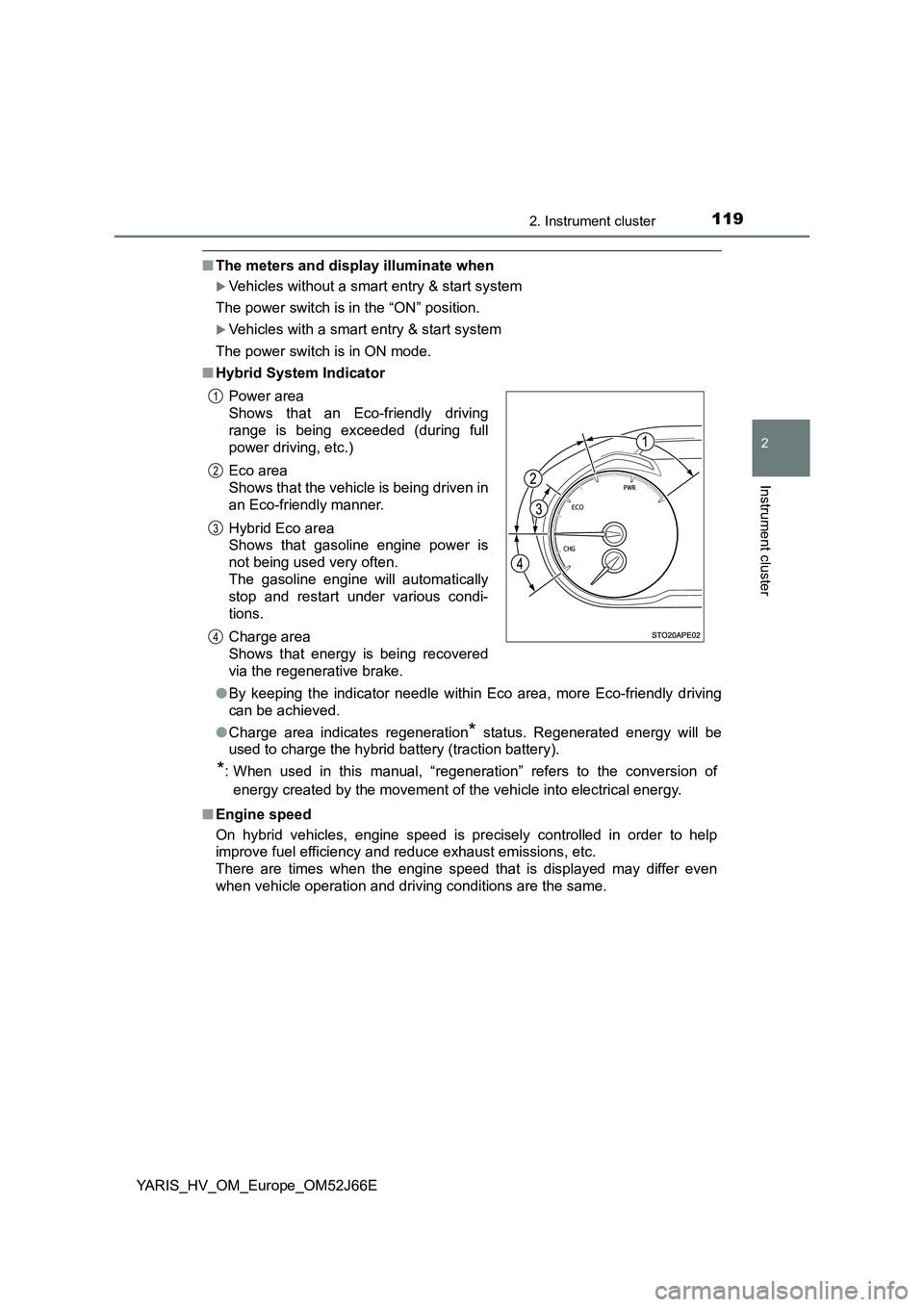
■ Hybrid System Indicator
● By keeping the indicator needle within Eco area, more Eco-friendly driving
can be achieved.
● Charge area indicates regeneration* status. Regenerated energy will be
used to charge the hybrid battery (traction battery).
*: When used in this manual, “regeneration” refers to the conversion of
energy created by the movement of the vehicle into electrical energy.
■ Engine speed
On hybrid vehicles, engine speed is precisely controlled in order to help
improve fuel efficiency and reduce exhaust emissions, etc.
There are times when the engine speed that is displayed may differ even
when vehicle operation and driving conditions are the same.
Power area
Shows that an Eco-friendly driving
range is being exceeded (during full
power driving, etc.)
Eco area
Shows that the vehicle is being driven in
an Eco-friendly manner.
Hybrid Eco area
Shows that gasoline engine power is
not being used very often.
The gasoline engine will automatically
stop and restart under various condi-
tions.
Charge area
Shows that energy is being recovered
via the regenerative brake.
1
2
3
4
Page 122 of 632
1222. Instrument cluster
YARIS_HV_OM_Europe_OM52J66E
■Odometer
Displays the total distance the vehicle has been driven.
■Trip meter
Displays the distance the vehicle has been driven since the meter
was last reset. Trip meters A and B can be used to record and dis-
play different distances independently.
Press and hold the button for longer than 1 second to reset. Pressing and
holding the button while the trip meter is displayed will reset the trip meter
to “0”.
■Instantaneous fuel consumption
Displays the instantaneous of fuel consumption.
Use the displayed instantaneous fuel consumption as a reference.
■Average fuel consumption
Displays the average rate of fuel consumption.
• The function can be reset by pressing the button for longer than 1 sec-
ond when the average fuel consumption is displayed.
• Use the displayed average fuel consumption as a reference.
■Driving range
Displays the estimated maximum distance that can be driven with
the quantity of fuel remaining.
• This distance is computed based on your average fuel consumption. As
a result, the actual distance that can be driven may differ from that dis-
played.
• When only a small amount of fuel is added to the tank, the display may
not be updated.
When refueling, turn the power switch to the “LOCK” position (vehicles
without a smart entry & start system) or off (vehicles with a smart entry &
start system). If the vehicle is refueled without turning the power switch to
the “LOCK” position or off, the display may not be updated.
■Average vehicle speed
Displays the average vehicle speed since the hybrid system was
last started.
Drive information
Page 123 of 632
1232. Instrument cluster
2
Instrument cluster
YARIS_HV_OM_Europe_OM52J66E
EV indicator can be activated or deactivated by pressing the display
change button when the EV indicator customization display is dis-
played.
To change the EV indicator customization display, display the odometer
and press and hold the display change button until the display changes.
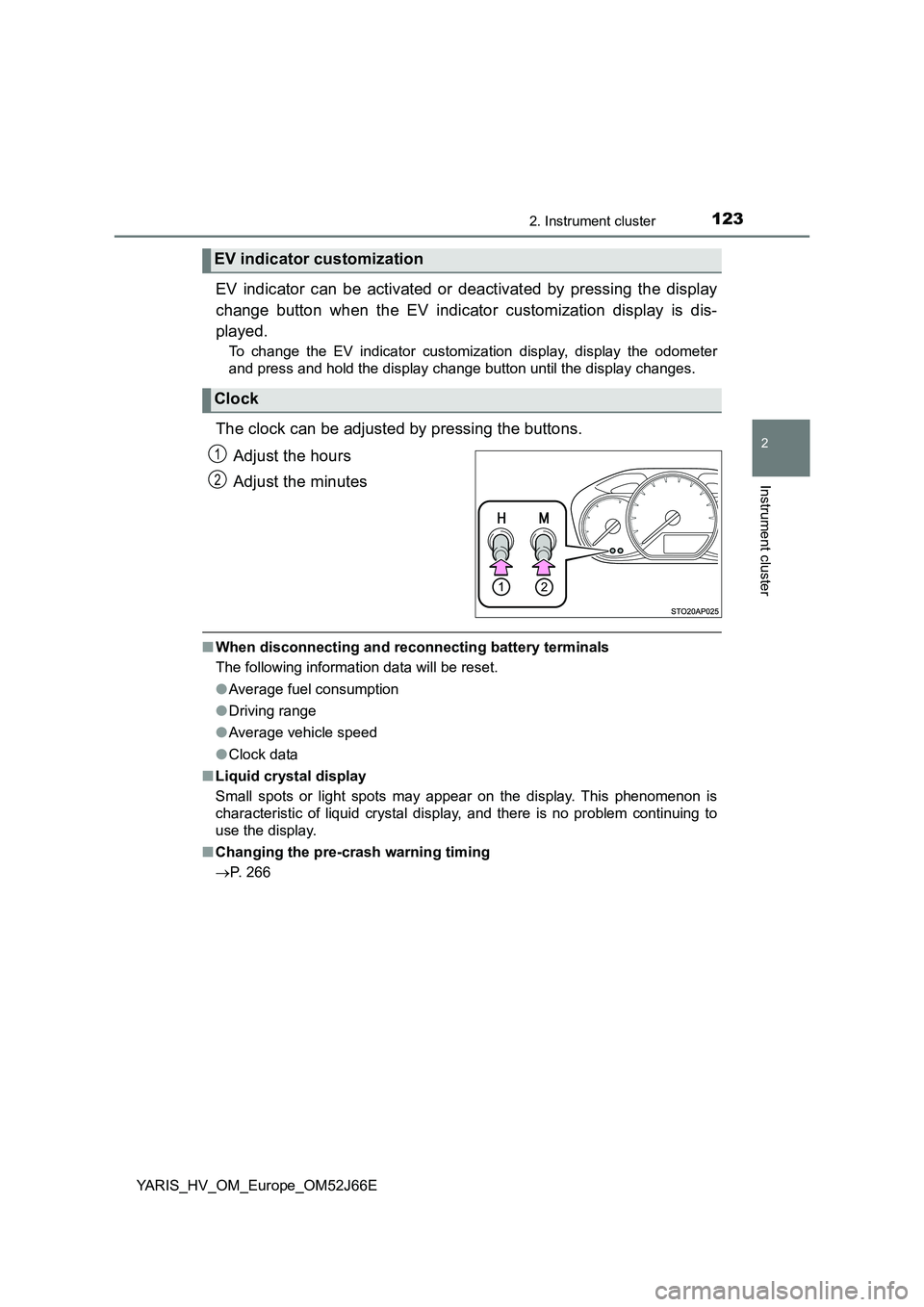
The clock can be adjusted by pressing the buttons.
Adjust the hours
Adjust the minutes
■ When disconnecting and reconnecting battery terminals
The following information data will be reset.
● Average fuel consumption
● Driving range
● Average vehicle speed
● Clock data
■ Liquid crystal display
Small spots or light spots may appear on the display. This phenomenon is
characteristic of liquid crystal display, and there is no problem continuing to
use the display.
■ Changing the pre-crash warning timing
P. 266
EV indicator customization
Clock
1
2
Page 127 of 632
1272. Instrument cluster
2
Instrument cluster
YARIS_HV_OM_Europe_OM52J66E
Items displayed can be switched by pressing “” or “” of the meter
control switches to select and pressing “ ” or “”.
● Average fuel consumption (after reset*/after start/after refuel)
Displays the average fuel consumption since the function was reset, the
hybrid system was on, and the vehicle was refueled, respectively
Use the displayed average fuel consumption as a reference.
● Average vehicle speed (after reset*/after start)
Displays the average vehicle speed since the function was reset and the
hybrid system was on, respectively
● Elapsed time (after reset*/after start)
Displays the elapsed time since the function was reset and the hybrid sys-
tem was on, respectively
● Distance (driving range/after refuel)
Displays the estimated maximum distance that can be driven with the
quantity of fuel remaining
• This distance is computed based on your average fuel consumption. As
a result, the actual distance that can be driven may differ from that dis-
played.
• When only a small amount of fuel is added to the tank, the display may
not be updated.
When refueling, turn the power switch off. If the vehicle is refueled with-
out turning the power switch off, the display may not be updated.
● Energy monitor
P. 133
●Speedometer
Displays the vehicle speed.
●Display off
A blank screen is displayed
*: The function can be reset by pressing and holding the of the meter
control switches when the reset item is displayed.
Drive information
Page 136 of 632
1362. Instrument cluster
YARIS_HV_OM_Europe_OM52J66E
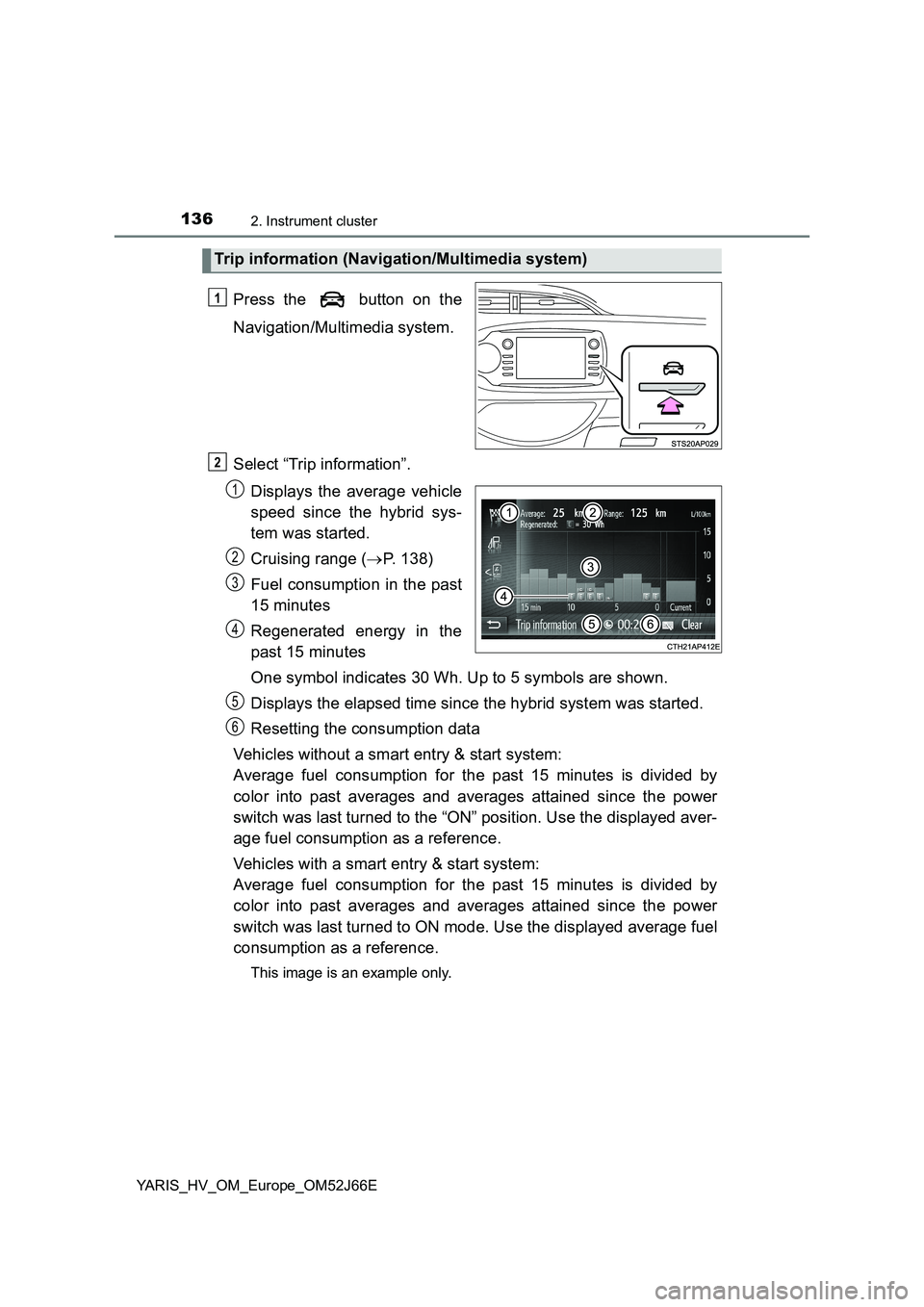
Press the button on the
Navigation/Multimedia system.
Select “Trip information”.
Displays the average vehicle
speed since the hybrid sys-
tem was started.
Cruising range ( P. 138)
Fuel consumption in the past
15 minutes
Regenerated energy in the
past 15 minutes
One symbol indicates 30 Wh. Up to 5 symbols are shown.
Displays the elapsed time since the hybrid system was started.
Resetting the consumption data
Vehicles without a smart entry & start system:
Average fuel consumption for the past 15 minutes is divided by
color into past averages and averages attained since the power
switch was last turned to the “ON” position. Use the displayed aver-
age fuel consumption as a reference.
Vehicles with a smart entry & start system:
Average fuel consumption for the past 15 minutes is divided by
color into past averages and averages attained since the power
switch was last turned to ON mode. Use the displayed average fuel
consumption as a reference.
This image is an example only.
Trip information (Navigation/Multimedia system)
1
2
1
2
3
4
5
6
Page 137 of 632
1372. Instrument cluster
2
Instrument cluster
YARIS_HV_OM_Europe_OM52J66E
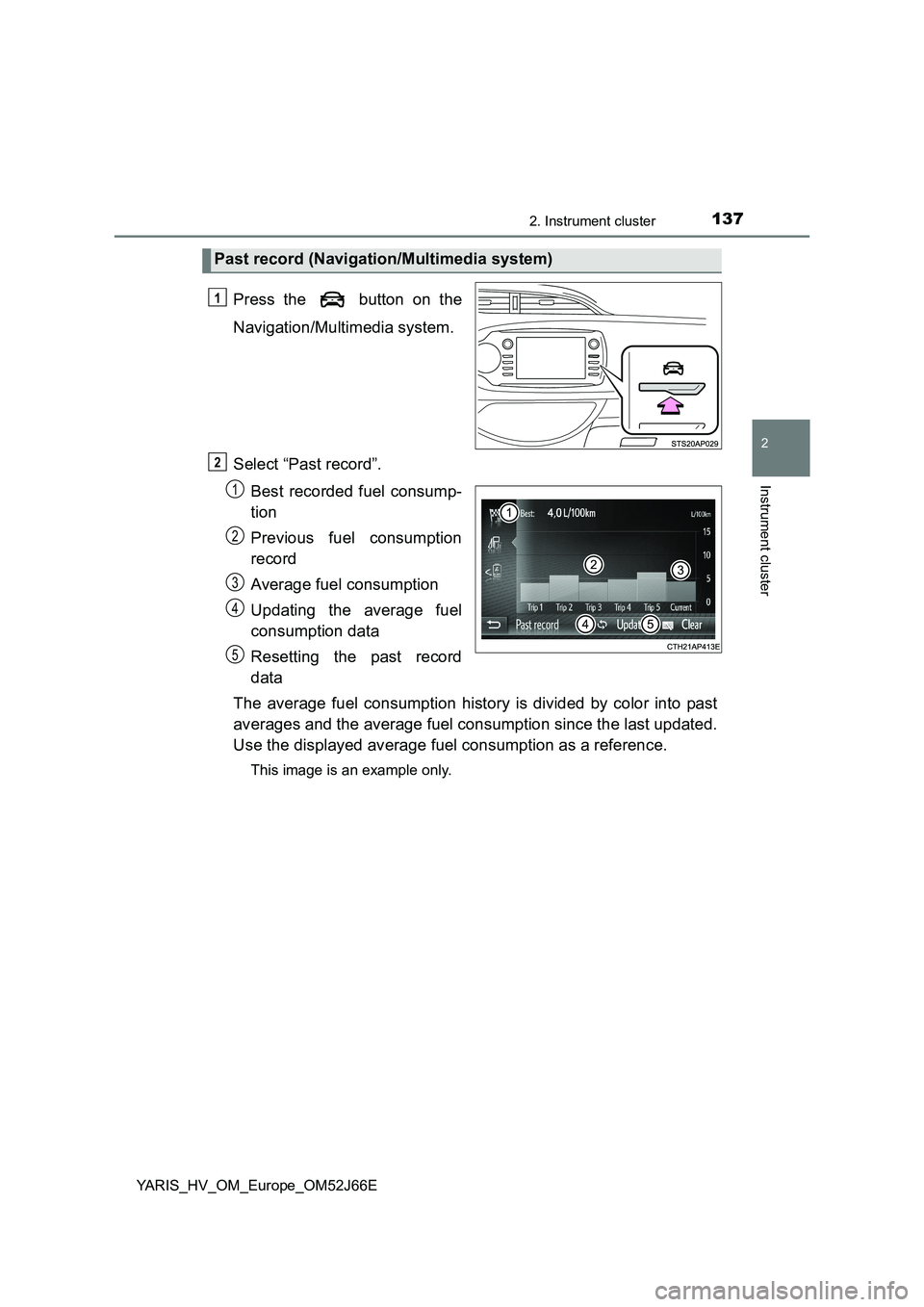
Press the button on the
Navigation/Multimedia system.
Select “Past record”.
Best recorded fuel consump-
tion
Previous fuel consumption
record
Average fuel consumption
Updating the average fuel
consumption data
Resetting the past record
data
The average fuel consumption history is divided by color into past
averages and the average fuel consumption since the last updated.
Use the displayed average fuel consumption as a reference.
This image is an example only.
Past record (Navigation/Multimedia system)
1
2
1
2
3
4
5
Page 138 of 632
1382. Instrument cluster
YARIS_HV_OM_Europe_OM52J66E
■Resetting the data
● Selecting “Clear” on the “Trip information” screen will reset the trip informa-
tion data.
● Selecting “Clear” on the “Past record” screen will reset the past record data.
■ Updating the past record data
Selecting “Update” on the “Past record” screen will update the past record
data.
Also, the average fuel consumption displayed in the multi-information display
will be reset at the same time. (vehicles with color display)
■ Cruising range
Displays the estimated maximum distance that can be driven with the quan-
tity of fuel remaining.
This distance is computed based on your average fuel consumption.
As a result, the actual distance that can be driven may differ from that dis-
played.