warning light TOYOTA YARIS 2018 Owner's Manual
[x] Cancel search | Manufacturer: TOYOTA, Model Year: 2018, Model line: YARIS, Model: TOYOTA YARIS 2018Pages: 632, PDF Size: 44.1 MB
Page 112 of 632
1122. Instrument cluster
YARIS_HV_OM_Europe_OM52J66E
*1: These lights turn on when the power switch is turned to the “ON” position
(vehicles without a smart entry & start system) or ON mode (vehicles with
a smart entry & start system) to indicate that a system check is being per-
formed. They will turn off after the hybrid system on, or after a few sec-
onds. There may be a malfunction in a system if a light does not come on,
or if the lights do not turn off. Have the vehicle inspected by any authorized
Toyota retailer or Toyota authorized repairer, or any reliable repairer.
*2: If equipped
*3: The light flashes to indicate that the system is operating.
*4: This light illuminates on the center panel.
*5: The light comes on when the system is turned off.
*6: The light comes on when system settings are changed.
*7: The light flashes in yellow to indicate that the vehicle is deviating from the
lane.
*8: Vehicles with monochrome display
*9: Vehicles with color display
*10: When the outside temperature is approximately 3°C (37°F) or lower, the
indicator will flash for approximately 10 seconds, then stay on.
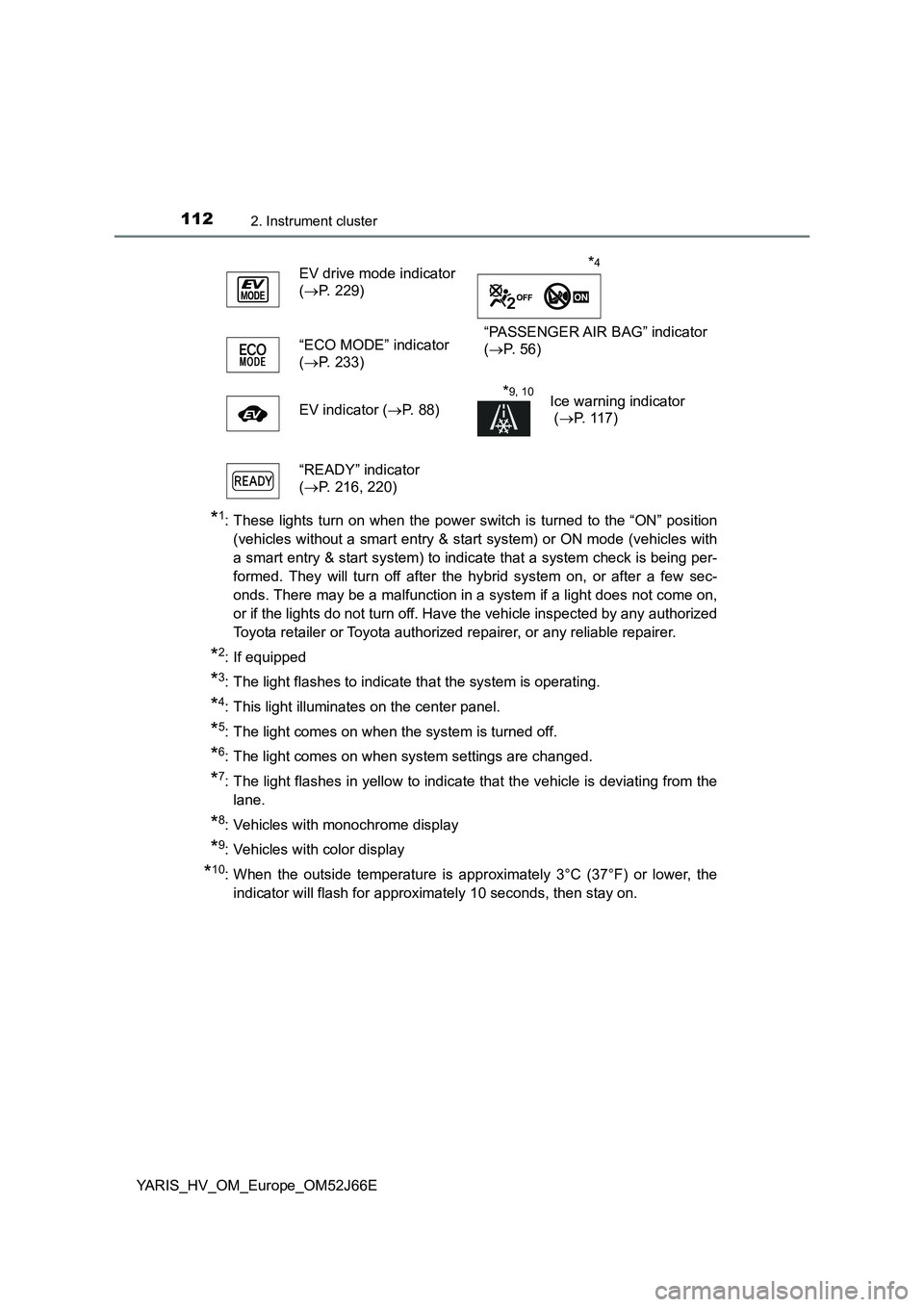
EV drive mode indicator
( P. 229)
“PASSENGER AIR BAG” indicator
( P. 5 6 ) “ECO MODE” indicator
( P. 233)
EV indicator ( P. 88)
*9, 10Ice warning indicator
( P. 117)
“READY” indicator
( P. 216, 220)
*4
Page 113 of 632
1132. Instrument cluster
2
Instrument cluster
YARIS_HV_OM_Europe_OM52J66E
WARNING
■If a safety system warning light does not come on
Should a safety system light such as the ABS and SRS warning light not
come on when you start the hybrid system, this could mean that these sys-
tems are not available to help protect you in an accident, which could result
in death or serious injury. Have the vehicle inspected by any authorized
Toyota retailer or Toyota authorized repairer, or any reliable repairer imme-
diately if this occurs.
Page 116 of 632
1162. Instrument cluster
YARIS_HV_OM_Europe_OM52J66E
● By keeping the indicator needle within Eco area, more Eco-friendly driving
can be achieved.
● Charge area indicates regeneration* status. Regenerated energy will be
used to charge the hybrid battery (traction battery).
*: When used in this manual, “regeneration” refers to the conversion of
energy created by the movement of the vehicle into electrical energy.
■ Engine speed
On hybrid vehicles, engine speed is precisely controlled in order to help
improve fuel efficiency and reduce exhaust emissions, etc.
There are times when the engine speed that is displayed may differ even
when vehicle operation and driving conditions are the same.
■ Outside temperature display
● In the following situations, the correct outside temperature may not be dis-
played, or the display may take longer than normal to change.
• When stopped, or driving at low speeds (less than 25 km/h [16 mph])
• When the outside temperature has changed suddenly (at the entrance/
exit of a garage, tunnel, etc.)
● When “- -” or “E” is displayed, the system may be malfunctioning.
Take your vehicle to any authorized Toyota retailer or Toyota authorized
repairer, or any reliable repairer.
● The temperature range that can be displayed is from -40°C (-40°F) to 50°C
(122°F).
NOTICE
■ To prevent damage to the engine and its components
The engine may be overheating if the high engine coolant temperature
warning light flashes or comes on. In this case, immediately stop the vehicle
in a safe place, and check the engine after it has cooled completely.
( P. 5 8 1 )
Page 118 of 632
1182. Instrument cluster
YARIS_HV_OM_Europe_OM52J66E
Odometer and trip meter display:
Displays the following items.
Odometer:
Displays the total distance the vehicle has been driven.
Trip meter:
Displays the distance the vehicle has been driven since the meter was last
reset. Trip meters A and B can be used to record and display different dis-
tances independently.
Multi-information display
Presents the driver with a variety of driving-related data. ( P. 1 2 5 )
Displays warning messages in case of a malfunction. ( P. 531)
Engine coolant temperature gauge
Displays the engine coolant temperature.
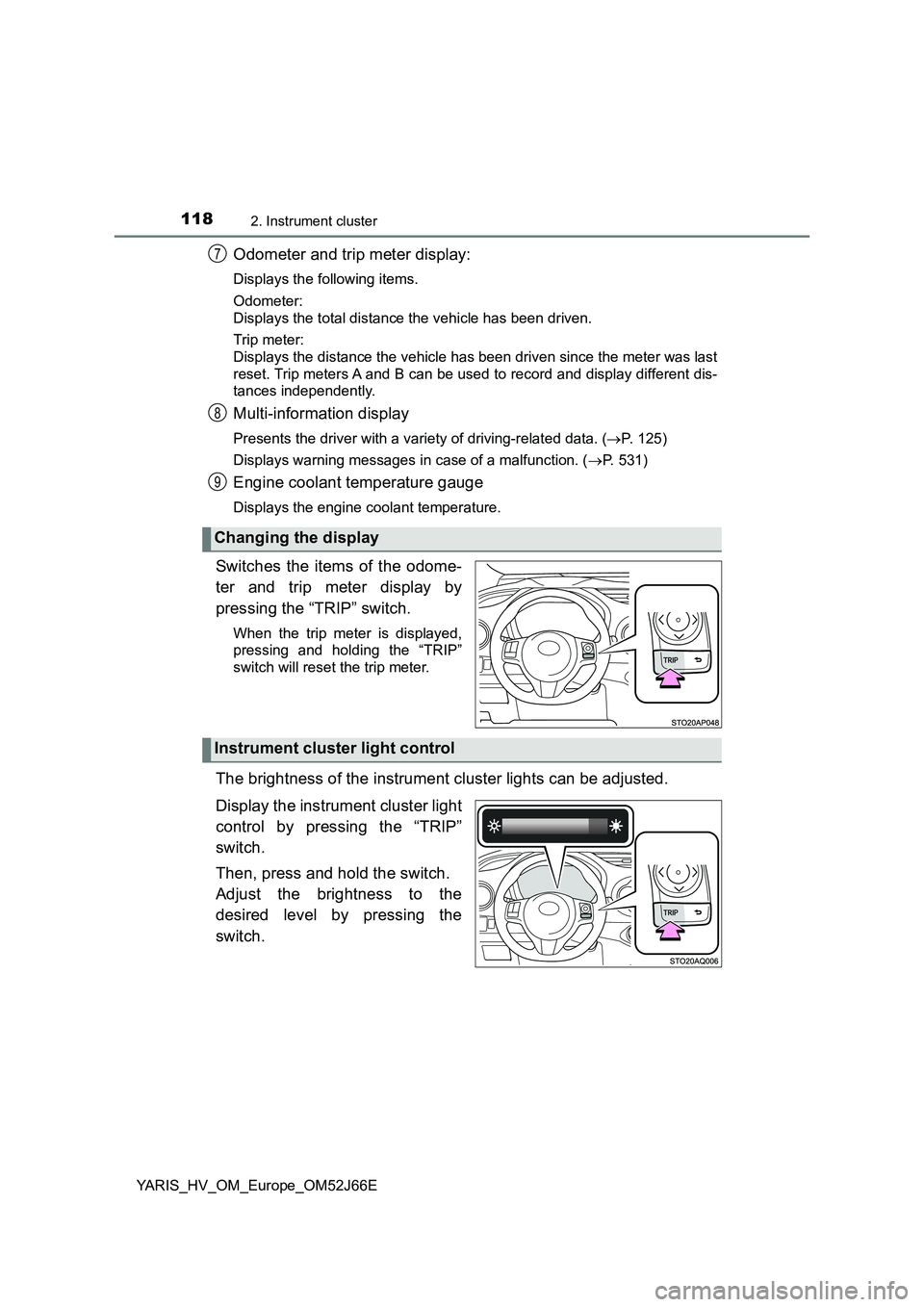
Switches the items of the odome-
ter and trip meter display by
pressing the “TRIP” switch.
When the trip meter is displayed,
pressing and holding the “TRIP”
switch will reset the trip meter.
The brightness of the instrument cluster lights can be adjusted.
Display the instrument cluster light
control by pressing the “TRIP”
switch.
Then, press and hold the switch.
Adjust the brightness to the
desired level by pressing the
switch.
Changing the display
7
8
9
Instrument cluster light control
Page 123 of 632
1232. Instrument cluster
2
Instrument cluster
YARIS_HV_OM_Europe_OM52J66E
EV indicator can be activated or deactivated by pressing the display
change button when the EV indicator customization display is dis-
played.
To change the EV indicator customization display, display the odometer
and press and hold the display change button until the display changes.
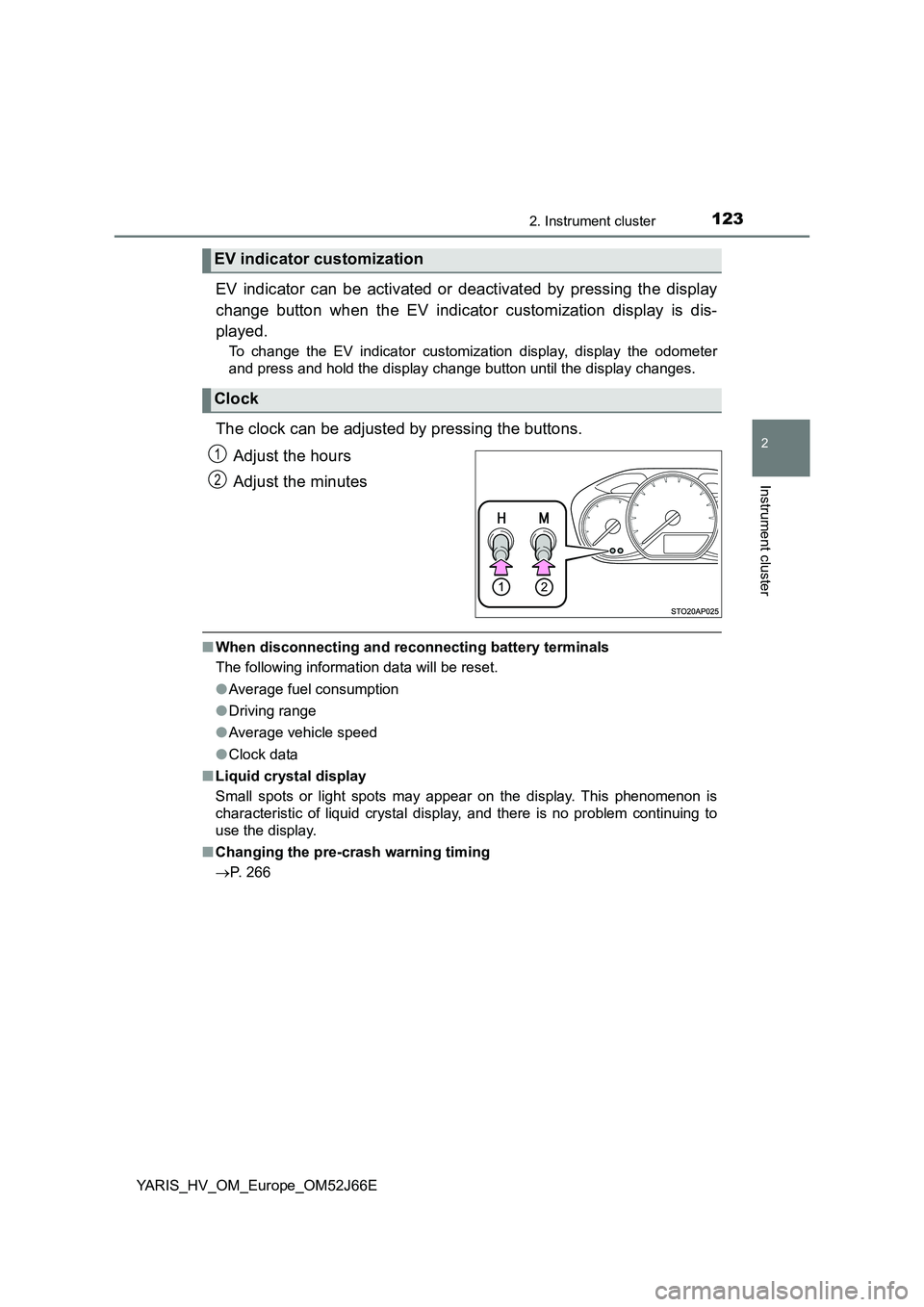
The clock can be adjusted by pressing the buttons.
Adjust the hours
Adjust the minutes
■ When disconnecting and reconnecting battery terminals
The following information data will be reset.
● Average fuel consumption
● Driving range
● Average vehicle speed
● Clock data
■ Liquid crystal display
Small spots or light spots may appear on the display. This phenomenon is
characteristic of liquid crystal display, and there is no problem continuing to
use the display.
■ Changing the pre-crash warning timing
P. 266
EV indicator customization
Clock
1
2
Page 131 of 632
1312. Instrument cluster
2
Instrument cluster
YARIS_HV_OM_Europe_OM52J66E
■Pop-up display
In some situations, such as when a switch operation is performed, a pop-up
display will be temporarily display ed on the multi-information display.
The pop-up display function can be set on/off.
■ Setting display automatic cancelation
“Settings” item in settings display is not selectable during driving and cannot
be operated.
Also, the settings screen is temporarily canceled in the following situations.
● A warning message is displayed.
● The vehicle starts off.
■ Liquid crystal display
Small spots or light spots may appear on the display. This phenomenon is
characteristic of liquid crystal displays, and there is no problem continuing to
use the display.
■ When disconnecting and reconnecting 12-volt battery terminals
The drive information and clock data will be reset.
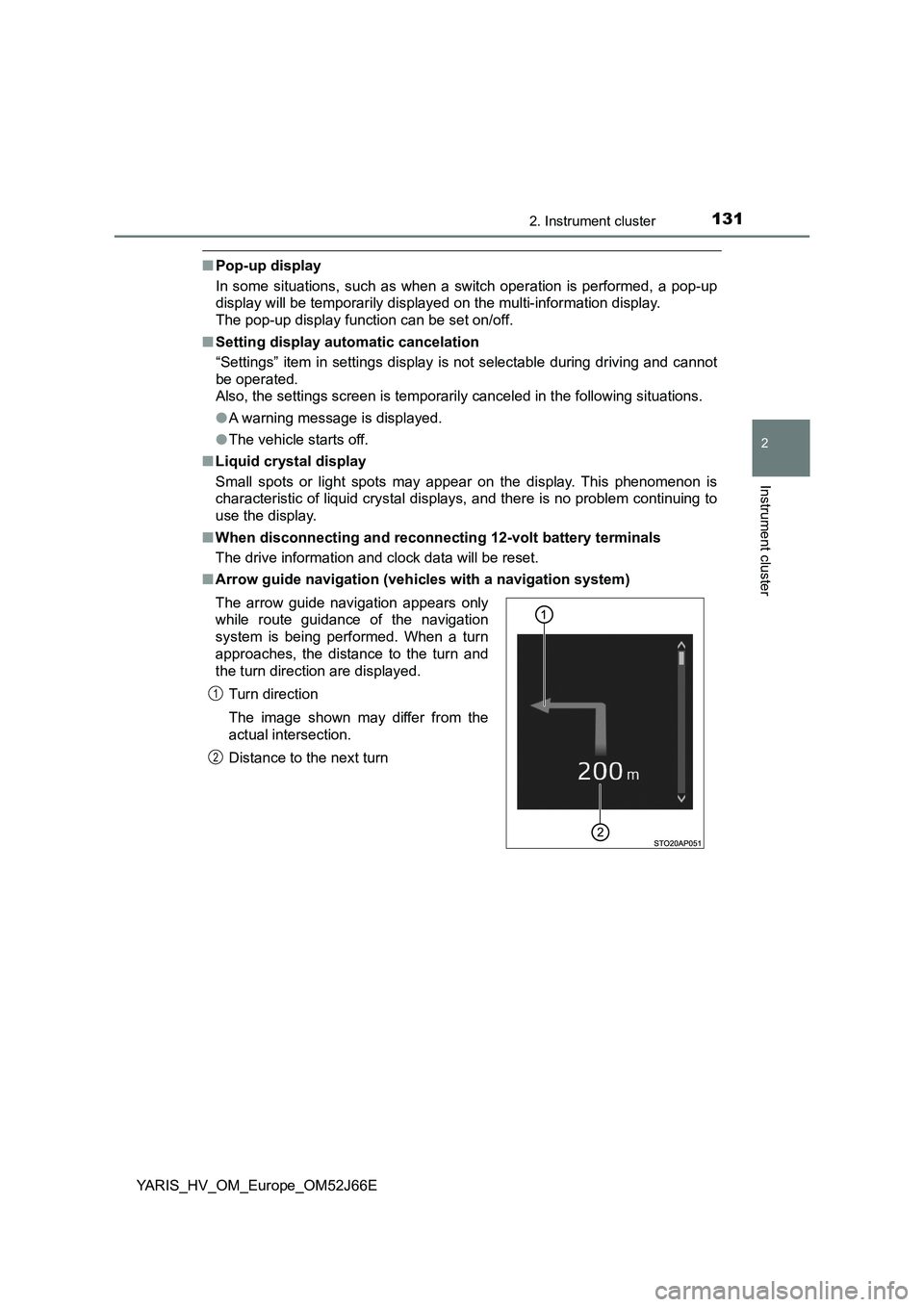
■ Arrow guide navigation (vehicles with a navigation system)
The arrow guide navigation appears only
while route guidance of the navigation
system is being performed. When a turn
approaches, the distance to the turn and
the turn direction are displayed.
Turn direction
The image shown may differ from the
actual intersection.
Distance to the next turn
1
2
Page 161 of 632
1613-2. Opening, closing and locking the doors
3
Operation of each component
YARIS_HV_OM_Europe_OM52J66E
■Operation signals (vehicles with an entry function or wireless remote
control)
The emergency flashers flash to indicate that the doors have been locked/
unlocked. (Locked: once; Unlocked: twice)
■ Open door warning buzzer
If a door or the back door is not fully closed, a buzzer will sound when the
vehicle speed reaches 5 km/h (3 mph).
Vehicles with color display only: T he open door(s) or back door is indicated
on the multi-information display.
■ Luggage compartment light
The luggage compartment lights turn on when the back door is opened.
WARNING
■ Caution while driving
● Keep the back door closed while driving.
If the back door is left open, it may hit near-by objects while driving or lug-
gage may be unexpectedly thrown out, causing an accident.
In addition, exhaust gases may enter the vehicle, causing death or a seri-
ous health hazard. Make sure to close the back door before driving.
● Before driving the vehicle, make sure that the back door is fully closed. If
the back door is not fully closed, it may open unexpectedly while driving,
causing an accident.
● Never let anyone sit in the luggage compartment. In the event of sudden
braking or a collision, they are susceptible to death or serious injury.
■ When children are in the vehicle
Observe the following precautions.
Failure to do so may result in death or serious injury.
● Do not allow children to play in the luggage compartment.
If a child is accidentally locked in the luggage compartment, they could
have heat exhaustion or other injuries.
● Do not allow a child to open or close the back door.
Doing so may cause the back door to move unexpectedly, or cause the
child’s hands, head, or neck to be caught by the closing back door.
Page 162 of 632
1623-2. Opening, closing and locking the doors
YARIS_HV_OM_Europe_OM52J66E
WARNING
■Operating the back door
Observe the following precautions.
Failure to do so may cause parts of the body to be caught, resulting in death
or serious injury.
● Remove any heavy loads, such as snow and ice, from the back door
before opening it. Failure to do so may cause the back door to suddenly
shut again after it is opened.
● When opening or closing the back door, thoroughly check to make sure
the surrounding area is safe.
● If anyone is in the vicinity, make sure they are safe and let them know that
the back door is about to open or close.
● Use caution when opening or closing the back door in windy weather as it
may move abruptly in strong wind.
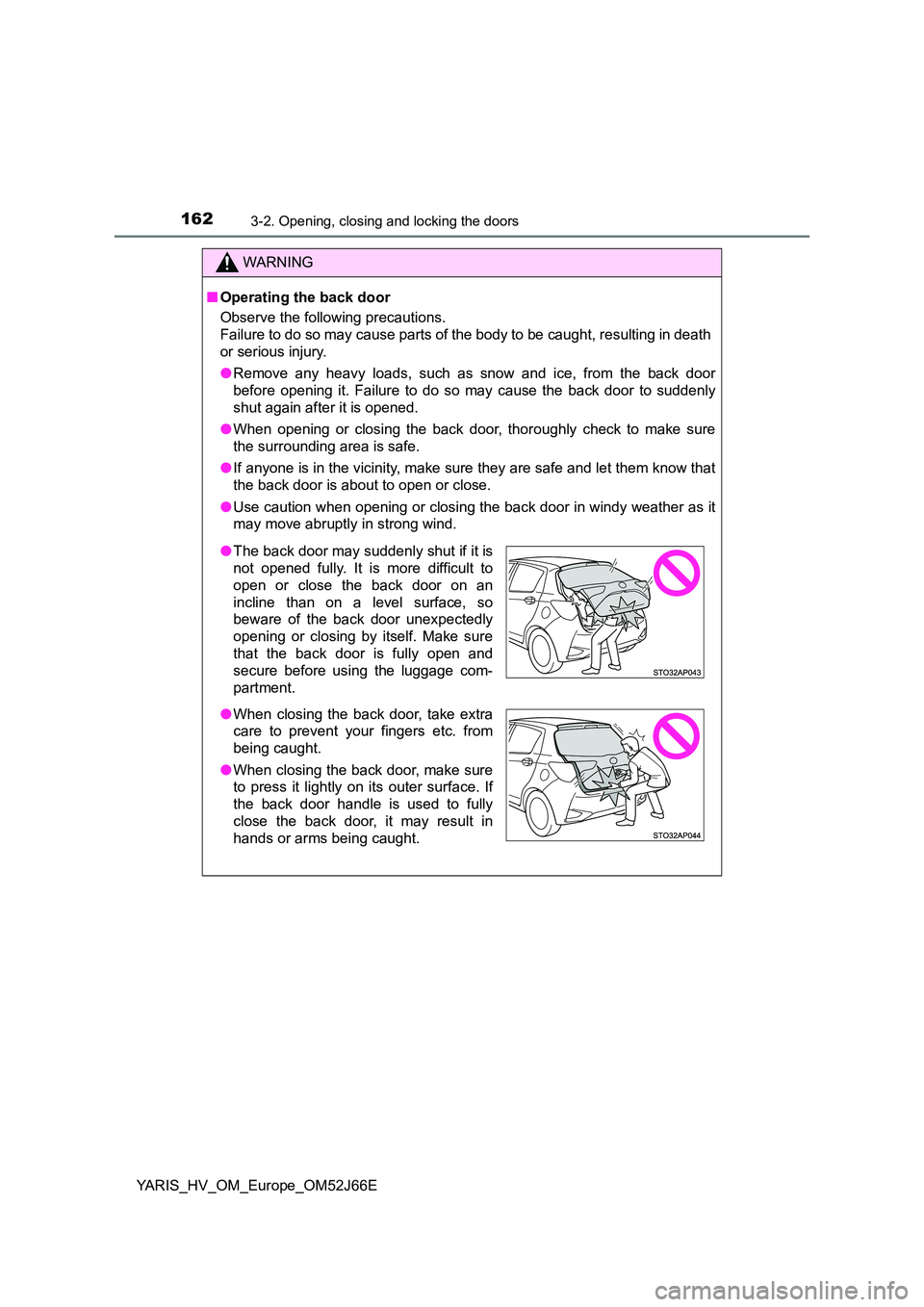
● The back door may suddenly shut if it is
not opened fully. It is more difficult to
open or close the back door on an
incline than on a level surface, so
beware of the back door unexpectedly
opening or closing by itself. Make sure
that the back door is fully open and
secure before using the luggage com-
partment.
● When closing the back door, take extra
care to prevent your fingers etc. from
being caught.
● When closing the back door, make sure
to press it lightly on its outer surface. If
the back door handle is used to fully
close the back door, it may result in
hands or arms being caught.
Page 165 of 632
1653-2. Opening, closing and locking the doors
3
Operation of each component
YARIS_HV_OM_Europe_OM52J66E
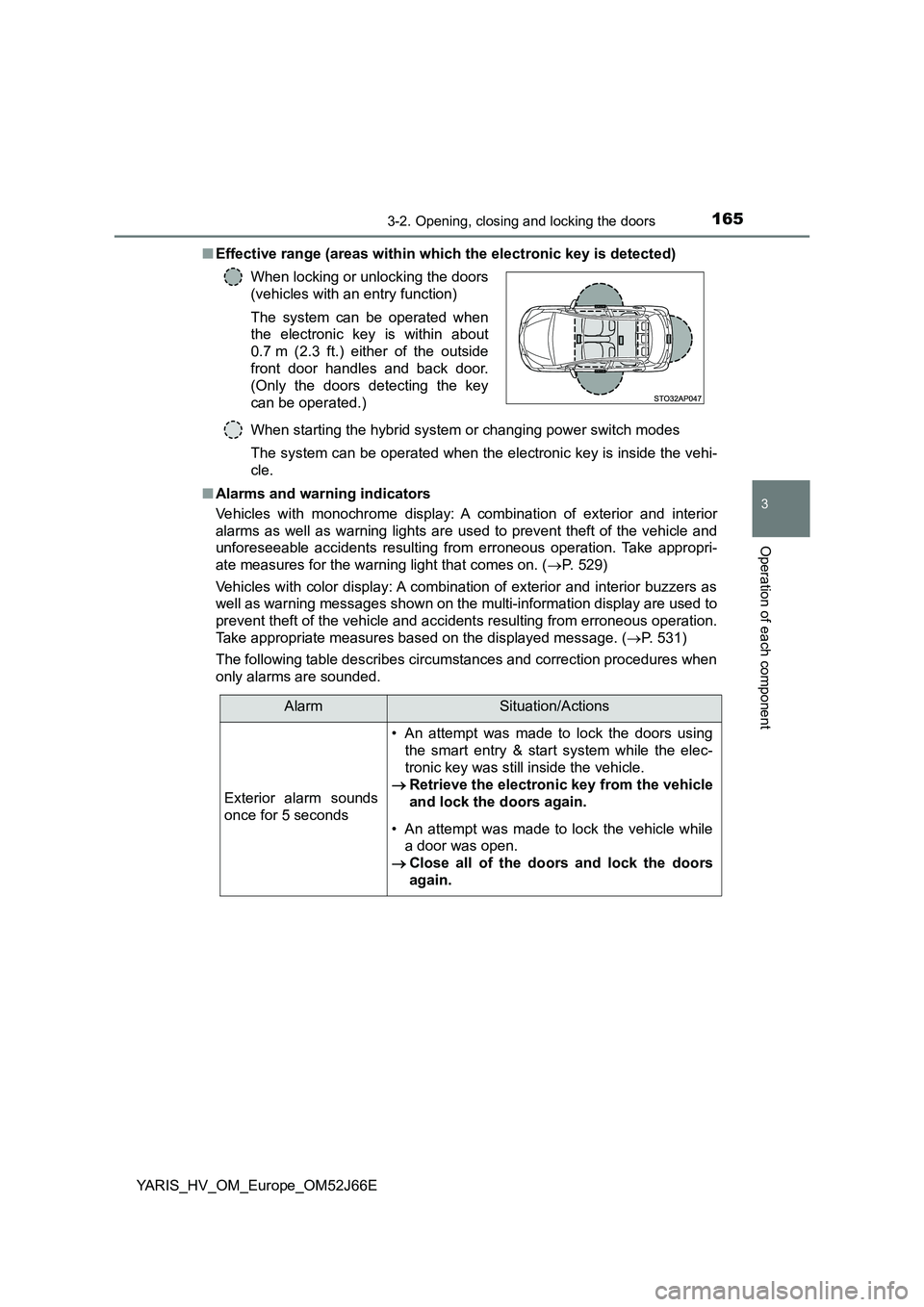
■ Effective range (areas within which the electronic key is detected)
When starting the hybrid system or changing power switch modes
The system can be operated when the electronic key is inside the vehi-
cle.
■ Alarms and warning indicators
Vehicles with monochrome display: A combination of exterior and interior
alarms as well as warning lights are used to prevent theft of the vehicle and
unforeseeable accidents resulting from erroneous operation. Take appropri-
ate measures for the warning light that comes on. ( P. 529)
Vehicles with color display: A combination of exterior and interior buzzers as
well as warning messages shown on the multi-information display are used to
prevent theft of the vehicle and accidents resulting from erroneous operation.
Take appropriate measures based on the displayed message. ( P. 531)
The following table describes circumstances and correction procedures when
only alarms are sounded.
When locking or unlocking the doors
(vehicles with an entry function)
The system can be operated when
the electronic key is within about
0.7 m (2.3 ft.) either of the outside
front door handles and back door.
(Only the doors detecting the key
can be operated.)
AlarmSituation/Actions
Exterior alarm sounds
once for 5 seconds
• An attempt was made to lock the doors using
the smart entry & start system while the elec-
tronic key was still inside the vehicle.
Retrieve the electronic key from the vehicle
and lock the doors again.
• An attempt was made to lock the vehicle while
a door was open.
Close all of the doors and lock the doors
again.
Page 186 of 632
1863-3. Adjusting the seats
YARIS_HV_OM_Europe_OM52J66E
WARNING
■When folding the rear seatbacks down
Observe the following precautions. Failure to do so may result in death or
serious injury.
● Do not fold the seatbacks down while driving.
● Stop the vehicle on level ground, set the parking brake and shift the shift
lever to P.
● Do not allow anyone to sit on a folded seatback or in the luggage compart-
ment while driving.
● Do not allow children to enter the luggage compartment.
● Do not allow anyone to sit on the rear center seat if the rear right seat is
folded down, as the seat belt buckle for the rear center seat belt is then
concealed under the folded seat and cannot be used.
● Be careful not to catch your hand when folding the rear seatbacks.
● Depending on the position of the front seat, it may interfere when trying to
fold down the rear seatbacks. If this happens, adjust the position of the
front seat.
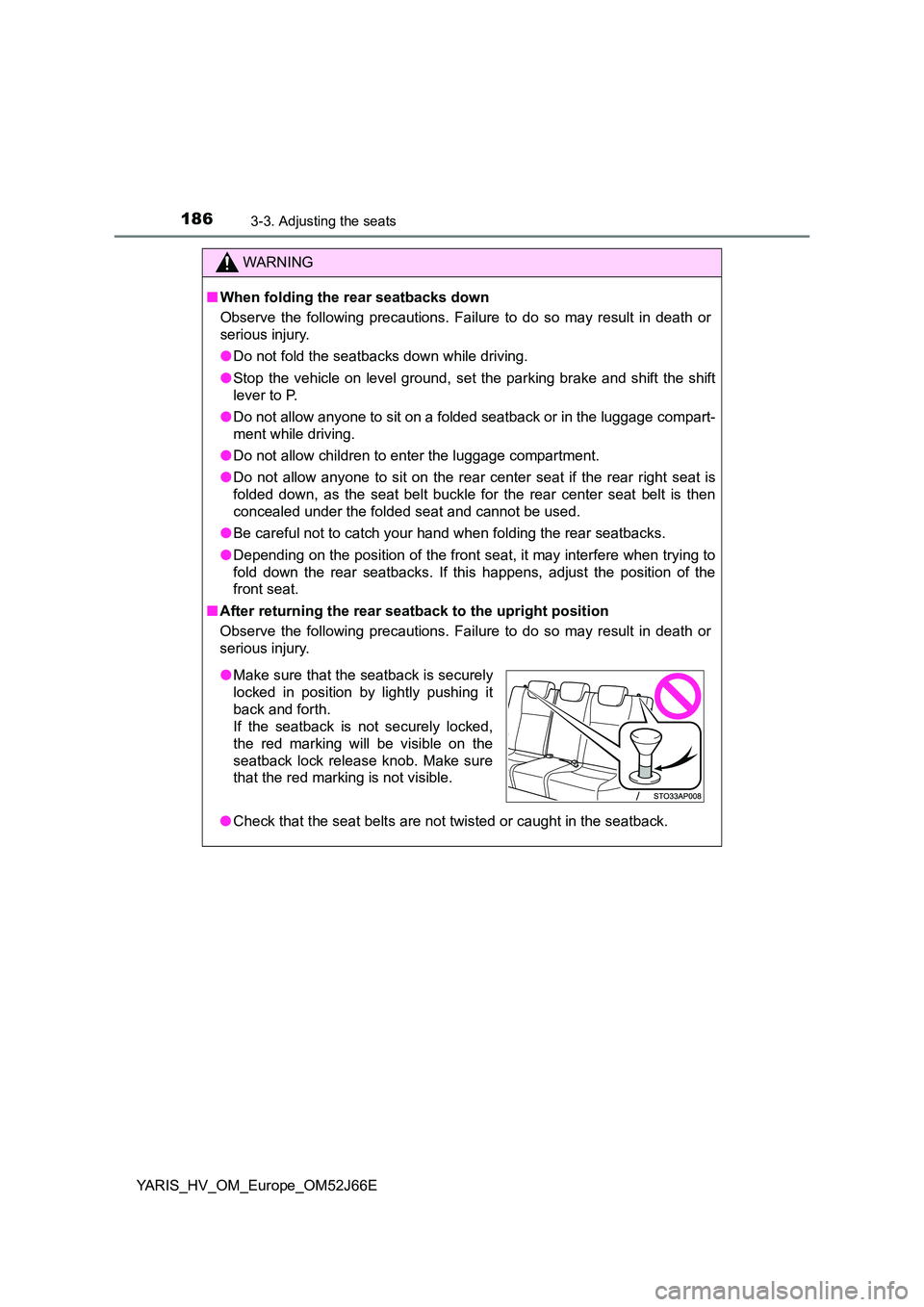
■ After returning the rear seatback to the upright position
Observe the following precautions. Failure to do so may result in death or
serious injury.
● Check that the seat belts are not twisted or caught in the seatback.
●Make sure that the seatback is securely
locked in position by lightly pushing it
back and forth.
If the seatback is not securely locked,
the red marking will be visible on the
seatback lock release knob. Make sure
that the red marking is not visible.