Cluster TOYOTA YARIS 2018 Owner's Guide
[x] Cancel search | Manufacturer: TOYOTA, Model Year: 2018, Model line: YARIS, Model: TOYOTA YARIS 2018Pages: 632, PDF Size: 44.1 MB
Page 133 of 632
133
2
2. Instrument cluster
Instrument cluster
YARIS_HV_OM_Europe_OM52J66E
Energy monitor/consumption screen
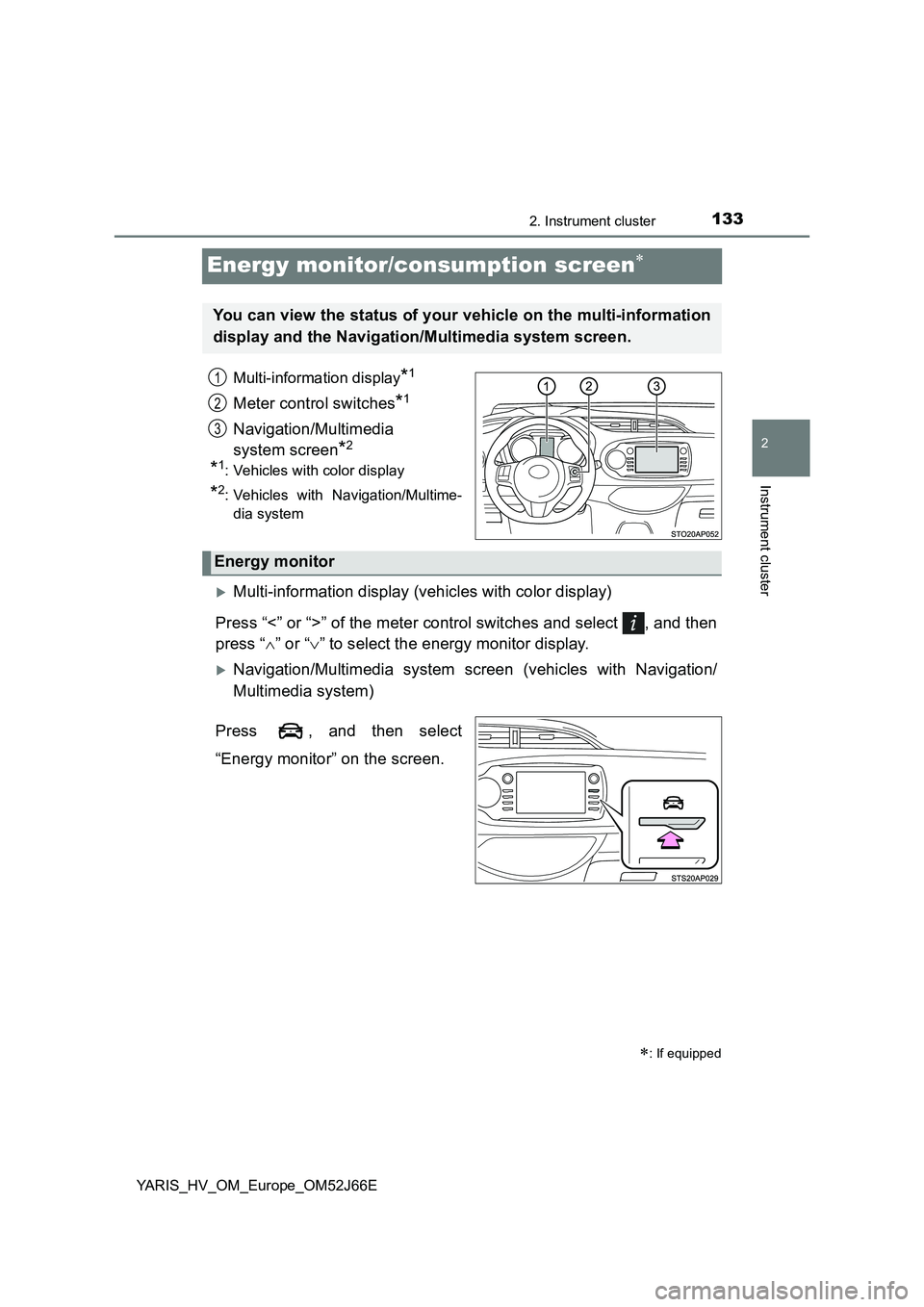
Multi-information display*1
Meter control switches*1
Navigation/Multimedia
system screen*2
*1: Vehicles with color display
*2: Vehicles with Navigation/Multime-
dia system
Multi-information display (vehicles with color display)
Press “<” or “>” of the meter control switches and select , and then
press “ ” or “” to select the energy monitor display.
Navigation/Multimedia system screen (vehicles with Navigation/
Multimedia system)
Press , and then select
“Energy monitor” on the screen.
: If equipped
You can view the status of your vehicle on the multi-information
display and the Navigation/Multimedia system screen.
1
2
3
Energy monitor
Page 134 of 632
1342. Instrument cluster
YARIS_HV_OM_Europe_OM52J66E
Navigation/Multimedia
system screen Multi-information display
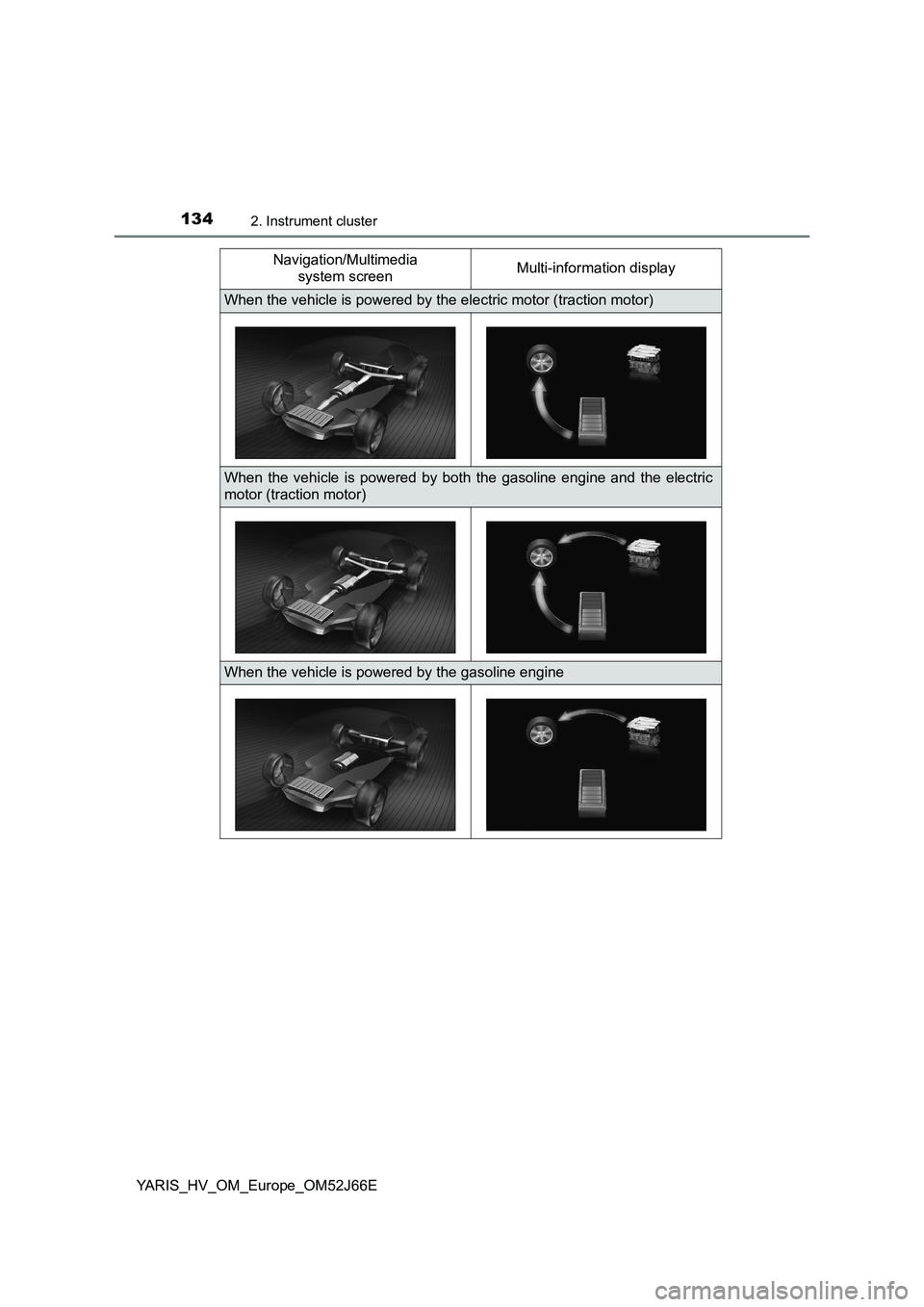
When the vehicle is powered by the electric motor (traction motor)
When the vehicle is powered by both the gasoline engine and the electric
motor (traction motor)
When the vehicle is powered by the gasoline engine
Page 135 of 632
1352. Instrument cluster
2
Instrument cluster
YARIS_HV_OM_Europe_OM52J66E
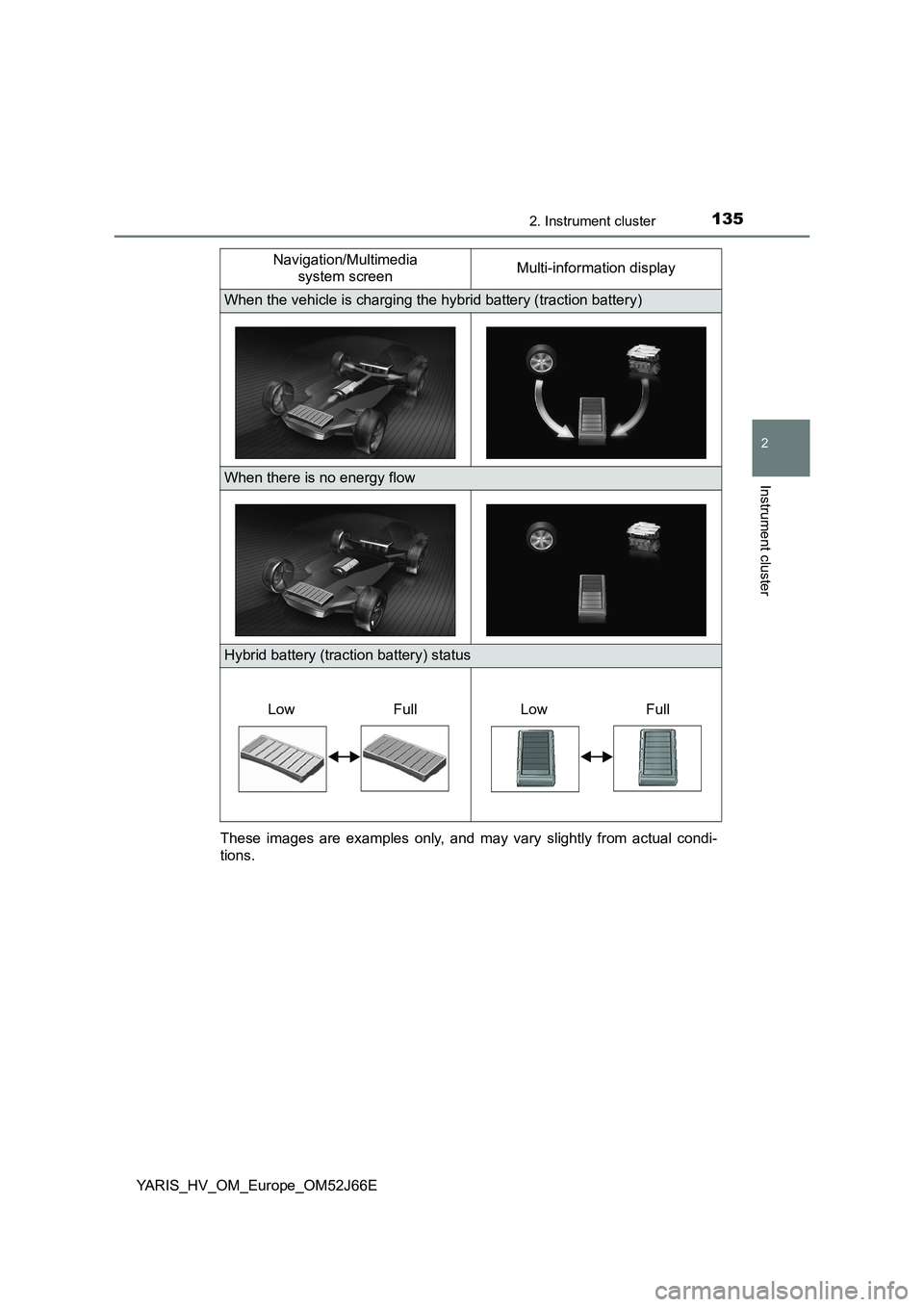
These images are examples only, and may vary slightly from actual condi-
tions.
When the vehicle is charging the hybrid battery (traction battery)
When there is no energy flow
Hybrid battery (traction battery) status
Navigation/Multimedia
system screen Multi-information display
Low FullLow Full
Page 136 of 632
1362. Instrument cluster
YARIS_HV_OM_Europe_OM52J66E
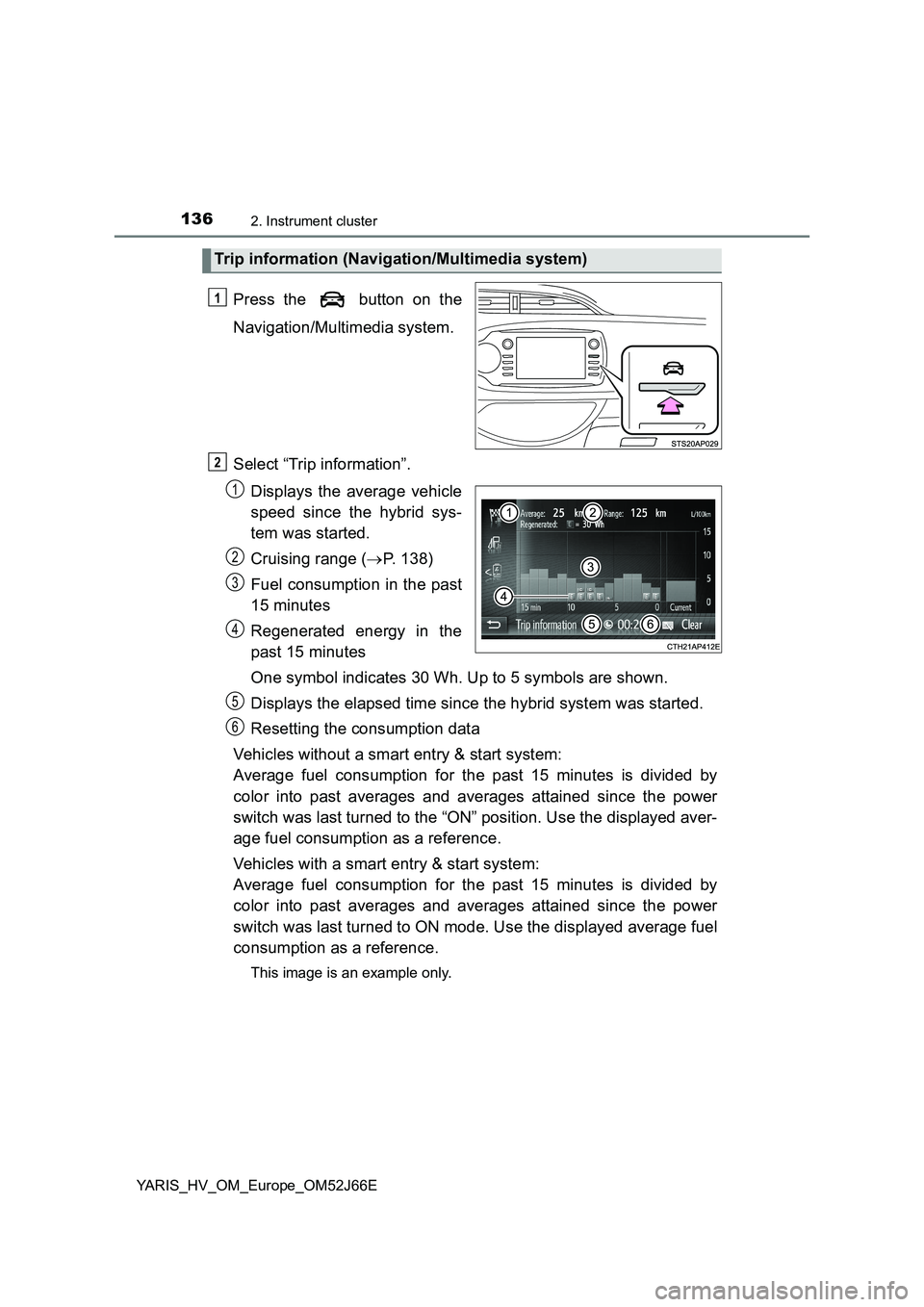
Press the button on the
Navigation/Multimedia system.
Select “Trip information”.
Displays the average vehicle
speed since the hybrid sys-
tem was started.
Cruising range ( P. 138)
Fuel consumption in the past
15 minutes
Regenerated energy in the
past 15 minutes
One symbol indicates 30 Wh. Up to 5 symbols are shown.
Displays the elapsed time since the hybrid system was started.
Resetting the consumption data
Vehicles without a smart entry & start system:
Average fuel consumption for the past 15 minutes is divided by
color into past averages and averages attained since the power
switch was last turned to the “ON” position. Use the displayed aver-
age fuel consumption as a reference.
Vehicles with a smart entry & start system:
Average fuel consumption for the past 15 minutes is divided by
color into past averages and averages attained since the power
switch was last turned to ON mode. Use the displayed average fuel
consumption as a reference.
This image is an example only.
Trip information (Navigation/Multimedia system)
1
2
1
2
3
4
5
6
Page 137 of 632
1372. Instrument cluster
2
Instrument cluster
YARIS_HV_OM_Europe_OM52J66E
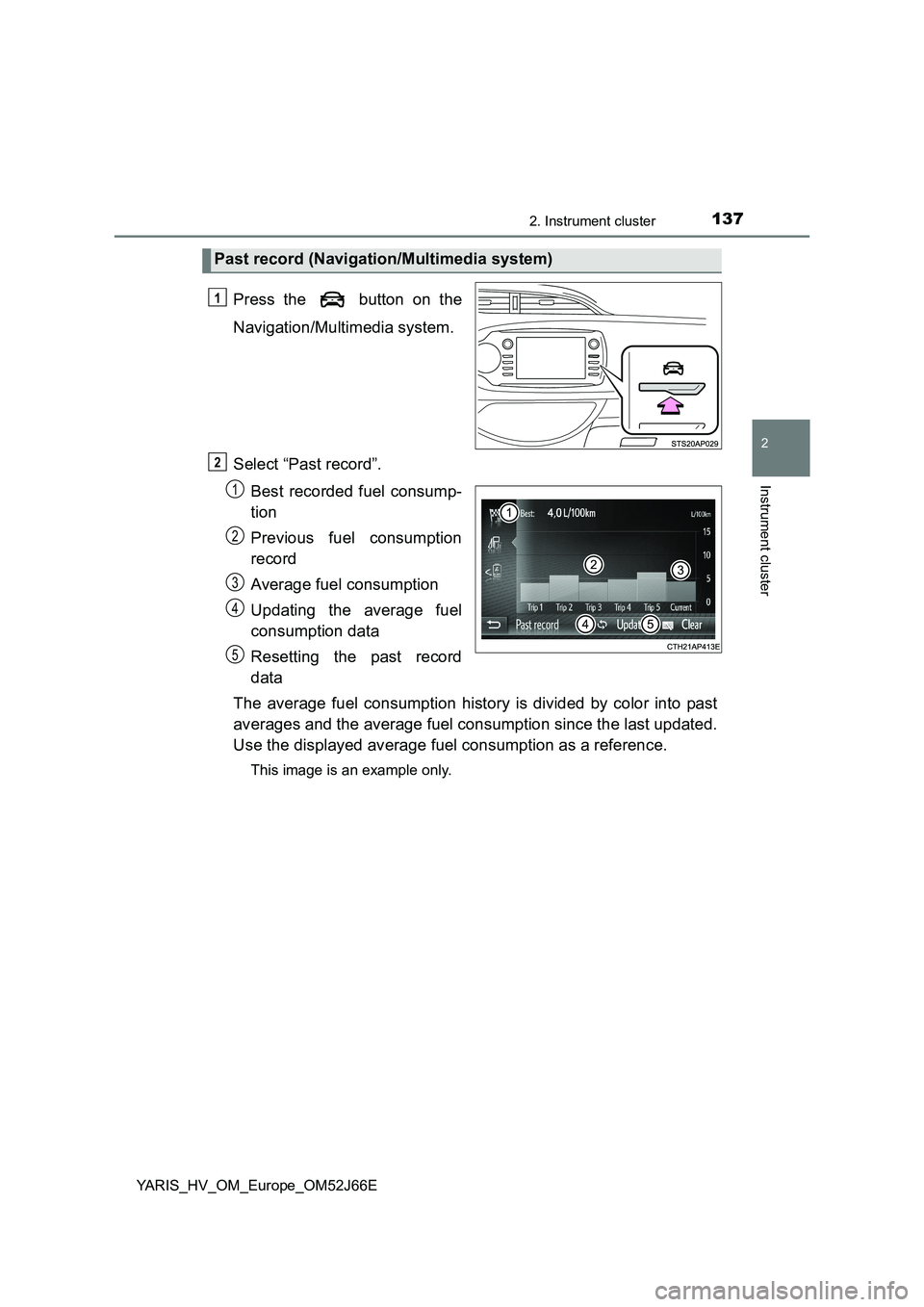
Press the button on the
Navigation/Multimedia system.
Select “Past record”.
Best recorded fuel consump-
tion
Previous fuel consumption
record
Average fuel consumption
Updating the average fuel
consumption data
Resetting the past record
data
The average fuel consumption history is divided by color into past
averages and the average fuel consumption since the last updated.
Use the displayed average fuel consumption as a reference.
This image is an example only.
Past record (Navigation/Multimedia system)
1
2
1
2
3
4
5
Page 138 of 632
1382. Instrument cluster
YARIS_HV_OM_Europe_OM52J66E
■Resetting the data
● Selecting “Clear” on the “Trip information” screen will reset the trip informa-
tion data.
● Selecting “Clear” on the “Past record” screen will reset the past record data.
■ Updating the past record data
Selecting “Update” on the “Past record” screen will update the past record
data.
Also, the average fuel consumption displayed in the multi-information display
will be reset at the same time. (vehicles with color display)
■ Cruising range
Displays the estimated maximum distance that can be driven with the quan-
tity of fuel remaining.
This distance is computed based on your average fuel consumption.
As a result, the actual distance that can be driven may differ from that dis-
played.
Page 229 of 632
229
4
4-2. Driving procedures
Driving
YARIS_HV_OM_Europe_OM52J66E
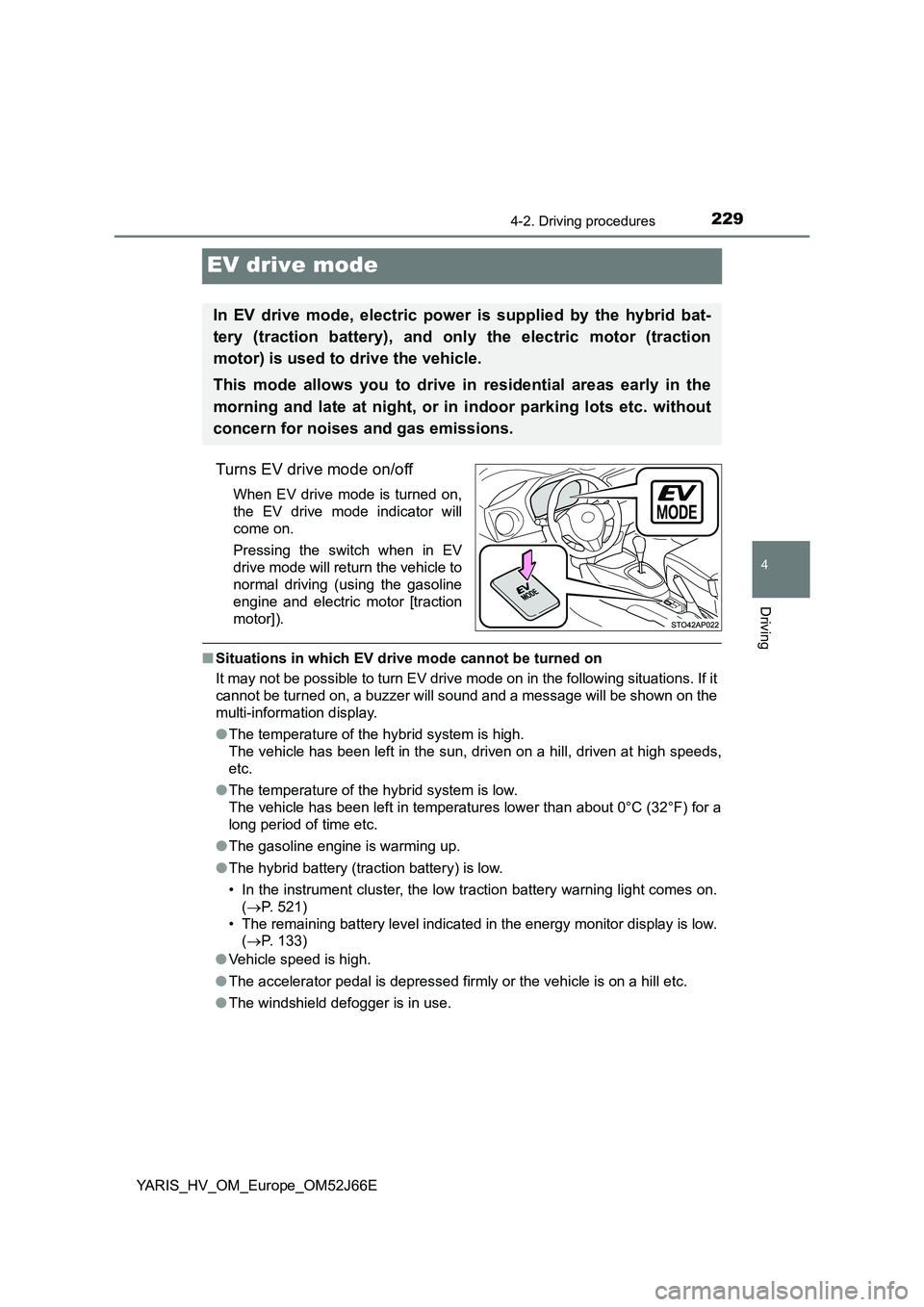
EV drive mode
Turns EV drive mode on/off
When EV drive mode is turned on,
the EV drive mode indicator will
come on.
Pressing the switch when in EV
drive mode will return the vehicle to
normal driving (using the gasoline
engine and electric motor [traction
motor]).
■ Situations in which EV drive mode cannot be turned on
It may not be possible to turn EV drive mode on in the following situations. If it
cannot be turned on, a buzzer will sound and a message will be shown on the
multi-information display.
● The temperature of the hybrid system is high.
The vehicle has been left in the sun, driven on a hill, driven at high speeds,
etc.
● The temperature of the hybrid system is low.
The vehicle has been left in temperatures lower than about 0°C (32°F) for a
long period of time etc.
● The gasoline engine is warming up.
● The hybrid battery (traction battery) is low.
• In the instrument cluster, the low traction battery warning light comes on.
( P. 521)
• The remaining battery level indicated in the energy monitor display is low.
( P. 133)
● Vehicle speed is high.
● The accelerator pedal is depressed firmly or the vehicle is on a hill etc.
● The windshield defogger is in use.
In EV drive mode, electric power is supplied by the hybrid bat-
tery (traction battery), and only the electric motor (traction
motor) is used to drive the vehicle.
This mode allows you to drive in residential areas early in the
morning and late at night, or in indoor parking lots etc. without
concern for noises and gas emissions.
Page 230 of 632
2304-2. Driving procedures
YARIS_HV_OM_Europe_OM52J66E
■ Switching to EV drive mode when the gasoline engine is cold
If the hybrid system is started while the gasoline engine is cold, the gasoline
engine will start automatically after a short period of time in order to warm up.
In this case, you will become unable to switch to EV drive mode.
After the hybrid system has started and the “READY” indicator has illumi-
nated, press the EV drive mode switch before the gasoline engine starts to
switch to EV drive mode.
■ Automatic cancelation of EV drive mode
When driving in EV drive mode, the gasoline engine may automatically restart
in the following situations. When EV drive mode is canceled, a buzzer will
sound and the EV drive mode indicator will flash and go off.
● The hybrid battery (traction battery) becomes low.
• In the instrument cluster, the low traction battery warning light comes on.
( P. 521)
• The remaining battery level indicated in the energy monitor display is low.
( P. 133)
● Vehicle speed is high.
● The accelerator pedal is depressed firmly or the vehicle is on a hill etc.
■ Possible driving distance when driving in EV drive mode
EV drive mode’s possible driving distance ranges from a few hundred meters
to approximately 1 km (0.6 miles). However, depending on vehicle conditions,
there are situations when EV drive mode cannot be used.
(The distance that is possible depends on the hybrid battery [traction battery]
level and driving conditions.)
■ Fuel economy
The hybrid system is designed to achieve the best possible fuel economy
during normal driving (using the gasol ine engine and electric motor [traction
motor]). Driving in EV drive mode more than necessary may lower fuel econ-
omy.
Page 623 of 632
623Alphabetical index
YARIS_HV_OM_Europe_OM52J66E
Hybrid battery air vent............... 91
Hybrid system ............................ 86
Emergency shut off system..... 91
Energy monitor/consumption
screen................................. 133
EV drive mode ...................... 229
High voltage components ....... 90
Hybrid System Indicator ........ 115
Hybrid system precautions...... 90
Hybrid vehicle driving tips ..... 310
If the hybrid system will
not start............................... 571
Overheating .......................... 581
Power switch ................. 216, 220
Regenerative braking .............. 88
Starting the hybrid
system ........................ 216, 220
Hybrid System Indicator ......... 115
Hybrid system overheat
warning light .......................... 522
Hybrid system overheat
warning message .................. 531
Hybrid transmission ................ 232
Identification ............................ 591
Engine................................... 591
Vehicle .................................. 591
Ignition switch
(Power switch) ............... 216, 220
Auto power off function ......... 225
Changing power switch
positions ............................. 217
Changing the power switch
modes................................. 222
If your vehicle has to be
stopped in an emergency ... 507
Starting the hybrid
system ........................ 216, 220
Ignition switch light
(Power switch light) .............. 398
Illuminated entry system ........ 399
Immobilizer system ................... 96
Indicators ................................. 111
Initialization
Items to initialize ................... 610
Tire pressure warning
system ................................ 454
Inside rear view mirror ............ 193
Instrument cluster light
control ............................ 115, 118
Interior lights............................ 398
Switch ................................... 398
Wattage ................................ 600
ISOFIX rigid anchors ................. 65
I
*: For vehicles with navigation/multimedia system, refer to
“Navigation and multimedia system Owner’s manual”.
Page 625 of 632
625Alphabetical index
YARIS_HV_OM_Europe_OM52J66E
Maintenance
Do-it-yourself
maintenance ....................... 430
Maintenance data ................. 590
Maintenance requirements ... 427
Malfunction indicator lamp ..... 518
Manual headlight
leveling dial ............................ 240
Meter ................................. 114, 117
Indicators .............................. 111
Instrument cluster light
control......................... 115, 118
Meters ........................... 114, 117
Multi-information
display ........................ 121, 125
Warning lights ....................... 109
Warning message ................. 531
Mirrors
Inside rear view mirror .......... 193
Outside rear view mirror
defoggers............................ 390
Outside rear view mirrors ...... 196
Vanity mirrors ........................ 407
MP3 disc*................................. 330
Multi-information
display ............................ 121, 125
Drive information ........... 122, 127
Energy monitor...................... 133
RSA (Road Sign Assist) ........ 293
Settings ................................. 128
Switching the display .... 121, 126
Warning message ................. 531
Multimedia system*
Navigation system*
Odometer.......................... 117, 122
Oil
Engine oil .............................. 593
Opener
Back door.............................. 160
Fuel filler door ....................... 254
Hood ..................................... 433
Outside rear view mirrors ....... 196
Adjusting and folding ............ 196
Outside rear view mirror
defoggers ........................... 390
Outside temperature
display ............................ 117, 121
Overheating.............................. 581
P position request warning
light......................................... 523
Parking brake ........................... 237
Operation .............................. 237
Parking brake engaged
warning buzzer ................... 517
PCS (Pre-Crash Safety
system)................................... 262
Function ................................ 262
PCS switch ........................... 266
Warning light ......................... 519
Warning messages ............... 277
MN
O
P
*: For vehicles with navigation/multimedia system, refer to
“Navigation and multimedia system Owner’s manual”.