Auto headlight TOYOTA YARIS 2018 Owners Manual
[x] Cancel search | Manufacturer: TOYOTA, Model Year: 2018, Model line: YARIS, Model: TOYOTA YARIS 2018Pages: 632, PDF Size: 44.1 MB
Page 3 of 632
3
1
7
8
6
5
4
3
2
9
YARIS_HV_OM_Europe_OM52J66E
3-3. Adjusting the seats
Front seats .........................182
Rear seats .........................184
Head restraints ..................188
3-4. Adjusting the steering
wheel and mirrors
Steering wheel ...................191
Inside rear view mirror .......193
Outside rear view
mirrors .............................196
3-5. Opening and closing
the windows
Power windows ..................199
4-1. Before driving
Driving the vehicle .............204
Cargo and luggage ............213
Trailer towing .....................215
4-2. Driving procedures
Power (ignition) switch
(vehicles without a smart
entry & start system)........216
Power (ignition) switch
(vehicles with a smart
entry & start system)........220
EV drive mode ...................229
Hybrid transmission ...........232
Turn signal lever ................236
Parking brake.....................237
4-3. Operating the lights
and wipers
Headlight switch ................ 238
Fog light switch ................. 244
Windshield wiper
and washer ..................... 246
Rear window wiper
and washer ..................... 250
4-4. Refueling
Opening the fuel tank
cap .................................. 252
4-5. Toyota Safety Sense
Toyota Safety Sense ......... 255
PCS (Pre-Crash Safety
system) ........................... 262
LDA (Lane Departure
Alert) ............................... 279
Automatic High Beam ....... 287
RSA (Road Sign Assist) .... 293
4-6. Using the driving support
systems
Cruise control .................... 299
Driving assist systems....... 303
4-7. Driving tips
Hybrid vehicle driving
tips .................................. 310
Winter driving tips.............. 313
4Driving
Page 18 of 632

18Pictorial index
YARIS_HV_OM_Europe_OM52J66E
■Switches (Left-hand drive vehicles)
Outside rear view mirror switches*. . . . . . . . . . . . . . . . . . . P. 196
Manual headlight leveling dial . . . . . . . . . . . . . . . . . . . . . . . P. 240
LDA (Lane Departure Alert) switch* . . . . . . . . . . . . . . . . . . P. 280
Automatic high beam switch* . . . . . . . . . . . . . . . . . . . . . . . P. 287
PCS (Pre-Crash Safety system) switch*. . . . . . . . . . . . . . . P. 266
1
2
3
4
5
Page 25 of 632
25Pictorial index
YARIS_HV_OM_Europe_OM52J66E
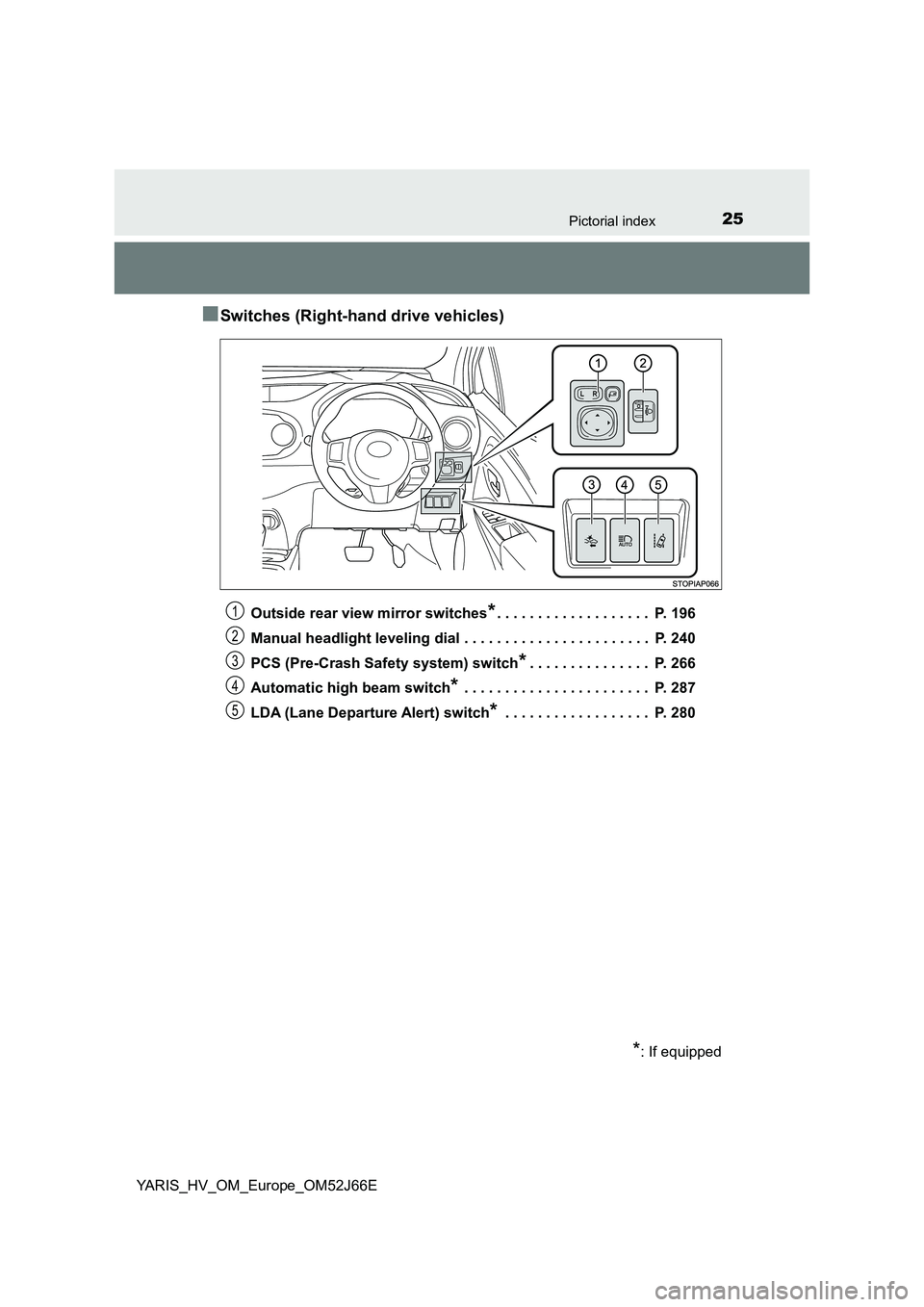
■Switches (Right-hand drive vehicles)
Outside rear view mirror switches*. . . . . . . . . . . . . . . . . . . P. 196
Manual headlight leveling dial . . . . . . . . . . . . . . . . . . . . . . . P. 240
PCS (Pre-Crash Safety system) switch*. . . . . . . . . . . . . . . P. 266
Automatic high beam switch* . . . . . . . . . . . . . . . . . . . . . . . P. 287
LDA (Lane Departure Alert) switch* . . . . . . . . . . . . . . . . . . P. 280
*: If equipped
1
2
3
4
5
Page 111 of 632
1112. Instrument cluster
2
Instrument cluster
YARIS_HV_OM_Europe_OM52J66E
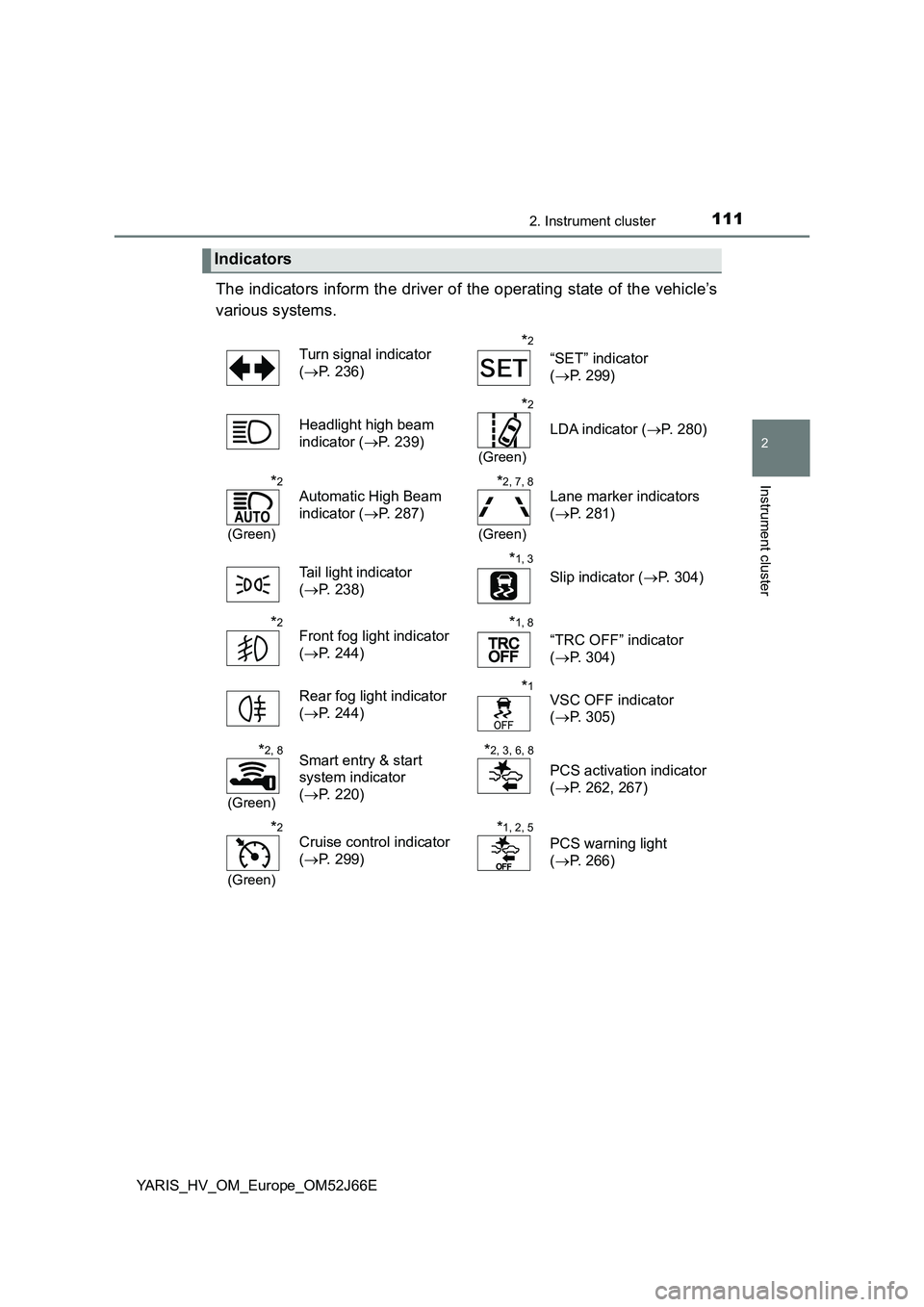
The indicators inform the driver of the operating state of the vehicle’s
various systems.
Indicators
Turn signal indicator
( P. 236)
*2
“SET” indicator
( P. 299)
Headlight high beam
indicator ( P. 239)
*2
(Green)
LDA indicator (P. 280)
*2
(Green)
Automatic High Beam
indicator ( P. 287)
*2, 7, 8
(Green)
Lane marker indicators
( P. 281)
Tail light indicator
( P. 238)
*1, 3
Slip indicator (P. 304)
*2Front fog light indicator
( P. 244)
*1, 8
“TRC OFF” indicator
( P. 304)
Rear fog light indicator
( P. 244)
*1VSC OFF indicator
( P. 305)
*2, 8
(Green)
Smart entry & start
system indicator
( P. 220)
*2, 3, 6, 8
PCS activation indicator
( P. 262, 267)
*2
(Green)
Cruise control indicator
( P. 299)
*1, 2, 5
PCS warning light
( P. 266)
Page 115 of 632
1152. Instrument cluster
2
Instrument cluster
YARIS_HV_OM_Europe_OM52J66E
The brightness of the instrument cluster lights (when the headlight
switch is on and the surrounding area is dark) can be adjusted.
Display the instrument cluster light
control by pressing the display
change button. ( P. 121)
Then, press and hold the button.
Adjust the brightness to the
desired level by pressing the but-
ton.
■ The meters and display illuminate when
Vehicles without a smart entry & start system
The power switch is in the “ON” position.
Vehicles with a smart entry & start system
The power switch is in ON mode.
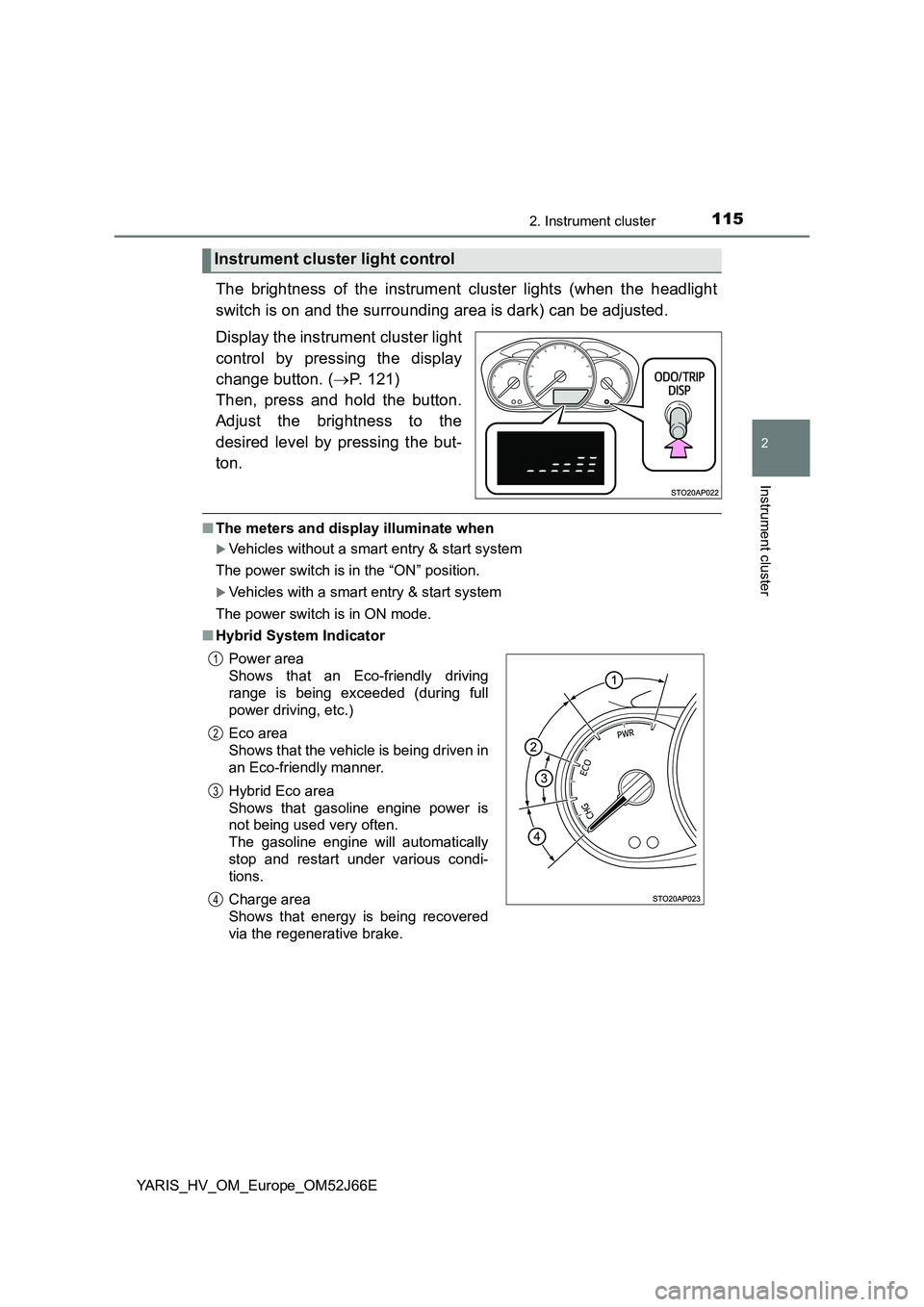
■ Hybrid System Indicator
Instrument cluster light control
Power area
Shows that an Eco-friendly driving
range is being exceeded (during full
power driving, etc.)
Eco area
Shows that the vehicle is being driven in
an Eco-friendly manner.
Hybrid Eco area
Shows that gasoline engine power is
not being used very often.
The gasoline engine will automatically
stop and restart under various condi-
tions.
Charge area
Shows that energy is being recovered
via the regenerative brake.
1
2
3
4
Page 194 of 632
1943-4. Adjusting the steering wheel and mirrors
YARIS_HV_OM_Europe_OM52J66E
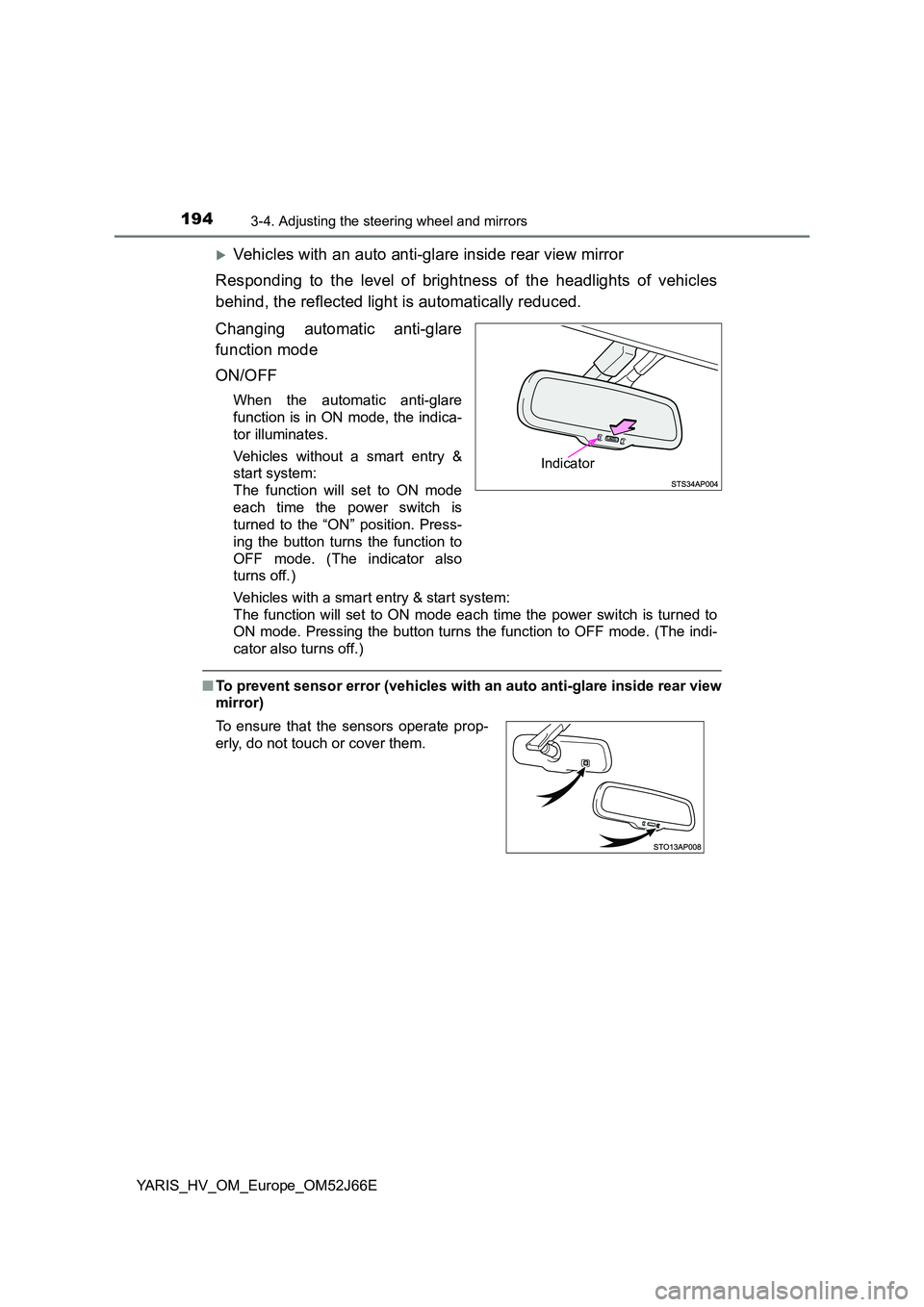
Vehicles with an auto anti-glare inside rear view mirror
Responding to the level of brightness of the headlights of vehicles
behind, the reflected light is automatically reduced.
Changing automatic anti-glare
function mode
ON/OFF
When the automatic anti-glare
function is in ON mode, the indica-
tor illuminates.
Vehicles without a smart entry &
start system:
The function will set to ON mode
each time the power switch is
turned to the “ON” position. Press-
ing the button turns the function to
OFF mode. (The indicator also
turns off.)
Vehicles with a smart entry & start system:
The function will set to ON mode each time the power switch is turned to
ON mode. Pressing the button turns the function to OFF mode. (The indi-
cator also turns off.)
■ To prevent sensor error (vehicles with an auto anti-glare inside rear view
mirror)
Indicator
To ensure that the sensors operate prop-
erly, do not touch or cover them.
Page 203 of 632
203
4Driving
YARIS_HV_OM_Europe_OM52J66E
4-1. Before driving
Driving the vehicle ............. 204
Cargo and luggage ............ 213
Trailer towing ..................... 215
4-2. Driving procedures
Power (ignition) switch
(vehicles without a smart
entry & start system)........ 216
Power (ignition) switch
(vehicles with a smart
entry & start system)........ 220
EV drive mode ................... 229
Hybrid transmission ........... 232
Turn signal lever ................ 236
Parking brake .................... 237
4-3. Operating the lights
and wipers
Headlight switch ................ 238
Fog light switch .................. 244
Windshield wiper
and washer ...................... 246
Rear window wiper
and washer ...................... 250
4-4. Refueling
Opening the fuel tank
cap ................................... 252
4-5. Toyota Safety Sense
Toyota Safety Sense ......... 255
PCS (Pre-Crash Safety
system) ............................ 262
LDA (Lane Departure
Alert) ................................ 279
Automatic High Beam ........ 287
RSA (Road Sign Assist)..... 293
4-6. Using the driving support
systems
Cruise control..................... 299
Driving assist systems ....... 303
4-7. Driving tips
Hybrid vehicle driving
tips ................................... 310
Winter driving tips .............. 313
Page 238 of 632
2384-3. Operating the lights and wipers
YARIS_HV_OM_Europe_OM52J66E
Headlight switch
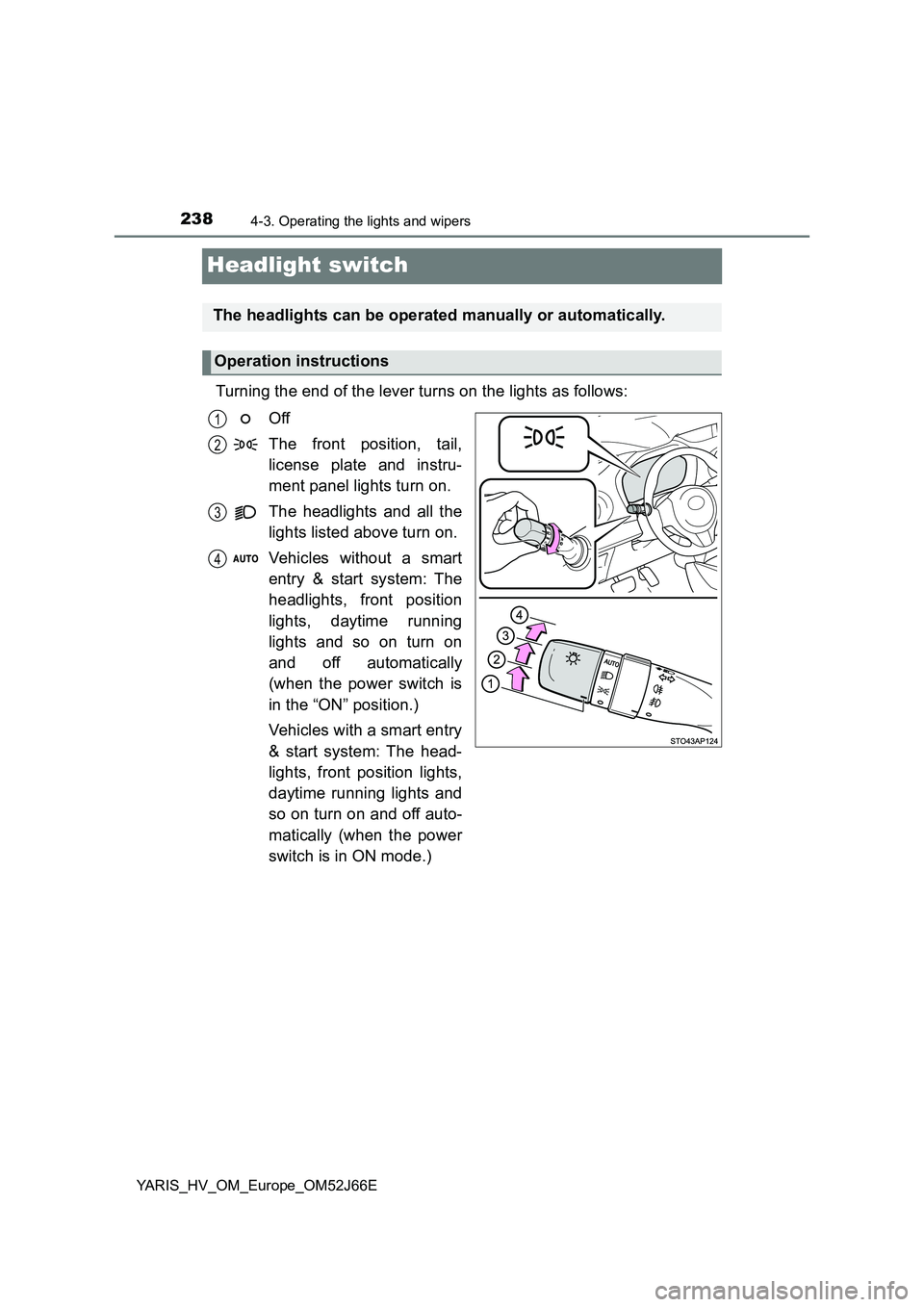
Turning the end of the lever turns on the lights as follows:
Off
The front position, tail,
license plate and instru-
ment panel lights turn on.
The headlights and all the
lights listed above turn on.
Vehicles without a smart
entry & start system: The
headlights, front position
lights, daytime running
lights and so on turn on
and off automatically
(when the power switch is
in the “ON” position.)
Vehicles with a smart entry
& start system: The head-
lights, front position lights,
daytime running lights and
so on turn on and off auto-
matically (when the power
switch is in ON mode.)
The headlights can be operated manually or automatically.
Operation instructions
1
2
3
4
Page 241 of 632
2414-3. Operating the lights and wipers
4
Driving
YARIS_HV_OM_Europe_OM52J66E
■Daytime running light system
To make your vehicle more visible to other drivers during daytime driving, the
daytime running lights turn on automatically whenever the hybrid system is
operated and the parking brake is released with the headlight switch off or in
the “AUTO” position. (Illuminate brighter than the front position lights.) Day-
time running lights are not designed for use at night.
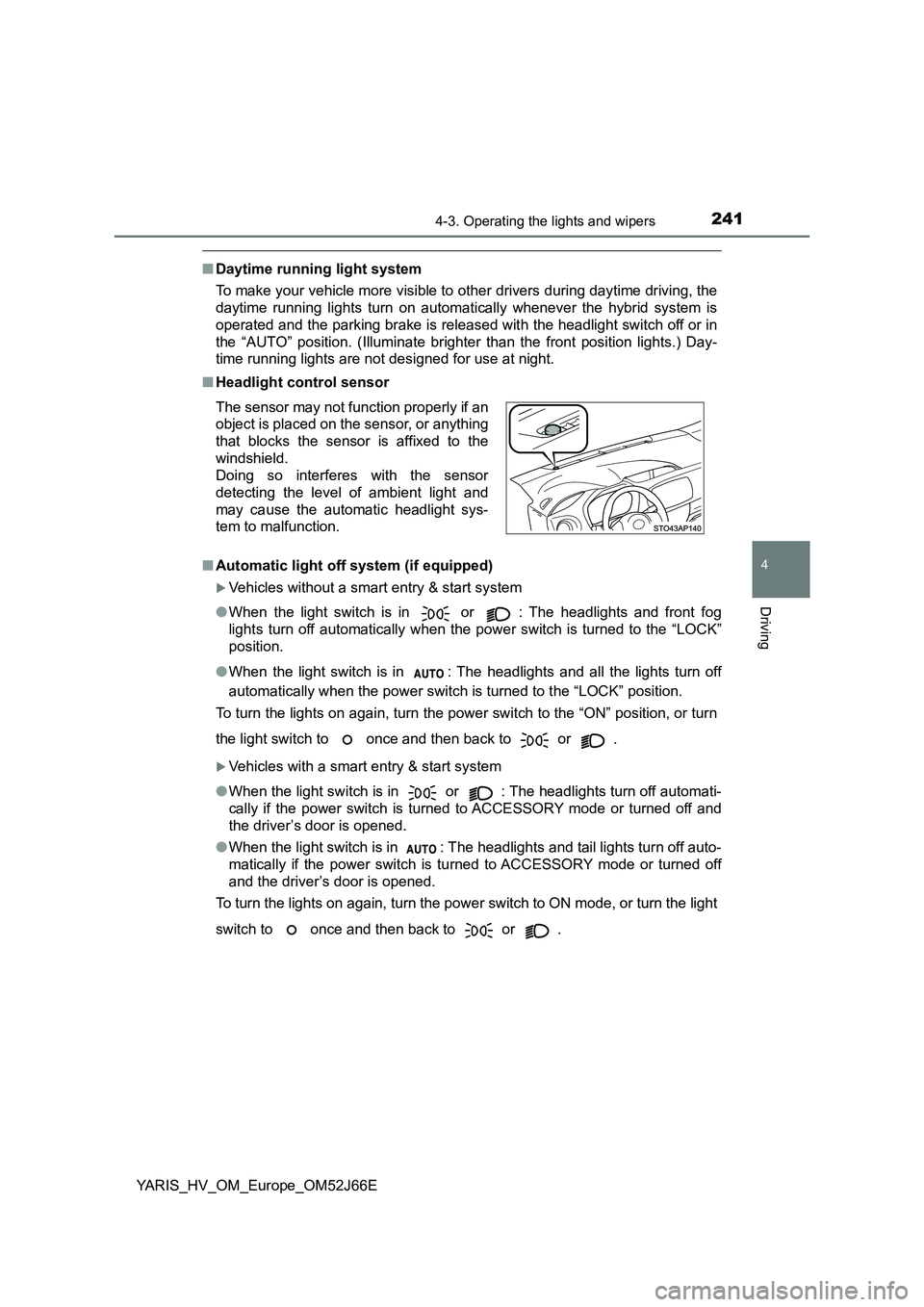
■ Headlight control sensor
■ Automatic light off system (if equipped)
Vehicles without a smart entry & start system
● When the light switch is in or : The headlights and front fog
lights turn off automatically when the power switch is turned to the “LOCK”
position.
● When the light switch is in : The headlights and all the lights turn off
automatically when the power switch is turned to the “LOCK” position.
To turn the lights on again, turn the power switch to the “ON” position, or turn
the light switch to once and then back to or .
Vehicles with a smart entry & start system
● When the light switch is in or : The headlights turn off automati-
cally if the power switch is turned to ACCESSORY mode or turned off and
the driver’s door is opened.
● When the light switch is in : The headlights and tail lights turn off auto-
matically if the power switch is tu rned to ACCESSORY mode or turned off
and the driver’s door is opened.
To turn the lights on again, turn the power switch to ON mode, or turn the light
switch to once and then back to or .
The sensor may not function properly if an
object is placed on the sensor, or anything
that blocks the sensor is affixed to the
windshield.
Doing so interferes with the sensor
detecting the level of ambient light and
may cause the automatic headlight sys-
tem to malfunction.
Page 242 of 632
2424-3. Operating the lights and wipers
YARIS_HV_OM_Europe_OM52J66E
■ Automatic High Beam (if equipped)
P. 287
■ Light reminder buzzer
Vehicles without a smart entry & start system
A buzzer sounds when the key is removed from the power switch and the
driver’s door is opened while the lights are turned on.
Vehicles with a smart entry & start system
A buzzer sounds when the power switch is turned off or turned to ACCES-
SORY mode and the driver’s door is opened while the lights are turned on.
■ Battery-saving function
In all conditions following below, the headlights and the other remaining lights
will go off automatically after 20 minutes in order to prevent the vehicle bat-
tery from being discharged:
● The headlights and/or tail lights are on.
● The light switch is in or .
● Vehicles without a smart entry & start system: The power switch is in the
“ACC” or the “LOCK” position.
● Vehicles with a smart entry & start system: The power switch is turned to
ACCESSORY mode or turned off.
This function will be canceled in any of the following situations:
● Vehicles without a smart entry & start system: When the power switch is
turned to the “ON” position.
● Vehicles with a smart entry & start system: When the power switch is turned
to ON mode.
● When the light switch is operated.
● When the door is opened or closed.
■ Customization
Settings (e.g. light sensor sensitivity) can be changed.
(Customizable features: P. 603)