key TOYOTA YARIS 2019 Accessories, Audio & Navigation (in English)
[x] Cancel search | Manufacturer: TOYOTA, Model Year: 2019, Model line: YARIS, Model: TOYOTA YARIS 2019Pages: 92, PDF Size: 1.51 MB
Page 2 of 92

2
Yaris Sedan_Navi_OM99S53z_(U)
Table of contents
1 Warnings and Safety inform ation................................. 4
2 Getting started ........... ..................................................... 6
2.1 Before using the navigation system .......................... ........................ 6
2.2 Navigation menu ............................................. ................................... 8
2.3 Buttons and other controls on the screen .................... .................. 10
2.3.1 Using keyboards .................................................................................. 10
2.3.2 Press and Hold ..................................................................................... 11
2.4 Map screen........................................................................................ 12
2.4.1 Navigating on the map ......................................................................... 12
2.4.2 Position markers .......................................... ........................................ 13
2.4.2.1 Selected m ap location (Cursor) a nd selected map object .. ...... 13
2.4.3 Objects on the map ........................................ ...................................... 13
2.4.3.1 Streets and roads....................................... ............................... 13
2.4.3.2 Turn preview and Next street .................................................. 14
2.4.3.3 Lane informat ion and Signposts .......................... .................... 16
2.4.3.4 Junction view........................................... ................................ 17
2.4.3.5 Highway/Freeway exit services............................................... 17
2.4.3.6 Elements of the active route .................................................... 19
2.4.4 Manipulating the map .......................................................................... 20
2.4.5 Checking the details of the current position (Where Am I?) ............... 23
2.5 Voice Recognition........................................... .................................. 24
2.5.1 Voice command list ............................................................................. 24
3 On-road navigation ...................................................... 26
3.1 Selecting the destination of a route........................ ......................... 26
3.1.1 Entering an address or a part of the address ........................................ 27
3.1.1.1 Entering an address ..................................... ............................ 27
3.1.1.2 Entering the midpoint of a street as the destination ................ 32
3.1.1.3 Selecting an i ntersection as the destination ............ ................. 35
3.1.1.4 Selecting a city center as the destination .............. ................... 38
3.1.2 Selecting the dest ination from the POI (point of interest) ................... 40
3.1.2.1 Quick search for a POI ( point of interest) ............................... 40
3.1.2.2 Searching for Help nearby....................................................... 43
3.1.2.3 Searching for a POI (point of interest) by category ................ 46
3.1.2.4 Searching for a POI (poi nt of interest) by name ..................... 50
Page 10 of 92
10
Yaris Sedan_Navi_OM99S53z_(U)
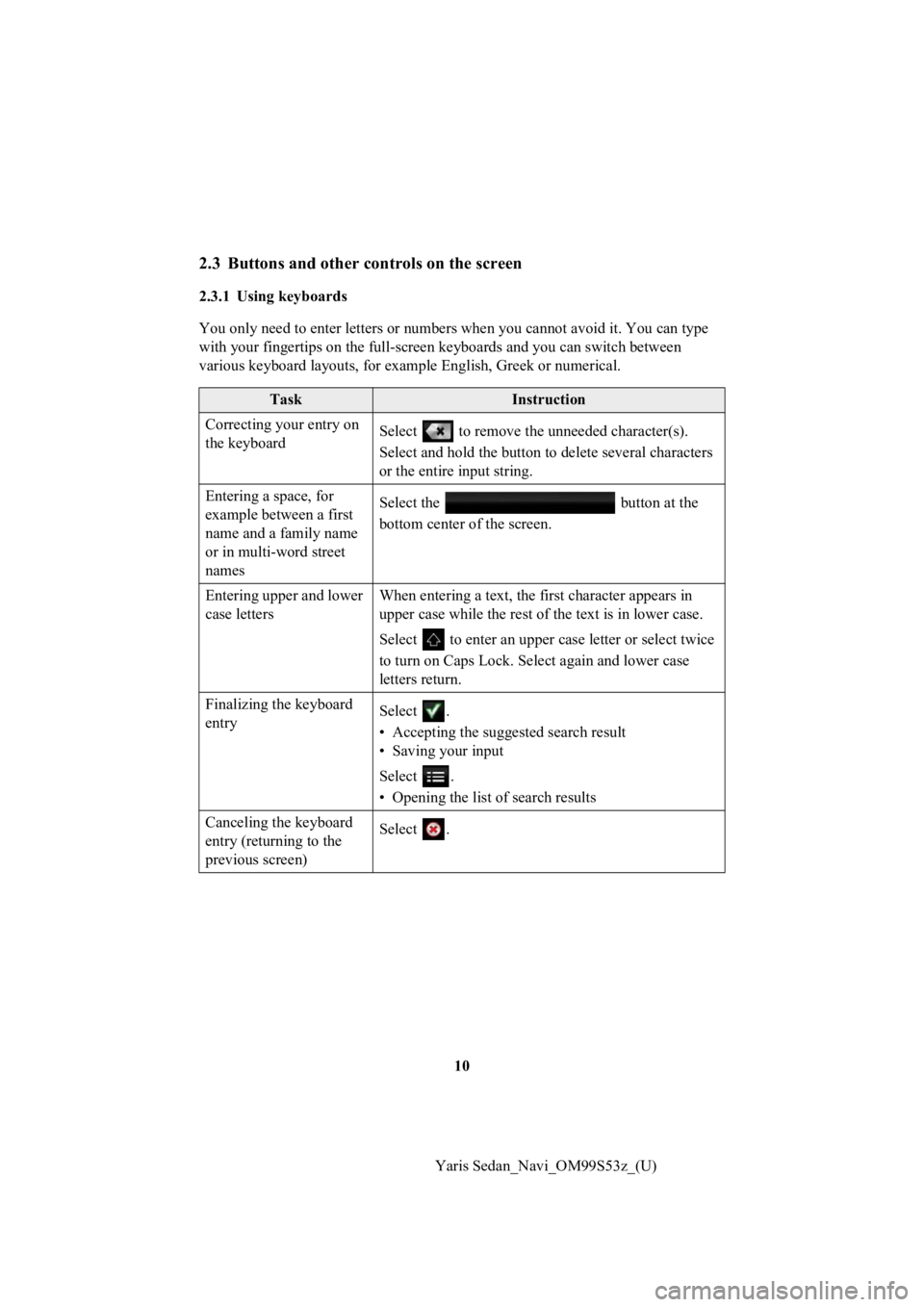
2.3 Buttons and other controls on the screen
2.3.1 Using keyboards
You only need to enter letters or numbers when you cannot avoid it. You can type
with your fingertips on the full-screen k eyboards and you can switch between
various keyboard layouts, for example English, Greek or numeric al.
TaskInstruction
Correcting your entry on
the keyboard Select to remove the u
nneeded character(s).
Select and hold the button to delete several characters
or the entire input string.
Entering a space, for
example between a first
name and a family name
or in multi-word street
names Select the button at the
bottom center of the screen.
Entering upper and lower
case letters When entering a text, the first character appears in
upper case while the rest of t
he text is in lower case.
Select to enter an upper case letter or select twice
to turn on Caps Lock. Sel ect again and lower case
letters return.
Finalizing the keyboard
entry Select .
• Accepting the suggested search result
• Saving your input
Select .
• Opening the list o
f search results
Canceling the keyboard
entry (returning to the
previous screen) Select .
Page 11 of 92
11
1
2
3
4
5
6
Yaris Sedan_Navi_OM99S53z_(U)
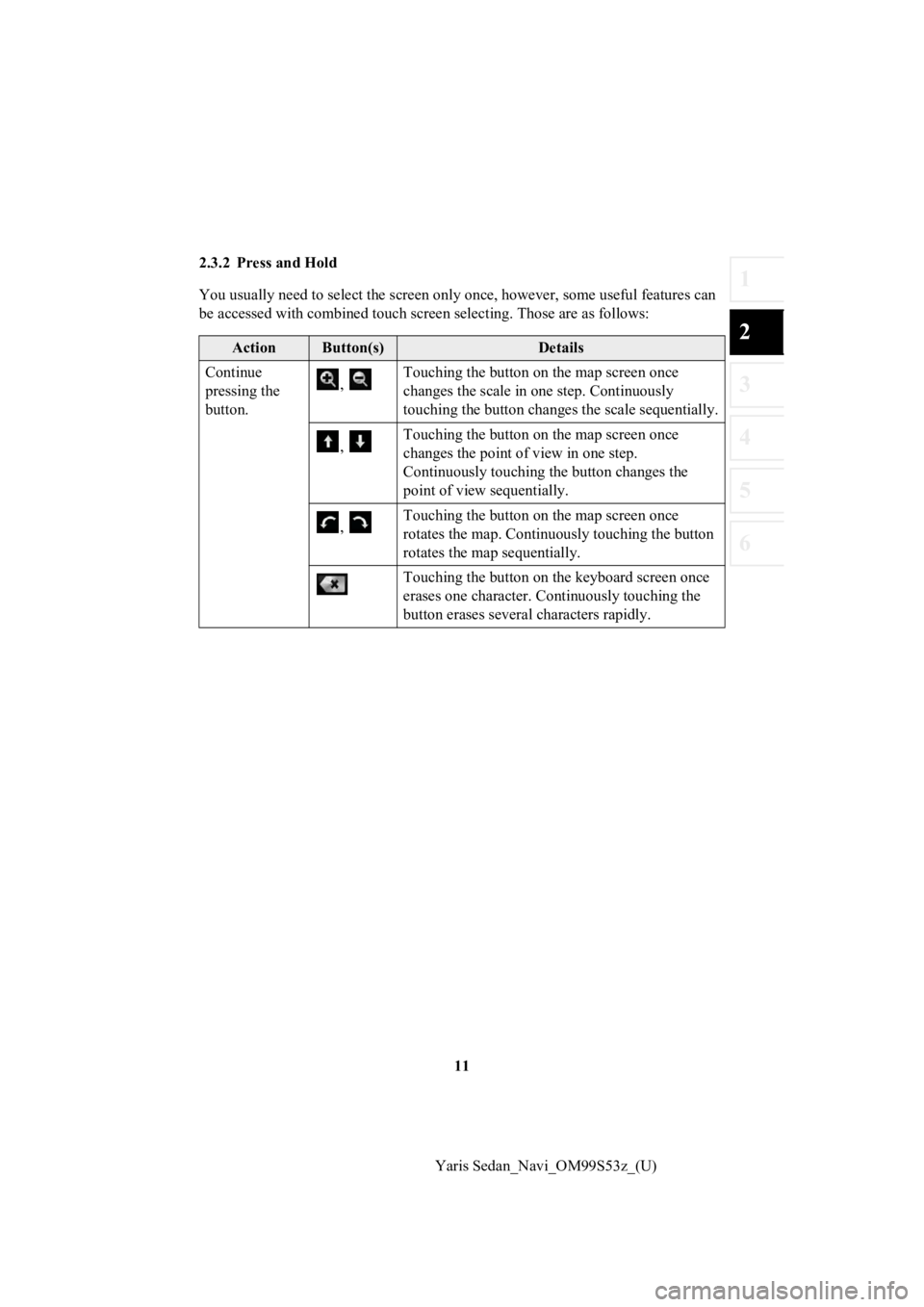
2.3.2 Press and Hold
You usually need to select the s
creen only once, however, some useful features can
be accessed with combined touch screen selecting. Those are as follows:
ActionButton(s)Details
Continue
pressing the
button. ,
Touching the button on
the map screen once
changes the scale in one step. Continuously
touching the button changes the scale sequentially.
, Touching the button on
the map screen once
changes the point of view in one step.
Continuously touching the button changes the
point of view sequentially.
, Touching the button on
the map screen once
rotates the map. Continuously touching the button
rotates the map sequentially.
Touching the button on th e keyboard screen once
erases one character. Continuously touching the
button erases several characters rapidly.
Page 24 of 92

24
Yaris Sedan_Navi_OM99S53z_(U)
2.5 Voice Recognition
Some items can be operated by vo ice using the vehicle’s microphone.
1. Press the talk button on the steering switch.
2. After “Say a command” is outpu t from the speaker and the beep sound is
heard, say your commands.
screen). 1) Press the talk button on the steering switch.
2) After “Say a command” is outpu t from the speaker and the beep sound is
heard, say, “New Destination”.
3) After “Which type of destination would you like?” is output f rom the speaker
and the beep sound is hear d, say, “Gas station”.
4) After “Gas station, say the des ired line number. You can also say: Try again”
is output from the speaker and the beep sound is heard, say, “N umber one”
(Destination is gas sta tion on the first row).
5) After “To begin navigation, say start” is output from the spe aker and the beep
sound is heard, say, “Start” to start route guidance.
2.5.1 Voice command list
If you have seven or more candida tes, say the command, “Page down” to move the
list.
Function operationVoice command
Switches to the screen where
new destinations can be selected. New Destination
Displays the route to your home. Take me home
Specifies the destination using
the address. Navigate to an address
Displays the history of the
recently specified destinations. Navigate to a r
ecent destination
Displays the current location. Where am I?
Reads out the previous guidance
again. Repeat instruction
Adds a route using keywords. Add way Point ~
Zooms in/out of the map screen. Zoom in/Zoom out
Adds the route using the address. Add way point address/Travel v ia address
Page 27 of 92
27
1
2
3
4
5
6
Yaris Sedan_Navi_OM99S53z_(U)
3.1.1 Entering an address
or a part of the address
If you know at least a part of the address, it is the quickest way to select the
destination of the route.
Using the same screen, you can f ind an address by entering:
• Destination address
• The center of a city
• An intersection
• The midpoint of a street
3.1.1.1 Entering an address
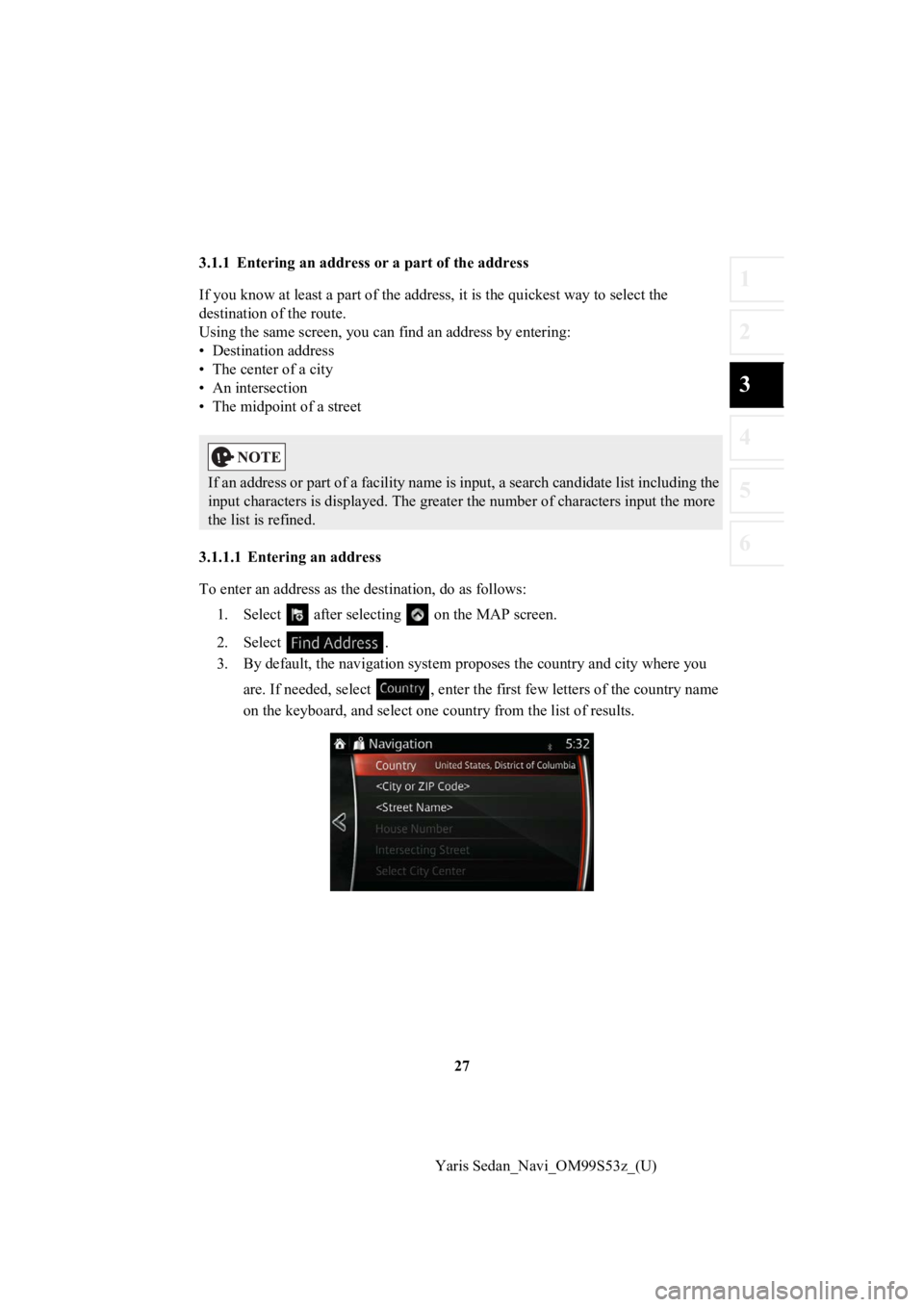
To enter an address as the d estination, do as follows:
1. Select after selectin g on the MAP screen.
2. Select .
3. By default, the navigation syst em proposes the country and city where you
are. If needed, select , enter t he first few letters of the country name
on the keyboard, and select one c ountry from the list of results.
If an address or part of a facility name is input, a search can didate list including the
input characters is displayed. The greater the number of charac ters input the more
the list is refined.
Page 28 of 92
28
Yaris Sedan_Navi_OM99S53z_(U)
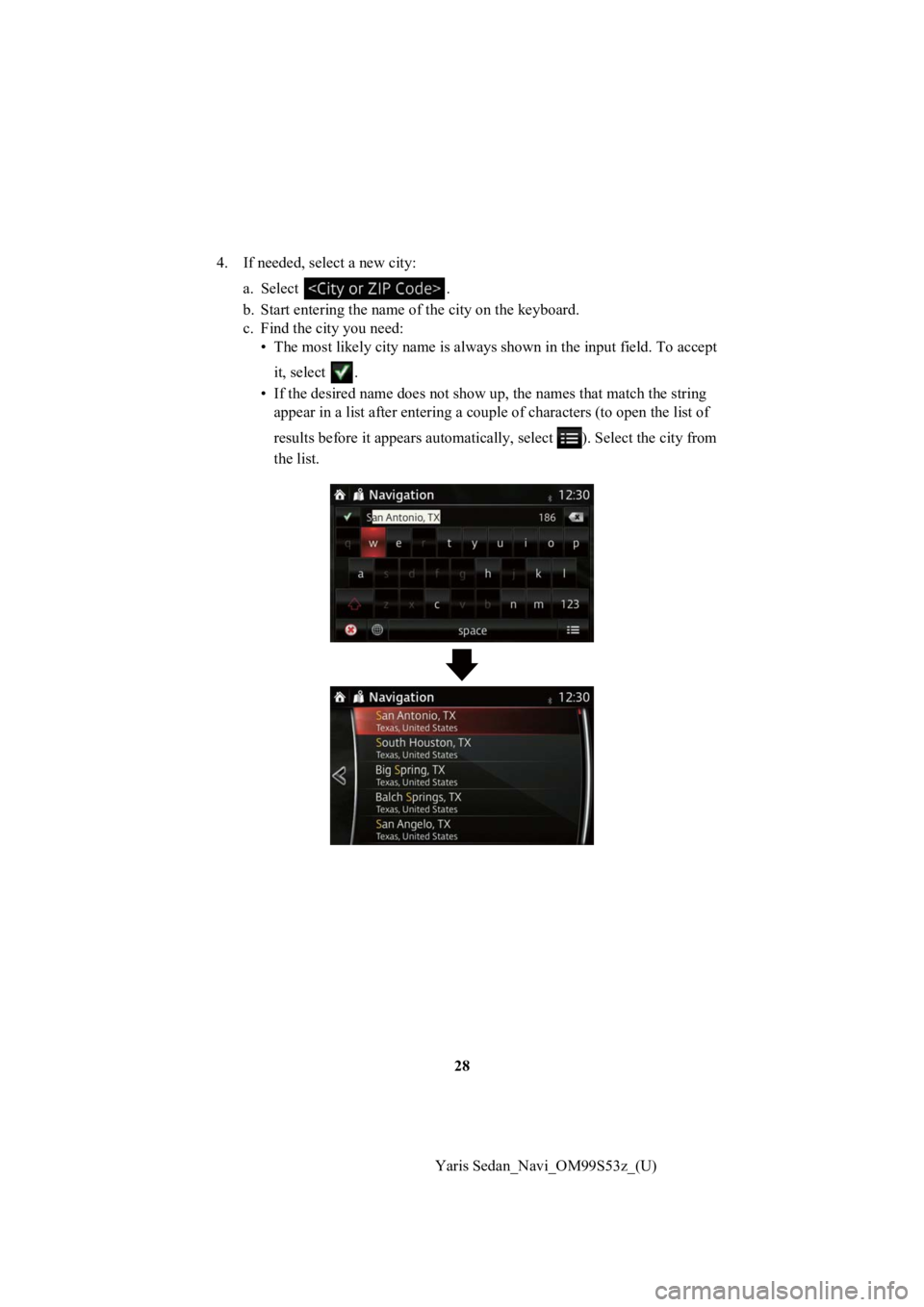
4. If needed, select a new city:
a. Select .
b. Start entering the name of the city on the keyboard.
c. Find the city you need: • The most likely city name is always shown in the input field. To accept
it, select .
• If the desired name does not s how up, the names that match the string
appear in a list after entering a couple of characters (to open the list of
results before it appears automa tically, select ). Select the city from
the list.
Page 29 of 92
29
1
2
3
4
5
6
Yaris Sedan_Navi_OM99S53z_(U)
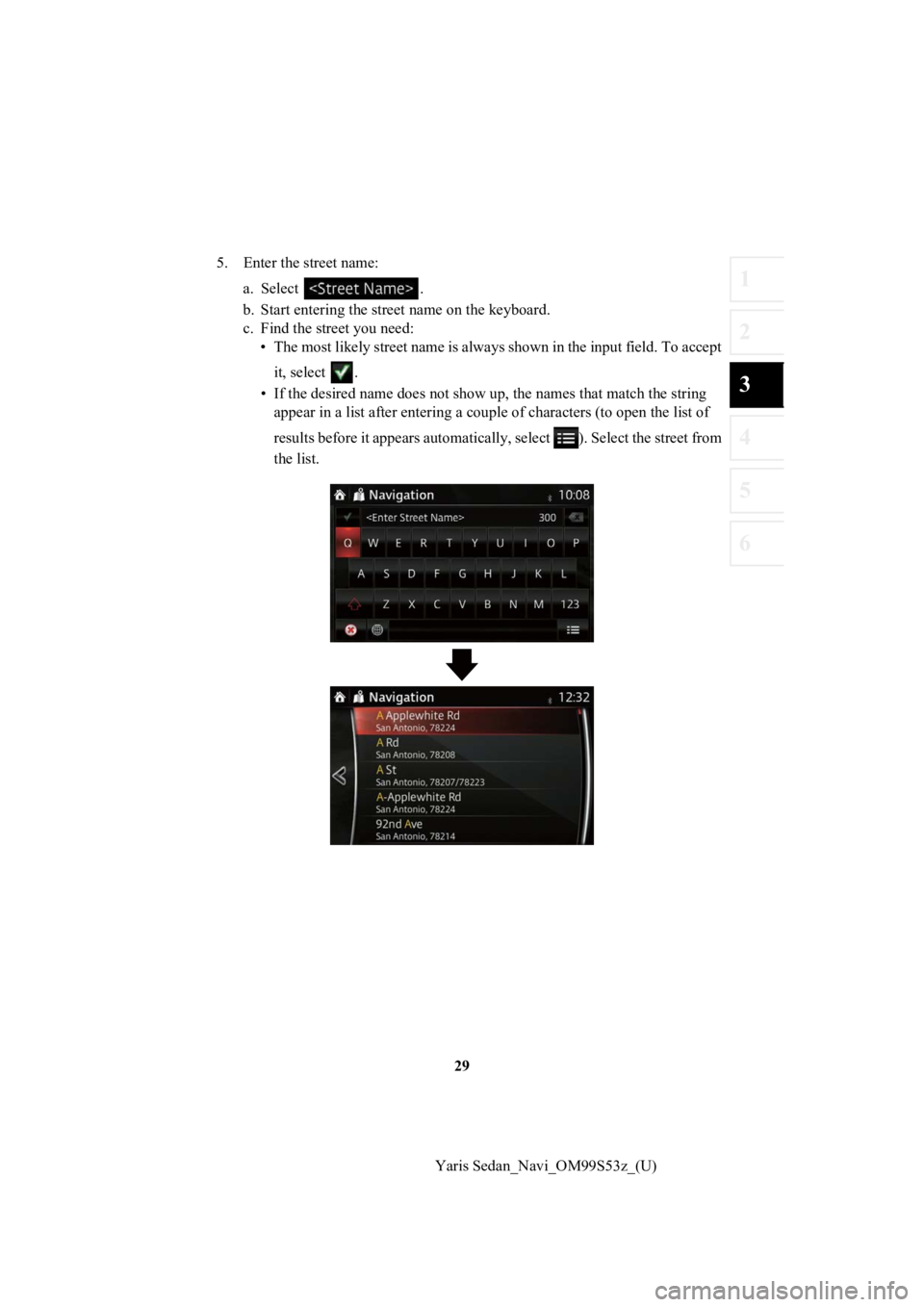
5. Enter the street name:
a. Select .
b. Start entering the str eet name on the keyboard.
c. Find the street you need: • The most likely street name is always shown in the input field . To accept
it, select .
• If the desired name does not s how up, the names that match the string
appear in a list after entering a couple of characters (to open the list of
results before it appears automatically, select ). Select the s treet from
the list.
Page 30 of 92
30
Yaris Sedan_Navi_OM99S53z_(U)
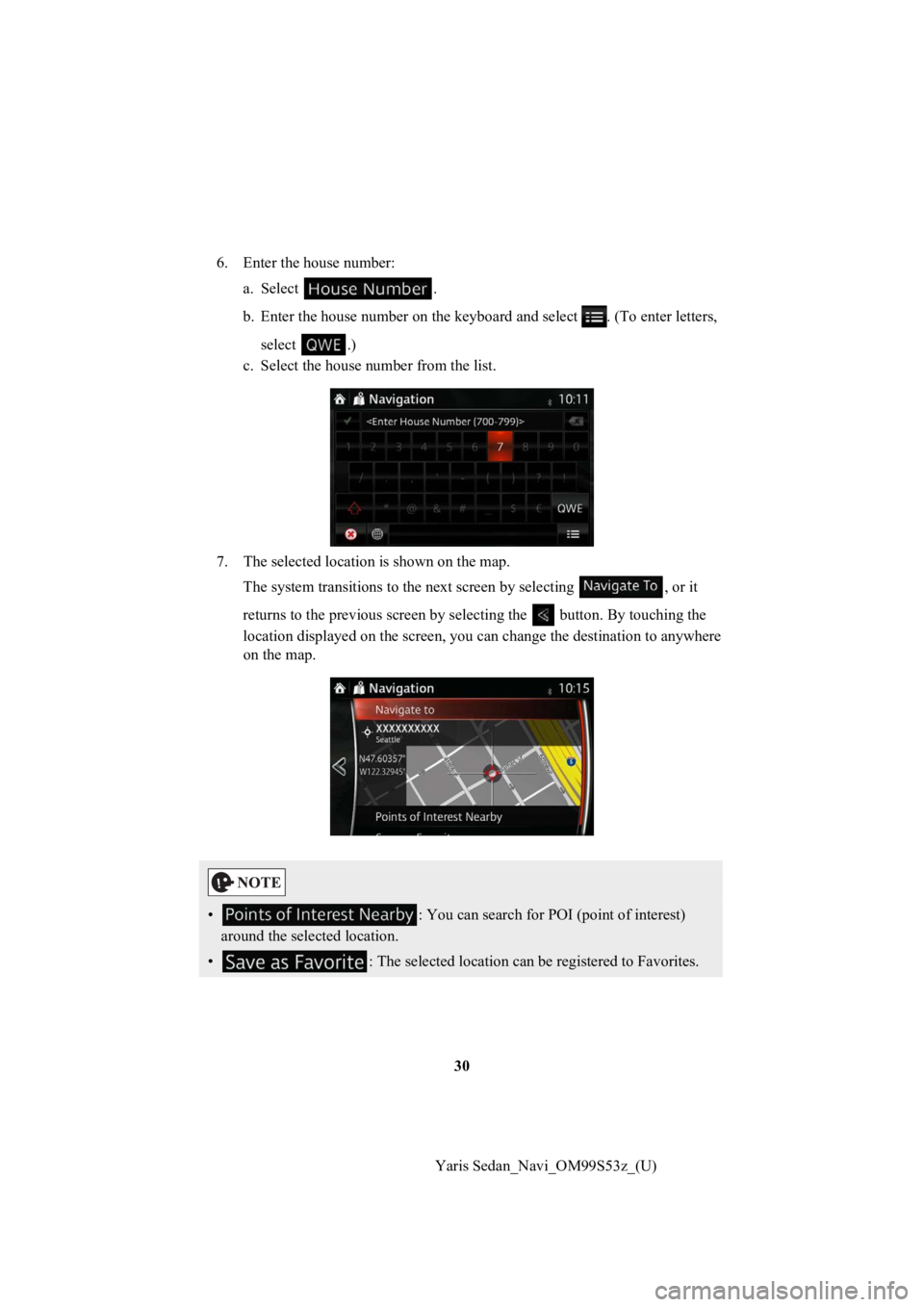
6. Enter the house number:
a. Select .
b. Enter the house number on the keyboard and select . (To enter letters,
select .)
c. Select the house number from the list.
7. The selected location is shown on the map. The system transitions to the next screen by selecting , or it
returns to the previous screen by selecting the button. By tou ching the
location displayed on the scree n, you can change the destinatio n to anywhere
on the map.
• : You can search for POI (point of interest)
around the selected location.
• : The selected location can be registered to Favorites.
Page 32 of 92
32
Yaris Sedan_Navi_OM99S53z_(U)
3.1.1.2 Entering the midpoint of a street as the destination
You can navigate to the midpoin
t of a street if the house number is not available:
1. Select after selectin g on the MAP screen.
2. Select .
3. If necessary, modify the country and city as described earlier (page 27).
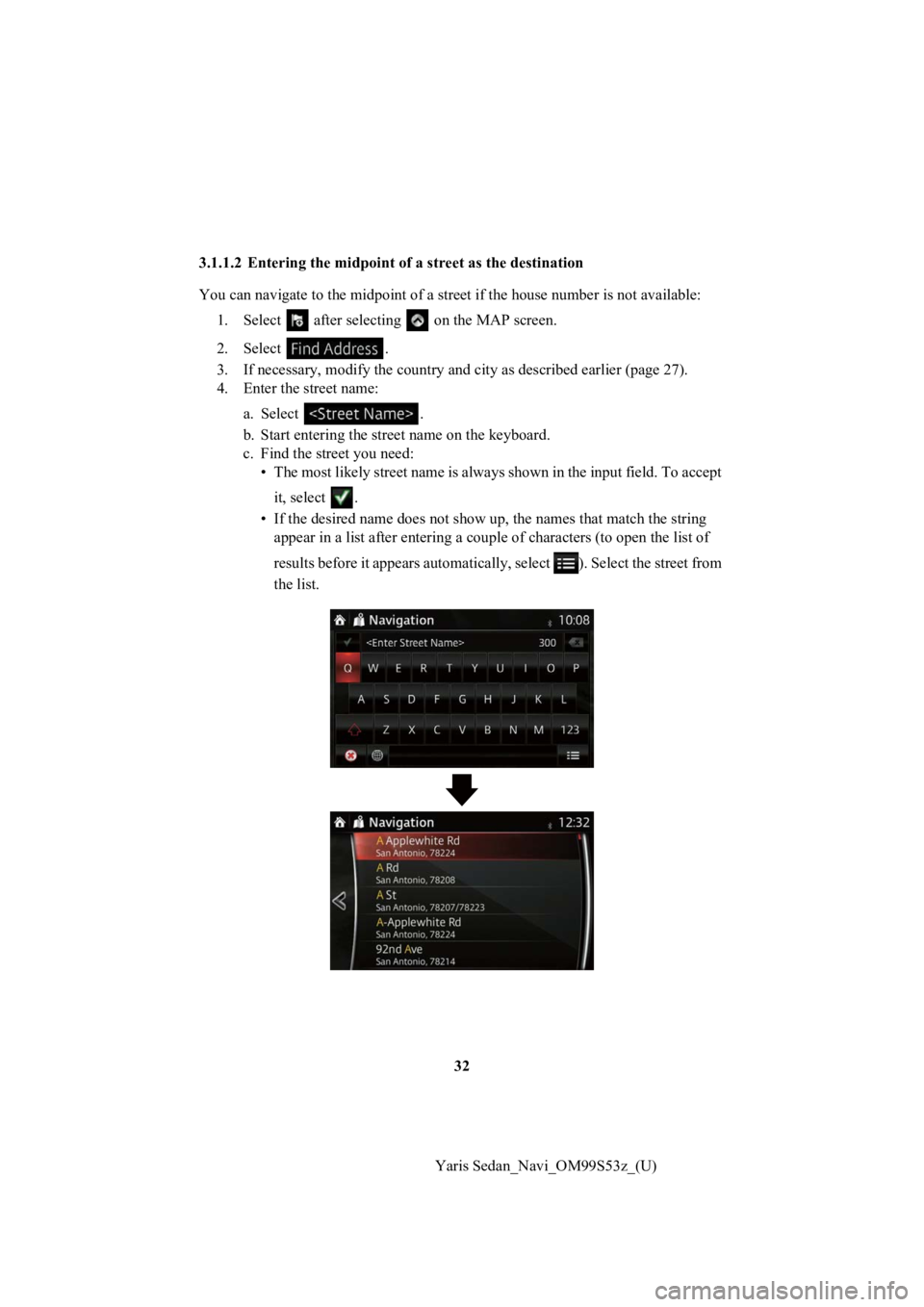
4. Enter the street name: a. Select .
b. Start entering the str eet name on the keyboard.
c. Find the street you need: • The most likely street name is always shown in the input field . To accept
it, select .
• If the desired name does not s how up, the names that match the string
appear in a list after entering a couple of characters (to open the list of
results before it appears automatically, select ). Select the s treet from
the list.
Page 35 of 92
35
1
2
3
4
5
6
Yaris Sedan_Navi_OM99S53z_(U)
3.1.1.3 Selecting an intersec
tion as the destination
To enter an address as the d estination, do as follows:
1. Select after selectin g on the MAP screen.
2. Select .
3. If necessary, modify the country and city as described earlier (page 27).
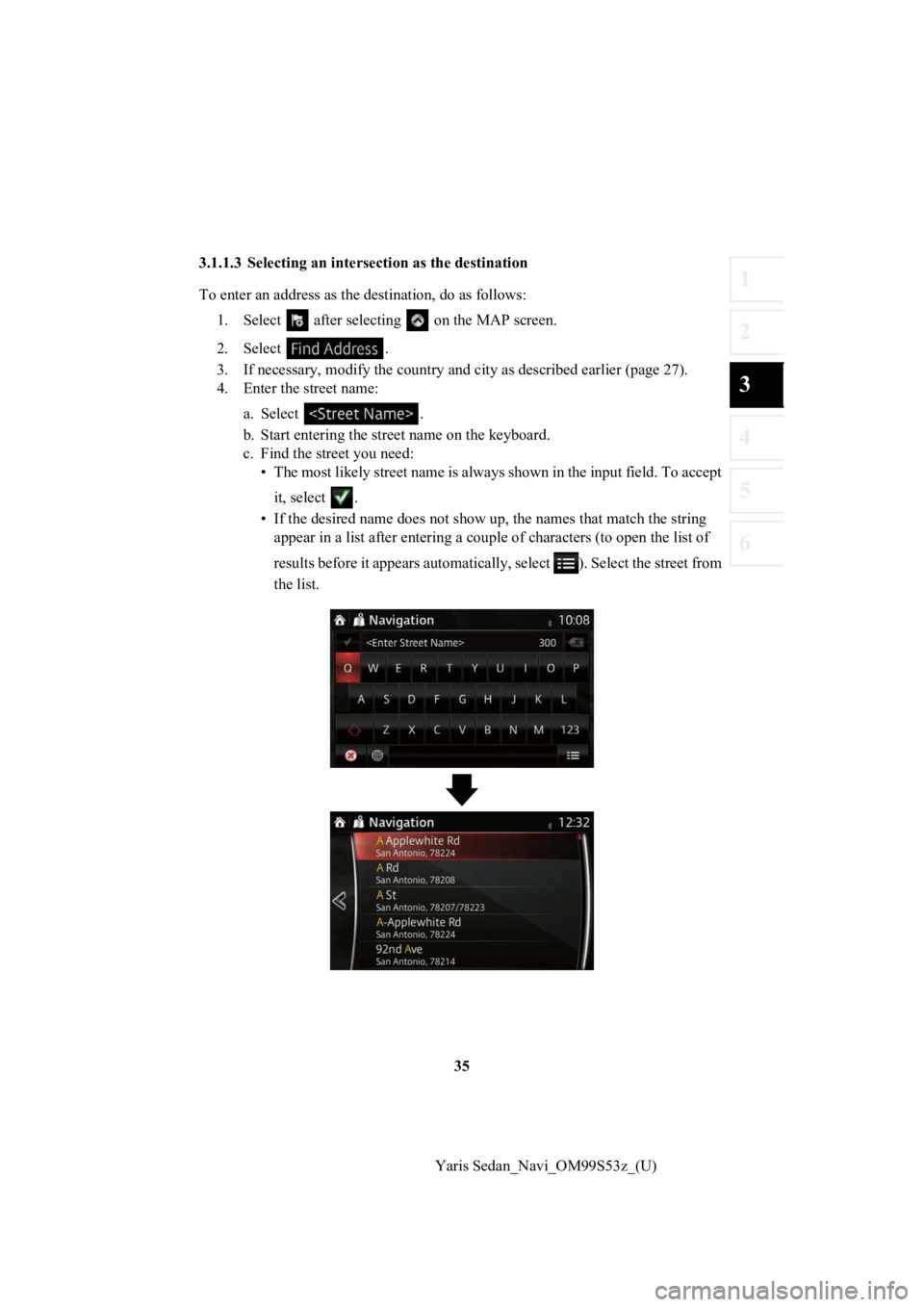
4. Enter the street name: a. Select .
b. Start entering the str eet name on the keyboard.
c. Find the street you need: • The most likely street name is always shown in the input field . To accept
it, select .
• If the desired name does not s how up, the names that match the string
appear in a list after entering a couple of characters (to open the list of
results before it appears automatically, select ). Select the s treet from
the list.