change time TOYOTA YARIS 2019 Owner's Manual
[x] Cancel search | Manufacturer: TOYOTA, Model Year: 2019, Model line: YARIS, Model: TOYOTA YARIS 2019Pages: 700, PDF Size: 65.2 MB
Page 372 of 700
3725-4. Playing audio CDs and MP3/WMA discs
YARIS_F_OM_Europe_OM52K19E
■Selecting a folders one at a time
Press (“
folder.
■Selecting a folder and file from folder list
Press (“List”).
The folder list will be displayed.
Turn and press the tune/scroll knob to select a folder and a file.
To return to the previous display, press (“Back”).
To exit, press (“Back”).
■Returning to the first folder
Press and hold (“
Turn the tune/scroll knob or press the “<” or “>” button of “SEEK
TRACK” to select the desired file.
■Fast-forwarding and rewinding files
To fast-forward or rewind, press and hold the “<” or “>” button of
“SEEK TRACK”.
■Random playback
Pressing (“RDM”) changes modes in the following order:
Folder random Disc randomOff
■Repeat play
Pressing (“RPT”) changes modes in the following order:
File repeat Folder repeat*Off
*: Available except when RDM (random playback) is selected
Playing back MP3 and WMA discs
1
2
Page 388 of 700
3885-5. Using an external device
YARIS_F_OM_Europe_OM52K19E
■Selecting a folders one at a time
Press (“
folder.
■Selecting a folder and file from folder list
Press the (“List”).
The folder list will be displayed.
Turn and press the tune/scroll knob to select a folder and file.
To return to the previous display, press the (“Back”).
■Returning to the first folder
Press and hold (“
TREACK” to select the desired file.
To fast-forward or rewind, press and hold the “ ” or “” button of
“SEEK TREACK”.
Pressing (“RDM”) changes modes in the following order:
Folder random Disc randomOff
Pressing (“RPT”) changes modes in the following order:
File repeat Folder repeat* Off.
*: Available except when RDM (random playback) is selected
Selecting a folder
Selecting files
Fast-forwarding and rewinding files
Random play
Repeat play
1
2
Page 434 of 700
4346-1. Using the air conditioning system and defogger
YARIS_F_OM_Europe_OM52K19E
■Switching between outside air and recirculated air modes
Turn the outside/recirculated air mode dial.
Select to change to recirculated air mode.
Select to change to outside air mode.
■Defogging the windshield
Defoggers are used to defog the windshield and front side win-
dows.
Set the air outlet selector dial to position.
Set the outside/recirculated air mode dial to outside mode if recirculated
air mode is used.
Perform the following operations accordingly:
● To adjust the fan speed, turn the fan speed control dial.
● To adjust the temperature setting, turn the temperature control
dial.
● Vehicles with the button: If the dehumidification function is
not operating, press to operate the dehumidification function.
To defog the windshield and the side windows early, turn the air flow and
temperature up.
■Defogging the rear window and outside rear view mirrors
Vehicles with a rear window defogger
Defogger is are used to defog the rear window.
Press .
The defoggers will automatically turn off after a period of time.
Vehicles with rear window and outside rear view mirror defoggers
Defoggers are used to defog the rear window, and to remove rain-
drops, dew and frost from the outside rear view mirrors.
Press .
The defoggers will automatically turn off after a period of time.
Other functions
Page 442 of 700
4426-1. Using the air conditioning system and defogger
YARIS_F_OM_Europe_OM52K19E
■Fan speed setting
Press “ ” on to increase the fan speed.
Press “ ” on to decrease the fan speed.
Press to turn the fan off.
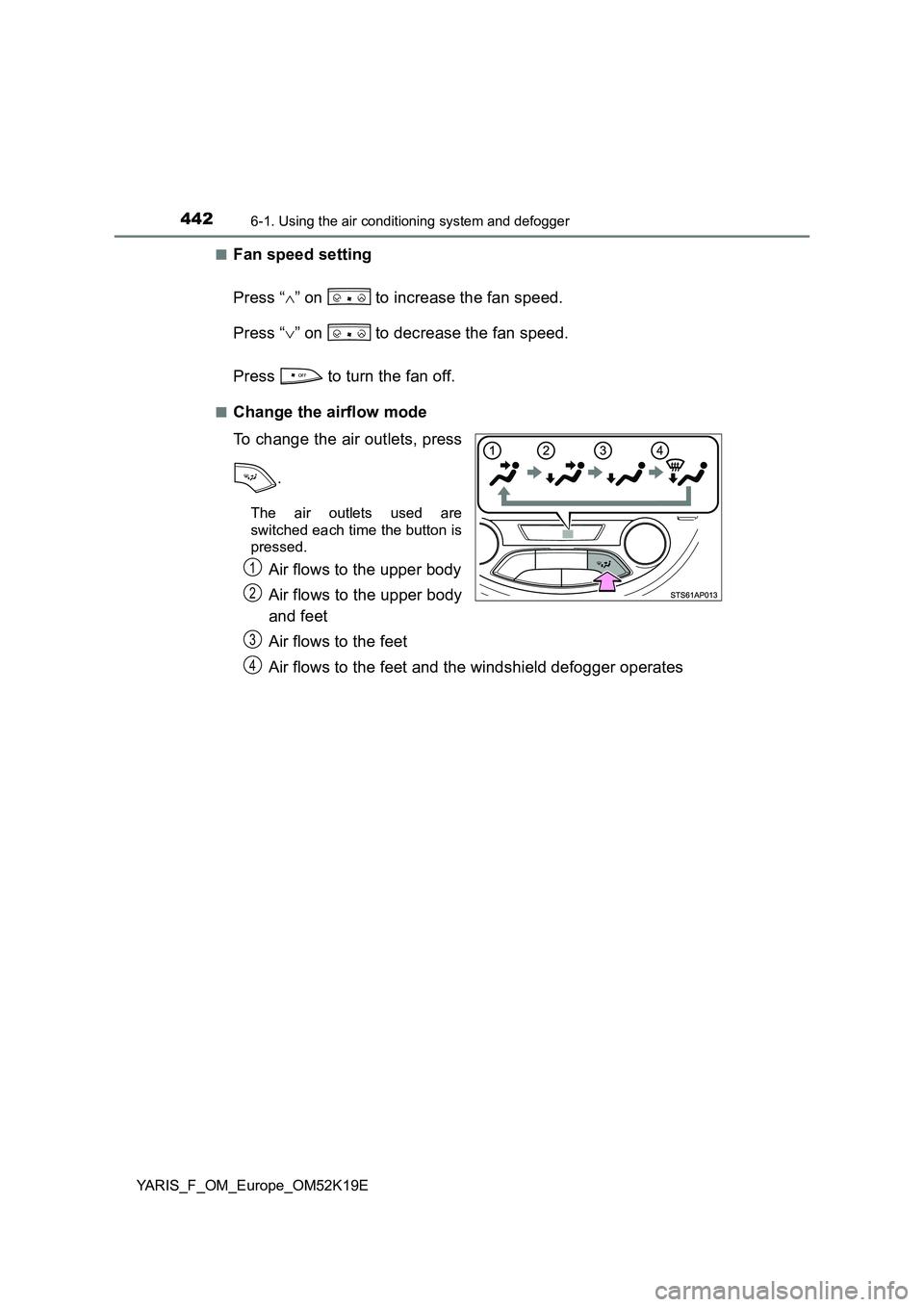
■Change the airflow mode
To change the air outlets, press
.
The air outlets used are
switched each time the button is
pressed.
Air flows to the upper body
Air flows to the upper body
and feet
Air flows to the feet
Air flows to the feet and the windshield defogger operates
1
2
3
4
Page 445 of 700
4456-1. Using the air conditioning system and defogger
6
Interior features
YARIS_F_OM_Europe_OM52K19E
■Defogging the rear window and outside rear view mirrors
Vehicles with a rear window defogger
Defogger is used to defog the rear window.
Press .
The defogger will automatically turn off after a period of time.
Vehicles with rear window and outside rear view mirror defoggers
Defoggers are used to defog the rear window, and to remove rain-
drops, dew and frost from the outside rear view mirrors.
Press .
The defoggers will automatically turn off after a period of time.
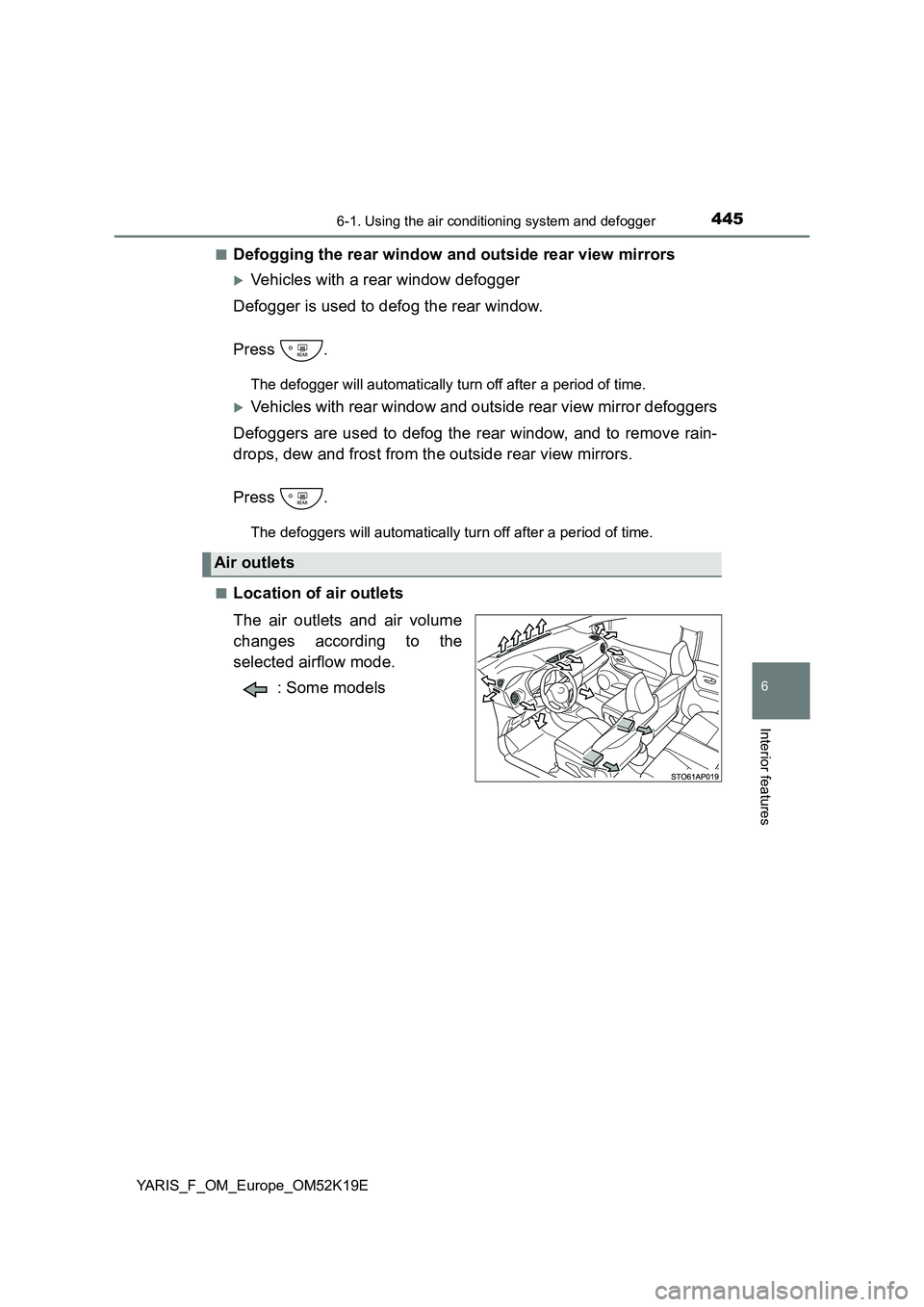
■Location of air outlets
The air outlets and air volume
changes according to the
selected airflow mode.
: Some models
Air outlets
Page 453 of 700
4536-2. Using the interior lights
6
Interior features
YARIS_F_OM_Europe_OM52K19E
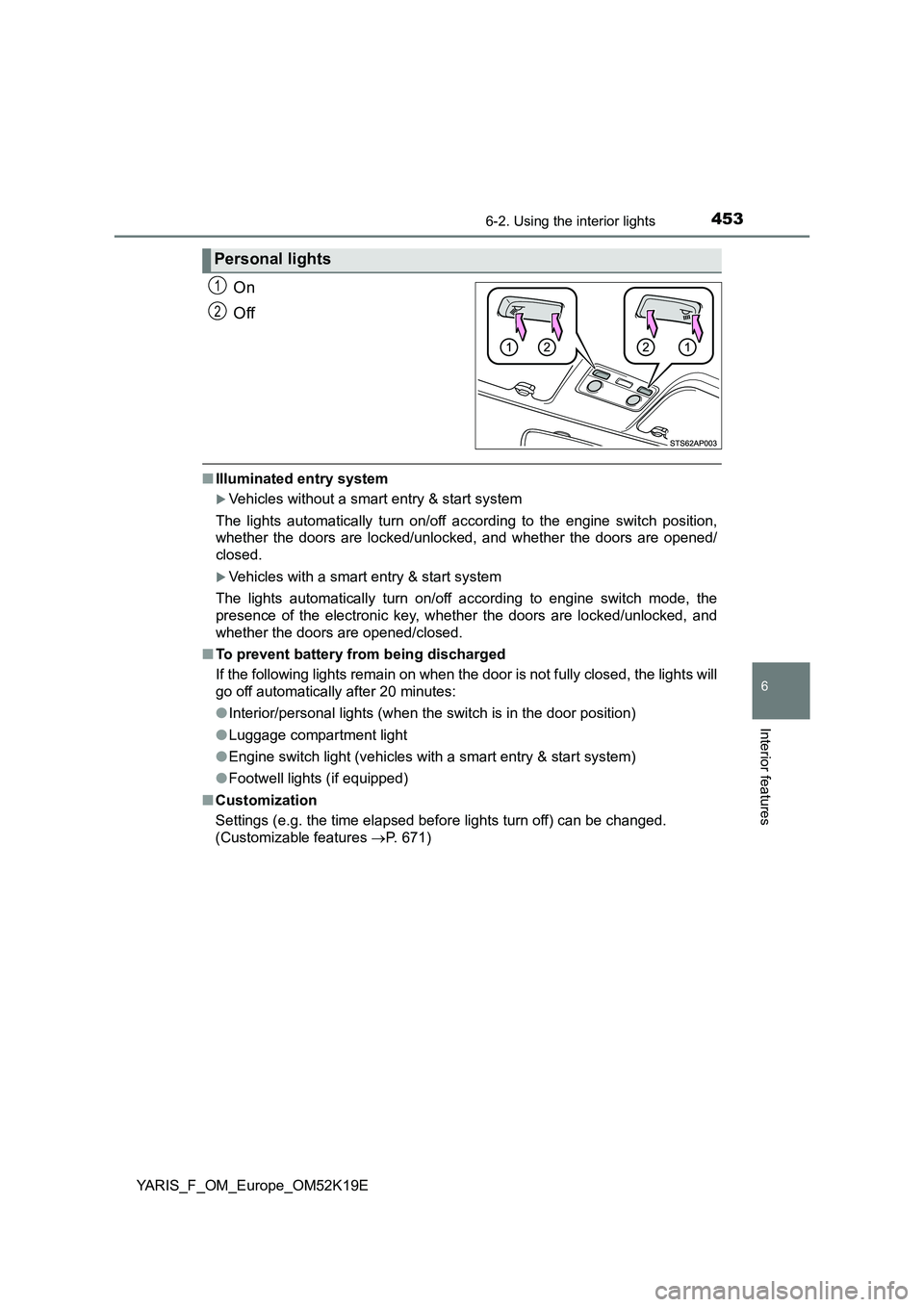
On
Off
■ Illuminated entry system
Vehicles without a smart entry & start system
The lights automatically turn on/off according to the engine switch position,
whether the doors are locked/unloc ked, and whether the doors are opened/
closed.
Vehicles with a smart entry & start system
The lights automatically turn on/off according to engine switch mode, the
presence of the electronic key, whet her the doors are locked/unlocked, and
whether the doors are opened/closed.
■ To prevent battery from being discharged
If the following lights remain on when the door is not fully closed, the lights will
go off automatically after 20 minutes:
● Interior/personal lights (when the switch is in the door position)
● Luggage compartment light
● Engine switch light (vehicles with a smart entry & start system)
● Footwell lights (if equipped)
■ Customization
Settings (e.g. the time elapsed before lights turn off) can be changed.
(Customizable features P. 671)
Personal lights
1
2
Page 493 of 700
4937-3. Do-it-yourself maintenance
7
Maintenance and care
YARIS_F_OM_Europe_OM52K19E
■Engine oil consumption
A certain amount of engine oil will be consumed while driving. In the following
situations, oil consumption may increase, and engine oil may need to be
refilled in between oil maintenance intervals.
● When the engine is new, for example directly after purchasing the vehicle or
after replacing the engine
● If low quality oil or oil of an inappropriate viscosity is used
● When driving at high engine speeds or with a heavy load, when towing
(except for South Africa), or when driving while accelerating or decelerating
frequently
● When leaving the engine idling for a long time, or when driving frequently
through heavy traffic
■ After changing the engine oil (diesel engine only)
The engine oil maintenance data should be reset. Perform the following pro-
cedures:
Switch the display to the trip meter “A” when the engine is running.
( P. 121)
Turn the engine switch to the “LOCK” position (vehicles without a smart
entry & start system) or off (vehicles with a smart entry & start system).
Vehicles without a smart entry & start system:
While pressing the display change button ( P. 117, 121), turn the engine
switch to the “ON” position (do not start the engine because reset mode
will be canceled). Continue to press and hold the button until the trip
meter displays “000000”.
Vehicles with a smart entry & start system:
While pressing the display change button ( P. 117, 121), turn the engine
switch to the IGNITION ON mode (do not start the engine because other-
wise the reset mode will be canceled). Continue to press and hold the
button until the trip meter displays “000000”.
1
2
3
Page 585 of 700
5858-2. Steps to take in an emergency
8
When trouble arises
YARIS_F_OM_Europe_OM52K19E
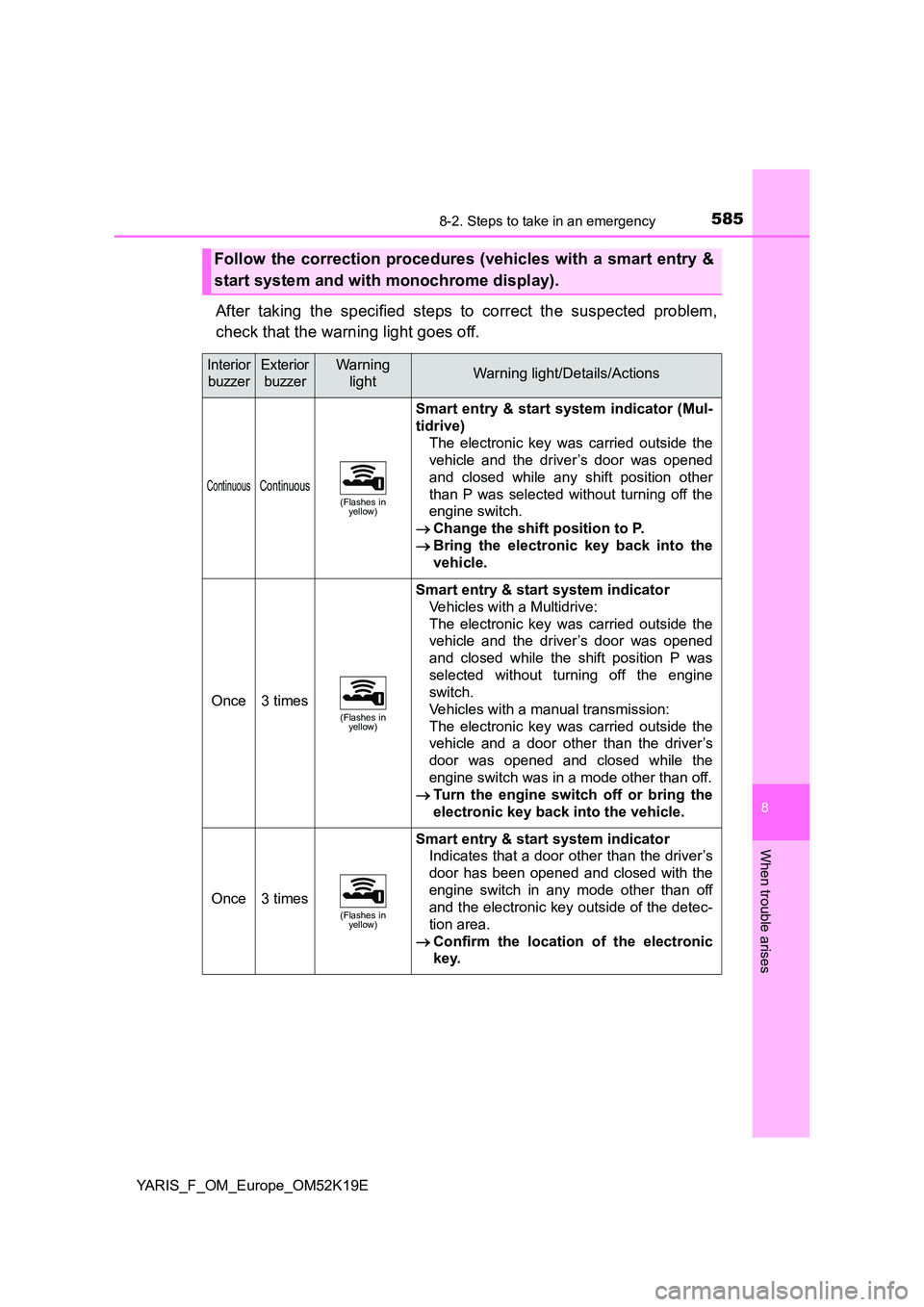
After taking the specified steps to correct the suspected problem,
check that the warning light goes off.
Follow the correction procedures (vehicles with a smart entry &
start system and with monochrome display).
Interior
buzzer
Exterior
buzzer
Warning
lightWarning light/Details/Actions
ContinuousContinuous(Flashes in yellow)
Smart entry & start system indicator (Mul-
tidrive)
The electronic key was carried outside the
vehicle and the driver’s door was opened
and closed while any shift position other
than P was selected without turning off the
engine switch.
Change the shift position to P.
Bring the electronic key back into the
vehicle.
Once3 times(Flashes in yellow)
Smart entry & start system indicator
Vehicles with a Multidrive:
The electronic key was carried outside the
vehicle and the driver’s door was opened
and closed while the shift position P was
selected without turning off the engine
switch.
Vehicles with a manual transmission:
The electronic key was carried outside the
vehicle and a door other than the driver’s
door was opened and closed while the
engine switch was in a mode other than off.
Turn the engine switch off or bring the
electronic key back into the vehicle.
Once3 times(Flashes in yellow)
Smart entry & start system indicator
Indicates that a door other than the driver’s
door has been opened and closed with the
engine switch in any mode other than off
and the electronic key outside of the detec-
tion area.
Confirm the location of the electronic
key.
Page 629 of 700
6298-2. Steps to take in an emergency
8
When trouble arises
YARIS_F_OM_Europe_OM52K19E
■Stopping the engine
Shift the shift lever to P (Multidrive) or N (manual transmission) and press the
engine switch as you normally do when stopping the engine.
■ Replacing the key battery
As the above procedure is a temporary measure, it is recommended that the
electronic key battery be replaced immediately when the battery is depleted.
( P. 532)
■ Changing engine switch modes
Release the brake pedal (Multidrive) or clutch pedal (manual transmission)
and press the engine switch in step above.
The engine does not start and modes will be changed each time the switch is
pressed. ( P. 248)
■ When the electronic key does not work properly
● Make sure that the smart entry & start system has not been deactivated in
the customization setting. If it is off, turn the function on.
(Customizable features: P. 671)
● Check if battery-saving mode is set. If it is set, cancel the function.
( P. 168)
3
Page 671 of 700
6719-2. Customization
9
Vehicle specifications
YARIS_F_OM_Europe_OM52K19E
Customizable features
When customizing vehicle features, ensure that the vehicle is parked
in a safe place with the shift lever in P (Multidrive) or N (manual trans-
mission) and the parking brake set.
Various setting can be changed. Refer to the list of settings that can be
changed for details.
■Changing using the multi-information display (vehicles with
color display)
Press or of the meter control switches and select
on the multi-information display.
Press or of the meter control switches and then press .
Press or of the meter control switches, and select the
desired setting, and then press .
■Changing on the navigation or multimedia system screen
(vehicles with a navigation or multimedia system)
Press .
Select “Vehicle” on the “Setup” screen.
Select the desired item.
Various settings can be changed. Refer to the list of settings that can
be changed for details.
Your vehicle includes a variety of electronic features that can be
personalized to suit your preferences. The settings of these fea-
tures can be changed using the multi-information display, on the
navigation/multimedia system, or at any authorized Toyota
retailer or Toyota authorized repairer, or any reliable repairer.
Some function settings are changed simultaneously with other func-
tions being customized. Contact any authorized Toyota retailer or
Toyota authorized repairer, or any reliable repairer for further details.
Customizing vehicle features
1
2
3
1
2