Media TOYOTA YARIS CROSS 2021 Owners Manual
[x] Cancel search | Manufacturer: TOYOTA, Model Year: 2021, Model line: YARIS CROSS, Model: TOYOTA YARIS CROSS 2021Pages: 650, PDF Size: 132.86 MB
Page 484 of 650
482
YARIS CROSS Owner's Manual_Europe_M52K60_en
7-2. Steps to take in an emergency
coolant is unavailable.
6 Start the hybrid system and turn
the air conditioning system on to
check that the radiator cooling
fan operates and to check for
coolant leaks from the radiator
or hoses.
The fan operates when the air condi- tioning system is turned on immediately
after a cold start. Confirm that the fan is operating by checking the fan sound and air flow. If it is difficult to check
these, turn the air conditioning system on and off repeatedly. (The fan may not operate in freezing temperatures.)
7 If the fan is not operating: Stop
the hybrid system immediately
and contact any authorized
Toyota retailer or Toyota autho-
rized repairer, or any reliable
repairer.
If the fan is operating: Have the
vehicle inspected at the nearest
any authorized Toyota retailer or
Toyota authorized repairer, or
any reliable repairer.
If “Hybrid System Overheated
Output Power Reduced” is
shown on the multi-information
display
1 Stop the vehicle in a safe place.
2 Stop the hybrid system and
carefully lift the hood.
3 After the hybrid system has
cooled down, inspect the hoses
and radiator core (radiator) for
any leaks.
If a large amount of coolant leaks, immediately contact any authorized Toyota retailer or Toyota authorized
repairer, or any reliable repairer.
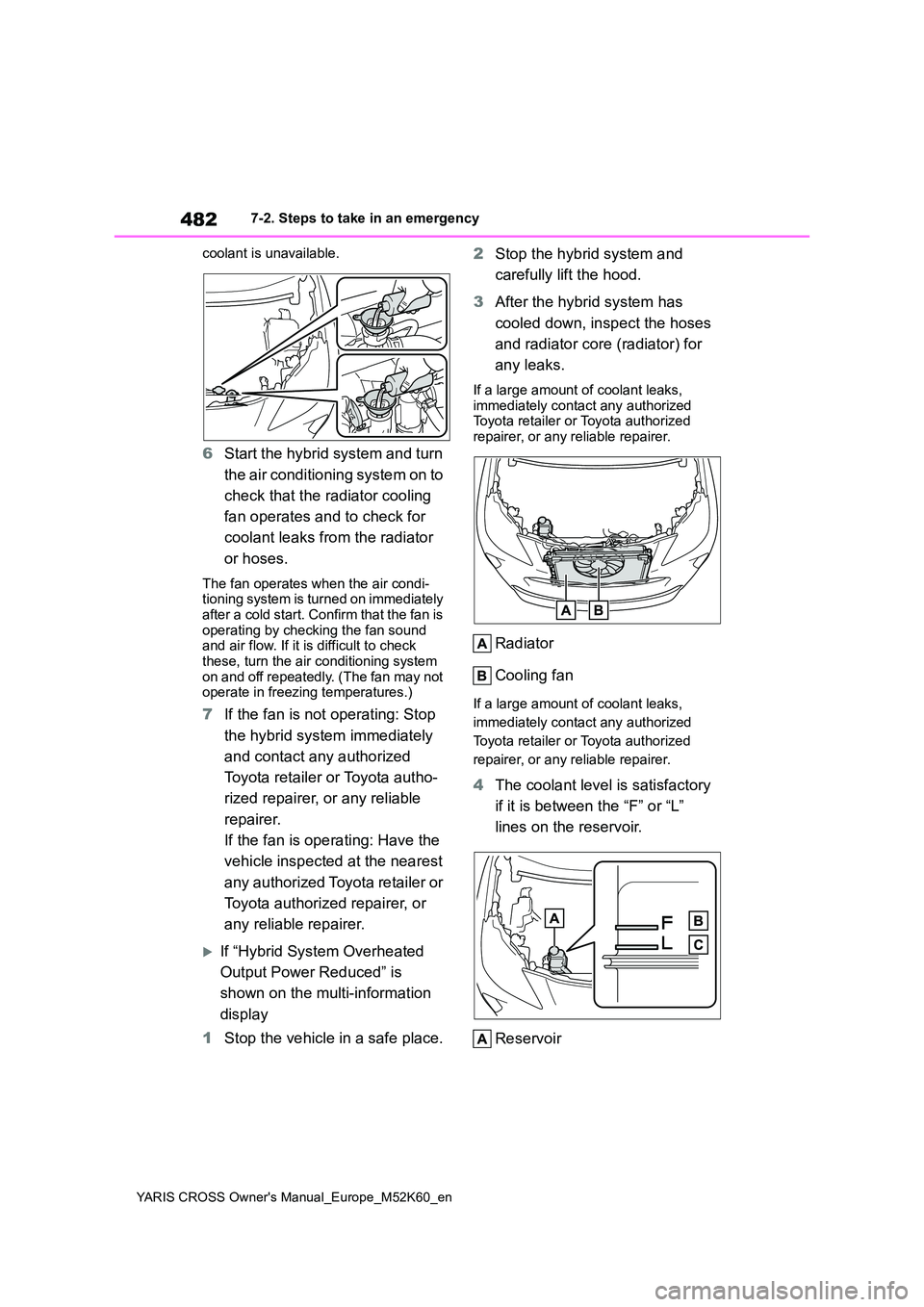
Radiator
Cooling fan
If a large amount of coolant leaks,
immediately contact any authorized
Toyota retailer or Toyota authorized
repairer, or any reliable repairer.
4 The coolant level is satisfactory
if it is between the “F” or “L”
lines on the reservoir.
Reservoir
Page 500 of 650
498
YARIS CROSS Owner's Manual_Europe_M52K60_en
8-2. Customization
8-2.Customiz ation
■Changing by using the naviga-
tion/multimedia system screen
(vehicles with 7-inch/8-inch
display multimedia system)
1 Press the “MENU” button.
2 Select “Setup” on the “Menu”
screen.
3 Select “Vehicle” on the “Setup”
screen.
4 Select “Vehicle customization”.
Various setting can be changed. Refer
to the list of settings that can be changed for details.
■Changing by using the meter
control switches
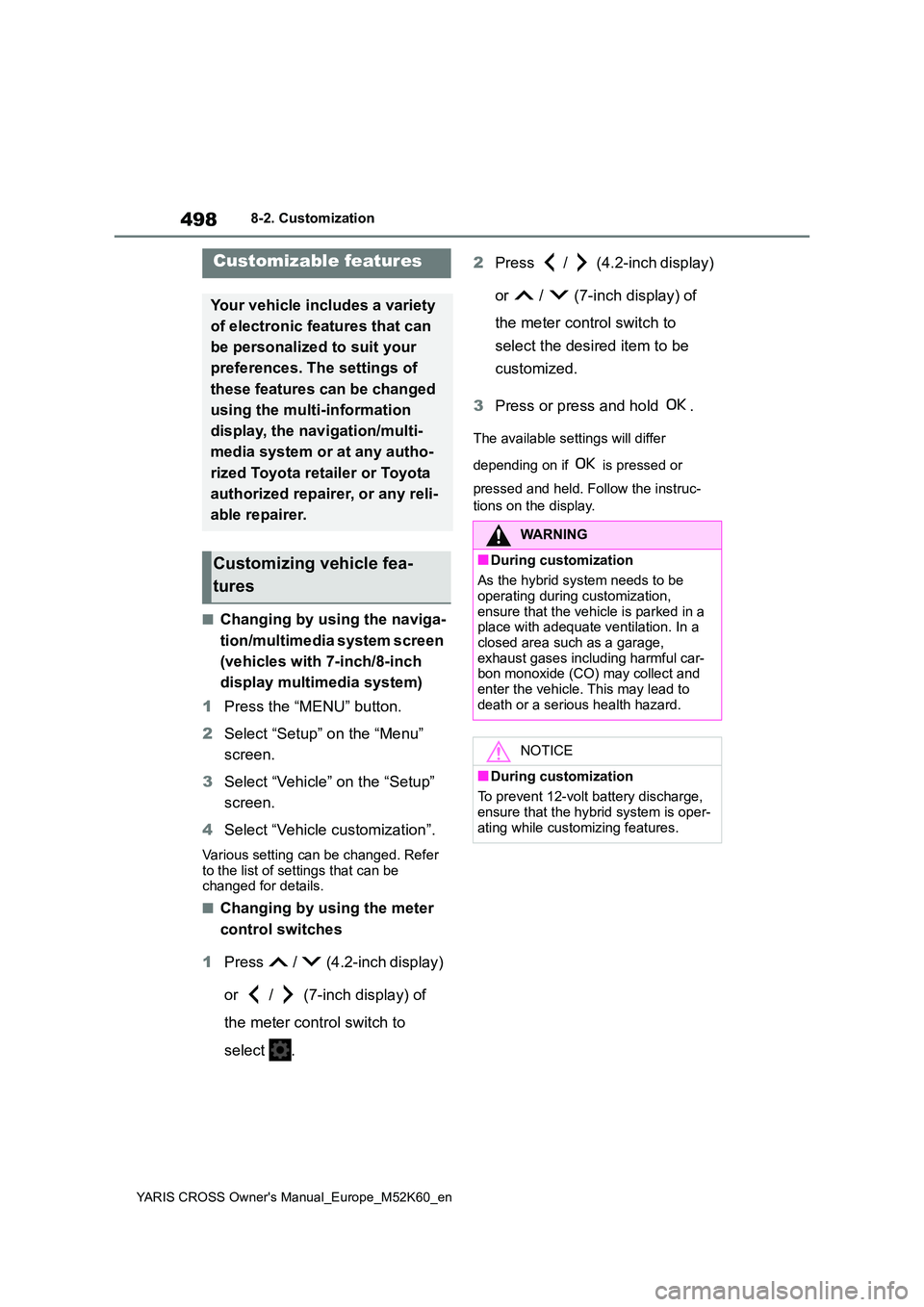
1 Press / (4.2-inch display)
or / (7-inch display) of
the meter control switch to
select .
2 Press / (4.2-inch display)
or / (7-inch display) of
the meter control switch to
select the desired item to be
customized.
3 Press or press and hold .
The available settings will differ
depending on if is pressed or
pressed and held. Follow the instruc-
tions on the display.
Customizable features
Your vehicle includes a variety
of electronic features that can
be personalized to suit your
preferences. The settings of
these features can be changed
using the multi-information
display, the nav igation/multi-
media system or at any autho-
rized Toyota retailer or Toyota
authorized repairer, or any reli-
able repairer.
Customizing vehicle fea-
tures
WARNING
■During customization
As the hybrid system needs to be operating during customization,
ensure that the vehicle is parked in a place with adequate ventilation. In a closed area such as a garage,
exhaust gases including harmful car- bon monoxide (CO) may collect and enter the vehicle. This may lead to
death or a serious health hazard.
NOTICE
■During customization
To prevent 12-volt battery discharge, ensure that the hybrid system is oper-
ating while customizing features.
Page 501 of 650
499
8
YARIS CROSS Owner's Manual_Europe_M52K60_en
8-2. Customization
Vehicle specifications
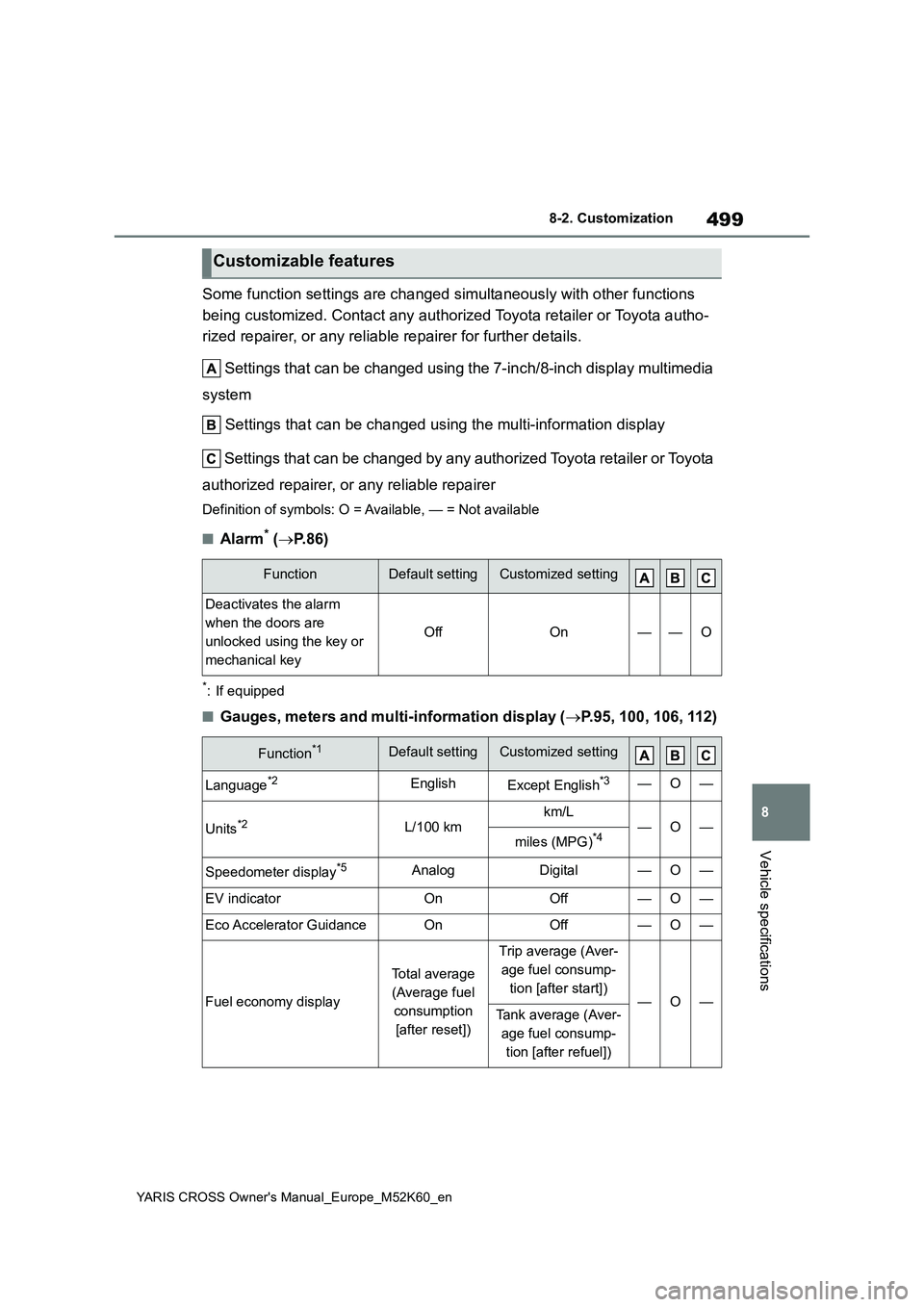
Some function settings are changed simultaneously with other functions
being customized. Contact any authorized Toyota retailer or Toy ota autho-
rized repairer, or any reliable repairer for further details.
Settings that can be changed using the 7-inch/8-inch display m ultimedia
system
Settings that can be changed using the multi-information displ ay
Settings that can be changed by any authorized Toyota retailer or Toy ota
authorized repairer, or any reliable repairer
Definition of symbols: O = Available, — = Not available
■Alarm* ( P.86)
*: If equipped
■Gauges, meters and multi-information display (P.95, 100, 106, 112)
Customizable features
FunctionDefault settingCustomized setting
Deactivates the alarm
when the doors are
unlocked using the key or
mechanical key
OffOn——O
Function*1Default settingCustomized setting
Language*2EnglishExcept English*3—O—
Units*2L/100 kmkm/L—O—miles (MPG)*4
Speedometer display*5AnalogDigital—O—
EV indicatorOnOff—O—
Eco Accelerator GuidanceOnOff—O—
Fuel economy display
Total average
(Average fuel
consumption
[after reset])
Trip average (Aver-
age fuel consump-
tion [after start])—O—Tank average (Aver-
age fuel consump-
tion [after refuel])
Page 507 of 650
505
8
YARIS CROSS Owner's Manual_Europe_M52K60_en
8-2. Customization
Vehicle specifications
*3: If a speed limit with supplemental mark is exceeded, the notification buzzer does
not operate.
*4: Vehicles with 7-inch/8-inch display navigation system
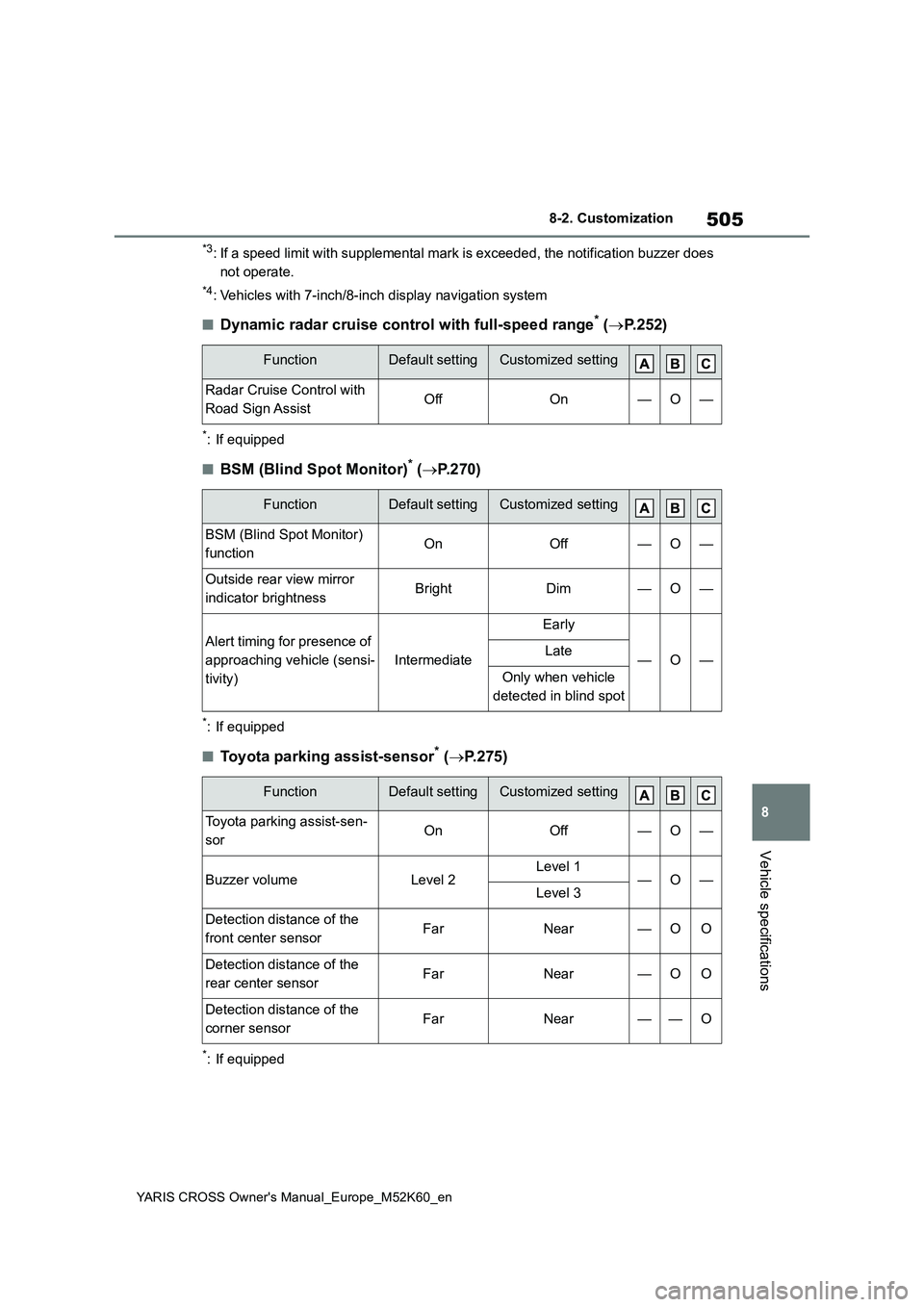
■Dynamic radar cruise control with full-speed range* ( P. 2 5 2 )
*: If equipped
■BSM (Blind Spot Monitor)* (P.270)
*: If equipped
■Toyota parking assist-sensor* (P.275)
*: If equipped
FunctionDefault settingCustomized setting
Radar Cruise Control with
Road Sign AssistOffOn—O—
FunctionDefault settingCustomized setting
BSM (Blind Spot Monitor)
functionOnOff—O—
Outside rear view mirror
indicator brightnessBrightDim—O—
Alert timing for presence of
approaching vehicle (sensi-
tivity)
Intermediate
Early
—O—Late
Only when vehicle
detected in blind spot
FunctionDefault settingCustomized setting
Toyota parking assist-sen-
sorOnOff—O—
Buzzer volumeLevel 2Level 1—O—Level 3
Detection distance of the
front center sensorFarNear—OO
Detection distance of the
rear center sensorFarNear—OO
Detection distance of the
corner sensorFarNear——O
Page 514 of 650
512
YARIS CROSS Owner's Manual_Europe_M52K60_en
What to do if... (Troubleshooting)
1-1.What to d o if... (Tro ublesho oting)What to do if... (Troubleshooting)
If you lose your keys or mechani-
cal keys, new genuine keys or
mechanical keys can be made
by any authorized Toyota retailer
or Toyota authorized repairer, or
any reliable repairer. ( P.473)
Vehicles with smart entry & start
system: If you lose your elec-
tronic keys, the risk of vehicle
theft increases significantly. Con-
tact any authorized Toyota
retailer or Toyota authorized
repairer, or any reliable repairer
immediately. ( P.473)
Is the key battery weak or
depleted? ( P.415)
Vehicles with a smart entry &
start system: Is the power switch
in ON?
When locking the doors, turn the power
switch off. ( P. 1 9 3)
Vehicles with a smart entry &
start system: Is the electronic
key left inside the vehicle?
When locking the doors, make sure that
you have the electronic key on your
person.
The function may not operate
properly due to the condition of
the radio wave. ( P.133,154)
Is the child-protector lock set?
The rear door cannot be opened from
inside the vehicle when the lock is set.
Open the rear door from outside and
then unlock the child-protector lock.
( P.139)
Is the shift lever in P? (P.189)
Is the steering wheel unlocked?
( P.189)
Is the 12-volt battery dis-
charged? ( P.476)
Did you press the power switch
If you have a problem, check
the following before contacting
any authorized Toyota retailer
or Toyota authorized repairer,
or any reliable repairer.
The doors cannot be locked,
unlocked, opened or closed
You lose your keys
The doors cannot be locked
or unlocked
The rear door cannot be
opened
If you think something is
wrong
The hybrid system does not
start (vehicles without a
smart entry & start system)
The hybrid system does not
start (vehicles with a smart
entry & start system)
Page 531 of 650
529
YARIS CROSS Owner's Manual_Europe_M52K60_en
Alphabetical Index
Windows
Power windows .......................... 169
Rear window defogger ............... 352
Washer ....................................... 219
Windshield wipers ........................ 219
Winter driving tips ........................ 345
Wireless charger........................... 367
Wireless remote control............... 132
Battery-Saving Function............. 153
Locking/Unlocking ...................... 132
Replacing the battery ................. 415
For vehicles with 7-inch/8-inch
display multimedia system,
refer to “Navigation and mul-
timedia system Owner’s
manual” for infor mation
regarding the equipment
listed below.
· Navigation system
· Audio/visual system
· Rear view monitor system
For vehicles with 9-inch dis-
play multimedia system,
refer to “TOYOTA SMART
CONNECT Owner’s manual”
for infor mation regarding the
equipment listed below.
· Navigation system
· Audio/visual system
· Rear view monitor system