reset TOYOTA YARIS CROSS 2021 User Guide
[x] Cancel search | Manufacturer: TOYOTA, Model Year: 2021, Model line: YARIS CROSS, Model: TOYOTA YARIS CROSS 2021Pages: 650, PDF Size: 132.86 MB
Page 119 of 650
117
2
YARIS CROSS Owner's Manual_Europe_M52K60_en
2-1. Instrument cluster
Vehicle status information and indicators
driven since hybrid system start*
• “Total Time”: Displays the elapsed
time since hybrid system start*
*: These items are reset each time the
hybrid system stops.
“Total”
• “Average Speed”: Displays the aver-
age vehicle speed since the display
was reset*
• “Distance”: Displays the distance
driven since the display was reset*
• “Total Time”: Displays the elapsed
time since the display was reset*
*: To reset, display the desired item and
press and hold the meter control
switch.
■Torque distribution (if
equipped)
Drive power put on each tire is dis-
played with a bar meter. The larger
the bar meter the larger the driving
power is displayed.
■Tire inflation pressure
Displays inflation pressure of each
tire.
■Meter display settings that can
be changed
Clock setting (vehicles without
navigation/multimedia system)
P. 1 0 4
Language
Select to change the language dis-
played.
Units
Select to change the units of measure
displayed.
Meter Type
The speed meter display method can
be changed.
EV indicator
Select to enable/disable the EV indica-
tor.
Select to change the displayed content
of the following:
• Hybrid System Indicator
Select to display/not display the Eco
Accelerator Guidance. ( P. 1 1 4 )
• Fuel economy display
Select to change the average fuel con-
sumption display between after
start/after reset/after refuel. ( P.114)
(if equipped)
Select to display/not display the audio
system linked display.
Select to change the displayed content
of the following:
• Display contents
Select to display/not display the energy
monitor/torque distribution display.
( P.123)
• Drive information type
Select to change the drive information
type display between after start/after
reset.
• Drive information items
Select to set the first and second items
of the drive information display to any of
Settings display
Page 120 of 650
118
YARIS CROSS Owner's Manual_Europe_M52K60_en
2-1. Instrument cluster
the following: average vehicle
speed/distance/elapsed time.
Current trip result display
Select to change the displayed informa-
tion about the current trip, measured
from when the hybrid system was
started until it was stopped, between
drive information/eco score. (The infor-
mation will be displayed temporarily
when the hybrid system is stopped.)
Pop-up display
Select to enable/disable pop-up dis-
plays for each relevant system.
Multi-information display off
Select to turn the multi-information dis-
play off.
To turn the multi-information display on
again, press any of the following meter
control switches
//// /.
Default setting
Select to reset the meter display set-
tings to the default setting.
■Vehicle functions and settings
that can be changed
P. 4 9 8
■Suspension of the settings display
●Some settings cannot be changed
while driving. When changing set- tings, park the vehicle in a safe place.
●If a warning message is displayed, operation of the settings display will be suspended.
WARNING
■Cautions during setting up the display
If the hybrid system is operating while changing certain settings on the set-tings display, ensure that the vehicle
is parked in a place with adequate ventilation. In a closed area such as a garage, exhaust gases including
harmful carbon monoxide (CO) may collect and enter the vehicle. This may lead to death or a serious health
hazard.
NOTICE
■During setting up the display
To prevent 12-volt battery discharge, ensure that the hybrid system is oper-ating while setting up the display fea-
tures.
Page 128 of 650
126
YARIS CROSS Owner's Manual_Europe_M52K60_en
2-1. Instrument cluster
Hybrid battery (traction battery)
Front tire
Rear tire*
*: For FF vehicles, the arrows to
and are not displayed.
■Hybrid battery (traction battery) status
The display changes in 8 levels accord- ing to the remaining charge amount of the hybrid battery (traction battery).
●The figure shows the multi-information display as an example for explanation.
●These images are examples only, and may vary slightly from actual condi-
tions.
Low
High
■Remaining charge amount warning
of hybrid battery (traction battery)
●The buzzer sounds intermittently
when the hybrid battery (traction bat- tery) remains without charging while the shift lever is in N, or the remaining
charge amount drops below a certain level. If the remaining charge amount drops further, the buzzer sounds con-
tinuously.
●When a warning message is shown
on the multi-information display and the buzzer sounds, follow the instruc-
tions displayed on the screen to per-
form troubleshooting.
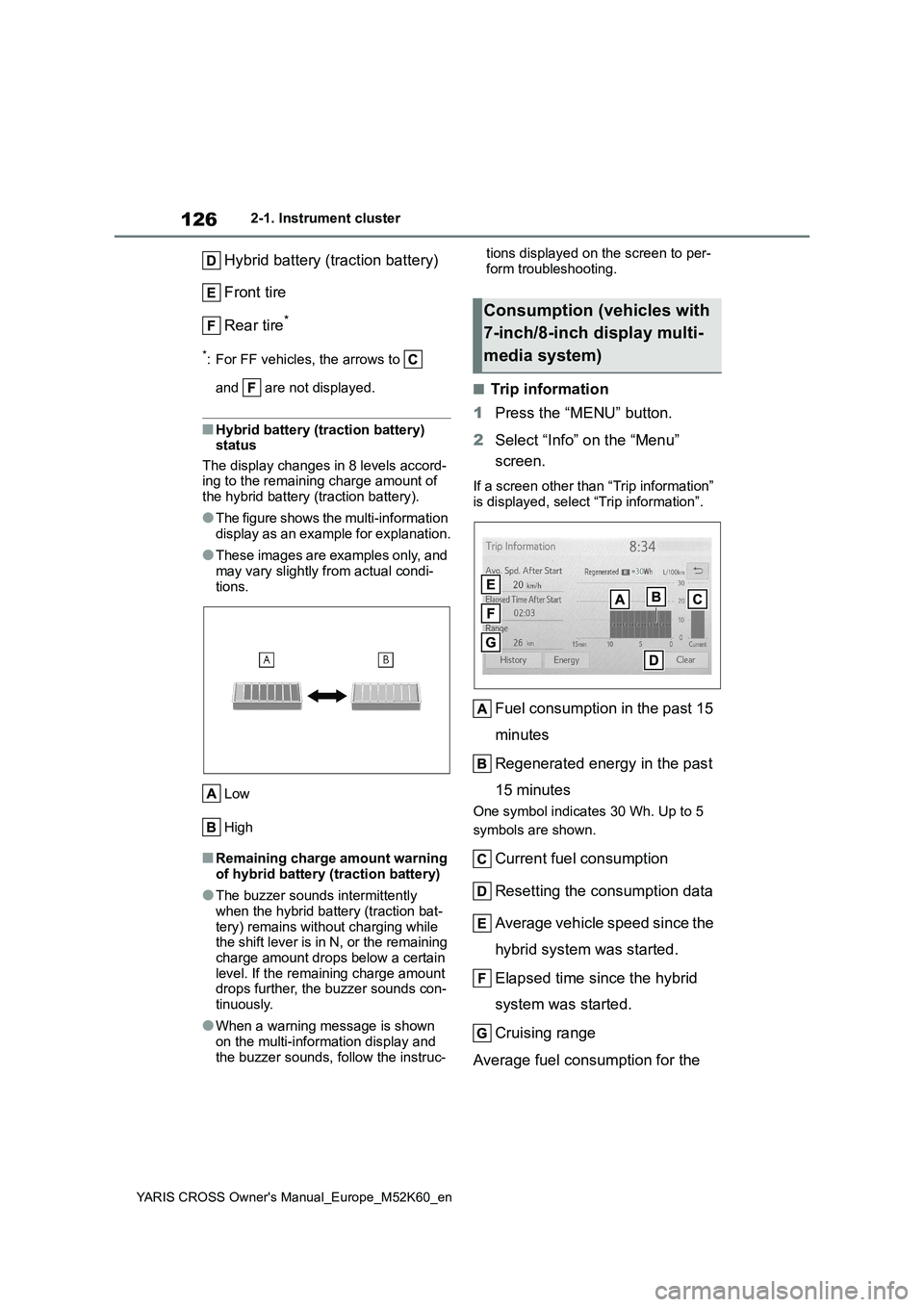
■Trip information
1 Press the “MENU” button.
2 Select “Info” on the “Menu”
screen.
If a screen other than “Trip information”
is displayed, select “Trip information”.
Fuel consumption in the past 15
minutes
Regenerated energy in the past
15 minutes
One symbol indicates 30 Wh. Up to 5
symbols are shown.
Current fuel consumption
Resetting the consumption data
Average vehicle speed since the
hybrid system was started.
Elapsed time since the hybrid
system was started.
Cruising range
Average fuel consumption for the
Consumption (vehicles with
7-inch/8-inch display multi-
media system)
Page 129 of 650
127
2
YARIS CROSS Owner's Manual_Europe_M52K60_en
2-1. Instrument cluster
Vehicle status information and indicators
past 15 minutes is divided by color
into past averages and averages
attained since the power switch
was last turned to ON. Use the dis-
played average fuel consumption
as a reference.
The image is an example only, and may
vary slightly from actual conditions.
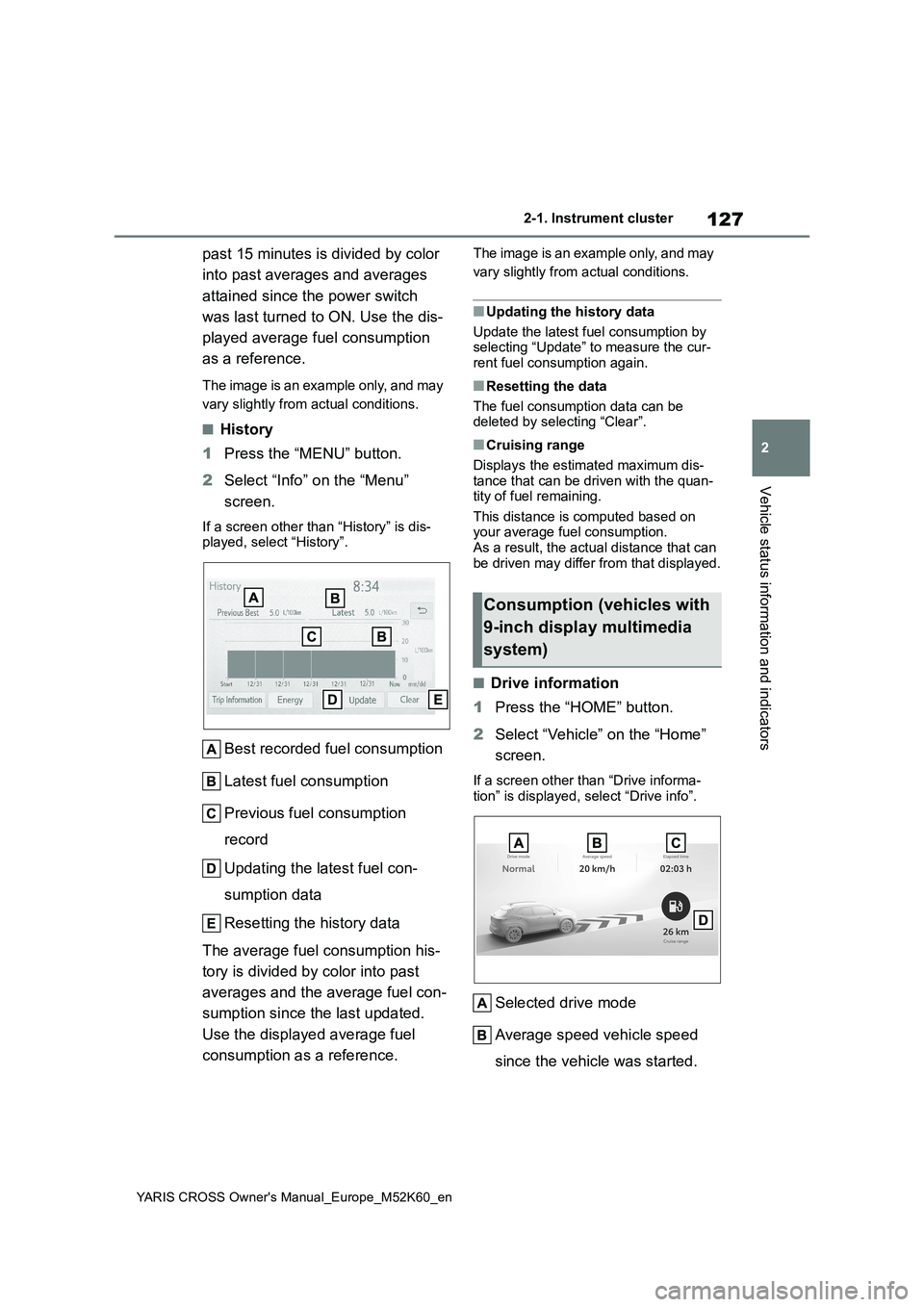
■History
1 Press the “MENU” button.
2 Select “Info” on the “Menu”
screen.
If a screen other than “History” is dis- played, select “History”.
Best recorded fuel consumption
Latest fuel consumption
Previous fuel consumption
record
Updating the latest fuel con-
sumption data
Resetting the history data
The average fuel consumption his-
tory is divided by color into past
averages and the average fuel con-
sumption since the last updated.
Use the displayed average fuel
consumption as a reference.
The image is an example only, and may
vary slightly from actual conditions.
■Updating the history data
Update the latest fuel consumption by selecting “Update” to measure the cur-
rent fuel consumption again.
■Resetting the data
The fuel consumption data can be deleted by selecting “Clear”.
■Cruising range
Displays the estimated maximum dis- tance that can be driven with the quan-tity of fuel remaining.
This distance is computed based on your average fuel consumption. As a result, the actual distance that can
be driven may differ from that displayed.
■Drive information
1 Press the “HOME” button.
2 Select “Vehicle” on the “Home”
screen.
If a screen other than “Drive informa-
tion” is displayed, select “Drive info”.
Selected drive mode
Average speed vehicle speed
since the vehicle was started.
Consumption (vehicles with
9-inch display multimedia
system)
Page 130 of 650
128
YARIS CROSS Owner's Manual_Europe_M52K60_en
2-1. Instrument cluster
Elapsed time since the hybrid
system was started
Cruising range
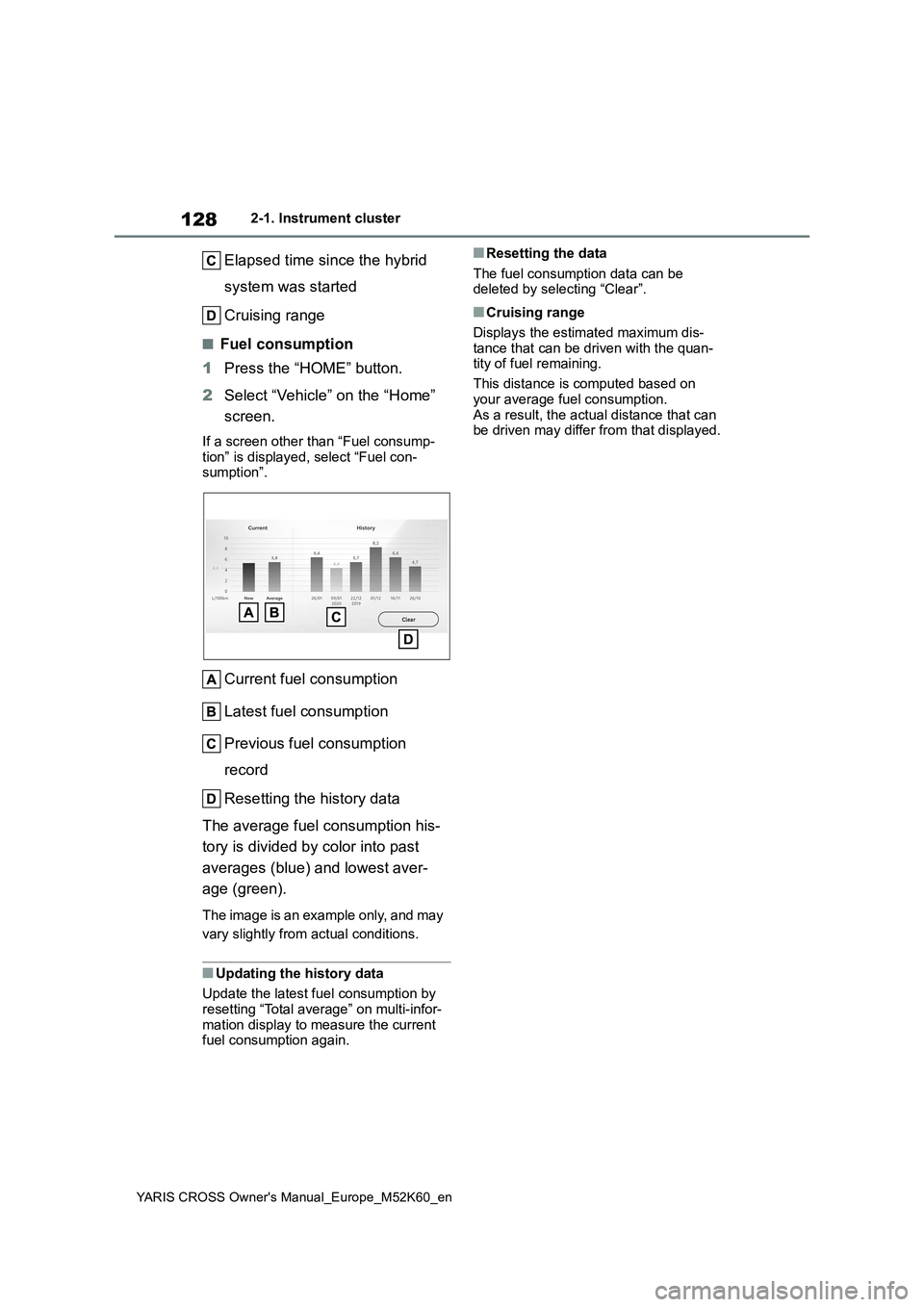
■Fuel consumption
1 Press the “HOME” button.
2 Select “Vehicle” on the “Home”
screen.
If a screen other than “Fuel consump-
tion” is displayed, select “Fuel con- sumption”.
Current fuel consumption
Latest fuel consumption
Previous fuel consumption
record
Resetting the history data
The average fuel consumption his-
tory is divided by color into past
averages (blue) and lowest aver-
age (green).
The image is an example only, and may
vary slightly from actual conditions.
■Updating the history data
Update the latest fuel consumption by
resetting “Total average” on multi-infor- mation display to measure the current fuel consumption again.
■Resetting the data
The fuel consumption data can be deleted by selecting “Clear”.
■Cruising range
Displays the estimated maximum dis-
tance that can be driven with the quan- tity of fuel remaining.
This distance is computed based on
your average fuel consumption. As a result, the actual distance that can be driven may differ from that displayed.
Page 153 of 650
151
3
YARIS CROSS Owner's Manual_Europe_M52K60_en
3-2. Opening, closing and locking the doors
Before driving
The settings of the power back door
system can be changed by display-
ing the “Vehicle Settings” -
(4.2-inch display) or
(7-inch display) screen from
the setting screen of the multi-infor-
mation display. ( P.498)
The changed power back door settings
are not reset by turning the power
switch to OFF. In order to restore the
original settings, they need to be
changed back on the setting screen of
the multi-information display.
The open position of the power
back door can be adjusted.
1 Stop the back door in the desir-
able position. ( P.142)
2 Press and hold the power back
door switch on the back door for
approximately 2 seconds.
When the settings are completed, the buzzer sounds 4 times.
When opening the back door the next time, the back door will stop at that
NOTICE
●Do not park the vehicle near objects that may move and contact the
lower center part of the rear bumper, such as grass or trees.If the vehicle has been parked for a
while near objects that may move and contact the lower center part of the rear bumper, such as grass or
trees, the kick sensor may not oper- ate. In this situation, move the vehi-cle from the current position and
then check if the kick sensor oper- ates. If it does not operate, have the vehicle inspected by any authorized
Toyota retailer or Toyota authorized repairer, or any reliable repairer.
●Do not subject the kick sensor or its surrounding area to a strong impact.
If the kick sensor or its surrounding area has been subjected to a strong impact, the kick sensor may not
operate properly. If the kick sensor does not operate in the following situations, have the vehicle
inspected by any authorized Toyota retailer or Toyota authorized repairer, or any reliable repairer.
• The kick sensor or its surrounding area has been subjected to a strong impact.
• The lower center part of the rear bumper is scratched or damaged.
●Do not disassemble the rear bumper.
●Do not attach stickers to the rear bumper.
●Do not paint the rear bumper.
●If a bicycle carrier or similar heavy
object is attached to the power back door, disable the kick sensor. ( P.151)
Changing settings of the
power back door system
(vehicles with power back
door)
Adjusting the open position
of the back door (vehicles
with power back door)
Page 393 of 650
391
6
YARIS CROSS Owner's Manual_Europe_M52K60_en
6-3. Do-it-yourself maintenance
Maintenance and care
■Engine oil consumption
A certain amount of engine oil will be
consumed while driving. In the following situations, oil consumption may increase, and engine oil may need to be
refilled in between oil maintenance inter- vals.
●When the engine is new, for example directly after purchasing the vehicle or after replacing the engine
●If low quality oil or oil of an inappropri-ate viscosity is used
●When driving at high engine speeds or with a heavy load, when towing
(vehicles with towing packages), or when driving while accelerating or decelerating frequently
●When leaving the engine idling for a long time, or when driving frequently
through heavy traffic
■After changing the engine oil
The engine oil maintenance data should be reset. Perform the following proce-
dures:
1 Press / (7-inch display) or
/ (4.2-inch display) of the
meter control switch to select .
2 Press / (7-inch display) or
/ (4.2-inch display) to select
“Vehicle Settings” and then press
and hold .
3 Press / to select “Oil Mainte-
nance” and then press .
4 Press / to select “Yes” and
then press .
A message will be displayed on the multi-information display when the reset
procedure has been completed.
■Engine coolant reservoir
The coolant level is satisfactory if it
is between the “F” and “L” lines on
WARNING
■Used engine oil
●Used engine oil contains poten-
tially harmful contaminants which may cause skin disorders such as inflammation and skin cancer, so
care should be taken to avoid pro- longed and repeated contact. To remove used engine oil from your
skin, wash thoroughly with soap and water.
●Dispose of used oil and filters only in a safe and acceptable manner. Do not dispose of used oil and fil-
ters in household trash, in sewers or onto the ground.Call any authorized Toyota retailer
or Toyota authorized repairer, or any reliable repairer, service station or auto parts store for information
concerning recycling or disposal.
●Do not leave used engine oil within
the reach of children.
NOTICE
■To prevent serious engine dam- age
Check the oil level on a regular basis.
■When replacing the engine oil
●Be careful not to spill engine oil on
the vehicle components.
●Avoid overfilling, or the engine
could be damaged.
●Check the oil level on the dipstick
every time you refill the vehicle.
●Be sure the engine oil filler cap is
properly tightened.
Checking the coolant
Page 404 of 650
402
YARIS CROSS Owner's Manual_Europe_M52K60_en
6-3. Do-it-yourself maintenance
formed.
8 Drive straight (with occasional
left and right turns) at approxi-
mately 40 km/h (25 mph) or
more for approximately 10 to 30
minutes.
Even if the vehicle is not driven at
approximately 40 km/h (25 mph) or more, initialization can be completed by driving for a long time. However, if ini-
tialization does not complete after driv- ing for 1 hour or more, park the vehicle in a safe place for more than 15 min-
utes and please drive a vehicle once again with the power switch ON. ( P.404)
■Initialization procedure
●Make sure to carry out initialization after adjusting the tire inflation pres-
sure. Also, make sure the tires are cold before carrying out initialization or tire
inflation pressure adjustment.
●If you have accidentally turned the
power switch off during initialization, it is not necessary to press the reset switch again as initialization will
restart automatically when the power switch is turned to ON the next time.
●If you accidentally press the reset switch when initialization is not neces-sary, adjust the tire inflation pressure
to the specified level when the tires are cold, and conduct initialization again.
●While the position of each tire is being
determined and the inflation pres-
sures are not being displayed on the multi-information display, if the infla-tion pressure of a tire drops, the tire
pressure warning light will come on.
■If the tire pressure warning system is not initialized properly
●In the following situations, initialization may take longer than usual to be com-pleted or may not be possible. (Usu-
ally, the vehicle will need to be driven for approximately 10 to 30 minutes to complete initialization.) If initialization
is not complete after driving approxi- mately 30 minutes, continue driving for a while.
• If the vehicle is driven on an unpaved road, it may take longer to complete initialization.
• If the vehicle is backed up while per- forming initialization, data collected during initialization will be cleared and
it will take longer than normal to com- plete.• If the vehicle is driven in heavy traffic
or another situation where other vehi- cles are driven close by, it may take time for the system to recognize the
tire pressure warning valve and trans- mitters of your vehicle over those of other vehicles.
If initialization is not complete after driv-
ing for approximately 1 hour, park the
vehicle in a safe place for more than 15
minutes and then drive the vehicle
again.
●In the following situations, initialization will not be started or was not com-
pleted properly and the system will not operate properly. Perform the initial-ization procedure again.
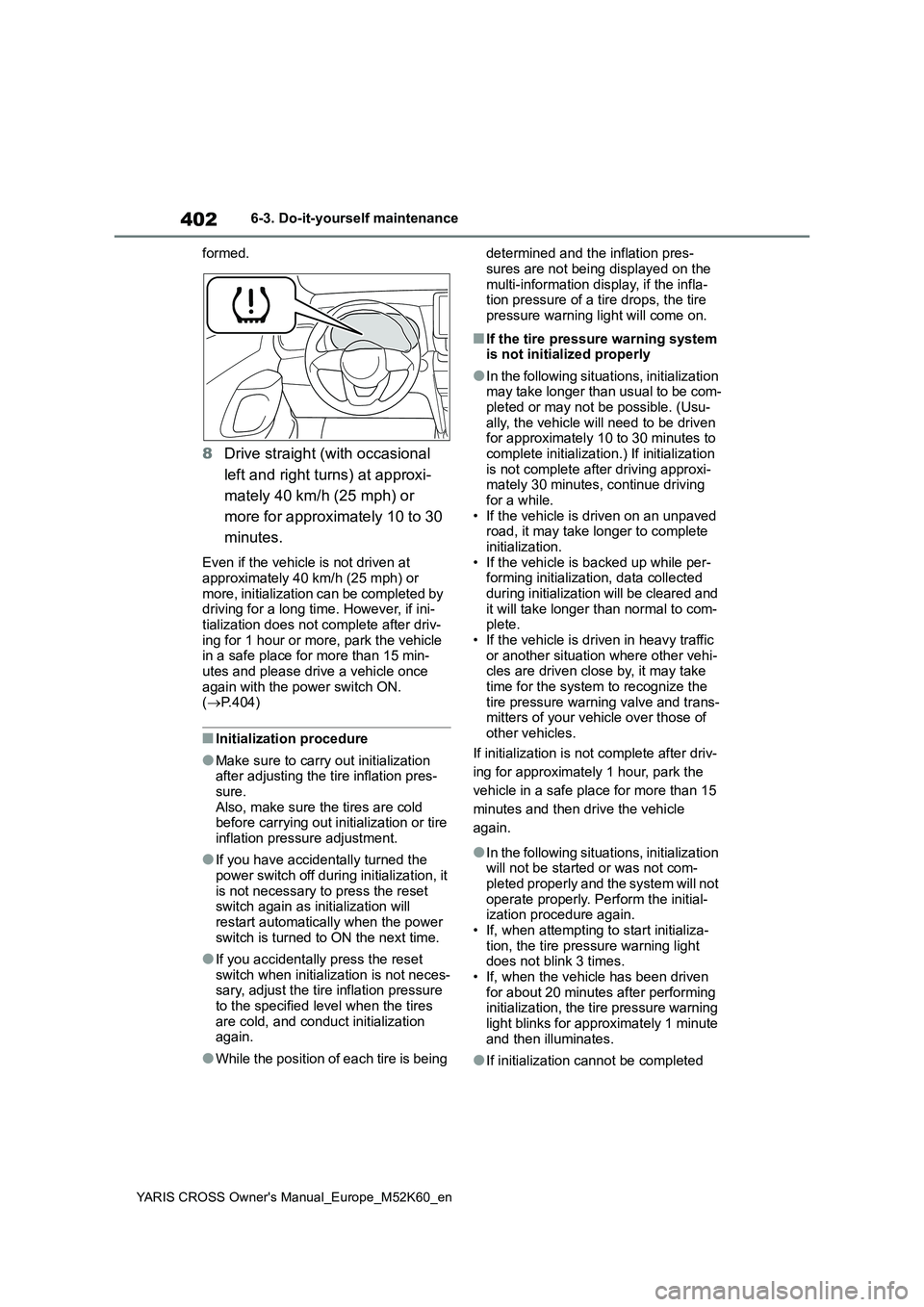
• If, when attempting to start initializa- tion, the tire pressure warning light does not blink 3 times.
• If, when the vehicle has been driven for about 20 minutes after performing initialization, the tire pressure warning
light blinks for approximately 1 minute and then illuminates.
●If initialization cannot be completed
Page 452 of 650
450
YARIS CROSS Owner's Manual_Europe_M52K60_en
7-2. Steps to take in an emergency
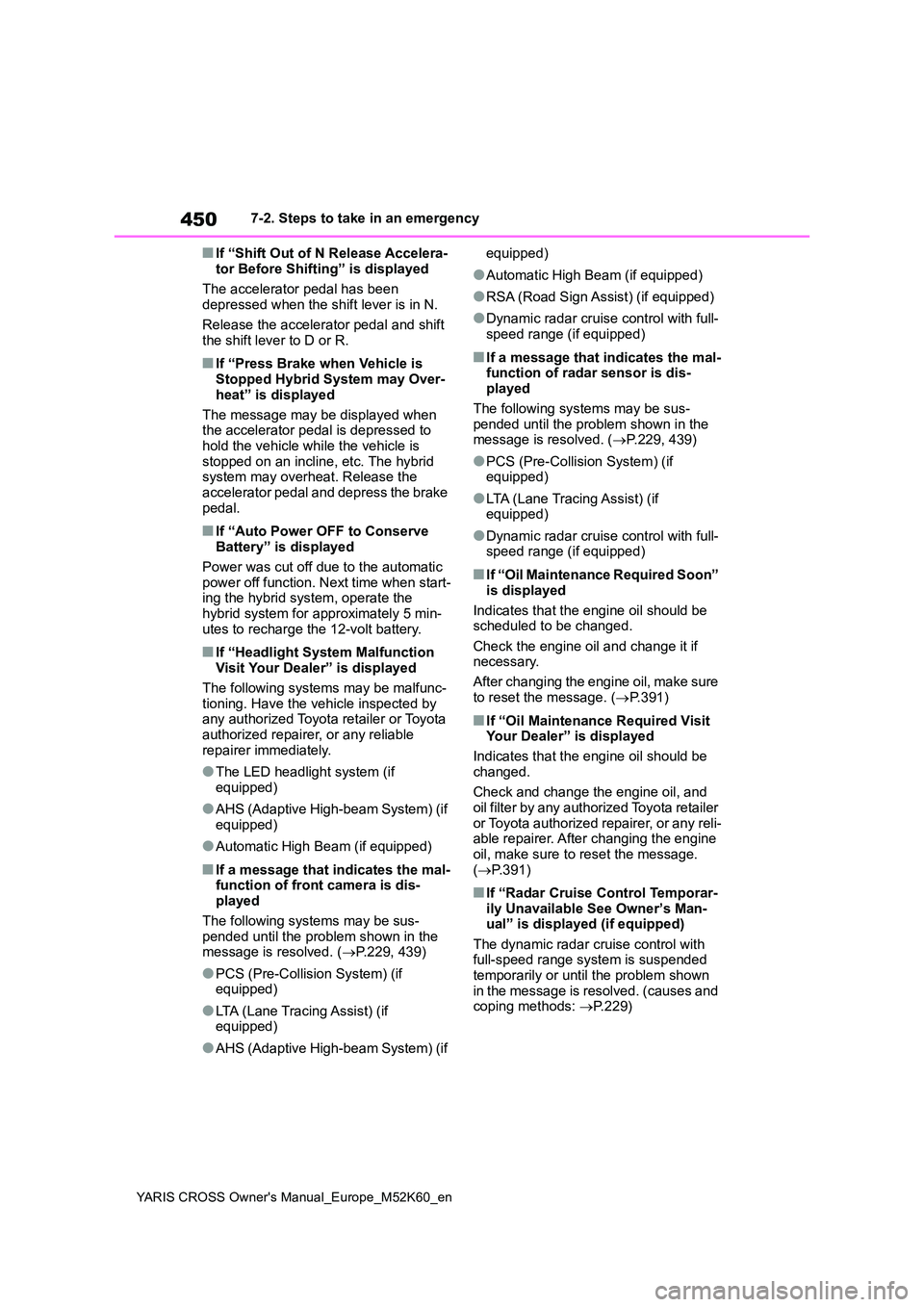
■If “Shift Out of N Release Accelera-
tor Before Shifting” is displayed
The accelerator pedal has been depressed when the shift lever is in N.
Release the accelerator pedal and shift the shift lever to D or R.
■If “Press Brake when Vehicle is Stopped Hybrid System may Over-
heat” is displayed
The message may be displayed when the accelerator pedal is depressed to
hold the vehicle while the vehicle is stopped on an incline, etc. The hybrid system may overheat. Release the
accelerator pedal and depress the brake pedal.
■If “Auto Power OFF to Conserve Battery” is displayed
Power was cut off due to the automatic power off function. Next time when start-ing the hybrid system, operate the
hybrid system for approximately 5 min- utes to recharge the 12-volt battery.
■If “Headlight System Malfunction Visit Your Dealer” is displayed
The following systems may be malfunc- tioning. Have the vehicle inspected by any authorized Toyota retailer or Toyota
authorized repairer, or any reliable repairer immediately.
●The LED headlight system (if equipped)
●AHS (Adaptive High-beam System) (if equipped)
●Automatic High Beam (if equipped)
■If a message that indicates the mal-function of front camera is dis-played
The following systems may be sus- pended until the problem shown in the message is resolved. ( P.229, 439)
●PCS (Pre-Collision System) (if equipped)
●LTA (Lane Tracing Assist) (if equipped)
●AHS (Adaptive High-beam System) (if
equipped)
●Automatic High Beam (if equipped)
●RSA (Road Sign Assist) (if equipped)
●Dynamic radar cruise control with full-
speed range (if equipped)
■If a message that indicates the mal- function of radar sensor is dis-played
The following systems may be sus- pended until the problem shown in the message is resolved. ( P.229, 439)
●PCS (Pre-Collision System) (if equipped)
●LTA (Lane Tracing Assist) (if equipped)
●Dynamic radar cruise control with full-speed range (if equipped)
■If “Oil Maintenance Required Soon”
is displayed
Indicates that the engine oil should be scheduled to be changed.
Check the engine oil and change it if necessary.
After changing the engine oil, make sure
to reset the message. ( P.391)
■If “Oil Maintenance Required Visit Your Dealer” is displayed
Indicates that the engine oil should be
changed.
Check and change the engine oil, and oil filter by any authorized Toyota retailer
or Toyota authorized repairer, or any reli- able repairer. After changing the engine oil, make sure to reset the message.
( P.391)
■If “Radar Cruise Control Temporar- ily Unavailable See Owner’s Man-ual” is displayed (if equipped)
The dynamic radar cruise control with full-speed range system is suspended temporarily or until the problem shown
in the message is resolved. (causes and coping methods: P.229)
Page 501 of 650
499
8
YARIS CROSS Owner's Manual_Europe_M52K60_en
8-2. Customization
Vehicle specifications
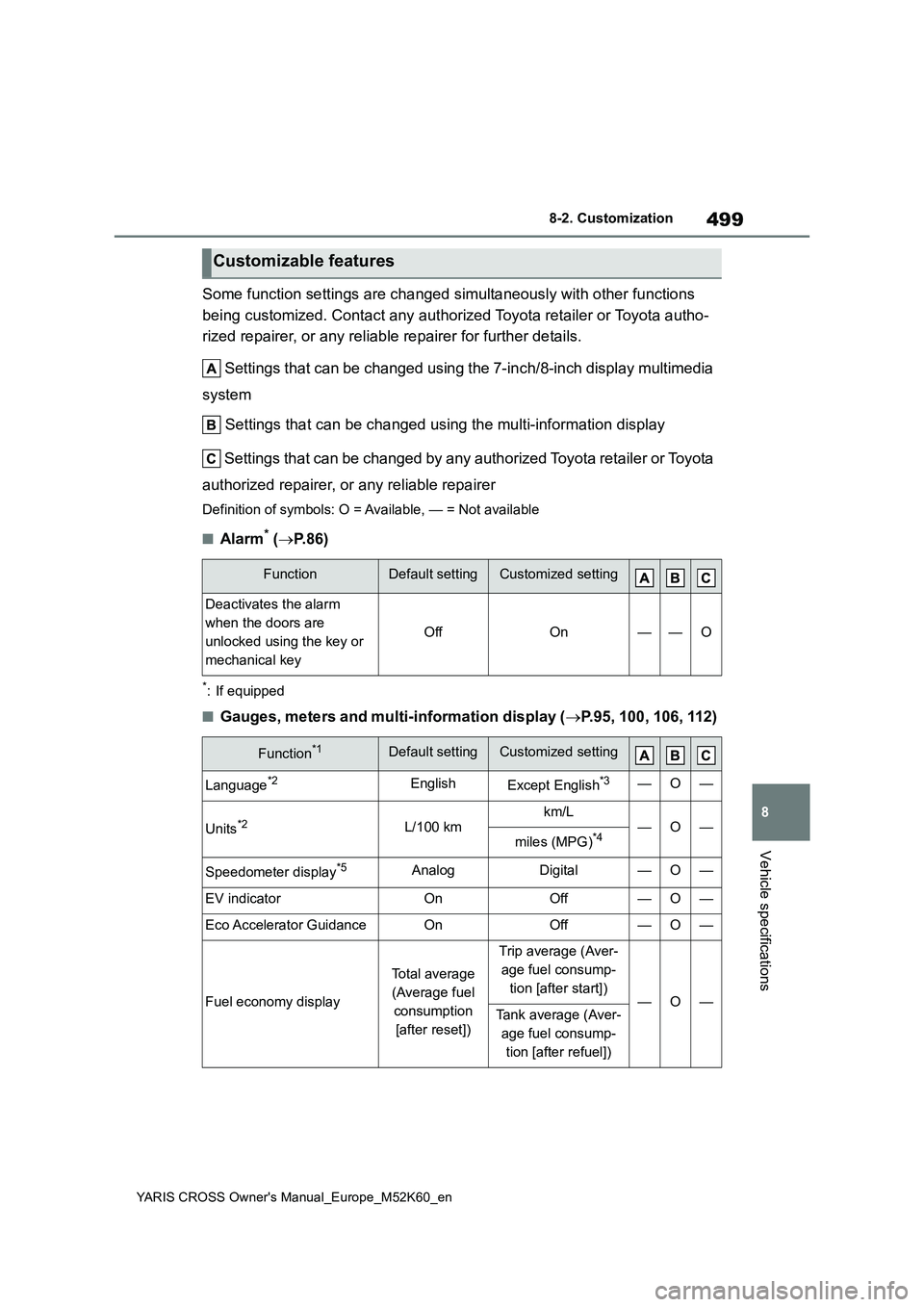
Some function settings are changed simultaneously with other functions
being customized. Contact any authorized Toyota retailer or Toy ota autho-
rized repairer, or any reliable repairer for further details.
Settings that can be changed using the 7-inch/8-inch display m ultimedia
system
Settings that can be changed using the multi-information displ ay
Settings that can be changed by any authorized Toyota retailer or Toy ota
authorized repairer, or any reliable repairer
Definition of symbols: O = Available, — = Not available
■Alarm* ( P.86)
*: If equipped
■Gauges, meters and multi-information display (P.95, 100, 106, 112)
Customizable features
FunctionDefault settingCustomized setting
Deactivates the alarm
when the doors are
unlocked using the key or
mechanical key
OffOn——O
Function*1Default settingCustomized setting
Language*2EnglishExcept English*3—O—
Units*2L/100 kmkm/L—O—miles (MPG)*4
Speedometer display*5AnalogDigital—O—
EV indicatorOnOff—O—
Eco Accelerator GuidanceOnOff—O—
Fuel economy display
Total average
(Average fuel
consumption
[after reset])
Trip average (Aver-
age fuel consump-
tion [after start])—O—Tank average (Aver-
age fuel consump-
tion [after refuel])