back light TOYOTA YARIS CROSS 2021 Owner's Manual
[x] Cancel search | Manufacturer: TOYOTA, Model Year: 2021, Model line: YARIS CROSS, Model: TOYOTA YARIS CROSS 2021Pages: 650, PDF Size: 132.86 MB
Page 227 of 650
225
4
YARIS CROSS Owner's Manual_Europe_M52K60_en
4-4. Refueling
Driving
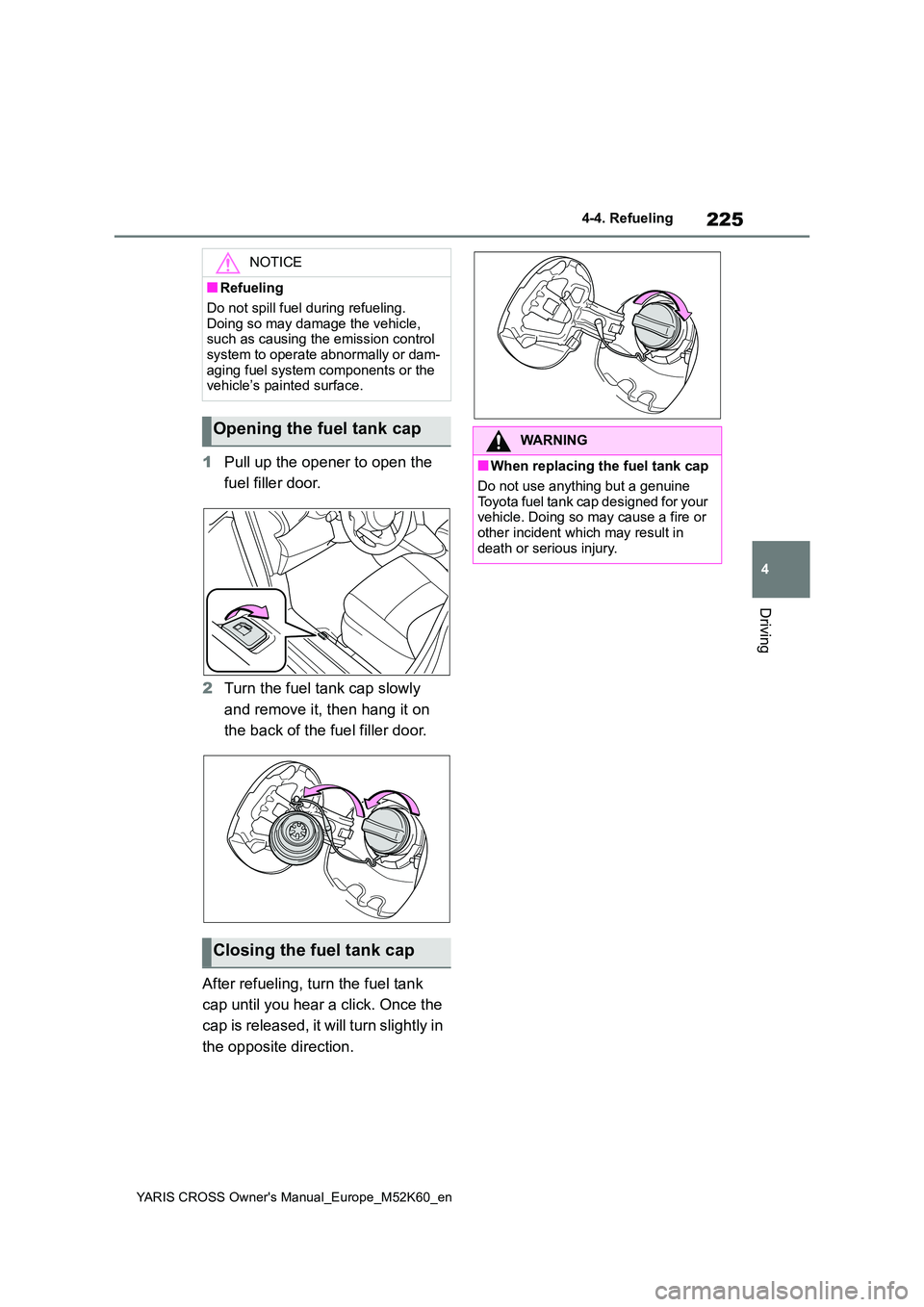
1Pull up the opener to open the
fuel filler door.
2 Turn the fuel tank cap slowly
and remove it, then hang it on
the back of the fuel filler door.
After refueling, turn the fuel tank
cap until you hear a click. Once the
cap is released, it will turn slightly in
the opposite direction.
NOTICE
■Refueling
Do not spill fuel during refueling.
Doing so may damage the vehicle, such as causing the emission control system to operate abnormally or dam-
aging fuel system components or the vehicle’s painted surface.
Opening the fuel tank cap
Closing the fuel tank cap
WARNING
■When replacing the fuel tank cap
Do not use anything but a genuine
Toyota fuel tank cap designed for your vehicle. Doing so may cause a fire or other incident which may result in
death or serious injury.
Page 247 of 650
245
4
YARIS CROSS Owner's Manual_Europe_M52K60_en
4-5. Using the driving support systems
Driving
■Lane departure alert function
When the system determines that
the vehicle might depart from its
lane or course*, a warning is dis-
played on the multi-information dis-
play, and either a warning buzzer
will sound or the steering wheel will
vibrate to alert the driver.
When the warning buzzer sounds or
the steering wheel vibrates, check the
area around your vehicle and carefully
operate the steering wheel to move the
vehicle back to the center of the lane.
Vehicle with BSM: When the system
determines that the vehicle might
depart from its lane and that the possi-
bility of a collision with an overtaking
vehicle in the adjacent lane is high, the
lane departure alert will operate even if
the turn signals are operating.
*: Boundary between asphalt and the
WARNING
●The traffic lines are yellow (which may be more difficult to recognize
than lines that are white).
●The white (yellow) lines cross over
a curb, etc.
●The vehicle is driven on a bright
surface, such as concrete.
●If the edge of the road is not clear
or straight.
●The vehicle is driven on a surface
that is bright due to reflected light, etc.
●The vehicle is driven in an area where the brightness changes sud-denly, such as at the entrances and
exits of tunnels, etc.
●Light from the headlights of an
oncoming vehicle, the sun, etc., enters the camera.
●The vehicle is driven on a slope.
●The vehicle is driven on a road
which tilts left or right, or a winding road.
●The vehicle is driven on an unpaved or rough road.
●The traffic lane is excessively nar-row or wide.
●The vehicle is extremely tilted due to carrying heavy luggage or having improper tire pressure.
●The distance to the preceding vehi-cle is extremely short.
●The vehicle is moving up and down a large amount due to road condi-
tions during driving (poor roads or road seams).
●When driving in a tunnel or at night with the headlights off or when a headlight is dim due to its lens
being dirty or it being misaligned.
●The vehicle is struck by a cross- wind.
●The vehicle is affected by wind from a vehicle driven in a nearby lane.
●The vehicle has just changed lanes or crossed an intersection.
●Tires which differ by structure, man-ufacturer, brand or tread pattern are used.
●When tires of a size other than specified are installed.
●Snow tires, etc., are equipped.
●The vehicle is being driven at extremely high speeds.
Functions included in LTA
system
Page 279 of 650
277
4
YARIS CROSS Owner's Manual_Europe_M52K60_en
4-5. Using the driving support systems
Driving
When the Toyota parking assist-
sensor function is disabled, the
Toyota parking assist-sensor OFF
indicator ( P.92) illuminates.
To re-enable the system when it
was disabled, select on the
multi-information display, select
and then on. If disabled using this
method, the system will not be re-
enabled by turning the power
switch off and then to ON.
WARNING
■Cautions regarding the use of
the system
There is a limit to the degree of recog- nition accuracy and control perfor-
mance that this system can provide, do not overly rely on this system. The driver is always responsible for paying
attention to the vehicle’s surroundings and driving safely.
■To ensure the system can oper-ate properly
Observe the following precautions.
Failing to do so may result in the vehi- cle being unable to be driven safely and possibly cause an accident.
●Do not damage the sensors, and always keep them clean.
●Do not a sticker or an electronic component, such as a backlit
license plate (especially fluorescent type), fog lights, fender pole or wire-less antenna is installed near a
radar sensor.
●Do not subject the radar sensor or its surrounding area to a strong impact. If the radar sensor, front
grille, or front bumper has been subjected to a strong impact, have the vehicle inspected by any autho-
rized Toyota retailer or Toyota authorized repairer, or any reliable repairer. If a sensor or the rear
bumper needs to be removed/installed or replaced, con-tact any authorized Toyota retailer
or Toyota authorized repairer, or any reliable repairer.
●Do n ot m od i fy, d is a sse mb l e o r p ai n t the sensors.
●Do not attach a license plate cover.
●Keep your tires properly inflated.
■When to disable the function
In the following situations, disable the
function as it may operate even though there is no possibility of a colli-sion.
●Failing to observe the warnings above.
●A non-genuine Toyota suspension (lowered suspension, etc.) is
installed.
■Notes when washing the vehicle
Do not apply intensive bursts of water or steam to the sensor area.
Doing so may result in the sensor
malfunctioning.
●When using a high pressure
washer to wash the vehicle, do not spray the sensors directly, as doing so may cause a sensor to malfunc-
tion.
●When using steam to clean the
vehicle, do not direct steam too close to the sensors as doing so may cause a sensor to malfunction.
Page 305 of 650
303
4
YARIS CROSS Owner's Manual_Europe_M52K60_en
4-5. Using the driving support systems
Driving
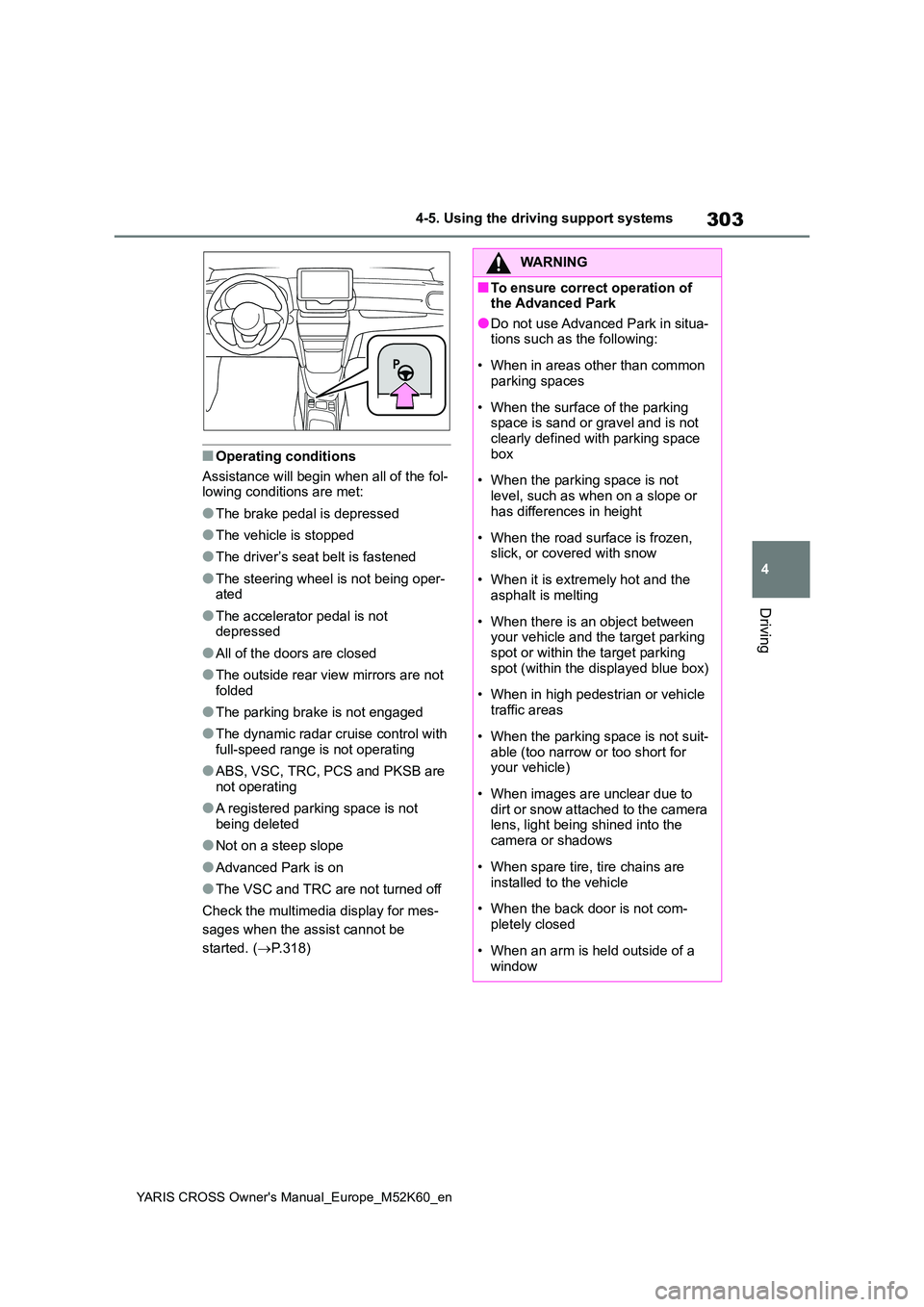
■Operating conditions
Assistance will begin when all of the fol- lowing conditions are met:
●The brake pedal is depressed
●The vehicle is stopped
●The driver’s seat belt is fastened
●The steering wheel is not being oper-ated
●The accelerator pedal is not depressed
●All of the doors are closed
●The outside rear view mirrors are not folded
●The parking brake is not engaged
●The dynamic radar cruise control with
full-speed range is not operating
●ABS, VSC, TRC, PCS and PKSB are
not operating
●A registered parking space is not
being deleted
●Not on a steep slope
●Advanced Park is on
●The VSC and TRC are not turned off
Check the multimedia display for mes-
sages when the assist cannot be
started. ( P.318)
WARNING
■To ensure correct operation of the Advanced Park
●Do not use Advanced Park in situa-tions such as the following:
• When in areas other than common parking spaces
• When the surface of the parking space is sand or gravel and is not clearly defined with parking space
box
• When the parking space is not
level, such as when on a slope or has differences in height
• When the road surface is frozen, slick, or covered with snow
• When it is extremely hot and the asphalt is melting
• When there is an object between your vehicle and the target parking spot or within the target parking
spot (within the displayed blue box)
• When in high pedestrian or vehicle
traffic areas
• When the parking space is not suit-
able (too narrow or too short for your vehicle)
• When images are unclear due to dirt or snow attached to the camera lens, light being shined into the
camera or shadows
• When spare tire, tire chains are
installed to the vehicle
• When the back door is not com-
pletely closed
• When an arm is held outside of a
window
Page 339 of 650
337
4
YARIS CROSS Owner's Manual_Europe_M52K60_en
4-5. Using the driving support systems
Driving
■The Secondary Collision
Brake
When the SRS airbag sensor
detects a collision and the system
operates, the brakes and brake
lights are automatically controlled
to reduce the vehicle speed and
help reduce the possibility of further
damage due to a secondary colli-
sion.
■When the TRC/VSC/ABS systems are operating
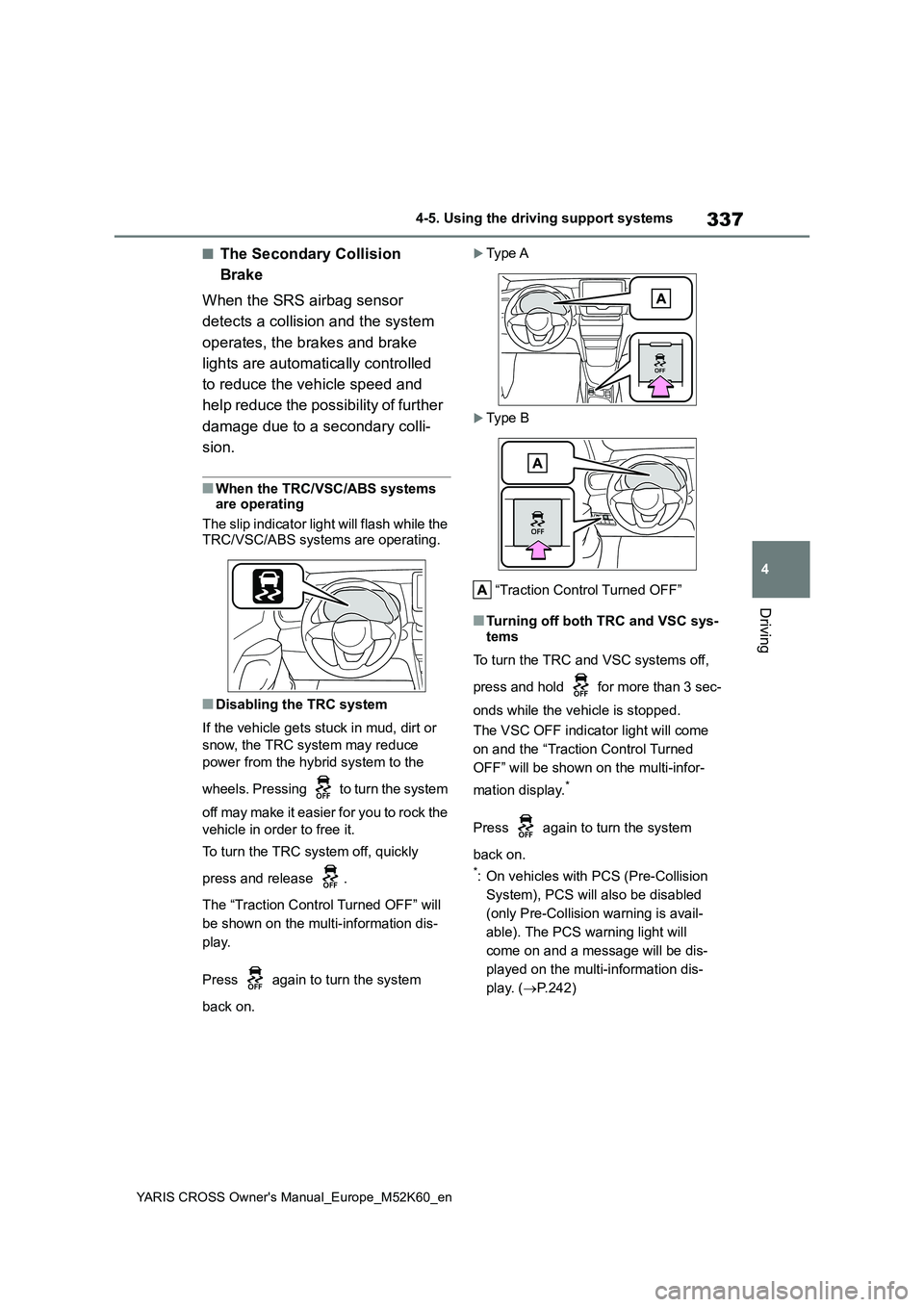
The slip indicator light will flash while the
TRC/VSC/ABS systems are operating.
■Disabling the TRC system
If the vehicle gets stuck in mud, dirt or
snow, the TRC system may reduce
power from the hybrid system to the
wheels. Pressing to turn the system
off may make it easier for you to rock the
vehicle in order to free it.
To turn the TRC system off, quickly
press and release .
The “Traction Control Turned OFF” will
be shown on the multi-information dis-
play.
Press again to turn the system
back on.
Ty p e A
Ty p e B
“Traction Control Turned OFF”
■Turning off both TRC and VSC sys- tems
To turn the TRC and VSC systems off,
press and hold for more than 3 sec-
onds while the vehicle is stopped.
The VSC OFF indicator light will come
on and the “Traction Control Turned
OFF” will be shown on the multi-infor-
mation display.*
Press again to turn the system
back on.
*: On vehicles with PCS (Pre-Collision
System), PCS will also be disabled
(only Pre-Collision warning is avail-
able). The PCS warning light will
come on and a message will be dis-
played on the multi-information dis-
play. ( P.242)
Page 404 of 650
402
YARIS CROSS Owner's Manual_Europe_M52K60_en
6-3. Do-it-yourself maintenance
formed.
8 Drive straight (with occasional
left and right turns) at approxi-
mately 40 km/h (25 mph) or
more for approximately 10 to 30
minutes.
Even if the vehicle is not driven at
approximately 40 km/h (25 mph) or more, initialization can be completed by driving for a long time. However, if ini-
tialization does not complete after driv- ing for 1 hour or more, park the vehicle in a safe place for more than 15 min-
utes and please drive a vehicle once again with the power switch ON. ( P.404)
■Initialization procedure
●Make sure to carry out initialization after adjusting the tire inflation pres-
sure. Also, make sure the tires are cold before carrying out initialization or tire
inflation pressure adjustment.
●If you have accidentally turned the
power switch off during initialization, it is not necessary to press the reset switch again as initialization will
restart automatically when the power switch is turned to ON the next time.
●If you accidentally press the reset switch when initialization is not neces-sary, adjust the tire inflation pressure
to the specified level when the tires are cold, and conduct initialization again.
●While the position of each tire is being
determined and the inflation pres-
sures are not being displayed on the multi-information display, if the infla-tion pressure of a tire drops, the tire
pressure warning light will come on.
■If the tire pressure warning system is not initialized properly
●In the following situations, initialization may take longer than usual to be com-pleted or may not be possible. (Usu-
ally, the vehicle will need to be driven for approximately 10 to 30 minutes to complete initialization.) If initialization
is not complete after driving approxi- mately 30 minutes, continue driving for a while.
• If the vehicle is driven on an unpaved road, it may take longer to complete initialization.
• If the vehicle is backed up while per- forming initialization, data collected during initialization will be cleared and
it will take longer than normal to com- plete.• If the vehicle is driven in heavy traffic
or another situation where other vehi- cles are driven close by, it may take time for the system to recognize the
tire pressure warning valve and trans- mitters of your vehicle over those of other vehicles.
If initialization is not complete after driv-
ing for approximately 1 hour, park the
vehicle in a safe place for more than 15
minutes and then drive the vehicle
again.
●In the following situations, initialization will not be started or was not com-
pleted properly and the system will not operate properly. Perform the initial-ization procedure again.
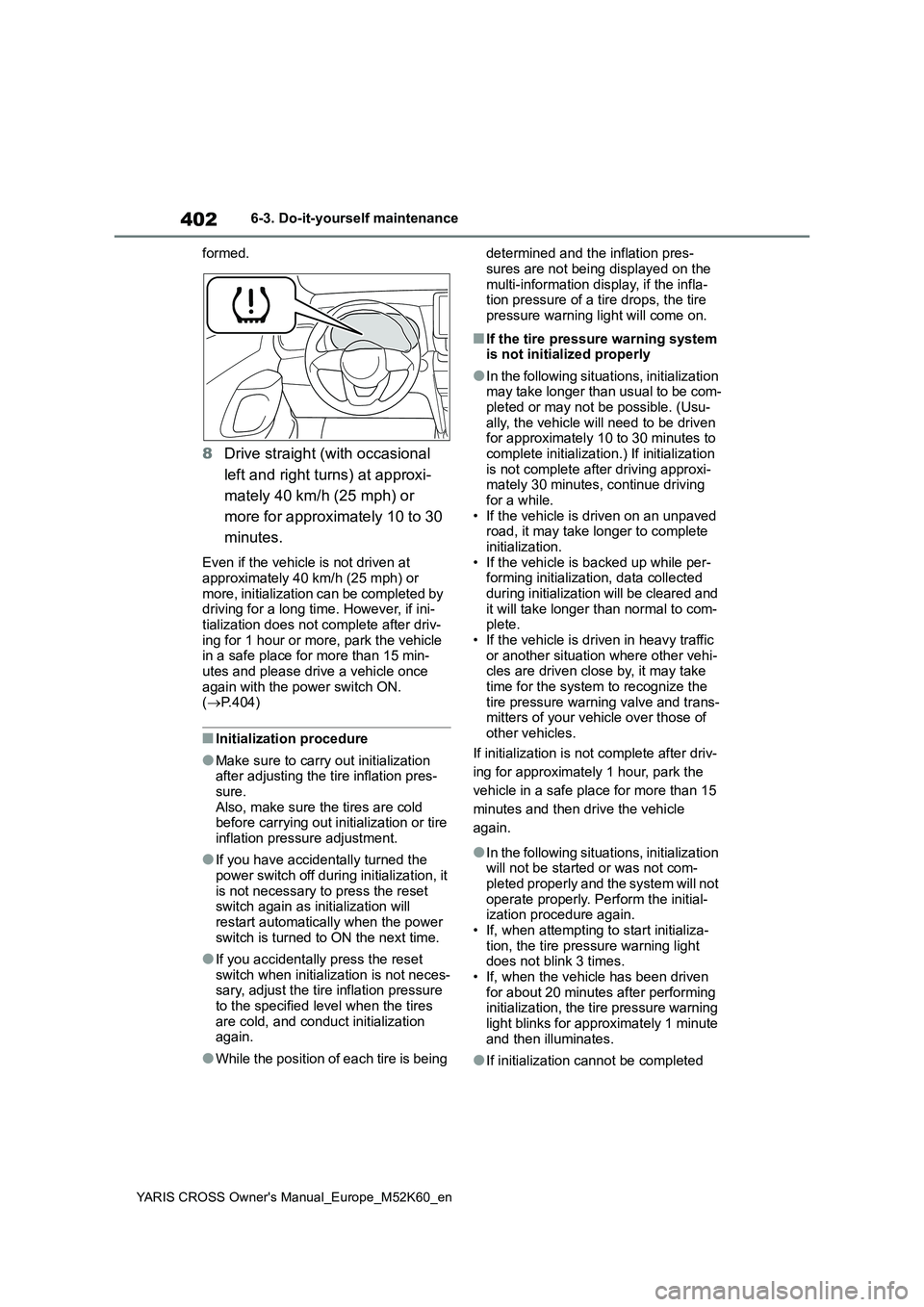
• If, when attempting to start initializa- tion, the tire pressure warning light does not blink 3 times.
• If, when the vehicle has been driven for about 20 minutes after performing initialization, the tire pressure warning
light blinks for approximately 1 minute and then illuminates.
●If initialization cannot be completed
Page 406 of 650
404
YARIS CROSS Owner's Manual_Europe_M52K60_en
6-3. Do-it-yourself maintenance
played on the multi-information display.
Registration may take longer than approximately 1 hour in certain situa-tions, such as when the vehicle is
stopped for a long time at traffic lights, etc. ( P.404)
8Initializing the tire pressure
warning system. ( P.401)
■When registering ID codes
●Before performing ID code registra- tion, make sure that no wheels with tire pressure warning valve and trans-
mitters installed are near the vehicle.
●Make sure to initialize the tire pres-
sure warning system after registering the ID codes. If the system is initial-ized before registering the ID codes,
the initialized values will be invalid.
●As the tires will be warm when regis-
tration is completed, make sure to allow the tires to cool before perform-ing initialization.
■Canceling ID code registration
●To cancel ID code registration after it has been started, operate the multi-
information display again to select “Identifying Each Wheel & Position”. ( P.403)
●If ID code registration has been can-
celed, the tire pressure warning light will blink for approximately 1 minute when the power switch is turned to
ON mode and then illuminate. The tire pressure warning system will be oper-ational when the tire pressure warning
light turns off.
●If the warning light does not turn off
even after several minutes have elapsed, ID code registration may not have been canceled correctly. To can-
cel registration, perform the ID code registration start procedure again and then turn the power switch off before
driving.
■If ID codes are not registered prop-
erly
●In the following situations, ID code
registration may take longer than usual to be completed or may not be possible. (Usually, the vehicle will
need to be driven for approximately 10 to 30 minutes to complete ID code registration.)
If ID code registration is not complete after driving for approximately 30 min-utes, continue driving for a while.
• If the vehicle is driven on an unpaved road, it may take longer than normal to complete registration.
• If the vehicle is backed up while per- forming registration, data collected during registration will be cleared, and
it will take longer than normal to com- plete.• If the vehicle is driven in heavy traffic
or another situation where other vehi- cles are driven close by, it may take time for the system to recognize the
tire pressure warning valve and trans- mitters of your vehicle over those of other vehicles.
• If a wheel with a tire pressure warning valve and transmitter installed is inside or near the vehicle, registration
of the ID codes for the installed wheels may not be possible.
If ID registration is not complete after
driving for approximately 1 hour, park
the vehicle in a safe place for approxi-
mately 20 minutes and then perform the
ID code registration procedure again.
●In the following situations, ID code registration will not be started or was not completed properly and the sys-
tem will not operate properly. Perform the ID code registration procedure again.
• If, when attempting to start ID code registration, the tire pressure warning light does not blink slowly 3 times.
• If, when the vehicle has been driven for about 10 minutes after performing ID code registration, the tire pressure
warning light blinks for approximately 1 minute and then illuminates.
Page 425 of 650
423
6
YARIS CROSS Owner's Manual_Europe_M52K60_en
6-3. Do-it-yourself maintenance
Maintenance and care
Check the wattage of the light bulb
to be replaced. ( P.495)
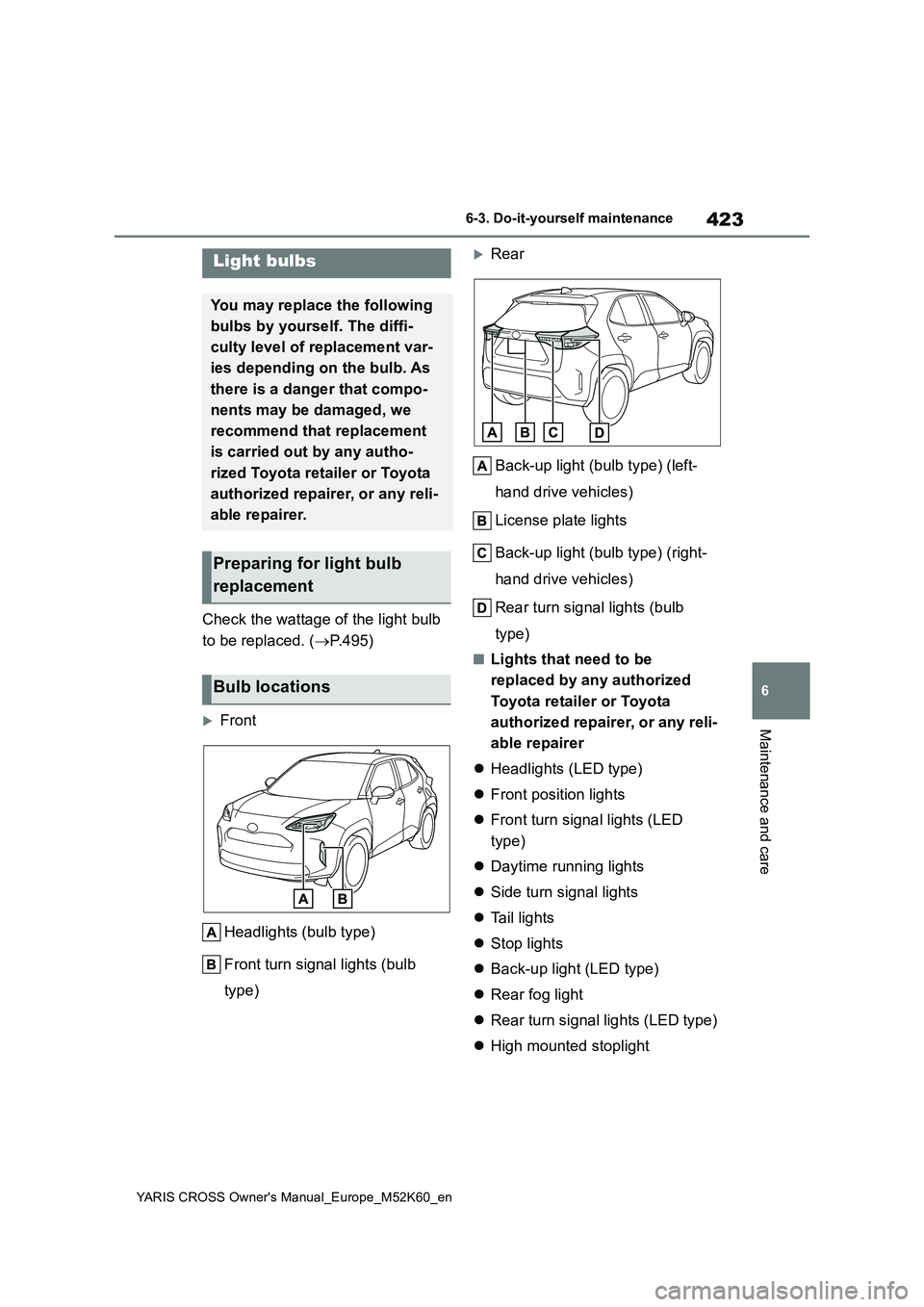
Front
Headlights (bulb type)
Front turn signal lights (bulb
type)
Rear
Back-up light (bulb type) (left-
hand drive vehicles)
License plate lights
Back-up light (bulb type) (right-
hand drive vehicles)
Rear turn signal lights (bulb
type)
■Lights that need to be
replaced by any authorized
Toyota retailer or Toyota
authorized repairer, or any reli-
able repairer
Headlights (LED type)
Front position lights
Front turn signal lights (LED
type)
Daytime running lights
Side turn signal lights
Ta i l l i g h t s
Stop lights
Back-up light (LED type)
Rear fog light
Rear turn signal lights (LED type)
High mounted stoplight
Light bulbs
You may replace the following
bulbs by yourself. The diffi-
culty level of replacement var-
ies depending on the bulb. As
there is a danger that compo-
nents may be damaged, we
recommend that replacement
is carried out by any autho-
rized Toyota retailer or Toyota
authorized repairer, or any reli-
able repairer.
Preparing for light bulb
replacement
Bulb locations
Page 426 of 650
424
YARIS CROSS Owner's Manual_Europe_M52K60_en
6-3. Do-it-yourself maintenance
■LED light bulbs
The lights other than the following lights
each consist of a number of LEDs. If any of the LEDs burn out, take your vehicle to any authorized Toyota retailer or
Toyota authorized repairer, or any reli- able repairer to have the light replaced.
●Headlights (bulb type)
●Front turn signal lights (bulb type)
●Rear turn signal lights (bulb type)
●License plate lights
●Back-up light (bulb type)
■Condensation build-up on the
inside of the lens
Temporary condensation build-up on the inside of the headlight lens does not
indicate a malfunction. Contact any authorized Toyota retailer or Toyota authorized repairer, or any reliable
repairer for more information in the fol- lowing situations:
●Large drops of water have built up on the inside of the lens.
●Water has built up inside the head-light.
■When replacing light bulbs
P. 4 2 1
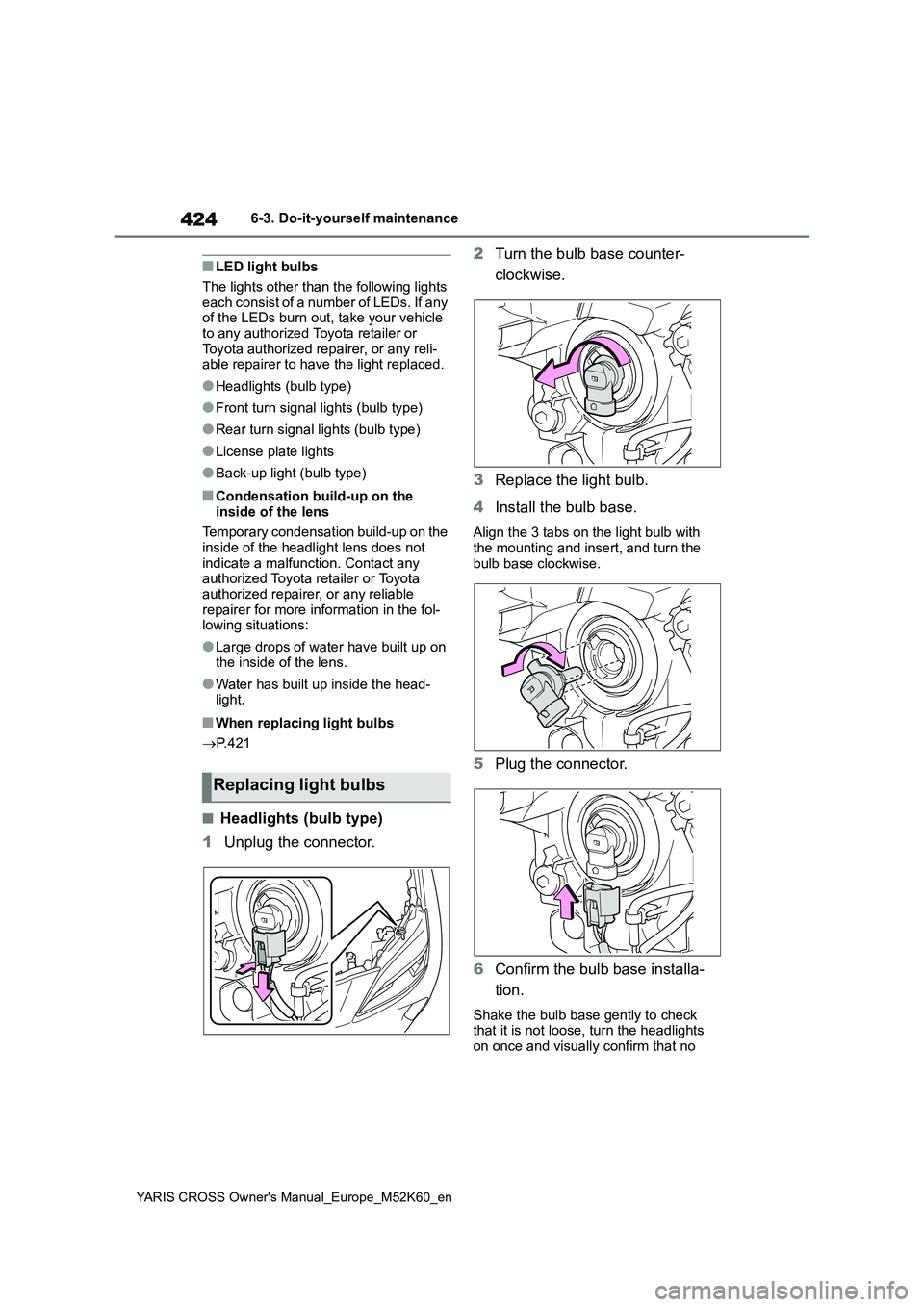
■Headlights (bulb type)
1 Unplug the connector.
2 Turn the bulb base counter-
clockwise.
3 Replace the light bulb.
4 Install the bulb base.
Align the 3 tabs on the light bulb with the mounting and insert, and turn the
bulb base clockwise.
5 Plug the connector.
6 Confirm the bulb base installa-
tion.
Shake the bulb base gently to check that it is not loose, turn the headlights
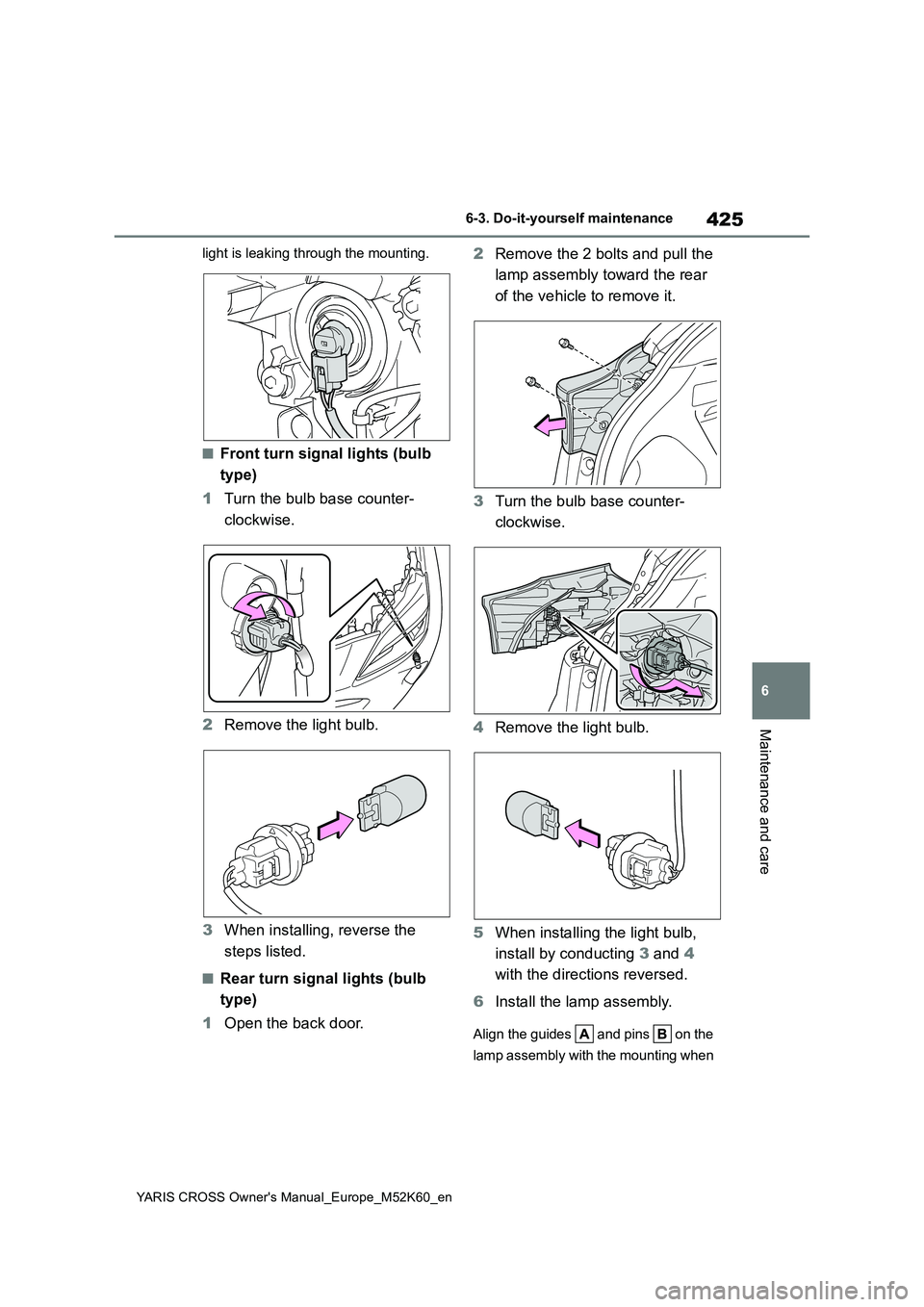
on once and visually confirm that no
Replacing light bulbs
Page 427 of 650
425
6
YARIS CROSS Owner's Manual_Europe_M52K60_en
6-3. Do-it-yourself maintenance
Maintenance and care
light is leaking through the mounting.
■Front turn signal lights (bulb
type)
1 Turn the bulb base counter-
clockwise.
2 Remove the light bulb.
3 When installing, reverse the
steps listed.
■Rear turn signal lights (bulb
type)
1 Open the back door.
2 Remove the 2 bolts and pull the
lamp assembly toward the rear
of the vehicle to remove it.
3 Turn the bulb base counter-
clockwise.
4 Remove the light bulb.
5 When installing the light bulb,
install by conducting 3 and 4
with the directions reversed.
6 Install the lamp assembly.
Align the guides and pins on the
lamp assembly with the mounting when