electrical TOYOTA YARIS CROSS 2021 Owners Manual
[x] Cancel search | Manufacturer: TOYOTA, Model Year: 2021, Model line: YARIS CROSS, Model: TOYOTA YARIS CROSS 2021Pages: 650, PDF Size: 132.86 MB
Page 98 of 650
96
YARIS CROSS Owner's Manual_Europe_M52K60_en
2-1. Instrument cluster
• When stopped on a hill or other slope
• When driving on a slope or around a curve
Odometer and trip meter display ( P. 9 7 )
Outside temperature
Displays the outside temperature within the range of -40°C (-40 °F) to 60°C (140°F)
Display change button (P. 9 7 )
Shift position indicator ( P.197)
■Engine speed
On hybrid vehicles, engine speed is pre- cisely controlled in order to help improve fuel efficiency and reduce exhaust emis-
sions, etc. There are times when the engine speed that is displayed may differ even when
vehicle operation and driving conditions are the same.
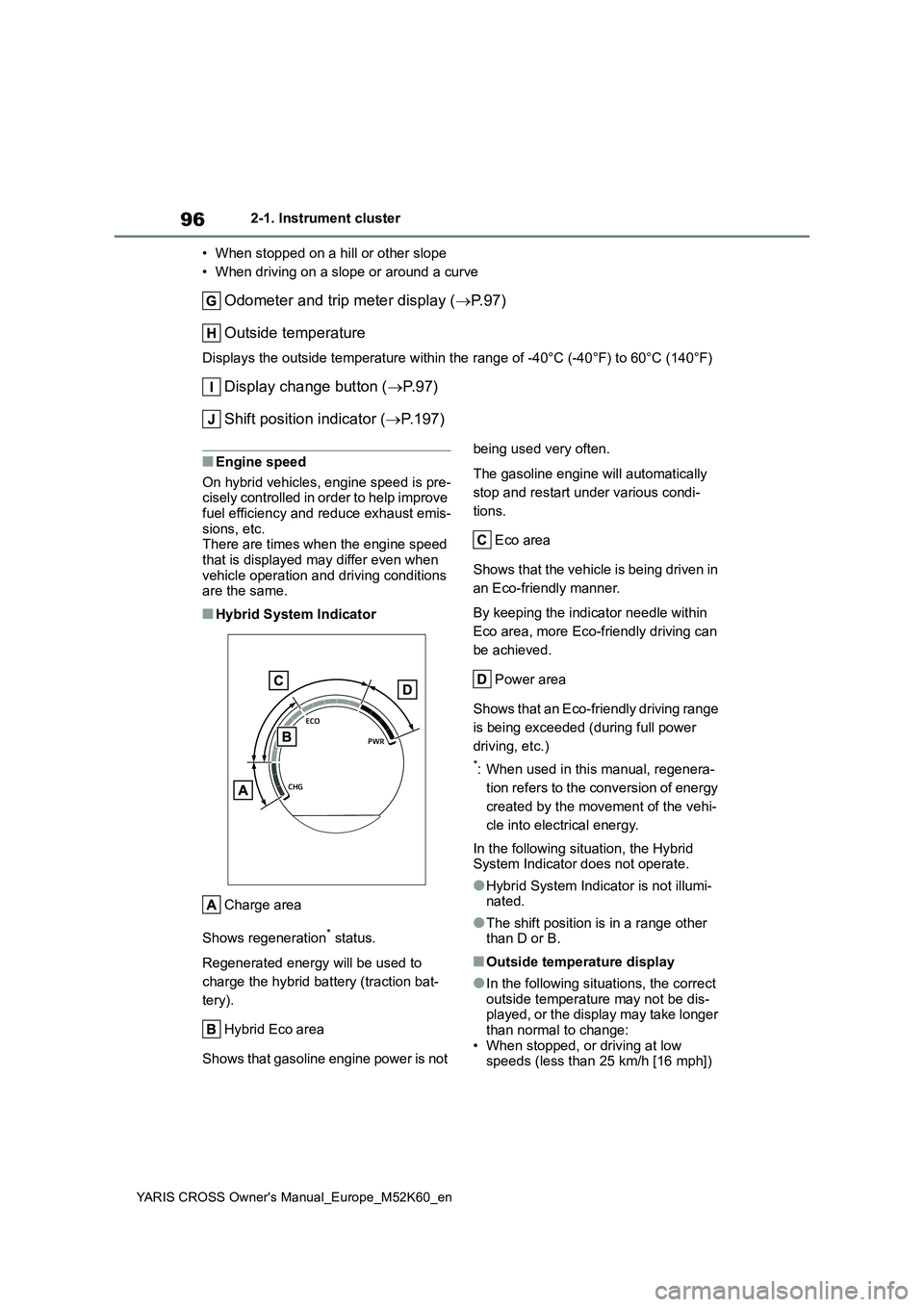
■Hybrid System Indicator
Charge area
Shows regeneration* status.
Regenerated energy will be used to
charge the hybrid battery (traction bat-
tery).
Hybrid Eco area
Shows that gasoline engine power is not
being used very often.
The gasoline engine will automatically
stop and restart under various condi-
tions.
Eco area
Shows that the vehicle is being driven in
an Eco-friendly manner.
By keeping the indicator needle within
Eco area, more Eco-friendly driving can
be achieved.
Power area
Shows that an Eco-friendly driving range
is being exceeded (during full power
driving, etc.)
*: When used in this manual, regenera-
tion refers to the conversion of energy
created by the movement of the vehi-
cle into electrical energy.
In the following situation, the Hybrid System Indicator does not operate.
●Hybrid System Indicator is not illumi-nated.
●The shift position is in a range other than D or B.
■Outside temperature display
●In the following situations, the correct outside temperature may not be dis-played, or the display may take longer
than normal to change: • When stopped, or driving at low speeds (less than 25 km/h [16 mph])
Page 105 of 650
103
2
YARIS CROSS Owner's Manual_Europe_M52K60_en
2-1. Instrument cluster
Vehicle status information and indicators
Shows that an Eco-friendly driving range
is being exceeded (during full power
driving, etc.)
*: When used in this manual, regenera-
tion refers to the conversion of energy
created by the movement of the vehi-
cle into electrical energy.
In the following situation, the Hybrid
System Indicator does not operate.
●“READY” indicator is not illuminated.
●The shift position is in a range other than D or B.
■Outside temperature display
●In the following situations, the correct outside temperature may not be dis-
played, or the display may take longer than normal to change:• When stopped, or driving at low
speeds (less than 25 km/h [16 mph]) • When the outside temperature has changed suddenly (at the
entrance/exit of a garage, tunnel, etc.)
●When “--” is displayed, the system
may be malfunctioning. Take your vehicle to any authorized Toyota retailer or Toyota authorized repairer,
or any reliable repairer.
■Fuel gauge and driving range dis- play
The fuel gauge and driving range dis-
play are linked. If the fuel gauge and driving range display do not update after refueling a small amount, they can be
updated by performing the following pro- cedure:
1 Stop the vehicle on a level surface.
Wait until the fuel in the fuel tank stabi-
lizes.
2 Press the display change button to change the odometer and trip meter display to the odometer.
3 Turn the power switch off.
4 While pressing and holding the dis-
play change button, turn the power switch to ON.
5 Continue holding the display change
button for approximately 5 seconds.
Release the button when the odometer begins blinking.
Updating will be complete when the odometer blinks for approximately 5 seconds and then returns to the normal
display.
■Liquid crystal display
P. 1 1 3
■Customization
The gauges and meters can be custom-
ized in of the multi-information dis-
play. ( P.498)
WARNING
■The information display at low temperatures
Allow the interior of the vehicle to warm up before using the liquid crys-tal information display. At extremely
low temperatures, the information dis- play monitor may respond slowly, and display changes may be delayed.
For example, there is a lag between the driver’s shifting and the new gear
number appearing on the display. This lag could cause the driver to downshift again, causing rapid and
excessive engine braking and possi- bly an accident resulting in death or injury.
NOTICE
■To prevent damage to the engine
and its components
The engine may be overheating if the engine coolant temperature gauge is
in the red zone (H). In this case, immediately stop the vehicle in a safe place, and check the engine after it
has cooled completely. ( P.481)
Page 122 of 650
120
YARIS CROSS Owner's Manual_Europe_M52K60_en
2-1. Instrument cluster
■Street name display (vehicles with
navigation system)
Only street names which are included in the map data will be displayed.Select on the multi-information
display ( P.498) and then “HUD
Main”.
■Enabling/disabling the head-
up display
Press the meter control switch
to enable/disable the head-up dis-
play.
■Changing the head-up display
settings
Press and hold the meter con-
trol switch to change the following
settings:
Brightness and vertical position
of the head-up display
Select to adjust the brightness or verti-
cal position of the head-up display.
Display content
Select to change the display between
the following:
• No content
• Hybrid System Indicator
• Tachometer
Select to enable/disable the fol-
lowing items:
• Route guidance to destination (if
equipped)
• Driving support system display (if
equipped)
• Compass (heading-up display) (if
equipped)
• Audio system operation status (if
equipped)
WARNING
■When using the head-up display
●Check that the position and bright- ness of the head-up display image
does not interfere with safe driving. Incorrect adjustment of the image’s position or brightness may obstruct
the driver’s view and lead to an accident, resulting in death or seri-ous injury.
●Do not continuously look at the head-up display while driving as
you may fail to see pedestrians, objects on the road, etc., ahead of the vehicle.
NOTICE
■Head-up display projector
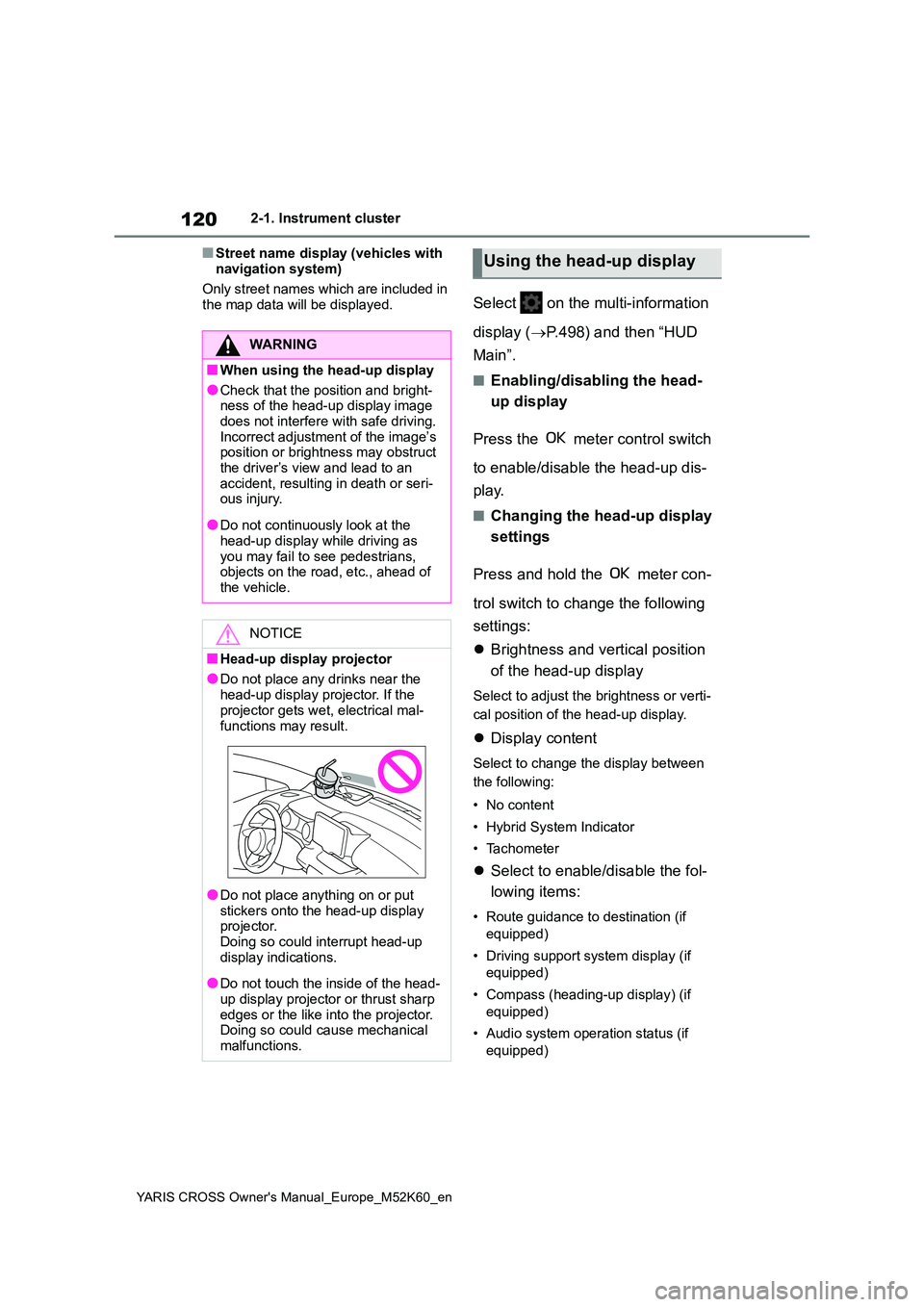
●Do not place any drinks near the
head-up display projector. If the projector gets wet, electrical mal-
functions may result.
●Do not place anything on or put
stickers onto the head-up display projector. Doing so could interrupt head-up
display indications.
●Do not touch the inside of the head-
up display projector or thrust sharp edges or the like into the projector. Doing so could cause mechanical
malfunctions.
Using the head-up display
Page 133 of 650
131
3
YARIS CROSS Owner's Manual_Europe_M52K60_en
3-1. Key information
Before driving
battery may be depleted. Replace the
battery when necessary. ( P.415) • The wireless remote control does not operate.
• The detection area becomes smaller.
■Key battery depletion (vehicles with a smart entry & start system)
●The standard battery life is 1 to 2 years.
●If the battery becomes low, an alarm will sound in the cabin and a message will be shown on the multi-information
display when the hybrid system is stopped.
●To reduce key battery depletion when the electronic key is to not be used for long periods of time, set the electronic
key to the battery-saving mode. ( P.153)
●As the electronic key always receives radio waves, the battery will become depleted even if the electronic key is
not used. The following symptoms indicate that the electronic key battery may be depleted. Replace the battery
when necessary. ( P.415) • The smart entry & start system or the wireless remote control does not oper-
ate. • The detection area becomes smaller.• The LED indicator on the key surface
does not turn on.
●To avoid serious deterioration, do not
leave the electronic key within 1 m (3 ft.) of the following electrical appli-ances that produce a magnetic field:
•TVs • Personal computers• Cellular phones, cordless phones and
battery chargers • Recharging cellular phones or cord-less phones
• Table lamps • Induction cookers
●If the electronic key is near the vehicle for longer than necessary, even if the smart entry & start system is not oper-
ated, the key battery may become depleted faster than normal.
■Replacing the battery
P. 4 1 5
■If “New Key Registered Contact Your Dealer if You Did Not Register a New Key” is shown on the multi-
information display (vehicles with a smart entry & start system)
This message will be displayed each
time the driver’s door is opened when the doors are unlocked from the outside for approximately 10 days after a new
electronic key has been registered. If this message is displayed but you have not had a new electronic key regis-
tered, ask any authorized Toyota retailer or Toyota authorized repairer, or any reli-able repairer to check if an unknown
electronic key (other than those in your possession) has been registered.
■If a wrong key is used
The key cylinder rotates freely, isolated
from the internal mechanism.
NOTICE
■To prevent key damage
●Do not drop the keys, subject them
to strong shocks, or bend them.
●Do not expose the keys to high
temperatures for long periods of time.
●Do not get the keys wet or wash them in an ultrasonic washer, etc.
●Vehicles with a smart entry & start system: Do not attach metallic or magnetic materials to the keys or
place the keys close to such materi- als.
●Do not disassemble the keys.
●Do not attach a sticker or anything
else to the surface of the key.
Page 134 of 650
132
YARIS CROSS Owner's Manual_Europe_M52K60_en
3-1. Key information
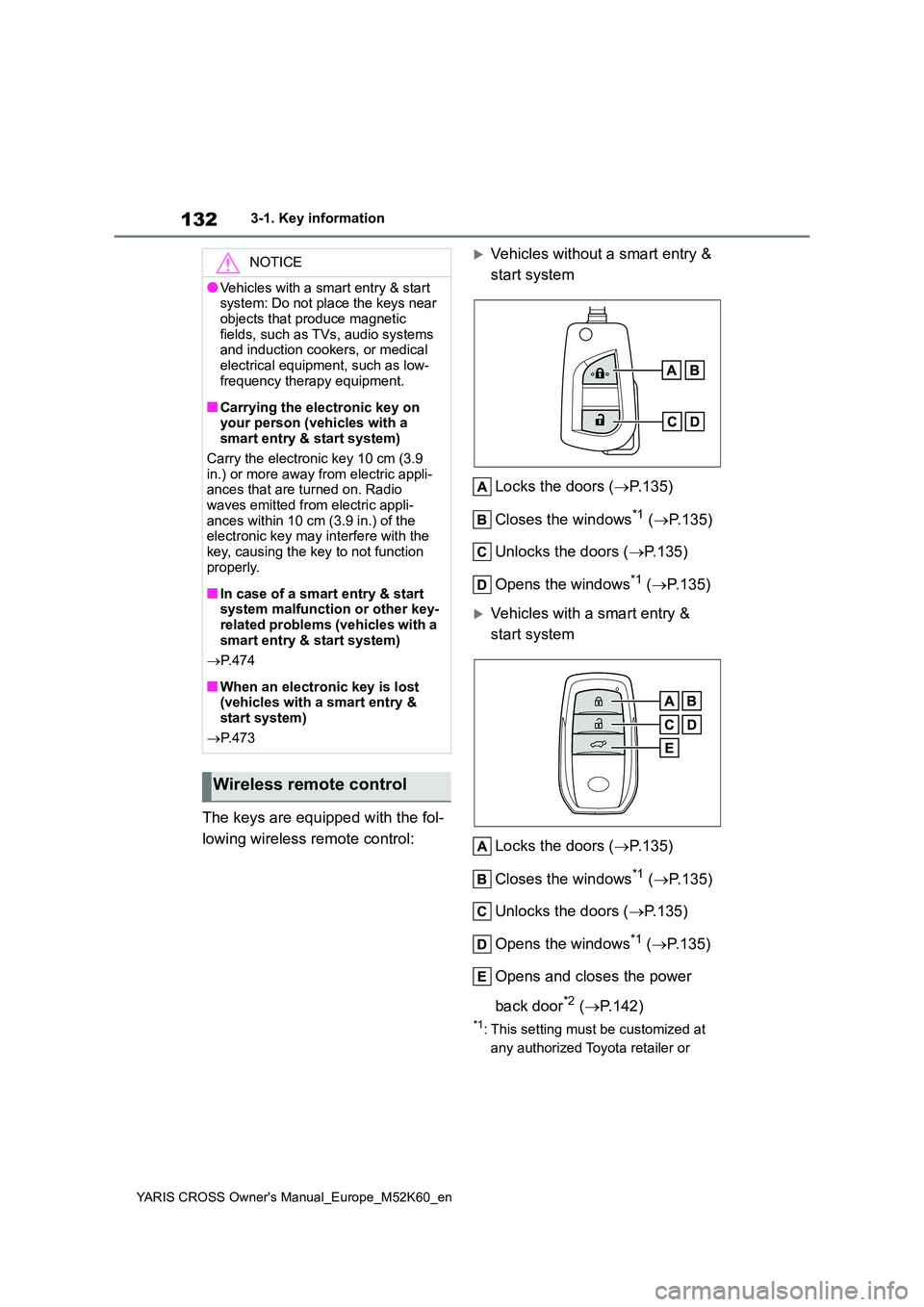
The keys are equipped with the fol-
lowing wireless remote control:
Vehicles without a smart entry &
start system
Locks the doors ( P.135)
Closes the windows*1 ( P.135)
Unlocks the doors ( P.135)
Opens the windows*1 ( P.135)
Vehicles with a smart entry &
start system
Locks the doors ( P.135)
Closes the windows*1 ( P.135)
Unlocks the doors ( P.135)
Opens the windows*1 ( P.135)
Opens and closes the power
back door*2 ( P.142)
*1: This setting must be customized at
any authorized Toyota retailer or
NOTICE
●Vehicles with a smart entry & start system: Do not place the keys near
objects that produce magnetic fields, such as TVs, audio systems and induction cookers, or medical
electrical equipment, such as low- frequency therapy equipment.
■Carrying the electronic key on your person (vehicles with a smart entry & start system)
Carry the electronic key 10 cm (3.9 in.) or more away from electric appli-ances that are turned on. Radio
waves emitted from electric appli- ances within 10 cm (3.9 in.) of the electronic key may interfere with the
key, causing the key to not function properly.
■In case of a smart entry & start system malfunction or other key-related problems (vehicles with a
smart entry & start system)
P. 4 7 4
■When an electronic key is lost (vehicles with a smart entry & start system)
P. 4 7 3
Wireless remote control
Page 135 of 650
133
3
YARIS CROSS Owner's Manual_Europe_M52K60_en
3-1. Key information
Before driving
Toyota authorized repairer, or any
reliable repairer.
*2: If equipped
■Conditions affecting the operation of the wireless remote control (vehicles without a smart entry &
start system)
The wireless remote control function may not operate normally in the follow-
ing situations:
●When the wireless key battery is
depleted
●Near a TV tower, electric power plant,
gas station, radio station, large dis- play, airport or other facility that gen-erates strong radio waves or electrical
noise
●When carrying a portable radio, cellu-
lar phone or other wireless communi- cation devices
●When the wireless key is in contact with, or is covered by a metallic object
●When another wireless key (that emits radio waves) is being used nearby
●If window tint with a metallic content or metallic objects are attached to the rear window
■Conditions affecting the operation
of the smart entry & start system or wireless remote control (vehicles
with a smart entry & start system)
P. 1 5 4
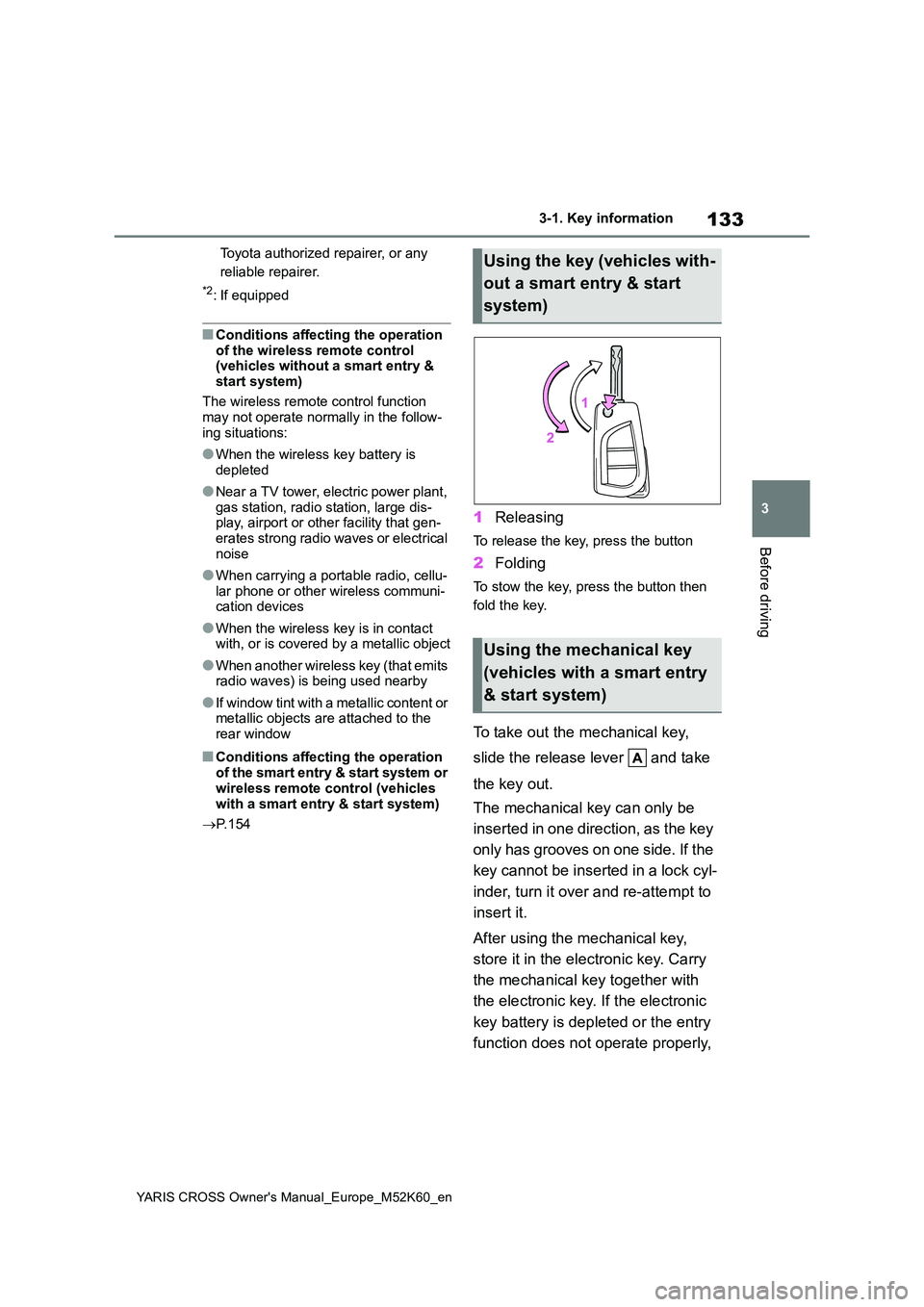
1Releasing
To release the key, press the button
2Folding
To stow the key, press the button then
fold the key.
To take out the mechanical key,
slide the release lever and take
the key out.
The mechanical key can only be
inserted in one direction, as the key
only has grooves on one side. If the
key cannot be inserted in a lock cyl-
inder, turn it over and re-attempt to
insert it.
After using the mechanical key,
store it in the electronic key. Carry
the mechanical key together with
the electronic key. If the electronic
key battery is depleted or the entry
function does not operate properly,
Using the key (vehicles with-
out a smart entry & start
system)
Using the mechanical key
(vehicles with a smart entry
& start system)
Page 149 of 650
147
3
YARIS CROSS Owner's Manual_Europe_M52K60_en
3-2. Opening, closing and locking the doors
Before driving
of the rear bumper and moved away
from the rear bumper. The power back door may also be operated by putting a hand, an elbow,
a knee, etc. near the lower center part of the rear bumper and moving it away from the rear bumper. Make sure to
hold it close enough to the center part of the rear bumper.
■Situations in which the Hands Free Power Back Door may not operate
properly
In the following situations, the Hands Free Power Back Door may not operate
properly:
●When a foot remains under the rear
bumper
●If the rear bumper is strongly hit with a
foot or is touched for a while
If the rear bumper has been touched for
a while, wait for a short time before
attempting to operate the Hands Free
Power Back Door again.
●When operated while a person is too
close to the rear bumper
●When an external radio wave source
interferes with the communication between the electronic key and the vehicle ( P.154)
●When the vehicle is parked near an electrical noise source which affects
the sensitivity of the Hands Free Power Back Door, such as a pay park-ing spot, gas station, electrically
heated road, or fluorescent light
●When the vehicle is near a TV tower,
electric power plant, radio station, large display, airport or other facility that generates strong radio waves or
electrical noise
●When a large amount of water is
applied to the rear bumper, such as when the vehicle is being washed or in heavy rain
●When mud, snow, ice, etc. is attached to the rear bumper
●When the vehicle has been parked for
a while near objects that may move
and contact the rear bumper, such as plants
●When an accessory is installed to the rear bumper
If an accessory has been installed, turn
the Hands Free Power Back Door (kick
sensor) operation setting off.
■Preventing unintentional operation of the Hands Free Power Back Door
When an electronic key is in the opera- tion range, the Hands Free Power Back Door may operate unintentionally, so be
careful in the following situations.
●When a large amount of water is
applied to the rear bumper, such as when the vehicle is being washed or in heavy rain
●When dirt is wiped off the rear bumper
●When a small animal or small object, such as a ball, moves under the rear bumper
●When an object is moved from under the rear bumper
●If someone is swinging their legs while sitting on the rear bumper
●If the legs or another part of some-one’s body contacts the rear bumper
while passing by the vehicle
●When the vehicle is parked near an
electrical noise source which affects the sensitivity of the Hands Free Power Back Door, such as a pay park-
ing spot, gas station, electrically heated road, or fluorescent light
●When the vehicle is near a TV tower, electric power plant, radio station, large display, airport or other facility
that generates strong radio waves or electrical noise
●When the vehicle is parked in a place where objects such as plants are near the rear bumper
●If luggage, etc. is set near the rear bumper
●If accessories or a vehicle cover is
Page 156 of 650
154
YARIS CROSS Owner's Manual_Europe_M52K60_en
3-2. Opening, closing and locking the doors
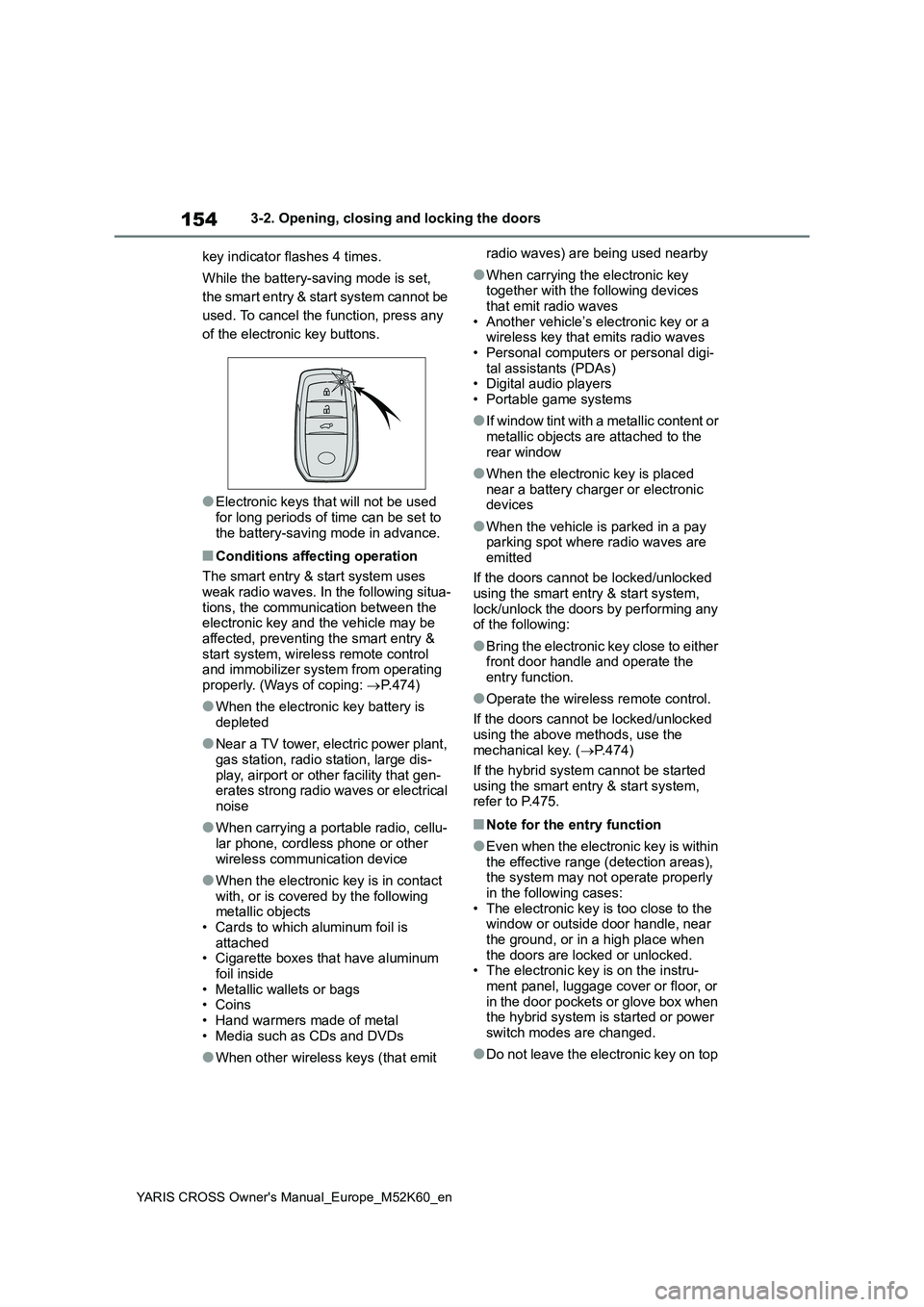
key indicator flashes 4 times.
While the battery-saving mode is set,
the smart entry & start system cannot be
used. To cancel the function, press any
of the electronic key buttons.
●Electronic keys that will not be used
for long periods of time can be set to the battery-saving mode in advance.
■Conditions affecting operation
The smart entry & start system uses
weak radio waves. In the following situa- tions, the communication between the electronic key and the vehicle may be
affected, preventing the smart entry & start system, wireless remote control and immobilizer system from operating
properly. (Ways of coping: P.474)
●When the electronic key battery is
depleted
●Near a TV tower, electric power plant,
gas station, radio station, large dis- play, airport or other facility that gen-erates strong radio waves or electrical
noise
●When carrying a portable radio, cellu-
lar phone, cordless phone or other wireless communication device
●When the electronic key is in contact with, or is covered by the following metallic objects
• Cards to which aluminum foil is attached• Cigarette boxes that have aluminum
foil inside • Metallic wallets or bags• Coins
• Hand warmers made of metal • Media such as CDs and DVDs
●When other wireless keys (that emit
radio waves) are being used nearby
●When carrying the electronic key together with the following devices
that emit radio waves • Another vehicle’s electronic key or a wireless key that emits radio waves
• Personal computers or personal digi- tal assistants (PDAs)• Digital audio players
• Portable game systems
●I f w i n d o w t i n t w i t h a m e t a l l i c c o n t e n t o r
metallic objects are attached to the rear window
●When the electronic key is placed near a battery charger or electronic devices
●When the vehicle is parked in a pay parking spot where radio waves are
emitted
If the doors cannot be locked/unlocked using the smart entry & start system,
lock/unlock the doors by performing any of the following:
●Bring the electronic key close to either front door handle and operate the entry function.
●Operate the wireless remote control.
If the doors cannot be locked/unlocked
using the above methods, use the mechanical key. ( P.474)
If the hybrid system cannot be started
using the smart entry & start system, refer to P.475.
■Note for the entry function
●Even when the electronic key is within the effective range (detection areas), the system may not operate properly
in the following cases: • The electronic key is too close to the window or outside door handle, near
the ground, or in a high place when the doors are locked or unlocked.• The electronic key is on the instru-
ment panel, luggage cover or floor, or in the door pockets or glove box when the hybrid system is started or power
switch modes are changed.
●Do not leave the electronic key on top
Page 158 of 650
156
YARIS CROSS Owner's Manual_Europe_M52K60_en
3-2. Opening, closing and locking the doors
■If the smart entry & start system
does not operate properly
●Locking and unlocking the doors:
P. 4 7 4
●Starting the hybrid system: P.475
■Customization
Some functions can be customized. ( P.498)
■If the smart entry & start system has been deactivated in a custom-
ized setting
●Locking and unlocking the doors: Use
the wireless remote control or mechanical key. ( P.135, 474)
●Starting the hybrid system and chang- ing power switch modes: P. 4 7 5
●Stopping the hybrid system: P. 1 9 3
■Certification for the smart entry & start system
P. 5 7 5
WARNING
■Caution regarding interference with electronic devices
●People with implantable cardiac
pacemakers, cardiac resynchroni- zation therapy-pacemakers or implantable cardioverter defibrilla-
tors should maintain a reasonable distance between themselves and the smart entry & start system
antennas. ( P.152) The radio waves may affect the operation of such devices. If neces-
sary, the entry function can be dis- abled. Ask any authorized Toyota retailer or Toyota authorized
repairer, or any reliable repairer for details, such as the frequency of radio waves and timing of the emit-
ted radio waves. Then, consult your doctor to see if you should disable the entry function.
●Users of any electrical medical device other than implantable car-diac pacemakers, cardiac resyn-
chronization therapy-pacemakers or implantable cardioverter defibril-lators should consult the manufac-
turer of the device for information about its operation under the influ-ence of radio waves.
Radio waves could have unex- pected effects on the operation of such medical devices.
Ask any authorized Toyota retailer or Toyota authorized repairer, or any reli-
able repairer for details on disabling the entry function.
Page 182 of 650
180
YARIS CROSS Owner's Manual_Europe_M52K60_en
4-1. Before driving
When the following unusual opera-
tion is performed with the accelera-
tor pedal depressed, the engine
WARNING
■If the vehicle becomes stuck (AWD models)
Do not spin the wheels excessively when any of the tires is up in the air, or the vehicle is stuck in sand, mud,
etc. This may damage the driveline components or propel the vehicle for-ward or backward, causing an acci-
dent.
NOTICE
■When driving the vehicle
●Do not depress the accelerator and
brake pedals at the same time during driving, as this may restrain the hybrid system output.
●Do not use the accelerator pedal or depress the accelerator and brake
pedals at the same time to hold the vehicle on a hill.
■When parking the vehicle
Always set the parking brake and shift
the shift lever to P. Failure to do so may cause the vehicle to move or the vehicle may accelerate suddenly if
the accelerator pedal is accidentally depressed.
■Avoiding damage to vehicle parts
●Do not turn the steering wheel fully in either direction and hold it there
for an extended period of time. Doing so may damage the power steering motor.
●When driving over bumps in the road, drive as slowly as possible to
avoid damaging the wheels, under- side of the vehicle, etc.
■If you get a flat tire while driving
A flat or damaged tire may cause the following situations. Hold the steering
wheel firmly and gradually depress the brake pedal to slow down the vehicle.
●It may be difficult to control your vehicle.
●The vehicle will make abnormal sounds or vibrations.
●The vehicle will lean abnormally.
Information on what to do in case of a
flat tire ( P.452, 463)
■When encountering flooded
roads
Do not drive on a road that has flooded after heavy rain, etc. Doing so
may cause the following serious dam- age to the vehicle:
●Engine stalling
●Short in electrical components
●Engine damage caused by water immersion
In the event that you drive on a flooded road and the vehicle
becomes flooded or stuck in mud or sand, be sure to have any authorized Toyota retailer or Toyota authorized
repairer, or any reliable repairer check the following:
●Brake function
●Changes in quantity and quality of
oil and fluid used for the engine, hybrid transmission, differential, etc.
●Lubricant condition for the bearings and suspension joints (where possi-
ble), and the function of all joints, bearings, etc.
Sudden start restraint con-
trol (Drive-Start Control
[DSC])