light TOYOTA YARIS CROSS 2022 Owners Manual
[x] Cancel search | Manufacturer: TOYOTA, Model Year: 2022, Model line: YARIS CROSS, Model: TOYOTA YARIS CROSS 2022Pages: 618, PDF Size: 130.77 MB
Page 235 of 618
233
4
CV Owner's Manual_Europe_M52N20_en
4-5. Using the driving support systems
Driving
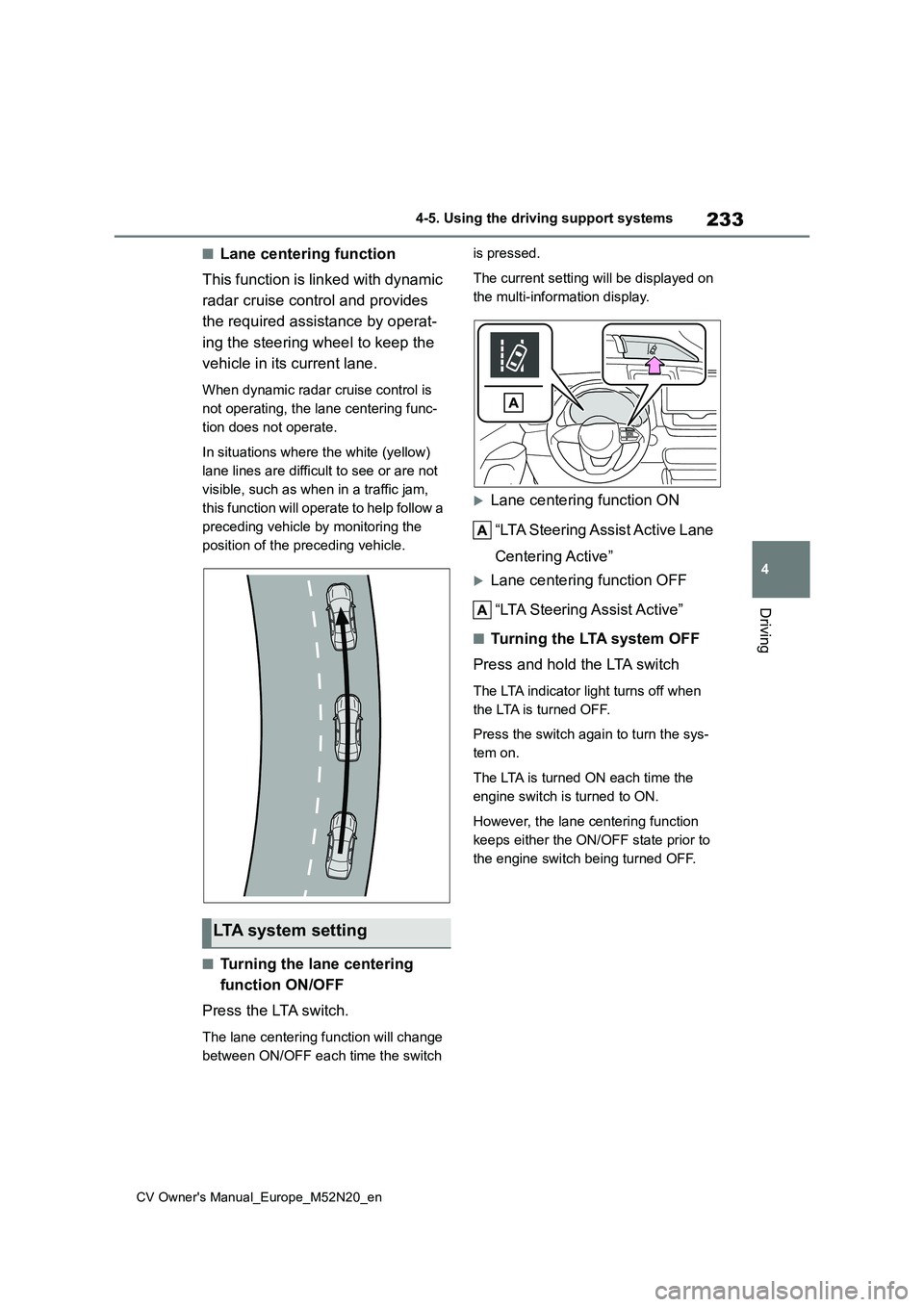
■Lane centering function
This function is linked with dynamic
radar cruise control and provides
the required assistance by operat-
ing the steering wheel to keep the
vehicle in its current lane.
When dynamic radar cruise control is
not operating, the lane centering func-
tion does not operate.
In situations where the white (yellow)
lane lines are difficult to see or are not
visible, such as when in a traffic jam,
this function will operate to help follow a
preceding vehicle by monitoring the
position of the preceding vehicle.
■Turning the lane centering
function ON/OFF
Press the LTA switch.
The lane centering function will change
between ON/OFF each time the switch
is pressed.
The current setting will be displayed on
the multi-information display.
Lane centering function ON
“LTA Steering Assist Active Lane
Centering Active”
Lane centering function OFF
“LTA Steering Assist Active”
■Tu r n i n g t h e LTA s y s t e m O F F
Press and hold the LTA switch
The LTA indicator light turns off when
the LTA is turned OFF.
Press the switch again to turn the sys-
tem on.
The LTA is turned ON each time the
engine switch is turned to ON.
However, the lane centering function
keeps either the ON/OFF state prior to
the engine switch being turned OFF.
LTA system setting
Page 243 of 618
241
4
CV Owner's Manual_Europe_M52N20_en
4-5. Using the driving support systems
Driving
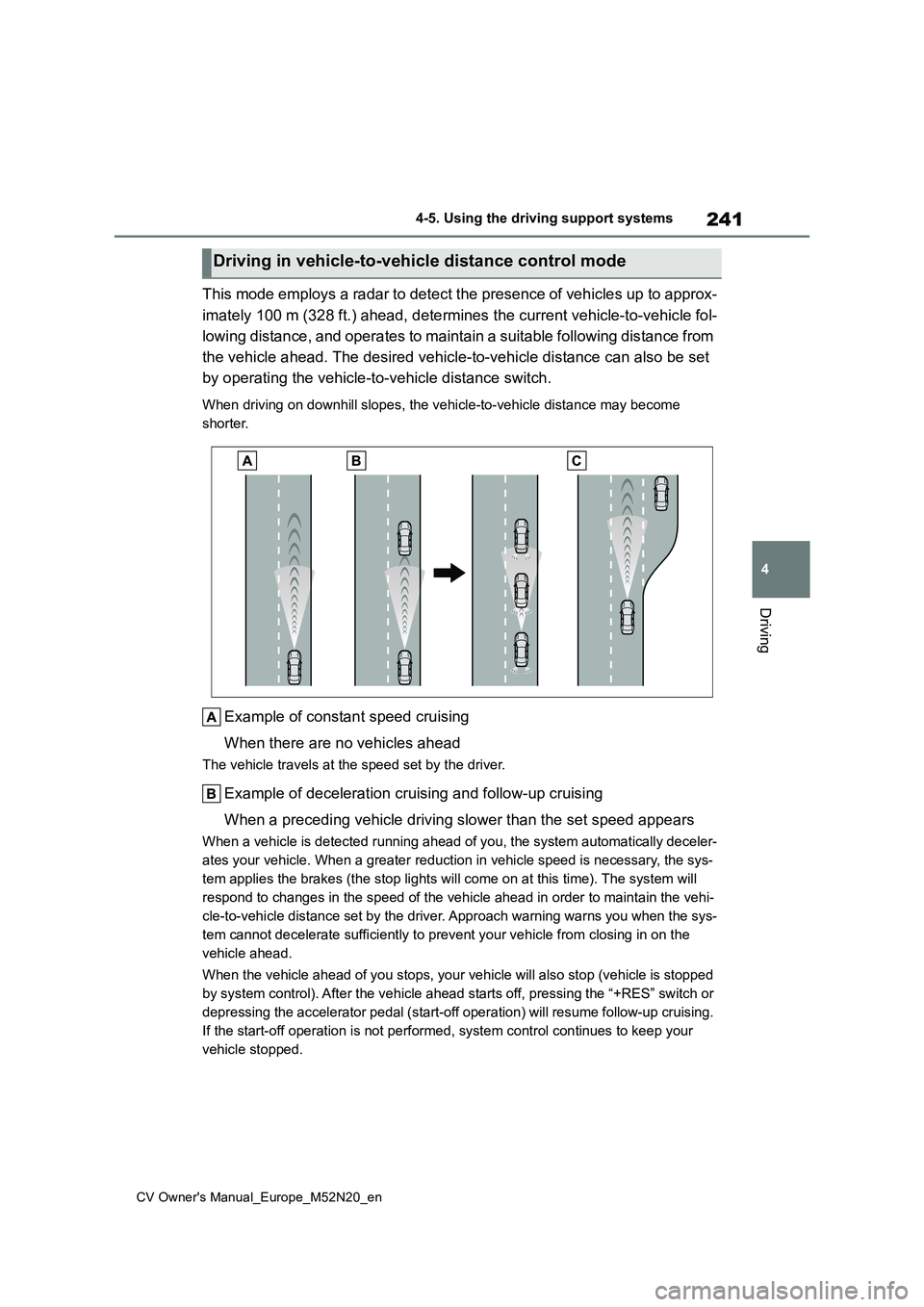
This mode employs a radar to detect the presence of vehicles up to approx-
imately 100 m (328 ft.) ahead, d etermines the current vehicle-to-vehicle fol-
lowing distance, and operates to maintain a suitable following distance from
the vehicle ahead. The desired vehicle-to-vehicle distance can also be set
by operating the vehicle-to-vehicle distance switch.
When driving on downhill slopes, the vehicle-to-vehicle distanc e may become
shorter.
Example of constant speed cruising
When there are no vehicles ahead
The vehicle travels at the speed set by the driver.
Example of deceleration cruising and follow-up cruising
When a preceding vehicle driving slower than the set speed appe ars
When a vehicle is detected running ahead of you, the system automatically deceler-
ates your vehicle. When a greater reduction in vehicle speed is necessary, the sys-
tem applies the brakes (the stop lights will come on at this ti me). The system will
respond to changes in the speed of the vehicle ahead in order t o maintain the vehi-
cle-to-vehicle distance set by the driver. Approach warning war ns you when the sys-
tem cannot decelerate sufficiently to prevent your vehicle from closing in on the
vehicle ahead.
When the vehicle ahead of you stops, your vehicle will also sto p (vehicle is stopped
by system control). After the vehicle ahead starts off, pressin g the “+RES” switch or
depressing the accelerator pedal (start-off operation) will res ume follow-up cruising.
If the start-off operation is not performed, system control con tinues to keep your
vehicle stopped.
Driving in vehicle-to-vehicle distance control mode
Page 249 of 618
247
4
CV Owner's Manual_Europe_M52N20_en
4-5. Using the driving support systems
Driving
Press and hold the “-SET” switch.
Dynamic Radar Cruise Control with
Road Sign Assist can be
enabled/disabled in on the
multi-information display. ( P.457)
When the Dynamic Radar Cruise
Control with Road Sign Assist is
operating, while driving down a hill,
the vehicle speed may exceed the
set speed.
In this case, the displayed set vehi-
cle speed will be highlighted and a
buzzer will sound to alert the driver.
■Dynamic radar cruise control with
full-speed range can be set when
●The shift lever is in D.
●The desired set speed can be set when the vehicle speed is approxi-
mately 30 km/h (20 mph) or more. (However, when the vehicle speed is set while driving at below approxi-
mately 30 km/h [20 mph], the set speed will be set to approximately 30 km/h [20 mph].)
■Accelerating after setting the vehi-cle speed
The vehicle can accelerate by operating
the accelerator pedal. After accelerat- ing, the set speed resumes. However, during vehicle-to-vehicle distance con-
trol mode, the vehicle speed may decrease below the set speed in order to maintain the distance to the preceding
vehicle.
■When the vehicle stops while fol-
low-up cruising
●Pressing the “+RES” switch while the
vehicle ahead stops will resume fol- low-up cruising if the vehicle ahead starts off within approximately 3 sec-
onds after the switch is pressed.
●If the vehicle ahead starts off within 3
seconds after your vehicle stops, fol- low-up cruising will be resumed.
■Automatic cancelation of vehicle-to-vehicle distance control mode
Vehicle-to-vehicle distance control mode is automatically canceled in the follow-ing situations.
●VSC is activated.
●TRC is activated for a period of time.
●When the VSC or TRC system is
turned off.
●The sensor cannot detect correctly
because it is covered in some way.
●When the brake control or output
restriction control of a driving support system operates. (For example: Pre-Collision System,
Drive-Start Control)
●The parking brake is operated.
●The vehicle is stopped by system con- trol on a steep incline.
●The following are detected when the vehicle has been stopped by system
control: • The driver is not wearing a seat belt.• The driver’s door is opened.
• The vehicle has been stopped for about 3 minutes
If vehicle-to-vehicle distance control
mode is automatically canceled for any reasons other than the above, there may be a malfunction in the system.
Contact any authorized Toyota retailer or Toyota authorized repairer, or any reli-able repairer.
■Automatic cancelation of constant
speed control mode
Constant speed control mode is auto- matically canceled in the following situa-
Enabling/Disabling the
Dynamic Radar Cruise Con-
trol with Road Sign Assist (if
equipped)
Page 255 of 618
253
4
CV Owner's Manual_Europe_M52N20_en
4-5. Using the driving support systems
Driving
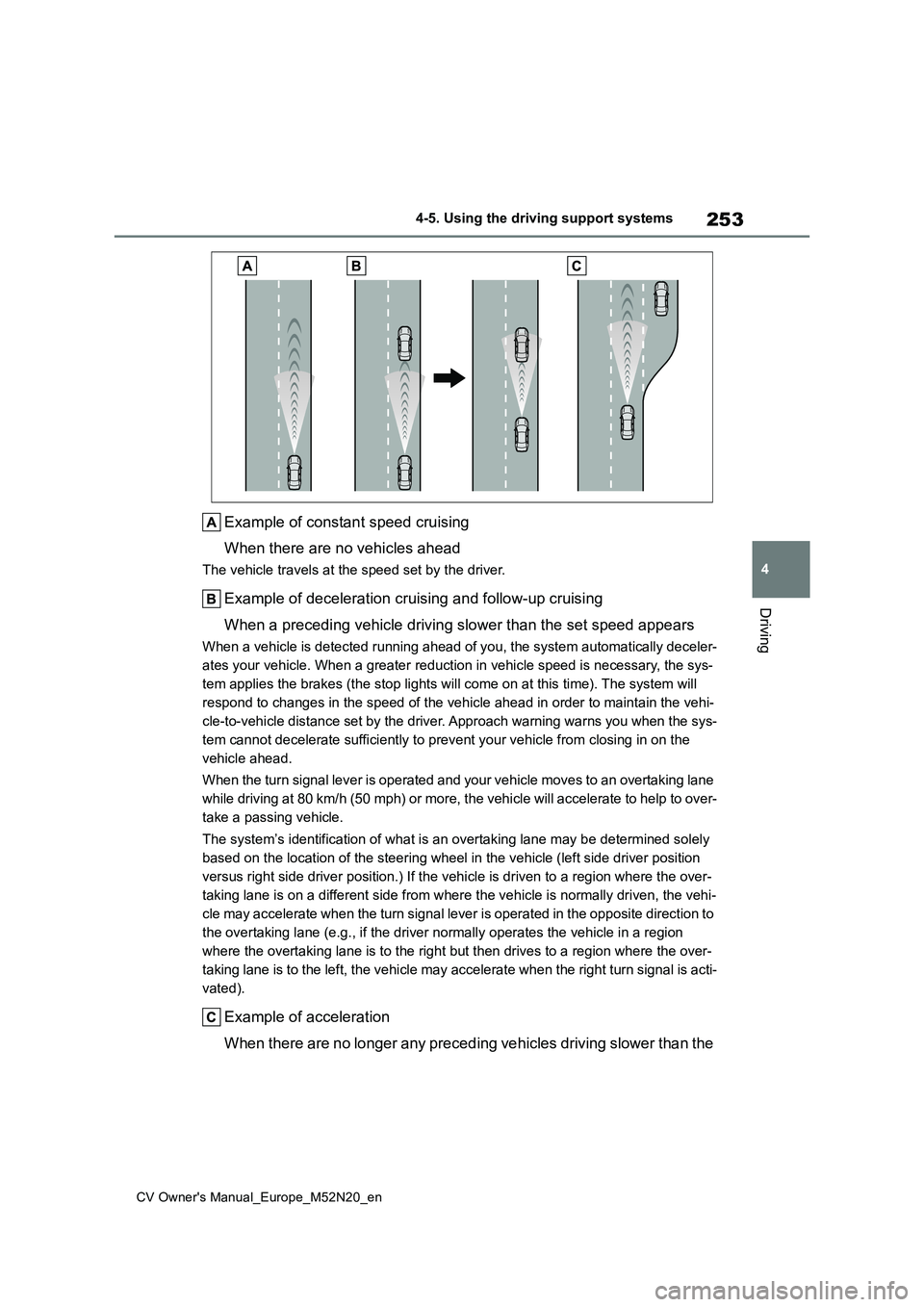
Example of constant speed cruising
When there are no vehicles ahead
The vehicle travels at the speed set by the driver.
Example of deceleration cruising and follow-up cruising
When a preceding vehicle driving slower than the set speed appe ars
When a vehicle is detected running ahead of you, the system automatically deceler-
ates your vehicle. When a greater reduction in vehicle speed is necessary, the sys-
tem applies the brakes (the stop lights will come on at this ti me). The system will
respond to changes in the speed of the vehicle ahead in order t o maintain the vehi-
cle-to-vehicle distance set by the driver. Approach warning war ns you when the sys-
tem cannot decelerate sufficiently to prevent your vehicle from closing in on the
vehicle ahead.
When the turn signal lever is operated and your vehicle moves t o an overtaking lane
while driving at 80 km/h (50 mph) or more, the vehicle will acc elerate to help to over-
take a passing vehicle.
The system’s identification of what is an overtaking lane may b e determined solely
based on the location of the steering wheel in the vehicle (lef t side driver position
versus right side driver position.) If the vehicle is driven to a region where the over-
taking lane is on a different side from where the vehicle is no rmally driven, the vehi-
cle may accelerate when the turn signal lever is operated in th e opposite direction to
the overtaking lane (e.g., if the driver normally operates the vehicle in a region
where the overtaking lane is to the right but then drives to a region where the over-
taking lane is to the left, the vehicle may accelerate when the right turn signal is acti-
vated).
Example of acceleration
When there are no longer any preceding vehicles driving slower than the
Page 260 of 618
258
CV Owner's Manual_Europe_M52N20_en
4-5. Using the driving support systems
Press and hold the “-SET” switch.
Dynamic Radar Cruise Control with
Road Sign Assist can be
enabled/disabled in on the
multi-information display. ( P.457)
When the Dynamic Radar Cruise
Control with Road Sign Assist is
operating, while driving down a hill,
the vehicle speed may exceed the
set speed.
In this case, the displayed set vehi-
cle speed will be highlighted and a
buzzer will sound to alert the driver.
■Dynamic radar cruise control can be set when
●The shift lever is in range 2nd or higher.
●Depending on the control mode, this item can be set at the following
speeds. • Vehicle-to-vehicle distance control mode: Approximately 30 km/h (20
mph) or more • Constant speed control mode: Approximately 30 km/h (20 mph) or
more
■Accelerating after setting the vehi- cle speed
The vehicle can accelerate by operating
the accelerator pedal. After accelerat- ing, the set speed resumes. However, during vehicle-to-vehicle distance con-
trol mode, the vehicle speed may decrease below the set speed in order to maintain the distance to the preceding
vehicle.
■Shift position selection
Select a shift position according to the vehicle speed. If the engine speed is too high or too low, control may be automat-
ically canceled.
■Automatic cancelation of vehicle- to-vehicle distance control mode
Vehicle-to-vehicle distance control mode
is automatically canceled in the follow- ing situations.
●Actual vehicle speed falls below approximately 25 km/h (16 mph).
●VSC is activated.
●TRC is activated for a period of time.
●When the VSC or TRC system is turned off.
●The sensor cannot detect correctly because it is covered in some way.
●When the brake control or output restriction control of a driving support
system operates. (For example: Pre- Collision System, Drive-Start Control)
●When the shift lever is in N or the clutch pedal is depressed for a certain amount of time or more.
●The parking brake is operated.
If vehicle-to-vehicle distance control
mode is automatically canceled for any reasons other than the above, there may be a malfunction in the system.
Contact any authorized Toyota retailer or Toyota authorized repairer, or any reli-able repairer.
■Automatic cancelation of constant
speed control mode
Constant speed control mode is auto- matically canceled in the following situa-
tions:
●Actual vehicle speed is more than
approximately 16 km/h (10 mph) below the set vehicle speed.
●Actual vehicle speed falls below approximately 30 km/h (20 mph).
●VSC is activated.
Enabling/Disabling the
Dynamic Radar Cruise Con-
trol with Road Sign Assist (if
equipped)
Page 268 of 618
266
CV Owner's Manual_Europe_M52N20_en
4-5. Using the driving support systems
*3: If the turn signal indicator is not
operated when changing lanes, the
mark does not display.
In the following situations, the RSA
system will notify the driver.
When the vehicle speed exceeds
the speed notification threshold
of the speed limit sign displayed,
the sign display will be empha-
sized and a buzzer will sound.
When the RSA system recog-
nizes a no-entry sign and detects
that the vehicle has entered a
no-entry area based on the map
information of the navigation sys-
tem, the no-entry sign flashes
and a buzzer will sound. (For
vehicles with 7-inch/8-inch dis-
play navigation system)
If it is detected that your vehicle
is overtaking when a no overtak-
ing sign is displayed on the multi-
information display, the dis-
played sign will flash and a
buzzer will sound.
Depending on the situation, traffic
environment (traffic direction,
speed unit) may be detected incor-
rectly and a notification function
may not operate properly.
■Setting procedure
1 Press / (4.2-inch display) or
/ (7-inch display) of the
meter control switches and select
.
2 Press / (4.2-inch display) or
/ (7-inch display) of the
meter control switches and select
, then press .
■Automatic turn-off of RSA sign dis- play
One or more signs automatically turn off
in the following situations.
●No sign has been recognized for a
certain distance.
●The road changes due to a left or right
turn, etc.
■Conditions in which the function may not operate or detect correctly
In the following situations, RSA does not
operate normally and may not recognize signs, display the incorrect sign, etc. However, this does not indicate a mal-
function.
●The front camera is misaligned due to
a strong impact being applied to the sensor, etc.
●Dirt, snow, stickers, etc., are on the windshield near the front camera.
●In inclement weather such as heavy rain, fog, snow or sand storms.
●Light from an oncoming vehicle, the sun, etc., enters the front camera.
●The sign is dirty, faded, tilted or bent.
●The contrast of electronic sign is low.
●All or part of the sign is hidden by the leaves of a tree, a pole, etc.
●The sign is only visible to the front camera for a short amount of time.
●The driving scene (turning, lane change, etc.) is judged incorrectly.
●If a sign not appropriate for the cur-rently traveled lane, but the sign exists
directly after a freeway branches, or in an adjacent lane just before merging.
Notification function
Page 269 of 618
267
4
CV Owner's Manual_Europe_M52N20_en
4-5. Using the driving support systems
Driving
●S t ic ke r s a r e a t t ac he d t o t h e r e ar o f t he
preceding vehicle.
●A sign resembling a system compati-
ble sign is recognized.
●Side road speed signs may be
detected and displayed (if positioned in sight of the front camera) while the vehicle is traveling on the main road.
●Roundabout exit road speed signs may be detected and displayed (if
positioned in sight of the front camera) while traveling on a roundabout.
●The front of the vehicle is raised or lowered due to the carried load.
●The surrounding brightness is not suf-ficient or changes suddenly.
●When a sign intended for trucks, etc., is recognized.
●The vehicle is driven in a country with a different direction of traffic.
●The 7-inch/8-inch display navigation system map data is outdated.
●The 7-inch/8-inch display navigation system is not operating.
●The speed information displayed on the meter and on the 7-inch/8-inch display navigation system may be dif-
ferent due to the 7-inch/8-inch display navigation system using map data.
■Speed limit sign display
If the engine switch was last turned off
while a speed limit sign was displayed on the multi-information display, the same sign displays again when the
engine switch is turned to ON.
■If “RSA Malfunction Visit Your Dealer” is shown
The system may be malfunctioning.
Have the vehicle inspected by any authorized Toyota retailer or Toyota authorized repairer, or any reliable
repairer.
■Customization
Some functions can be customized. (Customizable features: P.457)
*: If equipped
■Stopping the engine
1 Fully depress the clutch pedal
and depress the brake pedal to
stop the vehicle.
2 Move the shift lever to N and
release the clutch pedal. The
engine will stop automatically.
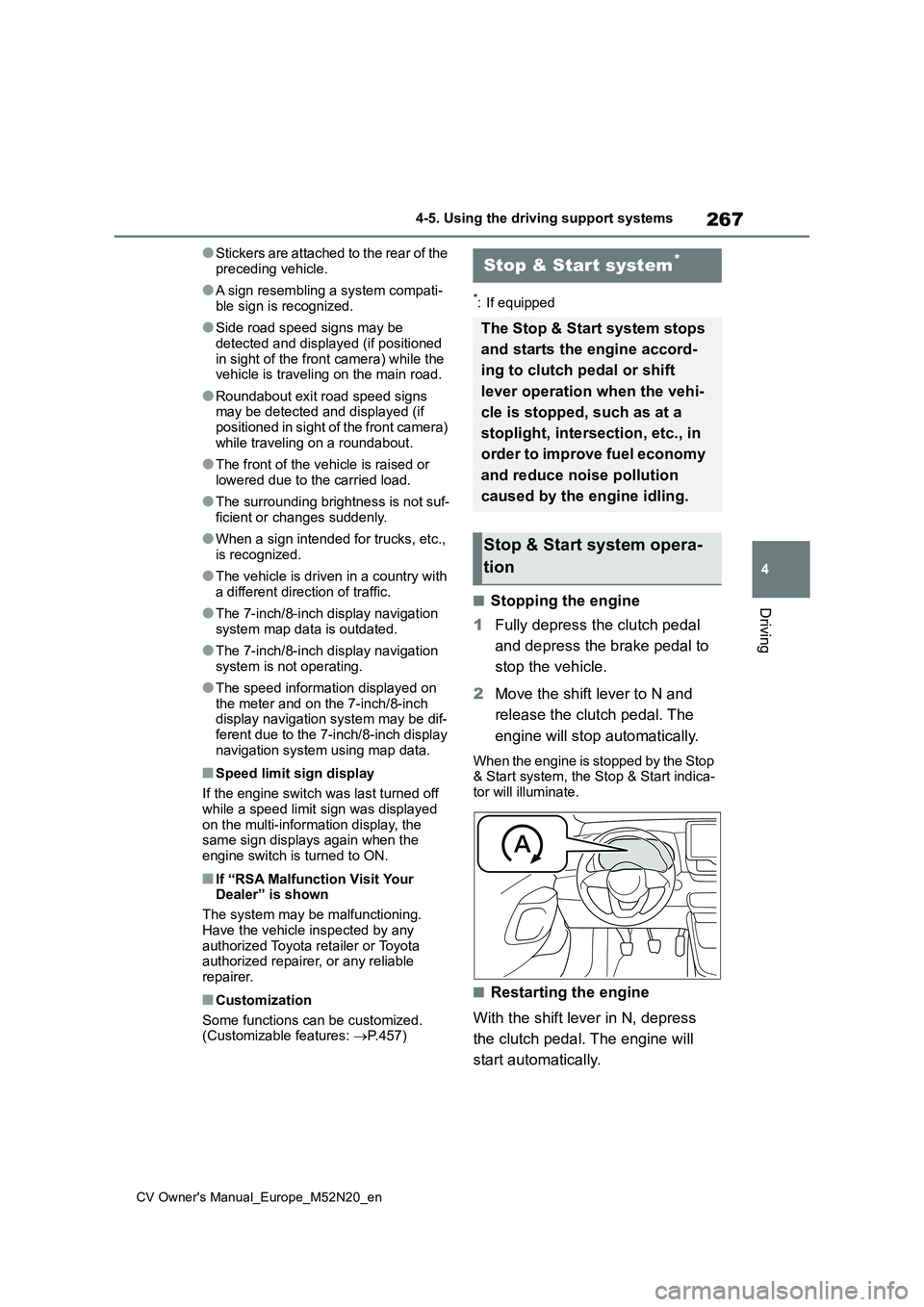
When the engine is stopped by the Stop & Start system, the Stop & Start indica-tor will illuminate.
■Restarting the engine
With the shift lever in N, depress
the clutch pedal. The engine will
start automatically.
Stop & Start system*
The Stop & Start system stops
and starts the engine accord-
ing to clutch pedal or shift
lever operation when the vehi-
cle is stopped, such as at a
stoplight, intersection, etc., in
order to improve fuel economy
and reduce noise pollution
caused by the engine idling.
Stop & Start system opera-
tion
Page 273 of 618
271
4
CV Owner's Manual_Europe_M52N20_en
4-5. Using the driving support systems
Driving
“Shift to N and depress clutch”
When the engine is stopped by the
Stop & Start system, the shift lever was
moved to a position other than N without
depressing the clutch pedal.
■The Stop & Start system protection function
●When the volume of the audio system is excessively high, sound output from
the audio system may suddenly be cut off in order to reduce battery con-sumption. To prevent the audio sys-
tem from being cut off, keep the volume of audio system at a moderate level. If the audio system has been cut
off, turn the engine switch off, wait for 3 seconds or more and then turn it to ACC or ON to re-enable the audio
system.
●The audio system may not be acti-
vated if the battery terminals are dis- connected and then reconnected. If this occurs, turn the engine switch off
and then repeat the following opera- tion twice to activate the audio system normally.
• Turn the engine switch to ON and then to off.
■Replacing the battery
P. 4 4 1
■If the Stop & Start cancel indicator
flashes continuously
The system may be malfunctioning. Have the vehicle inspected by any
authorized Toyota retailer or Toyota authorized repairer, or any reliable repairer.
■If “Stop & Start System Malfunction
Visit Your Dealer” is displayed on the multi-information display
The system may be malfunctioning.
Have the vehicle inspected by any authorized Toyota retailer or Toyota authorized repairer, or any reliable
repairer.
WARNING
■When the Stop & Start system is operating
Make sure to disable the Stop & Start system while the vehicle is in a poorly ventilated area.
If not disabled, the engine may be automatically restarted unexpectedly, causing exhaust gases to collect and
enter the vehicle, possibly resulting in death or a serious health hazard.
●Do not leave the vehicle while the
engine is stopped by the Stop & Start system (while the Stop & Start indicator is on). An accident may
occur due to the automatic engine start function.
●Depress the brake pedal and apply the parking brake when necessary while the engine is stopped by the
Stop & Start system (while the Stop & Start indicator is on).
NOTICE
■To ensure the system operates correctly
If any of the following situations occur, the Stop & Start system may not oper-ate correctly. Have your vehicle
inspected by any authorized Toyota retailer or Toyota authorized repairer, or any reliable repairer.
●While the driver’s seat belt is fas-tened, the driver’s and front pas-senger’s seat belt reminder light
flashes.
●Even though the driver’s seat belt is
not fastened, the driver’s and front passenger’s seat belt reminder light does not illuminate.
●Even though the driver’s door is closed, the open door warning light
is illuminated or the interior light is illuminated when the interior light switch is in the door position.
Page 274 of 618
272
CV Owner's Manual_Europe_M52N20_en
4-5. Using the driving support systems
*: If equipped
NOTICE
●Even though the driver’s door is open, the open door warning light
does not illuminate or the interior light does not illuminate when the interior light switch is in the door
position.
■If the engine stalls
If the Stop & Start system is enabled and the clutch pedal is depressed quickly, the engine may restart.
BSM (Blind Spot Moni-
tor)*
The Blind Spot Monitor is a
system that uses rear side
radar sensors installed on the
inner side of the rear bumper
on the left and right side to
assist the driver in confirming
safety when changing lanes.
WARNING
■Cautions regarding the use of
the system
The driver is solely responsible for safe driving. Always drive safely, tak-
ing care to observe your surround- ings.
The Blind Spot Monitor is a supple-
mentary function which alerts the driver that a vehicle is in a blind spot of the outside rear view mirrors or is
approaching rapidly from behind into a blind spot. Do not overly rely on the
Blind Spot Monitor. As the function cannot judge if it is safe to change lanes, over reliance could lead to an
accident resulting in death or serious injury.
As the system may not function cor-
rectly under certain conditions, the driver’s own visual confirmation of safety is necessary.
Page 275 of 618
273
4
CV Owner's Manual_Europe_M52N20_en
4-5. Using the driving support systems
Driving
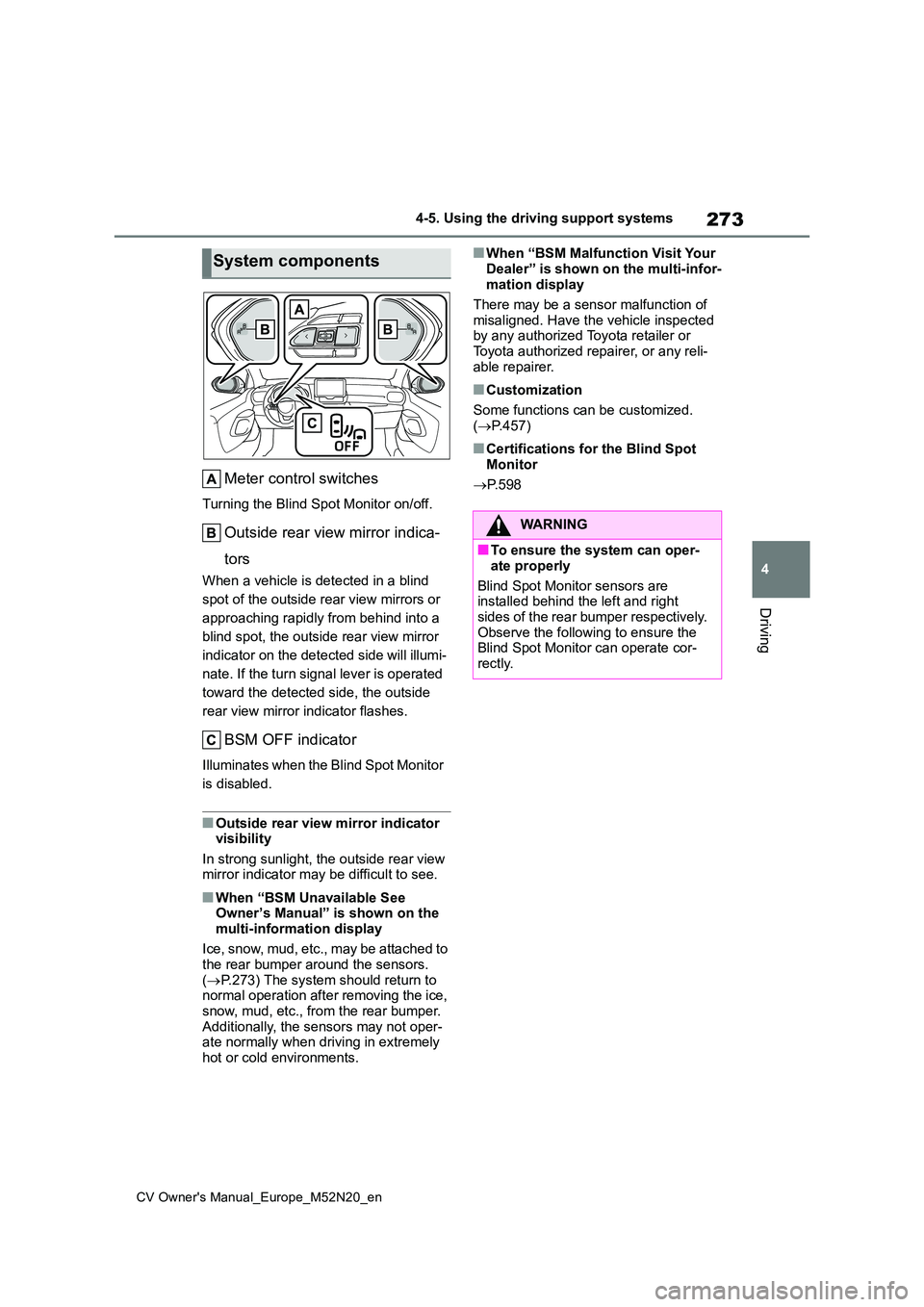
Meter control switches
Turning the Blind Spot Monitor on/off.
Outside rear view mirror indica-
tors
When a vehicle is detected in a blind
spot of the outside rear view mirrors or
approaching rapidly from behind into a
blind spot, the outside rear view mirror
indicator on the detected side will illumi-
nate. If the turn signal lever is operated
toward the detected side, the outside
rear view mirror indicator flashes.
BSM OFF indicator
Illuminates when the Blind Spot Monitor
is disabled.
■Outside rear view mirror indicator visibility
In strong sunlight, the outside rear view mirror indicator may be difficult to see.
■When “BSM Unavailable See Owner’s Manual” is shown on the
multi-information display
Ice, snow, mud, etc., may be attached to the rear bumper around the sensors.
( P.273) The system should return to normal operation after removing the ice, snow, mud, etc., from the rear bumper.
Additionally, the sensors may not oper- ate normally when driving in extremely hot or cold environments.
■When “BSM Malfunction Visit Your
Dealer” is shown on the multi-infor- mation display
There may be a sensor malfunction of
misaligned. Have the vehicle inspected by any authorized Toyota retailer or Toyota authorized repairer, or any reli-
able repairer.
■Customization
Some functions can be customized. ( P.457)
■Certifications for the Blind Spot
Monitor
P. 5 9 8
System components
WARNING
■To ensure the system can oper-
ate properly
Blind Spot Monitor sensors are installed behind the left and right
sides of the rear bumper respectively. Observe the following to ensure the Blind Spot Monitor can operate cor-
rectly.