instrument panel TOYOTA YARIS CROSS 2022 Owners Manual
[x] Cancel search | Manufacturer: TOYOTA, Model Year: 2022, Model line: YARIS CROSS, Model: TOYOTA YARIS CROSS 2022Pages: 618, PDF Size: 130.77 MB
Page 17 of 618
15
CV Owner's Manual_Europe_M52N20_en
Pictorial index
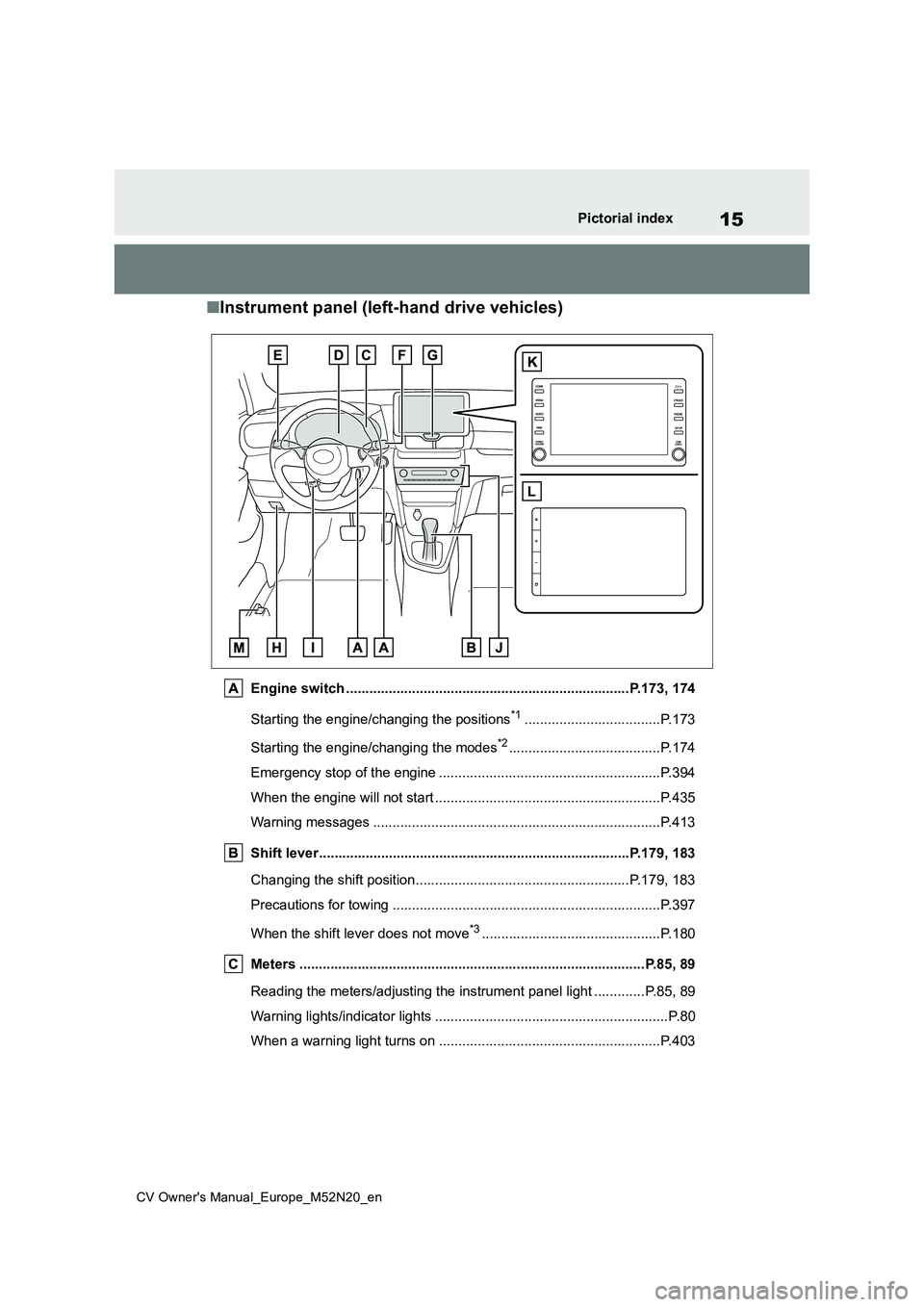
■Instrument panel (left-hand drive vehicles)
Engine switch .........................................................................P.173, 174
Starting the engine/changing the positions*1...................................P.173
Starting the engine/changing the modes*2.......................................P.174
Emergency stop of the engine ................................... ......................P.394
When the engine will not start ................................. .........................P.435
Warning messages ............................................... ...........................P.413
Shift lever.................................................... ............................P.179, 183
Changing the shift position.................................... ...................P.179, 183
Precautions for towing ......................................... ............................P.397
When the shift lever does not move*3..............................................P.180
Meters ......................................................... ................................P.85, 89
Reading the meters/adjusting the instrument panel light ........ .....P.85, 89
Warning lights/indicator lights ................................ ............................P.80
When a warning light turns on .................................. .......................P.403
Page 25 of 618
23
CV Owner's Manual_Europe_M52N20_en
Pictorial index
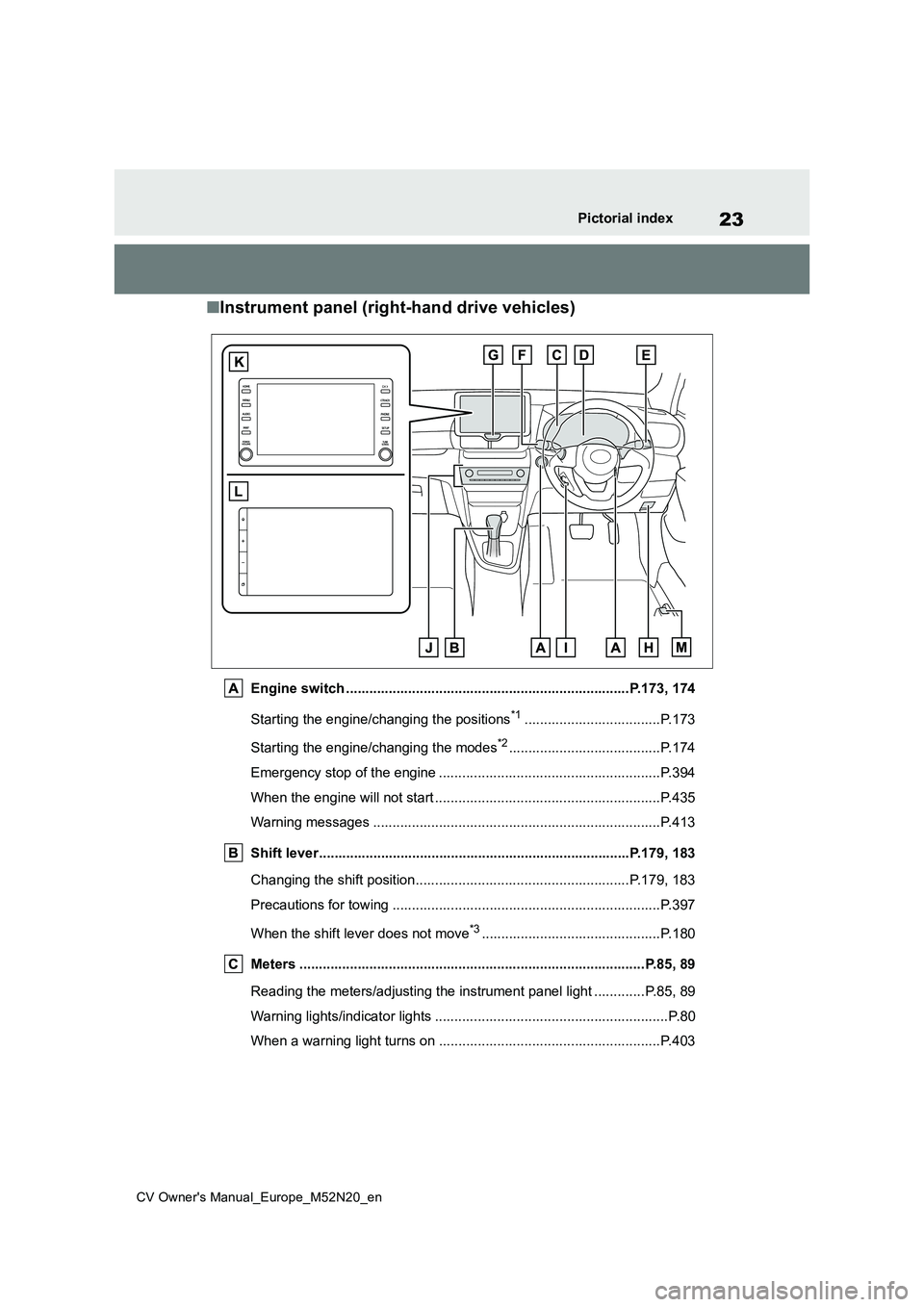
■Instrument panel (right-hand drive vehicles)
Engine switch .........................................................................P.173, 174
Starting the engine/changing the positions*1...................................P.173
Starting the engine/changing the modes*2.......................................P.174
Emergency stop of the engine ................................... ......................P.394
When the engine will not start ................................. .........................P.435
Warning messages ............................................... ...........................P.413
Shift lever.................................................... ............................P.179, 183
Changing the shift position.................................... ...................P.179, 183
Precautions for towing ......................................... ............................P.397
When the shift lever does not move*3..............................................P.180
Meters ......................................................... ................................P.85, 89
Reading the meters/adjusting the instrument panel light ........ .....P.85, 89
Warning lights/indicator lights ................................ ............................P.80
When a warning light turns on .................................. .......................P.403
Page 45 of 618
43
1
CV Owner's Manual_Europe_M52N20_en
1-1. For safe use
For safety and security
WARNING
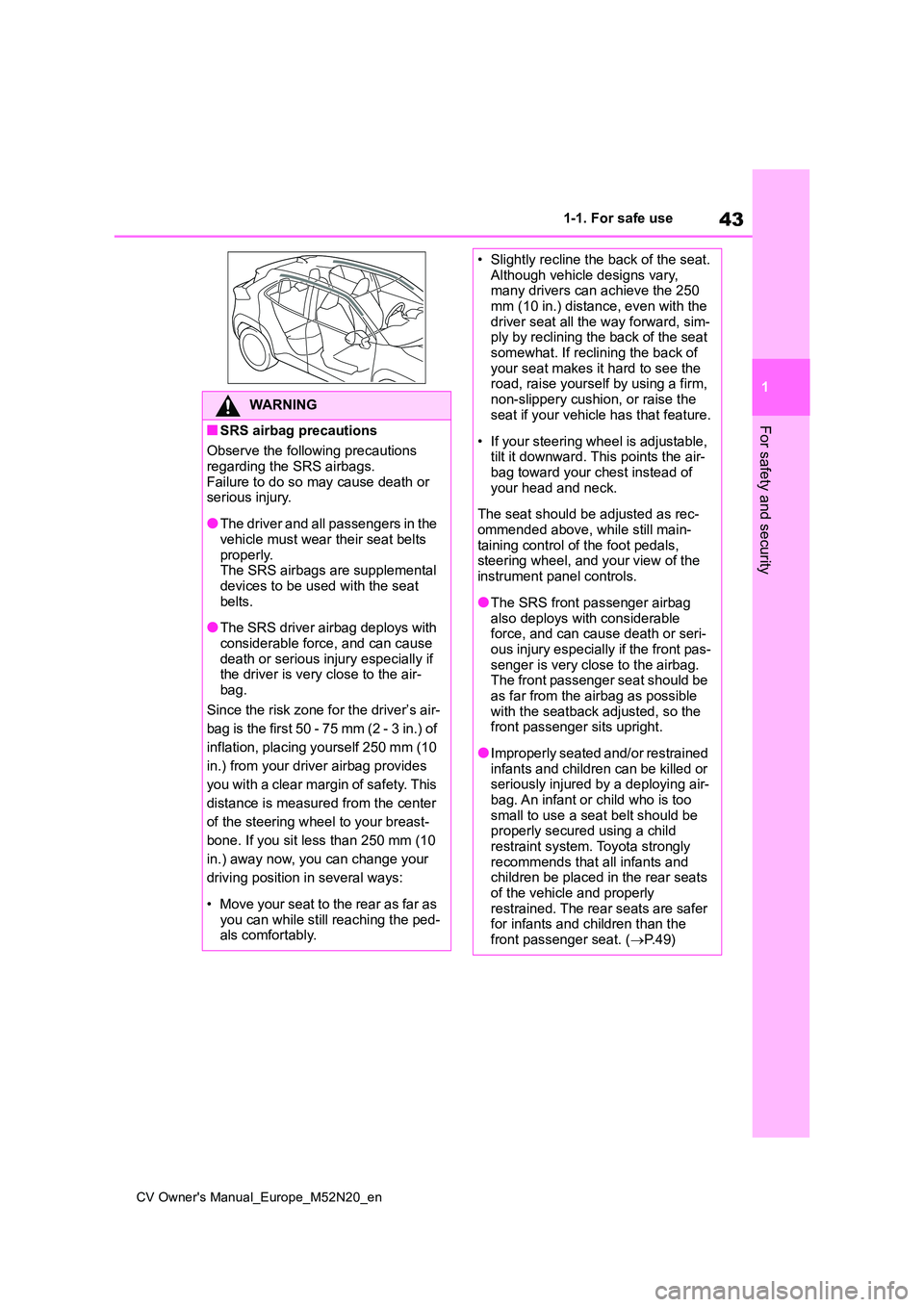
■SRS airbag precautions
Observe the following precautions
regarding the SRS airbags. Failure to do so may cause death or serious injury.
●The driver and all passengers in the vehicle must wear their seat belts
properly. The SRS airbags are supplemental devices to be used with the seat
belts.
●The SRS driver airbag deploys with
considerable force, and can cause death or serious injury especially if the driver is very close to the air-
bag.
Since the risk zone for the driver’s air-
bag is the first 50 - 75 mm (2 - 3 in.) of
inflation, placing yourself 250 mm (10
in.) from your driver airbag provides
you with a clear margin of safety. This
distance is measured from the center
of the steering wheel to your breast-
bone. If you sit less than 250 mm (10
in.) away now, you can change your
driving position in several ways:
• Move your seat to the rear as far as you can while still reaching the ped-als comfortably.
• Slightly recline the back of the seat.Although vehicle designs vary, many drivers can achieve the 250
mm (10 in.) distance, even with the driver seat all the way forward, sim-ply by reclining the back of the seat
somewhat. If reclining the back of your seat makes it hard to see the road, raise yourself by using a firm,
non-slippery cushion, or raise the seat if your vehicle has that feature.
• If your steering wheel is adjustable, tilt it downward. This points the air-bag toward your chest instead of
your head and neck.
The seat should be adjusted as rec-
ommended above, while still main- taining control of the foot pedals, steering wheel, and your view of the
instrument panel controls.
●The SRS front passenger airbag
also deploys with considerable force, and can cause death or seri-ous injury especially if the front pas-
senger is very close to the airbag. The front passenger seat should be as far from the airbag as possible
with the seatback adjusted, so the front passenger sits upright.
●Improperly seated and/or restrained infants and children can be killed or seriously injured by a deploying air-
bag. An infant or child who is too small to use a seat belt should be properly secured using a child
restraint system. Toyota strongly recommends that all infants and children be placed in the rear seats
of the vehicle and properly restrained. The rear seats are safer for infants and children than the
front passenger seat. ( P. 4 9 )
Page 47 of 618
45
1
CV Owner's Manual_Europe_M52N20_en
1-1. For safe use
For safety and security
WARNING
●Do not use seat accessories which cover the parts where the SRS side
airbags and SRS front seat center airbags inflate as they may interfere with inflation of the SRS airbags.
Such accessories may prevent the SRS side airbags and SRS front seat center airbags from activating
correctly, disable the system or cause the SRS side airbags and SRS front seat center airbags to
inflate accidentally, resulting in death or serious injury.
●Do not strike or apply significant levels of force to the area of the SRS airbag components or the
front doors. Doing so can cause the SRS air-bags to malfunction.
●Do not touch any of the component parts immediately after the SRS air-
bags have deployed (inflated) as they may be hot.
●If breathing becomes difficult after the SRS airbags have deployed, open a door or window to allow
fresh air in, or leave the vehicle if it is safe to do so. Wash off any resi-due as soon as possible to prevent
skin irritation.
●If the areas where the SRS airbags
are stored, such as the steering wheel pad and front and rear pillar garnishes, are damaged or
cracked, have them replaced by any authorized Toyota retailer or Toyota authorized repairer, or any
reliable repairer.
■Modification and disposal of SRS airbag system components
Do not dispose of your vehicle or per-
form any of the following modifica- tions without consulting your Toyota retailer or Toyota authorized repairer,
or any reliable repairer. The SRS air- bags may malfunction or deploy (inflate) accidentally, causing death or
serious injury.
●Installation, removal, disassembly
and repair of the SRS airbags
●Repairs, modifications, removal or
replacement of the steering wheel, instrument panel, dashboard, seats or seat upholstery, front, side and
rear pillars, roof side rails, front door panels, front door trims or front door speakers
●Modifications to the front door panel (such as making a hole in it)
●Repairs or modifications of the front fender, front bumper, or side of the
occupant compartment
●Installation of a grille guard (bull
bars, kangaroo bar, etc.), snow plows or winches
●Modifications to the vehicle’s sus-pension system
●Installation of electronic devices such as mobile two-way radios (RF-transmitter) and CD players
Page 82 of 618
80
CV Owner's Manual_Europe_M52N20_en
2-1. Instrument cluster
2-1.In strument clu ste r
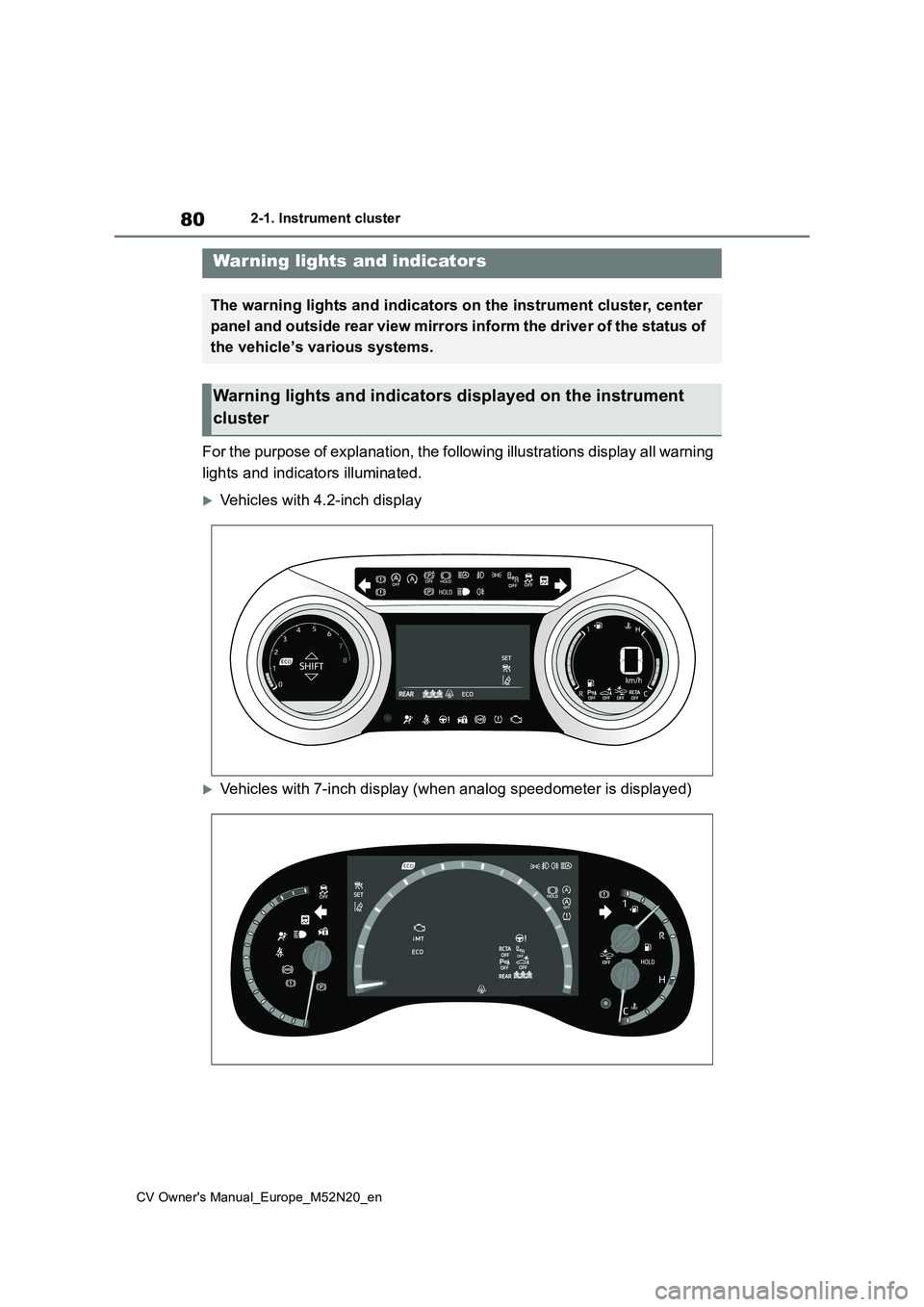
For the purpose of explanation, the following illustrations display all warning
lights and indicators illuminated.
Vehicles with 4.2-inch display
Vehicles with 7-inch display (when analog speedometer is displa yed)
Warning lights and indicators
The warning lights and indicators on the instrument cluster, center
panel and outside rear view mirrors inform the driver of the st atus of
the vehicle’s various systems.
Warning lights and indicators displayed on the instrument
cluster
Page 86 of 618
84
CV Owner's Manual_Europe_M52N20_en
2-1. Instrument cluster
*6: This light illuminates on the outside
rear view mirrors.
*7: When the outside temperature is
approximately 3°C (37°F) or lower,
this indicator will flash for approxi-
mately 10 seconds, then stay on.
*8: This light illuminates on the center
panel.
Page 90 of 618
88
CV Owner's Manual_Europe_M52N20_en
2-1. Instrument cluster
2Press or to select .
3 Press and hold the .
4 Press or to select an
item to be changed.
5 Press or to change the
setting.
The following can be changed:
12-hour/24-hour format
Hour
Minute
The clocks on the following can be
adjusted on the multimedia system
screen.
Multi-information display
Multimedia system screen
For details, refer to “Navigation and
multimedia system Owner’s man-
ual”.
■Clock settings screen (vehicles
with 7-inch/8-inch display multime- dia system)
If is displayed when is
selected on the multi-information dis-
play, the system may be malfunctioning.
Have the vehicle inspected by any
authorized Toyota retailer or Toyota
authorized repairer, or any reliable
repairer.
The brightness of the instrument
panel lights can be adjusted on
select to the multi-information
display.
The brightness of the instrument panel
lights can be adjusted separately for
when the tail lights are on and off.
1 Press or to select of
the multi-information display.
2 Press or to select ,
and then press and hold the
.
3 Press or to change the
brightness.
■Instrument cluster brightness adjustment
The instrument cluster brightness levels when the tail lights are on and off can be adjusted individually.
However, when the surroundings are bright (daytime, etc.), turning on the tail lights will not change the instrument
cluster brightness.
Adjusting the clock (vehi-
cles with 7-inch/8-inch dis-
play multimedia system)
Adjusting the instrument
panel light control
Page 95 of 618
93
2
CV Owner's Manual_Europe_M52N20_en
2-1. Instrument cluster
Vehicle status information and indicators
■Adjusting the minute to “00”
1 Press or to select of
the multi-information display.
2 Press or to select “Clock
: 00”.
Press the to set the clock to the
beginning of the nearest hour.
e.g.
1:00 to 1:29 1:00
1:30 to 1:59 2:00
■Changing the clock
1 Press or to select of
the multi-information display.
2 Press or to select “Clock
: 00”.
3 Press and hold the .
4 Press or to select an
item to be changed.
5 Press or to change the
setting.
The following can be changed:
12-hour/24-hour format
Hour
Minute
The clocks on the following can be
adjusted on the multimedia system
screen.
Multi-information display
Multimedia system screen
For details, refer to “Navigation and
multimedia system Owner’s man-
ual”.
■Clock settings screen (vehicles with 7-inch/8-inch display multime-
dia system)
If “Clock : 00” is displayed when is
selected on the multi-information dis-
play, the system may be malfunctioning.
Have the vehicle inspected by any
authorized Toyota retailer or Toyota
authorized repairer, or any reliable
repairer.
The brightness of the instrument
panel lights can be adjusted on
select to the multi-information
display.
The brightness of the instrument panel
lights can be adjusted separately for
when the tail lights are on and off.
1 Press or to select of
the multi-information display.
Adjusting the clock (vehi-
cles without 7-inch/8-inch
display multimedia system)
Adjusting the clock (vehi-
cles with 7-inch/8-inch dis-
play multimedia system)
Adjusting the instrument
panel light control
Page 141 of 618
139
3
CV Owner's Manual_Europe_M52N20_en
3-2. Opening, closing and locking the doors
Before driving
the engine is started or engine switch
modes are changed.
●Do not leave the electronic key on top
of the instrument panel or near the door pockets when exiting the vehicle. Depending on the radio wave recep-
tion conditions, it may be detected by the antenna outside the cabin and the door will become lockable from the
outside, possibly trapping the elec- tronic key inside the vehicle.
●As long as the electronic key is within the effective range, the doors may be locked or unlocked by anyone. How-
ever, only the doors detecting the electronic key can be used to unlock the vehicle.
●Even if the electronic key is not inside the vehicle, it may be possible to start
the engine if the electronic key is near the window.
●The doors may unlock or lock if a large amount of water splashes on the door handle, such as in the rain or in a
car wash when the electronic key is within the effective range. (The doors will automatically be locked after
approximately 30 seconds if the doors are not opened and closed.)
●If the wireless remote control is used to lock the doors when the electronic key is near the vehicle, there is a pos-
sibility that the door may not be unlocked by the entry function. (Use the wireless remote control to unlock
the doors.)
●Touching the door lock or unlock sen-
sor while wearing gloves may prevent lock or unlock operation.
●When the lock operation is performed using the lock sensor, recognition sig-nals will be shown up to two consecu-
tive times. After this, no recognition signals will be given.
●If the door handle becomes wet while the electronic key is within the effec-tive range, the door may lock and
unlock repeatedly. In that case, follow the following correction procedures to
wash the vehicle:
• Place the electronic key in a location 2 m (6 ft.) or more away from the vehi-cle. (Take care to ensure that the key
is not stolen.) • Set the electronic key to battery-sav-ing mode to disable the smart entry &
start system. ( P.137)
●If the electronic key is inside the vehi-
cle and a door handle becomes wet during a car wash, a message may be shown on the multi-information dis-
play and a buzzer will sound outside the vehicle. To turn off the alarm, lock all the doors.
●The lock sensor may not work prop-erly if it comes into contact with ice,
snow, mud, etc. Clean the lock sensor and attempt to operate it again.
●A sudden handle operation or a han-dle operation immediately after enter-ing the effective range may prevent
the doors from being unlocked. Touch the door unlock sensor and check that the doors are unlocked before pulling
the door handle again.
●If there is another electronic key in the
detection area, it may take slightly lon- ger to unlock the doors after the door handle is gripped.
■When the vehicle is not driven for
extended periods
●To prevent theft of the vehicle, do not
leave the electronic key within 2 m (6 ft.) of the vehicle.
●The smart entry & start system can be deactivated in advance. ( P.457)
●Setting the electronic key to battery- saving mode helps to reduce key bat-tery depletion. ( P.137)
■To operate the system properly
Make sure to carry the electronic key when operating the system. Do not get the electronic key too close to the vehi-
cle when operating the system from the outside of the vehicle.Depending on the position and holding
condition of the electronic key, the key may not be detected correctly and the
Page 164 of 618
162
CV Owner's Manual_Europe_M52N20_en
4-1. Before driving
WARNING
●Vehicles with a Multidrive: Be care- ful not to shift the shift lever with the
accelerator pedal depressed. Shift- ing the shift lever to any positions other than P or N may lead to unex-
pected rapid acceleration of the vehicle that may cause an accident and result in death or serious injury.
■If you hear a squealing or scrap-ing noise (brake pad wear indica-
tors)
Have the brake pads checked and replaced by any authorized Toyota
retailer or Toyota authorized repairer, or any reliable repairer as soon as possible.
Rotor damage may result if the pads are not replaced when needed.
It is dangerous to drive the vehicle when the wear limits of the brake
pads and/or those of the brake discs are exceeded.
■When the vehicle is stopped
●Do not race the engine.If the vehicle is in any gear other
than P (Multidrive) or N, the vehicle may accelerate suddenly and unex-pectedly, causing an accident.
●Vehicles with a Multidrive: In order to prevent accidents due to the
vehicle rolling away, always keep depressing the brake pedal while the engine is running, and apply the
parking brake as necessary.
●If the vehicle is stopped on an
incline, in order to prevent acci- dents caused by the vehicle rolling forward or backward, always
depress the brake pedal and securely apply the parking brake as needed.
●Avoid revving or racing the engine.Running the engine at high speed while the vehicle is stopped may
cause the exhaust system to over- heat, which could result in a fire if combustible material is nearby.
■When the vehicle is parked
●Do not leave glasses, cigarette
lighters, spray cans, or soft drink cans in the vehicle when it is in the sun.
Doing so may result in the follow- ing:
• Gas may leak from a cigarette lighter or spray can, and may lead to a fire.
• The temperature inside the vehicle may cause the plastic lenses and
plastic material of glasses to deform or crack.
• Soft drink cans may fracture, caus- ing the contents to spray over the interior of the vehicle, and may also
cause a short circuit in the vehicle’s electrical components.
●Do not leave cigarette lighters in the vehicle. If a cigarette lighter is in a place such as the glove box or on
the floor, it may be lit accidentally when luggage is loaded or the seat is adjusted, causing a fire.
●Do not attach adhesive discs to the windshield or windows. Do not
place containers such as air fresh- eners on the instrument panel or dashboard. Adhesive discs or con-
tainers may act as lenses, causing a fire in the vehicle.
●Do not leave a door or window open if the curved glass is coated with a metallized film such as a sil-
ver-colored one. Reflected sunlight may cause the glass to act as a lens, causing a fire.