audio TOYOTA YARIS HATCHBACK 2008 Owner's Guide
[x] Cancel search | Manufacturer: TOYOTA, Model Year: 2008, Model line: YARIS HATCHBACK, Model: TOYOTA YARIS HATCHBACK 2008Pages: 400, PDF Size: 6.56 MB
Page 212 of 400

198 3-2. Using the audio system
lFile names
The only files that can be recognized as MP3/WMA and played are those
with the extension .mp3 or .wma.
l Multi-sessions
As the audio system is compatible with multi-sessions, it is possible to play
discs that contain MP3 and WMA files. However, only the first session can
be played.
l ID3 and WMA tags
ID3 tags can be added to MP3 files, making it possible to record the track
title and artist name, etc.
The system is compatible with ID3 Ver. 1.0, 1.1, and Ver. 2.2, 2.3 ID3 tags.
(The number of characters is based on ID3 Ver. 1.0 and 1.1.)
WMA tags can be added to WMA files, making it possible to record the
track title and artist name in the same way as with ID3 tags.
l MP3 and WMA playback
When a disc containing MP3 or WMA files is inserted, all files on the disc
are first checked. Once the file check is finished, the first MP3 or WMA\
file
is played. To make the file check finish more quickly, we recommend you
do not write in any files other than MP3 or WMA files or create any unnec-
essary folders.
If the discs contain a mixture of music data and MP3 or WMA format data,
only music data can be played.
l Extensions
If the file extensions .mp3 and .wma are used for files other than MP3 and
WMA files, they will be mistakenly recognized and played as MP3 and
WMA files. This may result in large amounts of interference and damage
to the speakers.
l Playback
• To play MP3 file with steady sound quality, we recommend a fixed bit
rate of 128 kbps and a sampling frequency of 44.1 kHz.
• CD-R or CD-RW playback may not be possible in some instances, depending on the characteristics of the disc.
Page 213 of 400

199
3-2. Using the audio system
3
Interior features
• There is a wide variety of freeware and other encoding software for
MP3 and WMA files on the market, and depending on the status of the
encoding and the file format, poor sound quality or noise at the start of
playback may result. In some cases, playback may not be possible at
all.
• When files other than MP3 or WMA files are recorded on a disc, it may take more time to recognize the disc and in some cases, playback may
not be possible at all.
• Microsoft, Windows, and Windows Media are the registered trade- marks of Microsoft Corporation in the U.S. and other countries.
NOTICE
n CDs and adapters that cannot be used ( →P. 190)
n CD player precautions ( →P. 191)
Page 214 of 400
200
3-2. Using the audio system
Optimal use of the audio system
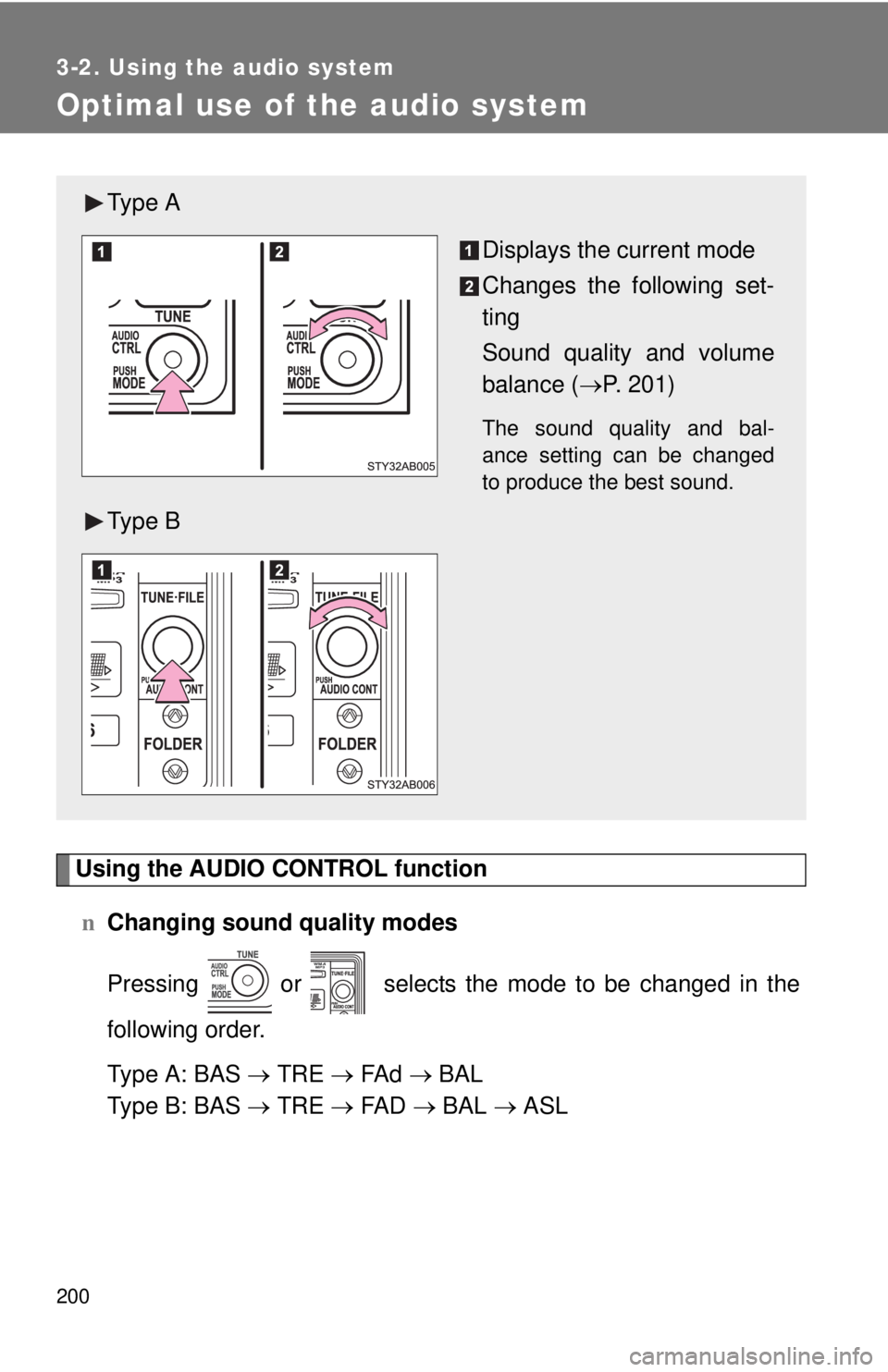
Using the AUDIO CONTROL functionn Changing sound quality modes
Pressing or selects the mode to be changed in the
following order.
Type A: BAS → TRE → FA d → BAL
Type B: BAS → TRE → FA D → BAL → ASL
Ty p e A
Displays the current mode
Changes the following set-
ting
Sound quality and volume
balance (→P. 201)
The sound quality and bal-
ance setting can be changed
to produce the best sound.
Ty p e B
Page 215 of 400
201
3-2. Using the audio system
3
Interior features
n
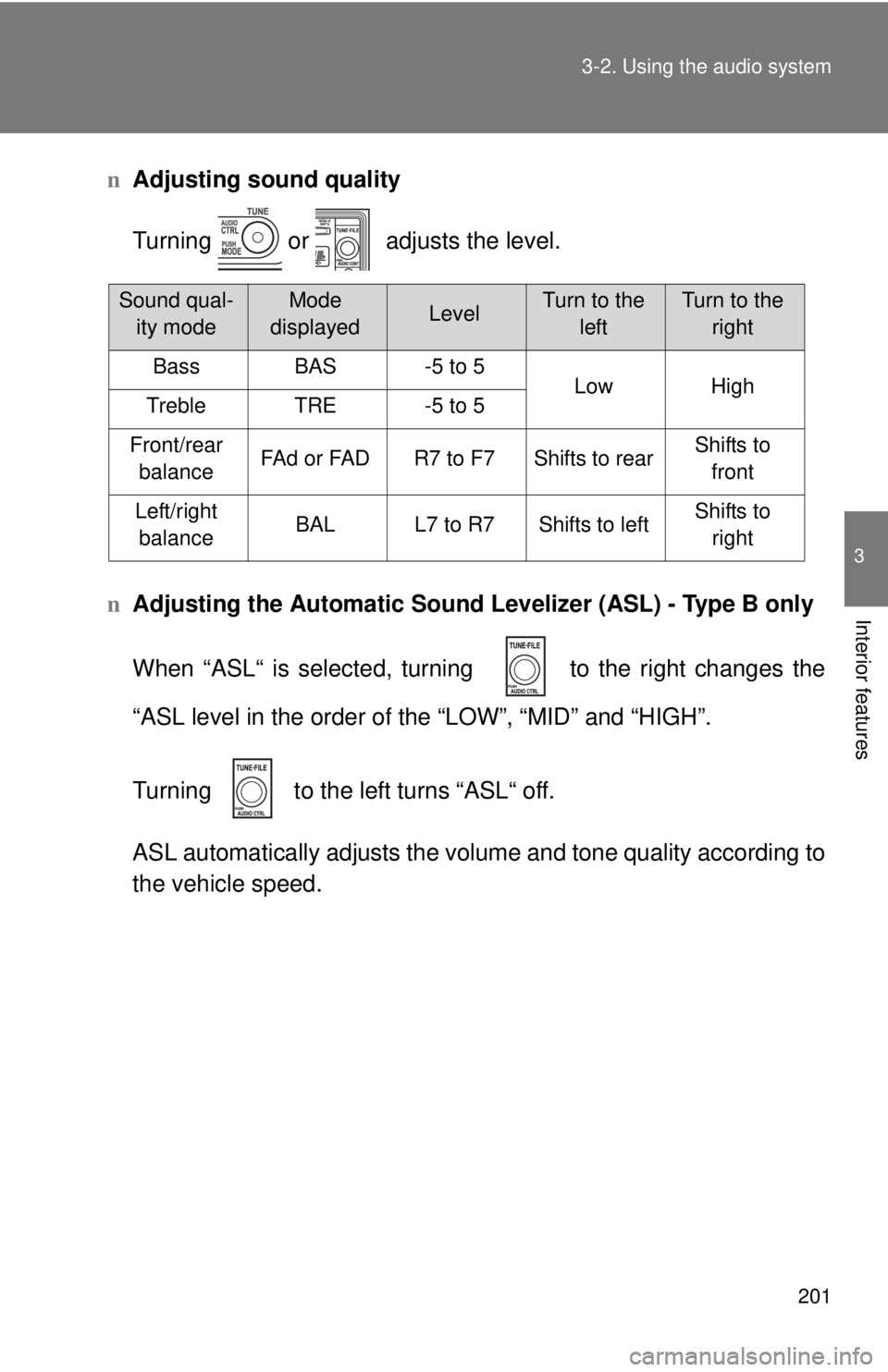
Adjusting sound quality
Turning or adjusts the level.
n Adjusting the Automatic Sound Levelizer (ASL) - Type B only
When “ASL“ is selected, turni ng to the right changes the
“ASL level in the order of the “LOW”, “MID” and “HIGH”.
Turning to the left turns “ASL“ off.
ASL automatically adjusts the volu me and tone quality according to
the vehicle speed.
Sound qual- ity modeMode
displayedLevelTurn to the leftTurn to the right
BassBAS-5 to 5LowHighTrebleTRE-5 to 5
Front/rear balanceFAd or FADR7 to F7Shifts to rearShifts to front
Left/right balanceBALL7 to R7Shifts to leftShifts to right
Page 216 of 400

202 3-2. Using the audio system
nTrademark owned by SRS Labs, Inc.
The type B audio system utilizes SRS FOCUS
® and SRS TruBass® audio
enhancement technologies, under license from SRS Labs, Inc., in all modes
except AM radio mode.
FOCUS, TruBass, SRS and
symbols are trademarks of SRS Labs,
Inc. FOCUS and TruBass technologies are incorporated under license from
SRS Labs, Inc.
Page 217 of 400
203
3-2. Using the audio system
3
Interior features
Using the AUX adapter (if equipped)
nOperating portable audio devices connected to the audio system
The volume can be adjusted using the vehicle’s audio controls. All other
adjustments must be made on the portable audio device itself.
n When using a portable audio devi ce connected to the power outlet
Noise may occur during playback. Use the power source of the portable
audio device.
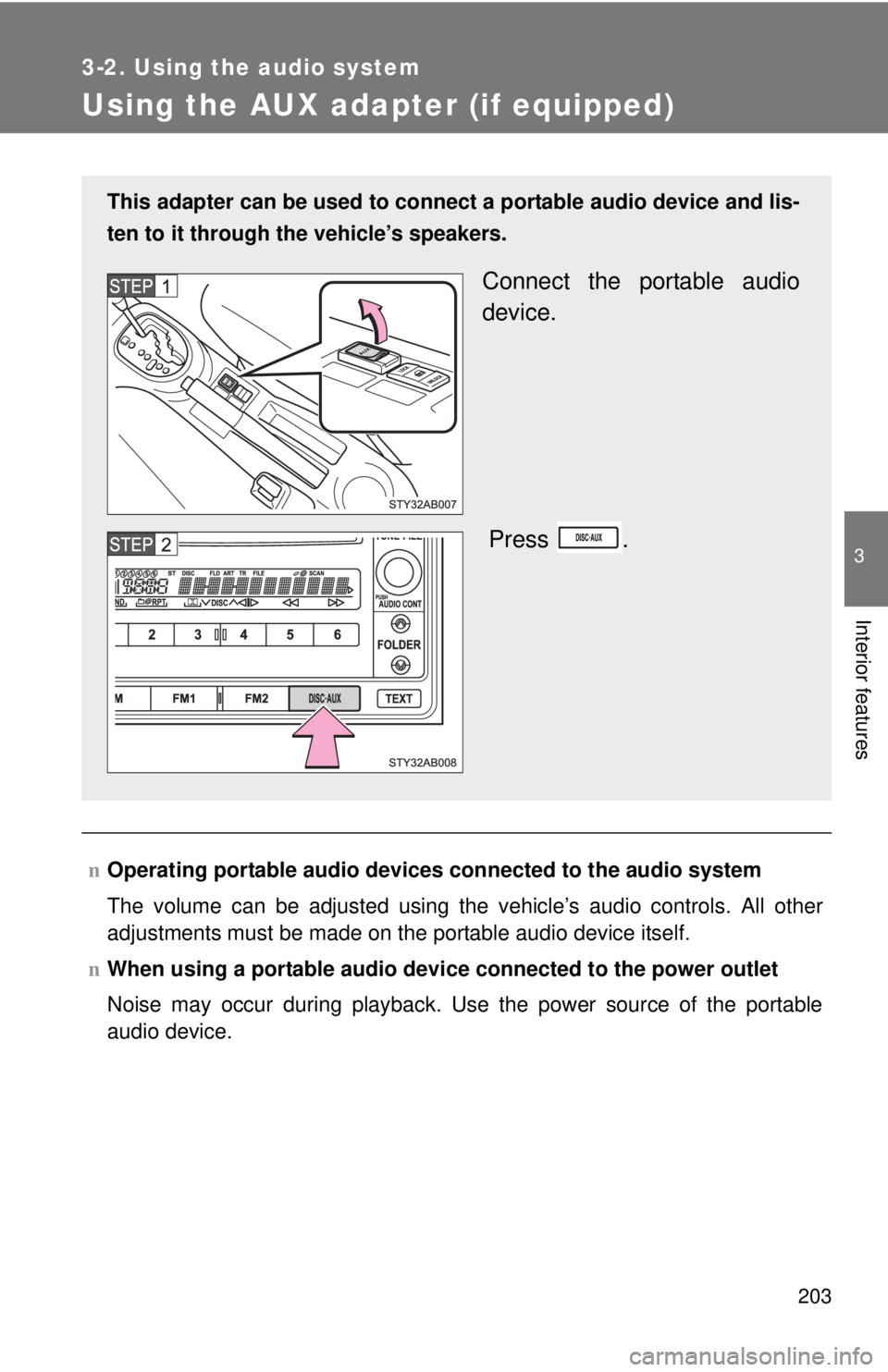
This adapter can be used to connect a portable audio device and lis-
ten to it through the vehicle’s speakers.
Connect the portable audio
device.
Press .
Page 239 of 400

226 4-1. Maintenance and care
NOTICE
nCleaning detergents
Do not use organic substances such as benzene or gasoline, acidic or alka-
line solutions, dye, bleach or other detergent. Doing so may discolor the
vehicle interior or cause streaks or damage to painted surfaces.
n Preventing damage to leather surfaces
Observe the following precautions to avoid damage to and deterioration o\
f
leather surfaces.
lRemove any dust or dirt on leather surfaces immediately.
l Do not expose the vehicle to direct sunlight for extended periods of time.
Park the vehicle in the shade, especially during summer.
l Do not place items made of vinyl, plastic, or that contain wax on the uphol-
stery, as they may stick to the leather surface if the vehicle interior heats
up significantly.
n Water on the floor
Do not wash the vehicle floor with water.
Vehicle systems such as the audio system may be damaged if water comes
into contact with electrical components under the floor of the vehicle, and
may also cause the body to rust.
n Cleaning the inside of the rear window
Be careful not to scratch or damage the heater wires.
Page 287 of 400
274 4-3. Do-it-yourself maintenance
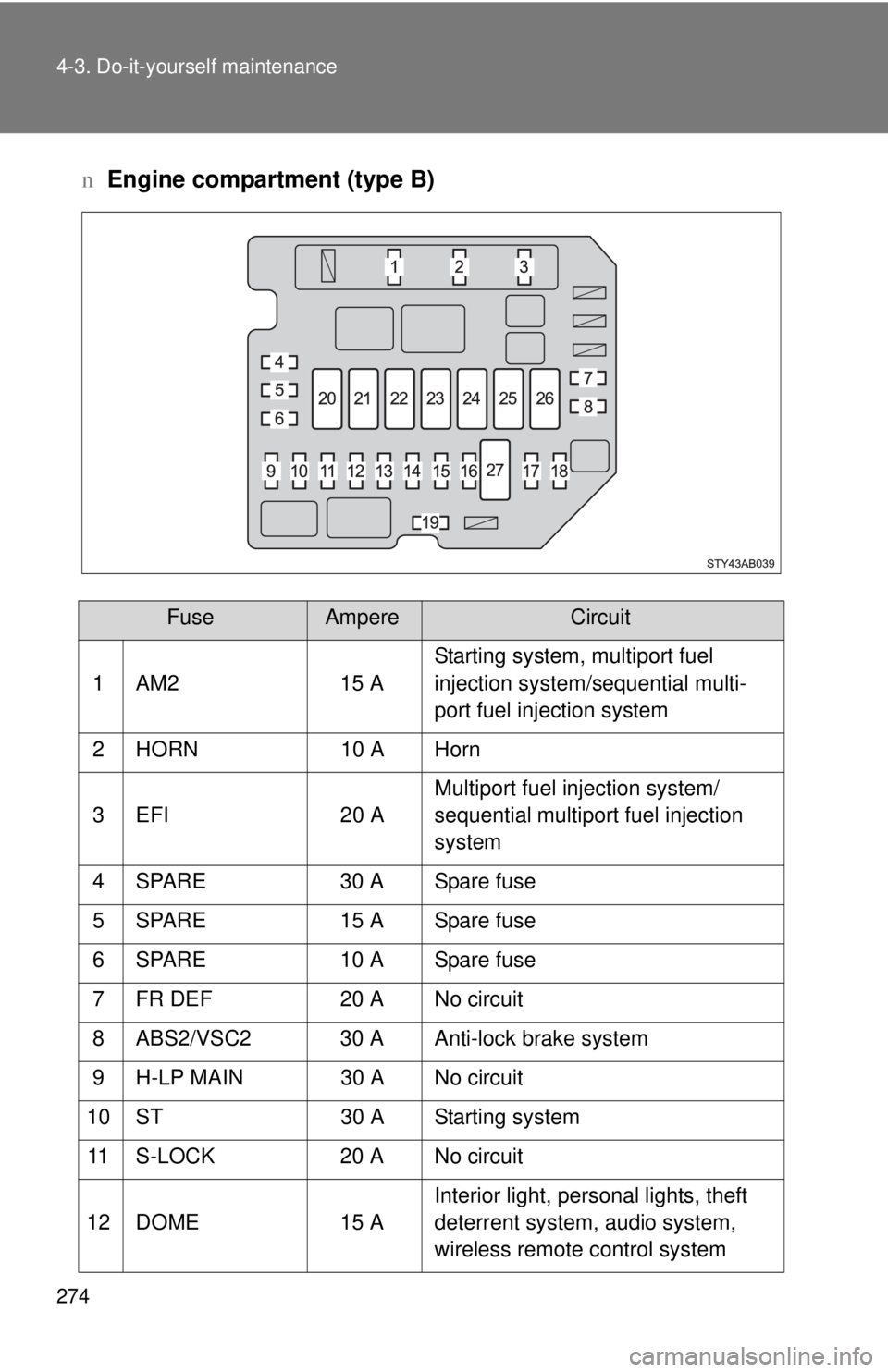
nEngine compartment (type B)
FuseAmpereCircuit
1 AM2 15 A Starting system, multiport fuel
injection system/sequential multi-
port fuel injection system
2 HORN 10 A Horn
3 EFI 20 A Multiport fuel injection system/
sequential multiport fuel injection
system
4 SPARE 30 A Spare fuse
5 SPARE 15 A Spare fuse
6 SPARE 10 A Spare fuse
7 FR DEF 20 A No circuit
8 ABS2/VSC2 30 A Anti-lock brake system
9 H-LP MAIN 30 A No circuit
10 ST 30 A Starting system 11 S-LOCK 20 A No circuit
12 DOME 15 A Interior light, personal lights, theft
deterrent system, audio system,
wireless remote control system
Page 290 of 400
277
4-3. Do-it-yourself maintenance
4
Maintenance and care
n
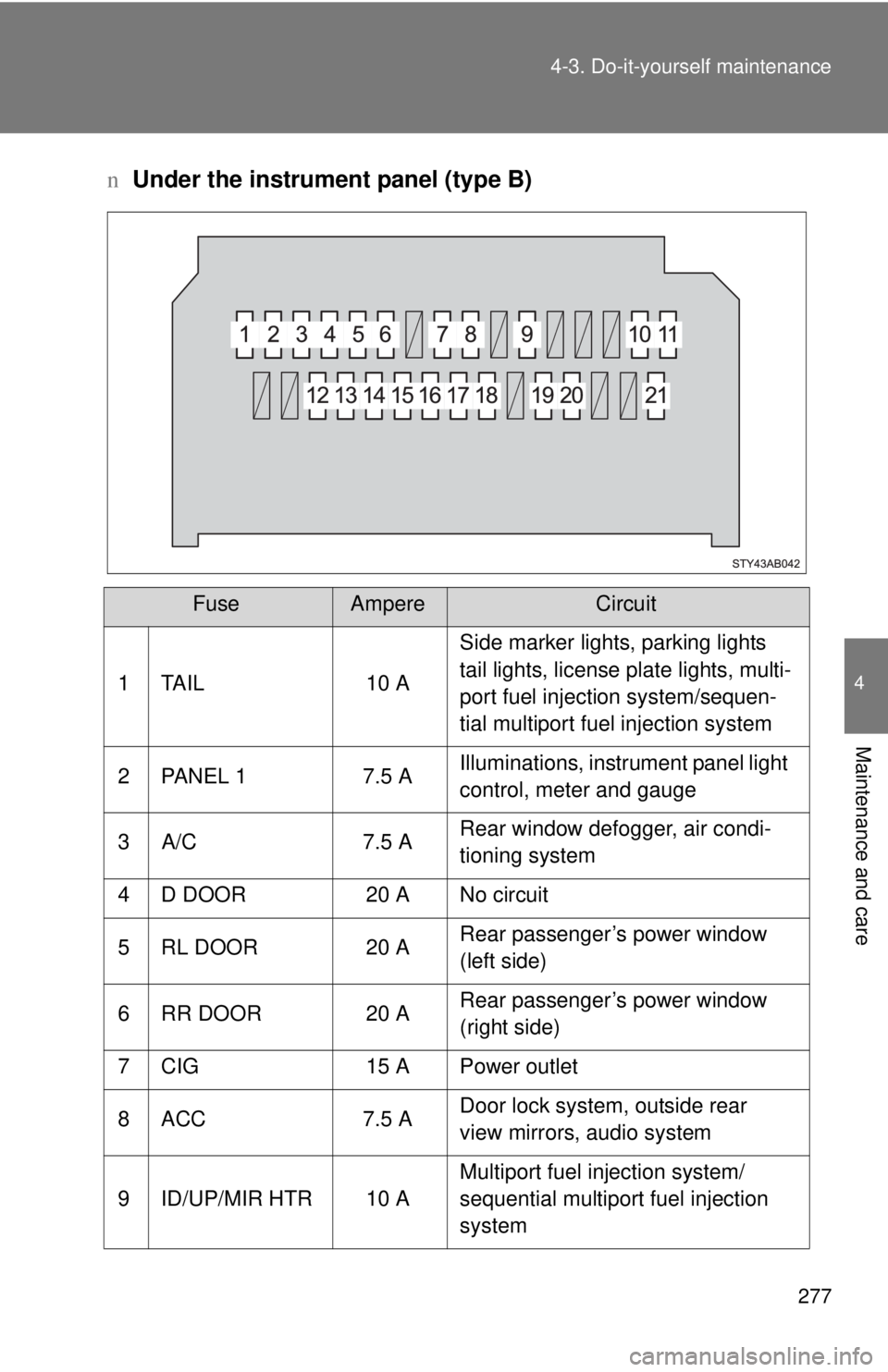
Under the instrument panel (type B)
FuseAmpereCircuit
1 TAIL 10 A Side marker lights, parking lights
tail lights, license plate lights, multi-
port fuel injection system/sequen-
tial multiport fuel injection system
2 PANEL 1 7.5 A Illuminations, instrument panel light
control, meter and gauge
3 A/C 7.5 A Rear window defogger, air condi-
tioning system
4 D DOOR 20 A No circuit
5 RL DOOR 20 A Rear passenger’s power window
(left side)
6 RR DOOR 20 A Rear passenger’s power window
(right side)
7 CIG 15 A Power outlet
8 ACC 7.5 A Door lock system, outside rear
view mirrors, audio system
9 ID/UP/MIR HTR 10 A Multiport fuel injection system/
sequential multiport fuel injection
system
Page 341 of 400
5
When trouble arises
329
5-2. Steps to take in an emergency
n
Avoiding a discharged battery
lTurn off the headlights and the audio system while the engine is turned
off.
l Turn off any unnecessary electrical components when the vehicle is run-
ning at a low speed for an extended period, such as in heavy traffic, etc.
Start the engine of the second vehicle. Increase the engine
speed slightly and maintain at that level for approximately 5
minutes to recharge the battery of your vehicle.
Maintain the engine speed of the second vehicle and start
the vehicle's engine.
Once the vehicle’s engine has started, remove the jumper
cables in the exact reverse order in which they were con-
nected.
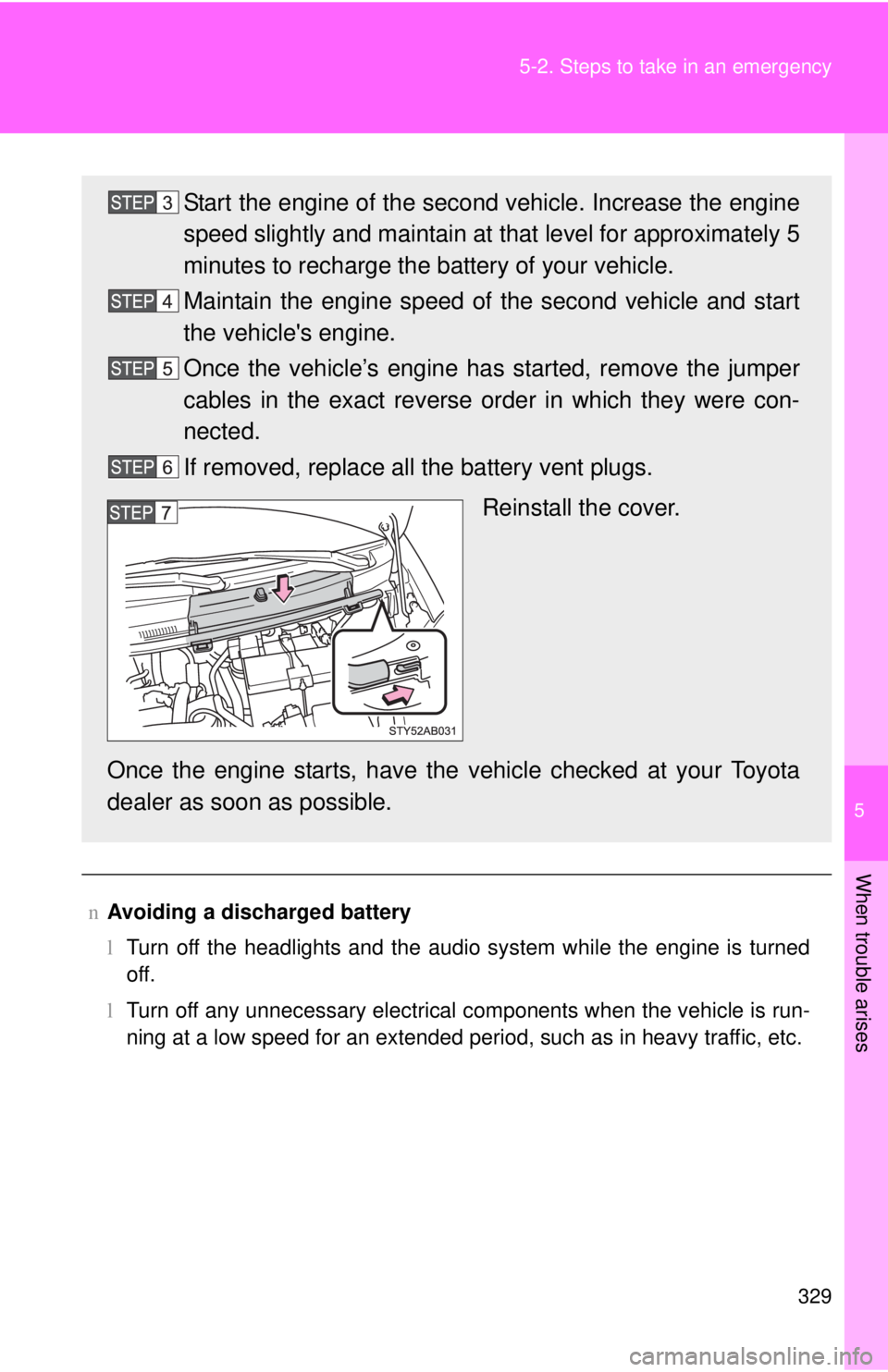
If removed, replace all the battery vent plugs.
Reinstall the cover.
Once the engine starts, have the vehicle checked at your Toyota
dealer as soon as possible.