lock TOYOTA YARIS HATCHBACK 2008 Workshop Manual
[x] Cancel search | Manufacturer: TOYOTA, Model Year: 2008, Model line: YARIS HATCHBACK, Model: TOYOTA YARIS HATCHBACK 2008Pages: 400, PDF Size: 6.56 MB
Page 137 of 400

122 2-1. Driving procedures
CAUTION
nCaution while driving
Do not turn the engine switch to the LOCK position.
If in an emergency, you must turn the engine off while the vehicle is moving,
turn the key only to the ACC position.
NOTICE
nTo prevent battery discharge
Do not leave the key in the ACC or ON position for long periods if the engine
is not running.
n When starting the engine
lDo not crank for more than 30 seconds at a time. This may overheat the
starter and wiring systems.
l Do not race a cold engine.
l If the engine becomes difficult to start or stalls frequently, have the engine
checked immediately.
Page 144 of 400
129
2
When driving
2-2. Instrument cluster
Gauges and meters
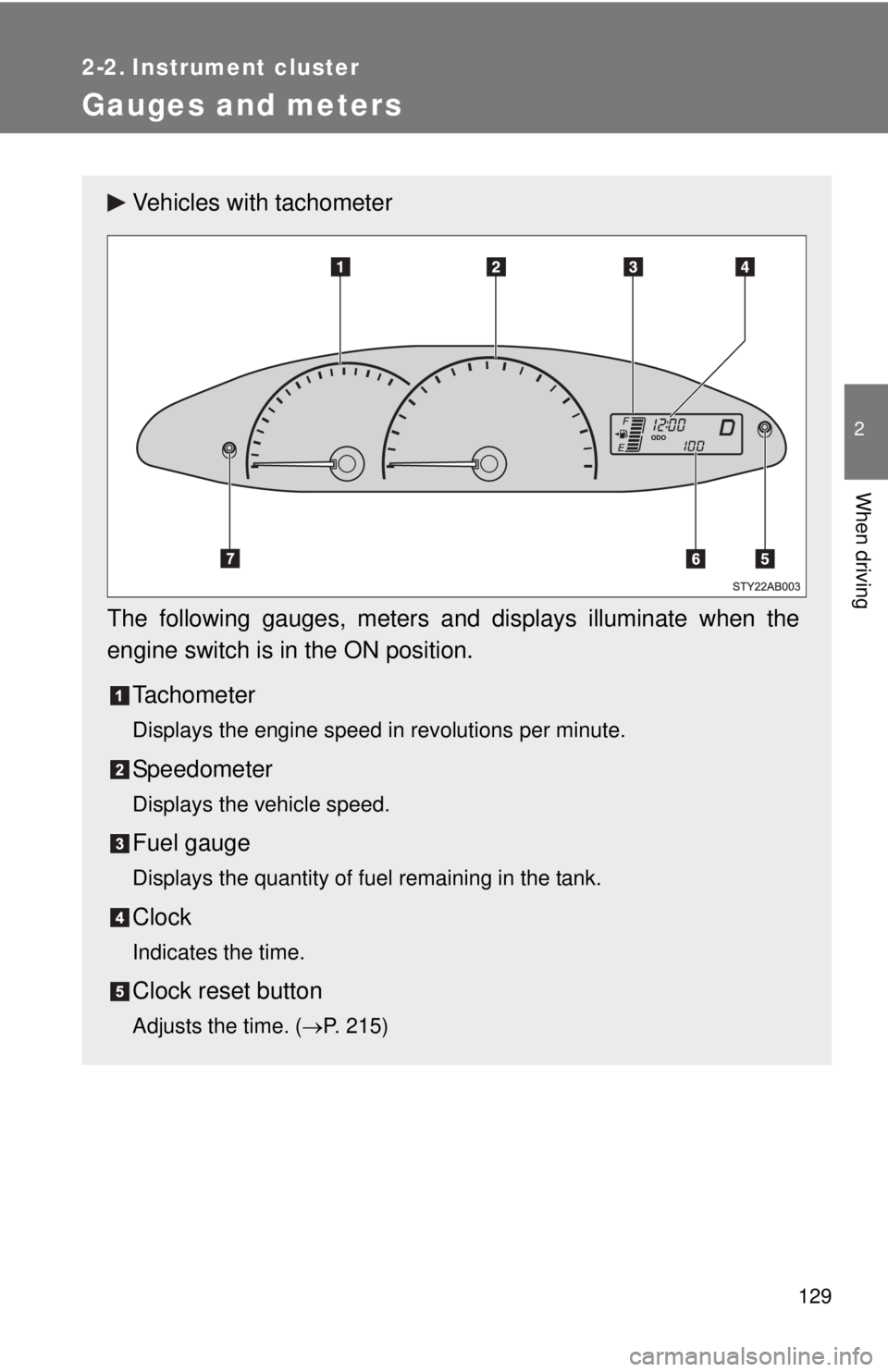
Vehicles with tachometer
The following gauges, meters and displays illuminate when the
engine switch is in the ON position. Tachometer
Displays the engine speed in revolutions per minute.
Speedometer
Displays the vehicle speed.
Fuel gauge
Displays the quantity of fuel remaining in the tank.
Clock
Indicates the time.
Clock reset button
Adjusts the time. ( →P. 215)
Page 146 of 400
131
2-2. Instrument cluster
2
When driving
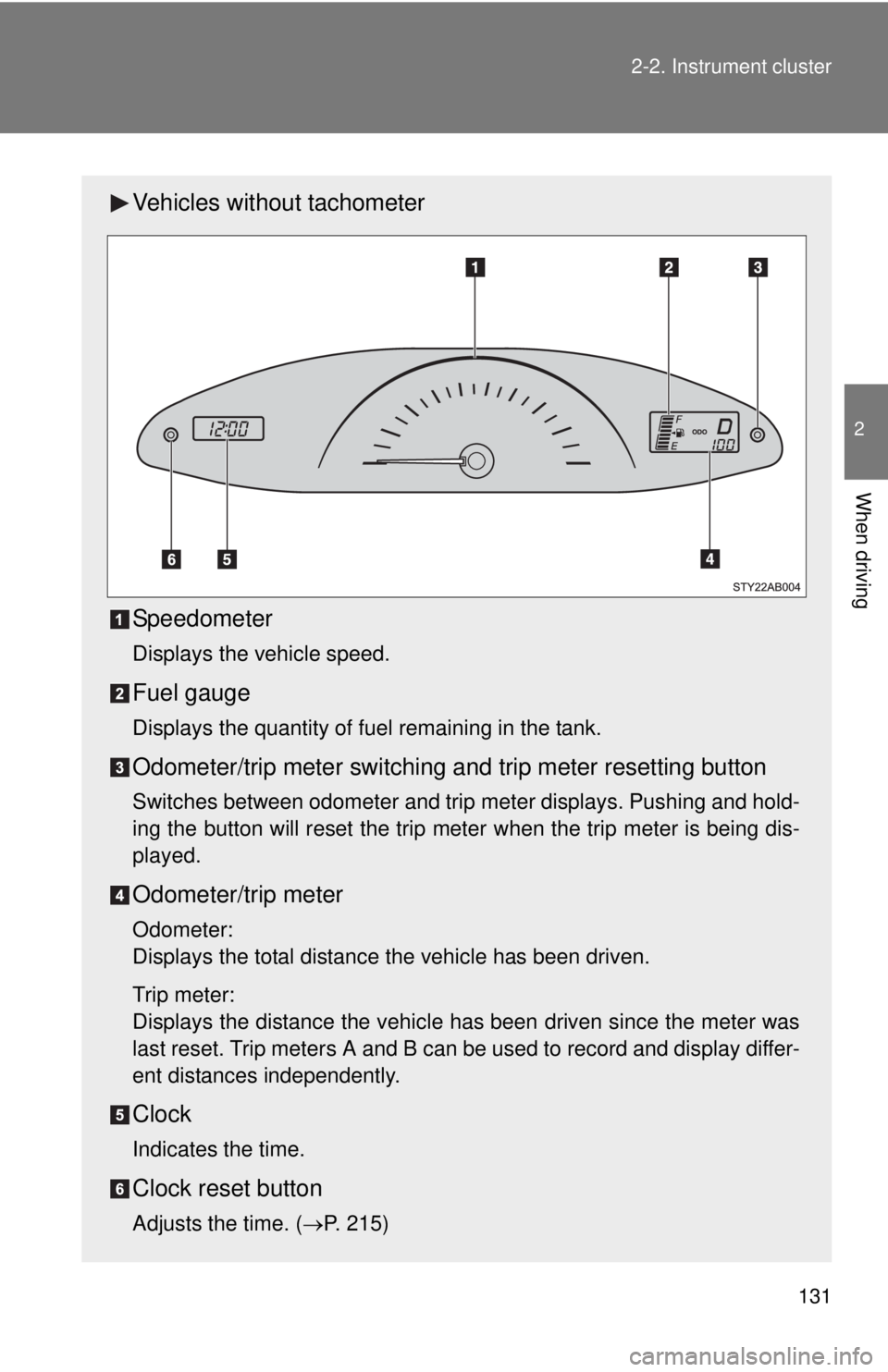
Vehicles without tachometer
Speedometer
Displays the vehicle speed.
Fuel gauge
Displays the quantity of fuel remaining in the tank.
Odometer/trip meter switching and trip meter resetting button
Switches between odometer and trip meter displays. Pushing and hold-
ing the button will reset the trip meter when the trip meter is being dis-
played.
Odometer/trip meter
Odometer:
Displays the total distance the vehicle has been driven.
Trip meter:
Displays the distance the vehicle has been driven since the meter was
last reset. Trip meters A and B can be used to record and display differ-
ent distances independently.
Clock
Indicates the time.
Clock reset button
Adjusts the time. (
→P. 215)
Page 157 of 400
142
2-3. Operating the lights and wipers
Windshield wipers and washer
nThe windshield wiper and washer can be operated when
The engine switch must be in the ON position.
n If no windshield washer fluid sprays
Check that the washer nozzles are not blocked and if there is washer fluid in
the windshield washer fluid reservoir.
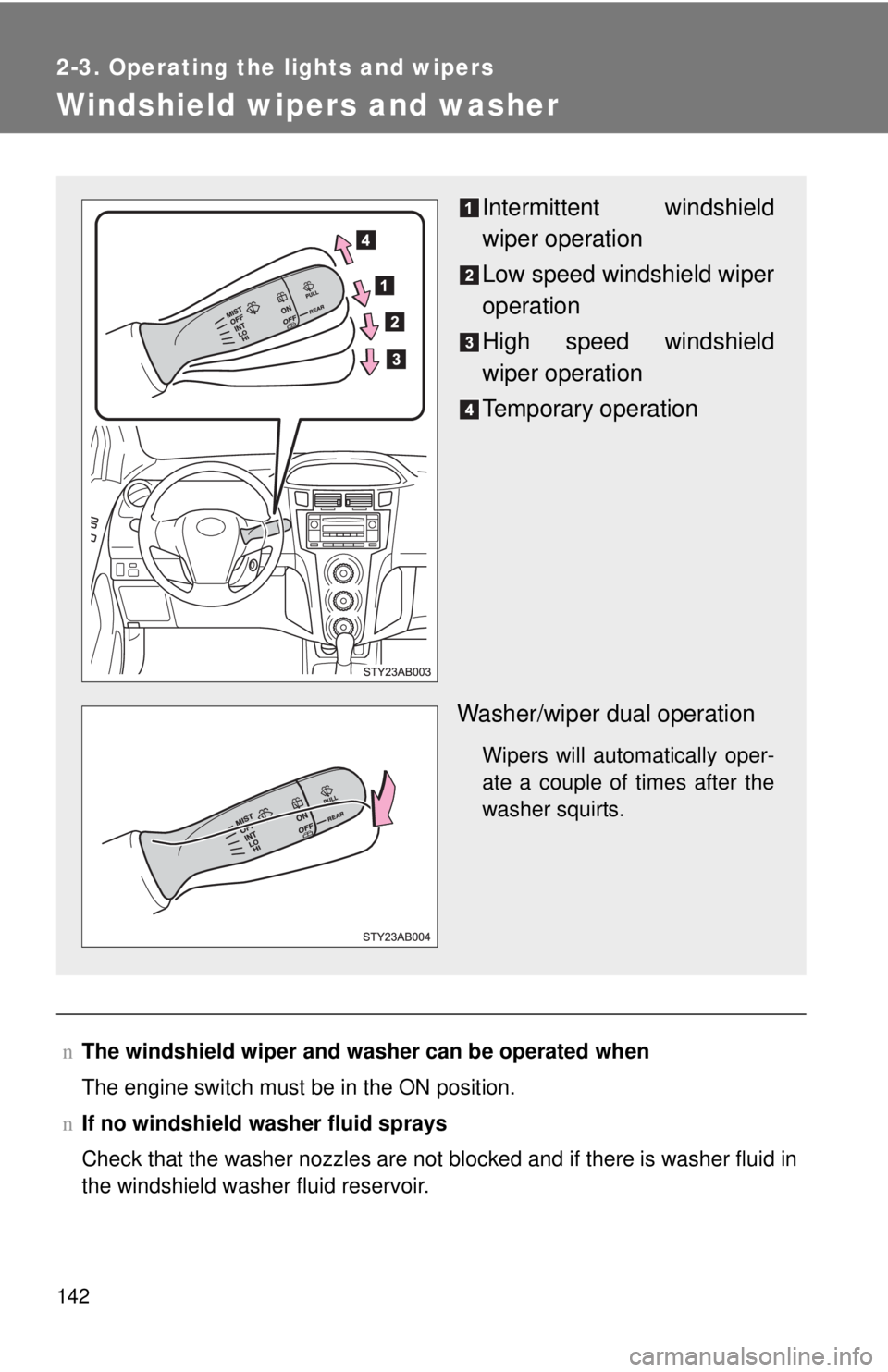
Intermittent windshield
wiper operation
Low speed windshield wiper
operation
High speed windshield
wiper operation
Temporary operation
Washer/wiper dual operation
Wipers will automatically oper-
ate a couple of times after the
washer squirts.
Page 158 of 400

143
2-3. Operating the lights and wipers
2
When driving
NOTICE
n
When the windshield is dry
Do not use the wipers, as they may damage the windshield.
n When there is no washer fluid spray from the nozzle
Damage to the washer fluid pump may be caused if the lever is pulled
toward you and held continually.
n When a nozzle becomes block
Do not try to clear it with a pin or other object. The nozzle will be damaged.
Page 160 of 400
145
2
When driving
2-4. Using other driving systems
Driving assist systems
nSounds and vibrations caused by the ABS
lA sound may be heard from the engine compartment when the engine is
started or just after the vehicle begins to move. This sound does not indi-
cate that a malfunction has occurred in this system.
l Any of the following conditions may occur when the above systems are
operating. None of these indicates that a malfunction has occurred.
• Vibrations may be felt through the vehicle body and steering.
• A motor sound may be heard after the vehicle comes to a stop.
• The brake pedal may pulsate slightly after the ABS is activated.
• The brake pedal may move down slightly after the ABS is activated.
n EPS operation sound
When the steering wheel operates, a motor sound (whirring sound) may be
heard.
This does not indicate a malfunction.
n Reduced effectiveness of EPS
The effectiveness of EPS is reduced to prevent the system from overheating
when there is frequent steering input over an extended period of time. The
steering wheel may feel heavy as a result. Should this occur, refrain from
excessive steering input or stop the vehicle and turn the engine off. The sys-
tem should return to normal within 10 minutes.
To help enhance driving safety a nd performance, the following sys-
tems operate automatically in res ponse to various driving situations.
Be aware, however, that these systems are supplementary and
should not be relied upon too heavi ly when operating the vehicle.
nABS (Anti-lock Brake System) (if equipped)
The anti-lock brake system is designed to automatically help prevent
lock-up of the wheels during a sudden braking or braking on slippery
road surfaces. This assists in providing directional stability and steering
performance of the vehicle under these circumstances.
nEPS (Electric Power Steering)
Employs an electric motor to reduce the amount of effort needed to turn
the steering wheel.
Page 177 of 400
162 2-5. Driving information
lIn order to maintain engine braking efficiency, do not use the trans-
mission in D (automatic transmission) or 5 (manual transmission).
l Due to the added load of the trailer, your vehicle’s engine may
overheat on hot days (at temper atures over 85°F [30°C]) when
driving up a long or steep grade. If the engine coolant temperature
gauge indicates overheating, immediately turn off the air condition-
ing (if in use), pull your vehicle off the road and stop in a safe spot.
( → P. 332)
l Always place wheel blocks under both the vehicle and the trailer
wheels when parking. Apply the parking brake firmly, and put the
transmission in P (automatic transmission) or in 1 or R (manual
transmission). Avoid parking on a slope, but if unavoidable, do so
only after performing the following:
Apply the brakes and keep them applied.
Have someone place wheel bloc ks under both the vehicle and
trailer wheels.
When the wheel blocks are in place, release the brakes slowly
until the blocks absorb the load.
Apply the parking brake firmly.
Shift into 1 or R (manual transmission) or P (automatic trans-
mission) and turn off the engine.
l When restarting after parking on a slope:
With the transmission in P (automatic transmission) or the
clutch pedal (manual transmission) depressed, start the
engine. On vehicles with an au tomatic transmission, be sure
to keep the brake pedal pressed.
Shift into a forward gear. If reversing, shift into R.
Release the parking brake (also brake pedal on vehicles with
an automatic transmission), and slowly pull or back away from
the wheel blocks. Stop and apply the brakes.
Have someone retrieve the blocks.
Page 181 of 400
166 2-5. Driving information
NOTICE
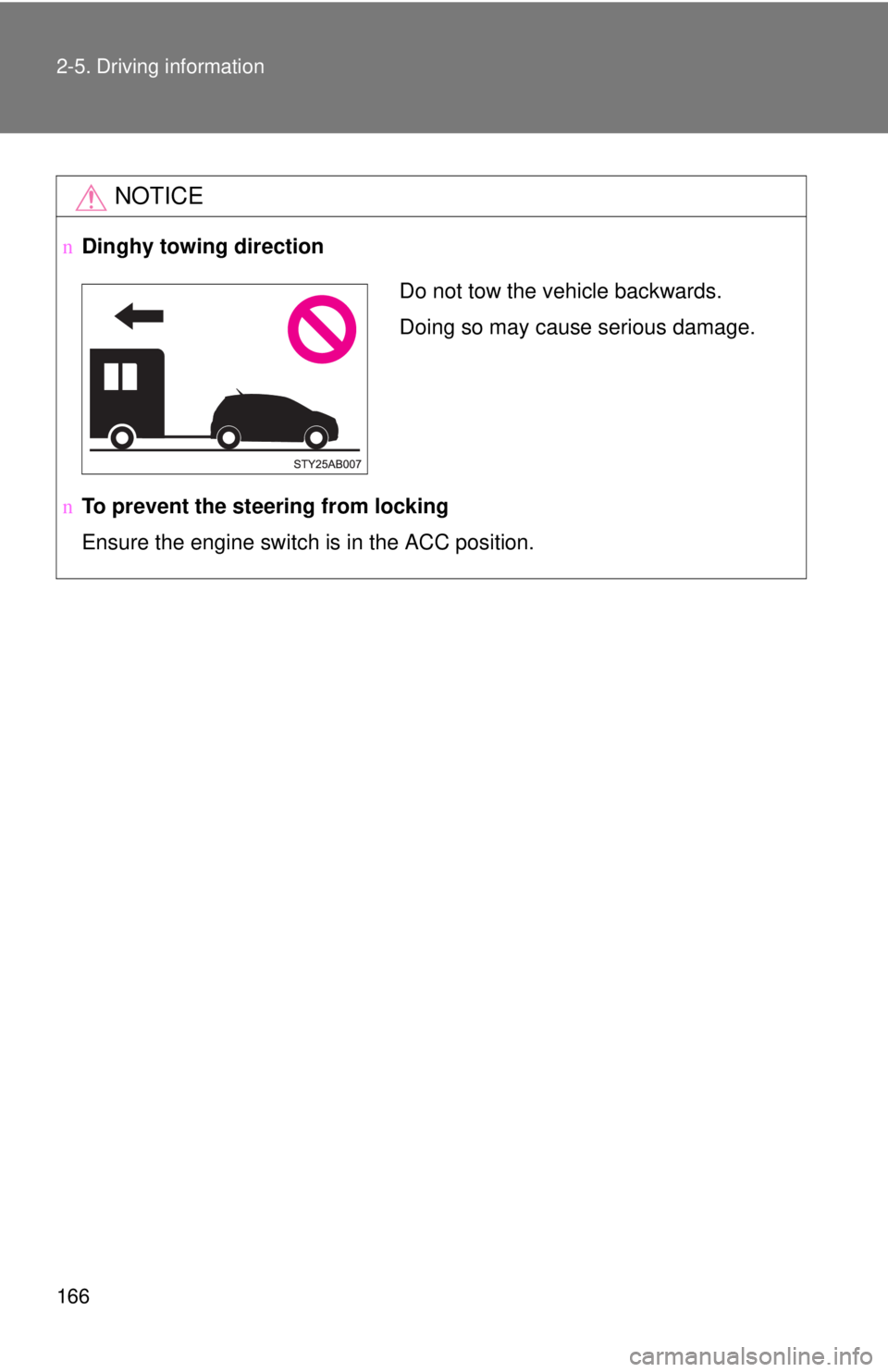
nDinghy towing direction
n To prevent the steering from locking
Ensure the engine switch is in the ACC position.
Do not tow the vehicle backwards.
Doing so may cause serious damage.
Page 182 of 400
168
3-1. Using the air conditioning system and defogger
Air conditioning system
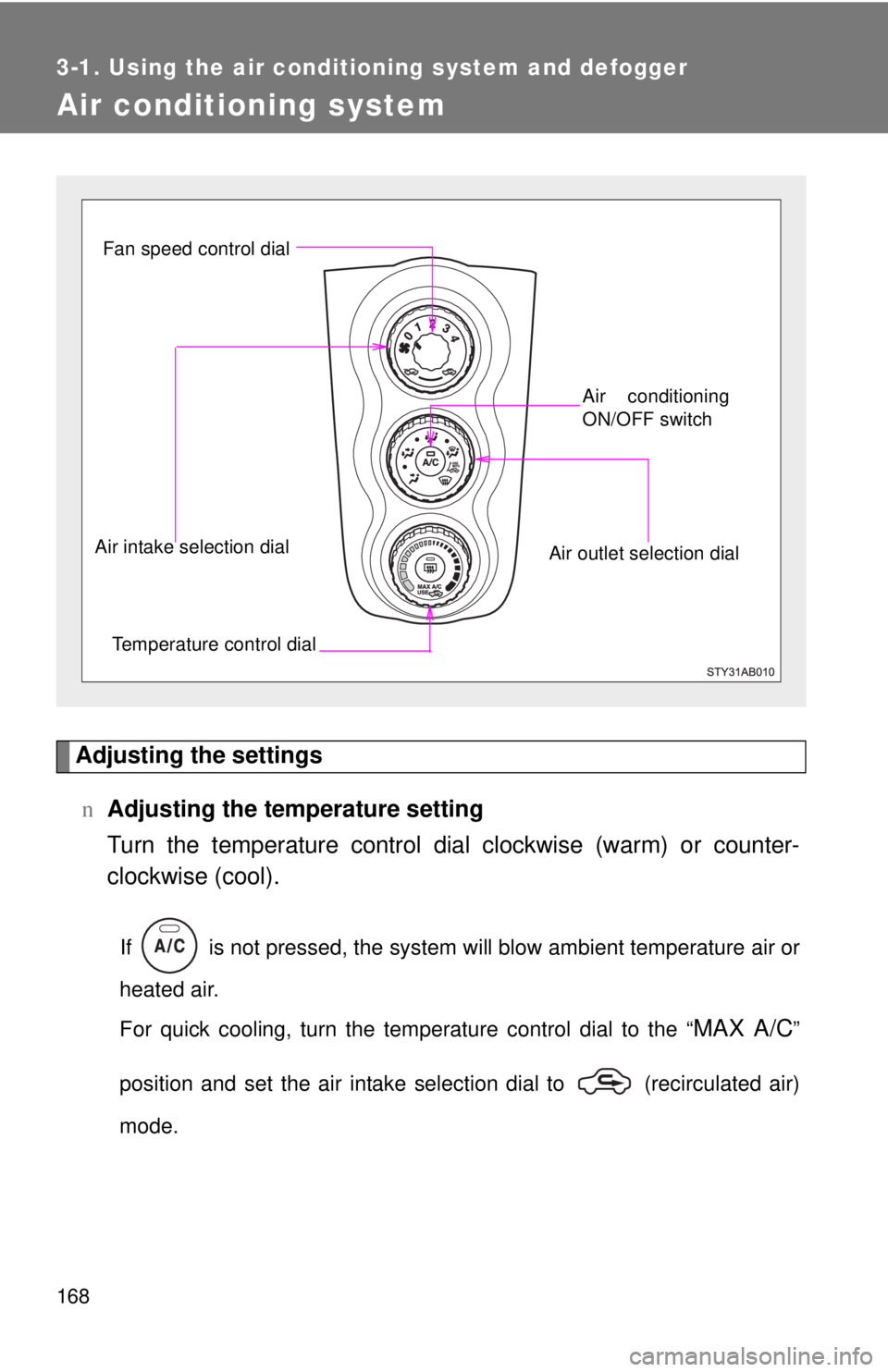
Adjusting the settingsn Adjusting the temperature setting
Turn the temperature control dial clockwise (warm) or counter-
clockwise (cool).
If is not pressed, the system will blow ambient temperature air or
heated air.
For quick cooling, turn the temperature control dial to the “
MAX A/C”
position and set the air intake selection dial to (recirculated air)
mode.
Fan speed control dial
Air outlet selection dialAir conditioning
ON/OFF switch
Temperature control dial
Air intake selection dial
Page 183 of 400
169
3-1. Using the air conditioning system
and defogger
3
Interior features
nAdjusting the fan speed
Turn the fan speed control dial clockwise (increase) or counter-
clockwise (decrease).
Set the dial to “0” to turn the fan off.
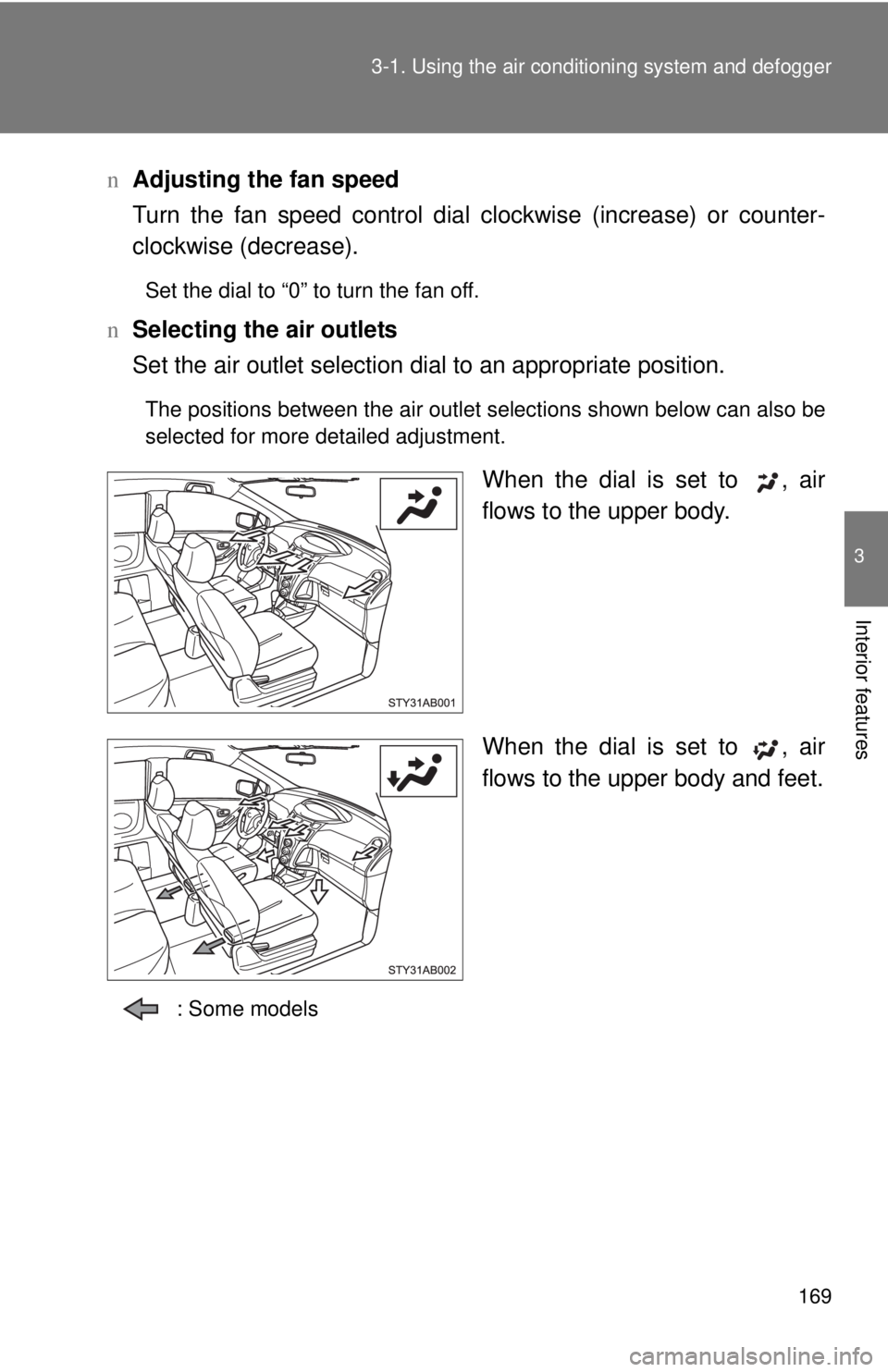
n Selecting the air outlets
Set the air outlet selection di al to an appropriate position.
The positions between the air outlet selections shown below can also be
selected for more detailed adjustment.
When the dial is set to , air
flows to the upper body.
When the dial is set to , air
flows to the upper body and feet.
: Some models